lock ACURA MDX 2022 Manual Online
[x] Cancel search | Manufacturer: ACURA, Model Year: 2022, Model line: MDX, Model: ACURA MDX 2022Pages: 712, PDF Size: 22.65 MB
Page 350 of 712
349
uuCustomized Features u
Continued
Features
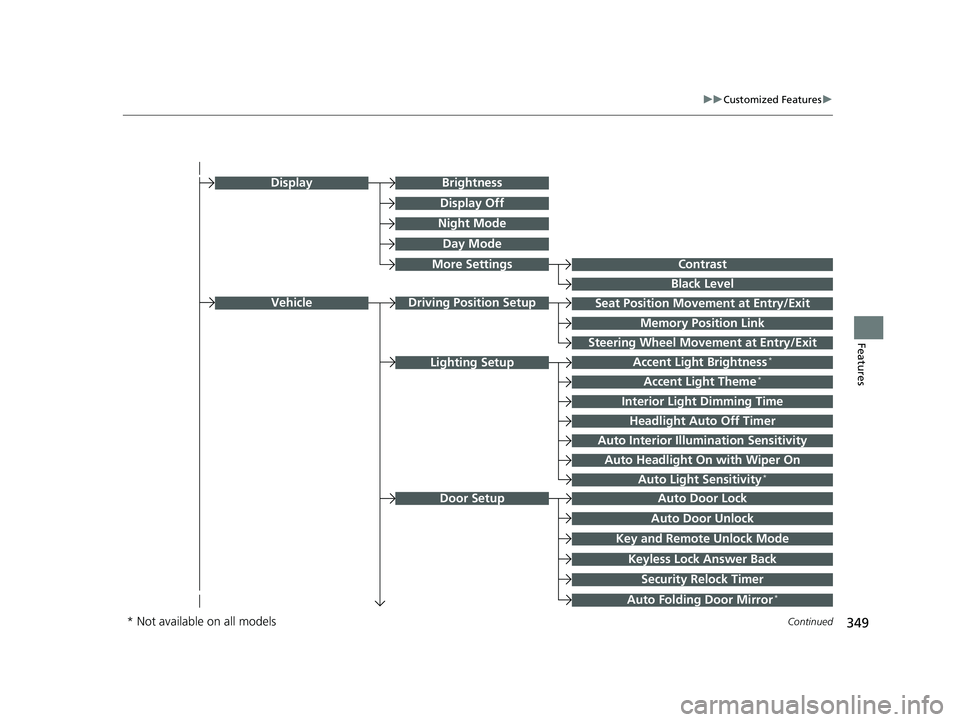
Seat Position Movement at Entry/Exit
Memory Position Link
VehicleDriving Position Setup
Night Mode
Day Mode
BrightnessDisplay
Contrast
Black Level
More Settings
Display Off
Key and Remote Unlock Mode
Auto Door Lock
Auto Door Unlock
Door Setup
Keyless Lock Answer Back
Security Relock Timer
Accent Light Brightness*
Accent Light Theme*
Interior Light Dimming Time
Headlight Auto Off Timer
Auto Interior Illumi nation Sensitivity
Lighting Setup
Auto Folding Door Mirror*
Auto Headlight On with Wiper On
Auto Light Sensitivity*
Steering Wheel Movement at Entry/Exit
* Not available on all models
22 ACURA MDX-31TYA6000_02.book 349 ページ 2020年11月5日 木曜日 午前11時39分
Page 351 of 712

350
uuCustomized Features u
Features
Power Tailgate Keyless Open Mode
Power Tailgate Open by Outer Handle
Hands Free Access Power Tailgate*
Power Tailgate Setup
Door Unlock Mode
Keyless Access Beep Volume
Keyless Access Light Flash
Keyless Access Beep
Remote Start System On/Off*
Walk Away Auto Lock
Keyless Access Setup
Lockout Protection
Remote Window Opening
“Trip B” Reset Timing
Adjust Outside Temp Display
“Trip A” Reset Timing
Meter Setup
Reverse Shift Position Beep
Adjust Alarm Volume
Turn by Turn Display
Rear Seat Reminder
Speed Limit Information
* Not available on all models
22 ACURA MDX-31TYA6000_02.book 350 ページ 2020年11月5日 木曜日 午前11時39分
Page 354 of 712

353
uuCustomized Features u
Continued
Features
■List of customizable options
*1:Default Setting Setup Group Customizable Features
Description Selectable Settings
System
System
Volumes
System SoundsChanges the system sounds volume.—
Phone CallsChanges the phone call volume.—
Voice RecognitionChanges the voice recognition volume.—
Navigation GuidanceChanges the navigation guidance
volume.—
Touchpad SensitivitySets the sensitivity of the True
Touchpad Interface.High/Low*1
Date & Time
Time FormatSelects the digital clock display from
12H to 24H.12 Hour*1/24 Hour
Set Date &
Time
Automatic
Date & TimeSelects On to have the GPS
automatically adjust the clock. Select
Off to cancel this function.
On*1/Off
Set DateAdjusts date.
2 Adjusting the Clock P. 128—
Set TimeAdjusts clock.
2Adjusting the Clock P. 128—
22 ACURA MDX-31TYA6000_02.book 353 ページ 2020年11月5日 木曜日 午前11時39分
Page 355 of 712

354
uuCustomized Features u
Features
*1:Default SettingSetup Group Customizable Features Description Selectable Settings
System
Date & TimeSet Time
Zone
Automatic
Time ZoneSets the audio system to automatically
adjust the clock when driving through
different time zones.
On*1/
Off
(Select time
zone)Changes the time zone manually.—
System Units
Changes the speed/distance unit on
the driver information interface, head-
up display
* and audio/information
screen.
Miles*1/ KM (U.S.)
Miles /KM*1 (Canada)
LanguageChanges the display language.English*1/Français /
Español
Factory Data Reset
Resets all the settings to their factory
default.
2 Defaulting All the Settings P. 372
Continue/Cancel
AboutDisplays the Android setting items.—
Advanced
OptionsLocation Access
Selects Off not to allow apps including
the navigation system* to access the
vehicle’s location.On*1/ Off
* Not available on all models
22 ACURA MDX-31TYA6000_02.book 354 ページ 2020年11月5日 木曜日 午前11時39分
Page 364 of 712

363
uuCustomized Features u
Continued
Features
*1:Default SettingSetup Group Customizable Features
Description Selectable Settings
Vehicle Door Setup Auto Door Lock
Changes the setting for the automatic
locking feature. OFF
/With Vehicle
Speed
*1/ Shift from P
Auto Door Unlock Changes the setting for when the
doors unlock automatically. All Doors with
Driver’s Door
Opens
*1/
All Doors
with Shift to P /All
Doors with IGN Off /
OFF
Key and Remote Unlock
Mode Sets up either the driver’s door or all
doors to unlock on the first push of the
remote or built-in key. Driver Door
*1/
All
Doors
Keyless Lock Answer Back LOCK/UNLOCK- The exterior lights
flash.
LOCK (2nd push)- The beeper sounds. ON
*1/
OFF
Security Relock Timer Changes the time it takes for the doors
to relock and the security system to set
after you unlock th
e vehicle without
opening any door. 30 sec
*1/
60 sec/ 90
sec
Auto Folding Door Mirror
*
Changes the setting so that the mirrors
fold at the time the doors are locked
with the remote transmitter or keyless
access system. Auto Fold with
Keyless
*1/
Manual
Only
* Not available on all models
22 ACURA MDX-31TYA6000_02.book 363 ページ 2020年11月5日 木曜日 午前11時39分
Page 365 of 712

364
uuCustomized Features u
Features
*1:Default SettingSetup Group Customizable Features Description Selectable Settings
Vehicle Power
Tailgate
SetupPower Tailgate Keyless Open
Mode
Changes the setting to enable the
power tailgate to be opened with the
keyless access remote at anytime or
only when the doors are unlocked.
Anytime
*1/
When
Unlocked
Power Tailgate Open by
Outer Handle Changes the setting to enable or
disable the power tailgate open
operation when the user presses the
outer handle of the power tailgate. Off (Manual only)
/
On (Power/
Manual)
*1
Hands Free Access Power
Tailgate*
Changes the setting to enable or
disable the power tailgate open
operation when a kicking motion
under the rear bumper is detected. On
*1/
Off
* Not available on all models
22 ACURA MDX-31TYA6000_02.book 364 ページ 2020年11月5日 木曜日 午前11時39分
Page 366 of 712

365
uuCustomized Features u
Continued
Features
*1:Default SettingSetup Group Customizable Features
Description Selectable Settings
VehicleKeyless
Access SetupDoor Unlock Mode
Changes which doors unlock when
you grab the driver’s door handle. Driver Door
*1/
All
Doors
Keyless Access Beep Volume Changes the beep volume. High
*1/Low
Keyless Access Light Flash Causes some exterior lights to flash
when you unlock/lock the doors. ON
*1/
OFF
Keyless Access Beep Causes the beeper to sound when you
unlock/lock the doors.
ON
*1/
OFF
Remote Start System On/
Off
*Turns the remote engine start feature
on and off. ON*1/
OFF
Walk Away Auto Lock Changes the settings for the auto lock
function when you walk away from
the vehicle. Enable
/Disable
*1
Lockout Protection Changes the settings for the lockout
protection function. Enable*1/
Disable
Remote Window Opening Changes the settings for the remote
window opening function. Enable
*1/
Disable
* Not available on all models
22 ACURA MDX-31TYA6000_02.book 365 ページ 2020年11月5日 木曜日 午前11時39分
Page 406 of 712

405Continued
Features
AcuraLink®
Is a subscription-based service that provid es convenient features such as voice
communication in case of emergency, online security, one-on-one operator
assistance, and the transmission of importa nt messages regarding your vehicle’s
status.
Use the following procedure to connect to AcuraLink.
■To enable the AcuraLink
You need to allow the consent of the lo cation service to enable the AcuraLink.
1. Press the (home) button.
2. Select AcuraLink .
u The confirmation message appears on
the screen for the first time, then select
Allow .
■To Connect to AcuraLink
1AcuraLink ®
AcuraLink also provides services you can operate
from the Internet or your smartphone.
To subscribe to AcuraLink, or to get more
information about all of its features, contact an Acura
dealer, or visit owners.acura.com (U.S.) or
www.acura.ca/owners/acuralink (Canada).
1To enable the AcuraLink
You can also set up a Vehicle Data Collection by
the following procedure.
1. Press the (home) button.
2. Select AcuraLink .
3. Select MENU .
4. Select Vehicle Data Collection .
5. Select Allow or Block.
•Allow: Sends the vehicle location data, diagnostic
information, driving behavior data and phone data
when you have previously allowed it when you
connect a phone with Bluetooth®.
•Block : Does not send the ve hicle location data,
diagnostic information, driving behavior data.
For detail information of all data shared visit https://
acuralink.acura.com/#/acuralinkLegalTerms
22 ACURA MDX-31TYA6000_02.book 405 ページ 2020年11月5日 木曜日 午前11時39分
Page 413 of 712

uuAcuraLink ®u
412
Features
Your subscribed telematics service provider can check your vehicle’s condition. For
maximum functionality download AcuraLink app in your smartphone and connect it
with the vehicle.
■Automatic Collision Notifications
A live agent will reach out and check on you and request that help be sent in the
event of a crash.
■Send Destination
Search for destinations on your phone and in stantly beam turn-by-turn directions to
your navigation system
*. Requires In-vehicle Navigation System*.
■Stolen Vehicle Locator
Helps authorities track and recover your vehicle in case of theft.
■Remote Start & Stop
Arrive at your vehicle with the engine warmed up and the interior set to a
comfortable temperature.
■Remote Lock & Unlock
Lock and unlock your vehicle with your smartphone.
■Find My Car
Find your parked vehicle and flash/sound your horns remotely using your
smartphone.
■Connection Features1 Connection Features
The contact information of your provider, your user
ID and PIN will be given when you subscribe to
AcuraLink. If you forget any of the above, contact a
Acura dealer, or go to owners.acura.com (U.S.) or
www.acura.ca/owners/acuralink (Canada).
You can also activate the remote door lock/unlock
and vehicle finder features from the Internet or using
your smartphone app. As k a dealer, or visit
owners.acura.com (U.S.) or www.acura.ca/owners/
acuralink (Canada) for details.
1Find My Car
The lights will stop flas hing and horn will stop
sounding under the following:
•When conditions 30 seconds have elapsed.
•You unlock the doors using the remote transmitter.
•You unlock the doors using the keyless access
system.
•You unlock the doors using the built-in key.
•The power mode is set to ACCESSORY or ON.
* Not available on all models
22 ACURA MDX-31TYA6000_02.book 412 ページ 2020年11月5日 木曜日 午前11時39分
Page 414 of 712

413
uuAcuraLink ®u
Features
■Vehicle Status
Get door and lock status as well as mileage, fuel, oil life, and tire pressure readings
on your phone.
■Emergency Call
A live agent will stay on the call with you and request that help be sent in the event
of an emergency.
■Security Alarm Alert
Receive alerts if vehicle security alarm is triggered.
■Destination by Voice
Talk to a live assistant who will search a nd send turn by turn directions to your
vehicle’s navigation system
*. Requires In-vehicle Navigation System*.
■Last Mile
Receive walking directions to your final destination right when you get out of your
Acura. Requires In-vehicle Navigation System
*.
* Not available on all models
22 ACURA MDX-31TYA6000_02.book 413 ページ 2020年11月5日 木曜日 午前11時39分