bumper ACURA MDX 2022 Owners Manual
[x] Cancel search | Manufacturer: ACURA, Model Year: 2022, Model line: MDX, Model: ACURA MDX 2022Pages: 712, PDF Size: 22.65 MB
Page 17 of 712
16
Quick Reference Guide
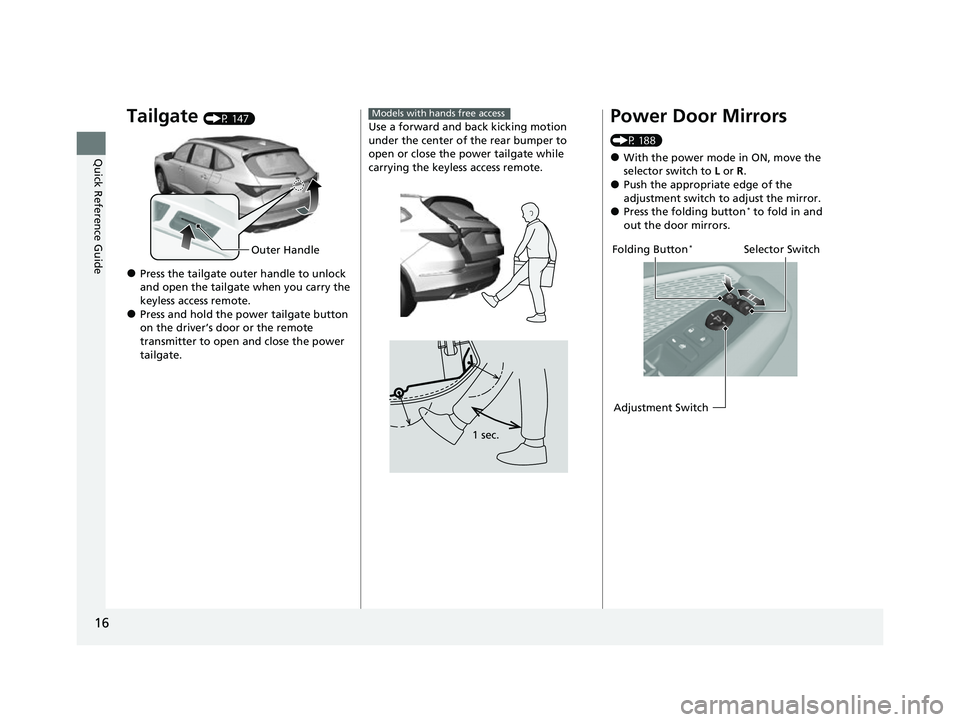
Tailgate (P 147)
●Press the tailgate outer handle to unlock
and open the tailgate when you carry the
keyless access remote.
●Press and hold the power tailgate button
on the driver’s door or the remote
transmitter to open and close the power
tailgate.
Outer Handle
Use a forward and back kicking motion
under the center of the rear bumper to
open or close the power tailgate while
carrying the keyless access remote.
Models with hands free access
1 sec.
Power Door Mirrors
(P 188)
●With the power mode in ON, move the
selector switch to L or R .
●Push the appropriate edge of the
adjustment switch to adjust the mirror.
●Press the folding button* to fold in and
out the door mirrors.
Selector Switch
Adjustment SwitchFolding Button*
22 ACURA MDX-31TYA6000_02.book 16 ページ 2020年11月5日 木曜日 午前11時39分
Page 25 of 712

24
Quick Reference Guide
AcuraWatchTM (P474)
AcuraWatch
TM is a driver support system
which employs the use of two distinctly
different kinds of sensors, a radar sensor
located behind the emblem, and a front
sensor camera mounted to the interior side
of the windshield, behind the rearview
mirror.
AcuraWatch
TM is a driver support system
which employs the use of three distinctly
different kinds of sensors, a radar sensor
located behind the emblem, a front sensor
camera mounted to the interior side of the
windshield, behind the rearview mirror, and
the sonar sensors located in the front and
rear bumpers.
Models without Low Speed Braking Control
Models with Low Speed Braking Control
All models
The camera is located
behind the rearview
mirror.
The radar sensor is
behind the emblem.
Front Sensor
Camera
Radar Sensor
Models with Low Speed Braking Control
Sonar Sensors
Collision Mitigation
Braking System
TM
(CMBS
TM) (P479)
Can assist you when there is a possibility of
your vehicle colliding with a vehicle or a
pedestrian detected in front of yours. The
CMBS
TM is designed to alert you when the
potential for a collision is determined, as
well as to reduce your vehicle speed to help
minimize collision severity when a collision is
deemed unavoidable.
Low Speed Braking
Control
* (P490)
Using sonar sensors lo cated on the front and
rear bumpers, this system detects if there is
danger of a potential collision with a wall or
other obstacle during normal driving or
when the accelerator pedal is depressed
with too much force. The system then assists
in avoiding collisions and reducing damage
from impact through assistive braking and/
or assistive driving power suppression.
22 ACURA MDX-31TYA6000_02.book 24 ページ 2020年11月5日 木曜日 午前11時39分
Page 106 of 712
Continued105
uuGauges and Displays uGauges
Instrument Panel
Displays the temperature of the engine coolant.
Shows the total number of miles or kilome ters that your vehicle has accumulated.
Shows the outside temperature in Fahr enheit (U.S.) or Celsius (Canada).
■Adjusting the outside temperature display
Adjust the temperature reading by up to ±5°F or ±3°C if the temperature reading
seems incorrect.
■Temperature Gauge
■Odometer
■Outside Temperature
1 Temperature Gauge
NOTICE
Driving with the temperat ure gauge reading in the
upper zone can cause serious engine damage. Pull
safely to the side of th e road and allow engine
temperature to return to normal. 2 Overheating P. 668
1Outside Temperature
The temperature sensor is in the front bumper.
Road heat and exhaust fr om another vehicle can
affect the temperature reading when your vehicle
speed is less than 19 mph (30 km/h).
It may take several minutes for the display to be
updated after the temperature reading has stabilized.
You can adjust the temperature reading. 2 Customized Features P. 345
22 ACURA MDX-31TYA6000_02.book 105 ページ 2020年11月5日 木曜日 午前11時39分
Page 148 of 712

147
Controls
Tailgate
Precautions for Opening/Closing the Tailgate
Always make sure individuals and objects are clear of the tailgate before opening or
closing it.
• Open the tailgate all the way.
u If it is not fully opened, the tailgate may begin to close under its own weight.
• Be careful when it is windy. The wi nd may cause the tailgate to close.
Keep the tailgate closed while driving to: u Avoid possible damage.
u Prevent exhaust gas from leaking into the vehicle.
2 Carbon Monoxide Gas P. 80
1Precautions for Opening/Closing the Tailgate
Be careful not to hit your head on the tailgate or to
put your hands between th e tailgate and the cargo
area when closing the tailgate.
When you are storing or picking up luggage from the
cargo area, or by using a forward and back kicking
motion under the center of the rear bumper for
hands free access
*, while the engine is idling, do not
stand in front of the ex haust pipe. You may get
burned.
Do not allow any passenger in the cargo space. They
may get hurt during hard braking, a sudden
acceleration, or a crash.
3WARNING
Anyone caught in the path of a tailgate
that is being opened or closed can be
seriously injured.
Make sure that all people are clear of the
tailgate before opening or closing it.
* Not available on all models
22 ACURA MDX-31TYA6000_02.book 147 ページ 2020年11月5日 木曜日 午前11時39分
Page 150 of 712
149
uuTailgate uOpening/Closing the Power Tailgate
Continued
Controls
Opening/Closing the Power Tailgate
The power tailgate can be operated by pr essing the power tailgate button on the
remote transmitter, pressing the power tailgate button on the driver’s door, pressing
the outer handle on the tailgate, or by using a forward and back kicking motion
under the center of the rear bumper for hands free access
*.
The power tailgate can be opened/clo sed when the transmission is in
(P.
1Opening/Closing the Power Tailgate
NOTICE
Do not push or pull on the power tailgate when it is
being automatically opened or closed.
Forcibly opening or closing the power tailgate while
in operation can deform the tailgate frame.
When operating the power tailgate, make sure there
is enough space around your ve hicle. People near the
tailgate may be se riously hurt if the tailgate hits or
closes on their heads. Be especially cautious if
children are around.
The power tailgate may not open or close under the
following conditions:
•You start the engine while the tailgate is
automatically openi ng or closing.
•The vehicle is parked on a steep hill.•The vehicle is swayed in a strong wind.
•The tailgate or the roof is covered with snow or ice.
3WARNING
Opening or closing a power tailgate while
any part of a passenger is in the tailgate’s
operating path can cause serious injury.
Make sure all passengers or objects are
clear of the tailgate operating range
before opening or closing the tailgate.
* Not available on all models
22 ACURA MDX-31TYA6000_02.book 149 ページ 2020年11月5日 木曜日 午前11時39分
Page 151 of 712

uuTailgate uOpening/Closing the Power Tailgate
150
Controls
Use a forward and back kicking motion for
about 1 second under the center of the rear
bumper to open or cl ose the power tailgate
while carrying the keyless access remote. u Some exterior lights flash and a beeper
sound, then the tailgate begins to move.
■Using the Hands Free Access*1Using the Hands Free Access*
During rain or in other instances when the vehicle
becomes wet, the sensor may not properly detect
your foot motion.
When performing work on or around the rear section
of the vehicle, you may in advertently open or close
the tailgate.
To prevent this from happe ning, select Customized
Features on the audio/information screen and then
select OFF for the feature. 2 Customized Features P. 345
If you hold your foot under the bumper for too long
or sweep your foot from side to side, the power
tailgate does not open or close.
This function will not opera te if you don’t have the
keyless access remote on you. Please make sure you
have the keyless access remote on you.
1 sec.
* Not available on all models
22 ACURA MDX-31TYA6000_02.book 150 ページ 2020年11月5日 木曜日 午前11時39分
Page 365 of 712

364
uuCustomized Features u
Features
*1:Default SettingSetup Group Customizable Features Description Selectable Settings
Vehicle Power
Tailgate
SetupPower Tailgate Keyless Open
Mode
Changes the setting to enable the
power tailgate to be opened with the
keyless access remote at anytime or
only when the doors are unlocked.
Anytime
*1/
When
Unlocked
Power Tailgate Open by
Outer Handle Changes the setting to enable or
disable the power tailgate open
operation when the user presses the
outer handle of the power tailgate. Off (Manual only)
/
On (Power/
Manual)
*1
Hands Free Access Power
Tailgate*
Changes the setting to enable or
disable the power tailgate open
operation when a kicking motion
under the rear bumper is detected. On
*1/
Off
* Not available on all models
22 ACURA MDX-31TYA6000_02.book 364 ページ 2020年11月5日 木曜日 午前11時39分
Page 472 of 712

471
uuWhen Driving uBlind spot information System
Continued
Driving
Blind spot information System
Is designed to detect vehicles in specified alert zones adjacent to your vehicle,
particularly in harder to see areas commonly known as “blind spots.”
When the system detects vehicles approach ing from behind in adjacent lanes, the
appropriate indicator comes on for a few seconds, providing assistance when you
change lanes.
■How the system works
1 Blind spot information System
Important Safety Reminder
Like all assistance systems, blind spot information
system has limitations. Over reliance on blind spot
information system may result in a collision.
The blind spot information system alert indicator may
not come on under the following conditions:
•A vehicle does not stay in the alert zone for more
than two seconds.
•A vehicle is parked in a side lane.•The speed difference betw een your vehicle and the
vehicle you are passing is greater than 6 mph (10
km/h).
•An object not detected by the radar sensors
approaches or passes your vehicle.
•A vehicle running in the adjacent lane is a
motorcycle or other small vehicle.
3WARNING
Failure to visually confirm that it is safe to
change lanes before doing so may result in
a crash and serious injury or death.
Do not rely only on the blind spot
information system wh en changing lanes.
Always look in your mi rrors, to either side
of your vehicle, and behind you for other
vehicles before changing lanes.
Alert zone range
A: Approx. 1.6 ft. (0.5 m)
B: Approx. 10 ft. (3 m)
C: Approx. 10 ft. (3 m) Radar Sensors:
underneath the
rear bumper
corners
Alert Zone
A
B
C
●The transmission is in (D
or
( S.●Your vehicle speed is
between 20 mph (32 km/h)
and 100 mph (160 km/h)
22 ACURA MDX-31TYA6000_02.book 471 ページ 2020年11月5日 木曜日 午前11時39分
Page 474 of 712

473
uuWhen Driving uBlind spot information System
Driving
■Blind spot information System On and Off
When you turn the blind spot information
system on and off, do the following.
1. Press the safety support switch.
2. Roll the right selector wheel to the
symbol and push it.
u The message appears on the driver
information interface when the system
becomes on or off.
u A check mark appears in the box and the
color of the symbol changes green
when the system is on. The check mark
disappear and the color of the symbol
changes gray when the system is off.
The blind spot information system is in the
previously selected on (checked) or off
(unchecked) setting eac h time you start the
engine.1 Blind spot information System
You can also select the safety support content from
the driver information interface.
2 Driver Information Interface (Right Side
Area) P. 108
Blind spot information sy stem may be adversely
affected when:
•Objects (guard rails, poles, trees, etc,.) are
detected.
•An object that does not re flect radio waves well,
such as a motorcycle, is in the alert zone.
•Driving on a curved road.
•A vehicle is moving from a far lane to the adjacent
lane.
•The system picks up external electrical interference.
•The rear bumper or the sensors have been
improperly repaired or the rear bumper has been
deformed.
•The orientation of the sensors has been changed.
•In bad weather (Heavy rain, snow, and fog).•Making a turn at an intersection.
•Driving on a bumpy road.
•Making a short turn that slightly tilts the vehicle.
For a proper blind spot in formation system operation:
•Always keep the rear bumper corner area clean.•Do not cover the rear bumper corner area with
labels or stickers of any kind.
•Take your vehicle to a dealer if you need the rear
bumper corner area or th e radar sensors to be
repaired, or the rear bumper corner area is strongly
impacted.
Right Selector Wheel
Safety Support Switch
22 ACURA MDX-31TYA6000_02.book 473 ページ 2020年11月5日 木曜日 午前11時39分
Page 475 of 712

474
Driving
AcuraWatchTM
AcuraWatchTM is a driver support system which employs the use of two distinctly
different kinds of sensors, a radar sens or located behind the emblem, and a front
sensor camera mounted to th e interior side of the windshield, behind the rearview
mirror.
AcuraWatch
TM is a driver support system which employs the use of three distinctly
different kinds of sensors, a radar sensor located behind the emblem, a front sensor
camera mounted to the interior side of th e windshield, behind the rearview mirror,
and the sonar sensors located in the front and rear bumpers.
AcuraWatch
TM has following functions.
■The functions whic h do not require switch operations to activate
• Collision Mitigation Braking SystemTM (CMBSTM) 2 P. 479
• Low Speed Braking Control* 2 P. 490
• Road Departure Mitigation System 2 P. 535
• Traffic Sign Recognition System 2 P. 541
■The functions wh ich require switch op erations to activate
• Adaptive Cruise Control ( ACC) with Low Speed Follow
2 P. 496
• Lane Keeping Assist System (LKAS) 2 P. 514
• Traffic Jam Assist 2 P. 523
Models without Low Speed Braking Control
Models with Low Speed Braking Control
* Not available on all models
22 ACURA MDX-31TYA6000_02.book 474 ページ 2020年11月5日 木曜日 午前11時39分