engine oil ACURA MDX 2022 Owners Manual
[x] Cancel search | Manufacturer: ACURA, Model Year: 2022, Model line: MDX, Model: ACURA MDX 2022Pages: 712, PDF Size: 22.65 MB
Page 27 of 712
26
Quick Reference Guide
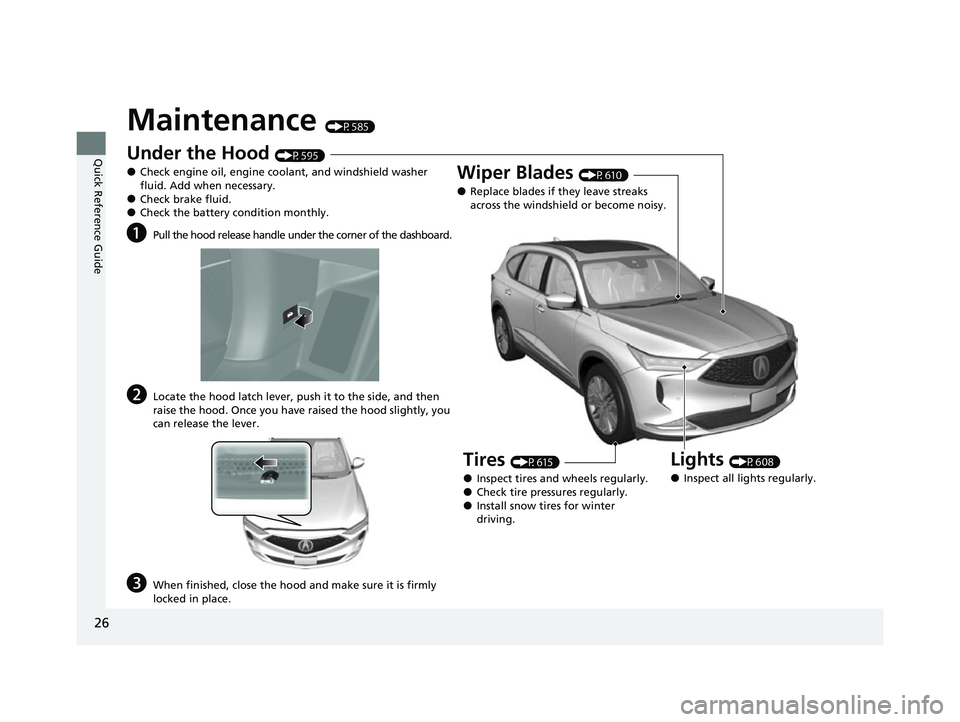
Maintenance (P585)
Under the Hood (P595)
●Check engine oil, engine coolant, and windshield washer
fluid. Add when necessary.
●Check brake fluid.●Check the battery condition monthly.
aPull the hood release handle under the corner of the dashboard.
bLocate the hood latch lever, push it to the side, and then
raise the hood. Once you have raised the hood slightly, you
can release the lever.
cWhen finished, close the hood and make sure it is firmly
locked in place.
Lights (P608)
●Inspect all lights regularly.
Wiper Blades (P610)
●Replace blades if they leave streaks
across the windshield or become noisy.
Tires (P615)
●Inspect tires and wheels regularly.●Check tire pressures regularly.●Install snow tires for winter
driving.
22 ACURA MDX-31TYA6000_02.book 26 ページ 2020年11月5日 木曜日 午前11時39分
Page 81 of 712
80
Safe Driving
Exhaust Gas Hazard
Carbon Monoxide Gas
The engine exhaust from this vehicle contains carbon monoxide, a colorless,
odorless, and highly toxic gas. As long as you properly maintain your vehicle, carbon
monoxide gas will not get into the interior.
■Have the exhaust system in spected for leaks whenever
• The exhaust system is m aking an unusual noise.
• The exhaust system may have been damaged.
• The vehicle is raised for an oil change.
When you operate a vehicle with the tailgate open, airflow can pull exhaust gas into
the interior and create a hazardous conditio n. If you must drive with the tailgate
open, open all the windows and set the climate control system as shown below.
1. Select the fresh air mode.
2. Select the mode.
3. Set the fan speed to high.
4. Set the temperature control to a comfortable setting.
Adjust the climate control system in the same manner if you sit in your parked
vehicle with the engine running.
1 Carbon Monoxide Gas
An enclosed area such as a garage can quickly fill up
with carbon monoxide gas.
Do not run the engine with the garage door closed.
Even when the garage door is open, drive out of the
garage immediately afte r starting the engine.
3WARNING
Carbon monoxide gas is toxic.
Breathing it can cause unconsciousness and
even kill you.
Avoid any enclosed areas or activities that
expose you to carbon monoxide.
22 ACURA MDX-31TYA6000_02.book 80 ページ 2020年11月5日 木曜日 午前11時39分
Page 109 of 712
108
uuGauges and Displays uDriver Information Interface (Left Side Area)
Instrument Panel
Driver Information Interface (Left Side Area)
Shows the current mode for Inte grated Dynamics System, audio* and phone*
information, etc.
2 Audio Remote Controls P. 242
2 Bluetooth ® HandsFreeLink ® P. 376
Shows the current mode for Integrated dynamics system.
2 Acura Integrated Dynamics System P. 450
Driver Information Inte rface (Right Side Area)
The driver information interface shows information such as the estimated travelable
distance and fuel economy of the vehicle. It also displays messages such as warnings
and other helpful information.
When a warning message displays, please check the message and contact a dealer
and have the vehicle inspected if necessary . Please refer to the pages below if the
Engine oil pressure low. or Engine temperature too hot. message is displayed.
2If the Low Oil Pressure Warning Appears P. 670
2 Overheating P. 668
■Current Mode for Integrated Dynamics System
* Not available on all models
22 ACURA MDX-31TYA6000_02.book 108 ページ 2020年11月5日 木曜日 午前11時39分
Page 224 of 712

Continued223
uuInterior Convenience Items uOther Interior Convenience Items
Controls
■When charging does not start
Perform one of the solutions in the following table.
IndicatorCauseSolution
Green &
AmberBlinking
simulta- neously
There is an obstacle(s) between
the charging area and the
device.Remove the
obstacle(s).
The device is not within the
charging area. Reset the device to the
center of the charging
area where is
located.
The temperature of the wireless
charger pad increases. Temporary suspend
charging the device.
Wait for temperature
to drop and attempt to
charge the device
again.
AmberBlinkingThe wireless charger is faulty.Contact a dealer for
repairs.
1
Wireless Charger
This system consumes a lot of power. Do not use the
system for a long time when the engine is not
running. This may weaken the battery, making it
difficult to start the engine.
When using the wireless charger, check the user’s
manual that came with th e compatible device you
want to charge.
3CAUTION
Metal objects between the charge pad and
the device to be charged will get hot and
can burn you.
• Always remove foreign objects from the
charge pad before charging the device.
• Be sure the surface is clear of dust and
other debris before charging.
• Do not spill liquids (i. e. water, drinks,
etc.) on the charger and the device.
• Do not use oil, grease, alcohol, benzine or
thinner for cleaning the charge pad.
• Do not cover the system with towels,
clothing, or other objects while charging
etc.
• Avoid spraying aerosols which may come
in contact with the charge pad surface.
22 ACURA MDX-31TYA6000_02.book 223 ページ 2020年11月5日 木曜日 午前11時39分
Page 438 of 712
Continued437
uuWhen Driving uStarting the Engine
Driving
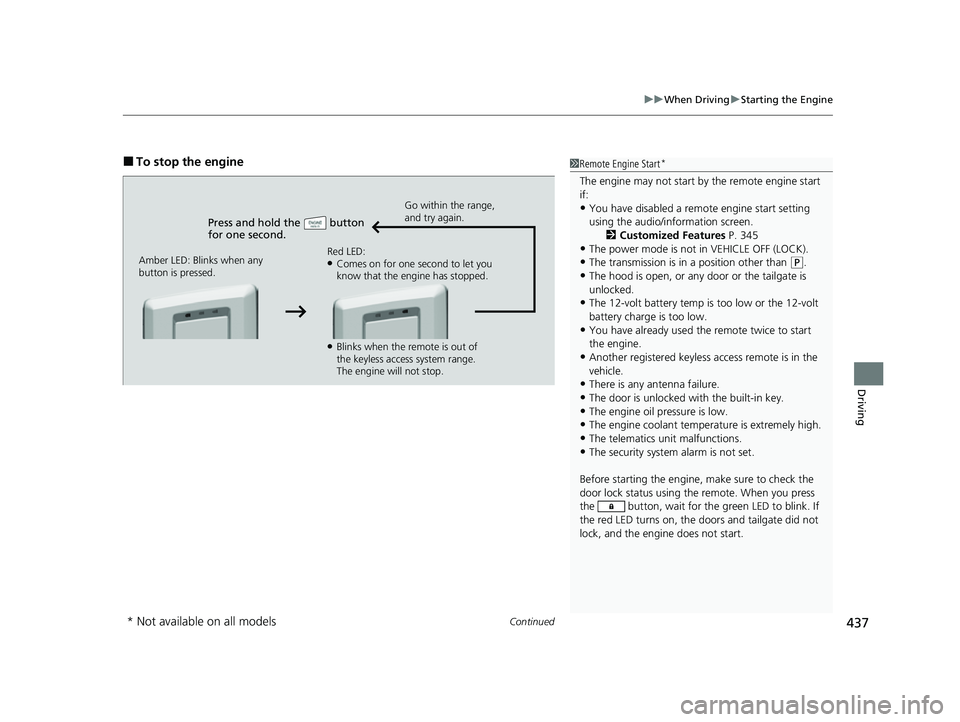
■To stop the engine
Press and hold the button
for one second.
Go within the range,
and try again.
Amber LED: Blinks when any
button is pressed. Red LED:
●Comes on for one second to let you
know that the engine has stopped.
●Blinks when the remote is out of
the keyless access system range.
The engine will not stop.
1
Remote Engine Start*
The engine may not start by the remote engine start
if:
•You have disabled a remo te engine start setting
using the audio/information screen. 2Customized Features P. 345
•The power mode is not in VEHICLE OFF (LOCK).
•The transmission is in a position other than (P.
•The hood is open, or any door or the tailgate is
unlocked.
•The 12-volt battery temp is too low or the 12-volt
battery charge is too low.
•You have already used the remote twice to start
the engine.
•Another registered keyless access remote is in the
vehicle.
•There is any antenna failure.
•The door is unlocked with the built-in key.
•The engine oil pressure is low.•The engine coolant temper ature is extremely high.
•The telematics unit malfunctions.
•The security system alarm is not set.
Before starting the engine, make sure to check the
door lock status using the remote. When you press
the button, wait for the green LED to blink. If
the red LED turns on, the doors and tailgate did not
lock, and the engine does not start.
* Not available on all models
22 ACURA MDX-31TYA6000_02.book 437 ページ 2020年11月5日 木曜日 午前11時39分
Page 561 of 712

560
Driving
Parking Your Vehicle
When Stopped
1.Depress the brake pedal firmly.
2. With the brake pedal depressed, pr ess the electric parking brake switch.
3. Change the shift position to
(P.
4. Turn off the engine.
u The parking brake and brake system indicator (red) goes off in about 30
seconds.
1Parking Your Vehicle
Do not park your vehicle near flammable objects,
such as dry grass, oil, or timber.
Heat from the exhaust can cause a fire.
3WARNING
The vehicle can roll aw ay if left unattended
without confirming that Park is engaged.
A vehicle that rolls away could cause a crash
resulting in serious injury or death.
Always keep your foot on the brake pedal
until you have confirmed that
( P is shown
on the gear position indicator.
1 When Stopped
NOTICE
The following can dama ge the transmission:
•Depressing the accelerator and brake pedals
simultaneously.
•Holding the vehicle in place when facing uphill by
depressing the accelerator pedal.
•Changing to ( P before the vehicle stops
completely.
22 ACURA MDX-31TYA6000_02.book 560 ページ 2020年11月5日 木曜日 午前11時39分
Page 585 of 712

584
Driving
Fuel Economy and CO2 Emissions
Improving Fuel Economy and Reducing CO2
Emissions
Achieving fuel economy and reducing CO2 emissions is dependent on several
factors, including driving conditions, load weight, idling time, driving habits, and
vehicle condition. Depending on these and other factors, you may not achieve the
rated fuel economy of this vehicle.
You can optimize your fuel economy with proper maintenance of your vehicle.
Always maintain your vehicle in accordance with the messages displayed on the
driver information interface.
• Use engine oil with the viscosity recommended.
2 Recommended Engine Oil P. 599
•Maintain the specified tire pressure.
• Do not load the vehicl e with excess cargo.
• Keep your vehicle clean. A buildup of snow or mud on your vehicle’s underside
adds weight and increases wind resistance.
■Maintenance and Fuel Economy
1Improving Fuel Economy and Reducing CO2 Emissions
Direct calculation is the recommended method to
determine actual fuel consumed while driving.
In Canada, posted fuel economy numbers are
established following a simulated test.
For more information on how this test is performed,
please visit https://www.nrcan.gc.ca and search for
“fuel consumption testing” in the search field at the
top of the page.
Miles driven Gallons of
fuel Miles per
Gallon
100 Liters of fuel Kilometers
driven L per 100 km
22 ACURA MDX-31TYA6000_02.book 584 ページ 2020年11月5日 木曜日 午前11時39分
Page 586 of 712
585
Maintenance
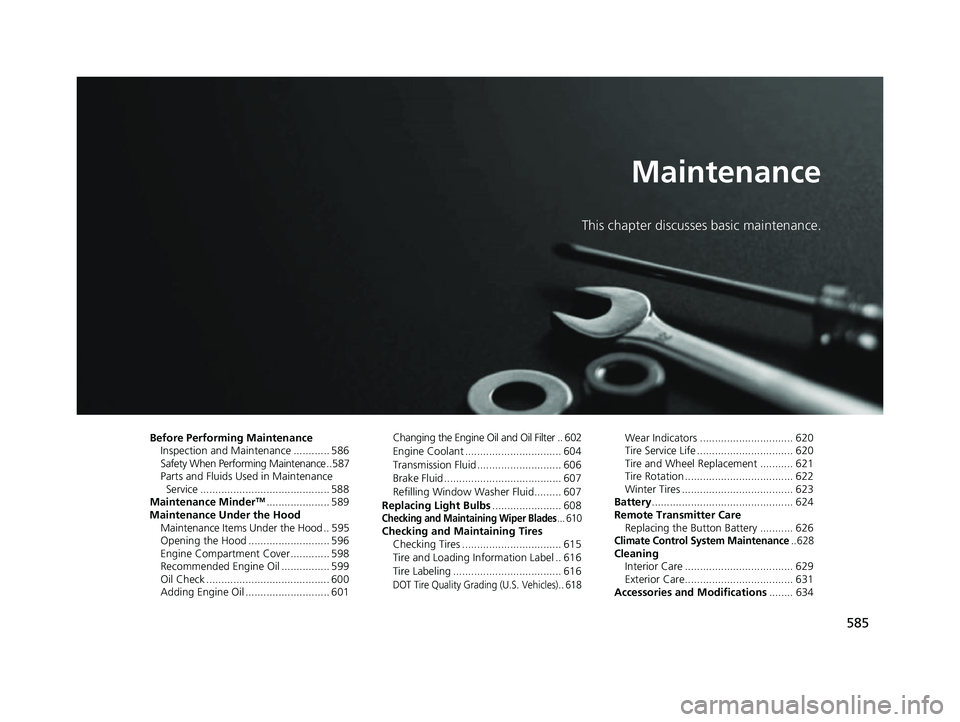
This chapter discusses basic maintenance.
Before Performing MaintenanceInspection and Maintenance ............ 586
Safety When Performing Maintenance ..587
Parts and Fluids Used in Maintenance Service ........................................... 588
Maintenance Minder
TM..................... 589
Maintenance Under the Hood Maintenance Items Under the Hood .. 595
Opening the Hood ........................... 596
Engine Compartment Cover ............. 598
Recommended Engine Oil ................ 599
Oil Check ......................................... 600
Adding Engine Oil ............................ 601 Changing the Engine Oi
l and Oil Filter .. 602
Engine Coolant ................................ 604
Transmission Fluid ............................ 606
Brake Fluid ....................................... 607
Refilling Window Washer Fluid......... 607
Replacing Light Bulbs ....................... 608
Checking and Maintaining Wiper Blades... 610Checking and Maintaining Tires
Checking Tires ................................. 615
Tire and Loading Information Label .. 616
Tire Labeling .................................... 616
DOT Tire Quality Grading (U.S. Vehicles).. 618
Wear Indicators ............................... 620
Tire Service Life ................................ 620
Tire and Wheel Replacement ........... 621
Tire Rotation .................................... 622
Winter Tires ..................................... 623
Battery ............................................... 624
Remote Transmitter Care Replacing the Button Battery ........... 626
Climate Control System Maintenance.. 628CleaningInterior Care .................................... 629
Exterior Care.................................... 631
Accessories and Modifications ........ 634
22 ACURA MDX-31TYA6000_02.book 585 ページ 2020年11月5日 木曜日 午前11時39分
Page 590 of 712

589Continued
Maintenance
Maintenance MinderTM
If the engine oil life is less than 15%, you will see the Maintenance Minder messages
appear on the driver inform ation interface every time you set the power mode to
ON. The messages notify you when to change the engine oil, or when to bring your
vehicle to a dealer for indicated maintenance services.
To Use Maintenance MinderTM
Maintenance items, which should be serviced at the same time that you replace the
engine oil, appear on the driver information interface.
You can view them on the engine oil life screen at any time.
1. Set the power mode to ON.
2. Press the right selector wheel until the content is displayed.
3. Roll the right selector wheel until the Maintenance screen is displayed. The engine oil
life appears on the driver information interface along with maintenance items due soon.
■Displaying the Maintenance Minder Information1 Displaying the Maintena nce Minder Information
Based on the engine ope rating conditions, the
remaining engine oi l life is calculated and displayed
as a percentage.
There is a list of maintena nce main and sub items you
can view on the driver information interface.
2 Maintenance Service Items P. 591
Displayed Engine Oil
Life (%)Calculated Engine Oil Life (%)
100 100 to 91
9090 to 81
80 80 to 71
7070 to 61
60 60 to 51
5050 to 41
40 40 to 31
3030 to 21
20 20 to 16
1515 to 11
10 10 to 6
55 to 1
00
Remaining Engine Oil Life
Maintenance Service Items
Right Selector Wheel
22 ACURA MDX-31TYA6000_02.book 589 ページ 2020年11月5日 木曜日 午前11時39分
Page 591 of 712

590
uuMaintenance MinderTMuTo Use Maintenance MinderTM
Maintenance
The system message indicator ( ) comes on along with the Maintenance Minder message.
■Maintenance Minder Messages on the Driver Information
Interface
Maintenance MessageOil Life DisplayExplanationInformation
—
When you select the Maintenance
screen, it displays codes for
maintenance items due at the next
engine oil change, along with the
percentage of engine oil life remaining.
—
Maintenance Due Soon15%The remaining engine oil life is 15 to
6 percent. Once you switch the
display by rolling the right selector
wheel, this message will go off.The engine oil is approaching the end
of its service life, and the maintenance
items should be inspected and serviced
soon.
Maintenance Due Now5%The remaining engine oil life is 5 to 1
percent. Roll the right selector wheel
to switch to another display.The engine oil has almost reached the
end of its service life, and the
maintenance items should be inspected
and serviced as soon as possible.
Maintenance Past DueNegative DistanceThe remaining engi ne oil life has
passed its service life, and a negative
distance appears. Roll the right
selector wheel to switch to another
display.The engine oil life has passed.
The maintenance items must be
inspected and serviced immediately.
22 ACURA MDX-31TYA6000_02.book 590 ページ 2020年11月5日 木曜日 午前11時39分