tire pressure ACURA MDX 2022 Owners Manual
[x] Cancel search | Manufacturer: ACURA, Model Year: 2022, Model line: MDX, Model: ACURA MDX 2022Pages: 712, PDF Size: 22.65 MB
Page 24 of 712
23
Quick Reference Guide
VSA® On and Off (P464)
●The Vehicle Stability AssistTM (VSA® )
system helps stabilize the vehicle during
cornering, and helps maintain traction
while accelerating on loose or slippery
road surfaces.
●VSA ® comes on automatically every time
you start the engine.
●To partially disable or fully restore VSA ®
function, press and ho ld the button until
you hear a beep.
CMBSTM On and Off
(P483)
●When a possible frontal collision is likely
unavoidable, the CMBSTM can help you to
reduce the vehicle speed and the severity
of the collision.
●The CMBSTM is turned on every time you
start the engine.
●To turn the CMBSTM on or off, use the
safety support switch.
Tire Pressure Monitoring System (TPMS) with Tire
Fill Assist
(P467, 675)
●The TPMS monitors tire pressure.●TPMS is turned on automatically every time you start the engine.●TPMS fill assist provides audible and visual guidance during tire pressure adjustment.
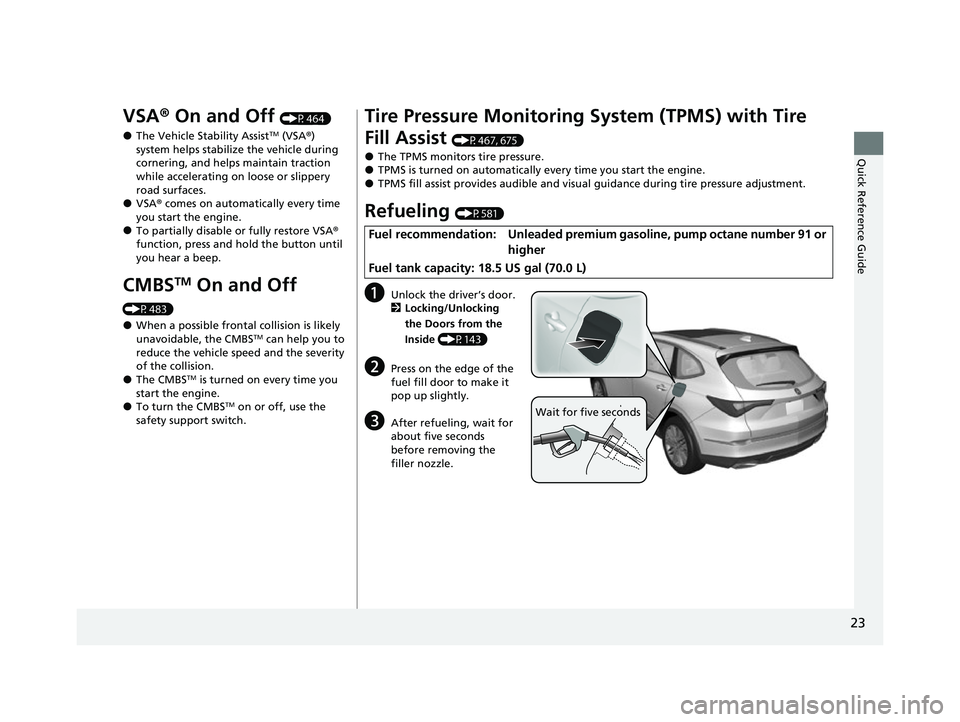
Refueling (P581)
aUnlock the driver’s door.
2 Locking/Unlocking
the Doors from the
Inside (P143)
bPress on the edge of the
fuel fill door to make it
pop up slightly.
cAfter refueling, wait for
about five seconds
before removing the
filler nozzle.
Fuel recommendation: Unleaded premium gasoline, pump octane number 91 or
higher
Fuel tank capacity: 18.5 US gal (70.0 L)
Wait for five seconds
22 ACURA MDX-31TYA6000_02.book 23 ページ 2020年11月5日 木曜日 午前11時39分
Page 27 of 712
26
Quick Reference Guide
Maintenance (P585)
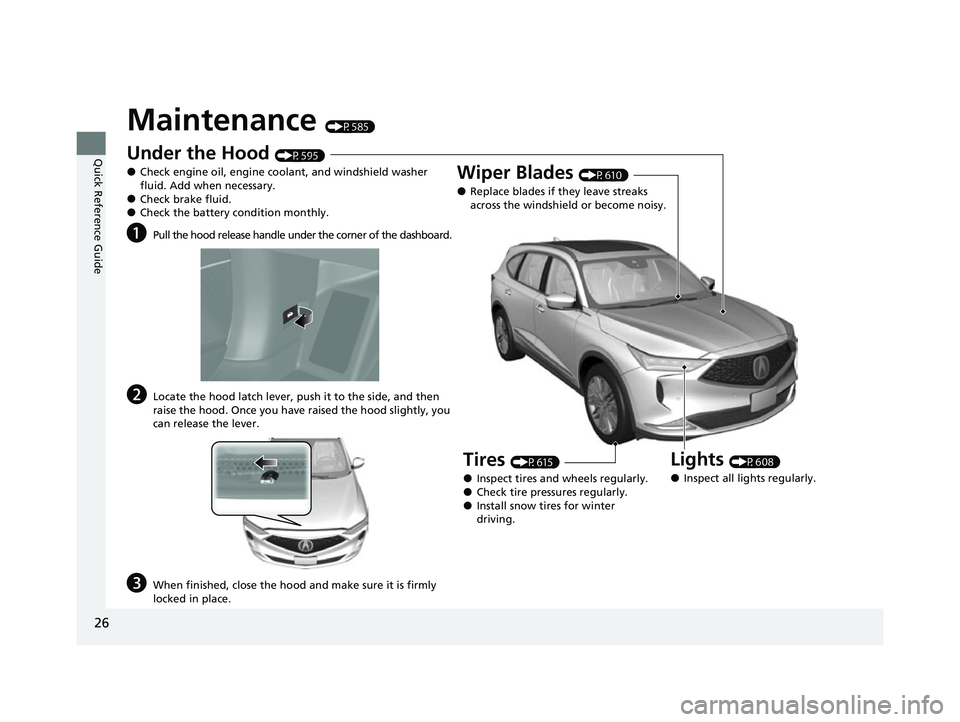
Under the Hood (P595)
●Check engine oil, engine coolant, and windshield washer
fluid. Add when necessary.
●Check brake fluid.●Check the battery condition monthly.
aPull the hood release handle under the corner of the dashboard.
bLocate the hood latch lever, push it to the side, and then
raise the hood. Once you have raised the hood slightly, you
can release the lever.
cWhen finished, close the hood and make sure it is firmly
locked in place.
Lights (P608)
●Inspect all lights regularly.
Wiper Blades (P610)
●Replace blades if they leave streaks
across the windshield or become noisy.
Tires (P615)
●Inspect tires and wheels regularly.●Check tire pressures regularly.●Install snow tires for winter
driving.
22 ACURA MDX-31TYA6000_02.book 26 ページ 2020年11月5日 木曜日 午前11時39分
Page 30 of 712
29
Quick Reference Guide
Why does a beeper sound
when I walk away from the
vehicle after I close the
door?The beeper sounds if you move outside the walk away auto lock
operating range before the door completely closes.
2Locking the doors and tailgate (Walk away auto lock ®) (P136)
Why does the beeper
sound when I start driving?The beeper sounds when the driver and/or front passenger are
not wearing their seat belts.
Pulling the electric parking
brake switch does not
release the parking brake.
Why?Pull the electric parking brake switch with the brake pedal
depressed.
I’m seeing an amber
indicator of a tire with an
exclamation point. What is
that?The Tire Pressure Monitoring Sy stem (TPMS) needs attention.
Check tire pressure.
2 If the Low Tire Pressure/TPMS Indicator Comes On or Blinks (P675)
Depressing the accelerator
pedal does not release the
parking brake
automatically. Why?●Fasten the driver’s seat belt.
●Check if the transmission is in (P or (N. If so, select any other
position.
22 ACURA MDX-31TYA6000_02.book 29 ページ 2020年11月5日 木曜日 午前11時39分
Page 34 of 712

33
uuFor Safe Driving uImportant Safety Precautions
Safe Driving
■Pay appropriate attention to the task of driving safely
Engaging in cell phone conversation or other activities that keep you from paying
close attention to the road, other vehicles , and pedestrians could lead to a crash.
Remember, situations can change quickly, and only you can decide when it is safe to
divert some attention away from driving.
■Control your speed
Excessive speed is a major factor in crash injuries and deaths. Generally, the higher
the speed, the greater the risk, but serious injuries can also occur at lower speeds.
Never drive faster than is safe for current conditions, regardless of the maximum
speed posted.
■Keep your vehicle in safe condition
Having a tire blowout or a mechanical failure can be extremely hazardous.
To reduce the possibility of such problems, check your tire pressures and condition
frequently, and perform all re gularly scheduled maintenance.
■Do not leave children unattended in the vehicle
Children, pets and people needing assistan ce left unattended in the vehicle may be
injured if they activate one or more of the vehicle controls. They may also cause the
vehicle to move, resulting in a crash in wh ich they and/or another person(s) can be
injured or killed. Also, depending on the am bient temperature, the temperature of
the interior may reach extreme levels, which ca n result in harm or death. Even if the
climate control system is on, never leave them in the vehicle unattended as the
climate control system can shut off at any time.
22 ACURA MDX-31TYA6000_02.book 33 ページ 2020年11月5日 木曜日 午前11時39分
Page 86 of 712
85
uuIndicators u
Continued
Instrument Panel
M (sequential mode)
Indicator/Gear
Selection Indicator P. 89
Parking Brake and
Brake System
Indicator (Red)
Parking Brake and
Brake System
Indicator (Amber)
U.S.
Canada
U.S.
Canada Automatic Brake
Hold System Indicator
Automatic Brake Hold
Indicator
U.S.
Canada
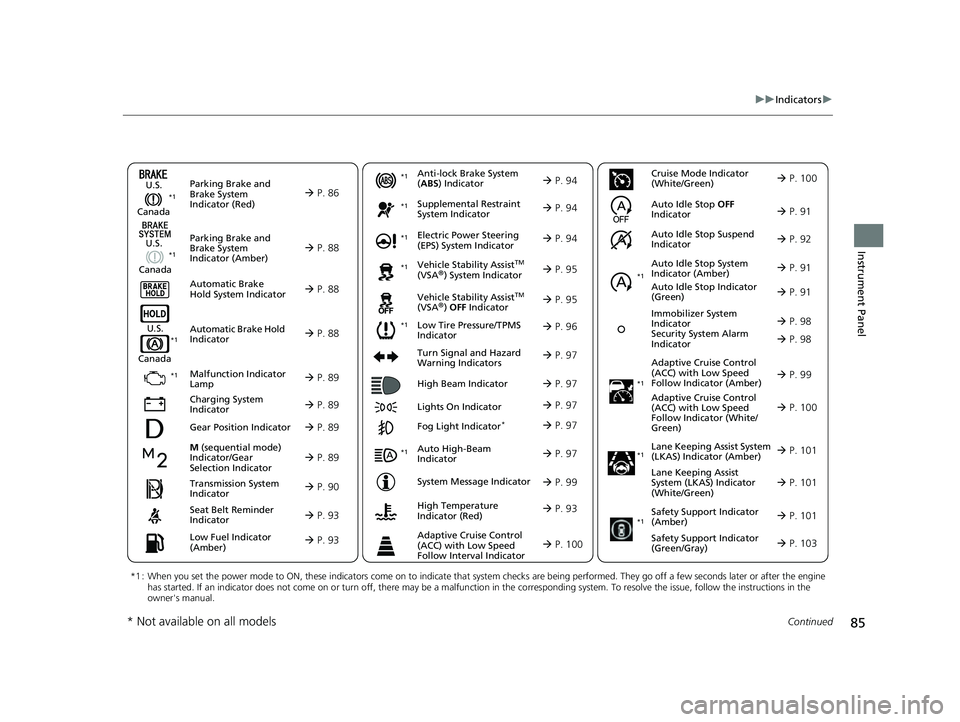
*1 : When you set the power mode to ON, these indicators come on to indicate that system checks are being perf ormed. They go off a few seconds later or after the engine
has started. If an indicator does not come on or turn off, th ere may be a malfunction in the corresponding system. To resolve the issue, follow the instructions in the
owner's manual.
P. 86*1
Malfunction Indicator
Lamp
Charging System
Indicator
Anti-lock Brake System
(ABS ) Indicator
Seat Belt Reminder
Indicator
Low Fuel Indicator
(Amber)
Vehicle Stability AssistTM
(VSA®) System Indicator
Vehicle Stability Assist
TM
(VSA®) OFF Indicator
Supplemental Restraint
System Indicator
Auto High-Beam
Indicator
Low Tire Pressure/TPMS
Indicator Electric Power Steering
(EPS) System Indicator
Turn Signal and Hazard
Warning Indicators
Lights On Indicator High Beam Indicator
Fog Light Indicator*
System Message Indicator Adaptive Cruise Control
(ACC) with Low Speed
Follow Indicator (Amber)
Lane Keeping Assist System
(LKAS) Indicator (Amber)
Safety Support Indicator
(Green/Gray)
P. 88
P. 88
P. 88
P. 89
P. 89*1 *1
P. 96
*1
Gear Position Indicator P. 89
Transmission System
Indicator P. 90
Auto Idle Stop System
Indicator (Amber)
P. 91
P. 93
P. 93
P. 94
P. 94
P. 97
P. 95
*1
*1
P. 95
*1 P. 94
P. 97
P. 99
*1
P. 97
P. 97
P. 97
Immobilizer System
Indicator
Security System Alarm
Indicator P. 98
P. 99
P. 101
P. 103
*1
Adaptive Cruise Control
(ACC) with Low Speed
Follow Indicator (White/
Green) P. 100
*1
Lane Keeping Assist
System (LKAS) Indicator
(White/Green) P. 101
*1
*1
Safety Support Indicator
(Amber) P. 101
*1
Cruise Mode Indicator
(White/Green) P. 100
Auto Idle Stop OFF
Indicator P. 91
Auto Idle Stop Suspend
Indicator P. 92
*1
Auto Idle Stop Indicator
(Green)
P. 91
High Temperature
Indicator (Red) P. 93
Adaptive Cruise Control
(ACC) with Low Speed
Follow Interval Indicator P. 100
P. 98
* Not available on all models
22 ACURA MDX-31TYA6000_02.book 85 ページ 2020年11月5日 木曜日 午前11時39分
Page 97 of 712

96
uuIndicators u
Instrument Panel
IndicatorNameOn/BlinkingExplanation
Low Tire Pressure/
TPMS Indicator
●Comes on if the tire pressure of any of the
tires becomes low.●Comes on while driving - Stop in a safe place,
check tire pressures, and inflate the tire(s) if
necessary.
●Blinks for about one minute, and then stays
on if there is a problem with the TPMS with
Tire Fill Assist, or when a compact spare tire
*
is temporarily installed.
●Blinks and remains on - Have your vehicle
checked by a dealer. If the vehicle is fitted with a
compact spare tire
*, get your regular tire repaired
or replaced and put back on your vehicle as soon as
you can.
●Comes on if the TPMS is deactivated
temporarily after the battery has been
disconnected, then reconnected.●Drive a short distance at more than 12 mph (20
km/h). The indicator should go off. If it does not,
have your vehicle checked by a dealer.
* Not available on all models
22 ACURA MDX-31TYA6000_02.book 96 ページ 2020年11月5日 木曜日 午前11時39分
Page 110 of 712
109
uuGauges and Displays uDriver Information Interface (Right Side Area)
Continued
Instrument Panel
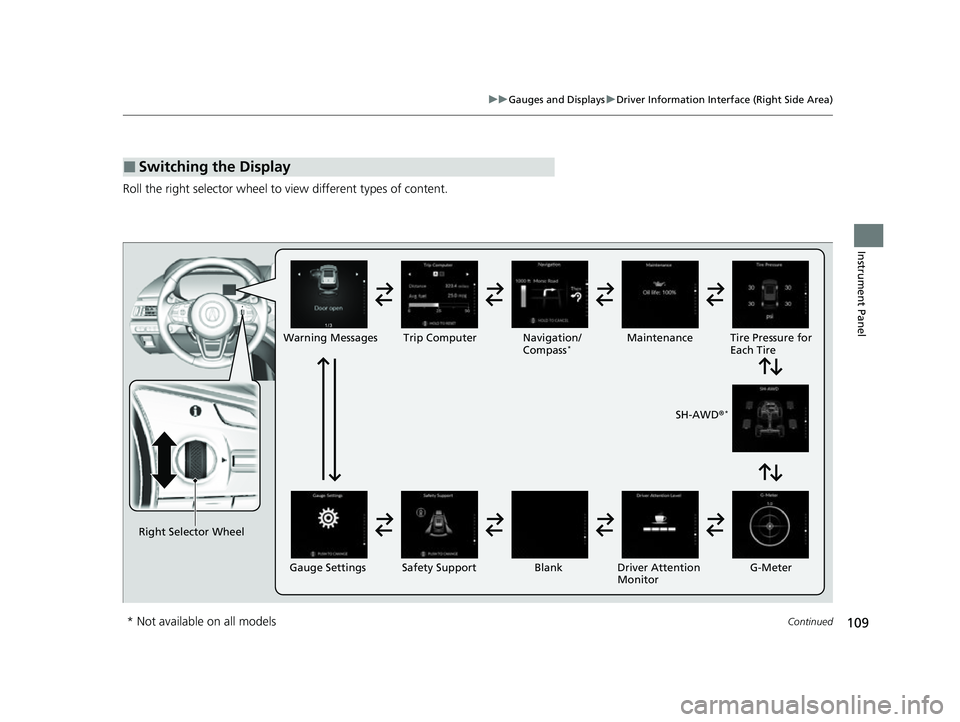
Roll the right selector wheel to view different types of content.
■Switching the Display
Right Selector Wheel Warning Messages Trip Computer
Gauge Settings Maintenance
Navigation/
Compass
*
Safety Support Driver Attention
Monitor
Blank Tire Pressure for
Each Tire
SH-AWD ®
*
G-Meter
* Not available on all models
22 ACURA MDX-31TYA6000_02.book 109 ページ 2020年11月5日 木曜日 午前11時39分
Page 113 of 712
uuGauges and Displays uDriver Information Interface (Right Side Area)
112
Instrument Panel
You can check if there are any active warning messages.
Shows the remaining oil life and Maintenance Minder
TM.
2 Maintenance MinderTM P. 589
Shows each tire’s pressure.
2Tire Pressure Monitoring System (TPMS) with Tire Fill Assist P. 467
■Warnings
■Maintenance
■Tire Pressure Monitor
1Warnings
If there are multiple warnings, you can move the right
selector wheel to the right or left to see other
warnings.
1 Tire Pressure Monitor
The following colors indicate the state of tire
pressure:
•Green: Within tire pressure regulation.
•Amber: Above or Below ti re pressure regulation.•White: There is a problem with the system.
22 ACURA MDX-31TYA6000_02.book 112 ページ 2020年11月5日 木曜日 午前11時39分
Page 414 of 712

413
uuAcuraLink ®u
Features
■Vehicle Status
Get door and lock status as well as mileage, fuel, oil life, and tire pressure readings
on your phone.
■Emergency Call
A live agent will stay on the call with you and request that help be sent in the event
of an emergency.
■Security Alarm Alert
Receive alerts if vehicle security alarm is triggered.
■Destination by Voice
Talk to a live assistant who will search a nd send turn by turn directions to your
vehicle’s navigation system
*. Requires In-vehicle Navigation System*.
■Last Mile
Receive walking directions to your final destination right when you get out of your
Acura. Requires In-vehicle Navigation System
*.
* Not available on all models
22 ACURA MDX-31TYA6000_02.book 413 ページ 2020年11月5日 木曜日 午前11時39分
Page 416 of 712

415
Driving
This chapter discusses driving and refueling.
Before Driving................................... 416
Towing a Trailer ................................ 422
Off-Highway Driving Guidelines ..... 432
When Driving Starting the Engine .......................... 434
Precautions While Driving................. 440
Automatic Transmission ................... 441
Shifting ............................................ 442
Acura Integrated Dynamics System... 450
Auto Idle Stop .................................. 457
Vehicle Stability Assist
TM (VSA ®), aka Electronic
Stability Control (ESC), System .............463
Agile Handling Assist ....................... 465
Super Handling-All Wheel DriveTM (SH-AWD®)*..... 466
Tire Pressure Monitoring System (TPMS) with Tire Fill Assist .......................... 467
Tire Pressure Monitoring System (TPMS) - Required Federal Explanation ......... 469
Blind spot information System.......... 471
AcuraWatch
TM................................... 474
Collision Mitigati on Braking SystemTM
(CMBSTM) ....................................... 479
Low Speed Braking Control*............ 490
Adaptive Cruise Control (ACC) with Low Speed Follow ................................. 496
Lane Keeping Assist System (LKAS) .. 514
Traffic Jam Assist.......................... 523Road Departure Mitigation System ..............535 Traffic Sign Recognition System ....... 541
Front Sensor Camera ....................... 547
Radar Sensor ................................... 549
Sonar Sensors
*................................ 550
Braking Brake System ................................... 551
Anti-lock Brake System (ABS) ........... 558
Brake Assist System ......................... 559
Parking Your Vehicle ........................ 560
Multi-View Rear Camera
*................ 571
Surround View Camera System*..... 573
Refueling Fuel Information .............................. 581
How to Refuel ................................. 582
Fuel Economy and CO
2 Emissions .... 584
* Not available on all models
22 ACURA MDX-31TYA6000_02.book 415 ページ 2020年11月5日 木曜日 午前11時39分