lock Acura MDX Hybrid 2017 Owner's Manual
[x] Cancel search | Manufacturer: ACURA, Model Year: 2017, Model line: MDX Hybrid, Model: Acura MDX Hybrid 2017Pages: 453, PDF Size: 23.77 MB
Page 377 of 453

uuCleaning uInterior Care
376
Maintenance
Wipe using a glass cleaner.
The front and second row passenger’s floor
mats hook over floor anchors, which keep
them from sliding forward. To remove a mat
for cleaning, turn the anchor knobs to the
unlock position. When reinstalling the mat
after cleaning, turn the knobs to the lock
position.
Do not put additional floor mats on top of
the anchored mats.
To properly clean leather:
1. Use a vacuum or soft dry cloth first to remove any dirt or dust.
2. Clean the leather with a soft cloth dampen ed with a solution comprised of 90%
water and 10% neutral soap.
3. Wipe away any soap residu e with a clean damp cloth.
4. Wipe away residual water and allow leather to air dry in the shade.
■Cleaning the Window
■Floor Mats
1Cleaning the Window
Wires are mounted to the in side of the rear window.
Wipe along the same direct ion as the wires with a
soft cloth so as not to damage them.
Be careful not to spill flui ds, such as water or glass
cleaner, on or around the co ver of both the front
sensor camera and the rainfall/light sensor.
2 Automatic Operation (automatic lighting
control) P. 169
2 Automatic Intermittent Wipers P. 176
2 Front Sensor Camera P. 257
1Floor Mats
If you use any floor mats that were not originally
provided with your vehicle, make sure they are
designed for your specific ve hicle, fit correctly, and
are securely anchored by the floor anchors.
Position the rear seat floor mat properly. If they are
not properly positioned, th e floor mat can interfere
with the front seat functions.
Lock
Unlock
■Maintaining Genuine Leather1
Maintaining Genuine Leather
It is important to clean or wipe away dirt or dust as
soon as possible. Spills can soak into leather resulting
in stains. Dirt or dust ca n cause abrasions in the
leather. In addition, pl ease note that some dark
colored clothing can rub onto the leather seats
resulting in discol oration or stains.
17 ACURA MDX E-AWD-31TRX6000.book 376 ページ 2017年1月20日 金曜日 午後2時 53分
Page 384 of 453
383
Handling the Unexpected
This chapter explains how to handle unexpected troubles.
ToolsTypes of Tools .................................. 384
If a Tire Goes Flat
Changing a Flat Tire
*....................... 385
Temporarily Repair ing a Flat Tire*..... 392
Power System Won’t Start ............... 404
Checking the Procedure ................... 404
If the Keyless Access Remote Battery is Weak ............................................. 405
Emergency Power System Off........... 406
Jump Starting .................................... 407
Overheating
How to Handle Overheating ............. 409 Indicator, Coming On/Blinking
If the Low Oil Pressure Indicator Comes On ... 412If the 12-Volt Battery Charging System
Indicator Comes On ....................... 412
If the Malfunction Indicator Lamp Comes On or Blinks ................................... 413
If the Brake System Indicator (Red) Comes On ................................................... 414
If the Speed-Sensitive Electric Power Steering (EPS) System Indicator Comes
On.................................................. 414
If the Low Tire Pressure/TPMS Indicator
Comes On or Blinks........................ 416 If the Transmission System Indicator Blinks
along with the Warning Message ...... 416
If the Power System Indicator Comes On .. 417Fuses Fuse Locations ................................. 418
Inspecting and Changing Fuses ........ 426
Emergency Towing ........................... 427
When You Cannot Unlock the Fuel Fill Door ................................................. 428
When You Cannot Open the Tailgate.. 429Refueling ........................................... 430Refueling From a Portable Fuel
Container ................................... 430
* Not available on all models
17 ACURA MDX E-AWD-31TRX6000.book 383 ページ 2017年1月20日 金曜日 午後2時 53分
Page 389 of 453

388
uuIf a Tire Goes Flat uChanging a Flat Tire*
Handling the Unexpected
8. Place a wheel block or rock in front and
rear of the wheel diagonal to the flat tire.
9. Place the compact spare tire (wheel side
up) under the vehicle body, near the tire
that needs to be replaced.
10. Loosen each wheel nut about one turn
using the wheel nut wrench.
Wheel
Blocks
The tire to be replaced.
17 ACURA MDX E-AWD-31TRX6000.book 388 ページ 2017年1月20日 金曜日 午後2時 53分
Page 390 of 453

Continued389
uuIf a Tire Goes Flat uChanging a Flat Tire*
Handling the Unexpected
1. Place the jack under the jacking point
closest to the tire to be changed.
2. Turn the end bracket (as shown in the
image) clockwise until the top of the jack
contacts the jacking point.
u Make sure that the jacking point tab is
resting in the jack notch.
3. Raise the vehicle, using the jack handle bar
and the jack handle, until the tire is off the
ground.
■How to Set Up the Jack1How to Set Up the Jack
Do not use the jack with people or luggage in the
vehicle.
Use the jack provided in your vehicle.
Other jacks may not support the weight (“load”) or
their shape may not match.
The following instructions must be followed to use
the jack safely:
•Do not use while the power system is on.
•Use only where the ground is firm and level.
•Use only at the jacking points.•Do not get in the vehicl e while using the jack.
•Do not put anything on top of or underneath the
jack.
3WARNING
The vehicle can easily roll off the jack,
seriously injuring anyone underneath.
Follow the directions for changing a tire
exactly, and never get under the vehicle
when it is supported only by the jack.
Jacking Points
Jack Handle Bar
Wheel Nut Wrench as Jack Handle
17 ACURA MDX E-AWD-31TRX6000.book 389 ページ 2017年1月20日 金曜日 午後2時 53分
Page 392 of 453

391
uuIf a Tire Goes Flat uChanging a Flat Tire*
Handling the Unexpected
1. Remove the center cap.
2. Place the flat tire face up under the hoist.
3. Insert the hoist bracke t into the center hole
of the flat tire.
4. Turn the wheel nut wrench with the jack
handle bar (clockwise) until the flat tire rests
against the underbody of the vehicle, and
you hear the hoist click.
5. Securely store the jack, wheel nut wrench,
and jack handle bar back in the tool case.
Store the case in the cargo area.
If you replace a flat tire wi th the spare tire, the low tire pressure/TPMS indicator comes
on while you are driving. After driving for a few miles (kilometers), the indicator will
start blinking for a short time and then stay on. Tire Pressure Monitor Problem
appears on the multi-information display (MID), but this is normal.
If you replace the tire with a specified regular tire, the warning message on the MID
and the low tire pressure/TPMS indicator will go off after a few miles (kilometers).
■Storing the Flat Tire1Storing the Flat Tire
3WARNING
Loose items can fly around the interior in a
crash and can seriously injure the
occupants.
Store the jack and tools securely before
driving.
Center Cap
Wheel Nut Wrench Jack Handle Bar
■TPMS and the Spare Tire1
TPMS and the Spare Tire
The system cannot monitor th e pressure of the spare
tire. Manually check the spare tire pressure to be sure
that it is correct.
Use TPMS specific wheels. Each is equipped with a
tire pressure sensor mounted inside the tire behind
the valve stem.
17 ACURA MDX E-AWD-31TRX6000.book 391 ページ 2017年1月20日 金曜日 午後2時 53分
Page 407 of 453

406
uuPower System Won’t Start uEmergency Power System Off
Handling the Unexpected
Emergency Power System Off
The POWER button may be used to turn the po wer system off due to an emergency
situation even while driving. If you must turn the powe r system off, do either of the
following operations:
• Press and hold the POWER button for about two seconds.
• Firmly press the POWER button three times.
The steering wheel will not lock. However, because turning off the power system
disables the power assist the power syst em provides to the steering and braking
systems, it will require significantly more physical effort and time to steer and slow
the vehicle. Use both feet on the brake pe dal to slow down the vehicle and stop
immediately in a safe place.
The gear position auto matically changes to
(P after the vehicle comes to a complete
stop. Then, the power mode changes to VEHICLE OFF.
1Emergency Power System Off
Do not press the button while driving unless it is
absolutely necessary for the power system to be
switched off.
17 ACURA MDX E-AWD-31TRX6000.book 406 ページ 2017年1月20日 金曜日 午後2時 53分
Page 422 of 453
421
uuFuses uFuse Locations
Continued
Handling the Unexpected
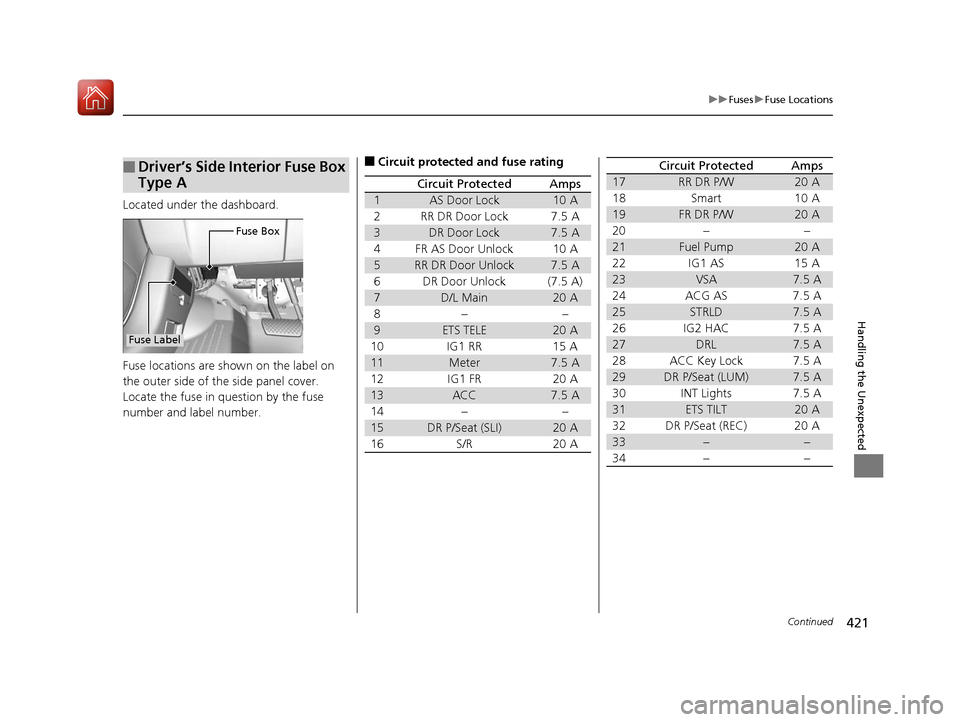
Located under the dashboard.
Fuse locations are shown on the label on
the outer side of the side panel cover.
Locate the fuse in question by the fuse
number and label number.
■Driver’s Side Interior Fuse Box
Type A
Fuse Box
Fuse Label
■Circuit protected and fuse rating
Circuit ProtectedAmps
1AS Door Lock10 A
2RR DR Door Lock7.5 A
3DR Door Lock7.5 A
4FR AS Door Unlock10 A
5RR DR Door Unlock7.5 A
6DR Door Unlock(7.5 A)
7D/L Main20 A
8−−
9ETS TELE20 A
10 IG1 RR 15 A
11Meter7.5 A
12 IG1 FR 20 A
13ACC7.5 A
14 − −
15DR P/Seat (SLI)20 A
16 S/R 20 A
17RR DR P/W20 A
18 Smart 10 A
19FR DR P/W20 A
20 − −
21Fuel Pump20 A
22 IG1 AS 15 A
23VSA7.5 A
24 ACG AS 7.5 A
25STRLD7.5 A
26 IG2 HAC 7.5 A
27DRL7.5 A
28 ACC Key Lock 7.5 A
29DR P/Seat (LUM)7.5 A
30 INT Lights 7.5 A
31ETS TILT20 A
32 DR P/Seat (REC) 20 A
33−−
34−−
Circuit ProtectedAmps
17 ACURA MDX E-AWD-31TRX6000.book 421 ページ 2017年1月20日 金曜日 午後2時 53分
Page 429 of 453
428
Handling the Unexpected
When You Cannot Unlock the Fuel Fill Door
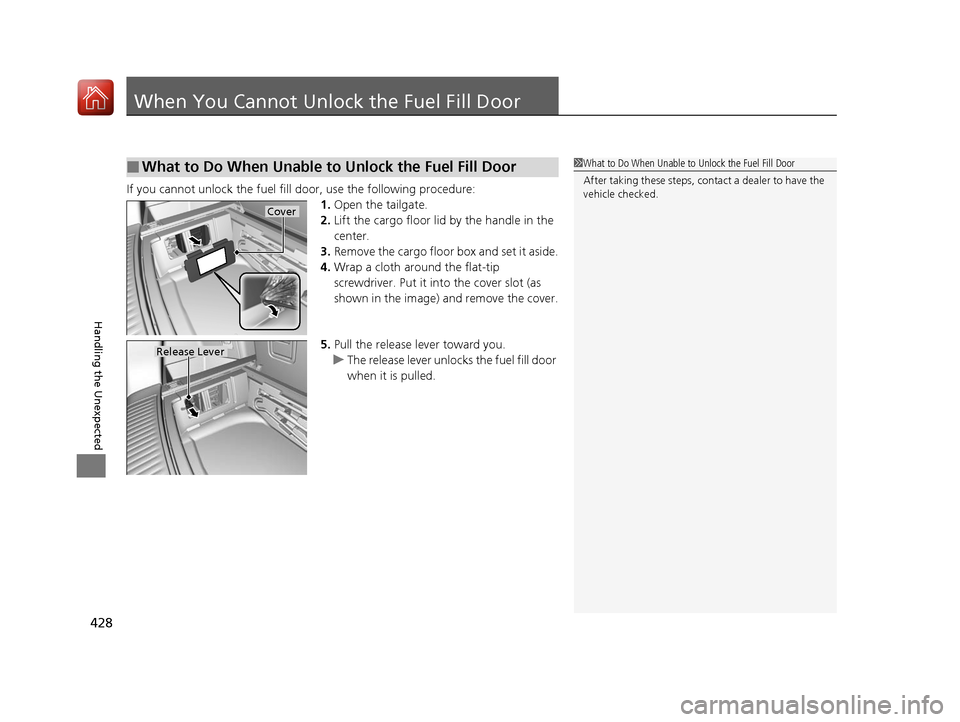
If you cannot unlock the fuel fill door, use the following procedure:1.Open the tailgate.
2. Lift the cargo floor lid by the handle in the
center.
3. Remove the cargo floor box and set it aside.
4. Wrap a cloth around the flat-tip
screwdriver. Put it in to the cover slot (as
shown in the image) and remove the cover.
5. Pull the release lever toward you.
u The release lever unlocks the fuel fill door
when it is pulled.
■What to Do When Unable to Unlock the Fuel Fill Door1What to Do When Unable to Unlock the Fuel Fill Door
After taking these steps, cont act a dealer to have the
vehicle checked.
Cover
Release Lever
17 ACURA MDX E-AWD-31TRX6000.book 428 ページ 2017年1月20日 金曜日 午後2時 53分
Page 443 of 453
Index
442
Index
Index
A
ABS (Anti-lock Brake System)................... 305
AC Power Outlet ....................................... 209
Accessories and Modifications ................. 380
Accessory Power Sockets .......................... 208
Acoustic Vehicle Alerting System ............ 255
AcuraWatch
TM............................................. 24
Adaptive Cruise Control (ACC) with Low
Speed Follow (LSF) .................................. 259
Indicator .................................................... 94
Additives
Coolant ................................................... 347
Engine Oil ................................................ 342
Washer .................................................... 351
Additives, Engine Oil ................................ 342
Adjusting Armrest ................................................... 199
Front Seats .............................................. 187
Head Restraints........................ 193, 195, 196
Headlights ............................................... 352
Mirrors .................................................... 184
Rear Seats................................................ 198
Steering Wheel ........................................ 183
Temperature ............................................ 121
Agile Handling Assist ................................ 289
Air Conditioning System (Climate Control System) .................................................... 214
Changing the Mode ................................ 217
Defrosting the Windshield and Windows ............................................... 221
Dust and Pollen Filter ............................... 374 Rear Climate Control System ................... 222
Sensors ................................................... 226
Synchronized Mode................................. 218
Using Automatic Climate Control ............ 214
Air Pressure ....................................... 362, 433
Airbags ........................................................ 45
Advanced Airbags ..................................... 51
After a Collision ........................................ 49
Airbag Care............................................... 59
Driver’s Knee Airbag.................................. 52
Event Data Recorder .................................... 0
Front Airbags (SRS) .................................... 48
Indicator.............................................. 57, 87
Passenger Front Airbag Off Indicator ......... 58
Sensors ..................................................... 45
Side Airbags .............................................. 54
Side Curtain Airbags.................................. 56
Anti-lock Brake System (ABS) .................. 305
Indicator.................................................... 87
Armrest ..................................................... 199
Audio System ............................................ 228
Authorized Manuals ................................ 440
Auto Door Locking/Unlocking ................. 150
Customize ............................................... 131
Auto Engine Stop/Start .............................. 13
Auto High-Beam ....................................... 172
Indicator.................................................... 87
Automatic Brake Hold ............................. 303
Indicator.................................................. 303
Automatic Brake Hold System Indicator.................................................. 303 Automatic Folding Door Mirror
.............. 186
Automatic Intermittent Wipers .............. 176
Automatic Lighting .................................. 169
Average Fuel Economy ............................ 121
Average Speed ......................................... 122B
Back-Up Light........................................... 355
Battery ...................................................... 370
12-Volt ................................................... 370
12-Volt Battery Charging System Indicator ......................................... 82, 412
High Voltage........................................... 298
Jump Starting ......................................... 407
Maintenance (Checking the 12-Volt Battery) ................................................. 370
Maintenance (Replacing) ......................... 371
Battery Types .............................................. 12
Belts (Seat) .................................................. 37
Beverage Holders ..................................... 206
Blind Spot Information (BSI) System ....... 291
Indicator ................................................... 98
Booster Seats (For Children) ...................... 74
Brake System ............................................ 299
Anti-lock Brake System (ABS) .................. 305
Automatic Brake Hold ............................. 303
Brake Assist System................................. 306
Brake System Indicator .............................. 79
Fluid ....................................................... 351
Foot Brake .............................................. 302
17 ACURA MDX E-AWD-31TRX6000.book 442 ページ 2017年1月20日 金曜日 午後2時 53分
Page 444 of 453
443
Index
Indicator ..................................... 78, 79, 414
Parking Brake.......................................... 299
Brake System (Amber) Indicator ................................................... 79
Brake System (Red)
Indicator ........................................... 78, 414
Brightness Control (Instrument Panel) ... 179
BSI (Blind Spot Information) System ....... 291
Bulb Replacement .................................... 352
Back-Up Light ......................................... 355
Brake Light and Rear Tu rn Signal Light .... 353
Fog Lights ............................................... 352
Front Turn Signal/ Parking, Daytime
Running and Front Side Marker Lights ... 352
Headlights .............................................. 352
High-Mount Brake Light.......................... 356
Puddle Lights .......................................... 356
Rear License Plate Lights ......................... 356
Side Turn Signal/Emergency Indicator Lights .................................................... 352
Taillights ................................................. 355
Taillights/Rear Side Maker Lights ............. 354
Bulb Specifications ................................... 432
C
Car Wash Mode........................................ 251
Carbon Monoxide Gas ............................... 75
Carrying Cargo ................................. 231, 233
Center Pocket ........................................... 205
Certification Label ................................... 434 Changing Bulbs
......................................... 352
Charging System Indicator ................. 82, 412
Child Safety ................................................. 60
Childproof Door Locks ............................. 149
Child Seat .................................................... 60
Booster Seats ............................................. 74
Child Seat for Infants ................................. 62
Child Seat for Small Children ..................... 63
Installing a Child Seat with a Lap/Shoulder Seat Belt .................................................. 68
Larger Children .......................................... 73
Rear-facing Child Seat ............................... 62
Selecting a Child Seat ................................ 64
Childproof Door Locks ............................. 149
Cleaning the Exterior ............................... 377
Cleaning the Interior ................................ 375
Client Service Information ....................... 441
Climate Control System ............................ 214
Changing the Mode ................................ 217
Defrosting the Windshield and Windows ............................................... 221
Dust and Pollen Filter ............................... 374
Rear Climate Control System ................... 222
Sensors .................................................... 226
Synchronized Mode ................................. 218
Using Automatic Climate Control ............ 214
Clock .......................................................... 136
CMBSTM (Collision Mitigation Braking
SystemTM) ................................................. 307
Coat Hook ................................................. 210 Collision Mitigation Braking System
TM
(CMBSTM) ................................................. 307
Compact Spare Tire .......................... 385, 433
Console Compartment ............................. 204
Controls ..................................................... 135
Coolant (Engine) ...................................... 347
Adding to the Radiator ............................ 348
Adding to the Reserve Tank..................... 347
Overheating ............................................ 409
Creeping (Dual Clutch Transmission) ...... 246
Cross Traffic Monitor ............................... 322
Cup Holders .............................................. 206
Customized Features ................................ 125
D
Daytime Running Lights .......................... 171
Dead Battery ............................................. 407
Defrosting the Windshield and Windows ................................................. 221
Detachable Anchor .................................... 42
Devices that Emit Radio Waves ............... 435
Dimming Headlights ............................................... 168
Rearview Mirror....................................... 184
Dipstick (Engine Oil) ................................. 343
Directional Signals (Turn Signal) ............. 167
Door Mirrors ............................................. 185
17 ACURA MDX E-AWD-31TRX6000.book 443 ページ 2017年1月20日 金曜日 午後2時 53分