audio Acura MDX Hybrid 2017 Owner's Guide
[x] Cancel search | Manufacturer: ACURA, Model Year: 2017, Model line: MDX Hybrid, Model: Acura MDX Hybrid 2017Pages: 453, PDF Size: 23.77 MB
Page 371 of 453
370
Maintenance
12-Volt Battery
Checking the 12-Volt Battery
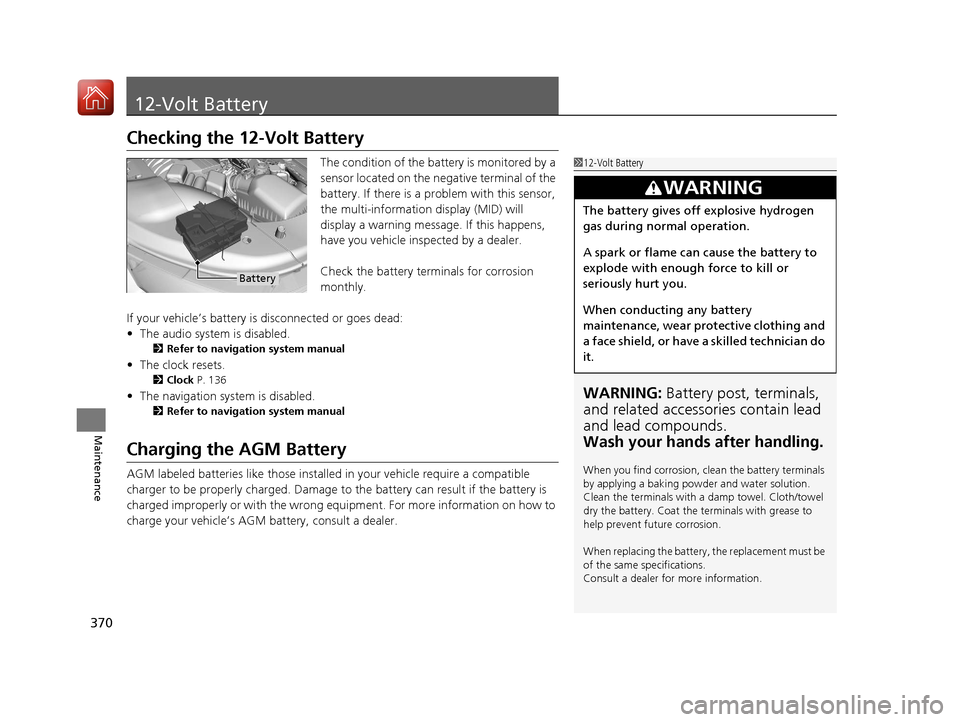
The condition of the battery is monitored by a
sensor located on the negative terminal of the
battery. If there is a problem with this sensor,
the multi-information display (MID) will
display a warning message. If this happens,
have you vehicle inspected by a dealer.
Check the battery terminals for corrosion
monthly.
If your vehicle’s battery is disconnected or goes dead:
• The audio system is disabled.
2 Refer to navigation system manual
•The clock resets.
2 Clock P. 136
•The navigation system is disabled.
2 Refer to navigation system manual
Charging the AGM Battery
AGM labeled batteries like those installed in your vehicle require a compatible
charger to be properly charged. Damage to the battery can result if the battery is
charged improperly or with the wrong equi pment. For more information on how to
charge your vehicle’s AGM battery, consult a dealer.
112-Volt Battery
WARNING: Battery post, terminals,
and related accessories contain lead
and lead compounds.
Wash your hands after handling.
When you find corrosion, cl ean the battery terminals
by applying a baking powder and water solution.
Clean the terminals with a damp towel. Cloth/towel
dry the battery. Coat the terminals with grease to
help prevent future corrosion.
When replacing the battery, the replacement must be
of the same specifications.
Consult a dealer for more information.
3WARNING
The battery gives off explosive hydrogen
gas during normal operation.
A spark or flame can cause the battery to
explode with enough force to kill or
seriously hurt you.
When conducting any battery
maintenance, wear prot ective clothing and
a face shield, or have a skilled technician do
it.
Battery
17 ACURA MDX E-AWD-31TRX6000.book 370 ページ 2017年1月20日 金曜日 午後2時 53分
Page 376 of 453

375Continued
Maintenance
Cleaning
Interior Care
Use a damp cloth with a mixture of mild detergent and warm water to remove dirt.
Use a clean cloth to remove detergent residue.
Use a soft brush with a mixture of mild soap and warm water to clean the seat belts.
Let the belts air dry. Wipe the openings of the seat belt anchors using a clean cloth.
■Cleaning Seat Belts
1Interior Care
Do not spill liquids inside the vehicle. Electrical
devices and systems may ma lfunction if liquids are
splashed on them.
Do not use silicone based sp rays on electrical devices
such as audio devices and switches. Doing so may
cause the items to malfunction or cause a fire inside
the vehicle.
If a silicone based spray is inadvertently used on
electrical devices, consult a dealer.
Depending on their compos ition, chemicals and
liquid aromatics may cause discoloration, wrinkles,
and cracking to resin-ba sed parts and textiles.
Do not use alkali solvents or organic solvents such as
benzene or gasoline.
After using chemical s, make sure to gently wipe them
away using a dry cloth.
Do not place used cloths on top of resin based parts
or textiles for long periods of time without washing.
Opening
17 ACURA MDX E-AWD-31TRX6000.book 375 ページ 2017年1月20日 金曜日 午後2時 53分
Page 387 of 453

uuIf a Tire Goes Flat uChanging a Flat Tire*
386
Handling the Unexpected
1. Push the rear edge of the handle on the
floor lid and open the lid.
2. Take out the cargo floor box.
3. Take the jack, wheel nut wrench, and jack
handle bar out of the tool case.
■Getting Ready to Replace the Flat Tire1Changing a Flat Tire*
NOTICE
Do not use the jack if it doesn’t work properly. Call
your dealer or a prof essional towing service.
The wheel nut wrench supplied with your vehicle is
specially adapted to fit th e holder shaft. Do not use
any other tool.
The subwoofer is located on the rear right side. Do
not store anything in th is area. Doing so may
compromise vehicle audio performance.
Handle
Cargo Floor Box
Tool Case
* Not available on all models
17 ACURA MDX E-AWD-31TRX6000.book 386 ページ 2017年1月20日 金曜日 午後2時 53分
Page 408 of 453
407Continued
Handling the Unexpected
Jump Starting
Turn off the power to electric devices, such as audio and lights. Turn off the power
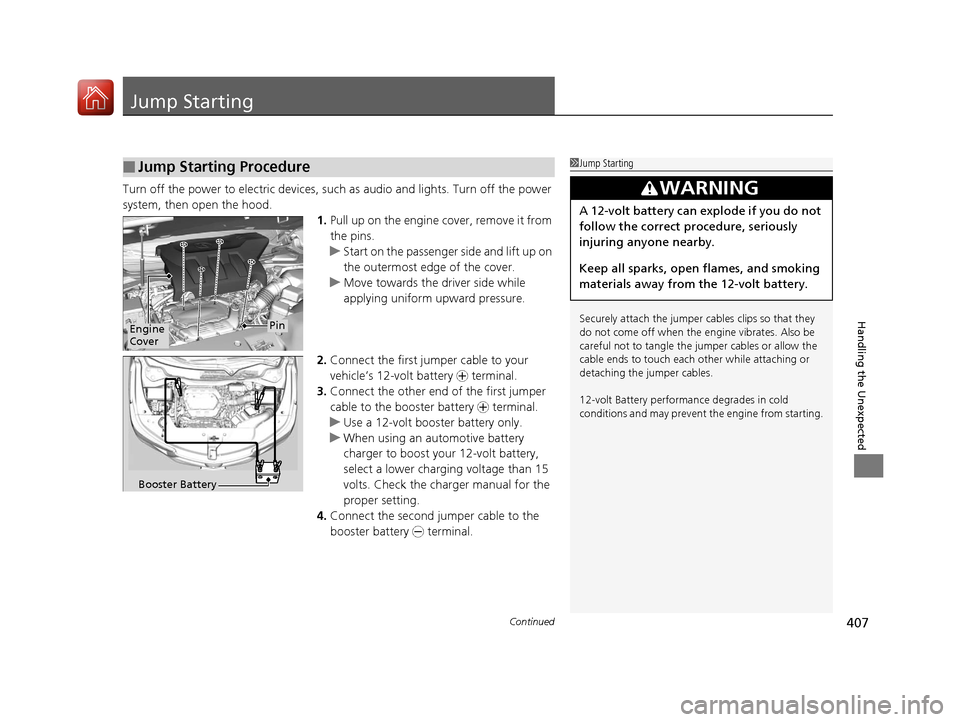
system, then open the hood. 1.Pull up on the engine cover, remove it from
the pins.
u Start on the passenger side and lift up on
the outermost edge of the cover.
u Move towards the driver side while
applying uniform upward pressure.
2. Connect the first jumper cable to your
vehicle’s 12-volt battery + terminal.
3. Connect the other end of the first jumper
cable to the booster battery + terminal.
u Use a 12-volt booster battery only.
u When using an automotive battery
charger to boost your 12-volt battery,
select a lower charging voltage than 15
volts. Check the ch arger manual for the
proper setting.
4. Connect the second jumper cable to the
booster battery - terminal.
■Jump Starting Procedure1Jump Starting
Securely attach the jumper cables clips so that they
do not come off when the e ngine vibrates. Also be
careful not to tangle the ju mper cables or allow the
cable ends to touch each other while attaching or
detaching the jumper cables.
12-volt Battery performa nce degrades in cold
conditions and may prevent the engine from starting.
3WARNING
A 12-volt battery can explode if you do not
follow the correct procedure, seriously
injuring anyone nearby.
Keep all sparks, open flames, and smoking
materials away from the 12-volt battery.
Engine
CoverPin
Booster Battery
17 ACURA MDX E-AWD-31TRX6000.book 407 ページ 2017年1月20日 金曜日 午後2時 53分
Page 436 of 453

435
Information
Devices that Emit Radio Waves
The following products and systems on your vehicle emit radio waves when in operation.
Each of the above complies with the appropriate requirements or the required standards of FCC (Federal Communications Commissio n)
and Industry Canada Standard, described below:
As required by the FCC:
This device complies with Part 15 of the FCC rules. Operation is subject to the following two conditions: (1)
This device may not cause harmful interference, and (2) this device must accept any interference received,
including interference that may cause undesired operation.
Changes or modifications not expres sly approved by the party responsible for compliance could void the
user’s authority to operate the equipment.
This device complies with Indus try Canada licence-exempt RSS standard(s). Operation is subject to the following two conditions: (1) this
device may not cause interference, and (2) this device must ac cept any interference, including interference that may cause unde sired
operation of the device.
AcuraLink
Audio System
Blind Spot Information System
Bluetooth ® Audio
Bluetooth® HandsFreeLink ®
HomeLink® Universal Transceiver
Collision Mitigati on Braking SystemTM
Immobilizer System
Remote Transmitter
Keyless Access System
Tire Pressure Monitoring System (TPMS)
Remote Engine Start with Vehicle Feedback
17 ACURA MDX E-AWD-31TRX6000.book 435 ページ 2017年1月20日 金曜日 午後2時 53分
Page 443 of 453
Index
442
Index
Index
A
ABS (Anti-lock Brake System)................... 305
AC Power Outlet ....................................... 209
Accessories and Modifications ................. 380
Accessory Power Sockets .......................... 208
Acoustic Vehicle Alerting System ............ 255
AcuraWatch
TM............................................. 24
Adaptive Cruise Control (ACC) with Low
Speed Follow (LSF) .................................. 259
Indicator .................................................... 94
Additives
Coolant ................................................... 347
Engine Oil ................................................ 342
Washer .................................................... 351
Additives, Engine Oil ................................ 342
Adjusting Armrest ................................................... 199
Front Seats .............................................. 187
Head Restraints........................ 193, 195, 196
Headlights ............................................... 352
Mirrors .................................................... 184
Rear Seats................................................ 198
Steering Wheel ........................................ 183
Temperature ............................................ 121
Agile Handling Assist ................................ 289
Air Conditioning System (Climate Control System) .................................................... 214
Changing the Mode ................................ 217
Defrosting the Windshield and Windows ............................................... 221
Dust and Pollen Filter ............................... 374 Rear Climate Control System ................... 222
Sensors ................................................... 226
Synchronized Mode................................. 218
Using Automatic Climate Control ............ 214
Air Pressure ....................................... 362, 433
Airbags ........................................................ 45
Advanced Airbags ..................................... 51
After a Collision ........................................ 49
Airbag Care............................................... 59
Driver’s Knee Airbag.................................. 52
Event Data Recorder .................................... 0
Front Airbags (SRS) .................................... 48
Indicator.............................................. 57, 87
Passenger Front Airbag Off Indicator ......... 58
Sensors ..................................................... 45
Side Airbags .............................................. 54
Side Curtain Airbags.................................. 56
Anti-lock Brake System (ABS) .................. 305
Indicator.................................................... 87
Armrest ..................................................... 199
Audio System ............................................ 228
Authorized Manuals ................................ 440
Auto Door Locking/Unlocking ................. 150
Customize ............................................... 131
Auto Engine Stop/Start .............................. 13
Auto High-Beam ....................................... 172
Indicator.................................................... 87
Automatic Brake Hold ............................. 303
Indicator.................................................. 303
Automatic Brake Hold System Indicator.................................................. 303 Automatic Folding Door Mirror
.............. 186
Automatic Intermittent Wipers .............. 176
Automatic Lighting .................................. 169
Average Fuel Economy ............................ 121
Average Speed ......................................... 122B
Back-Up Light........................................... 355
Battery ...................................................... 370
12-Volt ................................................... 370
12-Volt Battery Charging System Indicator ......................................... 82, 412
High Voltage........................................... 298
Jump Starting ......................................... 407
Maintenance (Checking the 12-Volt Battery) ................................................. 370
Maintenance (Replacing) ......................... 371
Battery Types .............................................. 12
Belts (Seat) .................................................. 37
Beverage Holders ..................................... 206
Blind Spot Information (BSI) System ....... 291
Indicator ................................................... 98
Booster Seats (For Children) ...................... 74
Brake System ............................................ 299
Anti-lock Brake System (ABS) .................. 305
Automatic Brake Hold ............................. 303
Brake Assist System................................. 306
Brake System Indicator .............................. 79
Fluid ....................................................... 351
Foot Brake .............................................. 302
17 ACURA MDX E-AWD-31TRX6000.book 442 ページ 2017年1月20日 金曜日 午後2時 53分