ECU Acura MDX Hybrid 2017 Owner's Guide
[x] Cancel search | Manufacturer: ACURA, Model Year: 2017, Model line: MDX Hybrid, Model: Acura MDX Hybrid 2017Pages: 453, PDF Size: 23.77 MB
Page 231 of 453
230
Driving
Before Driving
Driving Preparation
Check the following items before you start driving.
• Make sure there are no obstructions on th e windows, door mirrors, exterior
lights, or other parts of the vehicle.
u Remove any frost, snow, or ice.
u Remove any snow on the roof, as this can slip down and obstruct your field of
vision while driving. If frozen solid , remove ice once it has softened.
u When removing ice from around the wheel s, be sure not to damage the wheel
or wheel components.
• Make sure the hood is securely closed.
u If the hood opens while driving, your front view will be blocked.
• Make sure the tires are in good condition.
u Check air pressures, and check for damage and excessive wear.
2Checking and Maintaining Tires P. 361
•Make sure there are no people or ob jects behind or around the vehicle.
u There are blind spots from the inside.
■Exterior Checks1Exterior Checks
NOTICE
When doors are frozen s hut, use warm water around
the door edges to melt any ice. Do not try to force
them open, as this can damage the rubber trim
around the doors. When done, wipe dry to avoid
further freezing.
Do not pour warm water into the key cylinder.
You will be unable to insert the key if the water
freezes in the hole.
Heat from the engine and exhaust can ignite
flammable material s left under the hood, causing a
fire. If you’ve parked y our vehicle for an extended
period, inspect and remove any debris that may have
collected, such as dried grass and leaves that have
fallen or have been carried in for use as a nest by a
small animal. Also check under the hood for leftover
flammable materials after you or someone else has
performed maintenance on your vehicle.
17 ACURA MDX E-AWD-31TRX6000.book 230 ページ 2017年1月20日 金曜日 午後2時 53分
Page 232 of 453
Continued231
uuBefore Driving uDriving Preparation
Driving
• Store or secure all items on board properly.
u Carrying too much cargo, or improperly storing it, can affect your vehicle’s
handling, stability, sto pping distance, and tires, and make it unsafe.
2Maximum Load Limit P. 233
•Do not pile items higher than the seat height.
u They can block your view and may be thrown forward in the event of sudden
braking.
• Do not place anything in the front seat footwells. Make sure to secure the floor
mat.
u An object or unsecured floor mat can in terfere with your brake and accelerator
pedal operation while driving.
• If you have any animals on board, do not let them move around in the vehicle.
u They may interfere with driv ing and a crash could occur.
• Securely close and lock al l doors and the tailgate.
2Locking/Unlocking the Doors from the Inside P. 147
•Adjust your seating position properly.
u Adjust the head restraint, too.
2Adjusting the Seats P. 187
2 Adjusting the Front and Second Row Outer Head Restraint Positions P. 193
•Adjust the mirrors and steering wh eel properly for your driving.
u Adjust them while sitting in the proper driving position.
2 Adjusting the Steering Wheel P. 183
2 Adjusting the Mirrors P. 184
■Interior Checks1Interior Checks
The headlight aim is set by the factory, and does not
need to be adjusted. Howeve r, if you regularly carry
heavy items in the cargo area, have the aiming
readjusted at a dealer or by a qualified technician.
17 ACURA MDX E-AWD-31TRX6000.book 231 ページ 2017年1月20日 金曜日 午後2時 53分
Page 243 of 453
uuWhen Driving uTurning on the Power
242
Driving
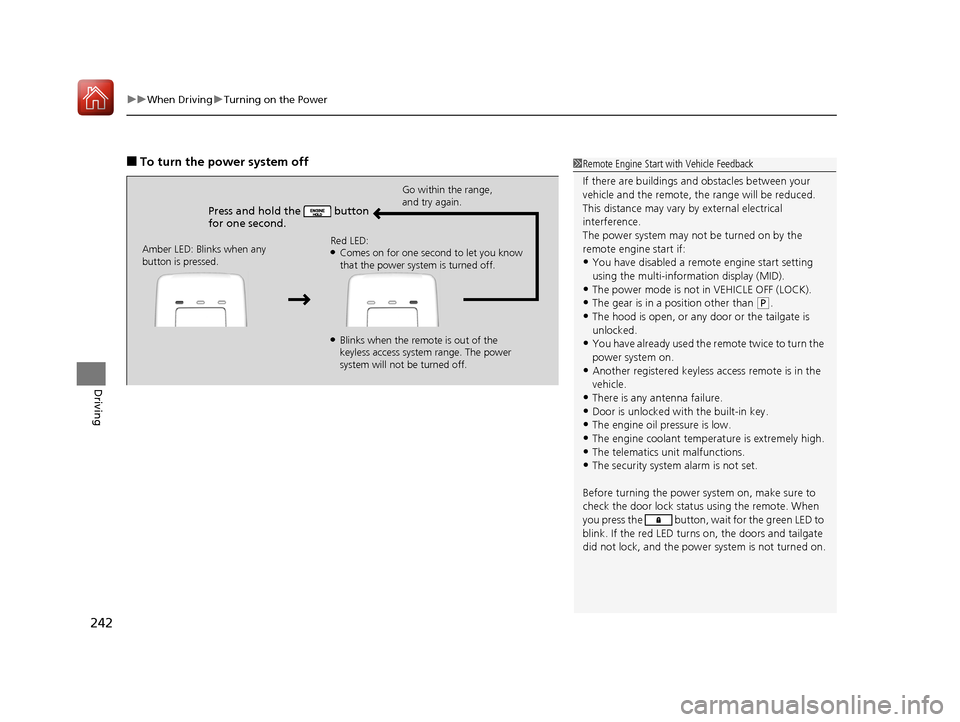
■To turn the power system off
Press and hold the button
for one second.
Go within the range,
and try again.
Amber LED: Blinks when any
button is pressed. Red LED:
●Comes on for one second to let you know
that the power system is turned off.
●Blinks when the remote is out of the
keyless access system range. The power
system will not be turned off.
1
Remote Engine Start with Vehicle Feedback
If there are buildings an d obstacles between your
vehicle and the remote, th e range will be reduced.
This distance may vary by external electrical
interference.
The power system may not be turned on by the
remote engine start if:
•You have disabled a remo te engine start setting
using the multi-information display (MID).
•The power mode is not in VEHICLE OFF (LOCK).
•The gear is in a position other than ( P.
•The hood is open, or any door or the tailgate is
unlocked.
•You have already used the remote twice to turn the
power system on.
•Another registered keyless access remote is in the
vehicle.
•There is any antenna failure.
•Door is unlocked with the built-in key.•The engine oil pressure is low.
•The engine coolant temper ature is extremely high.
•The telematics unit malfunctions.•The security system alarm is not set.
Before turning the power sy stem on, make sure to
check the door lock status using the remote. When
you press the button, wa it for the green LED to
blink. If the red LED turns on, the doors and tailgate
did not lock, and the power system is not turned on.
17 ACURA MDX E-AWD-31TRX6000.book 242 ページ 2017年1月20日 金曜日 午後2時 53分
Page 301 of 453

uuBraking uBrake System
300
Driving
■To release
1. Depress the brake pedal fully.
2. Pull the electric parking brake switch up
gently and securely.
u The electric parking brake indicator goes
off.
Manually releasing the parking brake using
the switch helps your ve hicle start slowly and
smoothly when facing down hill on steep hills.1 Parking Brake
In the following situations, the parking brake
automatically operates.
•When the vehicle stops more than 10 minutes
while ACC with LSF is activated.
•When the driver’s seat belt is unfastened while
your vehicle is stopped au tomatically by ACC with
LSF.
•When the power system is turned off while ACC
with LSF is activated.
•When the vehicle stops with the automatic brake
hold system activated for more than 10 minutes.
•When the driver’s seat belt is unfastened while
your vehicle is stopped and brake hold system is
applied.
•When the power system is turned off while brake
hold system is applied.
•When there is a problem with the Brake Hold
System while Brake Hold is applied.
Electric Parking
Brake Switch
17 ACURA MDX E-AWD-31TRX6000.book 300 ページ 2017年1月20日 金曜日 午後2時 53分
Page 341 of 453

340
uuMaintenance Under the Hood uOpening the Hood
Maintenance
Opening the Hood
1. Park the vehicle on a level surface, and set
the parking brake.
2. Pull the hood release handle under the
driver’s side lower co rner of the dashboard.
u The hood will pop up slightly.
3. Pull up the hood latch lever (located under
the front edge of the hood to the center)
and raise the hood. On ce you have raised
the hood slightly, you can release the lever.
4. Lift the hood up most of the way.
u The hydraulic supports will lift it up the
rest of the way and hold it up.
When closing, lower it to approximately 12
inches (30 cm), then pr ess down firmly with
your hands.1 Opening the Hood
NOTICE
Do not open the hood when the wiper arms are
raised. The hood will strike the wipers, resulting in
damage to the hood and/or the wipers.
Do not press the engine cover forcibly. This may
damage the engine cover and component parts.
When closing the hood, check that the hood is
securely latched.
If the hood latch lever moves stiffly, or if you can
open the hood without lifti ng the lever, the latch
mechanism should be cleaned and lubricated.
Hood Release Handle
Pull
Lever
17 ACURA MDX E-AWD-31TRX6000.book 340 ページ 2017年1月20日 金曜日 午後2時 53分
Page 345 of 453

344
uuMaintenance Under the Hood uAdding Engine Oil
Maintenance
Adding Engine Oil
1. Unscrew and remove the engine oil fill cap.
2. Add oil slowly.
3. Reinstall the engine oil fill cap, and tighten
it securely.
4. Wait for three minutes and recheck the
engine oil dipstick.1Adding Engine Oil
NOTICE
Do not fill the engine oil above the upper mark.
Overfilling the engine oil can result in leaks and
engine damage.
If any oil spills, wipe it away immediately. Spilled oil
may damage the engine compartment components.
Engine Oil Fill Cap
17 ACURA MDX E-AWD-31TRX6000.book 344 ページ 2017年1月20日 金曜日 午後2時 53分
Page 347 of 453

uuMaintenance Under the Hood uChanging the Engine Oil and Oil Filter
346
Maintenance
4. Remove the oil filter and dispose of the
remaining oil.
5. Check that the filter ga sket is not stuck to
the engine contact surface.
u If it is stuck, you must detach it.
6. Wipe away dirt and dust adhering to the
contact surface of the engine block, and
install a new oil filter.
u Apply a light coat of new engine oil to
the filter gasket.
7. Put a new washer on the drain bolt, then
reinstall the drain bolt.
u Tightening torque:
29 lbf∙ft (39 N∙m, 4.0 kgf∙m)
8. Pour the recommended engine oil into the
engine.
u Engine oil change capacity (including
filter):
4.5 US qt (4.3 ℓ)
9. Reinstall the engine oil fill cap securely and
start the engine.
10. Run the engine for a few minutes, and
then check that there is no leak from the
drain bolt or oil filter.
11. Stop the engine, wait for three minutes,
and then check the oil level on the
dipstick.
u If necessary, add more engine oil.1Changing the Engine Oil and Oil Filter
You will need a special wrench to replace the oil
filter. You can buy this wrench from a dealer.
When installing the new oil filter, follow the
instructions supplied with the oil filter.
Reinstall the engine oil fill cap. Start the engine. The
low oil pressure indicator should go off within five
seconds. If it does not, turn off the engine, and check
your work.
Oil Filter
17 ACURA MDX E-AWD-31TRX6000.book 346 ページ 2017年1月20日 金曜日 午後2時 53分
Page 377 of 453

uuCleaning uInterior Care
376
Maintenance
Wipe using a glass cleaner.
The front and second row passenger’s floor
mats hook over floor anchors, which keep
them from sliding forward. To remove a mat
for cleaning, turn the anchor knobs to the
unlock position. When reinstalling the mat
after cleaning, turn the knobs to the lock
position.
Do not put additional floor mats on top of
the anchored mats.
To properly clean leather:
1. Use a vacuum or soft dry cloth first to remove any dirt or dust.
2. Clean the leather with a soft cloth dampen ed with a solution comprised of 90%
water and 10% neutral soap.
3. Wipe away any soap residu e with a clean damp cloth.
4. Wipe away residual water and allow leather to air dry in the shade.
■Cleaning the Window
■Floor Mats
1Cleaning the Window
Wires are mounted to the in side of the rear window.
Wipe along the same direct ion as the wires with a
soft cloth so as not to damage them.
Be careful not to spill flui ds, such as water or glass
cleaner, on or around the co ver of both the front
sensor camera and the rainfall/light sensor.
2 Automatic Operation (automatic lighting
control) P. 169
2 Automatic Intermittent Wipers P. 176
2 Front Sensor Camera P. 257
1Floor Mats
If you use any floor mats that were not originally
provided with your vehicle, make sure they are
designed for your specific ve hicle, fit correctly, and
are securely anchored by the floor anchors.
Position the rear seat floor mat properly. If they are
not properly positioned, th e floor mat can interfere
with the front seat functions.
Lock
Unlock
■Maintaining Genuine Leather1
Maintaining Genuine Leather
It is important to clean or wipe away dirt or dust as
soon as possible. Spills can soak into leather resulting
in stains. Dirt or dust ca n cause abrasions in the
leather. In addition, pl ease note that some dark
colored clothing can rub onto the leather seats
resulting in discol oration or stains.
17 ACURA MDX E-AWD-31TRX6000.book 376 ページ 2017年1月20日 金曜日 午後2時 53分
Page 392 of 453

391
uuIf a Tire Goes Flat uChanging a Flat Tire*
Handling the Unexpected
1. Remove the center cap.
2. Place the flat tire face up under the hoist.
3. Insert the hoist bracke t into the center hole
of the flat tire.
4. Turn the wheel nut wrench with the jack
handle bar (clockwise) until the flat tire rests
against the underbody of the vehicle, and
you hear the hoist click.
5. Securely store the jack, wheel nut wrench,
and jack handle bar back in the tool case.
Store the case in the cargo area.
If you replace a flat tire wi th the spare tire, the low tire pressure/TPMS indicator comes
on while you are driving. After driving for a few miles (kilometers), the indicator will
start blinking for a short time and then stay on. Tire Pressure Monitor Problem
appears on the multi-information display (MID), but this is normal.
If you replace the tire with a specified regular tire, the warning message on the MID
and the low tire pressure/TPMS indicator will go off after a few miles (kilometers).
■Storing the Flat Tire1Storing the Flat Tire
3WARNING
Loose items can fly around the interior in a
crash and can seriously injure the
occupants.
Store the jack and tools securely before
driving.
Center Cap
Wheel Nut Wrench Jack Handle Bar
■TPMS and the Spare Tire1
TPMS and the Spare Tire
The system cannot monitor th e pressure of the spare
tire. Manually check the spare tire pressure to be sure
that it is correct.
Use TPMS specific wheels. Each is equipped with a
tire pressure sensor mounted inside the tire behind
the valve stem.
17 ACURA MDX E-AWD-31TRX6000.book 391 ページ 2017年1月20日 金曜日 午後2時 53分
Page 408 of 453
407Continued
Handling the Unexpected
Jump Starting
Turn off the power to electric devices, such as audio and lights. Turn off the power
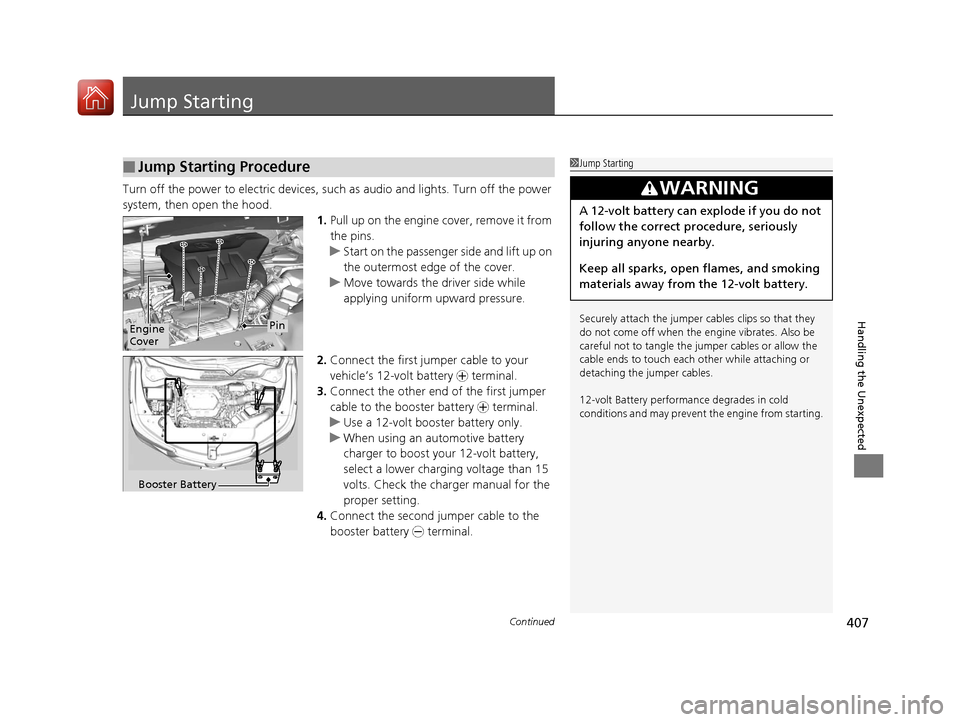
system, then open the hood. 1.Pull up on the engine cover, remove it from
the pins.
u Start on the passenger side and lift up on
the outermost edge of the cover.
u Move towards the driver side while
applying uniform upward pressure.
2. Connect the first jumper cable to your
vehicle’s 12-volt battery + terminal.
3. Connect the other end of the first jumper
cable to the booster battery + terminal.
u Use a 12-volt booster battery only.
u When using an automotive battery
charger to boost your 12-volt battery,
select a lower charging voltage than 15
volts. Check the ch arger manual for the
proper setting.
4. Connect the second jumper cable to the
booster battery - terminal.
■Jump Starting Procedure1Jump Starting
Securely attach the jumper cables clips so that they
do not come off when the e ngine vibrates. Also be
careful not to tangle the ju mper cables or allow the
cable ends to touch each other while attaching or
detaching the jumper cables.
12-volt Battery performa nce degrades in cold
conditions and may prevent the engine from starting.
3WARNING
A 12-volt battery can explode if you do not
follow the correct procedure, seriously
injuring anyone nearby.
Keep all sparks, open flames, and smoking
materials away from the 12-volt battery.
Engine
CoverPin
Booster Battery
17 ACURA MDX E-AWD-31TRX6000.book 407 ページ 2017年1月20日 金曜日 午後2時 53分