park assist Acura MDX Hybrid 2017 Owner's Manual
[x] Cancel search | Manufacturer: ACURA, Model Year: 2017, Model line: MDX Hybrid, Model: Acura MDX Hybrid 2017Pages: 453, PDF Size: 23.77 MB
Page 5 of 453
4
Quick Reference Guide
Quick Reference Guide
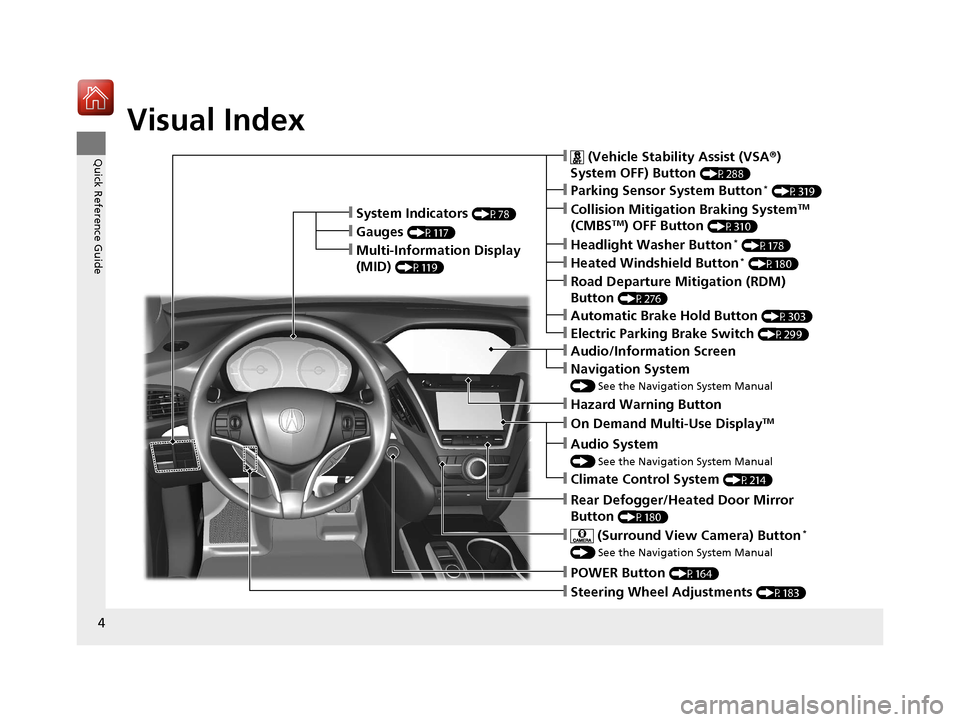
Visual Index
❙Steering Wheel Adjustments (P183)
❙POWER Button (P164)
❙Navigation System
() See the Navigation System Manual
❙Audio/Information Screen
❙Hazard Warning Button
❙On Demand Multi-Use DisplayTM
❙Audio System
() See the Navigation System Manual
❙System Indicators (P78)
❙Gauges (P117)
❙Multi-Information Display
(MID)
(P119)
❙Climate Control System (P214)
❙Rear Defogger/Heated Door Mirror
Button
(P180)
❙ (Surround View Camera) Button*
() See the Navigation System Manual
❙ (Vehicle Stability Assist (VSA ®)
System OFF) Button
(P288)
❙Parking Sensor System Button* (P319)
❙Collision Mitigation Braking SystemTM
(CMBSTM) OFF Button (P310)
❙Headlight Washer Button* (P178)
❙Heated Windshield Button* (P180)
❙Electric Parking Brake Switch (P299)
❙Road Departure Mitigation (RDM)
Button
(P276)
❙Automatic Brake Hold Button (P303)
17 ACURA MDX E-AWD-31TRX6000.book 4 ページ 2017年1月20日 金曜日 午後2時53分
Page 17 of 453
16
Quick Reference Guide
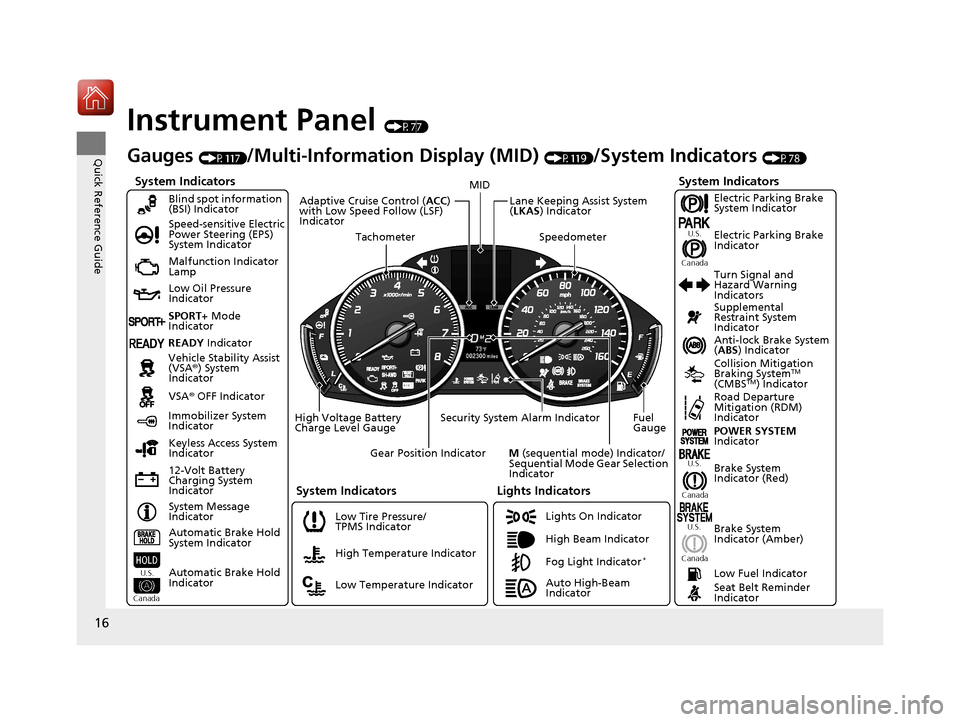
Instrument Panel (P77)
System Indicators
Malfunction Indicator
Lamp
Low Oil Pressure
Indicator
12-Volt Battery
Charging System
IndicatorAnti-lock Brake System
(
ABS ) Indicator
Vehicle Stability Assist
(VSA ®) System
Indicator
VSA ® OFF Indicator
Speed-sensitive Electric
Power Steering (EPS)
System Indicator
Lights Indicators
Lights On Indicator
High Beam Indicator
Immobilizer System
Indicator
Seat Belt Reminder
Indicator
System Indicators
System Message
IndicatorBrake System
Indicator (Red) Supplemental
Restraint System
Indicator
Low Fuel Indicator
Gauges (P117)/Multi-Information Display (MID) (P119)/System Indicators (P78)
Low Tire Pressure/
TPMS Indicator Turn Signal and
Hazard Warning
Indicators
Keyless Access System
Indicator
High Voltage Battery
Charge Level Gauge Security System Alarm Indicator Fuel
Gauge
Tachometer
MID
Speedometer
Gear Position Indicator
M (sequential mode) Indicator/
Sequential Mode Gear Selection
Indicator
Brake System
Indicator (Amber)
Blind spot information
(BSI) Indicator
System Indicators
Collision Mitigation
Braking SystemTM
(CMBSTM) IndicatorRoad Departure
Mitigation (RDM)
Indicator
Lane Keeping Assist System
( LKAS ) Indicator
Adaptive Cruise Control (
ACC)
with Low Speed Follow (LSF)
Indicator
U.S.
Canada U.S.
Canada
Fog Light Indicator*
Automatic Brake Hold
System Indicator
Automatic Brake Hold
Indicator
U.S.
Canada
Electric Parking Brake
System Indicator
Electric Parking Brake
Indicator
U.S.
Canada
Auto High-Beam
Indicator POWER SYSTEM
Indicator
High Temperature Indicator
Low Temperature Indicator
SPORT+
Mode
Indicator
READY Indicator
17 ACURA MDX E-AWD-31TRX6000.book 16 ページ 2017年1月20日 金曜日 午後2時5 3分
Page 80 of 453

79
uuIndicators u
Continued
Instrument Panel
IndicatorNameOn/BlinkingExplanationMessage
Brake System
Indicator (Amber)
●Comes on for a few seconds
when you set the power mode to
ON, then goes off.
●Comes on if there is a problem
with a system related to braking
other than the conventional
brake system.
●Comes on if there is a problem
with the electric parking brake
system.
●Comes on if there is a problem
with the cooperat ive control with
regenerative braking, the electric
servo brake system, or the hill
start assist system.
●Comes on while driving - Have your vehicle
checked by a dealer.
●Stays on constantly - Avoid high speeds and
sudden braking. Take the vehicle to a dealer
immediately.
●With this indicator on, your vehicle still has
normal braking ability.
●Comes on if there is a problem
with the automatic brake hold
system.
2 Automatic Brake Hold P. 303
U.S.
Canada
(Amber)
U.S.
Canada
U.S.
Canada
17 ACURA MDX E-AWD-31TRX6000.book 79 ページ 2017年1月20日 金曜日 午後2時5 3分
Page 174 of 453
Continued173
uuOperating the Switches Around the Steering Wheel uAuto High-Beam
Controls
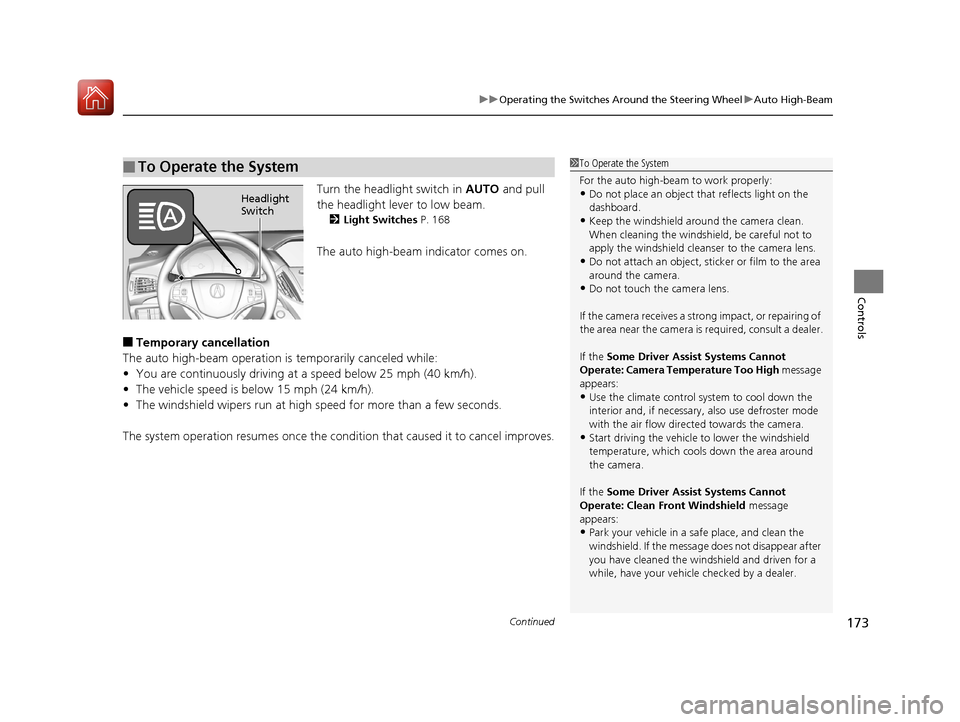
Turn the headlight switch in AUTO and pull
the headlight lever to low beam.
2 Light Switches P. 168
The auto high-beam indicator comes on.
■Temporary cancellation
The auto high-beam operation is temporarily canceled while:
• You are continuously driving at a speed below 25 mph (40 km/h).
• The vehicle speed is below 15 mph (24 km/h).
• The windshield wipers run at high speed for more than a few seconds.
The system operation resumes once the condit ion that caused it to cancel improves.
■To Operate the System1To Operate the System
For the auto high-beam to work properly:
•Do not place an object that reflects light on the
dashboard.
•Keep the windshield around the camera clean.
When cleaning the windshield, be careful not to
apply the windshield cleanser to the camera lens.
•Do not attach an object, sticker or film to the area
around the camera.
•Do not touch the camera lens.
If the camera receives a st rong impact, or repairing of
the area near the camera is required, consult a dealer.
If the Some Driver Assist Systems Cannot
Operate: Camera Temperature Too High message
appears:
•Use the climate control system to cool down the
interior and, if necessary, also use defroster mode
with the air flow directed towards the camera.
•Start driving the vehicle to lower the windshield
temperature, which cool s down the area around
the camera.
If the Some Driver Assist Systems Cannot
Operate: Clean Front Windshield message
appears:
•Park your vehicle in a sa fe place, and clean the
windshield. If the message does not disappear after
you have cleaned the winds hield and driven for a
while, have your vehicle checked by a dealer.
Headlight
Switch
17 ACURA MDX E-AWD-31TRX6000.book 173 ページ 2017年1月20日 金曜日 午後2時 53分
Page 230 of 453

229
Driving
This chapter discusses driving and refueling.
Before Driving................................... 230
Towing a Trailer ................................ 236
Off-Highway Driving Guidelines ..... 237
When Driving Turning on the Power ...................... 239
Dual Clutch Transmission ................. 246
Shifting ............................................ 247
Acoustic Vehicle Al erting System ...... 255
Integrated Dynamics System............. 256
Front Sensor Camera ....................... 257
Adaptive Cruise Control (ACC) with Low
Speed Follow (LSF) ............................. 259
Road Departure Mitigation (RDM) System ... 274Lane Keeping Assist System (LKAS)... 279
Vehicle Stability Assist (VSA ®), aka Electronic
Stability Control (ESC), System ............. 287
Agile Handling Assist ....................... 289
SPORT HYBRID Super Handling-All Wheel
Drive
TM (SPORT HYBRID SH-AWD ®) .. 290
Blind spot information (BSI) System .. 291
Tire Pressure Monitoring System (TPMS) with Tire Fill Assist .......................... 294
Tire Pressure Monitoring System (TPMS) - Required Federal Explanation ........... 296
High Voltage Battery ........................ 298
Braking Brake System ................................... 299
Anti-lock Brake System (ABS) ........... 305 Brake Assist System ......................... 306
Collision Mitigation Braking System
TM
(CMBSTM) ....................................... 307
Parking Your Vehicle When Stopped ................................ 316
Parking Sensor System
*................... 318
Cross Traffic Monitor ....................... 322
Multi-View Rear Camera .................. 326
Refueling Fuel Information .............................. 327
How to Refuel ................................. 328
Fuel Economy and CO
2 Emissions .... 330
* Not available on all models
17 ACURA MDX E-AWD-31TRX6000.book 229 ページ 2017年1月20日 金曜日 午後2時 53分
Page 245 of 453

uuWhen Driving uTurning on the Power
244
Driving
1. Depress the brake pedal and press the POWER button simultaneously.
2. Keeping your right foot on the br ake pedal, press the button. Select
(R
when reversing.
3. With the parking brake applied, release the brake pedal and gently depress the
accelerator pedal.
u Make sure the electric parking brake indicator goes off.
2 Parking Brake P. 299
2 If the Transmission System Indicator Blinks along with the Warning Message
P. 416
■Hill start assist system
Hill start assist keeps the brake engaged br iefly to help prevent the vehicle from
rolling on inclines as you move your fo ot from the brake pedal to the accelerator.
Change the gear position to
(D or (S when facing uphill, or (R when facing
downhill, then release the brake pedal.
■Starting to Drive1 Starting to Drive
The power system is turned off when the gear
position is ch anged from
(P before the POWER
button is pressed. Follow th e step 1 when starting to
drive.
You can also release the parking brake by pulling the
electric parking brake sw itch while depressing the
brake pedal.
When facing downhill, you can start your vehicle
more smoothly by manually releasing it with the
electric parking brake switch than by releasing it with
the accelerator pedal.
When the power system was started using the two-way
keyless access remoteWhen the power system was started using the two-way keyless access remote
When the power system was started in any case
D/S
1 Hill start assist system
Hill start assist may not prevent the vehicle from
rolling downhill on a very steep or slippe ry slope, and
will not operate on small inclines.
Hill start assist is not a replacement for the parking
brake.
17 ACURA MDX E-AWD-31TRX6000.book 244 ページ 2017年1月20日 金曜日 午後2時 53分
Page 259 of 453

uuWhen Driving uFront Sensor Camera
258
Driving
1Front Sensor Camera
If the Some Driver Assist Systems Cannot
Operate: Camera Temperature Too High message
appears:
•Use the climate control system to cool down the
interior and, if necessary, also use defroster mode
with the airflow directed towards the camera.
•Start driving the vehicle to lower the windshield
temperature, which cool s down the area around
the camera.
If the Some Driver Assist Systems Cannot
Operate: Clean Front Windshield message
appears:
•Park your vehicle in a sa fe place, and clean the
windshield. If the message does not disappear after
you have cleaned the winds hield and driven for a
while, have your vehicle checked by a dealer.
17 ACURA MDX E-AWD-31TRX6000.book 258 ページ 2017年1月20日 金曜日 午後2時 53分
Page 261 of 453

uuWhen Driving uAdaptive Cruise Control (ACC) with Low Speed Follow (LSF)
260
Driving
■How to activate the system1Adaptive Cruise Control (ACC) with Low Speed Follow (LSF)
When the MAIN button is pressed, ACC with LSF and
Lane Keeping Assist System (LKAS) are both turned
on or off.
ACC with LSF may not work properly under certain
conditions. 2 ACC with LSF Conditions and Limitations
P. 265
When not using ACC with LSF: Turn off adaptive
cruise by pressing the MAIN button. This also will
turn off the Lane Keeping Assist System (LKAS).
Do not use ACC with LSF under the following
conditions:
•On roads with heavy traf fic or while driving in
continuous stop and go traffic.
•On roads with sharp turns.
•On roads with steep downhill sections, as the set
vehicle speed can be exceeded by coasting. In such
cases, ACC with LSF will not apply the brakes to
maintain the set speed.
•On roads with toll collection facilities or other
objects between lanes of traffic, or in parking
areas, or faci lities with driv e through access.
■Press the MAIN button on
the steering wheel. ACC
(green) is on in the
instrument panel.
ACC with LSF is ready to
use.
17 ACURA MDX E-AWD-31TRX6000.book 260 ページ 2017年1月20日 金曜日 午後2時 53分
Page 393 of 453

392
uuIf a Tire Goes Flat uTemporarily Repairing a Flat Tire*
Handling the Unexpected
Temporarily Repairing a Flat Tire*
If the tire has a large cut or is otherwise se verely damaged, you will need to have the
vehicle towed. If the tire only has a smal l puncture, from a nail for instance, you can
use the temporary tire repair kit so that you can drive to the nearest service station
for a more permanent repair.
If a tire goes flat while driving, grasp the steering wheel firmly, and brake gradually
to reduce speed. Then stop in a safe place.
1. Park the vehicle on a firm, level, and n on-slippery surface, and apply the parking
brake.
2. Change the gear position to
(P.
3. Turn on the hazard warning lights an d set the power mode to VEHICLE OFF.
1Temporarily Repairing a Flat Tire*
The kit should not be used in the following situations
(Instead, contact a dealer or roadside assistance to
have the vehicle towed):
•The tire sealant has expired.
•More than one tire is punctured.•The puncture or cut is larger than 3/16 inch (4mm).
•The tire side wall is da maged or the puncture is
outside the contact area.
•Damage has been caused by driving with the tire
extremely under inflated.
•The tire bead is no longer seated.
•The rim is damaged.
Do not remove a nail or screw that punctured the
tire. If you remove it from the tire, you may not be
able to repair the puncture using the kit.
NOTICE
Do not use a puncture-repairing agent other than the
one provided in the kit that came with your vehicle. If
a different agent is used, you may permanently
damage the tire pressure sensor.
When the puncture is:Use Kit
Smaller than 3/16 inch (4 mm)Yes
Larger than 3/16 inch (4 mm)No
Contact
Area
* Not available on all models
17 ACURA MDX E-AWD-31TRX6000.book 392 ページ 2017年1月20日 金曜日 午後2時 53分
Page 405 of 453
404
Handling the Unexpected
Power System Won’t Start
Checking the Procedure
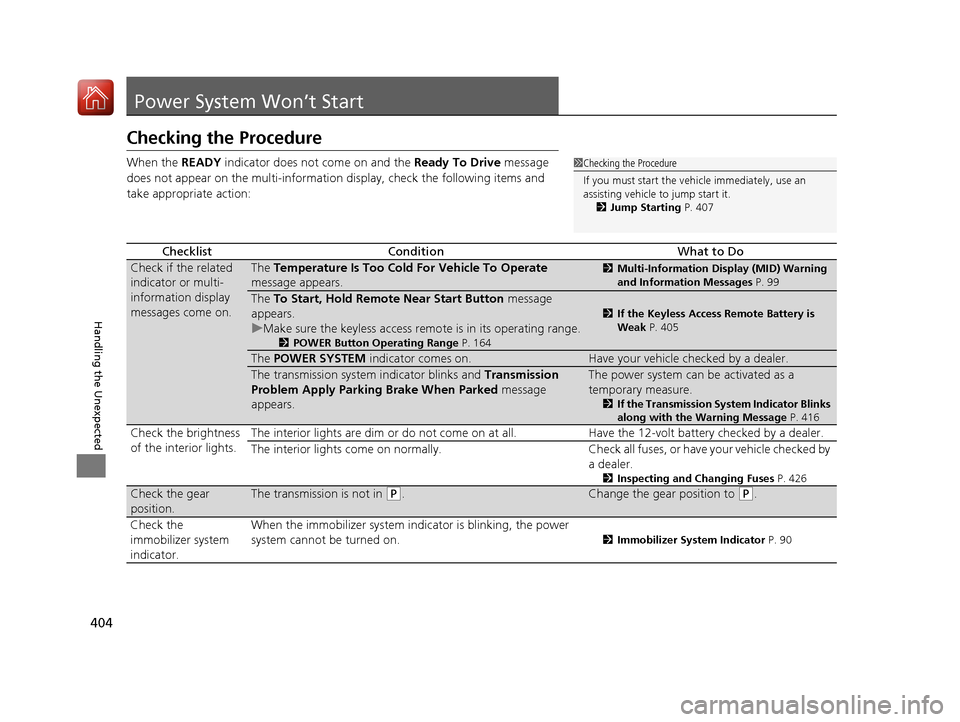
When the READY indicator does not come on and the Ready To Drive message
does not appear on the multi-informati on display, check the following items and
take appropriate action:
ChecklistConditionWhat to Do
Check if the related
indicator or multi-
information display
messages come on.The Temperature Is Too Cold For Vehicle To Operate
message appears.2 Multi-Information Display (MID) Warning
and Information Messages P. 99
The To Start, Hold Remote Near Start Button message
appears.
u Make sure the keyless access remo te is in its operating range.
2POWER Button Operating Range P. 164
2If the Keyless Access Remote Battery is
Weak P. 405
The POWER SYSTEM indicator comes on.Have your vehicle checked by a dealer.
The transmission system indicator blinks and Transmission
Problem Apply Parking Brake When Parked message
appears.The power system can be activated as a
temporary measure.
2 If the Transmission System Indicator Blinks
along with the Warning Message P. 416
Check the brightness
of the interior lights.The interior lights are dim or do not come on at
all. Have the 12-volt battery checked by a dealer.
The interior lights come on normally. Check all fuses, or have your vehicle checked by a dealer.
2Inspecting and Changing Fuses P. 426
Check the gear
position.The transmission is not in (P.Change the gear position to (P.
Check the
immobilizer system
indicator. When the immobilizer system in
dicator is blinking, the power
system cannot be turned on.
2 Immobilizer System Indicator P. 90
1Checking the Procedure
If you must start the vehi cle immediately, use an
assisting vehicle to jump start it.
2 Jump Starting P. 407
17 ACURA MDX E-AWD-31TRX6000.book 404 ページ 2017年1月20日 金曜日 午後2時 53分