interior Acura MDX HYBRID 2019 User Guide
[x] Cancel search | Manufacturer: ACURA, Model Year: 2019, Model line: MDX HYBRID, Model: Acura MDX HYBRID 2019Pages: 685, PDF Size: 36.92 MB
Page 182 of 685
Continued181
uuOperating the Switches Around the Steering Wheel uAuto High-Beam
Controls
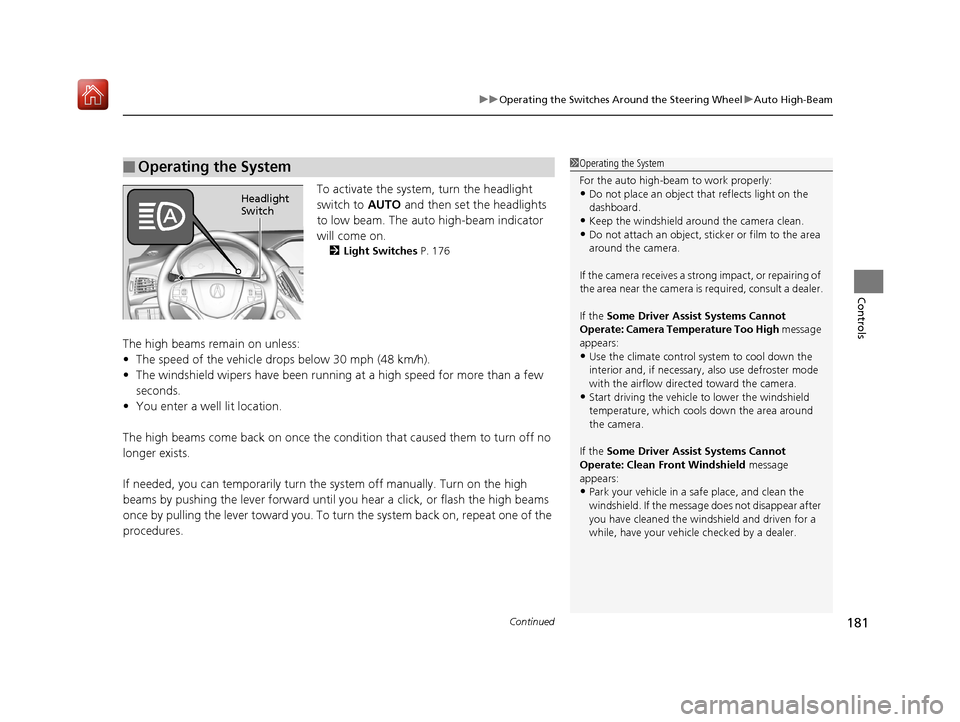
To activate the system , turn the headlight
switch to AUTO and then set the headlights
to low beam. The auto high-beam indicator
will come on.
2 Light Switches P. 176
The high beams remain on unless:
•The speed of the vehicle drops below 30 mph (48 km/h).
• The windshield wipers have been runnin g at a high speed for more than a few
seconds.
• You enter a well lit location.
The high beams come back on once the condi tion that caused them to turn off no
longer exists.
If needed, you can temporarily turn the system off manually. Turn on the high
beams by pushing the lever forward until you hear a click, or flash the high beams
once by pulling the lever toward you. To turn the system back on, repeat one of the
procedures.
■Operating the System1 Operating the System
For the auto high-beam to work properly:
•Do not place an object that reflects light on the
dashboard.
•Keep the windshield around the camera clean.•Do not attach an object, sticker or film to the area
around the camera.
If the camera receives a st rong impact, or repairing of
the area near the camera is required, consult a dealer.
If the Some Driver Assist Systems Cannot
Operate: Camera Temperature Too High message
appears:
•Use the climate control system to cool down the
interior and, if necessary, also use defroster mode
with the airflow directed toward the camera.
•Start driving the vehicle to lower the windshield
temperature, which cool s down the area around
the camera.
If the Some Driver Assist Systems Cannot
Operate: Clean Front Windshield message
appears:
•Park your vehicle in a sa fe place, and clean the
windshield. If the message does not disappear after
you have cleaned the windshield and driven for a
while, have your vehicle checked by a dealer.
Headlight
Switch
19 ACURA MDX E-AWD-31TRX6200.book 181 ページ 2018年6月22日 金曜日 午後7時42分
Page 193 of 685

192
Controls
Adjusting the Mirrors
Interior Rearview Mirror
Adjust the angle of the rearview mirror when you are sitting in the correct driving
position.
When you are driving after dark, the
automatic dimming rearview mirror and
power door mirrors
* reduce the glare from
headlights behind you, based on inputs from
the mirror sensor. This feature is always active.
■Automatic Dimming Rearview Mirror and Power Door
Mirrors
*
1 Adjusting the Mirrors
Keep the inside and out side mirrors clean and
adjusted for best visibility.
Adjust the mirrors before you start driving. 2 Front Seats P. 195
1Automatic Dimming Rearview Mirror and Power Door Mirrors*
The auto dimming function cancels when the
transmission is in
(R.
* Not available on all models
19 ACURA MDX E-AWD-31TRX6200.book 192 ページ 2018年6月22日 金曜日 午後7時42分
Page 207 of 685

206
uuAdjusting the Seats uMaintain a Proper Sitting Position
Controls
Maintain a Proper Sitting Position
After all occupants have adjusted their seats and head restraints, and put on their
seat belts, it is very important that they continue to sit upright, well back in their
seats, with their feet on the floor until the vehicle is safely parked and the power
system is off.
Sitting improperly can increase the chance of injury during a crash. For example, if
an occupant slouches, lies down, turns si deways, sits forward, leans forward or
sideways, or puts one or both feet up, the chance of injury during a crash is greatly
increased.
In addition, an occupant who is out of position in the front seat can be seriously or
fatally injured in a crash by striking interior parts of the vehicle or being struck by an
inflating front airbag.1 Maintain a Proper Sitting Position
3WARNING
Sitting improperly or out of position can
result in serious injury or death in a crash.
Always sit upright, well back in the seat,
with your feet on the floor.
19 ACURA MDX E-AWD-31TRX6200.book 206 ページ 2018年6月22日 金曜日 午後7時42分
Page 211 of 685

210
Controls
Interior Lights/Interior Convenience Items
Interior Lights
■ON
The interior lights come on regardless of
whether the tailgate and doors are open or
closed.
■Door activated
The interior lights come on in the following
situations:
• When the tailgate or any of the doors are
opened.
• You unlock the driver’s door.
• When the power mode is set to VEHICLE
OFF (LOCK).
■OFF
The interior lights remain off regardless of
whether the tailgate or any doors are open or
closed.
■Interior Light Switches1 Interior Light Switches
In the door activated position, the interior lights fade
out and go off about 30 se conds after the doors are
closed.
The lights go off after about 30 seconds in the
following situations:
•When you unlock the driver’s door but do not open
it.
•When you set the power mode to VEHICLE OFF
(LOCK) but do not open a door.
You can change the interi or lights dimming time.
2 Customized Features P. 131, 362
The interior lights go off i mmediately in the following
situations:
•When you lock the driver’s door.
•When you close the driver’s door in ACCESSORY
mode.
•When you set the power mode to ON.
To avoid draining the 12-vo lt battery, do not leave
the interior light on for an extended length of time
when the power system is off.
If you leave any of the tailgate or doors open in
VEHICLE OFF (LOCK) mode, th e interior lights go off
after about 15 minutes.
Door Activated Position
Off
On
19 ACURA MDX E-AWD-31TRX6200.book 210 ページ 2018年6月22日 金曜日 午後7時42分
Page 212 of 685

211
uuInterior Lights/Interior Convenience Items uInterior Lights
Controls
■Front
The map lights can be turned on and off by
pressing the (map light) button.
■Second and third row
The map lights can be turned on and off by
pressing the (map light) button when the
front interior light sw itch is in the door
activated position.
■ON
The light comes on when you open the
tailgate, and goes off when closed.
■OFF
The light stays off with or without opening the
tailgate.
■Map Lights1 Map Lights
When the interior light swit ch is in the door activated
position and any door is open, the map light will not
go off when you press the button.
Front
Second and third row
■Cargo Area Lights
Off On
19 ACURA MDX E-AWD-31TRX6200.book 211 ページ 2018年6月22日 金曜日 午後7時42分
Page 213 of 685

212
uuInterior Lights/Interior Convenience Items uInterior Convenience Items
Controls
Interior Convenience Items
Press the button to open the glove box. You
can lock the glove box with the built-in key.
■Removable shelf
The shelf in the glove box is detachable. To
remove it, disengage the tabs.
The removed shelf can be stored upside down
in the glove box.
■Glove Box1 Glove Box
3WARNING
An open glove box can cause serious injury
to your passenger in a crash, even if the
passenger is wearing the seat belt.
Always keep the glove box closed while
driving.
Glove Box
To Lock
Shelf
Tabs
19 ACURA MDX E-AWD-31TRX6200.book 212 ページ 2018年6月22日 金曜日 午後7時42分
Page 214 of 685

213
uuInterior Lights/Interior Convenience Items uInterior Convenience Items
Continued
Controls
Pull the passenger’s side handle to open the
console compartment.
Pull the driver’s side handle to open the utility
tray in the console lid.
■Console Tray
Slide or lift the tray when you use the console
compartment. u To lift this tray, sl ide it rearward, then
pull it up.
■Front and Rear* Console Compartment
* Not available on all models
19 ACURA MDX E-AWD-31TRX6200.book 213 ページ 2018年6月22日 金曜日 午後7時42分
Page 215 of 685
214
uuInterior Lights/Interior Convenience Items uInterior Convenience Items
Controls
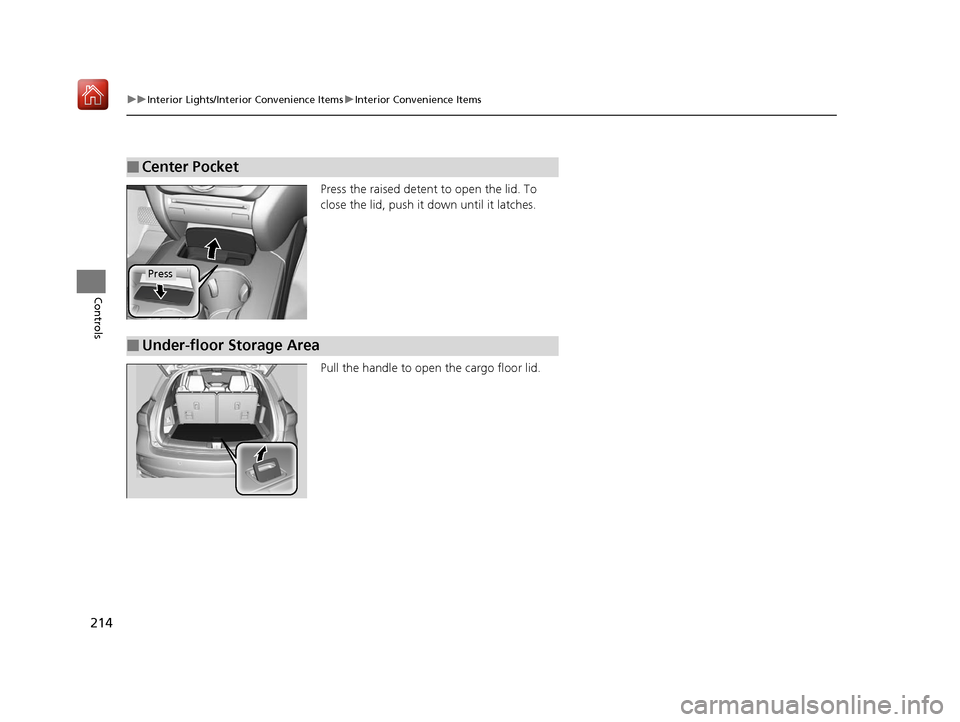
Press the raised detent to open the lid. To
close the lid, push it down until it latches.
Pull the handle to open the cargo floor lid.
■Center Pocket
Press
■Under-floor Storage Area
19 ACURA MDX E-AWD-31TRX6200.book 214 ページ 2018年6月22日 金曜日 午後7時42分
Page 216 of 685

Continued215
uuInterior Lights/Interior Convenience Items uInterior Convenience Items
Controls
■Front seat beverage holders
Are located in the console between the front
seats.
■Door side beverage holders
Are located on the both of the front and rear
door side pockets.
■Beverage Holders1 Beverage Holders
NOTICE
Spilled liquids ca n damage the upholstery, carpeting,
and electrical components in the interior.
Be careful when you are us ing the beverage holders.
Hot liquid can scald you.
Front
Rear
19 ACURA MDX E-AWD-31TRX6200.book 215 ページ 2018年6月22日 金曜日 午後7時42分
Page 217 of 685

216
uuInterior Lights/Interior Convenience Items uInterior Convenience Items
Controls
■Second row seat beverage holders
Fold the armrest down to use the rear seat
beverage holders.
Are located in the console between the
second row seats.
■Third row seat beverage holders
Models with bench seat
Models with captain seat
19 ACURA MDX E-AWD-31TRX6200.book 216 ページ 2018年6月22日 金曜日 午後7時42分