interior Acura MDX HYBRID 2019 Owner's Guide
[x] Cancel search | Manufacturer: ACURA, Model Year: 2019, Model line: MDX HYBRID, Model: Acura MDX HYBRID 2019Pages: 685, PDF Size: 36.92 MB
Page 378 of 685
377
uuCustomized Features u
Continued
Features
*1:Default SettingSetup
Group Customizable Features
Description Selectable Settings
Vehicle
Settings LightingInterior Light Dimming
Time
Changes the length
of time the interior lights stay
on after you close the doors. 60seconds/
30seconds
*1/
15seconds
Headlight Auto Off
Timer Changes the length of time the exterior lights
stay on after you close the driver’s door. 60seconds/
30seconds/
15seconds
*1/
0seconds
Auto Light Sensitivity
*Changes the timing for the headlights to come
on. Max
/High /Mid*1/
Low /Min
* Not available on all models
19 ACURA MDX E-AWD-31TRX6200.book 377 ページ 2018年6月22日 金曜日 午後7時42分
Page 450 of 685

Continued449
uuBefore Driving uDriving Preparation
Driving
• Store or secure all items on board properly.
u Carrying too much cargo, or improperly storing it, can affect your vehicle’s
handling, stability, sto pping distance, and tires, and make it unsafe.
2Maximum Load Limit P. 451
•Do not pile items higher than the seat height.
u They can block your view and may be thrown forward in the event of sudden
braking.
• Do not place anything in the front seat footwells. Make sure to secure the floor
mat.
u An object or unsecured floor mat can in terfere with your brake and accelerator
pedal operation while driving.
• If you have any animals on board, do not let them move around in the vehicle.
u They may interfere with driving and a crash could occur.
• Securely close and lock al l doors and the tailgate.
2Locking/Unlocking the Doors from the Inside P. 154
•Adjust your seating position properly.
u Adjust the head restraint, too.
2Adjusting the Seats P. 195
2 Adjusting the Front and Second Row Outer Head Restraint Positions P. 202
•Adjust the mirrors and steering wheel properly.
u Adjust them while sitting in the proper driving position.
2 Adjusting the Steering Wheel P. 191
2 Adjusting the Mirrors P. 192
■Interior Checks1Interior Checks
The headlight aim is set by the factory, and does not
need to be adjusted. Howeve r, if you regularly carry
heavy items in the cargo area, have the aiming
readjusted at a dealer or by a qualified technician.
Your vehicle is equipped with the automatic
headlight adjusting system that automatically adjusts
the vertical angle of the low beam headlights.
Canadian models
19 ACURA MDX E-AWD-31TRX6200.book 449 ページ 2018年6月22日 金曜日 午後7時42分
Page 476 of 685

475
uuWhen Driving uFront Sensor Camera
Continued
Driving
Front Sensor Camera
The camera, used in systems such as LKAS, RDM, ACC with LSF, CMBSTM, and auto
high-beam, is designed to detect an object that triggers any of the systems to
operate its functions.
This camera is located behind the rearview
mirror.
To help reduce the likelihood that high interior
temperatures will cause the camera’s sensing
system to shut off, when parking, find a shady
area or face the front of the vehicle away from
the sun. If you use a reflective sun shade, do
not allow it to cover the camera housing.
Covering the camera can concentrate heat on
it.
■Camera Location and Handling Tips
1Front Sensor Camera
Never apply a film or attach any objects to the
windshield, hood, or front grille that could obstruct
the camera’s field of vision and cause the system to
operate abnormally.
Scratches, nicks, and othe r damage to the windshield
within the camera’s fiel d of vision can cause the
system to operate abnormall y. If this occurs, we
recommend that you replac e the windshield with a
genuine Acura replacement windshield. Making even
minor repairs within the ca mera’s field of vision or
installing an aftermarke t replacement windshield
may also cause the system to operate abnormally.
After replacing the winds hield, have a dealer
recalibrate the camera. Pr oper calibration of the
camera is necessary for the system to operate
properly.
Do not place an object on the top of the instrument
panel. It may reflect onto the windshield and prevent
the system from detecting lane lines properly.
Front Sensor
Camera
19 ACURA MDX E-AWD-31TRX6200.book 475 ページ 2018年6月22日 金曜日 午後7時42分
Page 477 of 685

uuWhen Driving uFront Sensor Camera
476
Driving
1Front Sensor Camera
If the Some Driver Assist Systems Cannot
Operate: Camera Temperature Too High message
appears:
•Use the climate control system to cool down the
interior and, if necessary, also use defroster mode
with the airflow directed towards the camera.
•Start driving the vehicle to lower the windshield
temperature, which cool s down the area around
the camera.
If the Some Driver Assist Systems Cannot
Operate: Clean Front Windshield message
appears:
•Park your vehicle in a sa fe place, and clean the
windshield. If the message does not disappear after
you have cleaned the windshield and driven for a
while, have your vehicle checked by a dealer.
19 ACURA MDX E-AWD-31TRX6200.book 476 ページ 2018年6月22日 金曜日 午後7時42分
Page 562 of 685
561
Maintenance
This chapter discusses basic maintenance.
Before Performing MaintenanceInspection and Maintenance ............ 562
Safety When Performing Maintenance ..563
Parts and Fluids Used in Maintenance Service...564Maintenance MinderTM..................... 565
Maintenance Under the Hood
Maintenance Items Under the Hood .. 569
Opening the Hood ........................... 570
Engine Compartment Cover ............. 571
Recommended Engine Oil ................ 572
Oil Check ......................................... 573
Adding Engine Oil ............................ 574
Changing the Engine Oil and Oil Filter ...575 Cooling System ................................ 577
Inverter Coolant ............................... 579
Transmission Fluid ............................ 580
Brake Fluid ....................................... 581
Refilling Window Wa
sher Fluid......... 581
Replacing Light Bulbs ....................... 582
Checking and Maintaining Wiper Blades... 587Checking and Maintaining Tires
Checking Tires ................................. 591
Tire and Loading Information Label .. 592
Tire Labeling .................................... 592
DOT Tire Quality Grading (U.S. Vehicles).. 594Wear Indicators................................ 596 Tire Service Life ................................ 596
Tire and Wheel Replacement ........... 597
Tire Rotation .................................... 598
Winter Tires ..................................... 599
12-Volt Battery ................................. 600
Remote Transmitter Care ................. 601
Remote Control and Wireless Headphone Care
*........................... 602Climate Control System Maintenance.. 604Cleaning Interior Care .................................... 605
Exterior Care.................................... 607
Accessories and Modifications ........ 611
* Not available on all models
19 ACURA MDX E-AWD-31TRX6200.book 561 ページ 2018年6月22日 金曜日 午後7時42分
Page 606 of 685
605Continued
Maintenance
Cleaning
Interior Care
Use a damp cloth with a mixture of mild detergent and warm water to remove dirt.
Use a clean cloth to remove detergent residue.
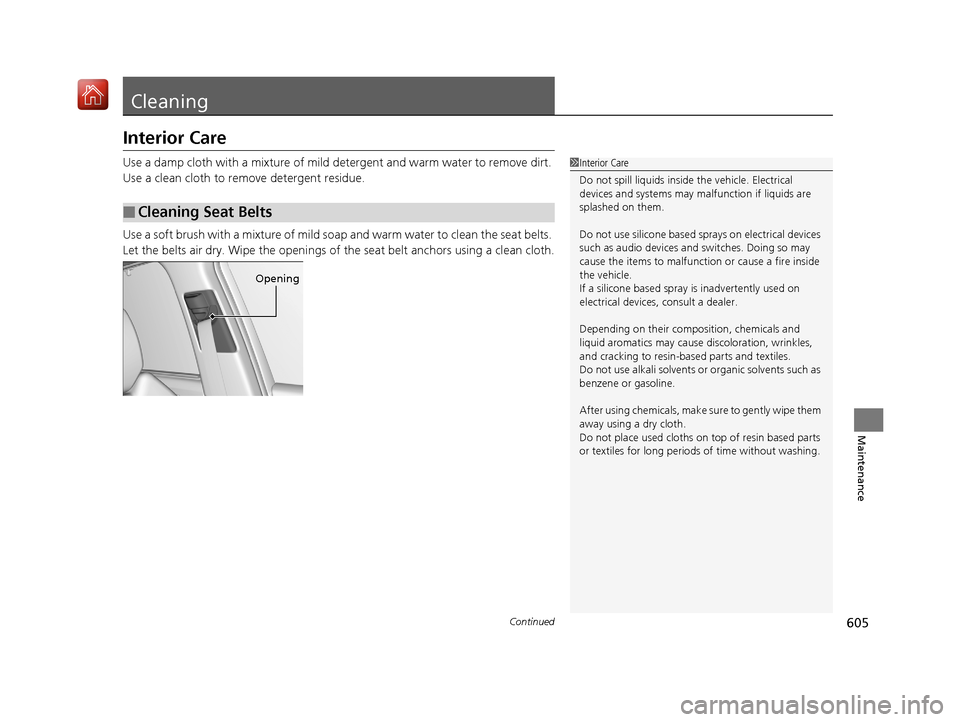
Use a soft brush with a mixture of mild soap and warm water to clean the seat belts.
Let the belts air dry. Wipe the openings of the seat belt anchors using a clean cloth.
■Cleaning Seat Belts
1Interior Care
Do not spill liquids inside the vehicle. Electrical
devices and systems may ma lfunction if liquids are
splashed on them.
Do not use silicone based sprays on electrical devices
such as audio devices and switches. Doing so may
cause the items to malfunction or cause a fire inside
the vehicle.
If a silicone based spray is inadvertently used on
electrical devices, consult a dealer.
Depending on their compos ition, chemicals and
liquid aromatics may cause discoloration, wrinkles,
and cracking to resin-ba sed parts and textiles.
Do not use alkali solvents or organic solvents such as
benzene or gasoline.
After using chemical s, make sure to gently wipe them
away using a dry cloth.
Do not place used cloths on top of resin based parts
or textiles for long periods of time without washing.
Opening
19 ACURA MDX E-AWD-31TRX6200.book 605 ページ 2018年6月22日 金曜日 午後7時42分
Page 607 of 685

uuCleaning uInterior Care
606
Maintenance
Wipe using a glass cleaner.
The front and second row passenger’s floor
mats hook over floor anchors, which keep
them from sliding forward. To remove a mat
for cleaning, turn the anchor knobs to the
unlock position. When reinstalling the mat
after cleaning, turn the knobs to the lock
position.
Do not put additional floor mats on top of
the anchored mats.
To properly clean leather:
1. Use a vacuum or soft dry cloth first to remove any dirt or dust.
2. Clean the leather with a soft cloth dampen ed with a solution comprised of 90%
water and 10% neutral soap.
3. Wipe away any soap residu e with a clean damp cloth.
4. Wipe away residual water and allow leather to air dry in the shade.
■Cleaning the Window
■Floor Mats
1Cleaning the Window
Wires are mounted to the in side of the rear window.
Wipe along the same direct ion as the wires with a
soft cloth so as not to damage them.
Be careful not to spill fluids, such as water or glass
cleaner, on or around the co ver of both the front
sensor camera and the rainfall/light sensor.
2 Automatic Operation (automatic lighting
control) P. 177
2 Automatic Intermittent Wipers P. 184
2 Front Sensor Camera P. 475
1Floor Mats
If you use any floor mats that were not originally
provided with your vehicle, make sure they are
designed for your specific ve hicle, fit correctly, and
are securely anchored by the floor anchors.
Position the rear seat floor mat properly. If they are
not properly positioned, th e floor mat can interfere
with the front seat functions.
Lock
Unlock
■Maintaining Genuine Leather1
Maintaining Genuine Leather
It is important to clean or wipe away dirt or dust as
soon as possible. Spills can soak into leather resulting
in stains. Dirt or dust ca n cause abrasions in the
leather. In addition, pl ease note that some dark
colored clothing can rub onto the leather seats
resulting in discol oration or stains.
19 ACURA MDX E-AWD-31TRX6200.book 606 ページ 2018年6月22日 金曜日 午後7時42分
Page 609 of 685
uuCleaning uExterior Care
608
Maintenance
• Keep sufficient distance between the cleaning nozzl e and the vehicle body.
• Take particular care around the windows. St anding too close may cause water to
enter the vehicle interior.
• Do not spray high pressure water directly into the engine compartment. Instead,
use low pressure water and a mild detergent.
A good coat of automotive body wax helps protect your vehicle’s paint from the
elements. Wax will wear off over time and expose your vehicle’s paint to the
elements, so reapply as necessary.
If you get gasoline, oil, engine coolant, or battery fluid on resin coated parts, they
may be stained or the coating may peel. Prom ptly wipe it away using a soft cloth and
clean water.
Wipe using a glass cleaner.
■Using High Pressure Cleaners
■Applying Wax
■Maintaining the Bumpers and Other Resin Coated Parts
■Cleaning the Window
1 Applying Wax
NOTICE
Chemical solvents and st rong cleaners can damage
the paint, metal, and plasti c on your vehicle. Wipe
away spills immediately.
1 Maintaining the Bumpers an d Other Resin Coated Parts
Ask a dealer about the correct coating material when
you want to repair the painted surface of the parts
made of resin.
19 ACURA MDX E-AWD-31TRX6200.book 608 ページ 2018年6月22日 金曜日 午後7時42分
Page 622 of 685

621
uuIf a Tire Goes Flat uChanging a Flat Tire*
Handling the Unexpected
1. Remove the center cap.
2. Place the flat tire face up under the hoist.
3. Insert the hoist bracket into the center hole
of the flat tire.
4. Slowly turn the wheel nut wrench clockwise
to take up the hoist cable slack. Make sure
the bracket is seated in the center hole of
the flat tire.
5. Turn the wheel nut wrench with the jack
handle bar (clockwise) until the flat tire rests
against the underbody of the vehicle, and
you hear the hoist click.
6. Securely store the jack, wheel nut wrench,
and jack handle bar back in the tool case.
Store the case in the cargo area.
If you replace a flat tire wi th the spare tire, the low tire pressure/TPMS indicator comes
on while you are driving. After driving for a few miles (kilometers), the indicator will
start blinking for a short time and then stay on. Tire Pressure Monitor Problem
appears on the multi-information display (MID), but this is normal.
If you replace the tire with a specified regular tire, the warning message on the MID
and the low tire pressure/TPMS indicator will go off after a few miles (kilometers).
■Storing the Flat Tire1Storing the Flat Tire
3WARNING
Loose items can fly around the interior in a
crash and can seriously injure the
occupants.
Store the jack and tools securely before
driving.
Center Cap
Wheel Nut Wrench Jack Handle Bar
■TPMS and the Spare Tire1
TPMS and the Spare Tire
The system cannot monitor th e pressure of the spare
tire. Manually check the spare tire pressure to be sure
that it is correct.
Use TPMS specific wheels. Each is equipped with a
tire pressure sensor mounted inside the tire behind
the valve stem.
19 ACURA MDX E-AWD-31TRX6200.book 621 ページ 2018年6月22日 金曜日 午後7時42分
Page 635 of 685

634
Handling the Unexpected
Power System Won’t Start
Checking the Procedure
When the READY indicator does not come on and the Ready To Drive message
does not appear on the multi-information display, check the following items and
take appropriate action.
ChecklistConditionWhat to Do
Check if the related
indicator or multi-
information display
messages come on.The Temperature Is Too Cold For Vehicle To Operate
message appears.2 Multi-Information Display (MID) Warning
and Information Messages P. 105
The To Start, Hold Remote Near Start Button message
appears.
u Make sure the keyless access remo te is in its operating range.
2POWER Button Operating Range P. 172
2If the Keyless Access Remote Battery is
Weak P. 635
The POWER SYSTEM indicator comes on.Have your vehicle checked by a dealer.
The transmission system indicator blinks and Transmission
Problem Apply Parking Brake When Parked message
appears.2 If the Transmission System Indicator Blinks
along with the Warning Message P. 645
Check the brightness
of the interior lights.The interior lights are dim or do not come on at
all. Have the 12-volt battery checked by a dealer.
The interior lights come on normally. Check al l fuses, or have your vehicle checked by
a dealer.
2 Inspecting and Changing Fuses P. 655
Check the gear
position.The transmission is not in (P.Change the gear position to (P.
Check the
immobilizer system
indicator. When the immobilizer system indicator is blinking, the power
system cannot be turned on.
2
Immobilizer System Indicator P. 96
1Checking the Procedure
If you must start the vehi cle immediately, use an
assisting vehicle or booster battery to jump start it.
2 Jump Starting P. 637
19 ACURA MDX E-AWD-31TRX6200.book 634 ページ 2018年6月22日 金曜日 午後7時42分