airbag Acura NSX 2017 User Guide
[x] Cancel search | Manufacturer: ACURA, Model Year: 2017, Model line: NSX, Model: Acura NSX 2017Pages: 116, PDF Size: 7.19 MB
Page 19 of 116

32 || 33
SAFETYSAFETY
n Airbag Care
You do not need
to, and should not, perform any maintenance on or replace any airbag
system components yourself. However, you should have your vehicle inspected by an
authorized Acura NSX dealer in the following situations:
When the airbags have deployed
If an airbag has inflated, the control unit and other related parts must be replaced. Similarly,
once an automatic seat belt tensioner has been activated, it must be replaced.
When the vehicle has been in a moderate-to-severe collision
Even if the airbags did not inflate, have your authorized Acura NSX dealer inspect the
following: weight sensors in the passenger’s seat, seat belt tensioners, and each seat belt
that was worn during the crash.
Do not remove or modify a seat without first consulting a dealer
This would likely disable the weight sensors in the passenger’s seat. If it is necessary to
remove or modify a seat to accommodate a person with disabilities, contact an authorized
Acura NSX dealer.
•
U.S. customers
à Main line: (800) 382-2238
àNSX specialists: (844) 68-ACURA [682-2872]
•
Canadian customers
à Main line: (888) 922-8729
àNSX specialists: (844) 9MYNSX9 [969-6799]
Child Safety
Each year, many children are injured or killed in vehicle crashes because they are either
unrestrained or not properly restrained. In fact, vehicle collisions are the number one cause of
death of children ages 12 and under.
The National Highway Traffic Safety Administration and Transport Canada recommend that
all children ages 12 and under be properly restrained in a rear seat. Some states or provinces/
territories have laws restricting where children may ride.
To reduce the number of child deaths and injuries, every state, Canadian province and territory
requires that infants and children be properly restrained when they ride in a vehicle.
Since this vehicle does not have a back seat, Acura recommends you do not carry as a
passenger a child aged 12 or under because:
•
An inflating front or side airbag can injur
e or kill a child sitting in the passenger’s seat.
•
A child in the passenger’s seat is mor
e likely to interfere with the driver’s ability to safely
control the vehicle.
•
Statistics show that children of all siz
es and ages are safer when they are properly restrained
in a rear seat.
•
Any child who is too small
to wear a seat belt correctly must be restrained in an approved
child seat that is properly secured to the vehicle using either the lap belt portion of the lap/
shoulder belt or the lower anchors of the LATCH system.
In addition:
•
Never hold a child on y
our or any passenger’s lap because it is impossible to protect them in
the event of a collision.
Page 21 of 116

36 || 37
SAFETYSAFETY
n Protecting Smaller Children
If a child is at least one y
ear old and within the weight range indicated by the child seat
manufacturer, the child should be properly restrained in a firmly secured forward-facing
child seat.
Since this vehicle does not have a back seat, Acura recommends that you do not carry a
child, age 12 or under, as a passenger. This is because placing a forward-facing child seat in
the passenger’s seat can be hazardous, even with advanced front airbags that automatically
turn the passenger’s front airbag off.
If you choose to ignore our warnings and transport a small child in this vehicle, be sure
to move the passenger seat as far to the rear as possible, and follow the instructions and
guidelines in the following pages.
Placing a forward-facing child seat in the front seat can result in serious injury or
death if the front airbag inflates.
If you must place a forward-facing child seat in front, move the vehicle seat as
far back as possible, and properly restrain the child.
WARNING
n Selecting a Child Seat
Important consideration when selecting a child seat
Mak
e sure the child seat meets the following three requirements:
•
The child seat is the correct type and siz
e for the child.
•
The child seat is the correct type
for the seating position.
•
The child seat is compliant with Federal Motor V
ehicle Safety Standard 213 or Canadian
Motor Vehicle Safety Standard 213.
Page 23 of 116

40 || 41
SAFETYSAFETY
n Adding Security with a Tether
A tether anchorage point is pr ovided behind the passenger seat. A child seat with a tether
can be installed, so long as the base of the child seat is secured using a seat belt.
Using an outer anchor
1.
Route the tether strap through the
head restraint legs.
Make sure the strap is not twisted.
2.
Secure the tether strap hook onto the
anchor.
Tether
PointAnchorage
3. Tighten the tether strap as instructed by the child seat
manufacturer.
Tether Strap Hook
Anchor
n Protecting Larger Children
Since this v
ehicle does not have a back seat, Acura recommends that you do not carry
a child age 12 or under as a passenger. This is because children who have outgrown child
seats are also at risk of being injured or killed by an inflating passenger’s front airbag. If a
larger child must ride in this vehicle, the information below provides guidelines to help you
decide when a given child may ride in this vehicle, and how to properly protect the child.
When a child is too big for a child seat, secure the child in the passenger’s seat using the lap/
shoulder seat belt.
Have the child sit upright and all the way back, then ensure the following:
•
The child’s knees bend comfortably o
ver the edge of the
seat.
•
The shoulder belt crosses between the child’s neck and
arm.
•
The lap part of the seat belt is as low as possible, touching
the
child’s thighs.
•
The child can stay seated for the whole
trip.
Page 24 of 116

42 || 43
SAFETYSAFETY
If a lap/shoulder belt cannot be used properly, position the child in a booster seat in the
passenger’s position. For the child’s safety, check that the child meets the booster seat
manufacturer’s recommendations.
Some U.S. states and Canadian provinces/territories require children to use a booster seat
until they reach a given age or weight (e.g., 6 years or 60 lbs). Be sure to check current laws
in the state or province/territory where you intend to drive.
Allowing a child age 12 or under to sit in the vehicle can result in injury or death
if the passenger’s front airbag inflates.
If a larger child must ride in front, move the vehicle seat as far to the rear as
possible, then have the child sit up properly and wear the seat belt properly,
using a booster seat if needed.
WARNING
Safety Label Locations
Safety labels are in the locations shown. They warn you of potential hazards that can cause
serious injury or death. Read these labels carefully.
Sun Visors
U.S. models
Inverter Coolant Filler
Tank Cap Canadian models
Engine Coolant
Reserve Tank Cap
U.S. models
High Voltage System Components
Canadian models
Dashboard
U.S. models only
49kPa
NEVER OPEN WHEN HO T
Hot coolant will scald yo uN’OUVREZ PAS QUAND CHAUD.NICHT BEI HEISSEM M OTOR ÖFFNEN .49kPa
DANGER
WA RNUNG
If driving at high speeds (over 168mph/270km/h),
adjust cold tire pressure as shown below to avoid
excess heat buildup and sudden tire failure.
DRIVING SPEED TIRE COLD TIRE PRESSUREOVER 168 mph/ 270 km/h FRONT
REAR 260
KPA, 38 PSI
260 KPA, 38 PSI
WARNINGIf driving at high\6 speeds (o ver 16\fmph/2\b0km/h),
adjust cold tire pr\6essure as shown be\6low to avoid
ex cess heat buildup a\6nd sudden tire fai\6lure. Pour conduire à gra\6nde vitesse (plus d\6e 16\f mph /
2\b0 km/h) ajuster la \6pression des pneus\6 à froid, comme
indiqué ci-dessous\6, afn d’éviter l’ac\6cumulation excessive
de chaleur et une d\6éfaillance soudaine \6du pneu.
DRIVING SPEED VITESSE DE CONDUITE COLD TIRE PRESSURE PRESSION DES PNEUS À FROIDTIRE/ PNEU
FRONT/AVANT
REAR/ARRIÈRE260 KPA, 38 PSI
260 KPA, 38 PSI
OVER/ PLUS DE
168 mph/ 270 km/h
WARNINGATTENTION
U.S. models Canadian models
Doorjamb
2DAAAA
Page 26 of 116
46 || 47
INSTRUMENT PANELINSTRUMENT PANEL
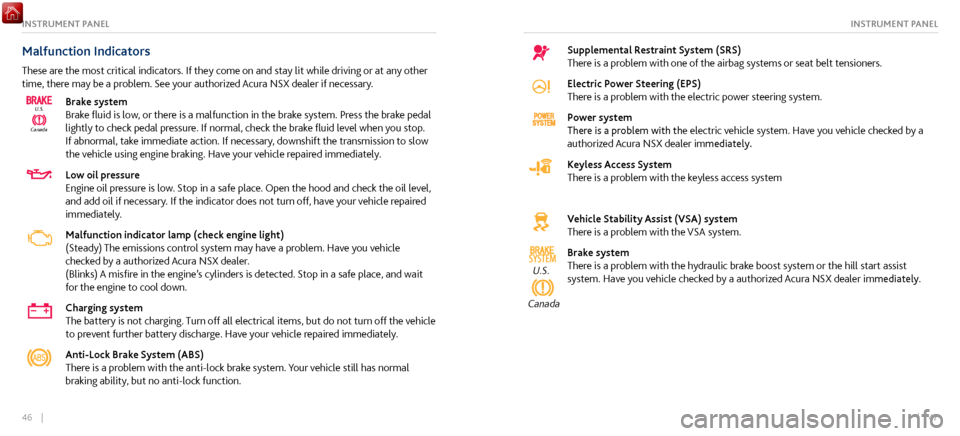
Malfunction Indicators
These are the most critical indicators. If they come on and stay lit while driving or at any other
time, there may be a problem. See your authorized Acura NSX dealer if necessary.
CanadaU.S.
Brake system
Brake fluid is low, or there is a malfunction in the brake system. Press the brake pedal
lightly to check pedal pressure. If normal, check the brake fluid level when you stop.
If abnormal, take immediate action. If necessary, downshift the transmission to slow
the vehicle using engine braking. Have your vehicle repaired immediately.
Low oil pressure
Engine oil pressure is low. Stop in a safe place. Open the hood and check the oil level,
and add oil if necessary. If the indicator does not turn off, have your vehicle repaired
immediately.
Malfunction indicator lamp (check engine light)
(Steady) The emissions control system may have a problem. Have you vehicle
checked by a authorized Acura NSX dealer.
(Blinks) A
misfire in the engine’s cylinders is
detected. Stop in a safe place, and wait
for the engine to cool down.
Charging system
The battery is not charging. Turn off all electrical items, but do not turn off the vehicle
to prevent further battery discharge. Have your vehicle repaired immediately.
Anti-Lock Brake System (ABS)
There is a problem with the anti-lock brake system. Your vehicle still has normal
braking ability, but no anti-lock function.
Supplemental Restraint System (SRS)
There is a problem with one of the airbag systems or seat belt tensioners.
Electric Power Steering (EPS)
There is a problem with the electric power steering system.
Power system
There is a problem with the electric vehicle system. Have you vehicle checked by a
authorized Acura NSX dealer immediately.
Keyless Access System
There is a problem with the keyless access system
Vehicle Stability Assist (VSA) system
There is a problem with the VSA system.
SYSTEMU.S.
Canada
Brake system
There is a problem with the hydraulic brake boost system or the hill start assist
system. Have you vehicle checked by a authorized Acura NSX dealer immediately.
Page 35 of 116
64 || 65
VEHICLE CONTROLSVEHICLE CONTROLS
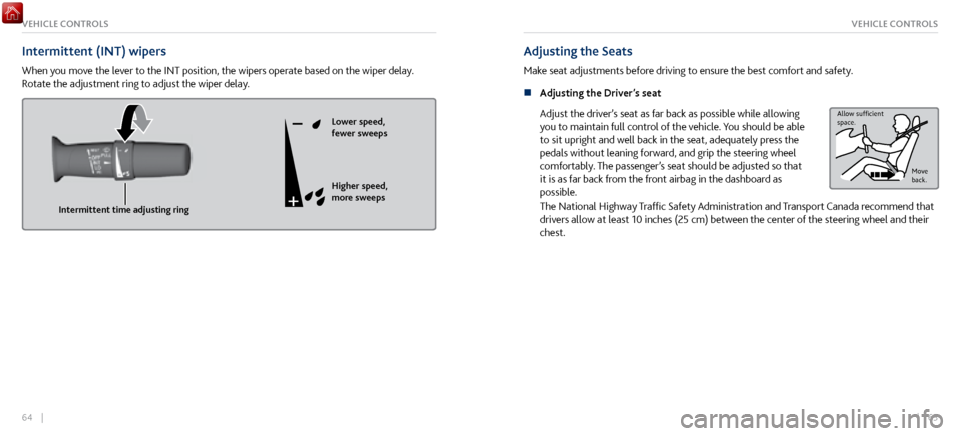
Intermittent (INT) wipers
When you move the lever to the INT position, the wipers operate based on the wiper delay.
Rotate the adjustment ring to adjust the wiper delay.
Intermittent time adjusting ringLower speed,
fewer sweeps
Higher speed,
more sweeps
Adjusting the Seats
Make seat adjustments before driving to ensure the best comfort and safety.
n
Adjusting the Driver
’s seat
Adjust the driver’s seat as far back as possible while allowing
you to maintain full control of the vehicle. You should be able
to sit upright and well back in the seat, adequately press the
pedals without leaning forward, and grip the steering wheel
comfortably. The passenger’s seat should be adjusted so that
it is as far back from the front airbag in the dashboard as
possible.
Allow sufcient
space.
Move
back.
The National Highway Traffic Safety Administration and Transport Canada recommend that
drivers allow at least 10 inches (25 cm) between the center of the steering wheel and their
chest.
Page 36 of 116

66 || 67
VEHICLE CONTROLSVEHICLE CONTROLS
Sitting improperly or out of position can result in serious injury or death in a
crash. Always sit upright, well back in the seat, with your feet on the floor.
WARNING
Sitting too close to a front airbag can result in serious injury or death if the front
airbags inflate.
Always sit as far back from the front airbags as possible while maintaining
control of the vehicle.
WARNING
Reclining the seat-back too far can result in serious injury or death in a crash.
Adjust the seat-back to an upright position, and sit well back in the seat.
WARNING
n Manual Seat Adjustments*
Horizontal
position
adjustment Seat-back angle
adjustment
Driver’s seat is shown
*if equipped
Page 59 of 116

112 || 113
Subscription Features
A subscription-based service that provides convenient features, such as collision notification,
emergency assistance, online security, and important messages about your vehicle.
To subscribe or get more information, contact a dealer or visit owners.acura.com (U.S.) or
www.myacura.ca (Canada). Requires enrollment and privacy agreement.
n
Emergency Assistance
If your v
ehicle’s airbags deploy or if the unit detects that
the vehicle is severely impacted, your vehicle automatically
attempts to connect to the AcuraLink operator if there is
sufficient cellular coverage. Once connected, information
about your vehicle, its positioning, and its condition will be
sent to the operator. You can also speak to the operator when
connected.
To manually connect to the operator, open the cover on the
ceiling console and press ASSIST when the vehicle is on.
ButtonASSIST
n Security Features
To use security
features, you need your user ID and personal identification number (PIN).
Some of these features are also available with the AcuraLink smartphone app. Visit owners.
acura.com/apps to download the app.
Stolen vehicle tracking: Searches and tracks down your vehicle position.
Remote door lock/unlock: Remotely lock or unlock doors.
Vehicle finder: Locate your vehicle in large areas, such as a parking lot.
Security alarm notification: If your vehicle’s security system detects tampering, the
provider notifies you.
n
Operator Assistance
Connect to the AcuraLink operator
when trying to find a
destination or for roadside assistance.
Press LINK to connect to an operator.
L INK button
ACURALINK®ACURALINK®
Page 111 of 116

216 || 217
CLIENT INFORMATIONCLIENT INFORMATION
Disclosures
n Devices That Emit Radio Waves
The following products and systems
on your vehicle emit radio waves when in operation:
AcuraLink
Audio system
Bluetooth Audio
Bluetooth
HandsFreeLink
HomeLink Universal Transceiver
Immobilizer system Remote transmitter
Remote engine starter
Keyless Access System
Tire Pressure Monitoring System
Charging cable
Interactive remote control
Each of the above complies with the appropriate requirements or the required standards of
FCC (Federal Communications Commission) and Industry Canada, described below:
As required by the FCC:
This device complies with Part 15 of the FCC rules. Operation is subject to the following two
conditions: (1) This device may not cause harmful interference, and (2) this device must accept
any interference received, including interference that may cause undesired operation.
Changes or modifications not expressly approved by the party responsible for compliance
could void the user’s authority to operate the equipment.
As required by Industry Canada:
This device complies with Industry Canada licence-exempt RSS standard(s). Operation is
subject to the following two conditions: (1) this device may not cause interference, and (2)
this device must accept any interference, including interference that may cause undesired
operation of the device. n
California Perchlorate C
ontamination Prevention Act
The airbags, seat belt tensioners, and CR-type batteries in this vehicle may contain
perchlorate materials—special handling may apply. See www.dtsc.ca.gov/hazardouswaste/
perchlorate/ for more information.
n
California Proposition 65 Warning
W
ARNING: This product contains or emits chemicals known to the state of California to
cause cancer and birth defects or other reproductive harm.
n
Event Data Recorders
This
vehicle is equipped with an event data recorder (EDR). The main purpose of an EDR
is to record, in certain crash or near crash-like situations, such as an air bag deployment
or hitting a road obstacle, data that will assist in understanding how a vehicle’s systems
performed. The EDR is designed to record data related to vehicle dynamics and safety
systems for a short period of time, typically 30 seconds or less. The EDR in this vehicle
is designed to record such data as:
How various systems in your vehicle were operating;
Whether or not the driver and passenger safety belts were buckled/fastened;
How far (if at all) the driver was depressing the accelerator and/or brake pedal; and,
How fast the vehicle was traveling.
These data can help provide a better understanding of the circumstances in which crashes
and injuries occur.
NOTE: EDR data are recorded by your vehicle only if a non-trivial crash situation occurs;
no data are recorded by the EDR under normal driving conditions and no personal data
(e.g., name, gender, age, and crash location) are recorded. However, other parties, such as
Page 114 of 116
222 || 223
VOICE COMMAND INDEXVOICE COMMAND INDEX
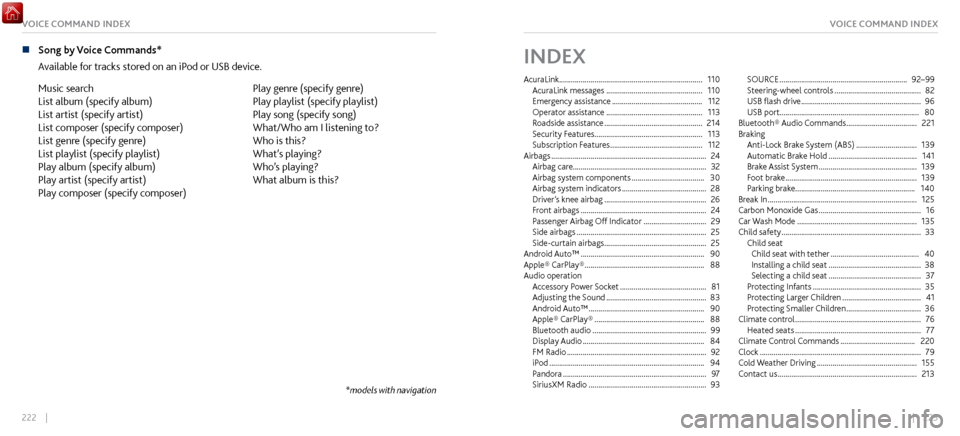
n Song by Voice Commands*
Available for tracks
stored on an iPod or USB device.
Music search
List album (specify album)
List artist (specify artist)
List composer (specify composer)
List genre (specify genre)
List playlist (specify playlist)
Play album (specify album)
Play artist (specify artist)
Play composer (specify composer) Play genre (specify genre)
Play playlist (specify playlist)
Play song (specify song)
What/Who am I listening to?
Who is this?
What’s playing?
Who’s playing?
What album is this?
*models with navigation
INDEX
AcuraLink ........................................................................\
.
110
AcuraLink messages ................................................. 110
Emergency assistance .............................................. 112
Operator assistance ................................................. 113
Roadside assistance .................................................. 214
Security Features
....................................................... 113
Subscription Features
............................................... 112
Airbags ........................................................................\
....... 24
Airbag care.................................................................... 32
Airbag system components
..................................... 30
Airbag system indicators ........................................... 28
Driver’
s knee airbag
.................................................... 26
Front airbags ................................................................ 24
Passenger Airbag Off
Indicator
................................ 29
Side airbags .................................................................. 25
Side-curtain airbags .................................................... 25
Android Auto™ ............................................................... 90
Apple® CarPlay® ............................................................. 88
Audio operation Accessory P
ower Socket
............................................ 81
Adjusting the Sound ................................................... 83
Android Auto™ ........................................................... 90
Apple® CarPlay® ........................................................ 88
Bluetooth audio .......................................................... 99
Display Audio .............................................................. 84
FM Radio ....................................................................... 92
iPod ........................................................................\
....... 94
Pandora ........................................................................\
. 97
SiriusXM Radio ............................................................ 93SOURCE
.................................................................
92–99
Steering-wheel controls ............................................ 82
USB flash drive ............................................................. 96
USB port....................................................................... 80
Bluetooth® Audio
Commands
.................................... 221
Braking Anti-Lock Brake System (ABS)
............................... 139
Automatic Brake Hold ............................................. 141
Brake Assist S
ystem
.................................................. 139
Foot brake ................................................................... 139
Parking brake.............................................................
140
Break In
........................................................................\
.... 125
Carbon Monoxide Gas .................................................... 16
Car Wash Mode ............................................................. 135
Child safety ....................................................................... 33
Child seat Child seat with tether
............................................. 40
Installing a child seat ............................................... 38
Selecting a child seat ............................................... 37
Protecting Infants ....................................................... 35
Protecting Lar
ger Children
........................................ 41
Protecting Smaller Children ...................................... 36
Climate control ................................................................ 76
Heated seats ................................................................ 77
Climate Control C
ommands
...................................... 220
Clock ........................................................................\
.......... 79
Cold Weather
Driving
................................................... 155
Contact us ....................................................................... 213