navigation system Acura NSX 2017 User Guide
[x] Cancel search | Manufacturer: ACURA, Model Year: 2017, Model line: NSX, Model: Acura NSX 2017Pages: 116, PDF Size: 7.19 MB
Page 60 of 116

114 || 115
NAVIGATIONNAVIGATION
NAVIGATION*
Learn how to enter a destination and operate the navigation system.
Basic Navigation Operation
A real-time navigation system uses GPS and a map database to show your current location and
help guide you to a desired destination. You can operate the system using voice commands or
the system controls.
To reduce the potential for driver distraction, certain manual functions may be inoperable or
grayed out while the vehicle is moving. Voice commands are always available.
n
Steering Wheel Controls
Use
the steering wheel controls to give voice commands.
Talk button: Press to give navigation commands.
Back button: Press to cancel a command or operation.
Back
button
Ta lk
button
*if equipped
n Talk Button Tips
For a full list
of navigation voice commands, see page 219.
When using the Talk button, wait for a beep before saying a command.
To bypass the system prompts, simply press the Talk button again to say your command.
When the Talk button is pressed, all available voice commands are highlighted in yellow
(except for voice command screen for navigation).
Speak in a clear, natural voice.
Reduce all background noise.
Adjust the dashboard and side vents away from the microphone in the ceiling.
Close the windows.
Using the navigation system while driving can take your attention away from the
road, causing a crash in which you could be seriously injured or killed.
Only operate system controls when the conditions permit you to safely do so.
WARNING
Page 61 of 116
116 || 117
NAVIGATIONNAVIGATION
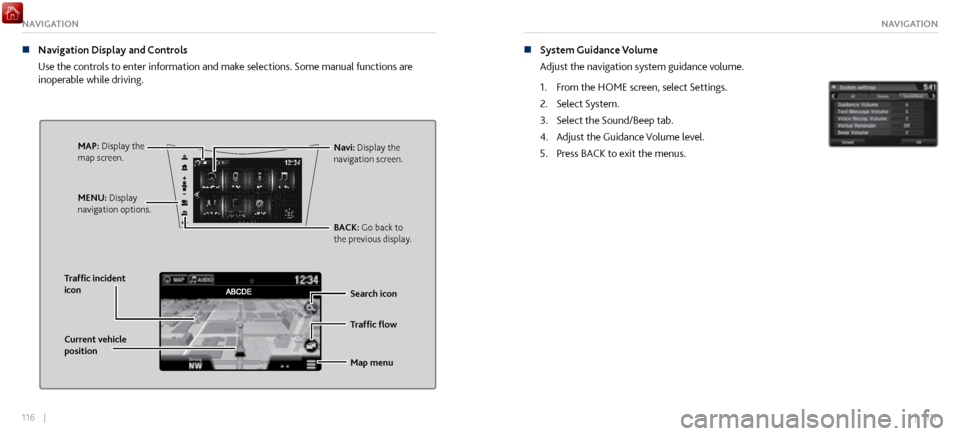
n Navigation Display and Controls
Use
the controls to enter information and make selections. Some manual functions are
inoperable while driving.
Traffic flow
Current vehicle
position Traffic incident
icon
Search icon
Map menu
Navi: Display the
navigation screen.
BACK: Go back to
the previous display.
MENU: Display
navigation options.MAP: Display the
map screen.
n System Guidance Volume
Adjust the navigation system guidance
volume.
1.
From the HOME scr
een, select Settings.
2.
Select System.
3.
Select the Sound/Beep tab.
4.
Adjust the Guidance V
olume level.
5.
Press BACK to exit
the menus.
Page 62 of 116
118 || 119
NAVIGATIONNAVIGATION
Entering a Destination
Use several methods to enter a destination.
n
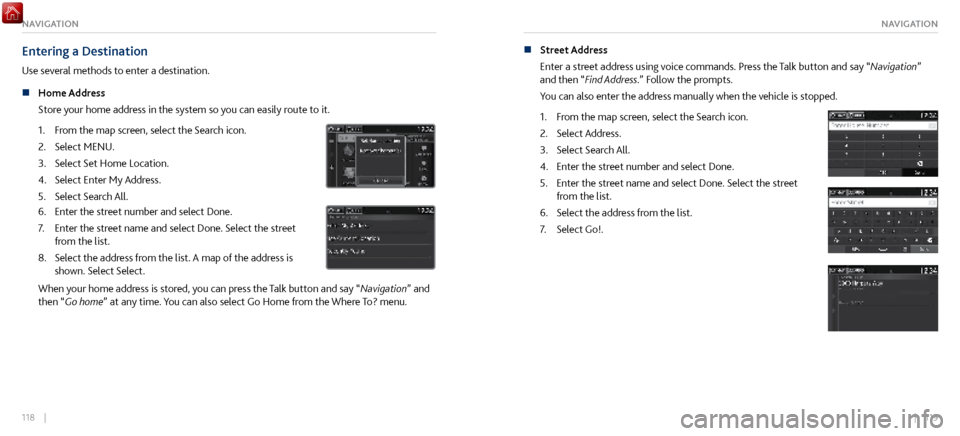
Home Address
Store
your home address in the system so you can easily route to it.
1.
From the map scr
een, select the Search icon.
2.
Select MENU.
3.
Select Set Home Location.
4.
Select Enter My Address.
5.
Select Search All.
6. Enter the street number and select Done.
7.
Enter the street name and select Done. Select
the street
from the list.
8.
Select the address fr
om the list. A map of the address is
shown. Select Select.
When your home address is stored, you can press the Talk button and say “Navigation” and
then “ Go home” at any time. You can also select Go Home from the Where To? menu. n
Street Address
Enter a str
eet address using voice commands. Press the Talk button and say “Navigation”
and then “Find Address.” Follow the prompts.
You can also enter the address manually when the vehicle is stopped.
1.
From the map scr
een, select the Search icon.
2.
Select Address.
3.
Select Search All.
4.
Enter the street number and select Done.
5.
Enter the street name and select Done. Select
the street
from the list.
6.
Select the address fr
om the list.
7.
Select Go!.
Page 64 of 116

122 || 123
NAVIGATIONNAVIGATION
Routing
After a destination is set, you can alter or cancel your route.
n
Map Legend
During route guidance
Next guidance
point
Speed limitSearch icon
Cancel route
Using the navigation system while driving can take your attention away from the
road, causing a crash in which you could be seriously injured or killed.
Operate system controls only when the conditions permit you to safely do so.
WARNING
Turn By Turn Directions
Shows a more detailed view of the next maneuver on the MID.
Upcoming
maneuver
Distance to
next guidance
point Current
routeStreet name of
next guidance
point
Page 108 of 116

210 || 211
CLIENT INFORMATIONSPECIFICATIONS
n Fluids
Brake Fluid
Dual Clutch Transmission Fluid
Twin Motor Unit Flui d
Specified
SpecifiedAcura Heavy Duty Brake Fluid DOT 4
Capacity ChangeAcura Automatic Transmission Fluid
ATF DW-1 2.75 US qt (2.6ℓ)
Specified
Capacity Change Acura Gear Oil GO-Type 2.0
4.86 US qt (4.6 ℓ)
Specified
Capacity Chang eAcura Automatic Transmission Fluid
ATF DW-1
2.56 US qt (2.42ℓ)
Clutch
Transmissio n
Engine Oil
Engine Coolant
Inverter Coolant
Recommended
Capacity Change
filter including
8.3 US qt (7.9 ℓ )
Specified Ultimate Full Synthetic Motor Oil,
Type3, 0W-40
Chang e7 .7 US qt (7.3 ℓ)
Ratio
Capacity
Specifie d
Ratio
Acura Long Life Antifreeze/Coolant Type250/50 with distilled water 4.1 US gal (15.5 ℓ)
(change including the remaining
0.34 US gal (1.29 ℓ ) in the
reserve tank and heater )
Capacity
Acura Long Life Antifreeze/Coolant Type250/50 with distilled water
0.50 US gal (1.90 ℓ)
(change including the remaining
0.12 US gal (0.46 ℓ) in the reserve tank)
Washer FluidTank Capacity 2.6 US qt (2.5 ℓ)
Brake Fluid
Dual Clutch Transmission Fluid
Twin Motor Unit Flui dSpecified
Specified Acura Heavy Duty Brake Fluid DOT 4
Capacity Change Acura Automatic Transmission Fluid
ATF DW-1
2.75 US qt (2.6ℓ)
Specified
Capacity Change Acura Gear Oil GO-Type 2.0
4.86 US qt (4.6 ℓ)
Specified
Capacity Chang
e
Acura Automatic Transmission Fluid
ATF DW-1
2.56 US qt (2.42ℓ)
Clutch
Transmissio n
Engine Oil
Engine Coolan t
Inverter C oolant
Recommended
Capacity Change
filter including
8.3 US qt (7.9 ℓ )
Specifie d Ultimate Full Synthetic Motor Oil,
Type3, 0W-40
Chang e7 .7 US qt (7.3 ℓ)
Ratio
Capacity
Specifie d
Ratio Acura Long Life Antifreeze/Coolant Type
2
50/50 with distilled water 4.1 US gal (15.5 ℓ)
(change including the remaining
0.34 US gal (1.29 ℓ ) in the
reserve tank and heater )
Capacity Acura Long Life Antifreeze/Coolant Type
2
50/50 with distilled water 0.50 US gal (1.90 ℓ)
(change including the remaining
0.12 US gal (0.46 ℓ) in the reserve tank)
Washer FluidTank Capacity 2.6 US qt (2.5 ℓ)
n Tires
Regular Size
Front
245/35ZR19 (93Y
)
Rear
305/30ZR20 (103Y )
Pressure Front
32 (220 [2.2])
psi (kPa [kgf/c m
2])Rear
32 (220 [2.2])
Wheel Size Front
19 X 8 1/2J
Rear
20 X 11J
Re
gula r
CLIENT INFORMATION
Learn about information specific to you as an Acura client and how to get help.
Frequently Asked Questions/Troubleshooting
Below are some frequently asked questions and troubleshooting items that you may have about
the vehicle.
Q:
How do I set the
vehicle clock?
A:
For vehicles
without navigation, see page 79. For vehicles with navigation, the time is
automatically set using GPS signals.
Q:
Why doesn’
t the vehicle start when I press the ENGINE START/STOP button?
A:
The brake pedal must be pressed to start
the engine.
Q:
What is the AUT
O setting on my headlight lever?
A:
When in the AUTO
position, the vehicle’s exterior lights will automatically turn on or off
depending on the ambient lighting.
Q:
Only the driv
er’s door unlocks when I shift to Park (P). Can both doors unlock?
A:
On the HOME Screen,
select Settings, then Vehicle, then Keyless Access Setup, then Door
Unlock Mode. Select “All Doors.”
Q:
After m
y battery was disconnected or went dead, the audio system is asking for a code.
Where do I find this?
A:
In most cases, you do not need
to enter a code. Turn on the vehicle and the audio system,
and press and hold the power button until the system reactivates.
Page 112 of 116

218 || 219
VOICE COMMAND INDEXCLIENT INFORMATION
law enforcement, could combine the EDR data with the type of personally identifying data
routinely acquired during a crash investigation.
To read data recorded by an EDR, special equipment is required, and access to the vehicle
or the EDR is needed. In addition to the vehicle manufacturer, other parties such as law
enforcement that have the special equipment can read the information if they have access
to the vehicle or the EDR.
The data belong to the vehicle owner and may not be accessed by anyone else except as
legally required or with the permission of the vehicle owner.
n
Service Diagnostic Recorders
This v
ehicle is equipped with service-related devices that record information about
powertrain performance. The data can be used to verify emissions law requirements and/
or help technicians diagnose and solve service problems. It may also be combined with data
from other sources for research purposes, but it remains confidential.VOICE COMMAND INDEX
Learn about all available voice commands to help you operate the vehicle.
Press the TALK button before saying a command.
n
Voice Portal C
ommands
When you press the Talk button, the Voice Portal screen appears. Say one of the options, and
follow the system prompts.
n
Navigation Voice Commands*
The system accepts
these commands on most screens. You only need to press the Talk
button once for navigation commands. Phone call
Music search
Audio
Climate control
Navigation* Voice setting
Voice help
What is today’s date?
What time is it?
View map
Find place
Find category
Find intersection
Recently found Go home
Find address
Find city
Find saved places
*models with navigation
Page 113 of 116

220 || 221
VOICE COMMAND INDEXVOICE COMMAND INDEX
n Climate Control Voice Commands*
The system accepts these commands on most screens.
Climate control on**
Climate control off**
Air conditioner on**
Air conditioner off**
Defrost on**
Defrost off** Fan speed # (#: 1 to 7)
Temperature # degrees (#: 57 to 87°F)
Temperature max heat
Temperature max cool
n
Phone Voice Commands
The system accepts
these commands on most screens.
Call by number
Call by name Call (number)
Call (name)
*models with navigation
**These commands toggle the function on and off, so the command may not match your intended action.
n Audio Voice Commands*
The system accepts these commands on most scr
eens. Audio volume levels cannot be
controlled using voice commands.
FM Radio Commands
Audio on**
Audio off**
Radio FM
Radio tune to # FM
(#: frequency, e.g., 95.5)
Radio FM preset # (#: 1 to 12)
SiriusXM Radio Commands
Radio SXM
SXM channel # (#: 0 to 255)
SXM channel (channel name)
Radio SXM preset # (#: 1 to 12)
Pandora Commands (U.S. only)
Pandora
Pandora play USB Commands
USB
USB play
USB play track # (#: 1 to 30)
iPod Commands
iPod
iPod play
iPod play track # (#: 1-30)
Bluetooth Audio Commands
Bluetooth audio play
(may not work on all phones)
*models with navigation
**These commands toggle the function on and off, so the command may not match your intended action.
Page 114 of 116
222 || 223
VOICE COMMAND INDEXVOICE COMMAND INDEX
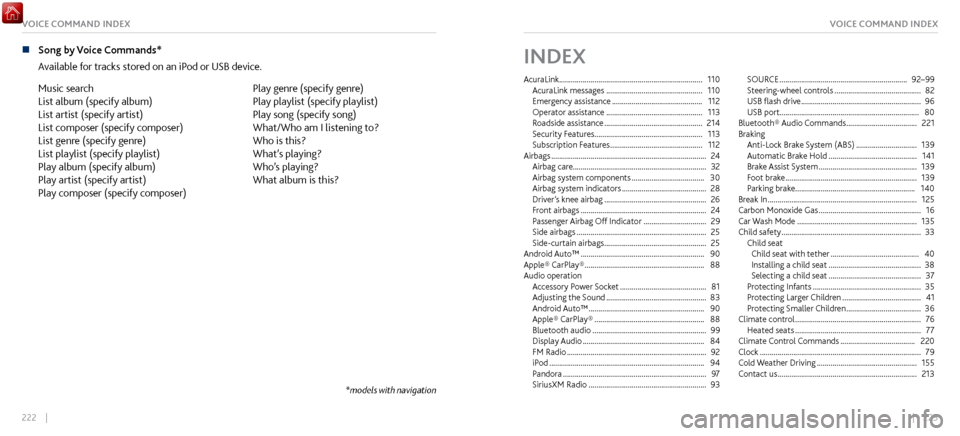
n Song by Voice Commands*
Available for tracks
stored on an iPod or USB device.
Music search
List album (specify album)
List artist (specify artist)
List composer (specify composer)
List genre (specify genre)
List playlist (specify playlist)
Play album (specify album)
Play artist (specify artist)
Play composer (specify composer) Play genre (specify genre)
Play playlist (specify playlist)
Play song (specify song)
What/Who am I listening to?
Who is this?
What’s playing?
Who’s playing?
What album is this?
*models with navigation
INDEX
AcuraLink ........................................................................\
.
110
AcuraLink messages ................................................. 110
Emergency assistance .............................................. 112
Operator assistance ................................................. 113
Roadside assistance .................................................. 214
Security Features
....................................................... 113
Subscription Features
............................................... 112
Airbags ........................................................................\
....... 24
Airbag care.................................................................... 32
Airbag system components
..................................... 30
Airbag system indicators ........................................... 28
Driver’
s knee airbag
.................................................... 26
Front airbags ................................................................ 24
Passenger Airbag Off
Indicator
................................ 29
Side airbags .................................................................. 25
Side-curtain airbags .................................................... 25
Android Auto™ ............................................................... 90
Apple® CarPlay® ............................................................. 88
Audio operation Accessory P
ower Socket
............................................ 81
Adjusting the Sound ................................................... 83
Android Auto™ ........................................................... 90
Apple® CarPlay® ........................................................ 88
Bluetooth audio .......................................................... 99
Display Audio .............................................................. 84
FM Radio ....................................................................... 92
iPod ........................................................................\
....... 94
Pandora ........................................................................\
. 97
SiriusXM Radio ............................................................ 93SOURCE
.................................................................
92–99
Steering-wheel controls ............................................ 82
USB flash drive ............................................................. 96
USB port....................................................................... 80
Bluetooth® Audio
Commands
.................................... 221
Braking Anti-Lock Brake System (ABS)
............................... 139
Automatic Brake Hold ............................................. 141
Brake Assist S
ystem
.................................................. 139
Foot brake ................................................................... 139
Parking brake.............................................................
140
Break In
........................................................................\
.... 125
Carbon Monoxide Gas .................................................... 16
Car Wash Mode ............................................................. 135
Child safety ....................................................................... 33
Child seat Child seat with tether
............................................. 40
Installing a child seat ............................................... 38
Selecting a child seat ............................................... 37
Protecting Infants ....................................................... 35
Protecting Lar
ger Children
........................................ 41
Protecting Smaller Children ...................................... 36
Climate control ................................................................ 76
Heated seats ................................................................ 77
Climate Control C
ommands
...................................... 220
Clock ........................................................................\
.......... 79
Cold Weather
Driving
................................................... 155
Contact us ....................................................................... 213
Page 116 of 116
226 || 227
VOICE COMMAND INDEXVOICE COMMAND INDEX
Navigation ...................................................................... 114
Display and controls ................................................. 116
Home address ............................................................ 118
Legend ........................................................................\
. 122
Recent places ............................................................. 120
Routing ........................................................................\
122
Saved places ............................................................... 121
Steering-wheel controls .......................................... 114
Street Addr
ess
............................................................ 119
System guidance v
oice
............................................. 117
TALK button ............................................................... 114
Trafficv ........................................................................\
. 124
Navigation Commands ................................................ 219
Overheating .................................................................... 160
Paint Care ....................................................................... 208
Pandora ........................................................................\
..... 97
Pandora® Commands ................................................... 221
Parking Sensor System ................................................. 146
Phone Commands ........................................................ 220
Power mode Changing the P
ower Mode
...................................... 131
Power system indicator..................................................
47
Readiness codes
............................................................ 206
Rear camera .................................................................... 147
Remote Transmitter ........................................................ 54
Roadside assistance ...................................................... 214
Safety Carbon monoxide gas
................................................ 16
Reporting safety defects ........................................... 44
Safety information ............................................. 14, 175
Safety label locations ................................................. 43Seat belts
........................................................................\
..
19
Fastening ....................................................................... 22
Lap/Shoulder belts ...................................................... 19
Seat Belt Inspection ................................................... 21
Seating Adjusting the driver
’s seat
......................................... 65
Driving Position Memory System ............................ 71
Heated seats ................................................................ 77
Manual Seat Adjustments ......................................... 67
Power Seat Adjustments .......................................... 68
Security system .............................................................. 49
SH-AWD Emergency Shutdown
................................................ 18
High Voltage battery .................................................. 13
In case of a collision ................................................... 18
Shifting Car Wash Mode
......................................................... 135
Electronic Gear Selector .......................................... 132
Sequential Shift Mode ............................................. 133
Siri Eyes-Fr
ee
.................................................................. 109
Specifications ................................................................ 209
Sport Hybrid SH-AWD ................................................... 13
Steering wheel Adjusting
....................................................................... 70
Steering-wheel controls ............................................ 82 Tires
Inflation Guidelines
.................................................. 197
Inspection Guidelines ............................................... 198
Tire and loading information label ........................ 199
Tire and wheel r
eplacement
.................................. 200
Tire chains................................................................\
... 201
Tire identification number
..................................... 203
Tire labeling ............................................................... 202
Tire Pressur
e Monitor System (TPMS)
.................. 163
Tire quality grading .................................................. 204
Tire repair kit .............................................................. 166
Tire service life .......................................................... 200
Tire terminology ....................................................... 203
Ultra High Performance tir
es.................................. 155
Wear indicators
......................................................... 198
Winter tires ................................................................ 201
Towing Emergency towing
.................................................... 162
Turn Signal ........................................................................\
62
USB ........................................................................\
............ 80
USB Commands ............................................................. 221
USB Flash Drive ................................................................ 96
Vehicle Stability Assist
(VSA)
...................................... 145
Voice command index .................................................. 219
Voice P
ortal Commands
.............................................. 219
Warranty ........................................................................\
. 215
Wi-Fi Connection ............................................................ 87Window
Power windows
........................................................... 59
Window washer fluid ............................................... 191
Wipers Front Wipers
................................................................. 63
Intermittent wipers ................................................... 64
Wiper blades .............................................................. 195