change wheel Acura NSX 2017 User Guide
[x] Cancel search | Manufacturer: ACURA, Model Year: 2017, Model line: NSX, Model: Acura NSX 2017Pages: 473, PDF Size: 16.01 MB
Page 137 of 473

136
uuOperating the Switches Around the Steering Wheel uBrightness Control
Controls
Brightness Control
When the power mode is in ON, you can use
the
(+ or (- button to adjust instrument
panel brightness.
To brighten: Press the
(+ button.
To dim: Press the
(- button.
You will hear a beep when the brightness
reaches minimum or maximum. Several
seconds after you have adjusted the
brightness, you will be returned to the
previous screen.
■Brightness level indicator
The brightness level is shown on the driver
information interface wh ile you are adjusting
it.
1 Brightness Control
Instrument panel brightne ss varies, depending on
whether the exterior lights are on or off. The
instrument panel dims to reduce glare when they are
on.
When it is bright out side and the headlight
integration with the wiper is activated, the
instrument panel bri ghtness does not change. If you press the (+ button until the brightness display
is up to max
, the beeper sounds. This cancels the
reduced instrument panel brightness when the
exterior lights are on.
The brightness can be set differently for when the
exterior lights are on, and when they are off.
( + Button
(- Button
17 NSX-31T6N6000.book 136 ページ 2016年4月22日 金曜日 午後3時44分
Page 140 of 473
139
uuOperating the Switches Around the Steering Wheel uDriving Position Memory System*
Controls
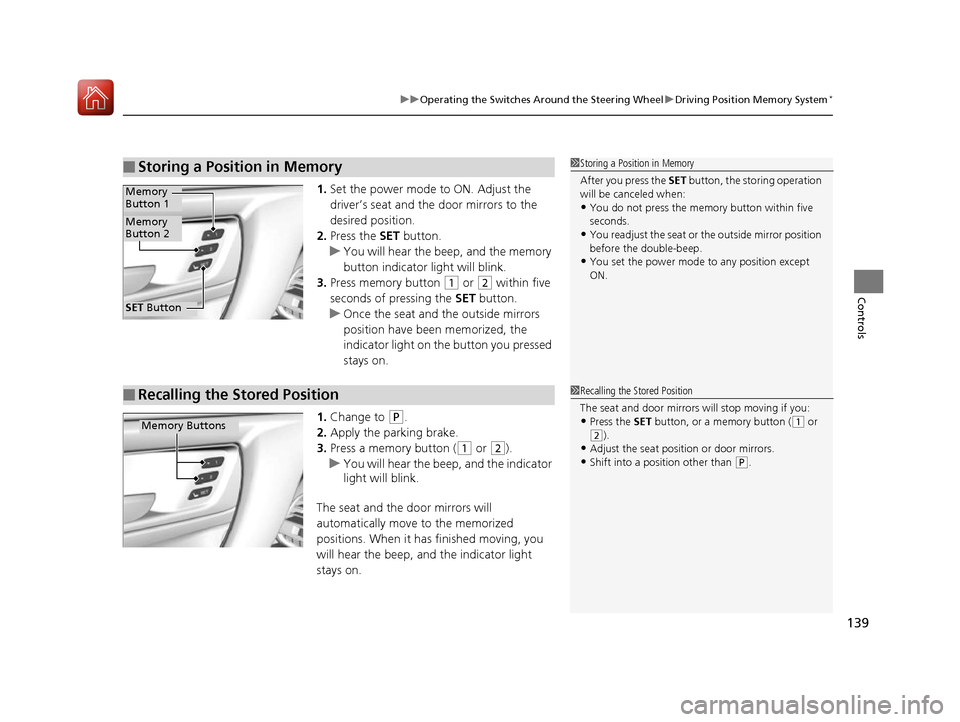
1. Set the power mode to ON. Adjust the
driver’s seat and the door mirrors to the
desired position.
2. Press the SET button.
u You will hear the beep, and the memory
button indicator light will blink.
3. Press memory button
(1 or (2 within five
seconds of pressing the SET button.
u Once the seat and the outside mirrors
position have been memorized, the
indicator light on the button you pressed
stays on.
1. Change to
(P.
2. Apply the parking brake.
3. Press a memory button (
(1 or (2).
u You will hear the beep, and the indicator
light will blink.
The seat and the door mirrors will
automatically move to the memorized
positions. When it has finished moving, you
will hear the beep, and the indicator light
stays on.
■Storing a Position in Memory1 Storing a Position in Memory
After you press the SET button, the storing operation
will be canceled when:
•You do not press the memory button within five
seconds.
•You readjust the seat or the outside mirror position
before the double-beep.
•You set the power mode to any position except
ON.
SET Button
Memory
Button 1
Memory
Button 2
■Recalling the Stored Position1 Recalling the Stored Position
The seat and door mirrors will stop moving if you:
•Press the SET button, or a memory button ((1 or
(2).•Adjust the seat position or door mirrors.
•Shift into a position other than (P.
Memory Buttons
17 NSX-31T6N6000.book 139 ページ 2016年4月22日 金曜日 午後3時44分
Page 194 of 473
Continued193
uuAudio System Basic Operation uPlaying SiriusXM ® Radio*
Features
1. Select .
2. Select Tune Mode .
3. Select Channel Mode or Category Mode .
■To Change the Tune Mode1Playing SiriusXM ® Radio*
In the channel mode, all available channels are
selectable. In the categor y mode, you can select a
channel within a ca tegory (Jazz, Rock, Classical, etc.).
There may be instances when SiriusXM ® Radio does
not broadcast all the data fi elds (artist name, title).
This does not indicate a problem with your audio
system.
SiriusXM ® Radio stations load in ascending order,
which can take about a mi nute. Once they have
loaded you will be able to scroll up or down to make
your selections.
Switching the Audio Mode
Press the SOURCE button on the steering wheel or
select SOURCE on the screen.
2 Audio Remote Controls P. 165
Tune Start:
When you change to a pres et channel, a song being
played on that channel restarts from the beginning
with this function. This can be turned on or off from
the Audio settings screen.
2 Customized Features P. 232
* Not available on all models
17 NSX-31T6N6000.book 193 ページ 2016年4月22日 金曜日 午後3時44分
Page 216 of 473
215
uuAudio System Basic Operation uSiri Eyes Free
Features
Siri Eyes Free
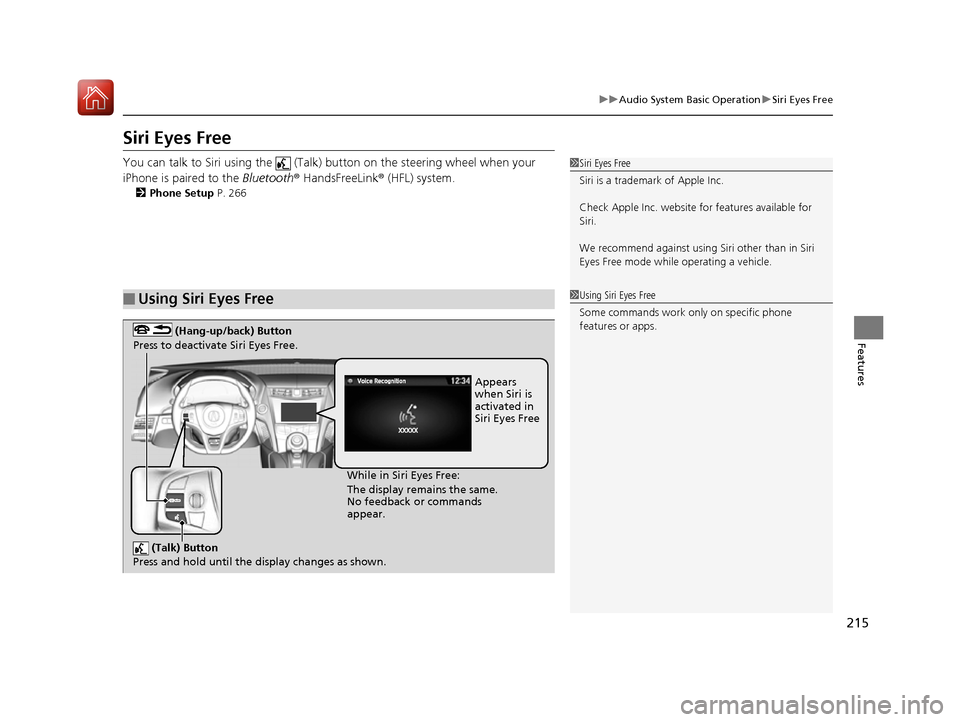
You can talk to Siri using the (Talk) button on the steering wheel when your
iPhone is paired to the Bluetooth® HandsFreeLink ® (HFL) system.
2Phone Setup P. 266
■Using Siri Eyes Free
1Siri Eyes Free
Siri is a trademark of Apple Inc.
Check Apple Inc. website for features available for
Siri.
We recommend against using Si ri other than in Siri
Eyes Free mode whil e operating a vehicle.
1Using Siri Eyes Free
Some commands work only on specific phone
features or apps.
(Talk) Button
Press and hold until the display changes as shown.
(Hang-up/back) Button
Press to deactivate Siri Eyes Free.
While in Siri Eyes Free:
The display remains the same.
No feedback or commands
appear. Appears
when Siri is
activated in
Siri Eyes Free
17 NSX-31T6N6000.book 215 ページ 2016年4月22日 金曜日 午後3時44分
Page 242 of 473
241
uuCustomized Features u
Continued
Features
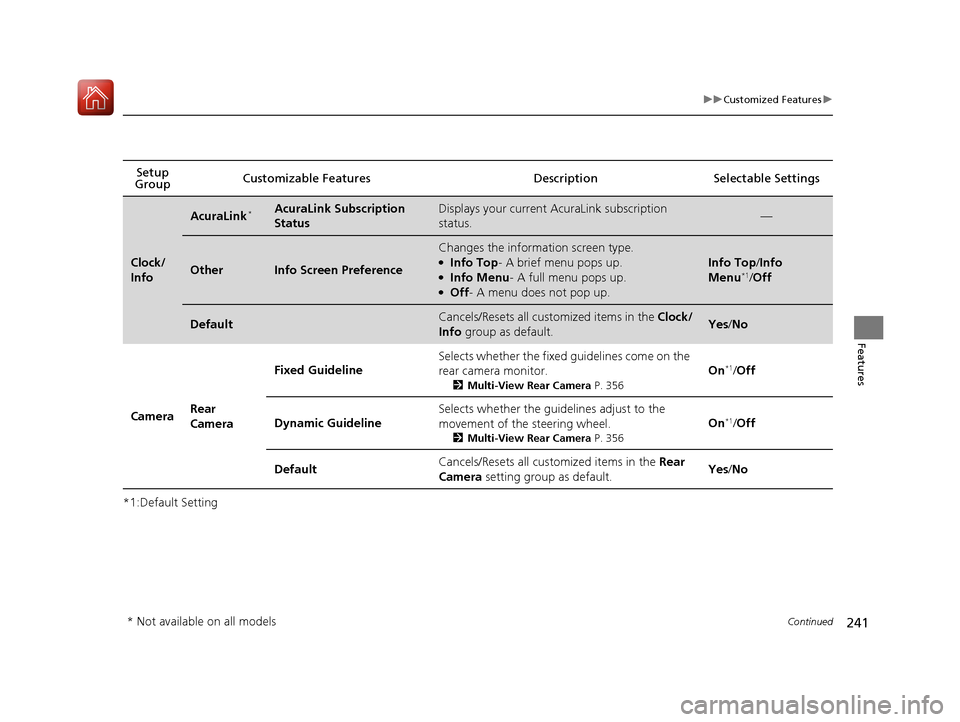
*1:Default SettingSetup
Group Customizable Features Desc
ription Selectable Settings
Clock/
Info
AcuraLink*AcuraLink Subscription
StatusDisplays your current AcuraLink subscription
status.—
OtherInfo Screen Preference
Changes the information screen type.●Info Top- A brief menu pops up.●Info Menu- A full menu pops up.●Off- A menu does not pop up.
Info Top /Info
Menu*1/ Off
DefaultCancels/Resets all cust omized items in the Clock/
Info group as default.Yes/No
Camera Rear
Camera Fixed Guideline
Selects whether the fixed guidelines come on the
rear camera monitor.
2
Multi-View Rear Camera P. 356
On*1/Off
Dynamic Guideline Selects whether the guidelines adjust to the
movement of the steering wheel.
2
Multi-View Rear Camera P. 356
On*1/Off
Default Cancels/Resets all cust
omized items in the Rear
Camera setting group as default. Yes
/No
* Not available on all models
17 NSX-31T6N6000.book 241 ページ 2016年4月22日 金曜日 午後3時44分
Page 259 of 473
258
Features
Bluetooth® HandsFreeLink ®
Bluetooth® HandsFreeLink ® (HFL) allows you to place and receive phone calls using
your vehicle’s audio system, without handling your cell phone.
Using HFL
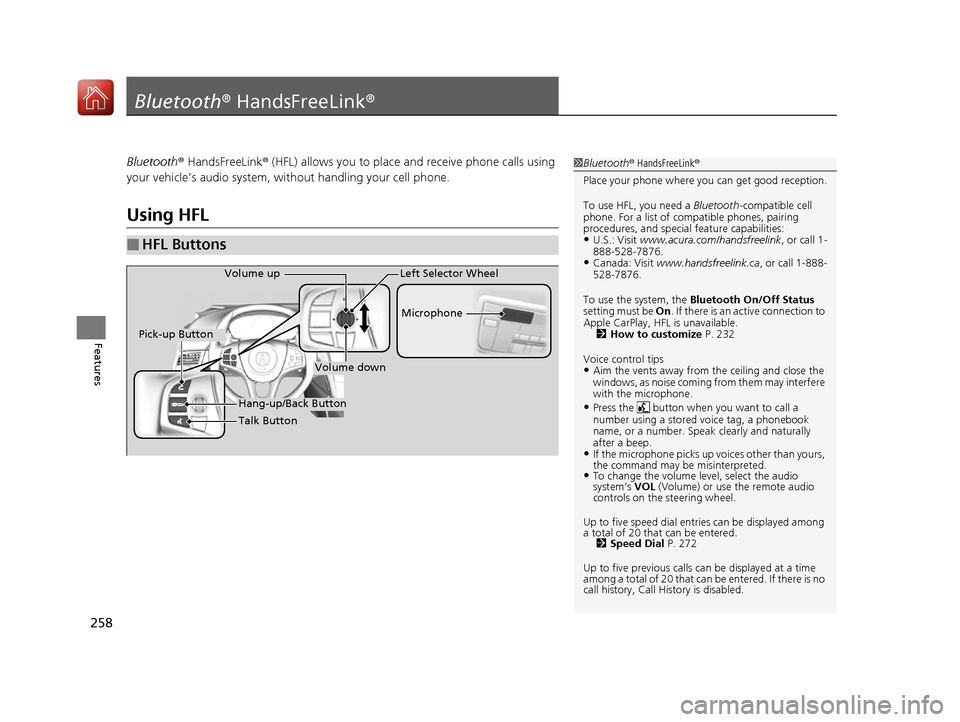
■HFL Buttons
1 Bluetooth ® HandsFreeLink ®
Place your phone where y ou can get good reception.
To use HFL, you need a Bluetooth-compatible cell
phone. For a list of compatible phones, pairing
procedures, and special feature capabilities:
•U.S.: Visit www.acura.com/handsfreelink , or call 1-
888-528-7876.
•Canada: Visit www.handsfreelink.ca , or call 1-888-
528-7876.
To use the system, the Bluetooth On/Off Status
setting must be On . If there is an active connection to
Apple CarPlay, H FL is unavailable.
2 How to customize P. 232
Voice control tips
•Aim the vents away from the ceiling and close the
windows, as noise coming fr om them may interfere
with the microphone.
•Press the button when you want to call a
number using a stored voice tag, a phonebook
name, or a number. Spe ak clearly and naturally
after a beep.
•If the microphone picks up vo ices other than yours,
the command may be misinterpreted.
•To change the volume level, select the audio
system’s VOL (Volume) or use the remote audio
controls on the steering wheel.
Up to five speed dial entries can be displayed among
a total of 20 that can be entered. 2 Speed Dial P. 272
Up to five previous calls can be displayed at a time
among a total of 20 that can be entered. If there is no
call history, Call History is disabled.
Talk Button Microphone
Hang-up/Back Button
Pick-up Button
Volume up
Volume down
Left Selector Wheel
17 NSX-31T6N6000.book 258 ページ 2016年4月22日 金曜日 午後3時44分
Page 320 of 473

Continued319
uuWhen Driving uShifting
Driving
Use the paddle shifters to change between 1st and 9th gears without removing your
hands from the steering wheel. The transmission will switch to the sequential mode.
■When the transmission is in (D (D-paddle shift mode):
The vehicle will go into the sequential m ode momentarily, and the gear selection
indicator becomes more prominent.
The sequential mode is automatically canc eled and the gear selection indicator
returns to ordinary display under the following conditions.
• Hold the
(+ paddle shifter for a few seconds.
• Once you start traveling at a constant speed.
• The vehicle comes to a complete stop.
• When you change to another IDS mode.
The sequential mode automatically shifts under following condition
• Accelerator pedal depressed beyond the click.
• Engine speed reaches near the tachometer’s red zone.
• Engine speed reaches idle speed while deceleration.
■Sequential Mode1Sequential Mode
When sequential mode is selected, the gasoline
engine powers the vehicle.
17 NSX-31T6N6000.book 319 ページ 2016年4月22日 金曜日 午後3時44分
Page 335 of 473
uuWhen Driving uVehicle Stability Assist (VSA® ), aka Electronic Stability Control (ESC), System
334
Driving
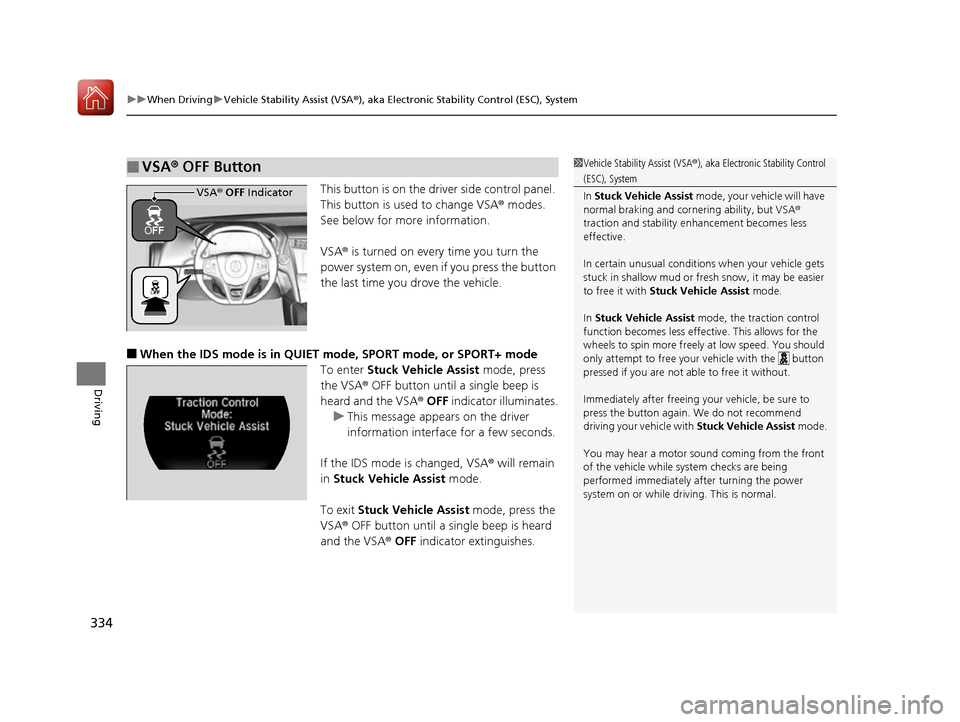
This button is on the driver side control panel.
This button is used to change VSA ® modes.
See below for more information.
VSA ® is turned on every time you turn the
power system on, even if you press the button
the last time you drove the vehicle.
■When the IDS mode is in QUIET mode, SPORT mode, or SPORT+ mode
To enter Stuck Vehicle Assist mode, press
the VSA® OFF button until a single beep is
heard and the VSA ® OFF indicator illuminates.
u This message appears on the driver
information interface for a few seconds.
If the IDS mode is changed, VSA ® will remain
in Stuck Vehicle Assist mode.
To exit Stuck Vehicle Assist mode, press the
VSA ® OFF button until a single beep is heard
and the VSA ® OFF indicator extinguishes.
■VSA ® OFF Button1 Vehicle Stability Assist (VSA ®), aka Electronic Stability Control
(ESC), System
In Stuck Vehicle Assist mode, your vehicle will have
normal braking and corn ering ability, but VSA®
traction and stability enhancement becomes less
effective.
In certain unusual conditions when your vehicle gets
stuck in shallow mud or fr esh snow, it may be easier
to free it with Stuck Vehicle Assist mode.
In Stuck Vehicle Assist mode, the traction control
function becomes less effective. This allows for the
wheels to spin more freely at low speed. You should
only attempt to free your vehicle with the button
pressed if you are not able to free it without.
Immediately after freeing your vehicle, be sure to
press the button again. We do not recommend
driving your vehicle with Stuck Vehicle Assist mode.
You may hear a motor sound coming from the front
of the vehicle while system checks are being
performed immediately after turning the power
system on or while driving. This is normal.
VSA ® OFF Indicator
17 NSX-31T6N6000.book 334 ページ 2016年4月22日 金曜日 午後3時44分
Page 352 of 473
351
Driving
Parking Your Vehicle
When Stopped
1.Depress the brake pedal firmly.
2. With the brake pedal depressed, pull up th e electric parking brake switch slowly,
but fully.
3. Change the gear position to
(P.
4. Turn off the power system.
u The electric parking brake indicato r goes off in about 15 seconds.
Always confirm the electric parking brake is set, in particular if you are parked on an
incline.
During Auto Engine Stop, th e gear position changes to
(P and the engine restarts
automatically under the following conditions:
• You unfasten the driver side seat belt and open the door.
1Parking Your Vehicle
Do not park your vehicle near flammable objects,
such as dry grass, oil, or timber.
Heat from the exhaust can cause a fire.
3WARNING
The vehicle can roll aw ay if left unattended
without confirming that Park is engaged.
Always keep your foot on the brake pedal
until you have confirmed that
( P is shown
on the gear position indicator.
1 When Stopped
NOTICE
The following can damage the driveline:•Depressing the accelera tor and brake pedals
simultaneously.
•Changing to ( P before the vehicle stops
completely.
When facing uphill, do not hold the vehicle by
depressing the accelerator pedal.
Doing so may cause the power system to overheat
and fail.
In extremely cold temperatures, the parking brake may
freeze up if applied. If such temperatures are expected, do
not apply the parking brake. If parking on a slope, either
turn the steering wheel so one of the front tires will contact
the curb or block the wheels to keep the vehicle from
moving. If you do not take either precaution, the vehicle
may roll unexpectedly, leading to a crash.
When the IDS mode is in QUIET mode or SPORT mode
17 NSX-31T6N6000.book 351 ページ 2016年4月22日 金曜日 午後3時44分
Page 357 of 473
356
Driving
Multi-View Rear Camera
About Your Multi-View Rear Camera
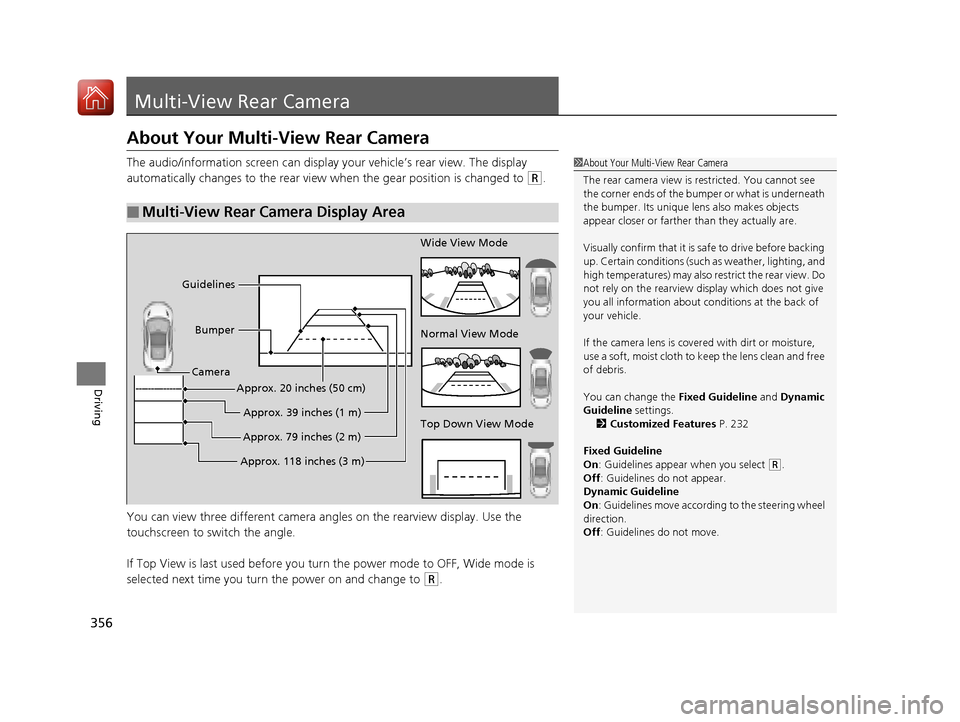
The audio/information screen can display your vehicle’s rear view. The display
automatically changes to the rear view when the gear position is changed to
(R.
You can view three different camera angl es on the rearview display. Use the
touchscreen to switch the angle.
If Top View is last used before you turn the power mode to OFF, Wide mode is
selected next time you turn the power on and change to
(R.
■Multi-View Rear Camera Display Area
1 About Your Multi-View Rear Camera
The rear camera view is restricted. You cannot see
the corner ends of the bum per or what is underneath
the bumper. Its unique le ns also makes objects
appear closer or farther than they actually are.
Visually confirm that it is safe to drive before backing
up. Certain conditions (such as weather, lighting, and
high temperatures) may also restrict the rear view. Do
not rely on the rearview display which does not give
you all information about conditions at the back of
your vehicle.
If the camera lens is cove red with dirt or moisture,
use a soft, moist cloth to keep the lens clean and free
of debris.
You can change the Fixed Guideline and Dynamic
Guideline settings. 2 Customized Features P. 232
Fixed Guideline
On : Guidelines appear when you select
(R.
Off : Guidelines do not appear.
Dynamic Guideline
On : Guidelines move according to the steering wheel
direction.
Off : Guidelines do not move.
Top Down View Mode Normal View Mode Wide View Mode
Guidelines
Bumper
Camera
Approx. 118 inches (3 m)Approx. 79 inches (2 m)
Approx. 39 inches (1 m)
Approx. 20 inches (50 cm)
17 NSX-31T6N6000.book 356 ページ 2016年4月22日 金曜日 午後3時44分