wheel Acura NSX 2017 Workshop Manual
[x] Cancel search | Manufacturer: ACURA, Model Year: 2017, Model line: NSX, Model: Acura NSX 2017Pages: 473, PDF Size: 16.01 MB
Page 320 of 473

Continued319
uuWhen Driving uShifting
Driving
Use the paddle shifters to change between 1st and 9th gears without removing your
hands from the steering wheel. The transmission will switch to the sequential mode.
■When the transmission is in (D (D-paddle shift mode):
The vehicle will go into the sequential m ode momentarily, and the gear selection
indicator becomes more prominent.
The sequential mode is automatically canc eled and the gear selection indicator
returns to ordinary display under the following conditions.
• Hold the
(+ paddle shifter for a few seconds.
• Once you start traveling at a constant speed.
• The vehicle comes to a complete stop.
• When you change to another IDS mode.
The sequential mode automatically shifts under following condition
• Accelerator pedal depressed beyond the click.
• Engine speed reaches near the tachometer’s red zone.
• Engine speed reaches idle speed while deceleration.
■Sequential Mode1Sequential Mode
When sequential mode is selected, the gasoline
engine powers the vehicle.
17 NSX-31T6N6000.book 319 ページ 2016年4月22日 金曜日 午後3時44分
Page 328 of 473

327
uuWhen Driving uIntegrated Dynamics System (IDS)
Driving
SPORT+ mode optimizes dynamic response
from all powertrain and chassis systems -
perfect for your favorite winding road.
• EV operation is elimin ated while operating
in SPORT+ .
TRACK mode gives maximum, consistent
performance from dynamic systems during
track day lapping sessions. Hybrid battery
charge is maintained for consistent
performance.
• VSA ® OFF indicator is illuminated in TRACK
mode indicating reduced stability control.
This allows more body side slip and wheel
spin before VSA ® begins to operate.
• Integrated Dynamics switch must be turned
and held to the right for several seconds to
engage TRACK mode.
■SPORT+ Mode
■TRACK Mode1TRACK Mode
Before choosing the TRACK mode, carefully read the
information about high performance driving.
2 High-Performance Driving P. 303
During TRACK mode, the climate control system may
weaken its function to pr ioritize cooling the High
Voltage battery.
17 NSX-31T6N6000.book 327 ページ 2016年4月22日 金曜日 午後3時44分
Page 331 of 473
330
uuWhen Driving uCruise Control
Driving
Cruise Control
Maintains a constant vehicle speed without having to keep your foot on the
accelerator. Use cruise control on freeways or open roads where you can travel at a
constant speed with little acceleration or deceleration.1Cruise Control
It may not be possible to maintain a constant speed
when driving uphill or downhill.
When not using cruise control:
Turn off cruise control by pressing the CRUISE
button.
3WARNING
Improper use of cruise control can lead to a
crash.
Use cruise control only when traveling on
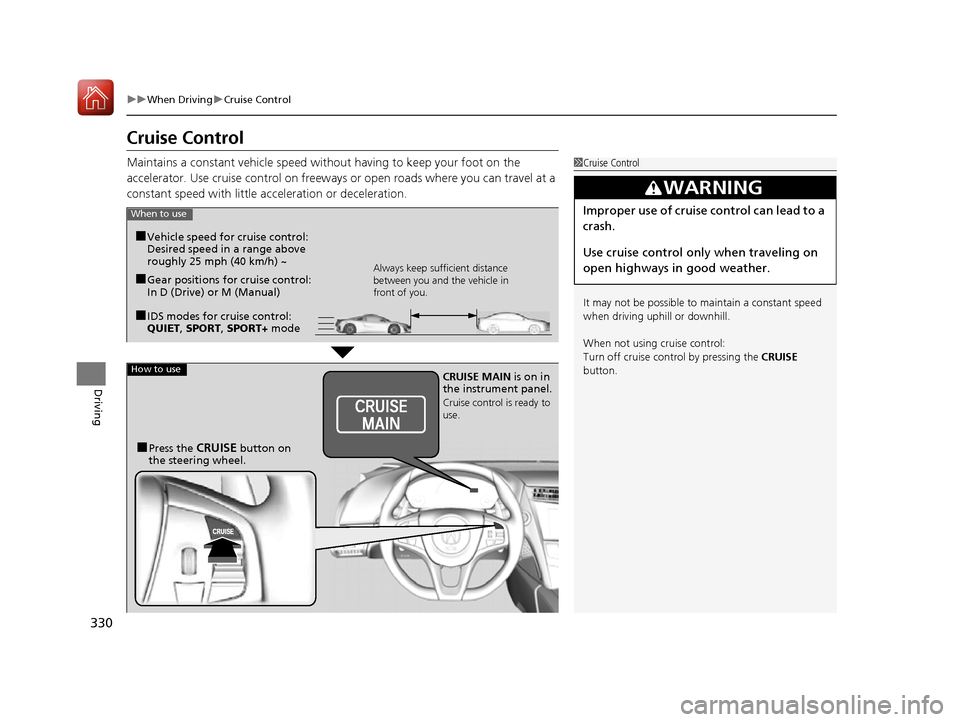
open highways in good weather.When to use
■Gear positions for cruise control:
In D (Drive) or M (Manual)Always keep sufficient distance
between you and the vehicle in
front of you.
■Vehicle speed for cruise control:
Desired speed in a range above
roughly 25 mph (40 km/h) ~
■IDS modes for cruise control:
QUIET , SPORT , SPORT+ mode
How to useCRUISE MAIN is on in
the instrument panel.
Cruise control is ready to
use.
■Press the CRUISE button on
the steering wheel.
17 NSX-31T6N6000.book 330 ページ 2016年4月22日 金曜日 午後3時44分
Page 333 of 473
uuWhen Driving uCruise Control
332
Driving
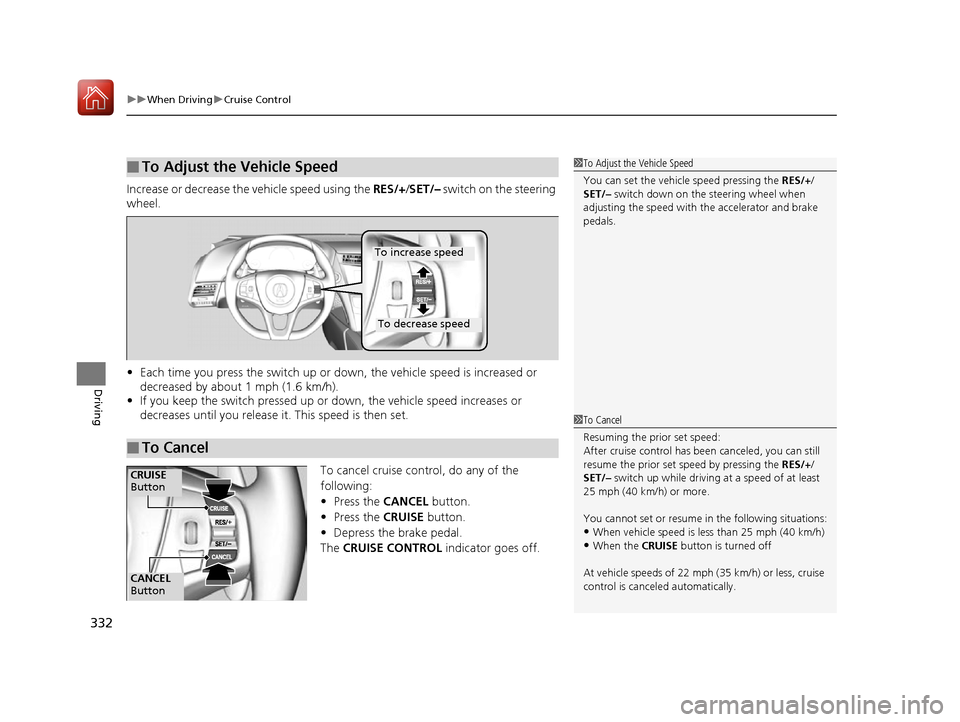
Increase or decrease the vehicle speed using the RES/+/SET/– switch on the steering
wheel.
• Each time you press the switch up or do wn, the vehicle speed is increased or
decreased by about 1 mph (1.6 km/h).
• If you keep the switch pressed up or down, the vehicle speed increases or
decreases until you release it . This speed is then set.
To cancel cruise control, do any of the
following:
•Press the CANCEL button.
• Press the CRUISE button.
• Depress the brake pedal.
The CRUISE CONTROL indicator goes off.
■To Adjust the Vehicle Speed1To Adjust the Vehicle Speed
You can set the vehicle speed pressing the RES/+/
SET/– switch down on the steering wheel when
adjusting the speed with the accelerator and brake
pedals.
■To Cancel
To decrease speed
To increase speed
1 To Cancel
Resuming the prior set speed:
After cruise control has be en canceled, you can still
resume the prior set speed by pressing the RES/+/
SET/– switch up while driving at a speed of at least
25 mph (40 km/h) or more.
You cannot set or resume in the following situations:
•When vehicle speed is less than 25 mph (40 km/h)•When the CRUISE button is turned off
At vehicle speeds of 22 m ph (35 km/h) or less, cruise
control is canceled automatically.
CANCEL
Button
CRUISE
Button
17 NSX-31T6N6000.book 332 ページ 2016年4月22日 金曜日 午後3時44分
Page 334 of 473

333
uuWhen Driving uVehicle Stability Assist (VSA ®), aka Electronic Stability Control (ESC), System
Continued
Driving
Vehicle Stability Assist (VSA ®), aka Electronic
Stability Control (ESC), System
Helps to stabilize the vehicl e during cornering if the vehicle turns more or less than
what was intended. It also assists in main taining traction on slippery surfaces. It does
so by regulating engine and motor output and selectively applying the brakes.
When VSA® activates, you may notice that the
engine and motor do not respond to the
accelerator. You may also notice some noise
from the hydraulic system. You will also see
the indicator blink.
■VSA ® Operation
1 Vehicle Stability Assist (VSA ®), aka Electronic Stability Control
(ESC), System
VSA ® may not function properly if tire type and size
are mixed. Make sure to use the same size and type
of tire, and the air pr essures as specified.
2 Tire and Wheel Replacement P. 399
When the VSA ® system indicator comes on and stays
on while driving, there ma y be a problem with the
system. While this may not interfere with normal
driving, have your vehicle checked by an authorized
Acura NSX dealer immediately.
VSA ® cannot enhance stability in all driving situations
and does not control the entire braking system. You
still need to drive and corner at speeds appropriate
for the conditions and always leave a sufficient
margin of safety.
The main function of the VSA ® system is generally
known as Electronic Stability Control (ESC). The
system also includes a traction control function.
VSA® System
Indicator
17 NSX-31T6N6000.book 333 ページ 2016年4月22日 金曜日 午後3時44分
Page 335 of 473
uuWhen Driving uVehicle Stability Assist (VSA® ), aka Electronic Stability Control (ESC), System
334
Driving
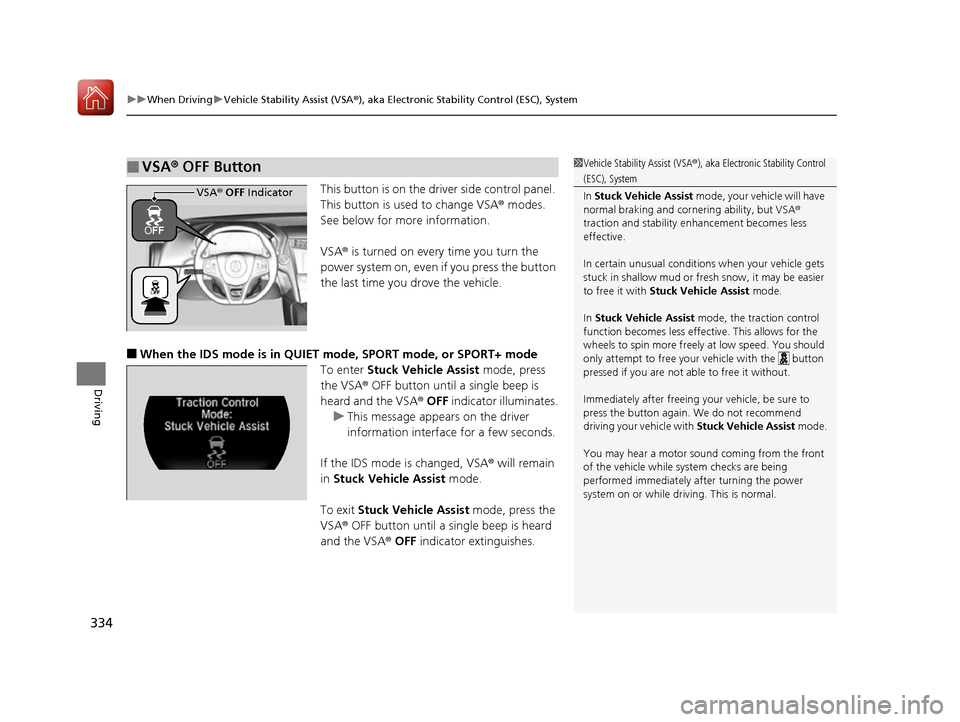
This button is on the driver side control panel.
This button is used to change VSA ® modes.
See below for more information.
VSA ® is turned on every time you turn the
power system on, even if you press the button
the last time you drove the vehicle.
■When the IDS mode is in QUIET mode, SPORT mode, or SPORT+ mode
To enter Stuck Vehicle Assist mode, press
the VSA® OFF button until a single beep is
heard and the VSA ® OFF indicator illuminates.
u This message appears on the driver
information interface for a few seconds.
If the IDS mode is changed, VSA ® will remain
in Stuck Vehicle Assist mode.
To exit Stuck Vehicle Assist mode, press the
VSA ® OFF button until a single beep is heard
and the VSA ® OFF indicator extinguishes.
■VSA ® OFF Button1 Vehicle Stability Assist (VSA ®), aka Electronic Stability Control
(ESC), System
In Stuck Vehicle Assist mode, your vehicle will have
normal braking and corn ering ability, but VSA®
traction and stability enhancement becomes less
effective.
In certain unusual conditions when your vehicle gets
stuck in shallow mud or fr esh snow, it may be easier
to free it with Stuck Vehicle Assist mode.
In Stuck Vehicle Assist mode, the traction control
function becomes less effective. This allows for the
wheels to spin more freely at low speed. You should
only attempt to free your vehicle with the button
pressed if you are not able to free it without.
Immediately after freeing your vehicle, be sure to
press the button again. We do not recommend
driving your vehicle with Stuck Vehicle Assist mode.
You may hear a motor sound coming from the front
of the vehicle while system checks are being
performed immediately after turning the power
system on or while driving. This is normal.
VSA ® OFF Indicator
17 NSX-31T6N6000.book 334 ページ 2016年4月22日 金曜日 午後3時44分
Page 338 of 473
337
uuWhen Driving uAgile Handling Assist System
Driving
Agile Handling Assist System
Lightly brakes each of the front and rear wheels, as needed, when you turn the
steering wheel, and helps support the vehicle’s stability and performance during
cornering.1 Agile Handling Assist System
The agile handling assist system cannot enhance
stability in all driving situat ions. You still need to drive
and corner at speeds appr opriate for the conditions
and always leave a sufficient margin of safety.
When the VSA ® system indicator comes on and stays
on while driving, the agil e handling assist system
does not activate.
You may hear a sound coming from the front of the
car while the system is activated. This is normal.
17 NSX-31T6N6000.book 337 ページ 2016年4月22日 金曜日 午後3時44分
Page 339 of 473

338
uuWhen Driving uSPORT HYBRID Super Handling-All Wheel DriveTM (SPORT HYBRID SH-AWD® )
Driving
SPORT HYBRID Super Handling-All Wheel DriveTM
(SPORT HYBRID SH-AWD ®)
The system controls and transfers varying amounts of motor and/or engine torque
to each wheel in accordance with the driving conditions.
SPORT HYBRID SH-AWD ® helps to enhance driving stability, and lets you handle
situations like slippery su rfaces better than when driving with standard two wheel
drive. However, the system does not help to enhance braking. Be cautious about the
following:
• It is still your responsibility to drive safely when you steer, accelerate, and apply
brakes.
• Leave a sufficient margin when braking on slippery surfaces.
1SPORT HYBRID Super Handling-All Wheel DriveTM (SPORT
HYBRID SH-AWD ®)
Do not drive through deep water.
The SPORT HYBRID SH-AWD ® system may not
function properly if tire type and size are mixed.
Make sure to use the same size and type of tire, and
the air pressures as specified. 2 Tire and Wheel Replacement P. 399
17 NSX-31T6N6000.book 338 ページ 2016年4月22日 金曜日 午後3時44分
Page 341 of 473

uuWhen Driving uTire Pressure Monitoring System (TPMS)
340
Driving
To select the tire pressure monitor, set the power
mode to ON, and roll the right selector wheel
until you see the tire pressure screen.
The pressure for each tire is displayed in PSI
(U.S.) or kPa (Canada).
Tire Pressures Low is displayed when a tire
has significantly low pressure. The specific tire
is displayed on the screen.
Tire Pressure Too Low For High Speed
Driving is displayed when driving at an
extremely high speed and one or more tires
are underinflated.
u Decelerate and drive your vehicle until
the message disappears.
■Tire Pressure Monitor1Tire Pressure Monitor
The pressure displayed on the multi-information
display can be slightly different from the actual
pressure as measured by a gauge. If there is a
significant di fference between the two values, or if
the low tire pressure/TPMS indicator and the message
on the multi-information di splay do not go off after
you have inflated the tire to the specified pressure,
have the system checked by an authorized Acura NSX
dealer.
Tire Pressure Monitor Problem may appear on the
driver information interface if there is a problem with
the TPMS. Please have the system checked by an
authorized Acura NSX dealer.
17 NSX-31T6N6000.book 340 ページ 2016年4月22日 金曜日 午後3時44分
Page 343 of 473

342
uuWhen Driving uTire Pressure Monitoring System (TPMS) - Required Federal Explanation
Driving
Please note that the TPMS is not a substitute for proper tire
maintenance, and it is the driver ’s responsibility to maintain
correct tire pressure, even if un der-inflation has not reached the
level to trigger illumina tion of the TPMS low ti re pressure telltale.
Your vehicle has also been eq uipped with a TPMS malfunction
indicator to indicate when the sy stem is not operating properly.
The TPMS malfunction indicator is combined with the low tire
pressure telltale. When the system detects a malfunction, the
telltale will flash fo r approximately one minute and then remain
continuously illuminated. This sequence will continue upon
subsequent vehicle start-ups as long as the malfunction exists.
When the malfunction indicator is illuminated, the system may
not be able to detect or signal low tire pressure as intended.
TPMS malfunctions may occur for a variety of reasons, including
the installation of replacement or alternate tires or wheels on the
vehicle that prevent the TPMS from functioning properly.
Always check the TPMS malfunction telltale after replacing one or
more tires or wheels on your vehicle to ensure that the
replacement or alternate tires and wheels allow the TPMS to
continue to function properly.
17 NSX-31T6N6000.book 342 ページ 2016年4月22日 金曜日 午後3時44分