Minder Acura NSX 2018 User Guide
[x] Cancel search | Manufacturer: ACURA, Model Year: 2018, Model line: NSX, Model: Acura NSX 2018Pages: 489, PDF Size: 27.64 MB
Page 249 of 489
248
uuCustomized Features u
Features
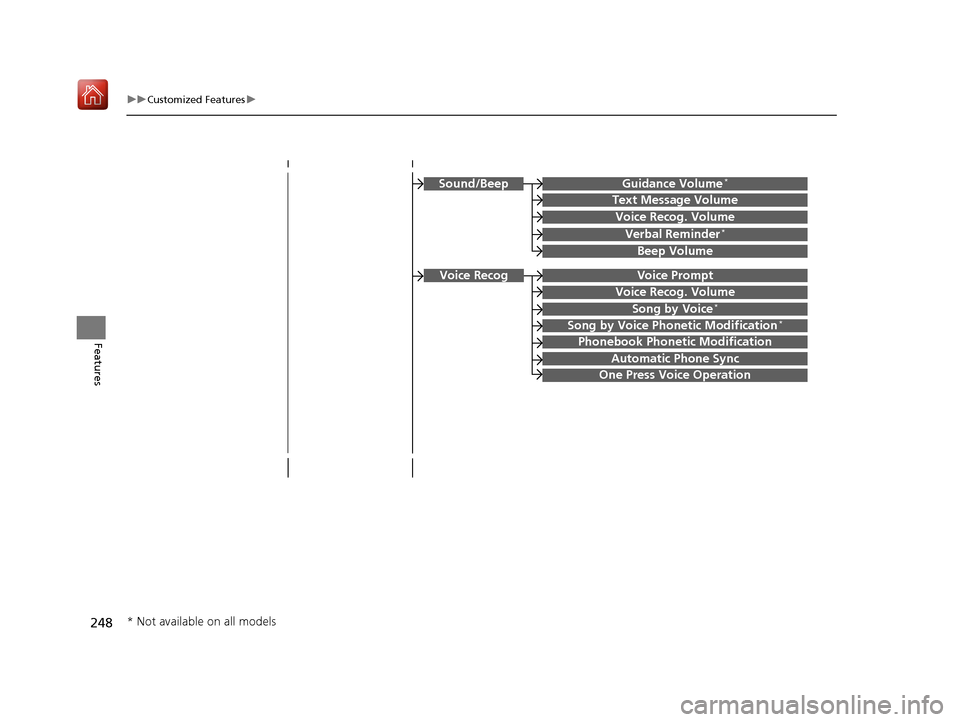
Guidance Volume*
Text Message Volume
Sound/Beep
Voice Recog. Volume
Verbal Reminder*
Beep Volume
Voice Prompt
Voice Recog. Volume
Song by Voice*
Song by Voice Phonetic Modification*
Phonebook Phonetic Modification
Automatic Phone Sync
One Press Voice Operation
Voice Recog
* Not available on all models
18 NSX-31T6N6100.book 248 ページ 2017年10月27日 金曜日 午後1時39分
Page 260 of 489
259
uuCustomized Features u
Continued
Features
*1:Default SettingSetup
Group Customizable Features Descri
ption Selectable Settings
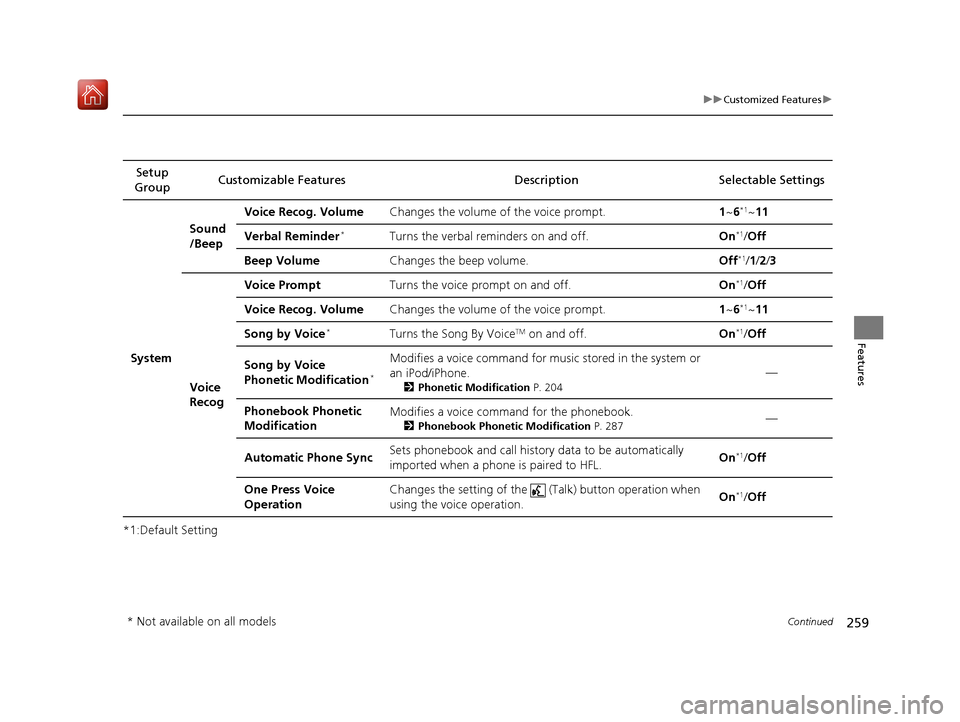
System Sound
/Beep
Voice Recog. Volume
Changes the volume of the voice prompt. 1~6
*1~11
Verbal Reminder
*Turns the verbal reminders on and off. On*1/Off
Beep Volume Changes the beep volume. Off
*1/1 /2 /3
Voice
Recog Voice Prompt
Turns the voice prompt on and off. On
*1/Off
Voice Recog. Volume Changes the volume of the voice prompt. 1~6
*1~11
Song by Voice
*Turns the Song By VoiceTM on and off. On*1/Off
Song by Voice
Phonetic Modification
*
Modifies a voice command for musi c stored in the system or
an iPod/iPhone.
2 Phonetic Modification P. 204
—
Phonebook Phonetic
Modification Modifies a voice command for the phonebook.
2
Phonebook Phonetic Modification P. 287—
Automatic Phone Sync Sets phonebook and call history data to be automatically
imported when a phone is paired to HFL.
On
*1/
Off
One Press Voice
Operation Changes the setting of the (Talk) button operation when
using the voice operation.
On
*1/
Off
* Not available on all models
18 NSX-31T6N6100.book 259 ページ 2017年10月27日 金曜日 午後1時39分
Page 368 of 489
367
uuParking Your Vehicle uParking Sensor System*
Driving
1. Make sure that the parking sensor system is not activated. Set the power mode to
VEHICLE OFF.
2. Press and hold the parking sensor system button, and set the power mode to ON.
3. Keep pressing the button for ten second s. Release the button when the indicator
in the button blinks.
4. Press the button again. The indi cator in the button goes off.
u The beeper sounds twice. The r ear sensors are now turned off.
To turn the rear sensors on again, follo w the above procedure. The beeper sounds
three times when the rear sensors come back on.
■Turning Off All Rear Sensors1 Turning Off All Rear Sensors
When you select
(R, the indicator in the parking
sensor system button blinks as a reminder that the
rear sensors have been turned off.
18 NSX-31T6N6100.book 367 ページ 2017年10月27日 金曜日 午後1時39分
Page 374 of 489
373
Driving
Turbo Engine Vehicle
Handling Precautions
The turbocharger is a high-precision device designed to obtain greater horsepower
by delivering a large volume of compressed air into the engine using a turbine driven
by the engine’s exhaust gas pressure.
• When the engine is cold just after starting, avoid hard or sudden
acceleration.
• Always replace the engine oil and en gine oil filter according to the
Maintenance Minder
TM.
The turbine rotates at very high speeds over 100,000 rpm and its temperature
reaches over 1,292°F (700°C). It is lubricated and cooled by engine oil.
If you fail to replace the engine oil and filt er at the scheduled distance or interval,
deteriorated engine oil may cause failure su ch as sticking and abnormal noise of the
turbine bearing.
1 Turbo Engine Vehicle
The scheduled maintenance intervals for replacing
the engine oil and filt er is indicated on the
Maintenance Minder
TM. Follow the information of
when to replace them.
2 Maintenance Minder
TM P. 379
2 Recommended Engine Oil P. 390
The temperature gauge needle is at the mark
when you restart the engi ne after driving under high
load conditions such as at high speed or in hilly
terrain. This is normal. The gauge needle goes down
after you idle or drive the vehicle for about one
minute.
H
18 NSX-31T6N6100.book 373 ページ 2017年10月27日 金曜日 午後1時39分
Page 376 of 489
375
Maintenance
This chapter discusses basic maintenance.
Before Performing MaintenanceInspection and Maintenance ............ 376
Safety When Performing Maintenance .... 377Parts and Fluids Used in Maintenance Service ........................................... 378
Maintenance Minder
TM..................... 379
Maintenance Under the Hood and Hatch Maintenance Items Under the Hood and Hatch ............................................. 385
Opening the Hatch .......................... 387
Opening the Hood ........................... 388
Engine Compartment Cover ............. 389
Recommended Engine Oil ................ 390
Oil Check ......................................... 391
Adding Engine Oil ............................ 394 Cooling System ................................ 396
Inverter Coolant ............................... 398
Transmission Fluids .......................... 399
Brake Fluid ....................................... 400
Refilling Window Washer Fluid......... 400
Replacing Light Bulbs ....................... 401Checking and Maintaining Wiper Blades.... 404Checking and Maintaining Tires
Checking Tires ................................. 407
Tire and Loading Information Label ..... 408Tire Labeling .................................... 408DOT Tire Quality Grading (U.S. Vehicles) ...... 410Wear Indicators................................ 412
Tire Service Life ................................ 412
Tire and Wheel Replacement............ 413 Tire Rotation .................................... 414
Winter Tires ..................................... 415
Cold Weather Driving ...................... 416
12-Volt Battery ................................. 417
Remote Transmitter Care Replacing the Button Battery ........... 418
Climate Control System Maintenance.... 419CleaningInterior Care .................................... 420
Exterior Care.................................... 422
Accessories and Modifications Accessories ...................................... 426
Modifications................................... 427
Storage .............................................. 428
18 NSX-31T6N6100.book 375 ページ 2017年10月27日 金曜日 午後1時39分
Page 380 of 489
379
Maintenance
Maintenance MinderTM
Select the Maintenance Minder to see maintenance items that are due soon and to
see the percentage of life remaining in the engine oil.
When the engine oil life is less than 15%, a Maintenance Minder message will
appear every time you set the power mode to ON, reminding you to bring your
vehicle to an authorized Acura NSX dealer for service.
18 NSX-31T6N6100.book 379 ページ 2017年10月27日 金曜日 午後1時39分
Page 381 of 489
380
uuMaintenance MinderTMuTo Use Maintenance MinderTM
Maintenance
To Use Maintenance MinderTM
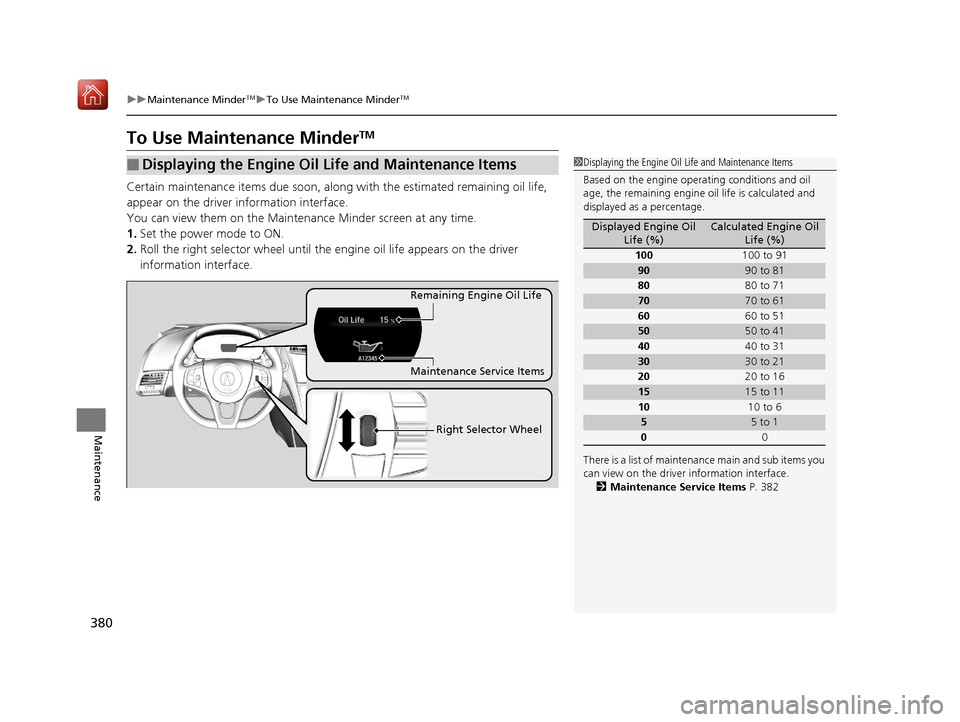
Certain maintenance items due soon, along with the estimated remaining oil life,
appear on the driver information interface.
You can view them on the Maintenance Minder screen at any time.
1. Set the power mode to ON.
2. Roll the right selector wheel until the engine oil life app ears on the driver
information interface.
■Displaying the Engine Oil Life and Maintenance Items1 Displaying the Engine Oil Life and Maintenance Items
Based on the engine opera ting conditions and oil
age, the remaining engine oi l life is calculated and
displayed as a percentage.
There is a list of maintena nce main and sub items you
can view on the driver information interface.
2 Maintenance Service Items P. 382
Displayed Engine Oil
Life (%)Calculated Engine Oil Life (%)
100 100 to 91
9090 to 81
80 80 to 71
7070 to 61
60 60 to 51
5050 to 41
40 40 to 31
3030 to 21
20 20 to 16
1515 to 11
10 10 to 6
55 to 1
0 0
Remaining Engine Oil Life
Maintenance Service Items
Right Selector Wheel
18 NSX-31T6N6100.book 380 ページ 2017年10月27日 金曜日 午後1時39分
Page 382 of 489
381
uuMaintenance MinderTMuTo Use Maintenance MinderTM
Continued
Maintenance
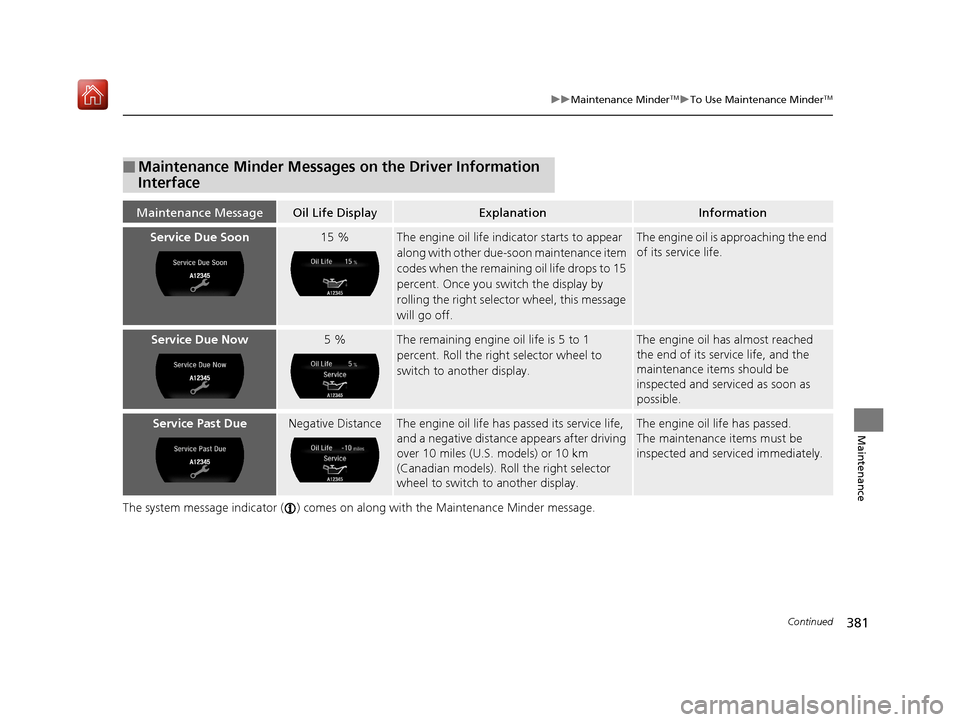
The system message indicator ( ) comes on along with the Maintenance Minder message.
■Maintenance Minder Messages on the Driver Information
Interface
Maintenance MessageOil Life DisplayExplanationInformation
Service Due Soon15 %The engine oil life indicator starts to appear
along with other due-soon maintenance item
codes when the remaining oil life drops to 15
percent. Once you switch the display by
rolling the right selector wheel, this message
will go off.The engine oil is approaching the end
of its service life.
Service Due Now5 %The remaining engine oil life is 5 to 1
percent. Roll the right selector wheel to
switch to another display.The engine oil has almost reached
the end of its service life, and the
maintenance items should be
inspected and servic ed as soon as
possible.
Service Past DueNegative DistanceThe engine oil life has passed its service life,
and a negative distance appears after driving
over 10 miles (U.S. models) or 10 km
(Canadian models). Roll the right selector
wheel to switch to another display.The engine oil life has passed.
The maintenance items must be
inspected and serviced immediately.
18 NSX-31T6N6100.book 381 ページ 2017年10月27日 金曜日 午後1時39分
Page 383 of 489
382
uuMaintenance MinderTMuTo Use Maintenance MinderTM
Maintenance
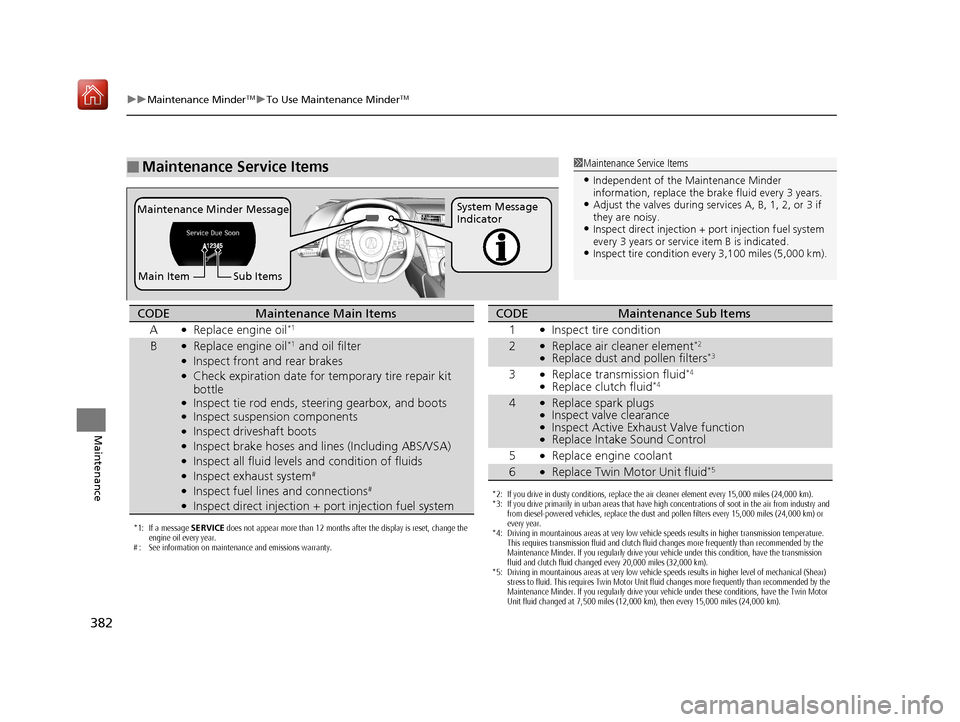
■Maintenance Service Items1Maintenance Service Items
•Independent of the Maintenance Minder
information, replace the brake fluid every 3 years.
•Adjust the valves during services A, B, 1, 2, or 3 if
they are noisy.
•Inspect direct injection + port injection fuel system
every 3 years or service item B is indicated.
•Inspect tire condition ev ery 3,100 miles (5,000 km).
Maintenance Minder Message System Message
Indicator
Main Item Sub Items
*1: If a message SERVICE does not appear more than 12 months after the display is reset, change the
engine oil every year.
# : See information on maintenance and emissions warranty.
CODEMaintenance Main Items
A
●Replace engine oil*1
B●Replace engine oil*1 and oil filter●Inspect front and rear brakes●Check expiration date for temporary tire repair kit
bottle
●Inspect tie rod ends, steering gearbox, and boots●Inspect suspension components●Inspect driveshaft boots●Inspect brake hoses and li nes (Including ABS/VSA)●Inspect all fluid levels and condition of fluids●Inspect exhaust system#
●Inspect fuel lines and connections#
●Inspect direct injection + port injection fuel system*2: If you drive in dusty conditions, replace the air cleaner element every 15,000 miles (24,000 km).
*3: If you drive primarily in urban areas that have high concentrations of soot in the air from industry and
from diesel-powered vehicles, replace the dust and pollen filters every 15,000 miles (24,000 km) or
every year.
*4: Driving in mountainous areas at very low vehicle speeds results in higher transmission temperature. This requires transmission fluid and clutch fluid changes more frequently than recommended by the
Maintenance Minder. If you regularly drive your vehicle under this condition, have the transmission
fluid and clutch fluid changed every 20,000 miles (32,000 km).
*5: Driving in mountainous areas at very low vehicle speeds results in higher level of mechanical (Shear) stress to fluid. This requires Twin Motor Unit fluid changes more frequently than recommended by the
Maintenance Minder. If you regularly drive your vehicle under these conditions, have the Twin Motor
Unit fluid changed at 7,500 miles (12,000 km), then every 15,000 miles (24,000 km).
CODEMaintenance Sub Items
1
●Inspect tire condition
2●Replace air cleaner element*2
●Replace dust and pollen filters*3
3●Replace transmission fluid*4
●Replace clutch fluid*4
4●Replace spark plugs●Inspect valve clearance●Inspect Active Exhaust Valve function●Replace Intake Sound Control
5
●Replace engine coolant
6●Replace Twin Motor Unit fluid*5
18 NSX-31T6N6100.book 382 ページ 2017年10月27日 金曜日 午後1時39分
Page 384 of 489
Continued383
uuMaintenance MinderTMuTo Use Maintenance MinderTM
Maintenance
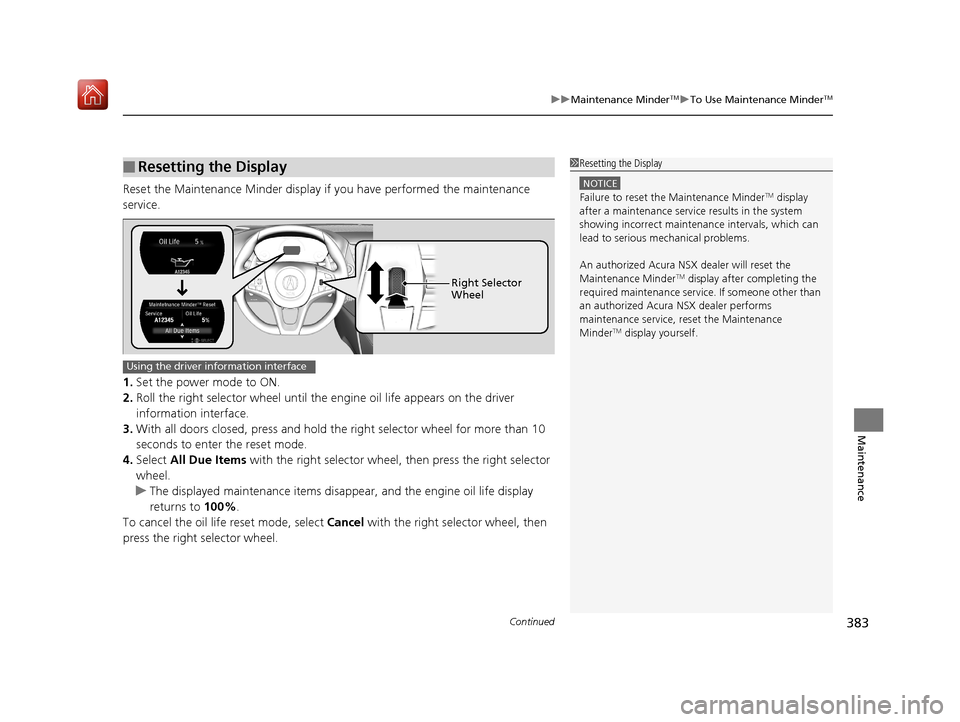
Reset the Maintenance Minder display if you have performed the maintenance
service.
1. Set the power mode to ON.
2. Roll the right selector wheel until the en gine oil life appears on the driver
information interface.
3. With all doors closed, press and hold the right selector wheel for more than 10
seconds to enter the reset mode.
4. Select All Due Items with the right selector wheel, then press the right selector
wheel.
u The displayed maintenance items disapp ear, and the engine oil life display
returns to 100%.
To cancel the oil life reset mode, select Cancel with the right selector wheel, then
press the right selector wheel.
■Resetting the Display1 Resetting the Display
NOTICE
Failure to reset the Maintenance MinderTM display
after a maintenance servic e results in the system
showing incorrect maintena nce intervals, which can
lead to serious mechanical problems.
An authorized Acura NSX dealer will reset the
Maintenance Minder
TM display after completing the
required maintenance service. If someone other than
an authorized Acura NSX dealer performs
maintenance service, reset the Maintenance
Minder
TM display yourself.
Right Selector
Wheel
Using the driver information interface
18 NSX-31T6N6100.book 383 ページ 2017年10月27日 金曜日 午後1時39分