fuel Acura NSX 2018 User Guide
[x] Cancel search | Manufacturer: ACURA, Model Year: 2018, Model line: NSX, Model: Acura NSX 2018Pages: 489, PDF Size: 27.64 MB
Page 99 of 489
98
uuGauges and Displays uDriver Information Interface
Instrument Panel
Driver Information Interface
The driver information interface shows the odometer, trip meter, outside
temperature indicator, and other gauges. It also displays important messages such
as warnings and other helpful information.
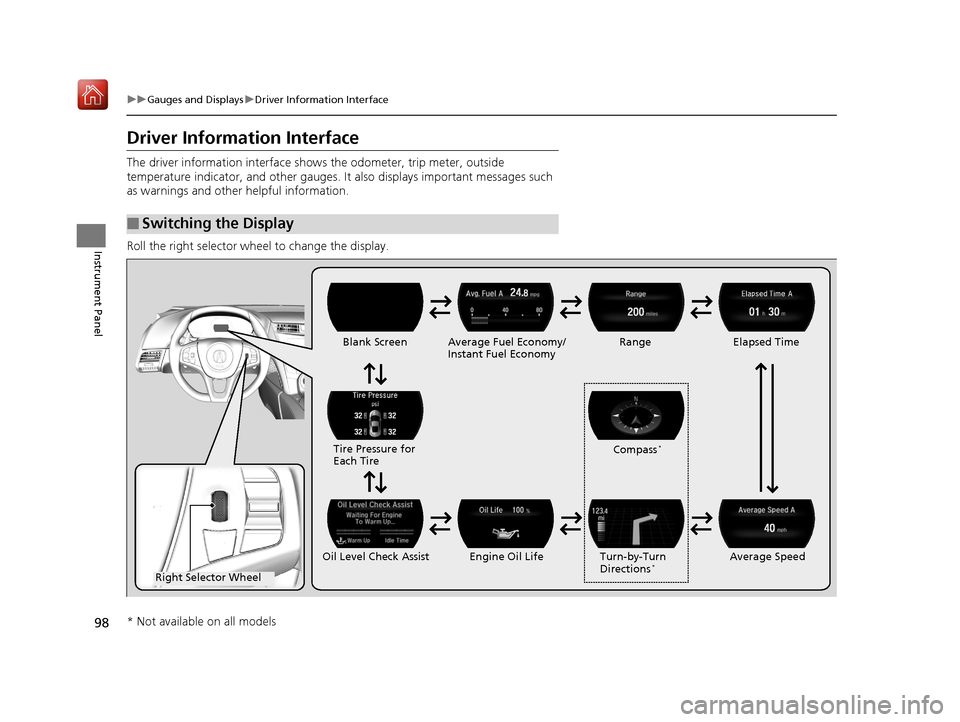
Roll the right selector wheel to change the display.
■Switching the Display
Right Selector Wheel Engine Oil LifeElapsed Time
Blank Screen
Average Speed
Range
Average Fuel Economy/
Instant Fuel Economy
Tire Pressure for
Each Tire
Turn-by-Turn
Directions
*Oil Level Check Assist Compass
*
* Not available on all models
18 NSX-31T6N6100.book 98 ページ 2017年10月27日 金曜日 午後1時39分
Page 101 of 489
uuGauges and Displays uDriver Information Interface
100
Instrument Panel
Shows the total number of miles (U.S.) or ki lometers (Canada) that your vehicle has
accumulated.
Shows the total number of miles (U.S.) or kilometers (Canada) driven since the last
reset. Meters A and B can be used to measure two separate trips.
■Resetting a trip meter
To reset a trip meter, display it, then press and hold the TRIP button. The trip meter
is reset to 0.0.
When a trip meter is reset, the average fuel economy, the elapsed time, and the
average speed are also reset.
Shows the outside temperature in Fahr enheit (U.S.) or Celsius (Canada).
■Adjusting the outside temperature display
Adjust the temperature reading up to ± 5° F or ± 3°C if the temperature reading
seems incorrect.
■Odometer
■Trip Meter
■Outside Temperature
1 Trip Meter
Switch between trip meter A and trip meter B by
pressing the TRIP button.
1Outside Temperature
The temperature sensor is in the front bumper.
Road heat and exhaust fr om another vehicle can
affect the temperature reading when your vehicle
speed is less than 19 mph (30 km/h).
It may take several minutes for the display to be
updated after the temperature reading has stabilized.
Use the audio system’s customized features to
correct the temperature.
2 Customized Features P. 244
18 NSX-31T6N6100.book 100 ページ 2017年10月27日 金曜日 午後1時39分
Page 102 of 489
Continued101
uuGauges and Displays uDriver Information Interface
Instrument Panel
Shows the estimated average fuel econom y of each trip meter in mpg (U.S.) or
l/100 km (Canada). The display is updated at set intervals. When a trip meter is reset,
the average fuel economy is also reset.
Shows the instant fuel economy as a bar gr aph in mpg (U.S.) or l/100 km (Canada).
Shows the estimated distance you can travel on the remaining power and fuel. This
distance is estimated from the fuel economy of your previous trips.
Shows the time elapsed since Trip A or Trip B was reset.
Shows the average speed in mph (U.S.) or km/h (Canada) since Trip A or Trip B was
reset.
■Average Fuel Economy
■Instant Fuel Economy
■Range
■Elapsed Time
■Average Speed
1 Average Fuel Economy
You can change when to reset the average fuel
economy.
2 Customized Features P. 244
1Range
The displayed ra nge may change even when the
vehicle is stationary.
1 Elapsed Time
You can change when to reset the elapsed time.
2 Customized Features P. 244
1Average Speed
You can change when to reset the average speed.
2 Customized Features P. 244
18 NSX-31T6N6100.book 101 ページ 2017年10月27日 金曜日 午後1時39分
Page 235 of 489
234
uuGeneral Information on the Audio System uHonda App License Agreement
Features
E. Information Collection and Storage
1. Information Collection , Use, Transmission and Storage of Data. Consent to Use of Data:
You agree that HONDA and PROVIDERS may
collect and use your information gathered in any manner as part of product support services related to the SOFTWARE or related services.
HONDA may share such information with third parties, including, without limitation, PROV IDERS, third party software and service s
suppliers, their affiliates and/or their design ated agents, solely to improve their products or to provide services or technologies to you.
HONDA, third party software and systems supp liers, their affiliates and/or their designated agent may disclose this information to others,
but not in a form that pe rsonally identifies you.
2. Information Storage.
Depending on the type of multimedia system you have in your VEHICLE, certain information may be stored for ease
of use of the SOFTWARE including, without limitation, search hi story, location history in certain applications, previous and saved
destinations, map locations within certain applications, and device numbers and contact information.
(a) Vehicle Health Information.
Your VEHICLE may remotely trans mit information regarding the status and health of your VEHICLE
(“VEHICLE INFORMATION”) to HONDA without notification to you. VEHICLE INFORMATION may contain VEHICLE maintenance and
malfunction status that is derived from VEHICLE diagnostic data and includes, but is not limited to, status of powered doors and windows,
battery life data, battery charging data, VEHICLE speed, coolant temperat ure, air compressor revolution, output power, warning codes,
diagnostic trouble codes, fuel injection volume, and engine rotati ons per minute. VEHICLE HEALTH INFORMATION may be used by HONDA
for research and development, to deliver HO NDA SERVICES and information to you, and to contact you, and is retained only for a period
of time necessary to fulfill these goals.
(b) VEHICLE Geolocation Data (non-navigation/map based).
If you opt-in to geolocation-based SERVICES, your vehicle’s geolocation data
(latitude and longitude) will be automatically sent from your VEHICLE to HONDA and PROVIDERS.
(c) You understand that the inputting or uploading of information to your VEHICLE’s multimedia system or the SOFTWARE or SERVICES is
at your own risk and that HONDA is not resp onsible for unauthorized access to or use of any personal or other information. All information
uploaded to the SOFTWARE and SERVICES may be stored on your VEHI CLES’s multimedia system and you understand that the security and
safety of your VEHICLE’s multimedia system is your sole responsibility.
18 NSX-31T6N6100.book 234 ページ 2017年10月27日 金曜日 午後1時39分
Page 263 of 489
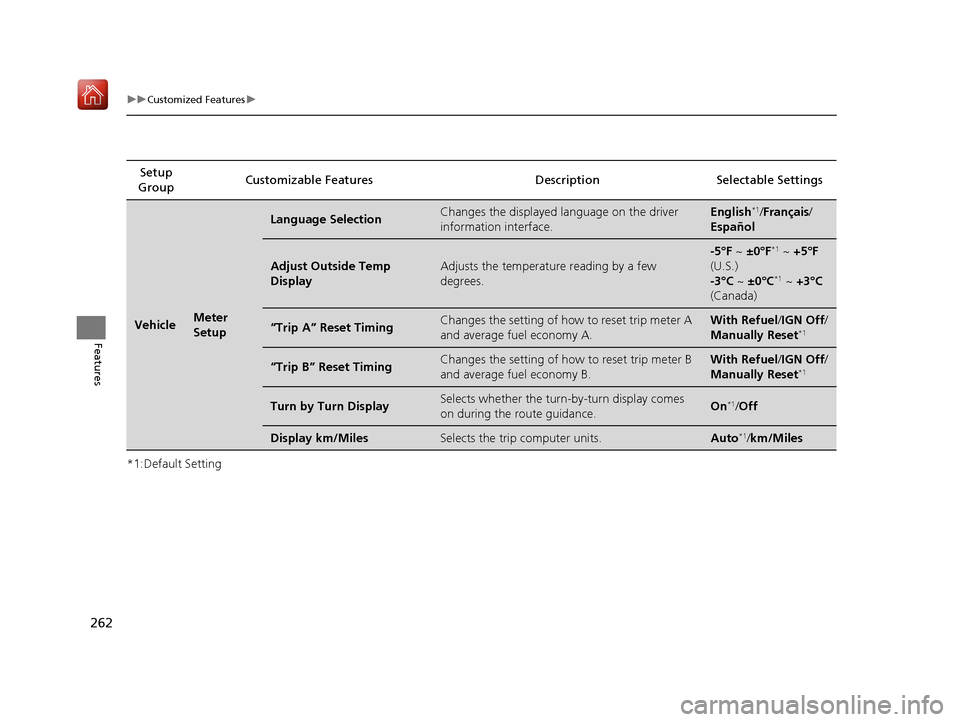
262
uuCustomized Features u
Features
*1:Default SettingSetup
Group Customizable Features Desc
ription Selectable Settings
VehicleMeter
Setup
Language SelectionChanges the displayed language on the driver
information interface.English*1/Français /
Español
Adjust Outside Temp
DisplayAdjusts the temperature reading by a few
degrees.
-5°F ~ ±0°F*1 ~ +5°F
(U.S.)
-3°C ~ ±0°C
*1 ~ +3°C
(Canada)
“Trip A” Reset TimingChanges the setting of how to reset trip meter A
and average fuel economy A.With Refuel /IGN Off /
Manually Reset*1
“Trip B” Reset TimingChanges the setting of how to reset trip meter B
and average fuel economy B.With Refuel /IGN Off /
Manually Reset*1
Turn by Turn DisplaySelects whether the turn-by-turn display comes
on during the route guidance.On*1/ Off
Display km/MilesSelects the trip computer units.Auto*1/km/Miles
18 NSX-31T6N6100.book 262 ページ 2017年10月27日 金曜日 午後1時39分
Page 310 of 489
309
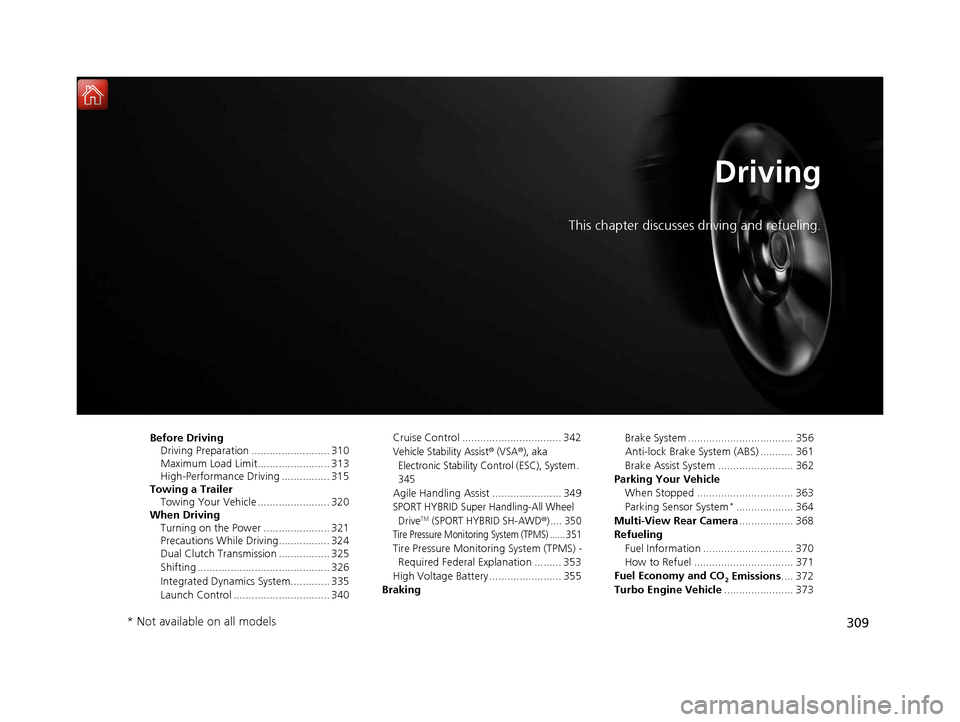
Driving
This chapter discusses driving and refueling.
Before DrivingDriving Preparation .......................... 310
Maximum Load Limit........................ 313
High-Performance Driving ................ 315
Towing a Trailer Towing Your Vehicle ........................ 320
When Driving Turning on the Power ...................... 321
Precautions While Driving................. 324
Dual Clutch Transmission ................. 325
Shifting ............................................ 326
Integrated Dynamics System............. 335
Launch Control ................................ 340 Cruise Control ................................. 342
Vehicle Stability Assist® (VSA®), aka
Electronic Stability Control (ESC), System .
345
Agile Handling Assist ....................... 349
SPORT HYBRID Super Handling-All Wheel DriveTM (SPORT HYBRID SH-AWD®) .... 350
Tire Pressure Monitoring System (TPMS) ...... 351
Tire Pressure Monitoring System (TPMS) - Required Federal Explanation ......... 353
High Voltage Battery ........................ 355
Braking Brake System ................................... 356
Anti-lock Brake System (ABS) ........... 361
Brake Assist System ......................... 362
Parking Your Vehicle When Stopped ................................ 363
Parking Sensor System
*................... 364
Multi-View Rear Camera .................. 368
Refueling Fuel Information .............................. 370
How to Refuel ................................. 371
Fuel Economy and CO
2 Emissions .... 372
Turbo Engine Vehicle ....................... 373
* Not available on all models
18 NSX-31T6N6100.book 309 ページ 2017年10月27日 金曜日 午後1時39分
Page 329 of 489
uuWhen Driving uShifting
328
Driving
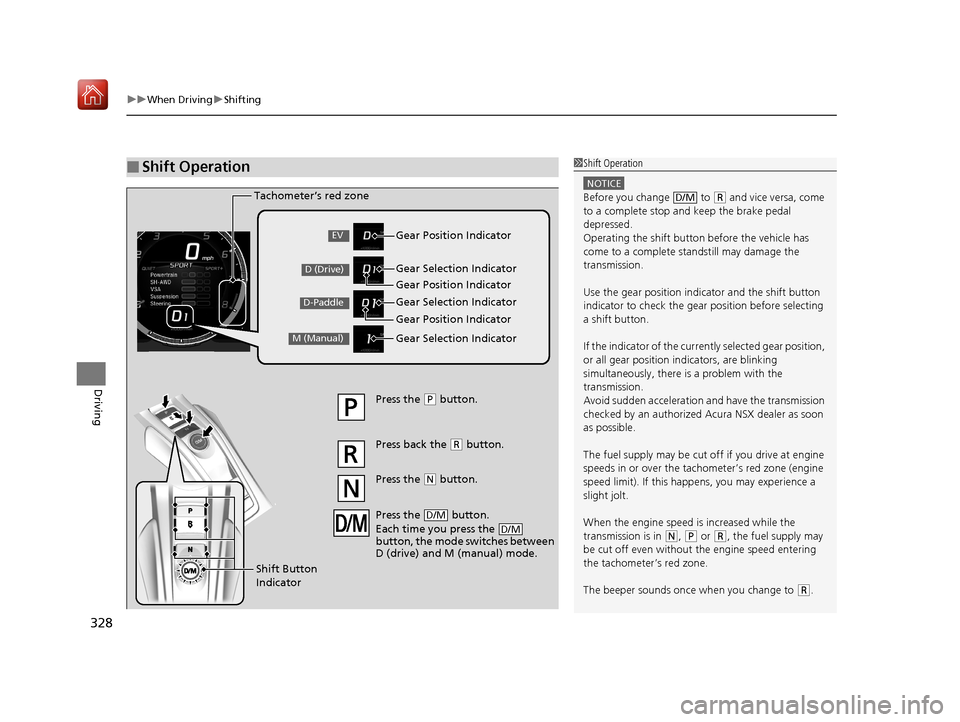
■Shift Operation1Shift Operation
NOTICE
Before you change to (R and vice versa, come
to a complete stop and keep the brake pedal
depressed.
Operating the shift button before the vehicle has
come to a complete standstill may damage the
transmission.
Use the gear position indicator and the shift button
indicator to check the gear position before selecting
a shift button.
If the indicator of the curren tly selected gear position,
or all gear position in dicators, are blinking
simultaneously, there is a problem with the
transmission.
Avoid sudden acceleration and have the transmission
checked by an authorized Acura NSX dealer as soon
as possible.
The fuel supply may be cut of f if you drive at engine
speeds in or over the tachometer’s red zone (engine
speed limit). If this happe ns, you may experience a
slight jolt.
When the engine speed is increased while the
transmission is in
( N, (P or (R, the fuel supply may
be cut off even without the engine speed entering
the tachometer’s red zone.
The beeper sounds once when you change to
( R.
D/M
Gear Position Indicator
Tachometer’s red zone
Press the (
P button.
Press back the ( R button.
Press the
( N button.
Press the button.
Each time you press the
button, the mode switches between
D (drive) and M (manual) mode.
D/M
D/M
Shift Button
Indicator Gear Selection Indicator
Gear Position Indicator
Gear Selection Indicator
Gear Position Indicator
Gear Selection IndicatorEV
D (Drive)
D-Paddle
M (Manual)
18 NSX-31T6N6100.book 328 ページ 2017年10月27日 金曜日 午後1時39分
Page 354 of 489
353
uuWhen Driving uTire Pressure Monitoring System (TPMS) - Required Federal Explanation
Continued
Driving
Tire Pressure Monitoring System (TPMS) - Required
Federal Explanation
Each tire, including the spare (if provided), should be checked
monthly when cold and inflated to the inflation pressure
recommended by the vehicle manufa cturer on the vehicle placard
or tire inflation pressure label.
(If your vehicle has tires of a diff erent size than the size indicated
on the vehicle placard or tire inflation pressure label, you should
determine the proper tire inflat ion pressure for those tires.)
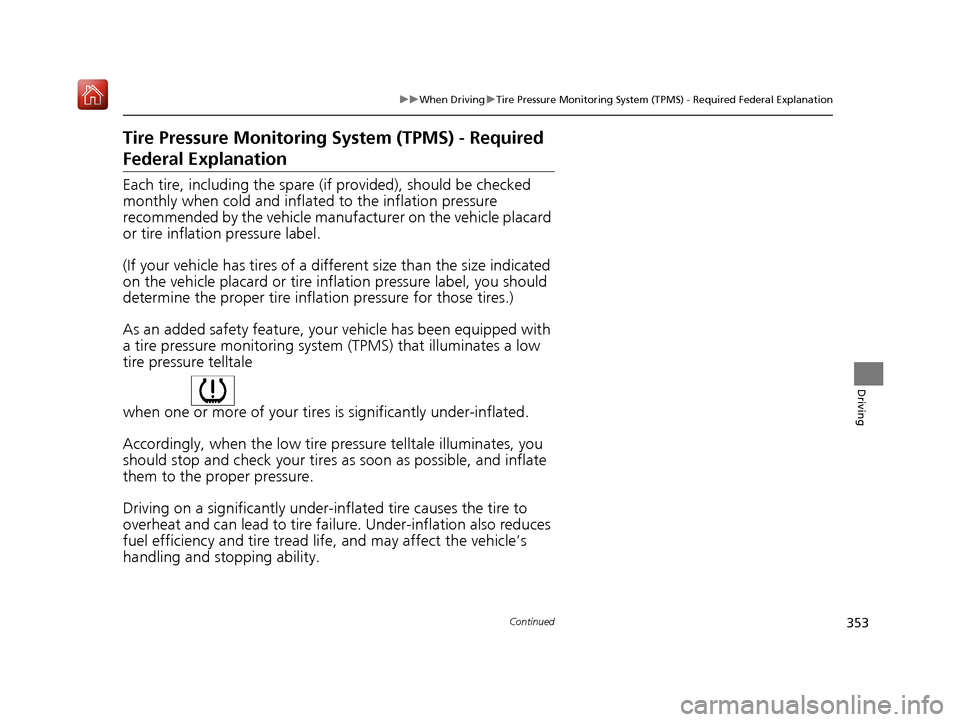
As an added safety feature, your vehicle has been equipped with
a tire pressure monitoring system (TPMS) that illuminates a low
tire pressure telltale
when one or more of your tires is significantly under-inflated.
Accordingly, when the low tire pressure telltale illuminates, you
should stop and check your tires as soon as possible, and inflate
them to the proper pressure.
Driving on a significantly under-inf lated tire causes the tire to
overheat and can lead to tire fail ure. Under-inflation also reduces
fuel efficiency and tire tread life, and may affect the vehicle’s
handling and stopping ability.
18 NSX-31T6N6100.book 353 ページ 2017年10月27日 金曜日 午後1時39分
Page 371 of 489
370
Driving
Refueling
Fuel Information
■Fuel requirement
Use of lower octane gasoline can cause occasional metallic knocking noise in the
engine and will result in decreased engine performance.
We recommend that you use a pump octane of 93 or higher to maximize the
performance of the engine.
Use of gasoline with a pump octane less than 91 can lead to engine damage.
■Top tier detergent gasoline
Because the level of detergency and additives in gasoline vary in the market, Acura
endorses the use of “TOP TIER Deterg ent Gasoline” where available to help
maintain the performance and reliability of your vehicle. TOP TIER Detergent
Gasoline meets a new gasoline standard join tly established by leading automotive
manufacturers to meet the need s of today’s advanced engines.
Qualifying gasoline retailers will, in most ca ses, identify their gasoline as having met
“TOP TIER Detergent Gasoline” standards at the retail location. This fuel is
guaranteed to contain the proper level of detergent additives and be free of metallic
additives. The proper level of detergent additives, and absence of harmful metallic
additives in gasoline, help avoid build-up of deposits in your engine and emission
control system.
For further important fuel-rel ated information for your vehicle, or on information on
gasoline that does not contain MMT, visit Acura Owners at owners.acura.com. In
Canada, visit www.acura.ca for additional informatio n on gasoline. For more
information on top tier gasoline, visit www.toptiergas.com.
■Fuel tank capacity: 15.6 US gal (59.0 liters)
Unleaded premium gasoline, pump octane number 91 or higher
1Fuel Information
NOTICE
We recommend quality ga soline containing
detergent additives that help prevent fuel system and
engine deposits. In addition, in order to maintain
good performance, fuel economy, and emissions
control, we strongly reco mmend the use of gasoline
that does NOT contain harmful manganese-based
fuel additives such as MMT, if such gasoline is
available.
Use of gasoline with these additives may adversely
affect performance, a nd cause the malfunction
indicator lamp on your inst rument panel to come on.
If this happens, contact an authorized Acura NSX
dealer for service.
Some gasoline today is ble nded with oxygenates such
as ethanol. Your vehicle is designed to operate on
oxygenated gasoline containing up to 15% ethanol
by volume. Do not use gaso line containing methanol.
If you notice any undesira ble operating symptoms, try
another service station or sw itch to another brand of
gasoline.
18 NSX-31T6N6100.book 370 ページ 2017年10月27日 金曜日 午後1時39分
Page 372 of 489
371
uuRefueling uHow to Refuel
Driving
How to Refuel
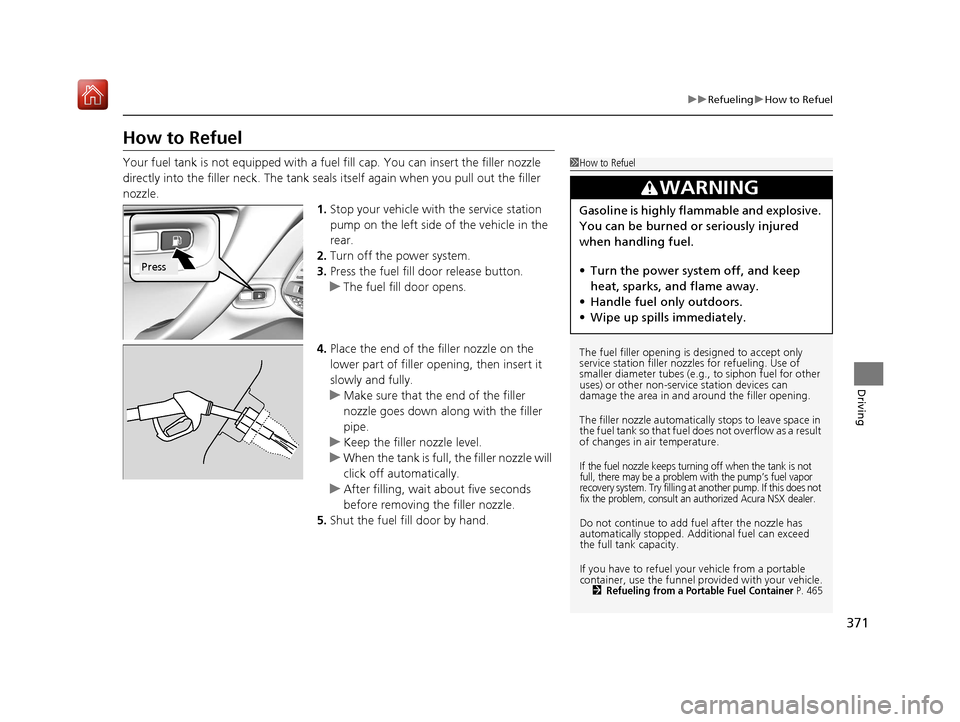
Your fuel tank is not equipped with a fu el fill cap. You can insert the filler nozzle
directly into the filler neck. The tank seals itself again when you pull out the filler
nozzle. 1.Stop your vehicle with the service station
pump on the left side of the vehicle in the
rear.
2. Turn off the power system.
3. Press the fuel fill door release button.
u The fuel fill door opens.
4. Place the end of the filler nozzle on the
lower part of filler opening, then insert it
slowly and fully.
u Make sure that the end of the filler
nozzle goes down along with the filler
pipe.
u Keep the filler nozzle level.
u When the tank is full, the filler nozzle will
click off automatically.
u After filling, wait about five seconds
before removing the filler nozzle.
5. Shut the fuel fill door by hand.1How to Refuel
The fuel filler opening is designed to accept only
service station filler nozzles for refueling. Use of
smaller diameter tubes (e.g ., to siphon fuel for other
uses) or other non-service station devices can
damage the area in and around the filler opening.
The filler nozzle automatically stops to leave space in
the fuel tank so that fuel does not overflow as a result
of changes in air temperature.
If the fuel nozzle keeps turning off when the tank is not
full, there may be a problem with the pump’s fuel vapor
recovery system. Try filling at another pump. If this does not
fix the problem, consult an authorized Acura NSX dealer.
Do not continue to add fuel after the nozzle has
automatically stopped. Addi tional fuel can exceed
the full tank capacity.
If you have to refuel y our vehicle from a portable
container, use the funnel pr ovided with your vehicle.
2Refueling from a Portable Fuel Container P. 465
3WARNING
Gasoline is highly flammable and explosive.
You can be burned or seriously injured
when handling fuel.
• Turn the power sy stem off, and keep
heat, sparks, and flame away.
• Handle fuel only outdoors.
• Wipe up spills immediately.
Press
18 NSX-31T6N6100.book 371 ページ 2017年10月27日 金曜日 午後1時39分