reset Acura NSX 2019 Owner's Guide
[x] Cancel search | Manufacturer: ACURA, Model Year: 2019, Model line: NSX, Model: Acura NSX 2019Pages: 485, PDF Size: 27.6 MB
Page 251 of 485
250
uuCustomized Features u
Features
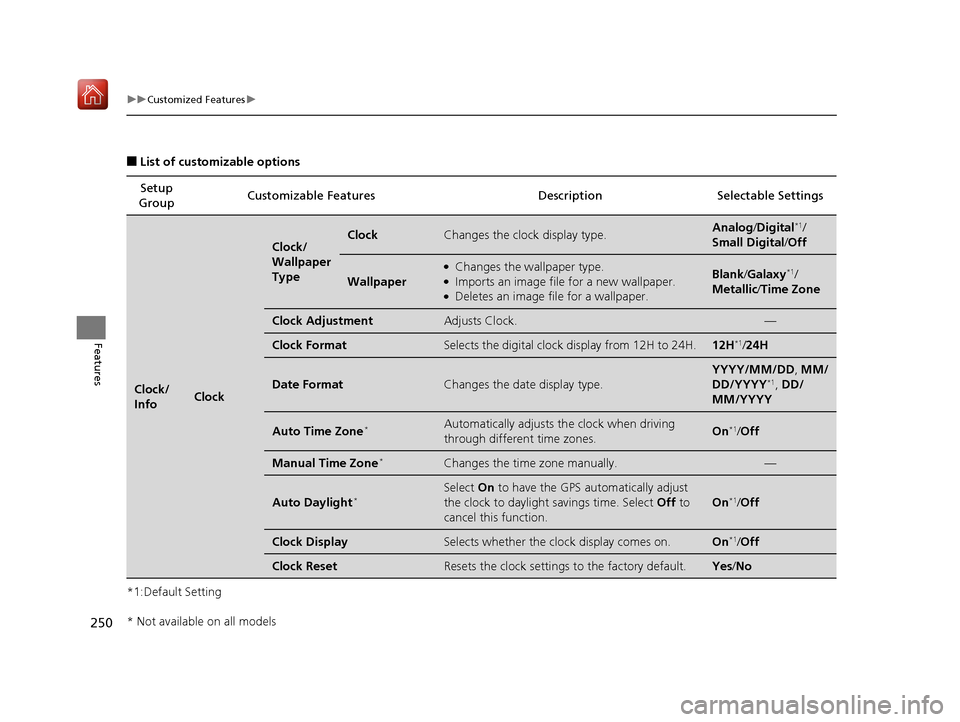
■List of customizable options
*1:Default Setting Setup
Group Customizable Features Desc
ription Selectable Settings
Clock/
InfoClock
Clock/
Wallpaper
TypeClockChanges the clock display type.Analog/Digital*1/
Small Digital /Off
Wallpaper
●Changes the wallpaper type.●Imports an image file for a new wallpaper.●Deletes an image file for a wallpaper.
Blank /Galaxy*1/
Metallic /Time Zone
Clock AdjustmentAdjusts Clock.—
Clock FormatSelects the digital clock display from 12H to 24H.12H*1/24H
Date FormatChanges the date display type.
YYYY/MM/DD, MM/
DD/YYYY*1, DD/
MM/YYYY
Auto Time Zone*Automatically adjusts th e clock when driving
through different time zones.On*1/ Off
Manual Time Zone*Changes the time zone manually.—
Auto Daylight*Select On to have the GPS automatically adjust
the clock to daylight savings time. Select Off to
cancel this function.
On*1/ Off
Clock DisplaySelects whether the clock display comes on.On*1/Off
Clock ResetResets the clock settings to the factory default.Yes /No
* Not available on all models
19 NSX-31T6N6200.book 250 ページ 2018年8月9日 木曜日 午前11時12分
Page 252 of 485
251
uuCustomized Features u
Continued
Features
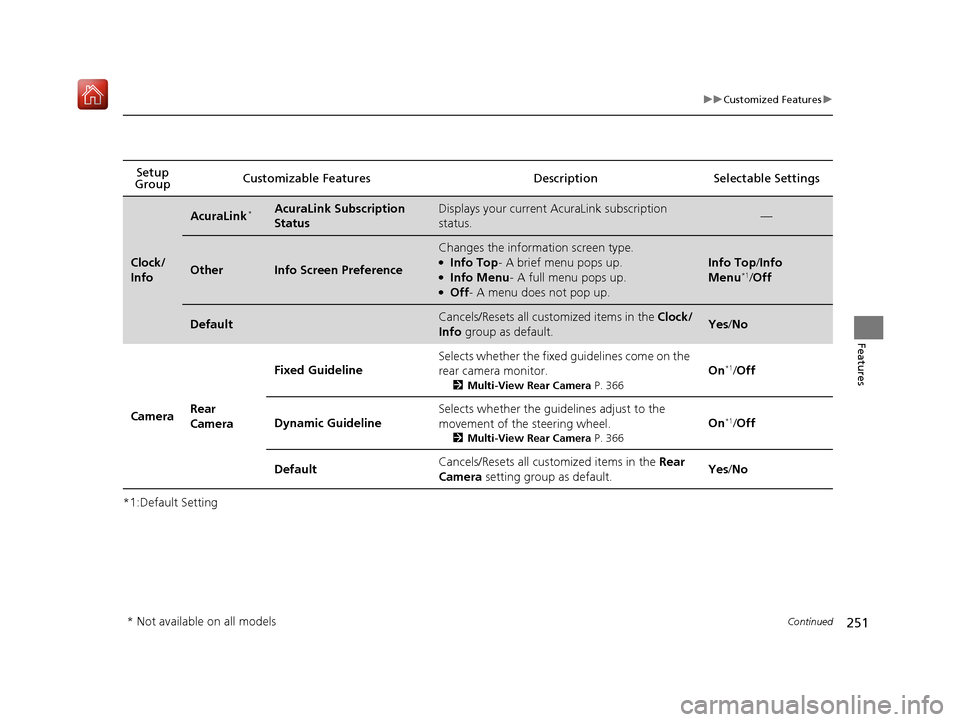
*1:Default SettingSetup
Group Customizable Features Desc
ription Selectable Settings
Clock/
Info
AcuraLink*AcuraLink Subscription
StatusDisplays your current AcuraLink subscription
status.—
OtherInfo Screen Preference
Changes the information screen type.●Info Top- A brief menu pops up.●Info Menu- A full menu pops up.●Off- A menu does not pop up.
Info Top /Info
Menu*1/ Off
DefaultCancels/Resets all cust omized items in the Clock/
Info group as default.Yes/No
Camera Rear
Camera Fixed Guideline
Selects whether the fixed guidelines come on the
rear camera monitor.
2
Multi-View Rear Camera P. 366
On*1/Off
Dynamic Guideline Selects whether the guidelines adjust to the
movement of the steering wheel.
2
Multi-View Rear Camera P. 366
On*1/Off
Default Cancels/Resets all cust
omized items in the Rear
Camera setting group as default. Yes
/No
* Not available on all models
19 NSX-31T6N6200.book 251 ページ 2018年8月9日 木曜日 午前11時12分
Page 253 of 485
252
uuCustomized Features u
Features
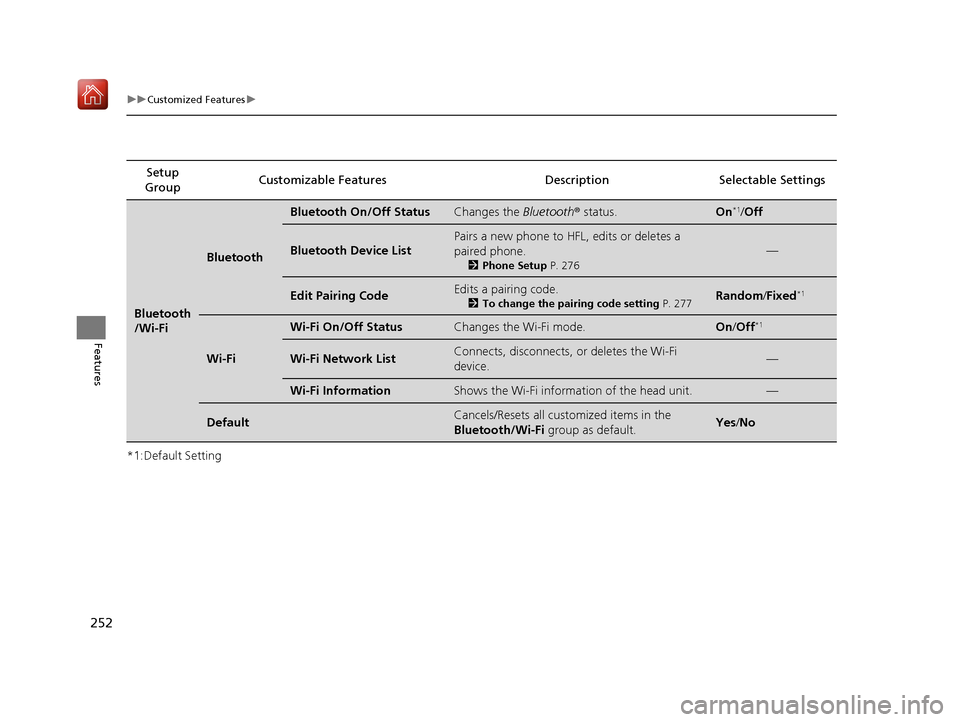
*1:Default SettingSetup
Group Customizable Featur
es Description Sel ectable Settings
Bluetooth
/Wi-Fi
Bluetooth
Bluetooth On/Off StatusChanges the Bluetooth® status.On*1/Off
Bluetooth Device List
Pairs a new phone to HFL, edits or deletes a
paired phone.
2 Phone Setup P. 276
—
Edit Pairing CodeEdits a pairing code.
2To change the pairing code setting P. 277Random/Fixed*1
Wi-Fi
Wi-Fi On/Off StatusChanges the Wi-Fi mode.On /Off*1
Wi-Fi Network ListConnects, disconnects, or deletes the Wi-Fi
device.—
Wi-Fi InformationShows the Wi-Fi information of the head unit.—
DefaultCancels/Resets all customized items in the
Bluetooth/Wi-Fi group as default.Yes/No
19 NSX-31T6N6200.book 252 ページ 2018年8月9日 木曜日 午前11時12分
Page 254 of 485
253
uuCustomized Features u
Continued
Features
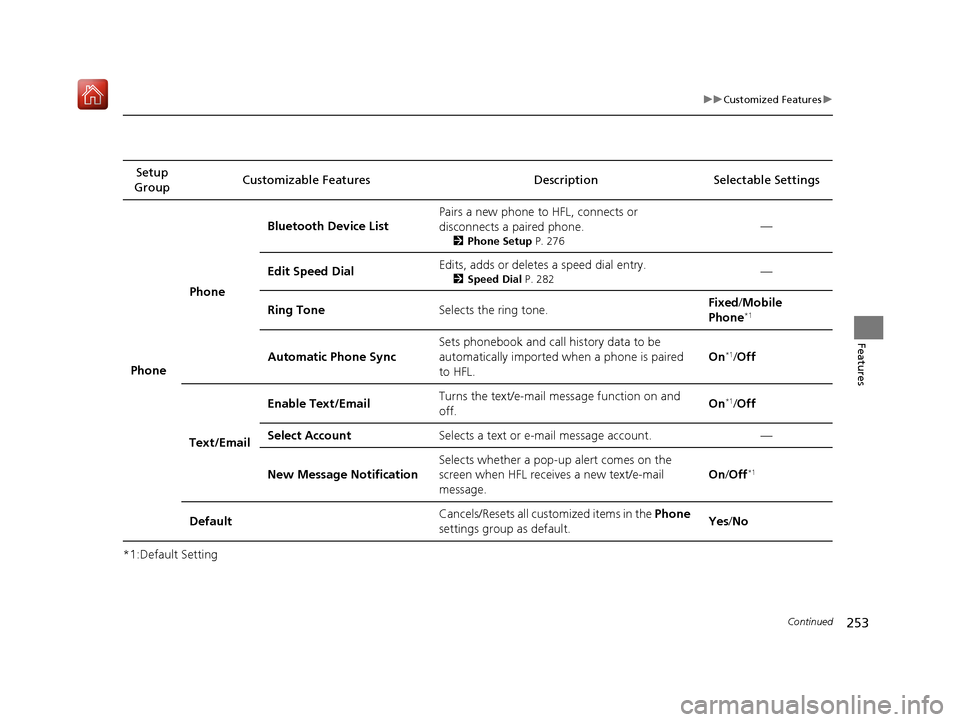
*1:Default SettingSetup
Group Customizable Features Description Selectable Settings
Phone Phone
Bluetooth Device List
Pairs a new phone to HFL, connects or
disconnects a paired phone.
2
Phone Setup P. 276
—
Edit Speed Dial Edits, adds or deletes a speed dial entry.
2
Speed Dial P. 282—
Ring Tone Selects the ring tone. Fixed
/Mobile
Phone
*1
Automatic Phone Sync Sets phonebook and call history data to be
automatically imported when a phone is paired
to HFL. On*1/
Off
Text/Email Enable Text/Email
Turns the text/e-mail
message function on and
off. On
*1/
Off
Select Account Selects a text or e-mail message account. —
New Message Notification Selects whether a pop-up
alert comes on the
screen when HFL receives a new text/e-mail
message. On
/Off
*1
Default Cancels/Resets all customized items in the
Phone
settings group as default. Yes
/No
19 NSX-31T6N6200.book 253 ページ 2018年8月9日 木曜日 午前11時12分
Page 256 of 485
255
uuCustomized Features u
Continued
Features
*1:Default SettingSetup
Group Customizable Features Descri
ption Selectable Settings
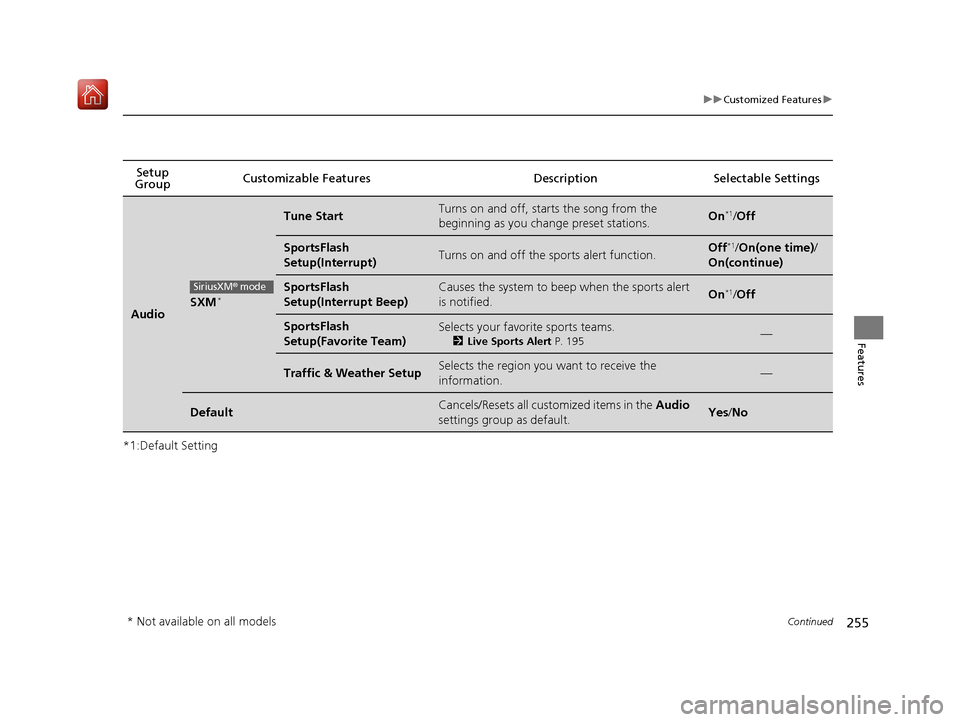
AudioSXM*
Tune StartTurns on and off, starts the song from the
beginning as you change preset stations.On*1/Off
SportsFlash
Setup(Interrupt)Turns on and off the sports alert function.Off*1/On(one time) /
On(continue)
SportsFlash
Setup(Interrupt Beep)Causes the system to beep when the sports alert
is notified.On*1/ Off
SportsFlash
Setup(Favorite Team)Selects your favorite sports teams.
2 Live Sports Alert P. 195—
Traffic & Weather SetupSelects the region you want to receive the
information.—
DefaultCancels/Resets all customized items in the Audio
settings group as default.Yes /No
SiriusXM® mode
* Not available on all models
19 NSX-31T6N6200.book 255 ページ 2018年8月9日 木曜日 午前11時12分
Page 259 of 485
258
uuCustomized Features u
Features
*1:Default SettingSetup
Group Customizable Features Description Selectable Settings
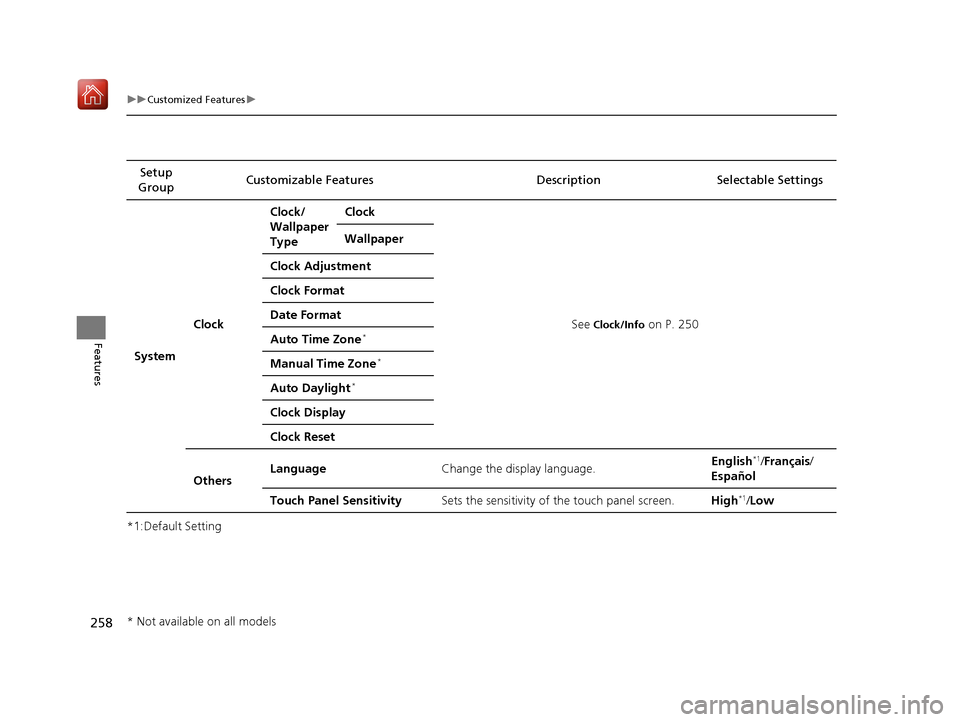
System Clock Clock/
Wallpaper
Type
Clock
See
Clock/Info on P. 250
Wallpaper
Clock Adjustment
Clock Format
Date Format
Auto Time Zone*
Manual Time Zone*
Auto Daylight*
Clock Display
Clock Reset
Others Language
Change the display language. English
*1/
Français /
Español
Touch Panel Sensitivity Sets the sensitivity of the touch panel screen. High
*1/Low
* Not available on all models
19 NSX-31T6N6200.book 258 ページ 2018年8月9日 木曜日 午前11時12分
Page 260 of 485
259
uuCustomized Features u
Continued
Features
*1:Default SettingSetup
Group Customizable Features Description Selectable Settings
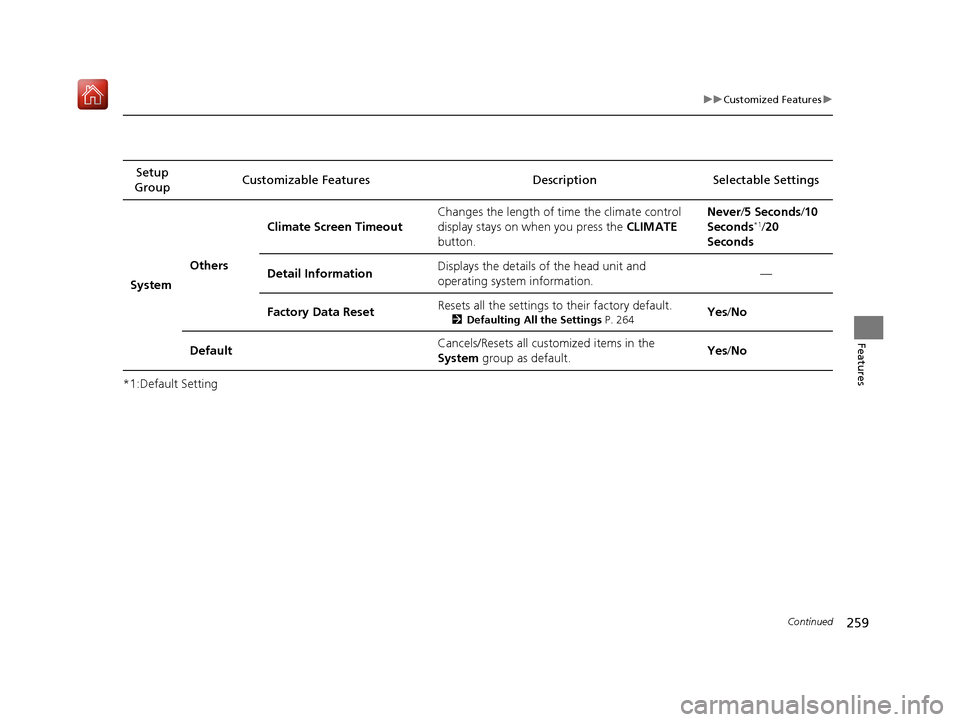
System Others Climate Screen Timeout
Changes the length of time the climate control
display stays on when you press the
CLIMATE
button. Never/
5 Seconds/ 10
Seconds
*1/ 20
Seconds
Detail Information Displays the details of the head unit and
operating system information. —
Factory Data Reset Resets all the settings to their factory default.
2
Defaulting All the Settings P. 264Yes/No
Default Cancels/Resets all cust
omized items in the
System group as default. Yes
/No
19 NSX-31T6N6200.book 259 ページ 2018年8月9日 木曜日 午前11時12分
Page 261 of 485
260
uuCustomized Features u
Features
*1:Default SettingSetup
Group Customizable Features Desc
ription Selectable Settings
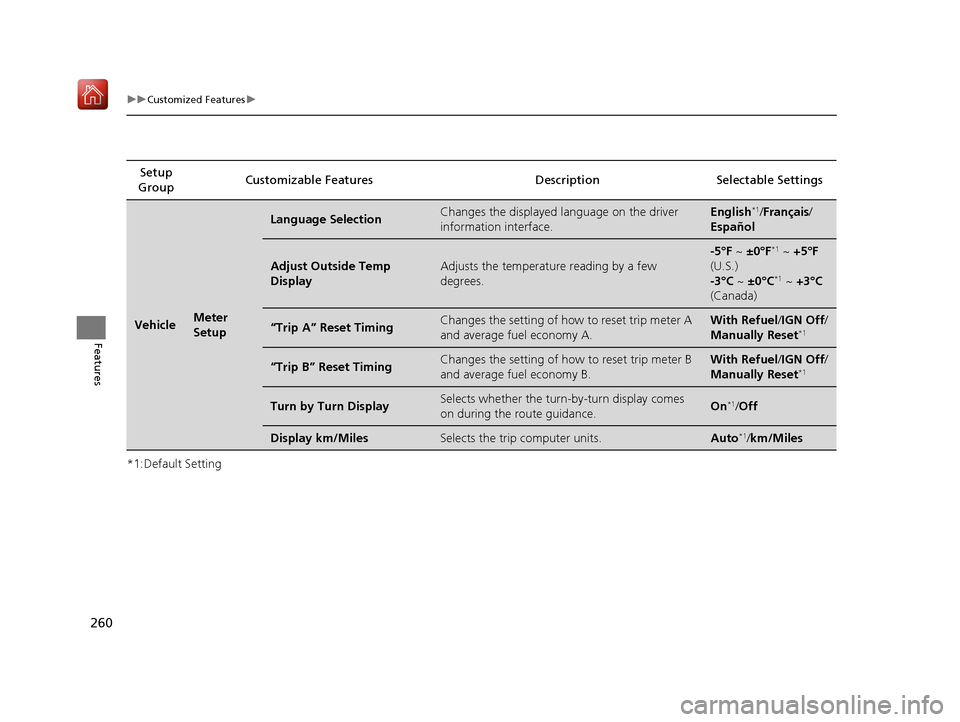
VehicleMeter
Setup
Language SelectionChanges the displayed language on the driver
information interface.English*1/Français /
Español
Adjust Outside Temp
DisplayAdjusts the temperature reading by a few
degrees.
-5°F ~ ±0°F*1 ~ +5°F
(U.S.)
-3°C ~ ±0°C
*1 ~ +3°C
(Canada)
“Trip A” Reset TimingChanges the setting of how to reset trip meter A
and average fuel economy A.With Refuel /IGN Off /
Manually Reset*1
“Trip B” Reset TimingChanges the setting of how to reset trip meter B
and average fuel economy B.With Refuel /IGN Off /
Manually Reset*1
Turn by Turn DisplaySelects whether the turn-by-turn display comes
on during the route guidance.On*1/ Off
Display km/MilesSelects the trip computer units.Auto*1/km/Miles
19 NSX-31T6N6200.book 260 ページ 2018年8月9日 木曜日 午前11時12分
Page 264 of 485
263
uuCustomized Features u
Features
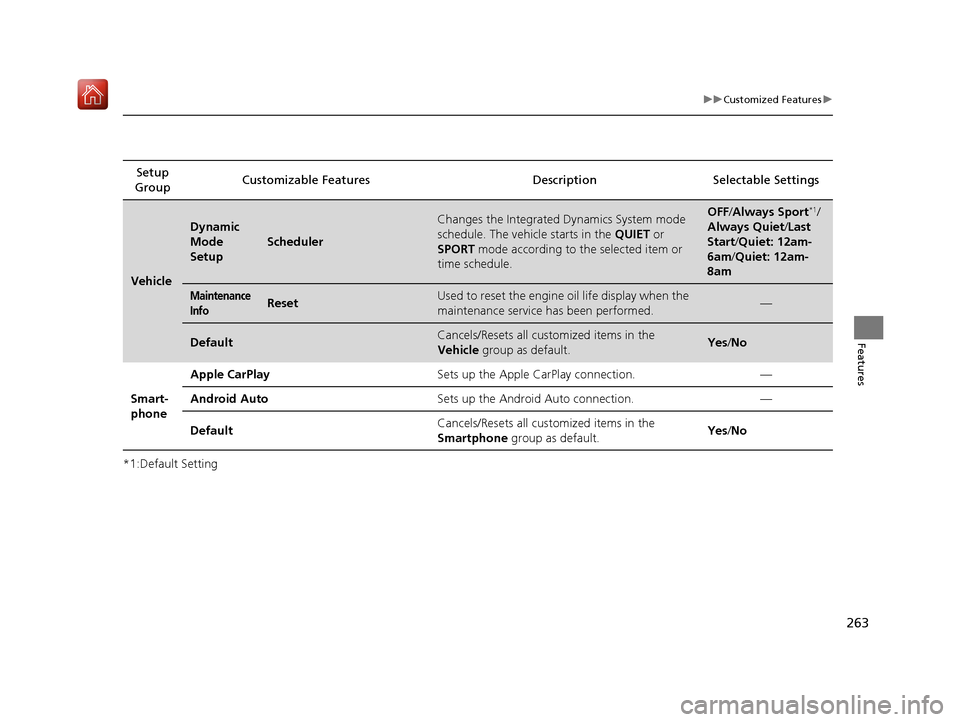
*1:Default SettingSetup
Group Customizable Features Description Selectable Settings
Vehicle
Dynamic
Mode
Setup
Scheduler
Changes the Integrated Dynamics System mode
schedule. The vehicle starts in the
QUIET or
SPORT mode according to the selected item or
time schedule.OFF /Always Sport*1/
Always Quiet /Last
Start/ Quiet: 12am-
6am/ Quiet: 12am-
8am
Maintenance
InfoResetUsed to reset the engine oil life display when the
maintenance service has been performed.—
DefaultCancels/Resets all customized items in the
Vehicle group as default.Yes/No
Smart-
phone Apple CarPlay
Sets up the Apple CarPlay connection. —
Android Auto Sets up the Android Auto connection. —
Default Cancels/Resets all customized items in the
Smartphone
group as default. Yes
/No
19 NSX-31T6N6200.book 263 ページ 2018年8月9日 木曜日 午前11時12分
Page 265 of 485
264
uuCustomized Features uDefaulting All the Settings
Features
Defaulting All the Settings
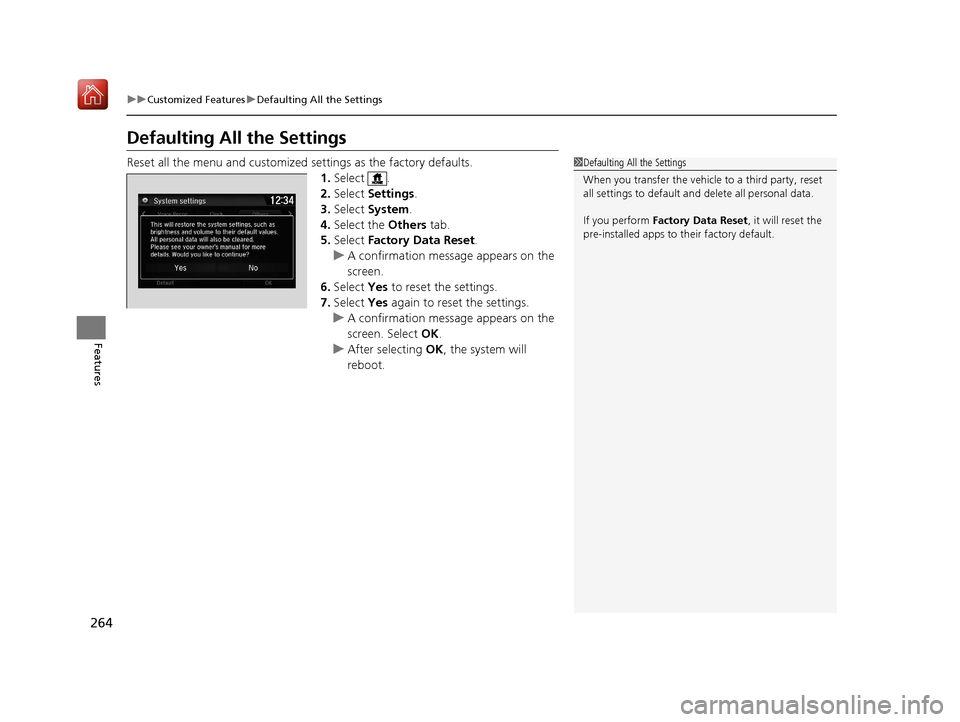
Reset all the menu and customized settings as the factory defaults.
1. Select .
2. Select Settings .
3. Select System .
4. Select the Others tab.
5. Select Factory Data Reset .
u A confirmation message appears on the
screen.
6. Select Yes to reset the settings.
7. Select Yes again to reset the settings.
u A confirmation message appears on the
screen. Select OK.
u After selecting OK, the system will
reboot.1 Defaulting All the Settings
When you transfer the vehicle to a third party, reset
all settings to default a nd delete all personal data.
If you perform Factory Data Reset , it will reset the
pre-installed apps to their factory default.
19 NSX-31T6N6200.book 264 ページ 2018年8月9日 木曜日 午前11時12分