audio Acura NSX 2019 Owner's Guide
[x] Cancel search | Manufacturer: ACURA, Model Year: 2019, Model line: NSX, Model: Acura NSX 2019Pages: 485, PDF Size: 27.6 MB
Page 174 of 485
173
uuAudio System Basic Operation uAudio/Information Screen
Continued
Features
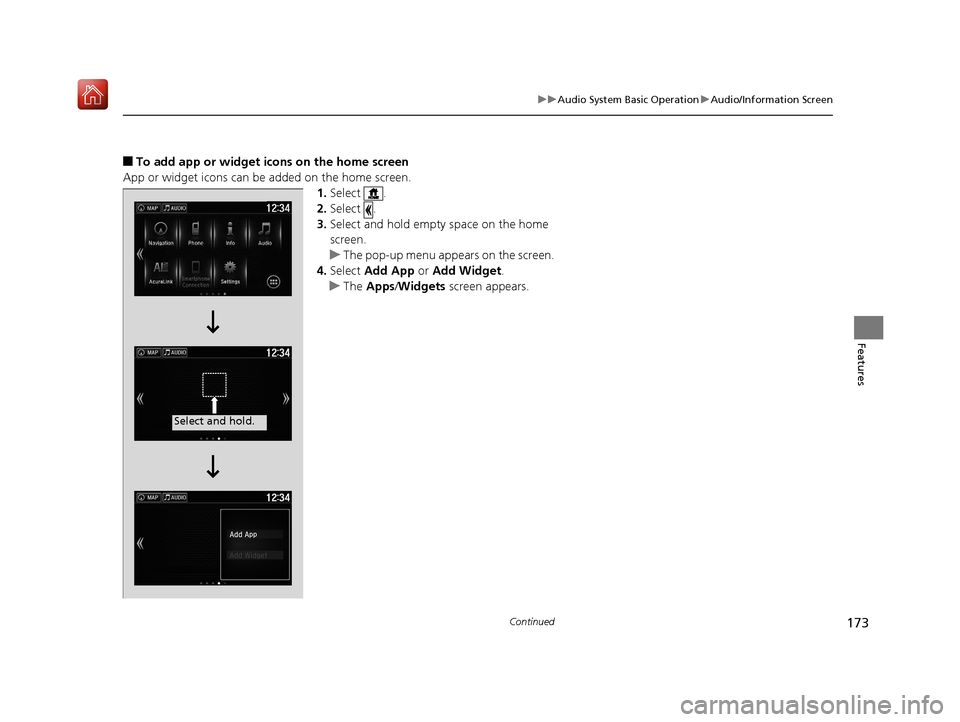
■To add app or widget icons on the home screen
App or widget icons can be added on the home screen. 1.Select .
2. Select .
3. Select and hold empty space on the home
screen.
u The pop-up menu appears on the screen.
4. Select Add App or Add Widget .
u The Apps /Widgets screen appears.
Select and hold.
19 NSX-31T6N6200.book 173 ページ 2018年8月9日 木曜日 午前11時12分
Page 175 of 485
174
uuAudio System Basic Operation uAudio/Information Screen
Features
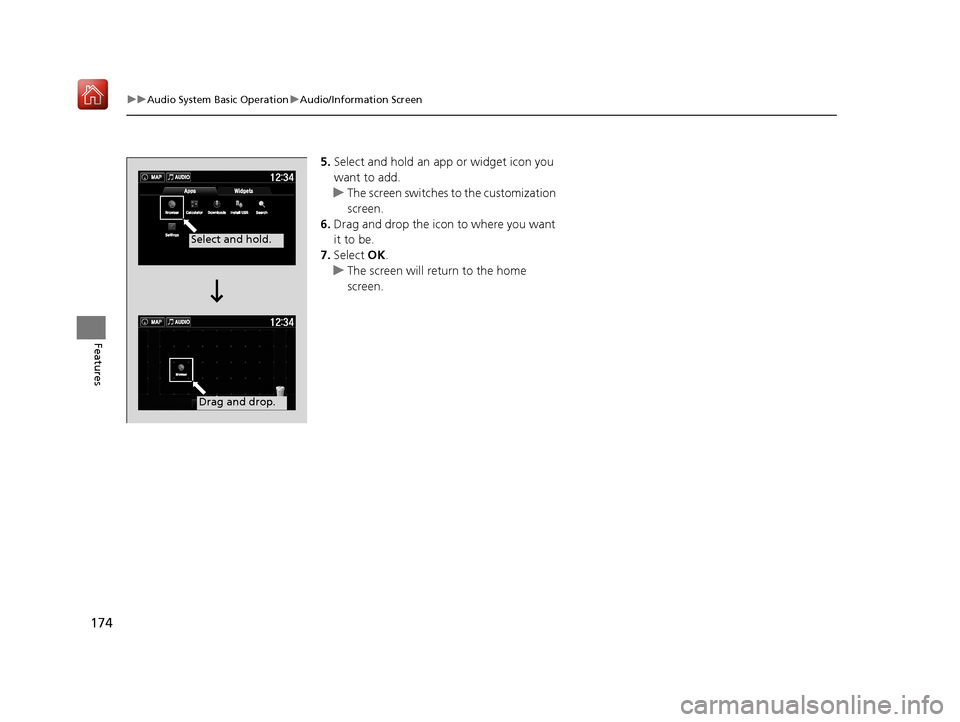
5. Select and hold an a pp or widget icon you
want to add.
u The screen switches to the customization
screen.
6. Drag and drop the icon to where you want
it to be.
7. Select OK.
u The screen will return to the home
screen.
Select and hold.
Drag and drop.
19 NSX-31T6N6200.book 174 ページ 2018年8月9日 木曜日 午前11時12分
Page 176 of 485
Continued175
uuAudio System Basic Operation uAudio/Information Screen
Features
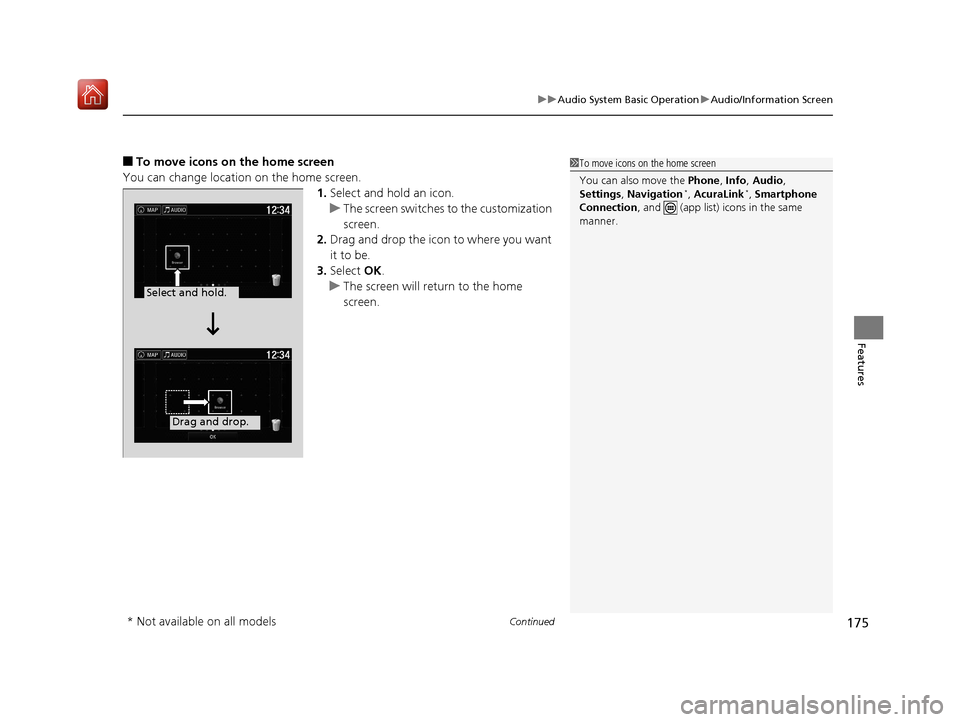
■To move icons on the home screen
You can change location on the home screen. 1.Select and hold an icon.
u The screen switches to the customization
screen.
2. Drag and drop the icon to where you want
it to be.
3. Select OK.
u The screen will return to the home
screen.1To move icons on the home screen
You can also move the Phone, Info, Audio ,
Settings , Navigation
*, AcuraLink*, Smartphone
Connection , and (app list) icons in the same
manner.
Select and hold.
Drag and drop.
* Not available on all models
19 NSX-31T6N6200.book 175 ページ 2018年8月9日 木曜日 午前11時12分
Page 177 of 485
uuAudio System Basic Operation uAudio/Information Screen
176
Features
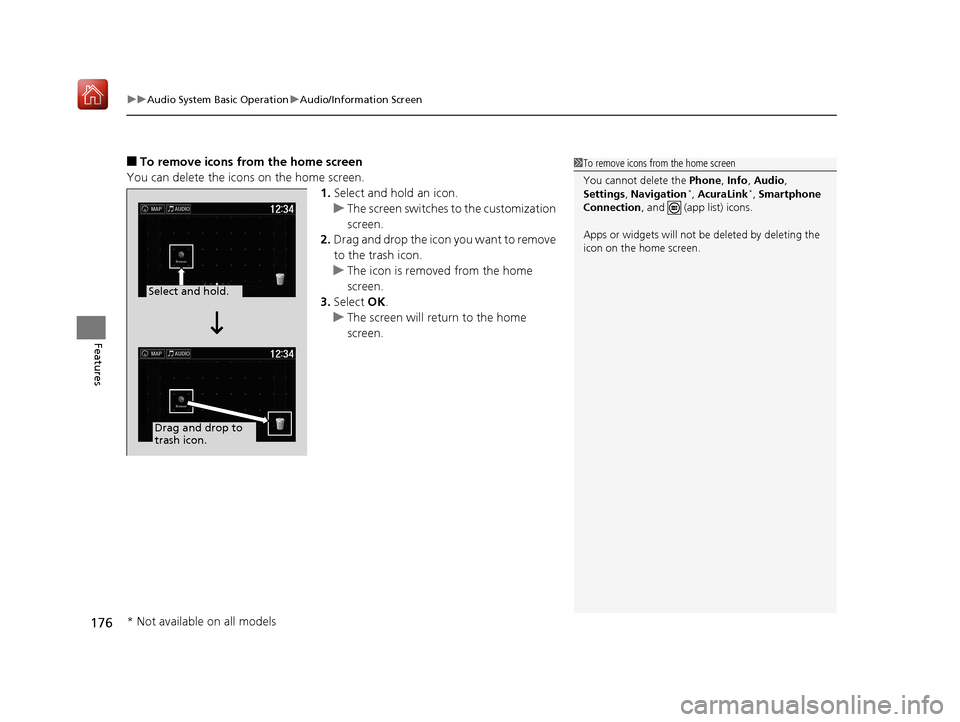
■To remove icons from the home screen
You can delete the icons on the home screen. 1.Select and hold an icon.
u The screen switches to the customization
screen.
2. Drag and drop the icon you want to remove
to the trash icon.
u The icon is removed from the home
screen.
3. Select OK.
u The screen will return to the home
screen.1To remove icons from the home screen
You cannot delete the Phone, Info, Audio ,
Settings , Navigation
*, AcuraLink*, Smartphone
Connection , and (app list) icons.
Apps or widgets will not be deleted by deleting the
icon on the home screen.
Select and hold.
Drag and drop to
trash icon.
* Not available on all models
19 NSX-31T6N6200.book 176 ページ 2018年8月9日 木曜日 午前11時12分
Page 178 of 485
177
uuAudio System Basic Operation uAudio/Information Screen
Continued
Features
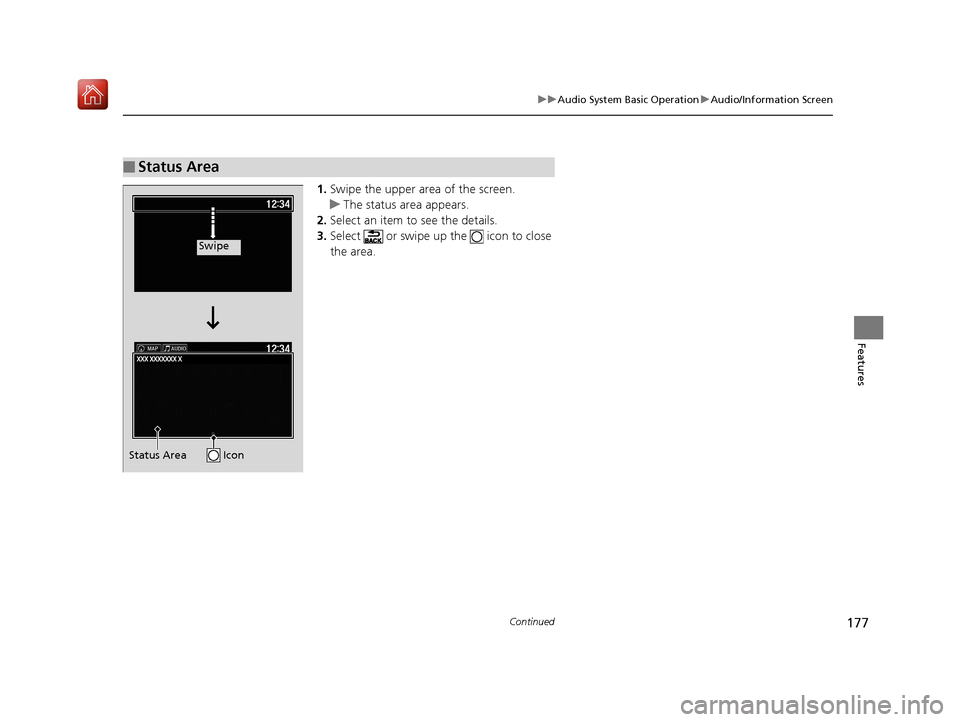
1. Swipe the upper area of the screen.
u The status area appears.
2. Select an item to see the details.
3. Select or swipe up the icon to close
the area.
■Status Area
Swipe
Status Area Icon
19 NSX-31T6N6200.book 177 ページ 2018年8月9日 木曜日 午前11時12分
Page 179 of 485
uuAudio System Basic Operation uAudio/Information Screen
178
Features
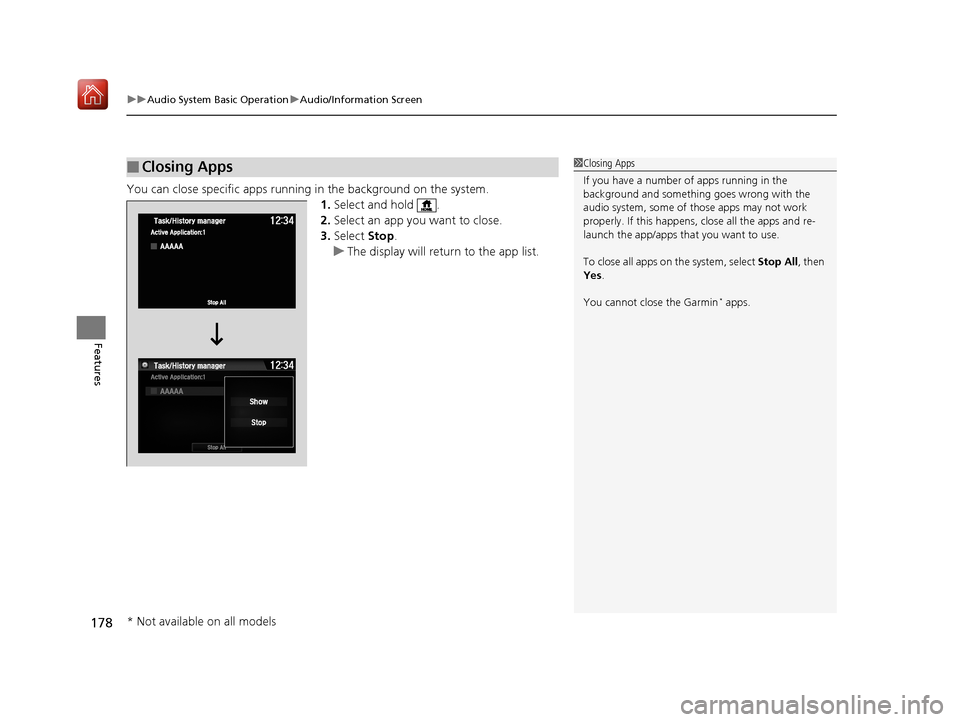
You can close specific apps running in the background on the system.
1.Select and hold .
2. Select an app you want to close.
3. Select Stop.
u The display will return to the app list.
■Closing Apps1Closing Apps
If you have a number of apps running in the
background and somethi ng goes wrong with the
audio system, some of t hose apps may not work
properly. If this happens, close all the apps and re-
launch the app/apps that you want to use.
To close all apps on the system, select Stop All, then
Yes .
You cannot close the Garmin
* apps.
* Not available on all models
19 NSX-31T6N6200.book 178 ページ 2018年8月9日 木曜日 午前11時12分
Page 180 of 485
179
uuAudio System Basic Operation uAdjusting the Sound
Features
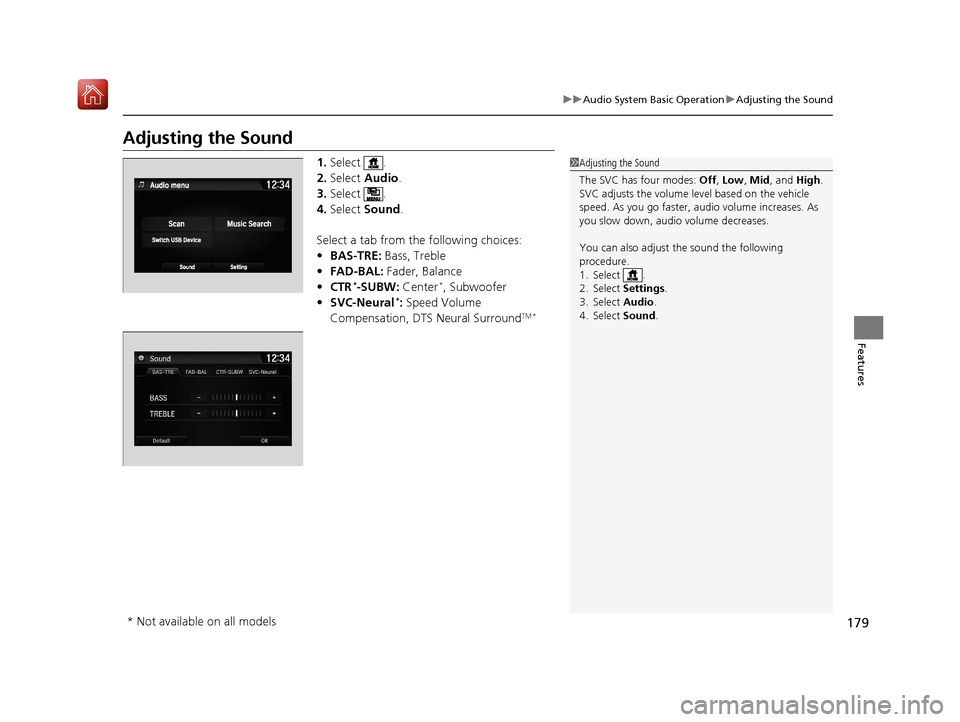
Adjusting the Sound
1. Select .
2. Select Audio .
3. Select .
4. Select Sound .
Select a tab from the following choices:
• BAS-TRE: Bass, Treble
• FAD-BAL: Fader, Balance
• CTR
*-SUBW: Center*, Subwoofer
• SVC-Neural*: Speed Volume
Compensation, DTS Neural SurroundTM *
1 Adjusting the Sound
The SVC has four modes: Off, Low , Mid, and High.
SVC adjusts the volume level based on the vehicle
speed. As you go faster, audio volume increases. As
you slow down, audi o volume decreases.
You can also adjust the sound the following
procedure.
1. Select .
2. Select Settings .
3. Select Audio .
4. Select Sound .
* Not available on all models
19 NSX-31T6N6200.book 179 ページ 2018年8月9日 木曜日 午前11時12分
Page 181 of 485
180
uuAudio System Basic Operation uDisplay Setup
Features
Display Setup
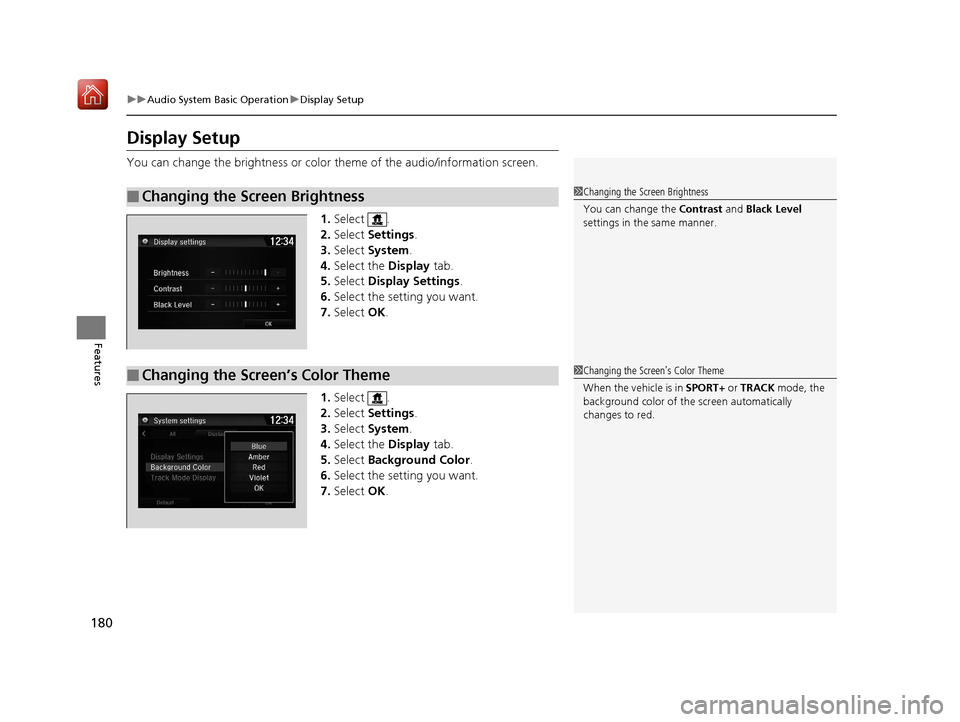
You can change the brightness or color theme of the audio/information screen.
1.Select .
2. Select Settings .
3. Select System .
4. Select the Display tab.
5. Select Display Settings .
6. Select the setting you want.
7. Select OK.
1. Select .
2. Select Settings .
3. Select System .
4. Select the Display tab.
5. Select Background Color .
6. Select the setting you want.
7. Select OK.
■Changing the Screen Brightness1Changing the Screen Brightness
You can change the Contrast and Black Level
settings in the same manner.
■Changing the Screen’s Color Theme1 Changing the Screen’s Color Theme
When the vehicle is in SPORT+ or TRACK mode, the
background color of the screen automatically
changes to red.
19 NSX-31T6N6200.book 180 ページ 2018年8月9日 木曜日 午前11時12分
Page 182 of 485
181
uuAudio System Basic Operation uDisplay Setup
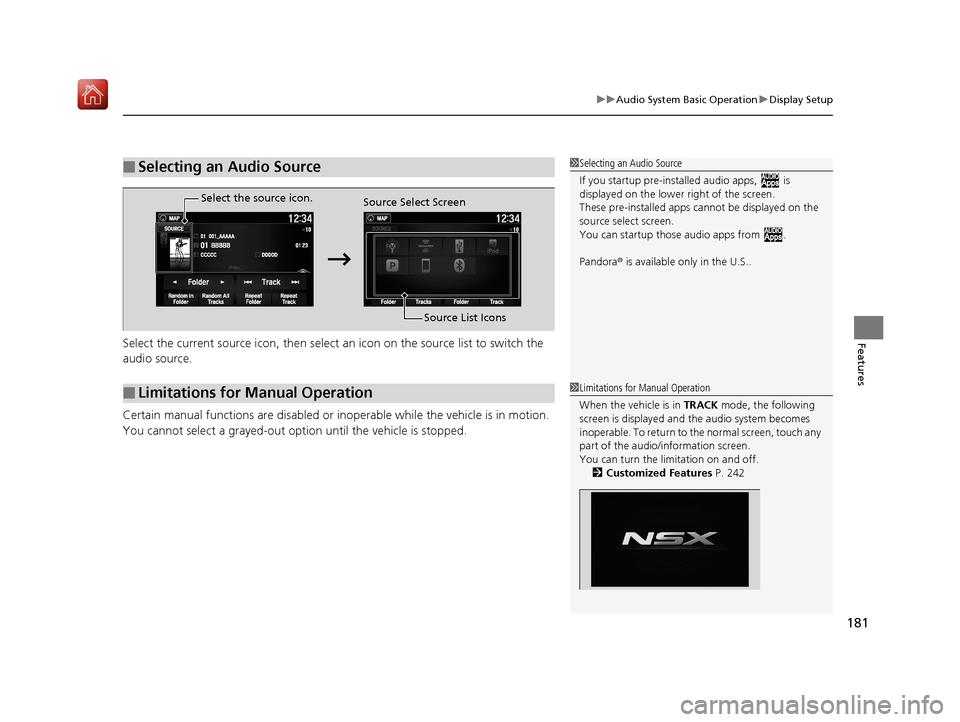
FeaturesSelect the current source icon, then select an icon on the source list to switch the
audio source.
Certain manual functions are disabled or inoperable while the vehicle is in motion.
You cannot select a grayed-out option until the vehicle is stopped.
■Selecting an Audio Source1 Selecting an Audio Source
If you startup pre-installed a udio apps, is
displayed on the lower right of the screen.
These pre-installed apps ca nnot be displayed on the
source select screen.
You can startup thos e audio apps from .
Pandora ® is available only in the U.S..
■Limitations for Manual Operation
Select the source icon.
Source Select Screen
Source List Icons
1Limitations for Manual Operation
When the vehicle is in TRACK mode, the following
screen is displayed and the audio system becomes
inoperable. To return to the normal screen, touch any
part of the audio/information screen.
You can turn the li mitation on and off.
2 Customized Features P. 242
19 NSX-31T6N6200.book 181 ページ 2018年8月9日 木曜日 午前11時12分
Page 183 of 485
182
uuAudio System Basic Operation uVoice Control Operation
Features
Voice Control Operation
Your vehicle has a voice control system that allows hands-free operation.
The voice control system uses the ( Talk) and (hang-up/back) buttons on
the steering wheel and a microphone near the map lights on the ceiling.
To achieve optimum voice recognition when using the voice control system:
• Make sure the correct screen is displa yed for the voice command that you are
using.
The system recognizes only certain commands. Available voice commands.
2 Voice Portal Screen P. 183
•Close the windows.
• Adjust the dashboard and side vents so air does not blow onto the microphone
on the ceiling.
• Speak clearly in a natural speaking vo ice without pausing between words.
• Reduce any background noise if possible. The system may misinterpret your
command if more than one person is speaking at the same time.
■Voice Recognition
1Voice Control Operation
When you press the button, a helpful prompt asks
what you would like to do. Press and release the
button again to bypass this prompt and give a
command.
1 Voice Recognition
The voice control system can only be used from the
driver’s seat because the microphone unit removes
noises from the front passenger’s side.
19 NSX-31T6N6200.book 182 ページ 2018年8月9日 木曜日 午前11時12分