phone Acura NSX 2019 Manual PDF
[x] Cancel search | Manufacturer: ACURA, Model Year: 2019, Model line: NSX, Model: Acura NSX 2019Pages: 485, PDF Size: 27.6 MB
Page 298 of 485
Continued297
uuBluetooth ® HandsFreeLink ®u HFL Menus
Features
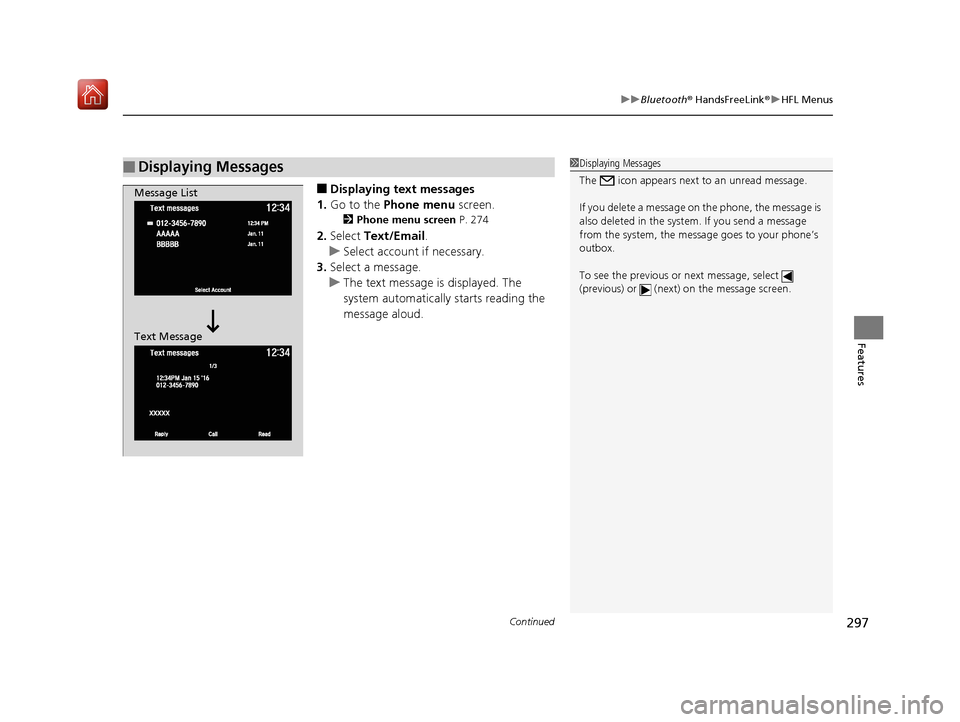
■Displaying text messages
1. Go to the Phone menu screen.
2Phone menu screen P. 274
2.Select Text/Email .
u Select account if necessary.
3. Select a message.
u The text message is displayed. The
system automatically starts reading the
message aloud.
■Displaying Messages1Displaying Messages
The icon appears next to an unread message.
If you delete a message on the phone, the message is
also deleted in the system. If you send a message
from the system, the message goes to your phone’s
outbox.
To see the previous or next message, select
(previous) or (next) on the message screen.
Message List
Text Message
19 NSX-31T6N6200.book 297 ページ 2018年8月9日 木曜日 午前11時12分
Page 299 of 485
298
uuBluetooth ® HandsFreeLink ®u HFL Menus
Features
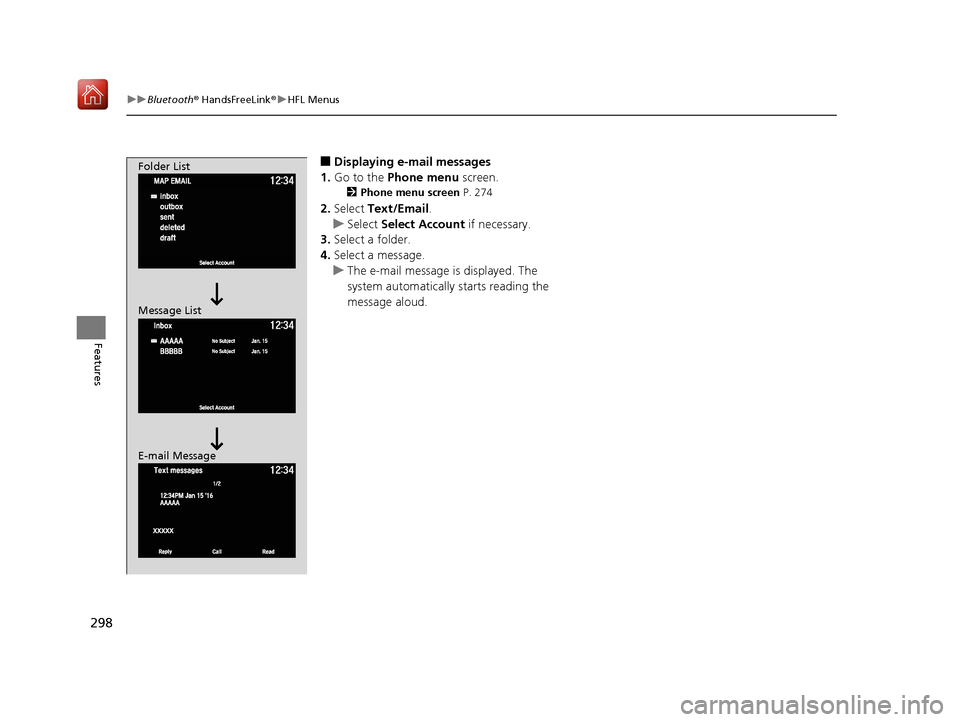
■Displaying e-mail messages
1. Go to the Phone menu screen.
2Phone menu screen P. 274
2.Select Text/Email .
u Select Select Account if necessary.
3. Select a folder.
4. Select a message.
u The e-mail message is displayed. The
system automatically starts reading the
message aloud.
Folder List
Message List
E-mail Message
19 NSX-31T6N6200.book 298 ページ 2018年8月9日 木曜日 午前11時12分
Page 300 of 485
Continued299
uuBluetooth ® HandsFreeLink ®u HFL Menus
Features
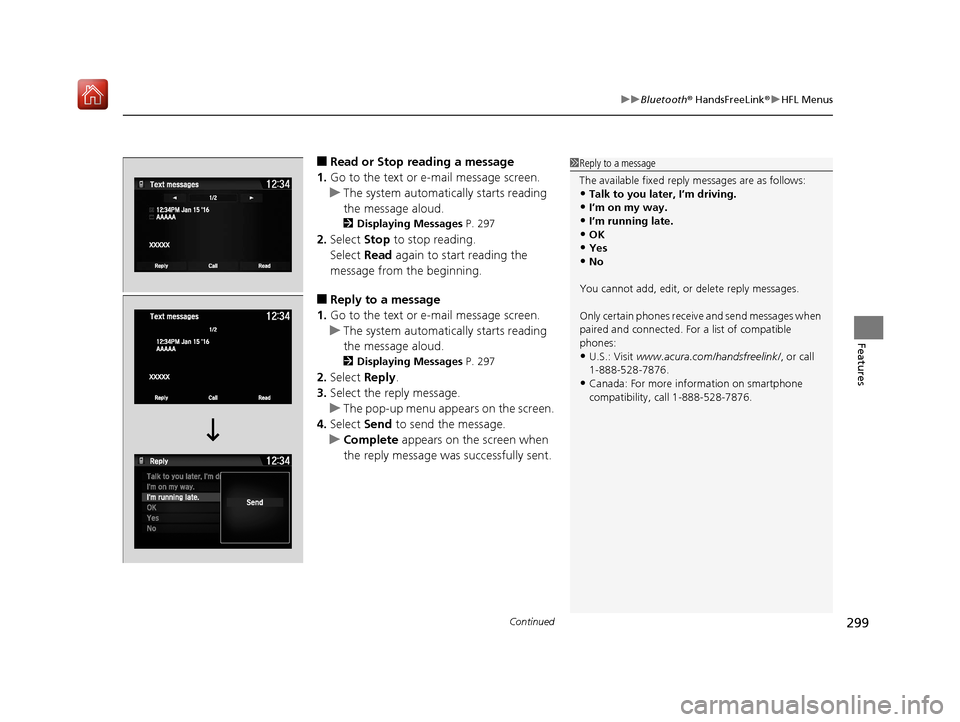
■Read or Stop reading a message
1. Go to the text or e-mail message screen.
u The system automatica lly starts reading
the message aloud.
2 Displaying Messages P. 297
2.Select Stop to stop reading.
Select Read again to start reading the
message from the beginning.
■Reply to a message
1. Go to the text or e-mail message screen.
u The system automatica lly starts reading
the message aloud.
2 Displaying Messages P. 297
2.Select Reply.
3. Select the reply message.
u The pop-up menu appears on the screen.
4. Select Send to send the message.
u Complete appears on the screen when
the reply message was successfully sent.
1 Reply to a message
The available fixed reply messages are as follows:
•Talk to you later, I’m driving.
•I’m on my way.
•I’m running late.•OK
•Yes
•No
You cannot add, edit, or delete reply messages.
Only certain phones receiv e and send messages when
paired and connected. For a list of compatible
phones:
•U.S.: Visit www.acura.com/handsfreelink/ , or call
1-888-528-7876.
•Canada: For more info rmation on smartphone
compatibility, call 1-888-528-7876.
19 NSX-31T6N6200.book 299 ページ 2018年8月9日 木曜日 午前11時12分
Page 302 of 485
301
uuBluetooth ® HandsFreeLink ®u HFL Menus
Features
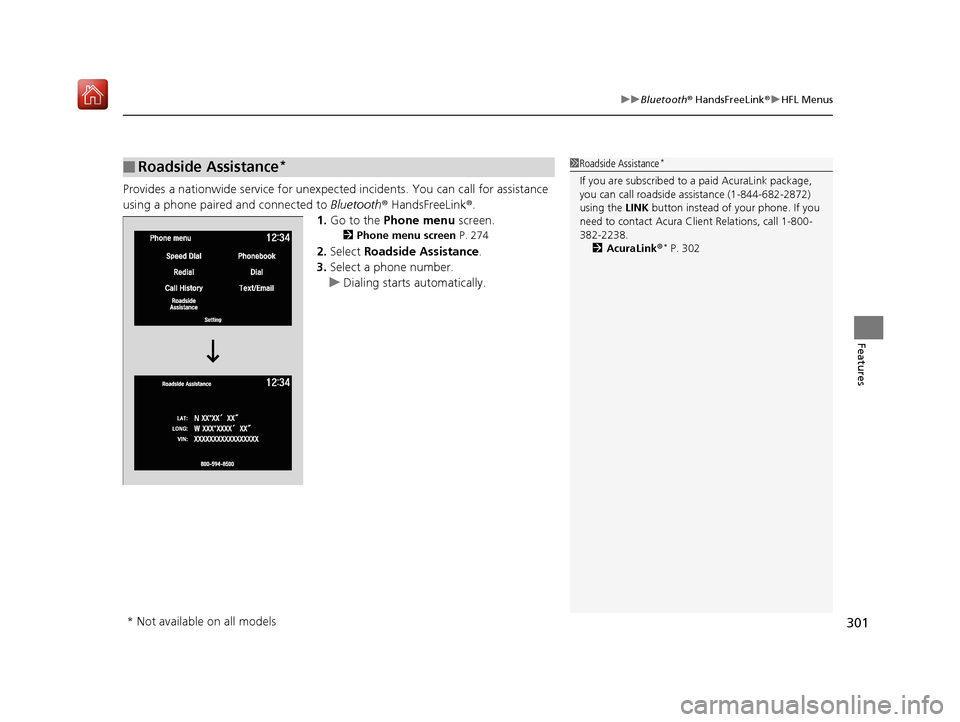
Provides a nationwide service for unexpected incidents. You can call for assistance
using a phone paired and connected to Bluetooth® HandsFreeLink ®.
1. Go to the Phone menu screen.
2Phone menu screen P. 274
2.Select Roadside Assistance .
3. Select a phone number.
u Dialing starts automatically.
■Roadside Assistance*1Roadside Assistance*
If you are subscribed to a paid AcuraLink package,
you can call roadside assistance (1-844-682-2872)
using the LINK button instead of your phone. If you
need to contact Acura Cl ient Relations, call 1-800-
382-2238.
2 AcuraLink ®
* P. 302
* Not available on all models
19 NSX-31T6N6200.book 301 ページ 2018年8月9日 木曜日 午前11時12分
Page 303 of 485
302
Features
AcuraLink®*
Is a subscription-based service that provid es convenient features such as voice
communication in case of an airbag deployment, online security, and one-on-one
operator assistance.
For information on traffic rerouting and traffi c information updates, provided by the
AcuraLink server, see the Na vigation System Manual.
■Automatic collision notification
If your vehicle’s airbags deploy or if the unit detects that the vehicle is severely
impacted, your vehicle will automatically attempt to connect to the AcuraLink
operator. Once connected, information about your vehicle, its positioning, and its
condition will be sent to the operator; you also can speak to the operator when
connected.
■In Case of a Crash
1 AcuraLink ®*
AcuraLink also provides services you can operate
from the Internet or your smartphone.
To subscribe to AcuraLink, or to get more
information about all of its features, contact an
authorized Acura NS X dealer, or visit
owners.acura.com (in U.S.) or www.acura.ca (in
Canada).
1 In Case of a Crash
Your vehicle may not be able to connect to the
operator if the battery level is low, the line is
disconnected or you do not have adequate cellular
coverage.
You cannot use the Assist services when:
•You travel outside the AcuraLink service coverage
areas.
•There is a problem with the connecting devices,
such as the ASSIST button, microphone, speakers,
or the unit itself.
•You are not subscribed to the service or your
subscription is no longer valid.
You cannot operate othe r navigation- or phone-
related functions using the screens while talking to
the operator.
Only the operator can terminate the connection to
your vehicle.
1 Automatic collision notification
If the unit fails to connect to the operator, it
repeatedly tries until it succeeds.
* Not available on all models
19 NSX-31T6N6200.book 302 ページ 2018年8月9日 木曜日 午前11時12分
Page 305 of 485
uuAcuraLink ®*u
304
Features
Your subscribed telematics service provider can track your vehicle’s location,
remotely lock or unlock doors, and help you find your vehicle.
To use these features, you need your us er ID and personal identification number
(PIN).
■Stolen vehicle tracking
This feature searches and tracks down your ve hicle position even if it is on the move.
If you believe that your vehicle has been stolen, contact the police as well as the
provider. Tracking requests must be initiated by the police.
■Remote door lock/unlock
The provider can remotely lock or unlock doors upon your request.
■Vehicle finder
This feature is convenient to use when trying to locate yo ur vehicle in large areas,
such as a crowded parking lot. If you cannot locate your vehicle after using the
remote transmitter’s answerback function, you can contact the provider which can
then flash your vehicle’s exterior lights and sound the horn.
■Security alarm notification
If the security system in your vehicle detects an abnormal condition, such as
someone tampering with the lock on your vehicle, the provider notifies you by email
or SMS.
■Security Features1 Security Features
The contact information of your provider, your user
ID and PIN will be given when you subscribe to
AcuraLink. If you forget any of the above, contact an
authorized Acura NSX dealer, or go to
owners.acura.com (in U.S.) or www.acura.ca (in
Canada).
You can also activate the remote door lock/unlock
and vehicle finder features from the Internet or using
your smartphone app. Ask an authorized Acura NSX
dealer, or visit owners.acura.com (in U.S.) or
www.acura.ca (in Canada) for details.
1Vehicle finder
The lights will stop flas hing and horn will stop
sounding under the foll owing conditions:
•When 30 seconds have elapsed.
•You unlock the doors using the remote transmitter.•You unlock the doors using the keyless access
system.
•You unlock the doors us ing the built-in key.•The power mode is set to ACCESSORY or ON.
19 NSX-31T6N6200.book 304 ページ 2018年8月9日 木曜日 午前11時12分
Page 476 of 485
475
Information
Authorized Manuals
■Service Express
For electronic copies of service publications, you can purchase a subscription to
Service Express. Visit www.techinfo.honda.com for pricing and options.
■For U.S. Owners
Manuals can be purchased from Helm Incorporated. You can order a manual by
phone at 1 (800) 782-4356 (credit ca rd orders only), or online at www.helminc.com.
■For Canadian Owners
Please contact an authorized Acura NSX d ealer to order any manuals that you may
require.
19 NSX-31T6N6200.book 475 ページ 2018年8月9日 木曜日 午前11時12分
Page 477 of 485
476
Information
Client Service Information
Authorized Acura NSX dealership personnel are trained professionals who should be
able to deal with any problems you may encounter with your vehicle. If, however,
you are faced with a problem that they cannot resolve to your satisfaction, contact
Acura Client Relations/Services.
U.S. Owners Canadian Owners
American Honda Motor Co., Inc. Honda Canada Inc.
Acura Client Relations Acura Client Services
Mail Stop 100-5E-8F 180 Honda Boulevard
1919 Torrance Blvd. Markham, ON
Torrance, CA 90501-2746 L6C 0H9
Tel: 1-844-68-ACURA Tel: 1-888-9-ACURA-9
(1-844-682-2872) 1-844-9-MYNSX-9 (NSX-
specific)
Fax: 1-877-939-0909
E-mail: [email protected]
In Puerto Rico and the U.S. Virgin Islands
Bella International
P.O. Box 190816
San Juan, PR 00919-0816
Tel: 1 (787) 620-75461 Client Service Information
When you call or write, please give us the following
information:
•Vehicle Identification Number
2Vehicle Identification Number (VIN),
Engine Number, Motor Number, and
Transmission Number P. 468
•Date of purchase•Odometer reading of your vehicle
•Your name, address, and telephone number
•A detailed description of the problem•Name of the authorized Acura NSX dealer who sold
the vehicle to you
19 NSX-31T6N6200.book 476 ページ 2018年8月9日 木曜日 午前11時12分
Page 481 of 485
480
Index
G
Gasoline (Fuel)Economy ................................................. 370
Gauge ....................................................... 95
Information ............................................. 368
Instant Fuel Economy ............................... 101
Low Fuel Indicator ..................................... 77
Refueling ................................................. 368
Gauges ......................................................... 95
Gear Position Indicator ....................... 76, 326
Gear Shift Positions
Dual Clutch Transmission ......................... 324
Glass (care) ........................................ 418, 421
Glove Box .................................................. 151
H
Handling the Unexpected ........................ 429
HandsFreeLink® (HFL)............................... 268
Automatic Import of Ce llular Phonebook and
Call History ............................................ 281
Displaying Messages ................................ 297
HFL Buttons ............................................. 268
HFL Menus .............................................. 271
HFL Status Display.................................... 270
Limitations for Manua l Operation ............ 270
Making a Call .......................................... 290
Options During a Call .............................. 294
Phone Setup ............................................ 276
Phonebook Phonetic M odification ........... 285
Receiving a Call ....................................... 294 Receiving a Text/E-mail Message.............. 295
Ring Tone................................................ 280
Roadside Assistance ................................ 301
Selecting a Mail Account ......................... 296
Speed Dial ............................................... 282
To Set Up Text/E-mail Message Options ... 279
Hatch ......................................................... 119
Unable to Open....................................... 462
Hazard Warning Button .............................. 4
Headlights ................................................. 131
Aiming .................................................... 399
Automatic Operation (automatic lighting control) ................................................. 132
Dimming ......................................... 131, 134
Operating................................................ 131
Heaters (Seat) ........................................... 153
HFL (HandsFreeLink ®)............................... 268
High Beam Indicator .................................. 81
High Voltage Battery ............................... 353
High-Performance Driving ....................... 313
Hill Start Assist System ............................. 321
HomeLink ® Universal Transceiver ............ 265
Honda App License Agreement .............. 226
Hybrid Vehicle SPORT HYBRID Super Handling-All Wheel
Drive
TM (SPORT HYBRID SH-AWD® )............ 9
I
Identification Numbers
Engine, Motor, and Transmission ............ 468
Vehicle Identification............................... 468
Immobilizer System .................................. 122
Indicator ................................................... 81
Indicators .................................................... 70
12-Volt Battery Charging System ...... 75, 450
Active Damper System .............................. 74
Anti-lock Brake System (ABS) .................... 78
Automatic Brake Hold ....................... 72, 357
Automatic Brake Hold System ........... 72, 357
Brake System (Amber) ............................... 73
Brake System (Red) ........................... 70, 451
Brake Wear ............................................... 74
CRUISE CONTROL ............................. 82, 341
CRUISE MAIN.................................... 82, 340
Door and Trunk (Hatch) Open ................... 35
Electric Parking Brake ................................ 71
Electric Parking Brake System ............ 71, 452
Electric Power Steering (EPS) System ............................................ 78, 451
Gear Position ............................................ 76
High Beam ................................................ 81
Immobilizer System ................................... 81
Keyless Access System............................... 82
Lights On .................................................. 81
Low Fuel ................................................... 77
Low Oil Pressure ....................................... 70
Low Tire Pressure/TPMS ............ 80, 349, 351
Malfunction Indicator Lamp .............. 75, 450
19 NSX-31T6N6200.book 480 ページ 2018年8月9日 木曜日 午前11時12分
Page 485 of 485
484
Index
Overheating............................................. 448
Power System Won’t Start ....................... 443
Premium Gasoline............................ 368, 466
Warning Indicators .................................... 70
Trunk
Light Bulb ................................................ 466
Turn Signals ............................................... 130
Indicators (Instrum ent Panel) ...................... 81
Turn-by-Turn Directions ........................... 102
Turning on the Power .............................. 319
Does Not Activate .................................... 443
Jump Starting .......................................... 446
Twin Motor Unit Fluid ................................................ 397, 467
U
Unlocking the Doors ................................. 107
Unlocking the Doors from the Inside ................................................. 18, 115
USB Flash Drives ........................................ 225
USB Ports ................................................... 161
Using the Keyless Access System .............. 107
V
Vehicle Identification Number................. 468
Vehicle Stability Assist ® (VSA ®) ................ 343
Off Button ............................................... 344
Off Indicator ...................................... 79, 344
System Indicator ................................ 79, 343 Vehicle Storage
........................................ 426
Viscosity (Oil) .................................... 388, 467
Voice Control Operation Audio Commands ................................... 184
Climate Control Commands .................... 185
General Commands ................................ 185
Music Search Commands ........................ 185
On Screen Commands............................. 185
Phone Commands ................................... 184
Useful Commands ................................... 184
Voice Portal Screen.................................. 183
Voice Recognition ................................... 182
VSA ® (Vehicle Stability Assist ®)................ 343
W
Wallpaper ................................................. 169
Warning and Information Messages ......... 83
Warning Indicator On/Blinking ............... 450
Warning Labels ........................................... 68
Warranties (Warranty Manual provided
separately) .............................................. 473
Watts ......................................................... 466
Wear Indicators (Tire) .............................. 410
Wi-Fi Connection ...................................... 211
Window Washers ..................................... 135
Adding/Refilling Fluid .............................. 398
Switch ..................................................... 135
Windows (Opening and Closing) ............ 125
Windshield
Cleaning ......................................... 418, 421 Defrosting/Defogging ..................... 156, 157
Washer Fluid ................................... 398, 466
Wiper Blades........................................... 402
Wipers and Washers ............................... 135
Winter Tires
Snow Tires .............................................. 413
Tire Chains.............................................. 413
Wipers and Washers ................................ 135
Checking and Replacing Wiper Blades..... 402
WMA ......................................................... 206
Worn Tires ................................................ 405
19 NSX-31T6N6200.book 484 ページ 2018年8月9日 木曜日 午前11時12分