lock ACURA NSX 2020 User Guide
[x] Cancel search | Manufacturer: ACURA, Model Year: 2020, Model line: NSX, Model: ACURA NSX 2020Pages: 491, PDF Size: 20.24 MB
Page 37 of 491

35
uuFor Safe DrivinguSafety Checklist
Safe Driving
Safety Checklist
For the safety of you and your passenger, make a habit of checking these items each
time before you drive. • After everyone has entered the vehicle, be sure both doors are closed and locked.
Locking the doors helps prevent an occupant from being ejected and an outsider
from unexpectedly opening a door. 2 Locking/Unlocking the Doors from the Inside P. 115
• Adjust your seat to a position suitable fo r driving. Be sure the seats are adjusted
as far to the rear as possible while allo wing the driver to control the vehicle.
Sitting too close to a front airbag can resu lt in serious or fatal injury in a crash.
2 Adjusting the Seats P. 144
• Always wear your seat belt, and make sure you wear it properly. Confirm that any
passenger is properly belted as well. 2 Fastening a Seat Belt P. 39
• If you choose to ignore our warnings and carry a child in this vehicle, make every
effort to protect them by properly using a se at belt or a child seat according to the
child’s age, height, and weight. 2 Child Safety P. 58
1Safety Checklist
If the Door Open or Door And Trunk Open
message appears on the driver information interface, a door and/or the trunk (h atch) is not completely
closed. Close both doors and the trunk (hatch) tightly
until the message disappears.
2 Driver Information Interface Warning and
Information Messages P. 88
20 ACURA NSX PMC-31T6N6300.book 35 ページ 2019年9月11日 水曜日 午後4時51分
Page 38 of 491

36
Safe Driving
Seat Belts
About Your Seat Belts
Seat belts are the single most effective safety device because they keep you
connected to the vehicle so that you can take advantage of many built-in safety
features. They also help keep you from be ing thrown against the inside of the
vehicle, against any passenger, or out of th e vehicle. When worn properly, seat belts
also keep your body properly positioned in a crash so that you can take full
advantage of the additional protec tion provided by the airbags.
In addition, seat belts help protect you in almost every type of crash, including:- frontal impacts
- side impacts
- rear impacts
- rollovers
■ Lap/shoulder seat belts
Both seating positions are equipped with lap/shoulder seat belts with emergency
locking retractors. In normal driving the re tractor lets you move freely while keeping
some tension on the belt. During a collision or sudden stop the retractor locks to
restrain your body. The passenger’s seat be lt has a lockable retractor that must be
properly activated when using a forward-facing child seat, should you choose to
disregard our recommendations and install one. 2 Installing a Child Seat P. 63
1About Your Seat Belts
Seat belts cannot complete ly protect you in every
crash. But in most cases, seat belts can reduce your
risk of serious injury.
Most states and all Canadian provinces and territories
require you to w ear seat belts.
If you extend the seat belt t oo quickly, it will lock in
place. If this happens, sli ghtly retract the seat belt,
then extend it slowly.
3WARNING
Not wearing a seat belt properly increases
the chance of serious injury or death in a
crash, even though your vehicle has
airbags.
Be sure you and your passenger always
wear seat belts and wear them properly.
20 ACURA NSX PMC-31T6N6300.book 36 ページ 2019年9月11日 水曜日 午後4時51分
Page 39 of 491

Continued37
uuSeat BeltsuAbout Your Seat Belts
Safe Driving
■Proper use of seat belts
Follow these guidelines for proper use: • All occupants should sit upright, well back in the seat, and remain in that position
for the duration of the trip. Slouching an d leaning reduce the effectiveness of the
belt and can increase the chance of serious injury in a crash.
• Never place the shoulder part of a lap/shoulder seat belt under your arm or
behind your back. This could cause very serious injuries in a crash.
• Two people should never use the same seat belt. If they do, they could be very
seriously injured in a crash.
• Do not put any accessories on the seat be lts. Devices intended to improve comfort
or reposition the shoulder part of a seat belt can reduce the protective capability
and increase the chance of serious injury in a crash.
The seat belt system includes an indicator on
the instrument panel to remind the driver or a
passenger or both to fasten their seat belts.
If you set the power mode to ON and a seat
belt is not fastened, a beeper will sound and
the indicator will blink. After a few seconds,
the beeper will stop and the indicator will
come on and remain illuminated until the seat belt is fastened.
The beeper will periodically sound and the
indicator will blink while the vehicle is moving
until the seat belt is fastened.
■Seat Belt Reminder
1About Your Seat Belts
If your passenger moves around and extends the seat
belt, the lockable retractor may activate. If this
happens, release the retractor by unfastening the
seat belt and allow the belt to retract completely.
Then refasten the belt.
1Seat Belt Reminder
The indicator will also co me on if a passenger does
not fasten their seat belt within six seconds after the
power mode is set to ON.
When no one is sitting in th e passenger’s seat, or a
child is riding there, the indicator will not come on
and the beeper will not sound.
20 ACURA NSX PMC-31T6N6300.book 37 ページ 2019年9月11日 水曜日 午後4時51分
Page 41 of 491

39
uuSeat BeltsuFastening a Seat Belt
Continued
Safe Driving
Fastening a Seat Belt
After adjusting your seat to the proper position, and while sitting upright and well
back in the seat: 2 Adjusting the Seats P. 144
1.Pull the seat belt out slowly.
2. Insert the latch plate into the buckle, then
tug on the belt to make sure the buckle is secure.
uMake sure that the belt is not twisted or
caught on anything.
1Fastening a Seat Belt
No one should sit in a seat with an inoperative seat
belt or one that does not appear to be working
correctly. Using a seat be lt that is not working
properly may not protect the occupant in a crash.
Have an authorized Acura NSX dealer check the belt
as soon as possible.
Never insert any foreign obj ects into the buckle or
retractor mechanism.
If the seat belt appears to be locked in a fully
retracted position, firmly pull out on the shoulder belt once, then push it back in.
Then smoothly pull it out of the retractor and fasten.
If you are unable to release the seat belt from a fully
retracted position, do not al low anyone to sit in the
seat, and take your vehicle to a dealer for repair.
2 About Your Seat Belts P. 36
2 Seat Belt Inspection P. 42
Pull out slowly.
Correct
Seated Posture.
Latch Plate
Buckle
20 ACURA NSX PMC-31T6N6300.book 39 ページ 2019年9月11日 水曜日 午後4時51分
Page 61 of 491

59
uuChild SafetyuProtecting Child Passengers
Safe Driving
•Any child who is too small to wear a seat belt correctly must be restrained in an
approved child seat that is properly secured to the vehicle using the lap belt
portion of the lap/shoulder belt.
• Never hold a child on your lap because it is impossible to protect them in the
event of a collision.
• Never put a seat belt over yourself and a child. During a crash, the belt would
likely press deep into the child and cause serious or fatal injuries.
• Never let two children use the same seat belt. Both children could be very
seriously injured in a crash.
• Do not allow children to operate the doors, windows or seat adjustments.
• Do not leave children in the vehicle unattended, especially in hot weather when
the inside of the vehicle can get hot enough to kill them. They could also activate
vehicle controls causing it to move unexpectedly.1Protecting Child Passengers
To deactivate a lockable retractor, release the buckle
and allow the seat belt to wind up all the way.
To remind you of the pa ssenger’s front airbag
hazards and child safety, your vehicle has warning
labels on the dashboard (U.S. models) and on the
front visors. Please read and follow the instructions
on these labels.
2 Safety Labels P. 68
3WARNING
Allowing a child to play with a seat belt or
wrap one around their neck can result in
serious injury or death.
Instruct children not to play with any seat
belt.
20 ACURA NSX PMC-31T6N6300.book 59 ページ 2019年9月11日 水曜日 午後4時51分
Page 65 of 491

Continued63
uuChild SafetyuSafety of Infants and Small Children
Safe Driving1.Move the passenger seat to the rearmost
position.
2. Place the child seat on the passenger seat.
3. Route the seat belt through the child seat
according to the seat manufacturer’s
instructions, and insert the latch plate into
the buckle.
uInsert the latch plate fully until it clicks.
4. Slowly pull the shoulder part of the belt all
the way out until it stops. This activates the
lockable retractor.
5. Let the seat belt completely wind up into
the retractor, then try to pull it out to make
sure the retractor is locked.
uIf you are able to pull the shoulder belt
out, the lockable retractor is not
activated. Pull the seat belt all the way
out, and repeat steps 3 – 5.
6. Grab the shoulder part of the seat belt near
the buckle, and pull up to remove any slack
from the lap part of the belt.
uWhen doing this, place your weight on
the child seat and push it into the vehicle
seat.
■Installing a Child Seat1Installing a Child Seat
A child seat must be secure d to the vehicle with the
lap part of a la p/shoulder belt.
For your child’s safety, when using a child seat
installed using the vehicle’ s seat belt system, check
that the seat is properly secured to the vehicle.
20 ACURA NSX PMC-31T6N6300.book 63 ページ 2019年9月11日 水曜日 午後4時51分
Page 66 of 491

uuChild SafetyuSafety of Infants and Small Children
64
Safe Driving
7. Make sure the child seat is firmly secured by
rocking it forward and back and side to
side; less than one inch of movement
should occur near the seat belt.
A tether anchorage point is provided behind
the passenger seat. A child seat with a tether
can be installed, so long as the base of the
child seat is secured using a seat belt. 1. Move the seat forward.
2 Adjusting the Seat Positions P. 144
2. Route the tether strap through the hole
between head restraint and seat-back.
Make sure the strap is not twisted.
3. Secure the tether strap hook to the anchor.
4. Tighten the tether strap as instructed by the
child seat manufacturer.
5. Move the seat to the rearmost position.1Installing a Child Seat A child seat that is not properly secured will not
adequately protect a child in a crash and may cause
injury to the child or another vehicle occupant.
To deactivate a lockable retractor, release the buckle
and allow the seat belt to wind up all the way.
■Adding Security with a Tether1Adding Security with a Tether Since a tether can provide additional security to the
lap/shoulder seat belt in stallation, we recommend
using a tether whenever one is available.
Tether
Anchorage
Point
Tether Strap Hook
Anchor
20 ACURA NSX PMC-31T6N6300.book 64 ページ 2019年9月11日 水曜日 午後4時51分
Page 80 of 491

78
uuIndicatorsu
Instrument Panel
IndicatorNameOn/BlinkingExplanationMessage
Anti-lock Brake
System (ABS)
Indicator
• Comes on for a few seconds when
you set the power mode to ON,
then goes off.
• If it comes on at any other time,
there is a problem with the ABS.•Stays on constantly - Have your vehicle
checked by an authorized Acura NSX
dealer. With this indi cator on, your vehicle
still has normal braking ability but no
anti-lock function. 2Anti-lock Brake System (ABS) P. 362
Supplemental
Restraint System
Indicator
•Comes on for a few seconds when
you set the power mode to ON,
then goes off.
• Comes on if a problem with any of the following is detected:
- Supplemental restraint system
- Side airbag system
- Side curtain airbag system
- Knee airbag system
- Seat belt tensioner• Stays on constantly or does not come
on at all - Have your vehicle checked by
an authorized Acura NSX dealer.
Electric Power
Steering (EPS)
System Indicator
• Comes on when you set the power
mode to ON, and goes off when the
power system is on.
• Comes on if there is a problem with
the EPS system.•Stays on constantly or does not come
on at all - Have your vehicle checked by
an authorized Acura NSX dealer. 2If the Electric Power Steering (EPS)
System Indicator Comes On P. 453
20 ACURA NSX PMC-31T6N6300.book 78 ページ 2019年9月11日 水曜日 午後4時51分
Page 105 of 491

103
Controls
This chapter explains how to operate th e various controls necessary for driving.
Clock.................................................. 104
Locking and Unlocking the Doors Key .................................................. 105
Low Keyless Access Remote Signal Strength ......................................... 106
Locking/Unlocking the Doors from the Outside .......................................... 107
Locking/Unlocking the Doors from the Inside ............................................. 115
Auto Door Locking/Unlocking .......... 118
Opening and Closing the Hatch ....... 119
Security System ................................ 122 Immobilizer System .......................... 122
Security System Alarm...................... 122
Opening and Closing the Windows.... 125
Operating the Switches Around the
Steering Wheel ENGINE START/STOP Button............. 127
Turn Signals ..................................... 130
Light Switches.................................. 131
Daytime Running Lights ................... 134
Wipers and Washers ........................ 135
Rear Defogger/Heated Door Mirror Button ....136
Brightness Control ........................... 137 Driving Position Memory System
*
.... 138
Adjusting the Steering Wheel .......... 140
Adjusting the Mirrors ....................... 141
Interior Rearview Mirror ................... 141
Power Door Mirrors ......................... 142
Adjusting the Seats .......................... 144
Interior Convenience Items .............. 149
Climate Control System ................... 155
Using Automatic Climate Control .... 155
Automatic Climate Control Sensors......159
* Not available on all models
20 ACURA NSX PMC-31T6N6300.book 103 ページ 2019年9月11日 水曜日 午後4時51分
Page 106 of 491
104
Controls
Clock
Adjusting the Clock
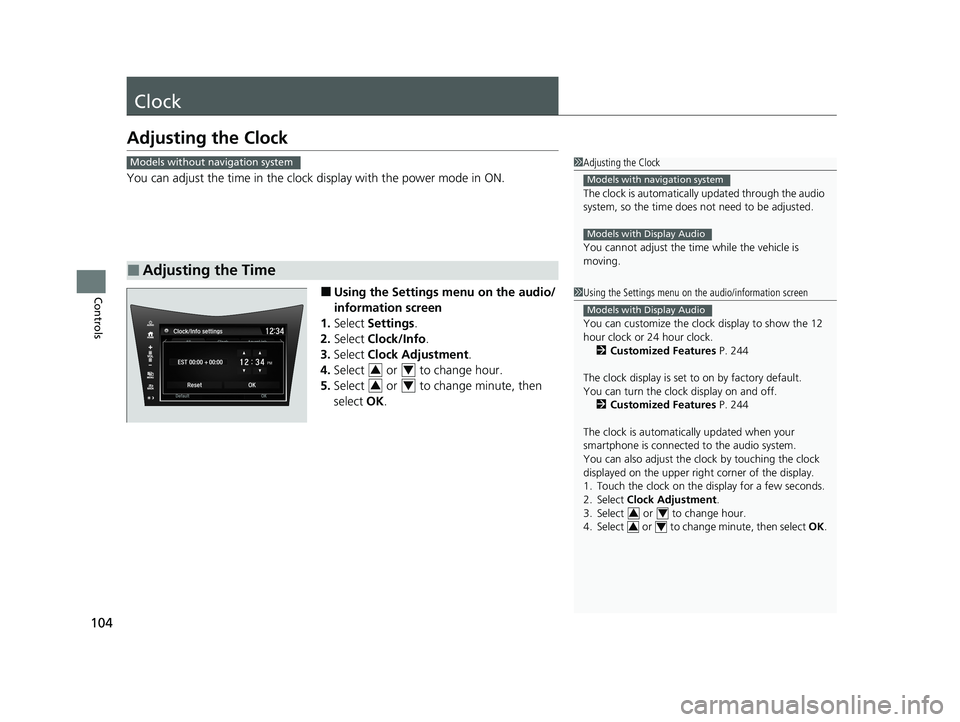
You can adjust the time in the clock display with the power mode in ON.
■ Using the Settings menu on the audio/
information screen
1. Select Settings .
2. Select Clock/Info .
3. Select Clock Adjustment .
4. Select or to change hour.
5. Select or to change minute, then
select OK.
■Adjusting the Time
1Adjusting the Clock
The clock is automatically updated through the audio
system, so the time does not need to be adjusted.
You cannot adjust the time while the vehicle is moving.
Models with navigation system
Models with Display Audio
Models without navigation system
1Using the Settings menu on the audio/information screen
You can customize the clock display to show the 12
hour clock or 24 hour clock.
2 Customized Features P. 244
The clock display is set to on by factory default.
You can turn the clock display on and off. 2 Customized Features P. 244
The clock is automatica lly updated when your
smartphone is connected to the audio system.
You can also adjust the clock by touching the clock
displayed on the upper right corner of the display.
1. Touch the clock on the di splay for a few seconds.
2. Select Clock Adjustment .
3. Select or to change hour.
4. Select or to change minute, then select OK.
Models with Display Audio
34
34
34
34
20 ACURA NSX PMC-31T6N6300.book 104 ページ 2019年9月11日 水曜日 午後4時51分