phone ACURA NSX 2020 User Guide
[x] Cancel search | Manufacturer: ACURA, Model Year: 2020, Model line: NSX, Model: ACURA NSX 2020Pages: 491, PDF Size: 20.24 MB
Page 180 of 491
uuAudio System Basic OperationuAudio/Information Screen
178
Features
■ To remove icons from the home screen
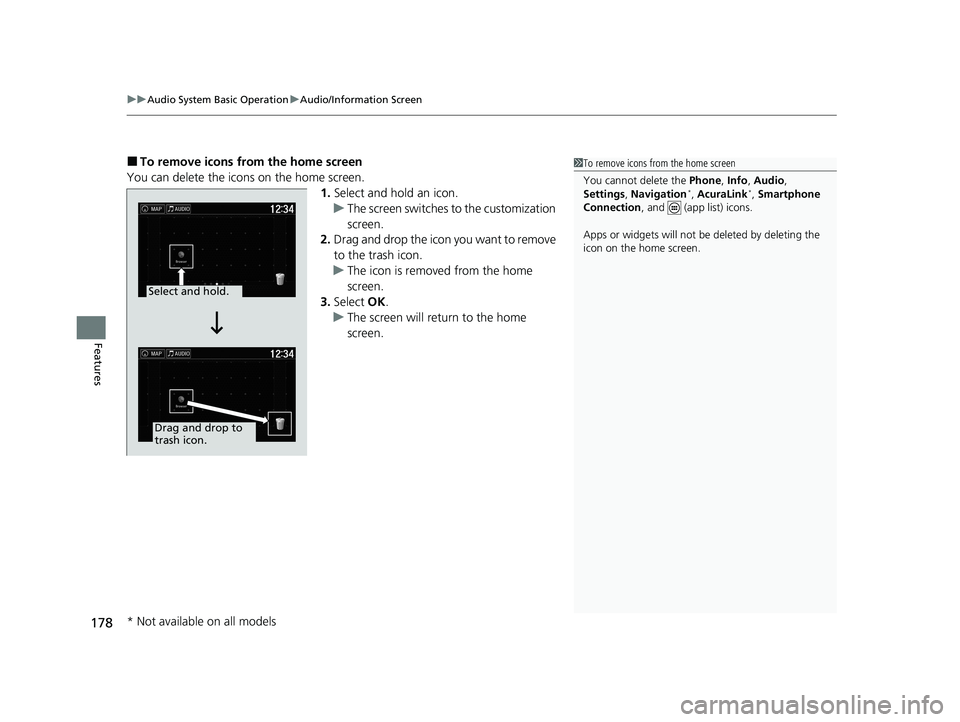
You can delete the icons on the home screen. 1.Select and hold an icon.
uThe screen switches to the customization screen.
2. Drag and drop the icon you want to remove
to the trash icon.
uThe icon is removed from the home screen.
3. Select OK.
uThe screen will return to the home screen.
1To remove icons from the home screen
You cannot delete the Phone, Info , Audio ,
Settings , Navigation *
, AcuraLink *
, Smartphone
Connection , and (app list) icons.
Apps or widgets will not be deleted by deleting the
icon on the home screen.
Select and hold.
Drag and drop to trash icon.
* Not available on all models
20 ACURA NSX PMC-31T6N6300.book 178 ページ 2019年9月11日 水曜日 午後4時51分
Page 186 of 491

184
uuAudio System Basic OperationuVoice Control Operation
Features
Voice Control Operation
Your vehicle has a voice control system that allows hands-free operation.
The voice control system uses the (Talk) and (hang-up/back) buttons on
the steering wheel and a microphone near the map lights on the ceiling.
To achieve optimum voice recognition when using the voice control system: • Make sure the correct screen is displa yed for the voice command that you are
using.
The system recognizes only certain commands. Available voice commands. 2 Voice Portal Screen P. 185
• Close the windows.
• Adjust the dashboard and side vents so air does not blow onto the microphone
on the ceiling.
• Speak clearly in a natural speaking vo ice without pausing between words.
• Reduce any background noise if possible. The system may misinterpret your
command if more than one person is speaking at the same time.
■Voice Recognition
1Voice Control Operation
When you press the button, a helpful prompt asks what you would like to do. Press and release the
button again to bypass th is prompt and give a
command.
1Voice Recognition
The voice control system can only be used from the driver’s seat because the microphone unit removes
noises from the front passenger’s side.
20 ACURA NSX PMC-31T6N6300.book 184 ページ 2019年9月11日 水曜日 午後4時51分
Page 187 of 491
185
uuAudio System Basic OperationuVoice Control Operation
Continued
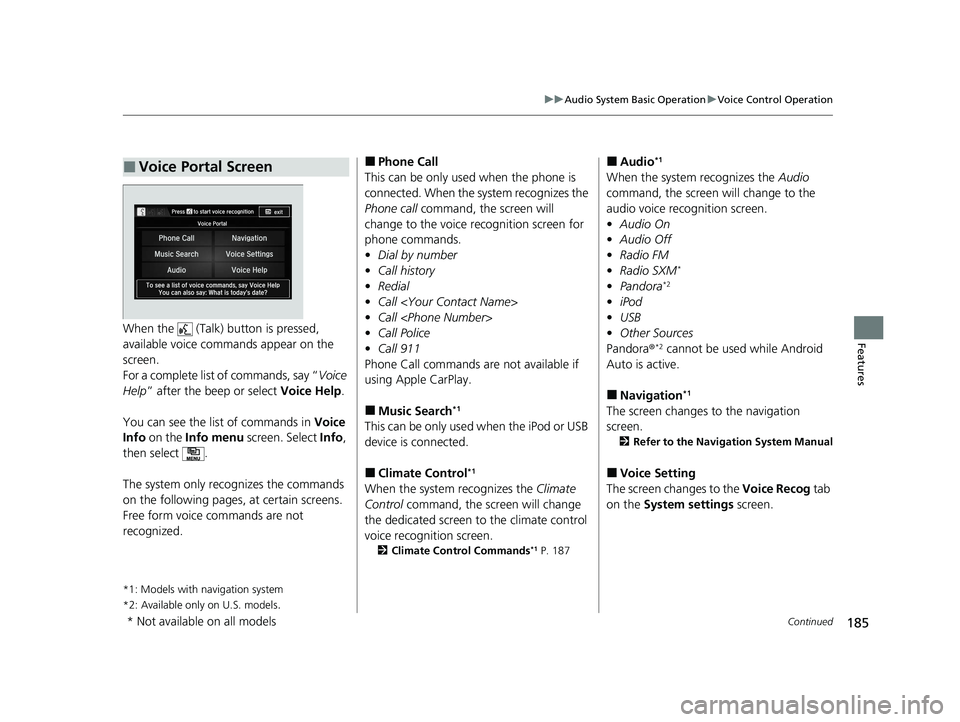
FeaturesWhen the (Talk) button is pressed,
available voice comma nds appear on the
screen.
For a complete list of commands, say “ Voice
Help ” after the beep or select Voice Help.
You can see the list of commands in Voice
Info on the Info menu screen. Select Info,
then select .
The system only recognizes the commands
on the following pages, at certain screens.
Free form voice commands are not
recognized.
*1: Models with navigation system
*2: Available only on U.S. models .
■Voice Portal Screen■
Phone Call
This can be only used when the phone is
connected. When the sy stem recognizes the
Phone call command, the screen will
change to the voice re cognition screen for
phone commands. • Dial by number
• Call history
• Redial
• Call
• Call
• Call Police
• Call 911
Phone Call commands are not available if
using Apple CarPlay.
■ Music Search *1
This can be only used when the iPod or USB
device is connected. ■ Climate Control *1
When the system recognizes the Climate
Control command, the screen will change
the dedicated screen to the climate control
voice recognition screen. 2 Climate Control Commands *1
P. 187 ■
Audio *1
When the system recognizes the Audio
command, the screen will change to the
audio voice recognition screen.• Audio On
• Audio Off
• Radio FM
• Radio SXM *
• Pandora *2
• iPod
• USB
• Other Sources
Pandora ®*2
cannot be used while Android
Auto is active.
■ Navigation *1
The screen changes to the navigation screen. 2 Refer to the Navigation System Manual
■ Voice Setting
The screen changes to the Voice Recog tab
on the System settings screen.
* Not available on all models
20 ACURA NSX PMC-31T6N6300.book 185 ページ 2019年9月11日 水曜日 午後4時51分
Page 188 of 491

186
uuAudio System Basic OperationuVoice Control Operation
Features
■Voice Help
You can see a list of the available
commands on the screen. • Useful Commands
• Phone Commands
• Audio Commands *1
• On Screen Commands
• Music Search Commands *1
• General Commands
• Climate Control Commands *1
The system accepts th ese commands on the
voice portal top screen.• Call
• Call
• What time is it?
• What is today
Page 202 of 491

uuAudio System Basic OperationuPlaying an iPod
200
Features
1. Select and select Music Search.
2. Select the items on that menu.
■How to Select a Song from the Music Search List1Playing an iPod Available operating functi ons vary on models or
versions. Some functions ma y not be available on the
vehicle’s audio system.
If there is a problem, you may see an error message
on the audio/information screen. 2 iPod/USB Flash Drive P. 223
If you operate any musi c app on your iPhone/iPod
while the phone is connected to the audio system,
you may no longer be able to operate the same app
on the audio/information screen.
Reconnect the devi ce if necessary.
If an iPhone is connected via Apple CarPlay, the iPod/
USB source is unavailable and audio files on the
phone can only be played within Apple CarPlay.
Category
Selection
Item Selection
20 ACURA NSX PMC-31T6N6300.book 200 ページ 2019年9月11日 水曜日 午後4時51分
Page 206 of 491

uuAudio System Basic OperationuSong By VoiceTM
(SBV)
204
Features
Add phonetic modifications of difficult or fo reign words so that it is easier for SBV
to recognize artists, songs, albums, and composers in voice commands when
searching for music on the USB flash drive or iPod. 1.Select .
2. Select Settings .
3. Select System .
4. Select the Voice Recog tab.
5. Select Song by Voice Phonetic
Modification .
6. Select New Modification .
7. Select USB or iPod .
■Phonetic Modification1Phonetic Modification
Song by Voice Phonetic Modification is grayed
out when Song by Voice is set to Off.
You can store up to 2, 000 phonetic modification
items.
20 ACURA NSX PMC-31T6N6300.book 204 ページ 2019年9月11日 水曜日 午後4時51分
Page 207 of 491

205
uuAudio System Basic OperationuSong By VoiceTM
(SBV)
Features
8. Select the item to modify (e.g., Artists).
uThe list of the selected item appears on the screen.
9. Select an entry to modify.
uThe pop-up menu appears on the screen.
uTo listen to the current phonetic
modification, select Play.
uTo delete the current phonetic
modification, select Delete.
10. Select Modify .
11. Select the phonetic spelling you want to
use (e.g., ”Artist A”) when prompted.
12. Select OK.
uThe artist “No Name” is phonetically
modified to “Artist A.” When in the SBV
mode, you can press the (Talk)
button and use th e voice command
“Play
Page 208 of 491
206
uuAudio System Basic OperationuPlaying Pandora®*1
Features
Playing Pandora
®*1
Your audio system allows you to listen to music from the Pandora ® app on a
compatible smartphone.
This function is available when the phone is paired and connected to the vehicle’s
Bluetooth ® HandsFreeLink ® (HFL) system, or with an iPhone, you can connect using
your USB cable to the USB port. 2 Phone Setup P. 278
2 USB Ports P. 163
*1:Available only on U.S. models.
1Playing Pandora ®*1
Pandora ®, the Pandora logo, and the Pandora trade
dress are trademarks or registered trademarks of
Pandora Media, Inc., used with permission. Pandora
is only available in certai n countries. Visit the Pandora
website for more information.
To find out if your phone is compatible with this
feature, visit www.acura.com/handsfreelink , or call
1-888-528-7876.
To use this service in your vehicle, the Pandora ® app
must first be installed on your phone. Visit www.pandora.com for more information.
Pandora ® is free, personalized radio that plays music
and comedy you’ll love. Just start with the name of
one of your favorite arti sts, songs, comedians or
composers and Pandora ® will create a custom station
that plays similar tracks. Pandora ® also features
hundreds of genre stations ranging from Dubstep to
Smooth Jazz to Power Workout. If you cannot operate Pandora ® through the audio
system, it may be streaming through Bluetooth®
Audio. Make sure Pandora ® mode on your audio
system is selected.
If your phone is connecte d to Android Auto, Pandora
is only available through the Android Auto interface.
Visit the Android Auto website to check
compatibility.
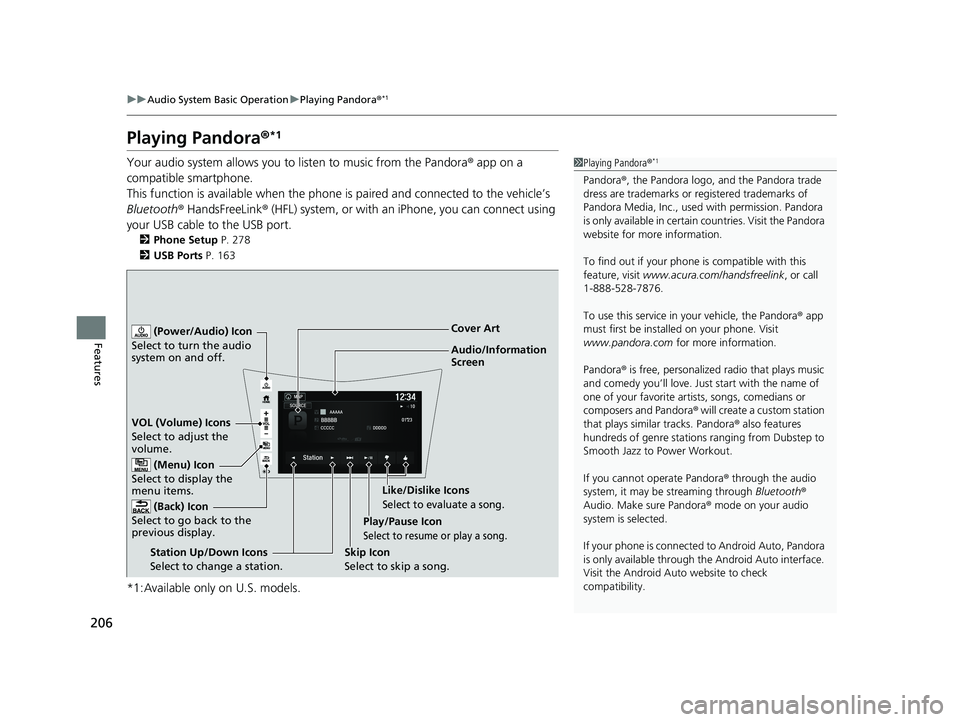
Audio/Information Screen
Cover Art
VOL (Volume) Icons S
elect to adjust the
volume.
(Back) Icon
Select to go back to the
previous display.
(Power/Audio) Icon
Select to turn the audio
system on and off.
(Menu) Icon
Select to display the
menu items.
Play/Pause Icon
Select to resume or play a song.
Station Up/Down Icons Select to change a station. Skip Icon
Select to skip a song.Like/Dislike Icons
Select to evaluate a song.
20 ACURA NSX PMC-31T6N6300.book 206 ページ 2019年9月11日 水曜日 午後4時51分
Page 213 of 491
211
uuAudio System Basic OperationuPlaying Bluetooth ® Audio
Continued
Features
Playing Bluetooth ® Audio
Your audio system allows you to listen to music from your Bluetooth-compatible
phone.
This function is available when the phone is paired and connected to the vehicle’s
Bluetooth ® HandsFreeLink ® (HFL) system.
2 Phone Setup P. 278
*1:Depending on the Bluetooth® device you connect, some or all of the lists may not
be displayed.
1Playing Bluetooth ® Audio
Not all Bluetooth -enabled phones with streaming
audio capabilities are comp atible with the system.
For a list of compatible phones: • U.S.: Visit www.acura.com/handsfreelink , or call 1-
888-528-7876.
• Canada: For more info rmation on smartphone
compatibility, call 1-888-528-7876.
It may be illegal to perform some data device
functions while driving. Only one phone can be used with HFL at a time.
When there are more than two paired phones in the
vehicle, the first paired phone the system finds is
automatically connected.
The connected phone for Bluetooth® Audio can be
different.
If more than one phone is paired to the HFL system,
there may be a delay before the system begins to
play.
In some cases, the name of the artist, album, or track
may not appear correctly.
Some functions may not be available on some
devices.If a phone is currently conne cted via Apple CarPlay or
Android Auto, Bluetooth® Audio from that phone is
unavailable. However, a se cond previously paired
phone can stream Bluetooth® Audio by selecting
Connect from the Bluetooth Device List .
2 Phone Setup P. 278
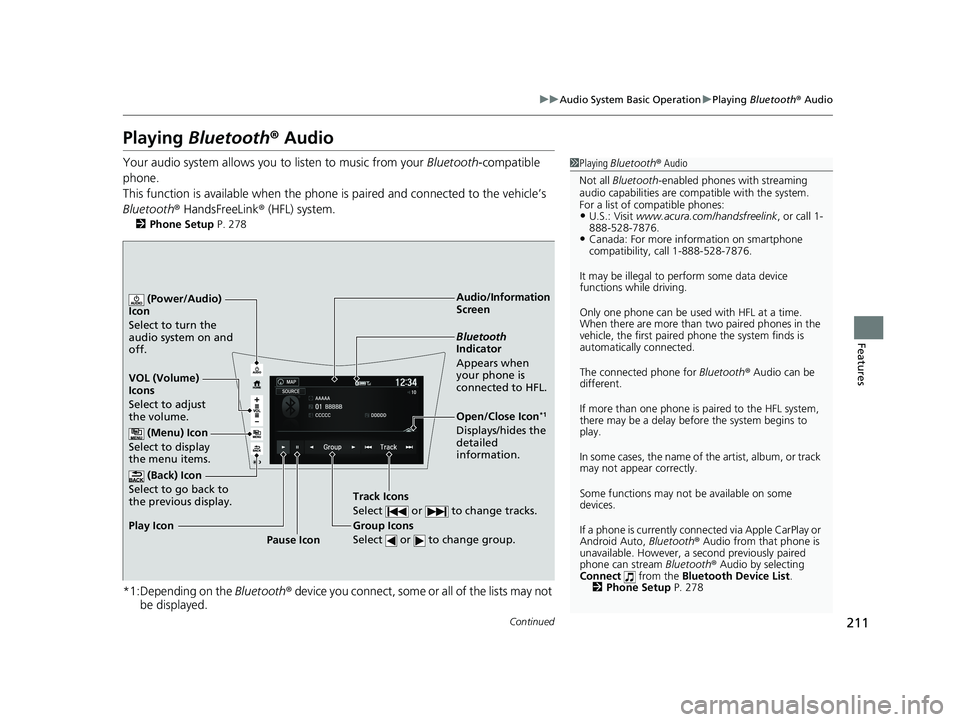
Audio/Information
Screen
VOL (Volume) Ic
ons
Select to adjust
the volume.
(Back) Icon
Select to go back to
the previous display.
(Power/Audio)
Icon Select to turn the
audio system on and off.
(Menu) Icon
Select to display
the menu items.
Group Icons
Select or to change group.
Pause Icon
Play Icon
Bluetooth
Indicator
Appears when
your phone is
connected to HFL.
Track Icons
Select or to change tracks.
Open/Close Icon *1
Displays/hides the
detailed
information.
20 ACURA NSX PMC-31T6N6300.book 211 ページ 2019年9月11日 水曜日 午後4時51分
Page 214 of 491
uuAudio System Basic OperationuPlaying Bluetooth ® Audio
212
Features
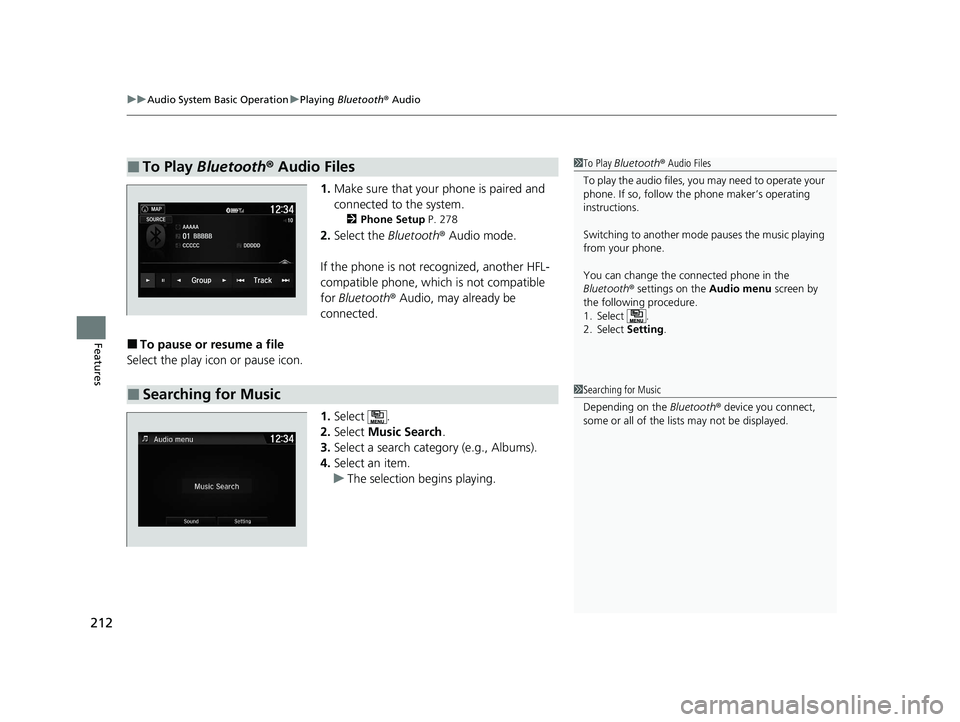
1. Make sure that your phone is paired and
connected to the system.
2 Phone Setup P. 278
2. Select the Bluetooth® Audio mode.
If the phone is not recognized, another HFL-
compatible phone, which is not compatible for Bluetooth ® Audio, may already be
connected.
■ To pause or resume a file
Select the play icon or pause icon.
1.Select .
2. Select Music Search .
3. Select a search category (e.g., Albums).
4. Select an item.
uThe selection begins playing.
■To Play Bluetooth ® Audio Files1To Play Bluetooth ® Audio Files
To play the audio files, y ou may need to operate your
phone. If so, follow the phone maker’s operating
instructions. Switching to another mode pauses the music playing
from your phone.
You can change the connected phone in the
Bluetooth ® settings on the Audio menu screen by
the following procedure.
1. Select .
2. Select Setting.
■Searching for Music1Searching for Music Depending on the Bluetooth® device you connect,
some or all of the list s may not be displayed.
20 ACURA NSX PMC-31T6N6300.book 212 ページ 2019年9月11日 水曜日 午後4時51分