clock ACURA NSX 2020 Owners Manual
[x] Cancel search | Manufacturer: ACURA, Model Year: 2020, Model line: NSX, Model: ACURA NSX 2020Pages: 491, PDF Size: 20.24 MB
Page 4 of 491
Contents
This owner’s manual should be considered a permanent part of the
vehicle and should remain with the vehicle when it is sold.
This owner’s manual covers all models of your vehicle. You may find
descriptions of equipment and features that are not on your
particular model.
Images throughout this owner’s manual (including the front cover)
represent features and equipment that are available on some, but
not all, models. Your particular mo del may not have some of these
features.
This owner’s manual is for vehicles sold in the United States and
Canada.
The information and specifications in cluded in this publication were
in effect at the time of approval for printing. Honda Motor Co., Ltd.
reserves the right, however, to discontinue or change specifications
or design at any time without notice and without incurring any
obligation.2 Safe Driving P. 31
For Safe Driving P. 32 Seat Belts P. 36 Airbags P. 43
2Instrument Panel P. 69
Indicators P. 70 Gauges and Displays P. 95
2Controls P. 103
Clock P. 104 Locking and Unlocking the Doors P. 105
Operating the Switches Around the Steering Wheel P. 127
Climate Control System P. 155
2Features P. 161
Audio System P. 162 Audio System Basic Operation P. 166
Customized Features P. 244 HomeLink ® Universal Transceiver P. 267
2 Driving P. 309
Before Driving P. 310 Towing a Trailer P. 320
Multi-View Rear Camera P. 369
2Maintenance P. 375
Before Performing Maintenance P. 376 Maintenance MinderTM
P. 379
Checking and Maintaining Wiper Blades P. 404 Climate Control System Maintenance P. 419
2Handling the Unexpected P. 431
Tools P. 432 If a Tire Goes Flat P. 433
Overheating P. 450 Indicator, Coming On/Blinking P. 452
When You Cannot Open the Hatch P. 464
2Information P. 467
Specifications P. 468 Identi fication Numbers P. 470
Emissions Testing P. 473 Warranty Coverages P. 475
20 ACURA NSX PMC-31T6N6300.book 2 ページ 2019年9月11日 水曜日 午後4時51分
Page 19 of 491
17
Quick Reference Guide
Controls (P 103)
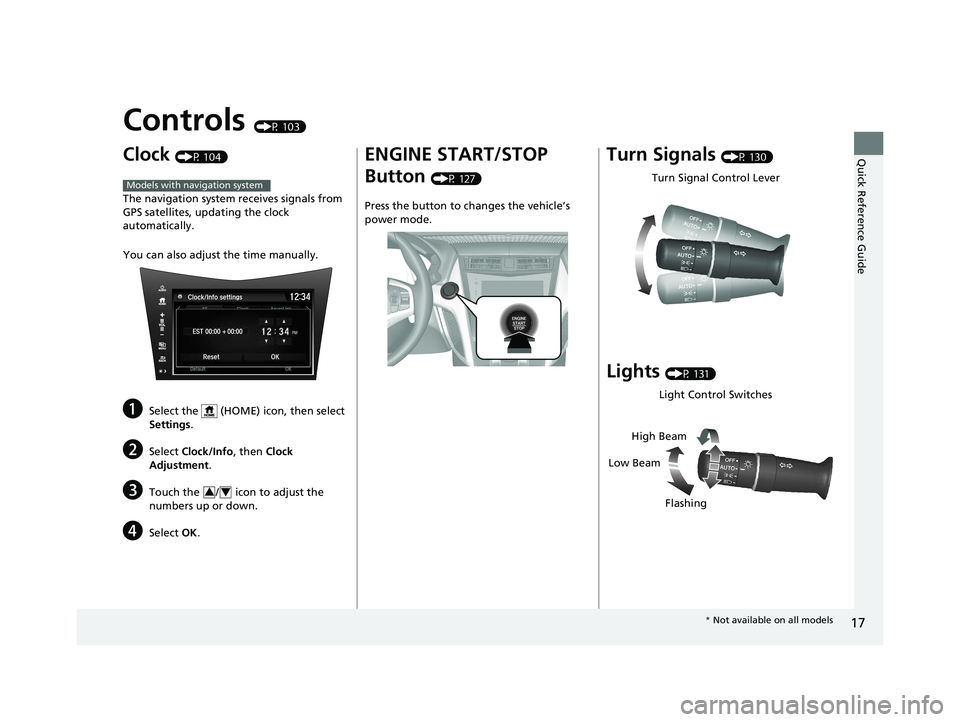
Clock (P 104)
The navigation system receives signals from
GPS satellites, updating the clock automatically.
You can also adjust the time manually.
a Select the (HOME) icon, then select
Settings .
b Select Clock/Info , then Clock
Adjustment .
c Touch the / icon to adjust the
numbers up or down.
d Select OK.
Models with navigation system
34
ENGINE START/STOP Button (P 127)
Press the button to ch anges the vehicle’s
power mode.Turn Signals (P 130)
Lights (P 131)
Turn Signal Control Lever
Light Control Switches
Low Beam High Beam
Flashing
* Not available on all models
20 ACURA NSX PMC-31T6N6300.book 17 ページ 2019年9月11日 水曜日 午後4時51分
Page 105 of 491

103
Controls
This chapter explains how to operate th e various controls necessary for driving.
Clock.................................................. 104
Locking and Unlocking the Doors Key .................................................. 105
Low Keyless Access Remote Signal Strength ......................................... 106
Locking/Unlocking the Doors from the Outside .......................................... 107
Locking/Unlocking the Doors from the Inside ............................................. 115
Auto Door Locking/Unlocking .......... 118
Opening and Closing the Hatch ....... 119
Security System ................................ 122 Immobilizer System .......................... 122
Security System Alarm...................... 122
Opening and Closing the Windows.... 125
Operating the Switches Around the
Steering Wheel ENGINE START/STOP Button............. 127
Turn Signals ..................................... 130
Light Switches.................................. 131
Daytime Running Lights ................... 134
Wipers and Washers ........................ 135
Rear Defogger/Heated Door Mirror Button ....136
Brightness Control ........................... 137 Driving Position Memory System
*
.... 138
Adjusting the Steering Wheel .......... 140
Adjusting the Mirrors ....................... 141
Interior Rearview Mirror ................... 141
Power Door Mirrors ......................... 142
Adjusting the Seats .......................... 144
Interior Convenience Items .............. 149
Climate Control System ................... 155
Using Automatic Climate Control .... 155
Automatic Climate Control Sensors......159
* Not available on all models
20 ACURA NSX PMC-31T6N6300.book 103 ページ 2019年9月11日 水曜日 午後4時51分
Page 106 of 491
104
Controls
Clock
Adjusting the Clock
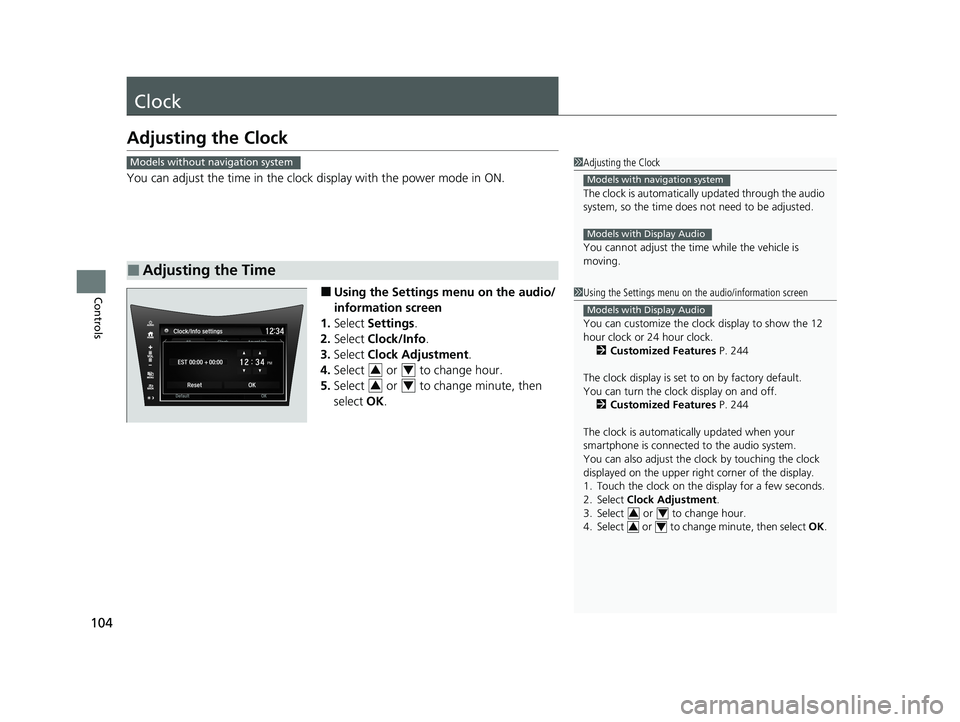
You can adjust the time in the clock display with the power mode in ON.
■ Using the Settings menu on the audio/
information screen
1. Select Settings .
2. Select Clock/Info .
3. Select Clock Adjustment .
4. Select or to change hour.
5. Select or to change minute, then
select OK.
■Adjusting the Time
1Adjusting the Clock
The clock is automatically updated through the audio
system, so the time does not need to be adjusted.
You cannot adjust the time while the vehicle is moving.
Models with navigation system
Models with Display Audio
Models without navigation system
1Using the Settings menu on the audio/information screen
You can customize the clock display to show the 12
hour clock or 24 hour clock.
2 Customized Features P. 244
The clock display is set to on by factory default.
You can turn the clock display on and off. 2 Customized Features P. 244
The clock is automatica lly updated when your
smartphone is connected to the audio system.
You can also adjust the clock by touching the clock
displayed on the upper right corner of the display.
1. Touch the clock on the di splay for a few seconds.
2. Select Clock Adjustment .
3. Select or to change hour.
4. Select or to change minute, then select OK.
Models with Display Audio
34
34
34
34
20 ACURA NSX PMC-31T6N6300.book 104 ページ 2019年9月11日 水曜日 午後4時51分
Page 170 of 491
168
uuAudio System Basic OperationuAudio/Information Screen
Features
■Phone
Displays the HFL information. 2 Bluetooth ® HandsFreeLink ® P. 270
■ Info
Displays Trip Computer or Clock/Wallpaper . Select on the Info Menu screen
to see all available options: Trip Computer, Voice Info , Clock/Wallpaper and
System/Device Information .
Trip Computer :
• Current Drive tab: Displays the current trip information.
• History of Trip A tab: Displays information for the three previous drives. The
information is stored every time you reset Trip A.
To delete the history manually, select Delete History on the History of Trip A
tab. The confirmation message ap pears on the screen, then select Yes.
Voice Info : Displays a list of all voice commands.
Clock/Wallpaper : Displays the clock and wallpaper.
System/Device Information :
• System Info : Displays the software version of the audio system.
• USB Info : Displays the memory usage of the USB device.
■ Audio
Displays the current audio information.
■ Settings
Enters the customiz ing menu screen.
2 Customized Features P. 244
20 ACURA NSX PMC-31T6N6300.book 168 ページ 2019年9月11日 水曜日 午後4時51分
Page 173 of 491
Continued171
uuAudio System Basic OperationuAudio/Information Screen
Features
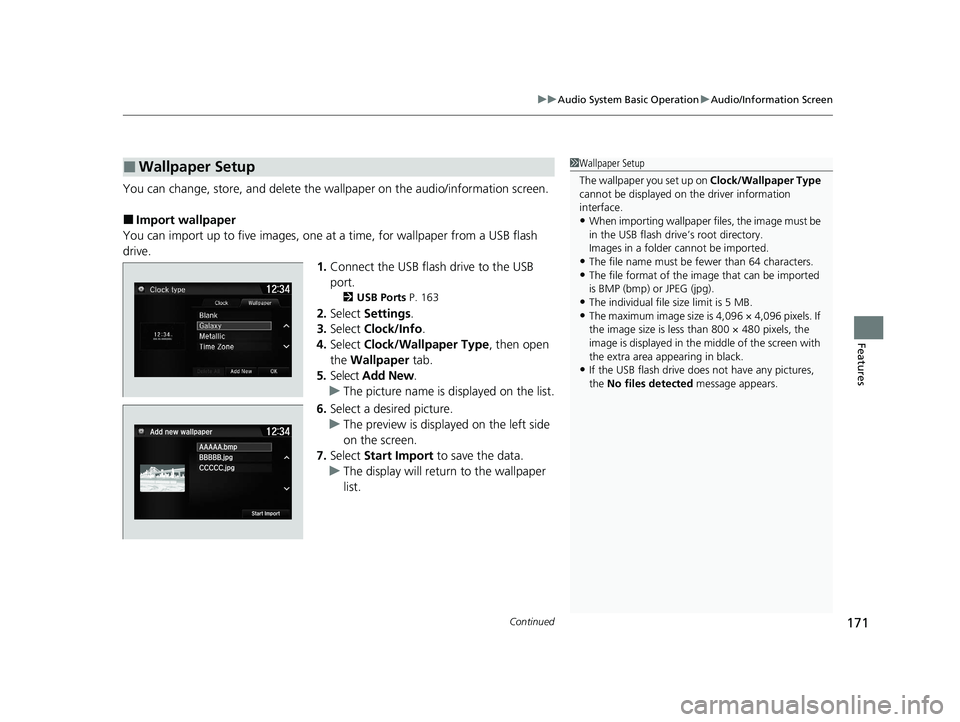
You can change, store, and delete the wallpaper on the audio/information screen.
■ Import wallpaper
You can import up to five images, one at a time, for wallpaper from a USB flash
drive.
1.Connect the USB flash drive to the USB
port.
2 USB Ports P. 163
2. Select Settings .
3. Select Clock/Info .
4. Select Clock/Wallpaper Type , then open
the Wallpaper tab.
5. Select Add New .
uThe picture name is displayed on the list.
6. Select a desired picture.
uThe preview is displayed on the left side
on the screen.
7. Select Start Import to save the data.
uThe display will return to the wallpaper
list.
■Wallpaper Setup1Wallpaper Setup
The wallpaper you set up on Clock/Wallpaper Type
cannot be displayed on th e driver information
interface. • When importing wallpaper f iles, the image must be
in the USB flash driv e’s root directory.
Images in a folder cannot be imported.
• The file name must be fewer than 64 characters.
• The file format of the im age that can be imported
is BMP (bmp) or JPEG (jpg).
• The individual file size limit is 5 MB.
• The maximum image size is 4,096 × 4,096 pixels. If
the image size is less than 800 × 480 pixels, the
image is displayed in the middle of the screen with
the extra area appearing in black.
• If the USB flash drive doe s not have any pictures,
the No files detected message appears.
20 ACURA NSX PMC-31T6N6300.book 171 ページ 2019年9月11日 水曜日 午後4時51分
Page 174 of 491
uuAudio System Basic OperationuAudio/Information Screen
172
Features
■ Select wallpaper
1. Select Settings .
2. Select Clock/Info .
3. Select Clock/Wallpaper Type , then open the Wallpaper tab.
uThe screen changes to the wallpaper list.
4. Select a desired wallpaper.
uThe preview is displayed on the left side on the screen.
uThe pop-up menu appears on the screen.
5. Select Set.
uThe display will return to the wallpaper list.
■ To view wallpaper once it is set
1. Select .
2. Select Info.
3. Select .
4. Select Clock/Wallpaper .
■ Delete wallpaper
1. Select Settings .
2. Select Clock/Info .
3. Select Clock/Wallpaper Type , then open the Wallpaper tab.
uThe screen changes to the wallpaper list.
4. Select a wallpaper that you want to delete.
uThe preview is displayed on the left side on the screen.
uThe pop-up menu appears on the screen.
5. Select Delete .
uA confirmation message appears on the screen.
6. Select Yes to delete completely.
uThe display will return to the wallpaper list.
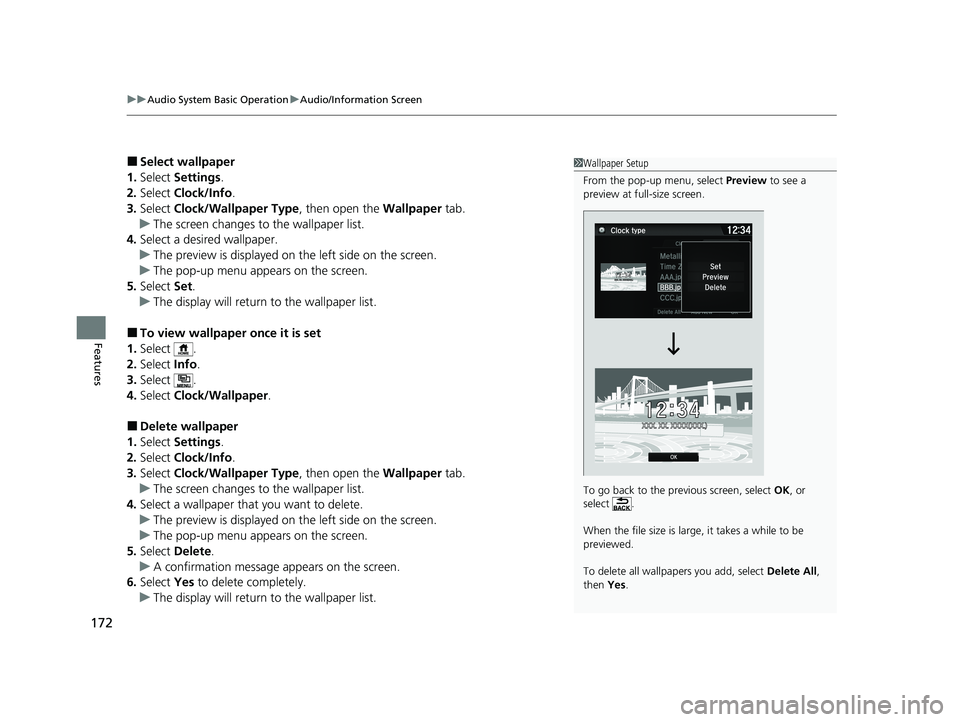
1Wallpaper Setup
From the pop-up menu, select Preview to see a
preview at full-size screen.
To go back to the previous screen, select OK, or
select .
When the file size is large, it takes a while to be previewed.
To delete all wallpapers you add, select Delete All,
then Yes.
20 ACURA NSX PMC-31T6N6300.book 172 ページ 2019年9月11日 水曜日 午後4時51分
Page 247 of 491
245
uuCustomized Featuresu
Continued
Features
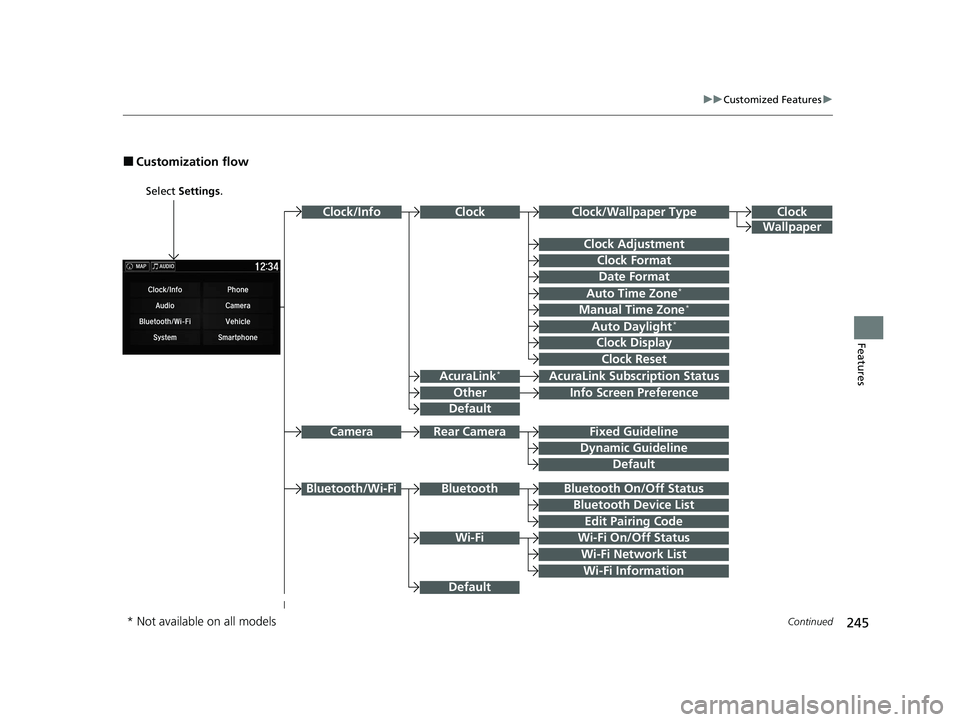
■Customization flow
Select Settings .
Clock
Wallpaper
Other
Clock/Wallpaper Type
Clock Adjustment
Clock Format
ClockClock/Info
Auto Time Zone *
Manual Time Zone *
Auto Daylight*
Clock Display
Clock Reset
Info Screen Preference
AcuraLink*AcuraLink Subscr
iption Status
Date Format
Default
Bluetooth On/Off Status
Bluetooth Device List
Edit Pairing Code
Wi-Fi On/Off Status
Wi-Fi Network List
Wi-Fi
BluetoothBluetooth/Wi-Fi
Wi-Fi Information
Fixed Guideline
Dynamic Guideline
Rear CameraCamera
Default
Default
* Not available on all models
20 ACURA NSX PMC-31T6N6300.book 245 ページ 2019年9月11日 水曜日 午後4時51分
Page 251 of 491
249
uuCustomized Featuresu
Continued
Features
ClockClock/Wallpaper Type
Clock Adjustment
Clock Format
Auto Time Zone*
Manual Time Zone *
Auto Daylight*
Clock Display
Clock Reset
Clock
Wallpaper
Language
Touch Panel Sensitivity
Factory Data Reset
Climate Screen Timeout
Detail Information
Others
Date Format
Default
* Not available on all models
20 ACURA NSX PMC-31T6N6300.book 249 ページ 2019年9月11日 水曜日 午後4時51分
Page 254 of 491
252
uuCustomized Featuresu
Features
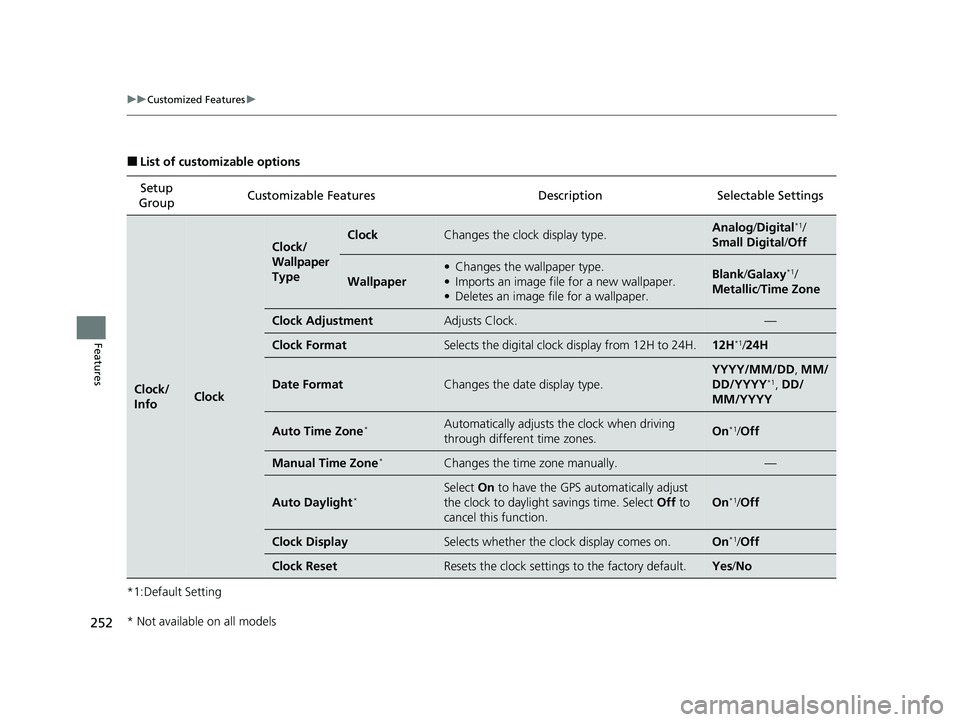
■List of customizable options
*1:Default Setting Setup
Group Customizable Features Desc
ription Selectable Settings
Clock/ InfoClock
Clock/
Wallpaper
TypeClockChanges the clock display type.Analog/Digital *1
/
Small Digital /Off
Wallpaper
• Changes the wallpaper type.
• Imports an image file for a new wallpaper.
• Deletes an image file for a wallpaper.Blank /Galaxy *1
/
Metallic /Time Zone
Clock AdjustmentAdjusts Clock.—
Clock FormatSelects the digital clock display from 12H to 24H.12H *1
/24H
Date FormatChanges the date display type.
YYYY/MM/DD , MM/
DD/YYYY *1
, DD/
MM/YYYY
Auto Time Zone *Automatically adjusts th
e clock when driving
through different time zones.On *1
/Off
Manual Time Zone *Changes the time zone manually.—
Auto Daylight*
Select
On to have the GPS automatically adjust
the clock to daylight savings time. Select Off to
cancel this function.
On *1
/Off
Clock DisplaySelects whether the clock display comes on.On *1
/Off
Clock ResetResets the clock settings to the factory default.Yes /No
* Not available on all models
20 ACURA NSX PMC-31T6N6300.book 252 ページ 2019年9月11日 水曜日 午後4時51分