clock ACURA NSX 2020 User Guide
[x] Cancel search | Manufacturer: ACURA, Model Year: 2020, Model line: NSX, Model: ACURA NSX 2020Pages: 491, PDF Size: 20.24 MB
Page 255 of 491
253
uuCustomized Featuresu
Continued
Features
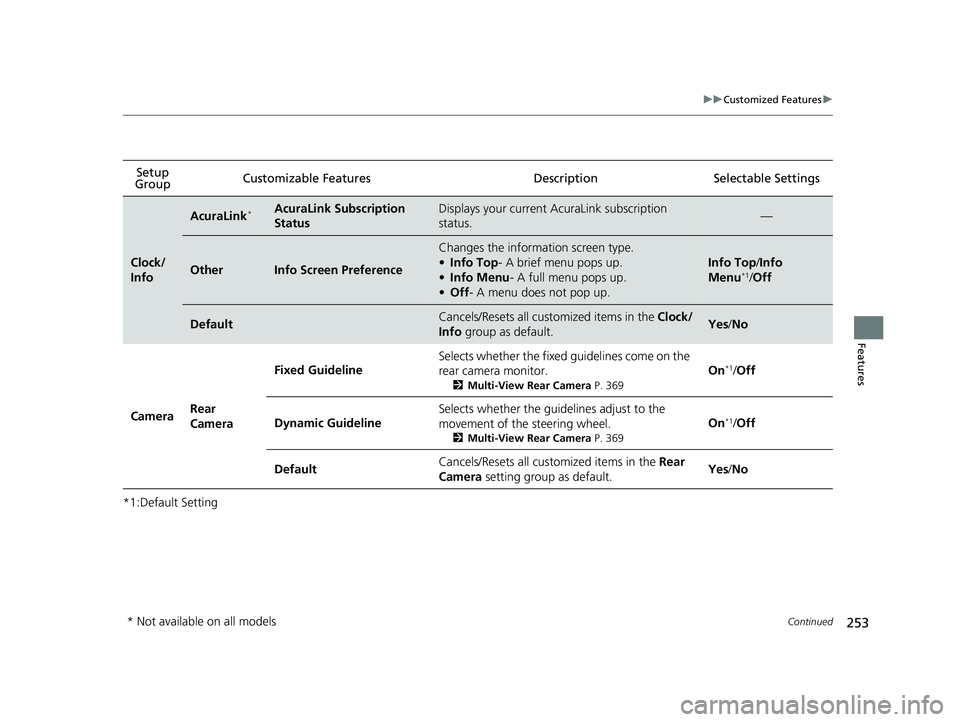
*1:Default SettingSetup
Group Customizable Features Desc
ription Selectable Settings
Clock/
Info
AcuraLink*AcuraLink Subscription
StatusDisplays your current AcuraLink subscription
status.—
OtherInfo Screen Preference
Changes the information screen type. •
Info Top - A brief menu pops up.
• Info Menu - A full menu pops up.
• Off - A menu does not pop up.
Info Top /Info
Menu *1
/Off
DefaultCancels/Resets all cust omized items in the Clock/
Info group as default.Yes/No
Camera Rear
Camera Fixed Guideline
Selects whether the fixed guidelines come on the
rear camera monitor.
2Multi-View Rear Camera P. 369On
*1
/Off
Dynamic Guideline Selects whether the guidelines adjust to the
movement of the steering wheel.
2Multi-View Rear Camera P. 369On
*1
/Off
Default Cancels/Resets all cust
omized items in the Rear
Camera setting group as default. Yes
/No
* Not available on all models
20 ACURA NSX PMC-31T6N6300.book 253 ページ 2019年9月11日 水曜日 午後4時51分
Page 262 of 491
260
uuCustomized Featuresu
Features
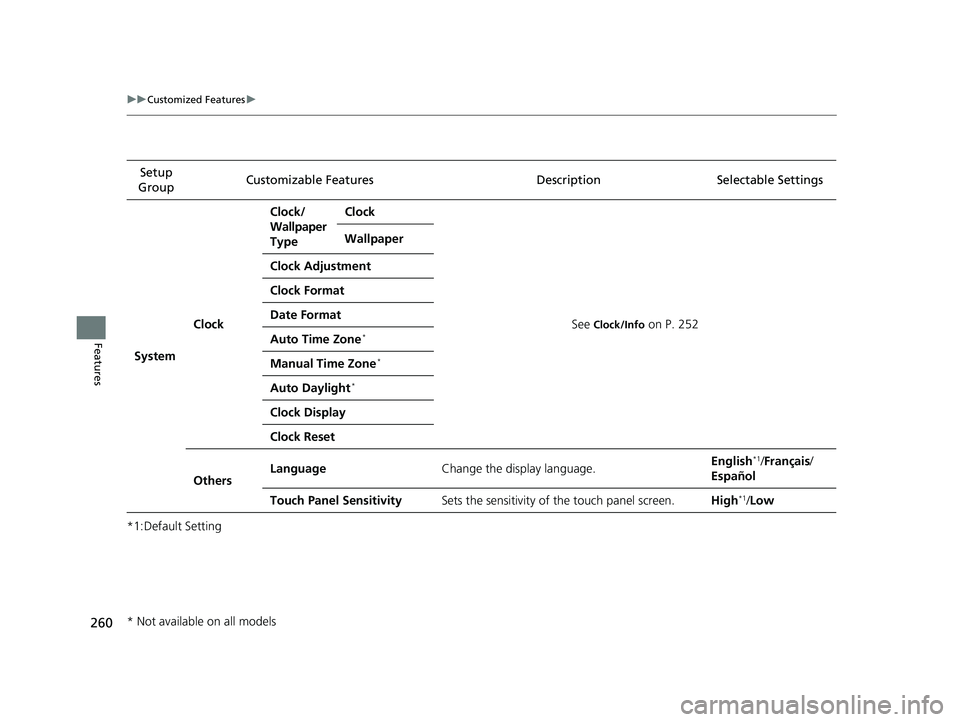
*1:Default SettingSetup
Group Customizable Features Description Selectable Settings
System Clock Clock/
Wallpaper Type
Clock
See Clock/Info
on P. 252
Wallpaper
Clock Adjustment
Clock Format
Date FormatAuto Time Zone *
Manual Time Zone *
Auto Daylight *
Clock Display
Clock Reset
Others Language
Change the display language. English
*1
/Français /
Español
Touch Panel Sensitivity Sets the sensitivity of the touch panel screen. High*1
/Low
* Not available on all models
20 ACURA NSX PMC-31T6N6300.book 260 ページ 2019年9月11日 水曜日 午後4時51分
Page 399 of 491

397
uuMaintenance Under the Hood and HatchuCooling System
Maintenance
1. Make sure the engine and radiator are cool.
2. Turn the reserve tank cap 1/8 turn counter-
clockwise and relieve any pressure in the
cooling system.
3. Push down and turn the reserve tank cap
counter-clockwise to remove it.
4. Pour coolant into the reserve tank until it reaches the MAX mark.
5. Put the reserve tank cap back on, and
tighten it fully.
■Adding the Coolant1Adding the Coolant
NOTICE
Pour the fluid slowly and ca refully so you do not spill
any. Clean up any spills immediately; they can
damage components in the engine compartment.
Reserve Tank Cap
20 ACURA NSX PMC-31T6N6300.book 397 ページ 2019年9月11日 水曜日 午後4時51分
Page 419 of 491

417
Maintenance
12-Volt Battery
Checking the 12-Volt BatteryCheck the battery terminals for corrosion
monthly.
The battery is protected by a cover.
Remove the cover by pressing the tabs.
Slide the terminal cover on your vehicle’s 12-
volt battery positive + terminal.
The battery condition is monitored by the
sensor on the negative terminal. If there is a
problem with the sensor, the warning
message on the driver information interface
will let you know. Have your vehicle checked
by an authorized Acura NSX dealer.
If your vehicle’s battery is disconnected or goes dead:• The audio system is disabled.
2 Reactivating the audio system P. 164
• The clock resets.
2 Clock P. 104
Charging the AGM Battery
AGM labeled batteries can be damaged if improperly charged. For more information
on how to charge an AGM battery, consult an authorized Acura NSX dealer.
112-Volt Battery
WARNING: Battery post, terminals,
and related accessories contain lead
and lead compounds.Wash your hands after handling.
When you find corrosion, cl ean the battery terminals
by applying a baking powder and water solution.
Clean the terminals with a damp towel. Cloth/towel
dry the battery. Coat the terminals with grease to
help prevent future corrosion.
When replacing the battery, the replacement must be
of the same specifications.
Consult an authorized Acura NSX dealer for more
information.
3WARNING
The battery gives off explosive hydrogen
gas during normal operation.
A spark or flame can cause the battery to
explode with enough force to kill or
seriously hurt you.
When conducting any battery
maintenance, wear prot ective clothing and
a face shield, or have a skilled technician do
it.
Tab
Cover
Terminal
Cover
20 ACURA NSX PMC-31T6N6300.book 417 ページ 2019年9月11日 水曜日 午後4時51分
Page 482 of 491

480
Index
B Battery12-Volt .................................................... 417 12-Volt Battery Charging System Indicator .......................................... 75, 452
Charging (AGM Battery) .......................... 417
High Voltage ........................................... 356
Jump Starting .......................................... 448
Maintenance (Checking the 12-Volt Battery) .................................................. 417
Maintenance (Replacing).......................... 418
Battery Types .............................................. 12
Belts (Seat) .................................................. 36
Beverage Holders ...................................... 152
Bluetooth ® Audio ..................................... 211
Bluetooth ® HandsFreeLink ®................... 270
Booster Seats (For Children) ....................... 66
Brake System ............................................. 357
Anti-lock Brake System (ABS) ................... 362
Automatic Brake Hold.............................. 360
Brake Assist System ................................. 363
Fluid ........................................................ 400
Foot Brake ............................................... 359
Parking Brake .......................................... 357
Brake System (Amber)
Indicator .................................................... 73
Brake System (Red) Indicator ............................................ 70, 453
Brake Wear Indicator .................................................... 74 Bulb Replacement
.................................... 401
Back-Up Lights ........................................ 402
Daytime Running Lights........................... 401
Front Side Marker Lights.......................... 401
Front Turn Signal/Parking Lights .............. 401
Headlights ............................................... 401
High-Mount Brake Light .......................... 403
Rear License Plate Lights .......................... 403
Rear Side Marker Lights ........................... 402
Rear Turn Signal Lights ............................ 402
Side Turn Signal/Emergency Indicator
Lights .................................................... 401
Taillights.................................................. 402
Bulb Specifications ................................... 468
C
Carbon Monoxide Gas ............................... 67
Carrying Cargo ................................. 311, 313
Certification Label .................................... 470
Changing Bulbs ........................................ 401
Charging System Indicator ................. 75, 452
Child Safety ................................................. 58
Emergency Hatch Opener ........................ 121
Child Seat .................................................... 58
Booster Seats ............................................ 66
Child Seat for Infants................................. 60
Child Seat for Small Children ..................... 61
Installing a Child Seat ................................ 63
Larger Children ......................................... 65
Selecting a Forward-facing Child Seat........ 62 Using a Tether .......................................... 64
Cleaning the Exterior ............................... 422
Cleaning the Interior ............................... 420
Client Service Information ....................... 478
Climate Control System ........................... 155
Defrosting the Windshield and Windows ...................................... 157, 158
Dust and Pollen Filters ............................. 419
Recirculation/Fresh Air Mode................... 156
Sensors ................................................... 159
Using Automatic Climate Control............ 155
Clock ......................................................... 104
Cold Weather ........................................... 416
Console Compartment ............................. 151
Controls .................................................... 103
Coolant (Engine) ...................................... 396
Adding the Coolant ................................ 397
Checking the Coolant ............................. 396
Overheating ............................................ 450
Coolant (Inverter) .................................... 398
Creeping (Dual Clutch Transmission) ...... 325
Cruise Control .......................................... 343
CRUISE CONTROL Indicator ....................... 82
CRUISE MAIN Indicator .............................. 82
Cup Holders .............................................. 152
Customized Features ............................... 244
D
Daytime Running Lights .......................... 134
Dead Battery (12-Volt) ............................. 448
20 ACURA NSX PMC-31T6N6300.book 480 ページ 2019年9月11日 水曜日 午後4時51分
Page 487 of 491

485
Index
Tires........................................................ 413
Wiper Blade Rubber ................................ 404
Reporting Safety Defects ......................... 472
Resetting a Trip Meter ............................. 100
Reverse Tilt Door Mirror .......................... 143
Right Selector Wheel ................................. 98
S
Safe Driving ................................................ 31
Safety Check ............................................... 35
Safety Labels .............................................. 68
Safety Message ............................................ 1
Seat Belts .................................................... 36
Automatic Seat Belt Tensioners ................. 38
Checking .................................................. 42
Fastening .................................................. 39
Installing a Child Seat................................ 63
Pregnant Women...................................... 41
Reminder ............................................ 37, 77
Warning Indicator ............................... 37, 77
Seat Heaters ............................................. 154
Seats .......................................................... 144
Adjusting ................................................ 144
Seat Heaters ........................................... 154
Security System ........................................ 122
Immobilizer System Indicator..................... 81
Security System Alarm Indicator ................ 82
Selecting a Forward-facing Child Seat ...... 62
Sequential Mode ...................................... 331
Sequential Mode Operation ................... 334Setting the Clock
...................................... 104
Shift Button ........................................ 23, 326
Operation ................................................ 328
Shifting (Transmission) ....................... 23, 326
Side Airbags ................................................ 52
Side Curtain Airbags ................................... 54
Siri Eyes Free ............................................. 215
SiriusXM ® Radio ........................................ 192
Snow Tires ................................................. 415
Sounds Unique to the SPORT HYBRID SH- AWD ® System ............................................ 13
Spark Plugs ................................................ 468
Specifications ............................................ 468
Specified Fuel .................................... 371, 468
SPORT HYBRID Super Handling All-Wheel- Drive TM
(SPORT HYBRID SH-AWD ®)........ 351
SRS Airbags (Airbags) ................................. 46
Steering Wheel Adjusting ................................................. 140
Stopping .................................................... 364
Storage ...................................................... 428
Summer Tires ............................................ 415
Supplemental Restraint System (SRS) ........ 46
Switches (Around the Steering Wheel) ............................................. 4, 5, 127
System Message Indicator .......................... 80
T
Temperature Gauge ....................................................... 96 Temperature Sensor
................................. 159
Temporary Tire Repair Kit ....................... 433
Time (Setting) ........................................... 104
Tire Pressure Monitoring System (TPMS) ..................................................... 352
Indicator............................................ 80, 455
Tires ........................................................... 407
Air Pressure ..................................... 408, 469
Chains..................................................... 415
Checking and Maintaining ...................... 407
Flat Tire (Puncture) .................................. 433
Inspection ............................................... 407
Labeling .................................................. 408
Regulations ............................................. 410
Rotation .................................................. 414
Summer .................................................. 415
Temporary Tire Repair Kit ........................ 433
Wear Indicators ....................................... 412
Winter..................................................... 415
Tools .......................................................... 432
Towing a Trailer ....................................... 320
Towing Your Vehicle ................................ 320
Emergency .............................................. 462
TPMS (Tire Pressure Monitoring System) .................................................... 352
Transmission ....................................... 23, 326
Dual Clutch ............................... 23, 325, 326
Fluids .............................................. 399, 469
Gear Position Indicator ...................... 76, 328
Number................................................... 470
Sequential Mode ..................................... 331
20 ACURA NSX PMC-31T6N6300.book 485 ページ 2019年9月11日 水曜日 午後4時51分