transmission ACURA NSX 2021 User Guide
[x] Cancel search | Manufacturer: ACURA, Model Year: 2021, Model line: NSX, Model: ACURA NSX 2021Pages: 494, PDF Size: 16.57 MB
Page 98 of 494

96
uuIndicators uDriver Information Interface Wa rning and Information Messages
Instrument Panel
MessageConditionExplanation
•Appears when a problem with the transmission
prevents a gear from changing to
(R.
•Have your vehicle checked by an authorized Acura NSX
dealer.
• Appears when the High Voltage battery is extremely
low and cannot start the power system.•Have your vehicle checked by an authorized Acura NSX
dealer.
• Appears when the vehicle cannot be driven by the
engine.•Stop your vehicle in a safe place and contact an
authorized Acur a NSX dealer.
•Appears when the engine speed exceeds reduced REV
LIMIT while engine temperature is low.•Continue driving at a low engine speed until the engine
temperature becomes warm.
• Appears when braking ability is reduced.•Slow down and drive carefully. Have your vehicle
checked by an authorized Acura NSX dealer.
• Appears if you are driving at an extremely high speed
and one or more tires are underinflated.•Decelerate and drive your vehicle until the message
disappears.
21 ACURA NSX PMC-31T6N6400.book 96 ページ 2020年10月8日 木曜日 午後3時7分
Page 99 of 494

97
uuIndicators uDriver Information Interface Wa rning and Information Messages
Continued
Instrument Panel
MessageConditionExplanation
•Appears for a few seconds if you have not pressed the
(N button long enough to initiate Neutral-Hold mode.2 If you want to keep the transmission in (N position
(car wash mode) P. 333
•Appears when you press and hold (N button for more
than 2 seconds.• Disappears when you set the gear position to other than
(N.
2 If you want to keep the transmission in (N position
(car wash mode) P. 333
•Appears when the device for starting the vehicle is too
hot.• Wait until message disappears.
21 ACURA NSX PMC-31T6N6400.book 97 ページ 2020年10月8日 木曜日 午後3時7分
Page 100 of 494

98
uuIndicators uDriver Information Interface Wa rning and Information Messages
Instrument Panel
MessageConditionExplanation
•Appears when launch control cannot be used due to
the condition of your vehicle.
2 Launch Control P. 345
•Appears if you shift the gear or do anything else after
Launch Mode is ready.
2 Launch Control P. 345
•Appears when Launch Mode is ready.
2 Launch Control P. 345
•Appears when the temperature of the transmission is
not in the operable range for launch control.
2 Launch Control P. 345
•Appears if the Integrated Dynamics System mode
cannot be changed due to ce rtain situations, such as a
system error or adverse driving conditions.
2 Integrated Dynamics System P. 340
21 ACURA NSX PMC-31T6N6400.book 98 ページ 2020年10月8日 木曜日 午後3時7分
Page 134 of 494

132
uuOperating the Switches Around the Steering Wheel uENGINE START/STOP Button
Controls
If you leave the vehicle for more than 30 minutes with the transmission in (P and
the power mode in ACCESSORY, the vehicle will automatically go into VEHICLE OFF
(LOCK) mode to prevent dr aining the 12-volt battery.
If you open the driver’s door when the powe r mode is set to ACCESSORY, a warning
buzzer will sounds.
■Automatic Power Off
■Power Mode Reminder
21 ACURA NSX PMC-31T6N6400.book 132 ページ 2020年10月8日 木曜日 午後3時7分
Page 137 of 494
135
uuOperating the Switches Around the Steering Wheel uLight Switches
Continued
Controls
Light Switches
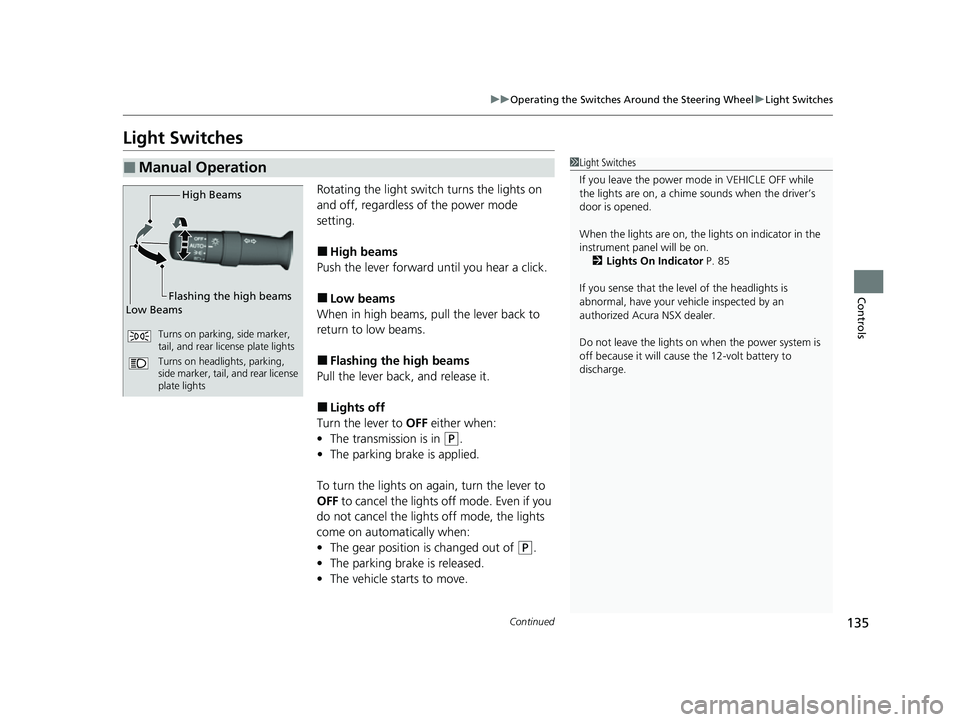
Rotating the light switch turns the lights on
and off, regardless of the power mode
setting.
■High beams
Push the lever forward until you hear a click.
■Low beams
When in high beams, pull the lever back to
return to low beams.
■Flashing the high beams
Pull the lever back, and release it.
■Lights off
Turn the lever to OFF either when:
• The transmission is in
(P.
• The parking brake is applied.
To turn the light s on again, turn the lever to
OFF to cancel the lights off mode. Even if you
do not cancel the lights off mode, the lights
come on automatically when:
• The gear position is changed out of
(P.
• The parking brake is released.
• The vehicle starts to move.
■Manual Operation1Light Switches
If you leave the power mode in VEHICLE OFF while
the lights are on, a chime sounds when the driver’s
door is opened.
When the lights are on, the lights on indicator in the
instrument pane l will be on.
2 Lights On Indicator P. 85
If you sense that the le vel of the headlights is
abnormal, have your vehicle inspected by an
authorized Acura NSX dealer.
Do not leave the lights on when the power system is
off because it will caus e the 12-volt battery to
discharge.
High Beams
Flashing the high beams
Low Beams
Turns on parking, side marker,
tail, and rear license plate lights
Turns on headlights, parking,
side marker, tail, and rear license
plate lights
21 ACURA NSX PMC-31T6N6400.book 135 ページ 2020年10月8日 木曜日 午後3時7分
Page 144 of 494
142
uuOperating the Switches Around the Steering Wheel uDriving Position Memory System*
Controls
Driving Position Memory System*
You can store two driver’s seat (except for power lumbar) and outside door mirrors
position with the driving position memory system.
When you unlock and open th e driver’s door with a remote transmitter, or keyless
access system, door mirrors adjust to one of the two preset positions and the seat
adjusts to retracted positions of one of the two preset positions automatically.
The seat will move to th e stored position when you set the power mode to
ACCESSORY.
When you enter the vehicle, the driver in formation interface briefly shows you which
remote transmitter you used to unlock the vehicle.
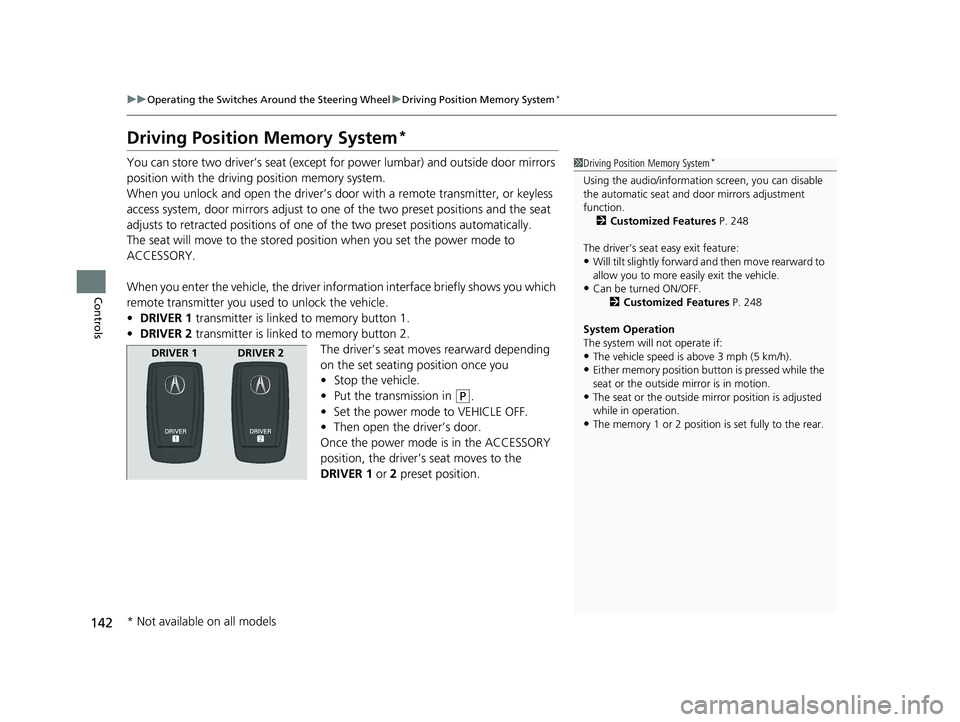
• DRIVER 1 transmitter is linked to memory button 1.
• DRIVER 2 transmitter is linked to memory button 2.
The driver’s seat moves rearward depending
on the set seating position once you
•Stop the vehicle.
• Put the transmission in
(P.
• Set the power mode to VEHICLE OFF.
• Then open the driver’s door.
Once the power mode is in the ACCESSORY
position, the driver’s seat moves to the
DRIVER 1 or 2 preset position.
1Driving Position Memory System*
Using the audio/informati on screen, you can disable
the automatic seat and d oor mirrors adjustment
function. 2 Customized Features P. 248
The driver’s seat easy exit feature:
•Will tilt slightly forward and then move rearward to
allow you to more easily exit the vehicle.
•Can be turned ON/OFF. 2Customized Features P. 248
System Operation
The system will not operate if:
•The vehicle speed is above 3 mph (5 km/h).
•Either memory position button is pressed while the
seat or the outside mirror is in motion.
•The seat or the outside mi rror position is adjusted
while in operation.
•The memory 1 or 2 position is set fully to the rear.
DRIVER 1 DRIVER 2
* Not available on all models
21 ACURA NSX PMC-31T6N6400.book 142 ページ 2020年10月8日 木曜日 午後3時7分
Page 145 of 494

143
uuOperating the Switches Around the Steering Wheel uDriving Position Memory System*
Controls
1. Set the power mode to ON. Adjust the
driver’s seat and the door mirrors to the
desired position.
2. Press the SET button.
u You will hear the beeper, and the
memory button indicator light will blink.
3. Press memory button
(1 or (2 within five
seconds of pressing the SET button.
u Once the seat and the outside mirrors
position have been memorized, you will
hear the beeper twic e, and the indicator
light on the button you pressed stays on.
1. Put the transmission into
(P.
2. Apply the parking brake.
3. Press a memory button (
(1 or (2).
u You will hear the beep, and the indicator
light will blink.
The seat and the door mirrors will
automatically move to the memorized
positions. When it has finished moving, you
will hear the beeper tw ice, and the indicator
light stays on.
■Storing a Position in Memory1 Storing a Position in Memory
After you press the SET button, the storing operation
will be canceled when:
•You do not press the memory button within five
seconds.
•You readjust the seat or the outside mirror position
before the double-beep.
•You set the power mode to any position except
ON.
SET Button
Memory
Button 1
Memory
Button 2
■Recalling the Stored Position1Recalling the Stored Position
The seat and door mirrors will stop moving if you:
•Press the SET button, or a memory button ((1 or (2).
•Adjust the seat position or door mirrors.
•Put the transmission into a position other than (P.
Memory Buttons
21 ACURA NSX PMC-31T6N6400.book 143 ページ 2020年10月8日 木曜日 午後3時7分
Page 147 of 494

145
Controls
Adjusting the Mirrors
Interior Rearview Mirror
Adjust the angle of the rearview mirror when you are sitting in the correct driving
position.
When you are driving after dark, the
automatic dimming rearview mirror reduces
the glare from headlights behind you, based
in inputs from the mirror sensor. This feature
is always active.
■Automatic Dimming Rearview Mirror
1 Adjusting the Mirrors
Keep the inside and out side mirrors clean and
adjusted for best visibility.
Adjust the mirrors befo re you start driving.
2 Adjusting the Seat Positions P. 148
1Automatic Dimming Rearview Mirror
The auto dimming function cancels when the
transmission is in
(R.
21 ACURA NSX PMC-31T6N6400.book 145 ページ 2020年10月8日 木曜日 午後3時7分
Page 149 of 494

147
uuAdjusting the Mirrors uPower Door Mirrors
Controls
If activated, either side door mirror
automatically tilts downward when you press
back the
(R button; this improves close-in
visibility on the selected side of the vehicle
when backing up. The mirror automatically
returns to its original position when you take
the transmission out of
(R.
To activate this feature, set the power mode
to ON and slide the sele ctor switch to the left
or right side.
If activated, passenger side door mirror
automatically tilts downward when you press
back the
(R button; this improves close-in
visibility on the passenger side of the vehicle
when backing up. The mirror automatically
returns to its original position when you take
the transmission out of
(R.
To activate this feature, set the power mode
to ON and slide the selector switch to the
passenger side.
■Reverse Tilt Door Mirror
Slide the selector switch to left
or right to tilt down either side
door mirror.
Models with driving position memory system
Selector Switch
Models without driving position memory system
21 ACURA NSX PMC-31T6N6400.book 147 ページ 2020年10月8日 木曜日 午後3時7分
Page 223 of 494

Continued221
uuAudio System Basic Operation uApple CarPlayTM
Features
■Maps
Display Apple CarPlay map and use the navigation function just as you would on
your iPhone.
Only one navigation system (pre-installed navigation or Apple CarPlay) can give
directions at a time. When you are using one system, directions to any prior
destination set on the other system will be canceled, and the system you are
currently using will direct you to your destination.
After you have connected your iPhone to the system via USB, use the following
procedure to set up Apple CarPlay. Us e of Apple CarPlay will result in the
transmission of certain user and vehicle information (such as vehicle location, speed,
and status) to your iPhone to enhance the Apple CarPlay experience. You will need
to consent to the sharing of this info rmation on the audio/information screen.
■Enabling Apple CarPlay
Enable once: Allows only once. (Prompt
shows again next time.)
Always enable: Allows anytime. (Prompt
does not show again.)
Cancel : Does not allow this consent.
You may change the consent settings under
the Smartphone settings menu.
■Setting Up Apple CarPlay
1Apple CarPlayTM
Apple CarPlay Operating Requirements &
Limitations
Apple CarPlay requi res a compatible iPhone with an
active cellular connecti on and data plan. Your
carrier’s rate plans will apply.
Changes in operating systems, hardware, software,
and other technology integral to providing Apple
CarPlay functionality, as well as new or revised
governmental regulations, may result in a decrease or
cessation of Apple CarPlay functionality and services.
Acura cannot and does not provide any warranty or
guarantee of future Appl e CarPlay performance or
functionality.
It is possible to use 3r d party apps if they are
compatible with Apple CarPlay. Refer to the Apple
homepage for information on compatible apps.
Models with navigation system
1 Setting Up Apple CarPlay
You can also use the method below to set up Apple
CarPlay:
Select Settings Smartphone Apple CarPlay
Use of user and vehicle information
The use and handling of user and vehicle information
transmitted to/from your iP hone by Apple CarPlay is
governed by the Apple iOS terms and conditions and
Apple’s Privacy Policy.
21 ACURA NSX PMC-31T6N6400.book 221 ページ 2020年10月8日 木曜日 午後3時7分