radio ACURA NSX 2021 Owner's Manual
[x] Cancel search | Manufacturer: ACURA, Model Year: 2021, Model line: NSX, Model: ACURA NSX 2021Pages: 494, PDF Size: 16.57 MB
Page 203 of 494
Continued201
uuAudio System Basic Operation uPlaying SiriusXM ® Radio*
Features
While listening to other channels, you can re ceive sports alerts such as scores from
the games of your favorite teamsM
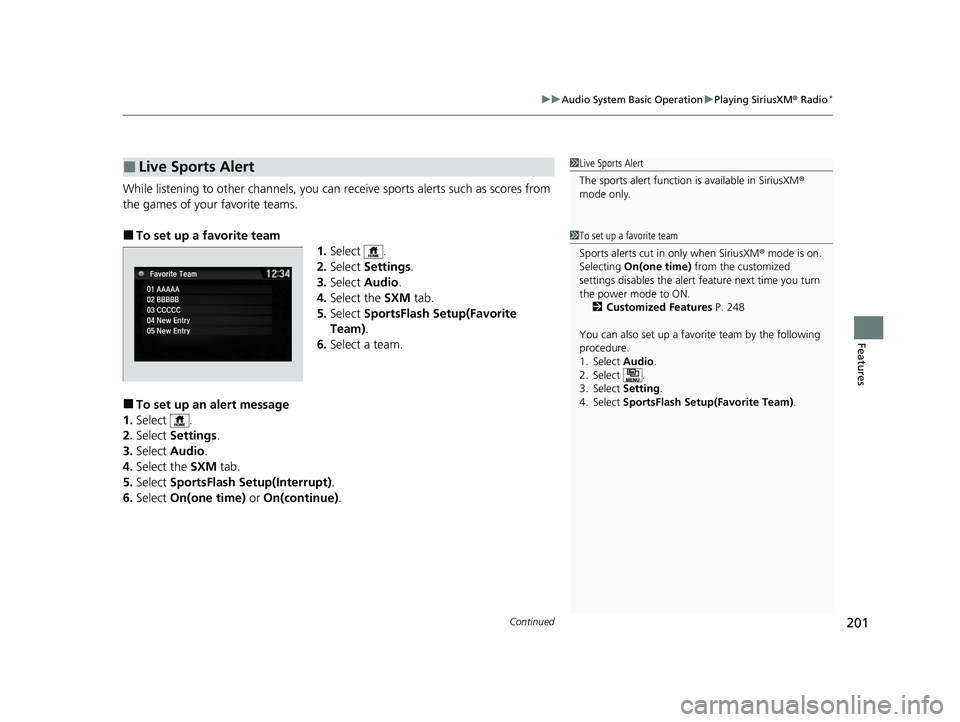
■To set up a favorite team 1.Select .
2. Select Settings .
3. Select Audio .
4. Select the SXM tab.
5. Select SportsFlash Setup(Favorite
Team) .
6. Select a team.
■To set up an alert message
1. Select .
2. Select Settings .
3. Select Audio .
4. Select the SXM tab.
5. Select SportsFlash Setup(Interrupt) .
6. Select On(one time) or On(continue) .
■Live Sports Alert1Live Sports Alert
The sports alert function is available in SiriusXM®
mode only.
1 To set up a favorite team
Sports alerts cut in only when SiriusXM ® mode is on.
Selecting On(one time) from the customized
settings disables the alert feature next time you turn
the power mode to ON.
2 Customized Features P. 248
You can also set up a favori te team by the following
procedure.
1. Select Audio .
2. Select .
3. Select Setting .
4. Select SportsFlash Setup(Favorite Team) .
21 ACURA NSX PMC-31T6N6400.book 201 ページ 2020年10月8日 木曜日 午後3時7分
Page 204 of 494

uuAudio System Basic Operation uPlaying SiriusXM ® Radio*
202
Features
■To set up an alert beep
1. Select .
2. Select Settings .
3. Select Audio .
4. Select the SXM tab.
5. Select SportsFlash Setup(Interrupt Beep) .
6. Select On.
■Traffic and Weather Information
You can receive traffic and weather information.
1. Select .
2. Select Settings .
3. Select Audio .
4. Select the SXM tab.
5. Select Traffic & Weather Setup .
6. Select the region.
u When you do not want to rece ive the information, select Unset.
Sample each channel on the sele cted mode for 10 seconds.
1. Select Scan.
2. Select Scan Channels .
u You can select the desired channel by songs using Scan Songs in Presets .
To turn off scan, select Cancel.
■Scan
1To set up an alert beep
You can also set up a alert beep by the following
procedure.
1. Select Audio.
2. Select .
3. Select Setting .
4. Select SportsFlash Setup(Interrupt Beep) .
1Traffic and Weather Information
The traffic and weather information function in
SiriusXM ® mode only.
You can also set up th e traffic and weather
information by the following procedure.
1. Select Audio.
2. Select .
3. Select Setting .
4. Select Traffic & Weather Setup .
1Scan
The “Scan Songs in Preset” function is based on
TuneScan
TM technology of SiriusXM ®.
The “Featured Channels ” function is based on
Featured Favorites
TM technology of SiriusXM ®.
TuneScan
TM and Featured FavoritesTM are registered
trademarks of SiriusXM ® Radio, Inc.
21 ACURA NSX PMC-31T6N6400.book 202 ページ 2020年10月8日 木曜日 午後3時7分
Page 212 of 494
210
uuAudio System Basic Operation uPlaying Pandora ®*1
Features
Playing Pandora ®*1
Your audio system allows you to listen to music from the Pandora ® app on a
compatible smartphone.
This function is available when the phone is paired and connected to the vehicle’s
Bluetooth ® HandsFreeLink ® (HFL) system, or with an iPhone, you can connect using
your USB cable to the USB port.
2 Phone Setup P. 282
2 USB Ports P. 167
*1:Available only on U.S. models.
1Playing Pandora ®*1
Pandora®, the Pandora logo, and the Pandora trade
dress are trademarks or registered trademarks of
Pandora Media, Inc., used with permission. Pandora
is only available in certai n countries. Visit the Pandora
website for more information.
To find out if your phone is compatible with this
feature, visit www.acura.com/handsfreelink , or call
1-888-528-7876.
To use this service in your vehicle, the Pandora ® app
must first be installed on your phone. Visit
www.pandora.com for more information.
Pandora ® is free, personalized radio that plays music
and comedy you’ll love. Just start with the name of
one of your favorite arti sts, songs, comedians or
composers and Pandora ® will create a custom station
that plays similar tracks. Pandora ® also features
hundreds of genre stations ranging from Dubstep to
Smooth Jazz to Power Workout.
If you cannot operate Pandora ® through the audio
system, it may be streaming through Bluetooth®
Audio. Make sure Pandora ® mode on your audio
system is selected.
If your phone is connecte d to Android Auto, Pandora
is only available through the Android Auto interface.
Visit the Android Auto website to check
compatibility.
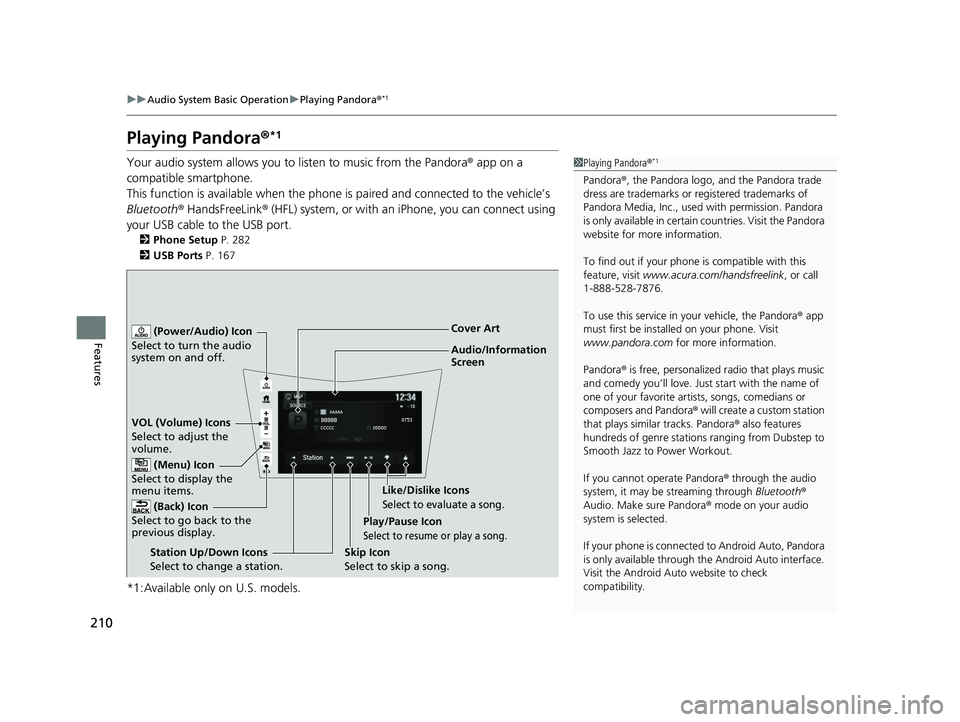
Audio/Information
Screen Cover Art
VOL (Volume) Icons
S elect
to
adjust the
volume.
(Back) Icon
Select to go back to the
previous display.
(Power/Audio) Icon
Select to turn the audio
system on and off.
(Menu) Icon
Select to display the
menu items.
Play/Pause Icon
Select to resume or play a song.
Station Up/Down Icons
Select to change a station. Skip Icon
Select to skip a song.Like/Dislike Icons
Select to evaluate a song.
21 ACURA NSX PMC-31T6N6400.book 210 ページ 2020年10月8日 木曜日 午後3時7分
Page 232 of 494

230
Features
General Information on the Audio System
SiriusXM® Radio Service*
1. You need your radio ID ready before regist ering for subscription. To see the ID on
the screen, select Channel 0.
2. Have your radio ID ready, and either call SiriusXM ® or visit the SiriusXM ® website
to subscribe.
Switch to the SiriusXM ® mode by using the SOURCE button on the steering wheel,
or through the audio/information screen, and stay in this mode for about 30
minutes until the service is activated. Make sure your vehicle is in an open area with
good reception.
Channel Not Subscribed:
You are not subscribed to the channel selected.
Subscription Update:
SiriusXM ® radio is receiving information update from the network.
Channel Not Available:
No such channel exists, or the artist or title information is unavailable.
No Signal:
The signal is too weak in the current location.
Antenna Disconnected:
The SiriusXM ® antenna is disconnected. Contact an authorized Acura NSX dealer.
■Subscribing to SiriusXM® Radio
■Receiving SiriusXM ® Radio
■SiriusXM ® Radio Display Messages
1 Subscribing to SiriusXM ® Radio
Contact Information for SiriusXM ® Radio:
•U.S.: SiriusXM ® Radio at www.siriusxm.com/
subscribenow, or 1-877-447-0011
•Canada: SiriusXM ® Canada at www.siriusxm.ca/
subscribe-now , or 1-877-209-0079
1Receiving SiriusXM ® Radio
The SiriusXM ® satellites are in orbit over the equator;
therefore, objects south of the vehicle may cause
satellite rece ption interruptions. Sa tellite signals are
more likely to be blocked by tall buildings and
mountains the farther north you travel from the
equator.
You may experience rece ption problems under the
following circumstances:
•In a location with an obstruction to the south of
your vehicle.
•In tunnels•On the lower level of a multi-tiered road
•Large items carried on the roof rack
* Not available on all models
21 ACURA NSX PMC-31T6N6400.book 230 ページ 2020年10月8日 木曜日 午後3時7分
Page 252 of 494

250
uuCustomized Features u
Features
Text/Email
Bluetooth Device List
Edit Speed Dial
Ring Tone
Phone
Automatic Phone Sync
Enable Text/Email
Select Account
New Message Notification
Phone
HD Radio Mode
RDS INFO
Audio
FM
Default
Sound
Audio Source Pop-Up
Common
Cover Art
Bluetooth Device List
Tune Start
SportsFlash Setup(Interrupt)
Traffic & Weather Setup
SXM*
Default
SportsFlash Setup(Interrupt
Beep)
SportsFlash Setup(Favorite Team)
* Not available on all models
21 ACURA NSX PMC-31T6N6400.book 250 ページ 2020年10月8日 木曜日 午後3時7分
Page 262 of 494

260
uuCustomized Features u
Features
*1:Default SettingSetup
Group Customizable Features Description Selectable Settings
Audio
Common
Sound
Adjusts the settings of the audio
speakers’ sound.
2
Adjusting the Sound P. 185
-6~0*1~+6 (BASS and TREBLE),
RR9 ~0*1~FR9 ( FADER ),
L9 ~0*1~R9 (BALANCE ),
-6 ~0*1~+6 (Center* and Subwoofer ),
Off /Low /Mid*1/High
( Speed Volume Compensation ),
Off
*1/ On (Neural*)
Audio Source Pop-Up
Selects whether the list of
selectable audio sources comes on
when Audio is selected on the
home screen.
On /Off*1
[Your selected media]
Cover ArtTurns the cover art display on and
off.On*1/ Off
Bluetooth Device List
Pairs a new phone to HFL, edits or
deletes a paired phone.
2 Phone Setup P. 282
—
FM
HD Radio Mode
Selects whether the audio system
automatically switches to the
digital radio waves or receives the
analog waves only.
Auto*1/Analog
RDS INFOTurns on and off the RDS
information.On*1/Off
FM mode
* Not available on all models
21 ACURA NSX PMC-31T6N6400.book 260 ページ 2020年10月8日 木曜日 午後3時7分
Page 328 of 494

uuWhen Driving uTurning on the Power
326
Driving
3. Press the ENGINE START/STOP button
without depressing the accelerator pedal.
u The Ready To Drive message appears
on the driver information interface.
u When the ambient temperature is
extremely low, the ve hicle does not move
until certain conditions are met.
A warning message appears instead of
Ready To Drive .
2Driver Information Interface
Warning and Information Messages
P. 94
u If the High Voltage battery is fully ch arged, the gasoline engine may not start.
u The gasoline engine starts either according to the temperature of the engine or
when the High Voltage batte ry charge level is low.
u Regardless of the High Voltage battery char ge level, the gasoline engine always
starts.
u Gasoline engine starts with a louder sound than QUIET mode.
When engine temperature or High Volt age battery temperature are low, or
when High Voltage battery charge level is low, gasoline engine starts at the
same sound level as QUIET mode.
You can turn the power system off when the vehicle is completely stopped.
1. Select
(P.
2. Press the ENGINE START/STOP button.
1Turning on the Power
The immobilizer system pr otects your vehicle from
theft. If an improperly code d key (or other device) is
used, the power system does not activate. 2 Immobilizer System P. 126
Bring the keyless access remote close to the ENGINE
START/STOP button if the batte ry in the keyless
access remote is weak.
2 If the Keyless Access Remote Battery is
Weak P. 450
The power system may not activate if the keyless
access remote is subjecte d to strong radio waves.
Do not hold the ENGINE START/STOP button to
start the power system.
If the power system does not start, wait at least 30
seconds before trying again.
You can set the Integrated Dynamics System mode to
be selected when you set the power mode to ON.
2 Customized Features P. 248
■Stopping the Power System
When the Integrated Dynamics System is in QUIET mode
When the Integrated Dynamics System is in SPORT mode
21 ACURA NSX PMC-31T6N6400.book 326 ページ 2020年10月8日 木曜日 午後3時7分
Page 473 of 494

471
Information
This chapter includes your vehicle’s specifications, locations of identification numbers, and other
information required by regulation.
Specifications.................................... 472
Identification Numbers Vehicle Identification Number (VIN), Engine Number, Motor Number, and
Transmission Number..................... 474
Devices that Emit Radio Waves ....... 475
Reporting Safety Defects ................. 476
Emissions Testing Testing of Readiness Codes.............. 477
Warranty Coverages ........................ 479
Authorized Manuals ......................... 482
Client Service Information ............... 483
21 ACURA NSX PMC-31T6N6400.book 471 ページ 2020年10月8日 木曜日 午後3時7分
Page 477 of 494
475
Information
Devices that Emit Radio Waves
Each radio frequency device installed in the vehicle conforms to the requirements
and standards of the regulation listed below:
As required by the FCC:
This device complies with Part 15 of the FCC rules. Operation is
subject to the following two cond itions: (1) This device may not
cause harmful interferenc e, and (2) this device must accept any
interference received, including interference that may cause
undesired operation.
Changes or modifications not ex pressly approved by the party
responsible for compliance could void the user’s authority to
operate the equipment.
This device complies with industry Canada licence-exempt RSS standard(s).
Operation is subject to the following two conditions: (1) this device may not cause
interference, and (2) this device must acce pt any interference, including interference
that may cause undesired operation of the device.
21 ACURA NSX PMC-31T6N6400.book 475 ページ 2020年10月8日 木曜日 午後3時7分
Page 487 of 494
485
Index
If the 12-Volt Battery Is Dead .................. 452
Maintenance (Checking the 12-Volt Battery) ................................................. 421
Maintenance (Replacing) ......................... 422
Battery Types .............................................. 14
Belts (Seat) .................................................. 38
Beverage Holders ..................................... 156
Bluetooth ® Audio ..................................... 215
Bluetooth ® HandsFreeLink ®................... 274
Booster Seats (For Children) ...................... 69
Brake System ............................................ 361
Anti-lock Brake System (ABS) .................. 366
Automatic Brake Hold ............................. 364
Brake Assist System................................. 367
Fluid ....................................................... 404
Foot Brake .............................................. 363
Parking Brake.......................................... 361
Brake System (Amber) Indicator ................................................... 77
Brake System (Red) Indicator ........................................... 74, 457
Brake Wear
Indicator ................................................... 78
Bulb Replacement .................................... 405
Back-Up Lights ........................................ 406
Daytime Running Lights .......................... 405
Front Side Marker Lights ......................... 405
Front Turn Signal/Parking Lights .............. 405
Headlights .............................................. 405
High-Mount Brake Light.......................... 407
Rear License Plate Lights ......................... 407 Rear Side Marker Lights ........................... 406
Rear Turn Signal Lights ............................ 406
Side Turn Signal/Em
ergency Indicator
Lights .................................................... 405
Taillights .................................................. 406
Bulb Specifications ................................... 472
C
Carbon Monoxide Gas ................................ 70
Carrying Cargo .................................. 315, 317
Certification Label .................................... 474
Changing Bulbs ......................................... 405
Charging System Indicator ................. 79, 456
Child Safety ................................................. 61
Emergency Hatch Opener ........................ 125
Child Seat .................................................... 61
Booster Seats ............................................. 69
Child Seat for Infants ................................. 63
Child Seat for Small Children ..................... 64
Installing a Child Seat ................................ 66
Larger Children .......................................... 68
Selecting a Forward-facing Child Seat ........ 65
Using a Tether ........................................... 67
Cleaning the Exterior ............................... 426
Cleaning the Interior ................................ 424
Client Service Information ....................... 483
Climate Control System ............................ 159
Defrosting the Windshield and Windows ....................................... 161, 162
Dust and Pollen Filters ............................. 423 Recirculation/Fresh Air Mode ................... 160
Sensors ................................................... 163
Using Automatic Climate Control ............ 159
Clock .......................................................... 108
Cold Weather ........................................... 420
Console Compartment ............................. 155
Controls ..................................................... 107
Coolant (Engine) ...................................... 400
Adding the Coolant................................. 401
Checking the Coolant ............................. 400
Overheating ............................................ 454
Coolant (Inverter) ..................................... 402
Creeping (Dual Clutch Transmission) ...... 329
Cruise Control ........................................... 347
CRUISE CONTROL Indicator ....................... 86
CRUISE MAIN Indicator .............................. 86
Cup Holders .............................................. 156
Customized Features ................................ 248
D
Daytime Running Lights .......................... 138
Dead Battery (12-Volt) ............................. 452
Defrosting the Windshield and
Windows ......................................... 161, 162
Devices that Emit Radio Waves ............... 475
Dimming
Headlights ............................................... 135
Rearview Mirror....................................... 145
Dipstick (Engine Oil) ......................... 390, 397
Directional Signals (Turn Signal) ............. 134
21 ACURA NSX PMC-31T6N6400.book 485 ページ 2020年10月8日 木曜日 午後3時7分