change time ACURA NSX 2022 Owner's Manual
[x] Cancel search | Manufacturer: ACURA, Model Year: 2022, Model line: NSX, Model: ACURA NSX 2022Pages: 492, PDF Size: 16.2 MB
Page 239 of 492

237
uuGeneral Information on the Audio System uHonda App License Agreement
Continued
Features
L. Changes to the SOFTWARE or SERVICES. WE may change, modify, or update the SOFT WARE or SERVICES from time to time. Unless
explicitly stated otherwise, any new featur es or services that augment or enhance the SOFTWARE or SERVICES in the future shall
respectively be considered part of the SOFTWARE or SERVICES and s ubject to this AGREEMENT. WE reserve the right at any time and from
time to time to interrupt, res trict, modify, suspend, discontinue, temporarily or permanently, the SOFTWARE or SERVICES (or any portion
thereof), with or without notice to you, and you agree that HONDA shall not be li able to you or to any third party for any modification,
suspension or discontinuance of the SOFTWARE or SERVICES.
M. ARBITRATION:
PLEASE READ THIS ARBITRATION PROVISION CAREFULLY TO UNDER STAND YOUR RIGHTS. YOU AGREE THAT ANY CLAIM THAT YOU
MAY HAVE IN THE FUTURE MUST BE RESOLVED THROUGH BIND ING ARBITRATION. YOU WAIVE THE RIGHT TO HAVE YOUR DISPUTE
HEARD IN COURT AND WAIVE THE RIGHT TO BRING CLASS CLAIMS. YOU UNDERSTAND THAT DISCOVERY AND APPEAL RIGHTS ARE
MORE LIMITED IN ARBITRATION.
Arbitration is a method of resolving a clai m, dispute or controversy without filing a lawsuit. By agreeing to arbitrate, the right to go to
court is waived and instead claims, disputes or controversies ar e submitted to binding arbitration. This provision sets forth the terms and
conditions of our agreement. YOU and HONDA agree and acknowle dge that this Agreement affects interstate commerce and the
Federal Arbitration Act (“FAA”) applies. By using the Software, Vehicle, or Services, YO U elect to have disputes resolved by arbitration.
YOU, HONDA or any involved third party may pursue a Claim. “Claim” means any dispute between YOU, HONDA, or any involved third
party relating to your use of the Software , the Vehicle, or the Services, this Agreement, or our relationship, including any
representations, omissions or warranties. “Claim” does not include personal injury or wrongful death claims. YOU or HONDA may s eek
remedies in small claims court or provisional judicial remedi es without arbitrating. In addition, notwithstanding anything here in to the
contrary, YOU or HONDA may seek equitable re lief in a court of competent jurisdiction.
YOU or HONDA may select arbitration with American Arbitration Asso ciation, JAMS or National Arbitration and Mediation. Contact
these sponsors for their rules. The hearing will be in the federa l district where YOU reside. If agreed, it may be by telephone or written
submissions. Filing and arbitrator fees to be paid per the sponsor rules. You may contact the sponsor for a fee waiver. If no fee waivers,
HONDA will pay filing and arbitrator fees up to $5,000, unless law requires more. Each party is responsible for other fees. Arbitrator
may award costs or fees to prevailing party, if permitted by law. HONDA will not seek fees, unless the claims are frivolous.
22 ACURA NSX PMC-31T6N6500.book 237 ページ 2021年9月28日 火曜日 午後4時7分
Page 242 of 492

240
uuGeneral Information on the Audio System uLegal Information on Apple CarPlay/Android Auto
Features
YOU EXPRESSLY ACKNOWLEDGE AND AGREE THAT USE OF APPLE CARPLAY OR ANDROID AUTO (“THE APPLICATIONS”) IS AT YOUR
SOLE RISK AND THAT THE ENTIRE RISK AS TO SATISFACTORY QUALITY, PERFORMANCE, ACCURACY AND EFFORT IS WITH YOU TO THE
MAXIMUM EXTENT PERMITTED BY APPLICABLE LAW, AND THAT TH E APPLICATIONS AND INFORMATION ON THE APPLICATIONS IS
PROVIDED “AS IS” AND “AS AVAILABLE,” WITH ALL FAULTS AND WITHOUT WARRANTY OF ANY KIND, AND HONDA HEREBY
DISCLAIMS ALL WARRANTIES AND CONDITIONS WITH RESPECT TO TH E APPLICATIONS AND INFORMATION ON THE APPLICATIONS,
EITHER EXPRESS, IMPLIED OR STATUTORY, INCLUDING, BUT NOT LIMITED TO, TH E IMPLIED WARRANTIES AND/OR CONDITIONS OF
MERCHANTABILITY, SATISFACTORY QUALITY, FITNESS FOR A PART ICULAR PURPOSE, ACCURACY, QUIET ENJOYMENT, AND NON-
INFRINGEMENT OF THIRD PARTY RIGHTS. NO ORAL OR WRI TTEN INFORMATION OR ADVICE GIVEN BY HONDA OR AN AUTHORIZED
REPRESENTATIVE SHALL CREATE A WARRANT Y. AS EXAMPLES, AND WITHOUT LIMITATION, HONDA DISCLAIMS ANY WARRANTY
REGARDING THE ACCURACY OF DATA PROVIDED BY THE APPL ICATIONS, SUCH AS THE ACCURACY OF DIRECTIONS, ESTIMATED
TRAVEL TIME, SPEED LIMITS, ROAD CONDITIONS, NEWS, WEATHER, TRAFFIC, OR OTHER CONTENT PROVIDED BY APPLE, GOOGLE, THEIR
AFFILIATES, OR THIRD PARTY PROVIDERS; HONDA DOES NOT GUARANTEE AGAINST LOSS OF APPLICATION DATA, WHICH MAY BE LOST
AT ANY TIME; HONDA DOES NOT GUARANTEE THAT THE APPLICATION S OR ANY SERVICES PROVIDED THROUGH THEM WILL BE
PROVIDED AT ALL TIMES OR THAT ANY OR ALL SERVICES WILL BE AVAILABLE AT ANY PA RTICULAR TIME OR LOCATION. FOR EXAMPLE,
SERVICES MAY BE SUSPENDED OR INTERRUPTED WITHOUT NOTICE FOR REPAIR, MAINTENANCE, SECURITY FIXES, UPDATES, ETC.,
SERVICES MAY BE UNAVAILABLE IN YOUR AREA OR LOCATION, ETC. IN ADDITION, YOU UNDERSTAND THAT CHANGES IN THIRD PARTY
TECHNOLOGY OR GOVERNMENT REGULATION MAY RENDER THE SERVICES AND/OR APPLICATIONS OBSOLETE AND/OR UNUSABLE.
TO THE EXTENT NOT PROHIBITED BY LAW, IN NO EVENT SHALL HONDA OR ITS AFFILIATES BE LIABLE FOR PERSONAL INJURY, OR ANY
INCIDENTAL, SPECIAL, INDIRECT OR CONSEQUENTIAL DAMAG ES WHATSOEVER, INCLUDING, WITHOUT LIMITATION, DAMAGES FOR
LOSS OF PROFITS, CORRUPTION OR LOSS OF DATA, FAILURE TO TRANSMIT OR RECEIV E ANY DATA, BUSINESS INTERRUPTION OR ANY
OTHER COMMERCIAL DAMAGES OR LOSSES, ARISING OUT OF OR RELATE D TO THE APPLICATIONS OR YOUR USE OF OR INABILITY TO
USE THE APPLICATIONS OR INFORMATION ON THE APPLICATIONS, HOWEVER CAUSED, REGARDLESS OF THE THEORY OF LIABILITY
(CONTRACT, TORT OR OTHERWISE) AND EVEN IF HONDA WERE AD VISED OF THE POSSIBILITY OF SUCH DAMAGES. SOME STATES AND
JURISDICTIONS DISALLOW THE EXCLUSION OR LIMITATION OF LI ABILITY FOR DAMAGES, SO THESE LIMITATIONS AND EXCLUSIONS MAY
NOT APPLY TO YOU. IN NO EVENT SHALL HONDA’S TOTAL LIABILIT Y TO YOU FOR ALL DAMAGES (OTHER THAN AS MAY BE REQUIRED
BY APPLICABLE LAW IN CASES INVOLVING PERSONAL INJURY) EXC EED THE AMOUNT OF FIVE DOLLARS ($5.00). THE FOREGOING
LIMITATIONS WILL APPLY EVEN IF THE ABOVE STA TED REMEDY FAILS OF ITS ESSENTIAL PURPOSE.
■DISCLAIMER OF WARRANTIES; LIMITATION ON LIABILITY
22 ACURA NSX PMC-31T6N6500.book 240 ページ 2021年9月28日 火曜日 午後4時7分
Page 253 of 492
251
uuCustomized Features u
Continued
Features
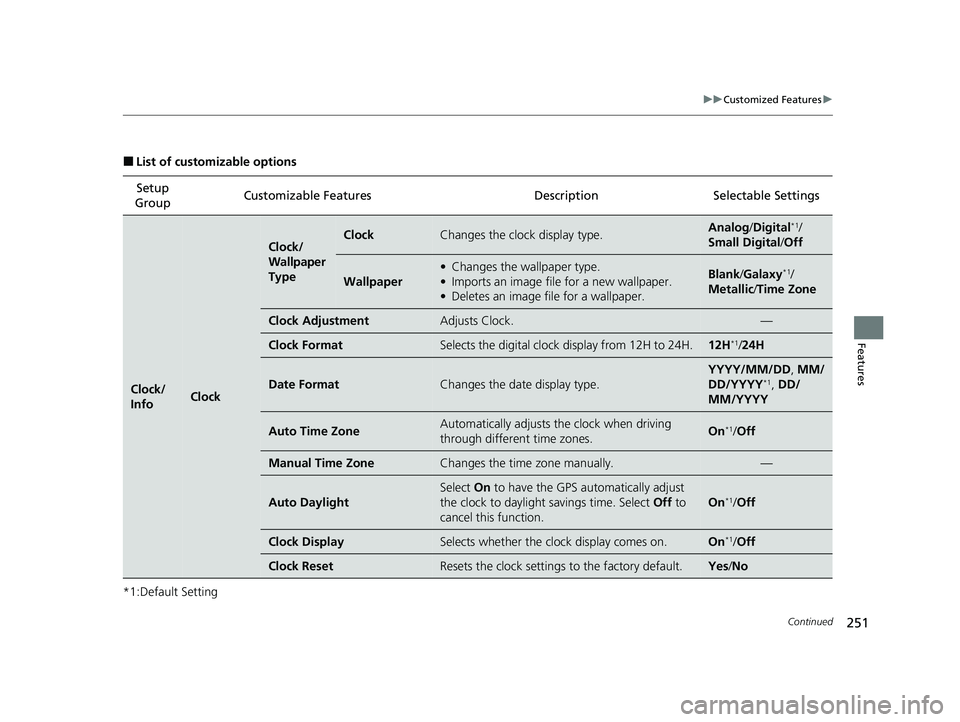
■List of customizable options
*1:Default Setting Setup
Group Customizable Features Description Selectable Settings
Clock/
InfoClock
Clock/
Wallpaper
TypeClockChanges the clock display type.Analog
/Digital*1/
Small Digital /Off
Wallpaper
• Changes the wallpaper type.
• Imports an image file for a new wallpaper.
• Deletes an image file for a wallpaper.Blank /Galaxy*1/
Metallic /Time Zone
Clock AdjustmentAdjusts Clock.—
Clock FormatSelects the digital clock display from 12H to 24H.12H*1/24H
Date FormatChanges the date display type.
YYYY/MM/DD , MM/
DD/YYYY*1, DD/
MM/YYYY
Auto Time ZoneAutomatically adjusts the clock when driving
through different time zones.On*1/ Off
Manual Time ZoneChanges the time zone manually.—
Auto Daylight
Select On to have the GPS automatically adjust
the clock to daylight savings time. Select Off to
cancel this function.
On*1/ Off
Clock DisplaySelects whether the clock display comes on.On*1/Off
Clock ResetResets the clock settings to the factory default.Yes /No
22 ACURA NSX PMC-31T6N6500.book 251 ページ 2021年9月28日 火曜日 午後4時7分
Page 258 of 492

256
uuCustomized Features u
Features
*1:Default SettingSetup
Group Customizable Features
DescriptionSelectable Settings
AudioSXM*
Tune StartTurns on and off, starts the song from the
beginning as you change preset stations.On*1/Off
SportsFlash
Setup(Interrupt)Turns on and off the sports alert function.Off*1/On(one time) /
On(continue)
SportsFlash
Setup(Interrupt Beep)Causes the system to beep when the sports alert
is notified.On*1/ Off
SportsFlash
Setup(Favorite Team)Selects your favorite sports teams.
2 Live Sports Alert P. 197—
Traffic & Weather SetupSelects the region you want to receive the
information.—
DefaultCancels/Resets all cust omized items in the Audio
settings group as default.Yes /No
SiriusXM® mode
* Not available on all models
22 ACURA NSX PMC-31T6N6500.book 256 ページ 2021年9月28日 火曜日 午後4時7分
Page 259 of 492

257
uuCustomized Features u
Continued
Features
*1:Default SettingSetup
Group Customizable Features Desc
ription Selectable Settings
System Display Display
Settings
Brightness
Changes the brightness of the audio/information
screen. 0
~5 ~10
*1
(Daytime mode)
0 ~5
*1~10
(Nighttime mode)
Contrast Changes the contrast of the audio/information
screen. -5
~0
*1~+5
Black Level Changes the black level of the audio/information
screen.
-5
~0
*1~+5
Background Color Changes the background color of the audio/
information screen. Blue
*1/
Amber /Red/
Violet
Track Mode Display Turns the limitation screen for the
TRACK mode
on and off.
2 Limitations for Manual Operation P. 183
On*1/Off
Sound/
Beep Guidance Volume
Changes the sound volume.
Adjusts the guidance volume of the navigation
system. 1
~6
*1~11
Text Message Volume Changes the text/e-mail message reading
volume. 1
~6
*1~11
22 ACURA NSX PMC-31T6N6500.book 257 ページ 2021年9月28日 火曜日 午後4時7分
Page 261 of 492

259
uuCustomized Features u
Continued
Features
*1:Default SettingSetup
Group Customizable Features Desc
ription Selectable Settings
System Clock Clock/
Wallpaper
Type
Clock
See
Clock/Info on P. 251
Wallpaper
Clock Adjustment
Clock Format
Date Format
Auto Time Zone
Manual Time Zone
Auto Daylight
Clock Display
Clock Reset
Others Language
Change the display language. English
*1/
Français /
Español
Touch Panel Sensitivity Sets the sensitivity of the touch panel screen. High
*1/Low
22 ACURA NSX PMC-31T6N6500.book 259 ページ 2021年9月28日 火曜日 午後4時7分
Page 262 of 492
260
uuCustomized Features u
Features
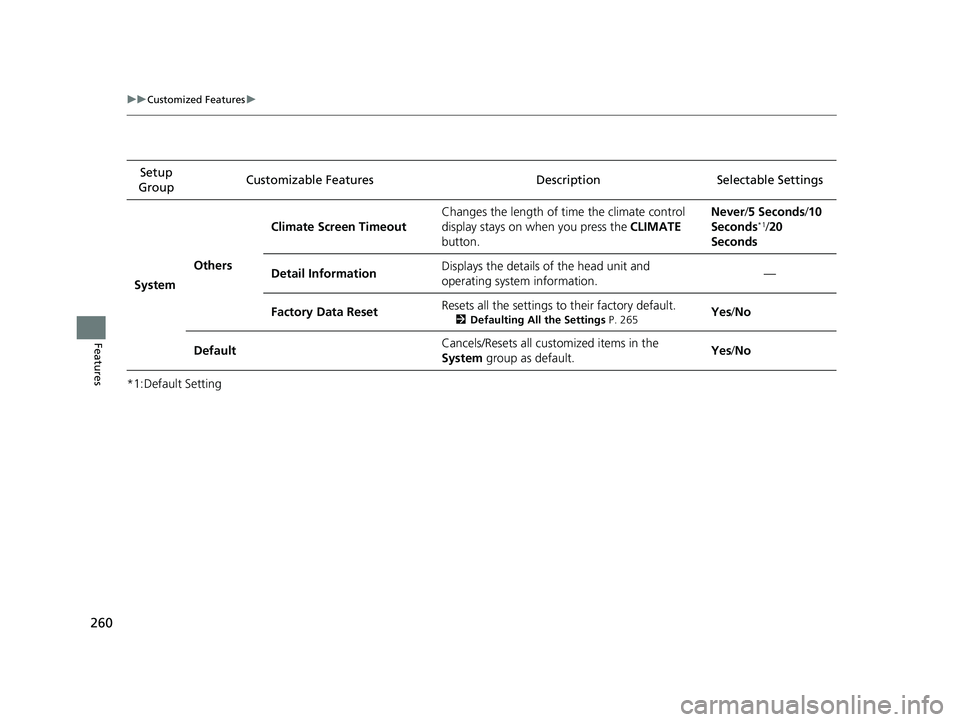
*1:Default SettingSetup
Group Customizable Features Desc
ription Selectable Settings
System Others Climate Screen Timeout
Changes the length of time the climate control
display stays on when you press the
CLIMATE
button. Never/
5 Seconds /10
Seconds
*1/ 20
Seconds
Detail Information Displays the details of the head unit and
operating system information. —
Factory Data Reset Resets all the settings to their factory default.
2
Defaulting All the Settings P. 265Yes/No
Default Cancels/Resets all customized items in the
System
group as default. Yes
/No
22 ACURA NSX PMC-31T6N6500.book 260 ページ 2021年9月28日 火曜日 午後4時7分
Page 264 of 492

262
uuCustomized Features u
Features
*1:Default SettingSetup
Group Customizable Features Desc
ription Selectable Settings
Vehicle
Driving
Position
SetupEasy Entry/Exit
Moves the seat rearward when you get in/get out
of the vehicle. Changes the setting for this
feature.
On*1/Off
Memory Position LinkTurns the driving position memory system on and
off.On*1/Off
Keyless
Access
Setup
Door Unlock ModeChanges which doors unlock when you grab the
driver’s door handle.Driver Door Only*1/
All Doors
Keyless Access Light FlashCauses some exterior lights to flash when you
unlock/lock the doors.On*1/ Off
Keyless Access BeepCauses the beeper to sound when you unlock/
lock the doors.On*1/Off
Lighting
Setup
Interior Light Dimming
TimeChanges the length of time the interior lights stay
on after you close the doors.60 sec /30 sec*1/ 15 sec
Headlight Auto Off TimerChanges the length of ti me the exterior lights
stay on after you close the driver’s door.60 sec /30 sec /15
sec*1/ 0 sec
Auto Interior Illumination
SensitivityChanges the sensitivity of the brightness of the
instrument panel when the headlight switch is in
the AUTO position.Min/Low/Mid*1/High /
Max
22 ACURA NSX PMC-31T6N6500.book 262 ページ 2021年9月28日 火曜日 午後4時7分
Page 265 of 492

263
uuCustomized Features u
Continued
Features
*1:Default SettingSetup
Group Customizable Features Description Selectable Settings
Vehicle
Lighting
Setup
Auto Headlight On with
Wiper OnChanges the settings for the wiper operation
when the headlights automatically come on while
the headlight switch is in the
AUTO position.
On*1/Off
Auto Light Sensitivity*Changes the level of ambient light that causes
the headlights to come on in AUTO position.Max/High /Mid*1/
Low/ Min
Door
Setup
Auto Door LockUsed to change the sett ing for when the doors
automatically lock.With Vehicle
Speed*1/ Shift from P /
Off
Auto Door UnlockChanges the setting for when the doors unlock
automatically.
All Doors with
Driver’s Door
Opens
*1/ All Doors
with Shift to P /All
Doors with IGN Off /
Off
Key And Remote Unlock
ModeSets up the driver’s door or all the doors to unlock
on the first push of the remote.Driver Door*1/ All
Doors
Keyless Lock Answer BackLOCK/UNLOCK- The exterior lights flash.
LOCK (2nd push)- The beeper sounds.On*1/ Off
Security Relock Timer
Changes the time it takes for the doors to relock
and the security system to set after you unlock
the vehicle without opening either door.
90 sec /60 sec /30 sec*1
* Not available on all models
22 ACURA NSX PMC-31T6N6500.book 263 ページ 2021年9月28日 火曜日 午後4時7分
Page 266 of 492

264
uuCustomized Features u
Features
*1:Default SettingSetup
Group Customizable Features Desc
ription Selectable Settings
Vehicle
Dynamic
Mode
Setup
Scheduler
Changes the Integrated Dynamics System mode
schedule. The vehicle starts in the QUIET or
SPORT mode according to the selected item or
time schedule.OFF /Always Sport*1/
Always Quiet /Last
Start/ Quiet: 12am-
6am /Quiet: 12am-
8am
Maintenance
InfoResetUsed to reset the engine oil life display when the
maintenance service has been performed.—
DefaultCancels/Resets all customized items in the
Vehicle group as default.Yes/No
Smart-
phone Apple CarPlay
Sets up the Apple CarPlay connection. —
Android Auto Sets up the Android Auto connection. —
Default Cancels/Resets all customized items in the
Smartphone
group as default. Yes
/No
22 ACURA NSX PMC-31T6N6500.book 264 ページ 2021年9月28日 火曜日 午後4時7分