instrument panel ACURA NSX 2022 Owners Manual
[x] Cancel search | Manufacturer: ACURA, Model Year: 2022, Model line: NSX, Model: ACURA NSX 2022Pages: 492, PDF Size: 16.2 MB
Page 6 of 492
Contents
This owner’s manual should be considered a permanent part of the
vehicle and should remain with the vehicle when it is sold.
The Navigation Manual is available online at owners.acura.com
(U.S.) or acura.ca (Canada). If you are the firs t registered owner
of your vehicle, you may request a complimentary printed
copy of the Navigation Manual within the first six months of
vehicle purchase. To request a copy, visit owners.acura.com. In
Canada, please request a copy from your Acura dealer.
This owner’s manual covers all models of your vehicle. You may find
descriptions of equipment and features that are not on your
particular model.
Images throughout this owner’s ma nual (including the front cover)
represent features and equipment that are available on some, but
not all, models. Your particular mo del may not have some of these
features.
This owner’s manual is for vehicles sold in the United States and
Canada.
The information and specifications in cluded in this publication were
in effect at the time of approval for printing. Honda Motor Co., Ltd.
reserves the right, however, to discontinue or change specifications
or design at any time without notice and without incurring any
obligation.2 Safe Driving P. 33
For Safe Driving P. 34 Seat Belts P. 38 Airbags P. 45
2Instrument Panel P. 73
Indicators P. 74 Gauges and Displays P. 99
2Controls P. 107
Clock P. 108 Locking and Unlocking the Doors P. 109
Operating the Switches Around the Steering Wheel P. 130
Climate Control System P. 156
2 Features P. 161
Audio System P. 162 Audio System Basic Operation P. 166
Customized Features P. 243 HomeLink® Universal Transceiver P. 266
2 Driving P. 307
Before Driving P. 308 Towing a Trailer P. 318
Multi-View Rear Camera P. 367
2Maintenance P. 375
Before Performing Maintenance P. 376 Maintenance MinderTM P. 379
Checking and Maintaining Wiper Blades P. 404
Climate Control System Maintenance P. 419
2Handling the Unexpected P. 433
Tools P. 434 If a Tire Goes Flat P. 435
Overheating P. 452 Indicator, Coming On/Blinking P. 454
If You Cannot Open the Hatch P. 467 Refueling P. 468
2Information P. 469
Specifications P. 470 Identification Numbers P. 472
Emissions Testing P. 475 Warranty Coverages P. 477
22 ACURA NSX PMC-31T6N6500.book 4 ページ 2021年9月28日 火曜日 午後4時7分
Page 7 of 492
Contents
Child Safety P. 61Exhaust Gas Hazard P. 70Safety Labels P. 71
Opening and Closing the Hatch P. 122 Security System P. 125 Opening and Closing the Windows P. 128
Adjusting the Mirrors P. 144 Adjusting the Seats P. 146 Interior Convenience Items P. 150
Audio Error Messages P. 222General Information on the Audio System P. 225
Bluetooth ® HandsFreeLink ® P. 269 AcuraLink ® P. 303
When Driving P. 319 Braking P. 355Parking Your Vehicle P. 362
Refueling P. 369 Fuel Economy and CO
2 Emissions P. 372
Maintenance Under the Hood and Hatch P. 385 Replacing Light Bulbs P. 401
Checking and Maintaining Tires P. 407 12-Volt Battery P. 417 Remote Transmitter Care P. 418
Cleaning P. 420 Accessories and Modifications P. 428 Storage P. 430
Power System Won’t Start P. 447 If th e 12-Volt Battery Is Dead P. 450
Fuses P. 460 Emergency Towing P. 465 If You Cannot Unlock the Fuel Fill Door P. 466
Devices that Emit Radio Waves P. 473 Reporting Safety Defects P. 474
Authorized Manuals P. 480 Client Service Information P. 481
Quick Reference GuideP. 6
Safe DrivingP. 33
Instrument PanelP. 73
ControlsP. 107
FeaturesP. 161
DrivingP. 307
MaintenanceP. 375
Handling the UnexpectedP. 433
InformationP. 469
IndexP. 482
22 ACURA NSX PMC-31T6N6500.book 5 ページ 2021年9月28日 火曜日 午後4時7分
Page 20 of 492
18
Quick Reference Guide
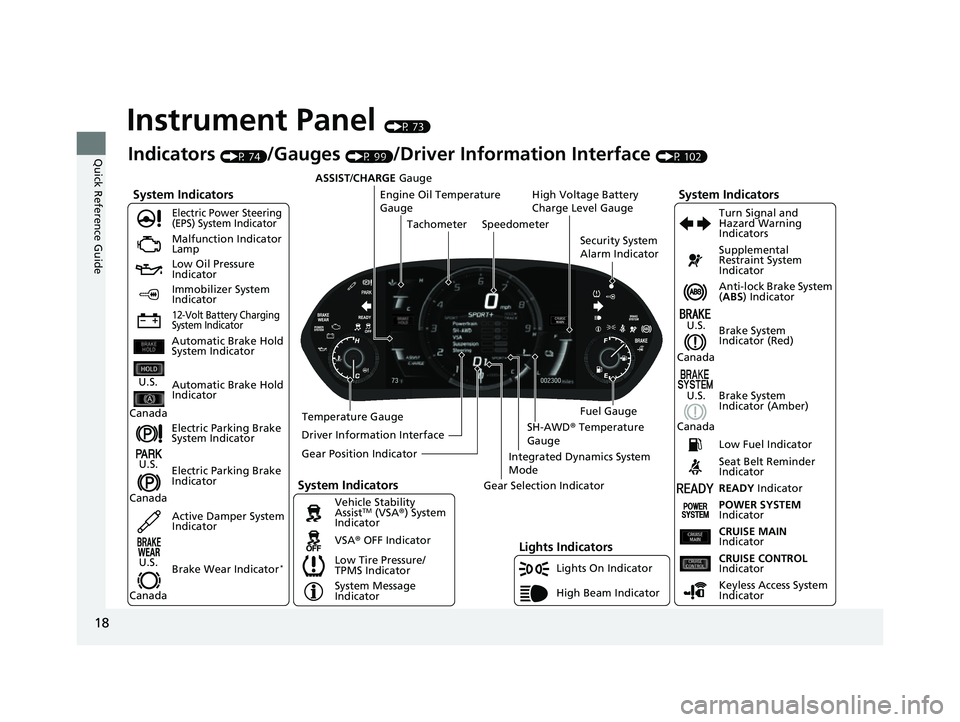
Instrument Panel (P 73)
System Indicators
Malfunction Indicator
Lamp
Low Oil Pressure
Indicator
12-Volt Battery Charging
System Indicator
Anti-lock Brake System
(ABS ) Indicator
Vehicle Stability
Assist
TM (VSA® ) System
Indicator
VSA ® OFF Indicator
Electric Power Steering
(EPS) System Indicator
Lights Indicators
Lights On Indicator
High Beam Indicator
Immobilizer System
Indicator
Seat Belt Reminder
Indicator
System Indicators
System Message
IndicatorBrake System
Indicator (Red) Supplemental
Restraint System
Indicator
Low Fuel Indicator
Indicators (P 74)/Gauges (P 99)/Driver Information Interface (P 102)
Low Tire Pressure/
TPMS Indicator Turn Signal and
Hazard Warning
Indicators
Keyless Access System
Indicator
High Voltage Battery
Charge Level Gauge
Security System
Alarm Indicator
Fuel Gauge
Tachometer
Driver Information Interface Speedometer
Gear Position Indicator Gear Selection Indicator
Electric Parking Brake
System Indicator
Electric Parking Brake
Indicator Automatic Brake Hold
System Indicator
Brake System
Indicator (Amber)
System Indicators
Automatic Brake Hold
IndicatorU.S.
Canada
U.S.
Canada
U.S.
Canada
U.S.
Canada
READY Indicator
POWER SYSTEM
Indicator
Temperature Gauge ASSIST/CHARGE
Gauge
U.S.
Canada Active Damper System
Indicator
Brake Wear Indicator
*
CRUISE MAIN
Indicator
CRUISE CONTROL
Indicator
Engine Oil Temperature
Gauge
Integrated Dynamics System
Mode
SH-AWD ® Temperature
Gauge
22 ACURA NSX PMC-31T6N6500.book 18 ページ 2021年9月28日 火曜日 午後4時7分
Page 41 of 492
Continued39
uuSeat Belts uAbout Your Seat Belts
Safe Driving
■Proper use of seat belts
Follow these guidelines for proper use:
• All occupants should sit upright, well back in the seat, and remain in that position
for the duration of the trip. Slouching and leaning reduce the effectiveness of the
belt and can increase the chance of serious injury in a crash.
• Never place the shoulder part of a lap/shoulder seat belt under your arm or
behind your back. This could cause very serious injuries in a crash.
• Two people should never use the same seat belt. If they do, they could be very
seriously injured in a crash.
• Do not put any accessories on the seat be lts. Devices intended to improve comfort
or reposition the shoulder part of a seat belt can reduce the protective capability
and increase the chance of serious injury in a crash.
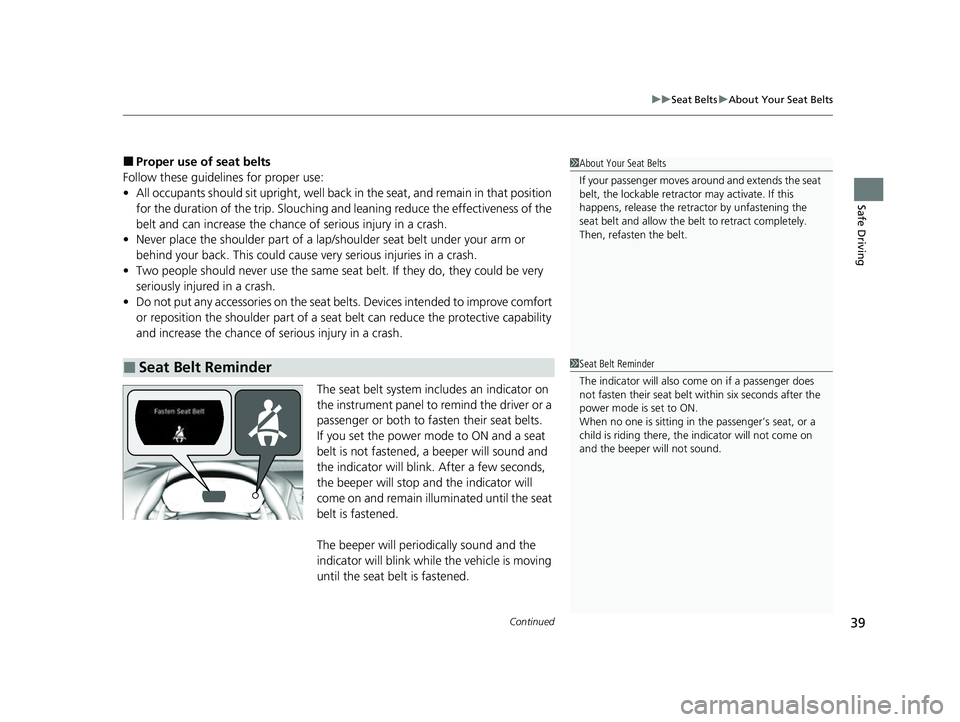
The seat belt system includes an indicator on
the instrument panel to remind the driver or a
passenger or both to fasten their seat belts.
If you set the power mode to ON and a seat
belt is not fastened, a beeper will sound and
the indicator will blink. After a few seconds,
the beeper will stop and the indicator will
come on and remain illuminated until the seat
belt is fastened.
The beeper will periodically sound and the
indicator will blink while the vehicle is moving
until the seat belt is fastened.
■Seat Belt Reminder
1About Your Seat Belts
If your passenger moves around and extends the seat
belt, the lockable retractor may activate. If this
happens, release the retractor by unfastening the
seat belt and allow the belt to retract completely.
Then, refasten the belt.
1Seat Belt Reminder
The indicator will also co me on if a passenger does
not fasten their seat belt within six seconds after the
power mode is set to ON.
When no one is sitting in th e passenger’s seat, or a
child is riding there, the indicator will not come on
and the beeper will not sound.
22 ACURA NSX PMC-31T6N6500.book 39 ページ 2021年9月28日 火曜日 午後4時7分
Page 48 of 492

46
uuAirbags uAirbag System Components
Safe Driving
The front, driver’s knee, side, and side
curtain airbags are deployed according to
the direction and severity of impact. Both
side curtain airbags are deployed in a
rollover. The airbag system includes:
aTwo SRS (Supplemental Restraint System)
front airbags. The driver’s airbag is stored
in the center of the steering wheel; the
passenger’s airbag is stored in the
dashboard. Both are marked SRS
AIRBAG.
bDriver’s knee airbag. The knee airbag is
stored under the steering column. It is
marked SRS AIRBAG.
cTwo side airbags, one for the driver and
one for the passenger. The airbags are
stored in the outer edges of the seat-
backs. Both are marked SIDE AIRBAG .
dTwo side curtain airbags, one for each
side of the vehicle. The airbags are stored
in the ceiling, above the side windows.
The front and rear pillars are marked
SIDE CURTAIN AIRBAG.
eAn electronic control unit that, when the
power system is on, continually monitors
information about the various impact
sensors, seat and buckle sensors, rollover
sensor, airbag activators, seat belt
tensioners, and other vehicle
information. During a crash event the
unit can record such information.
fAutomatic seat belt tensioners. In
addition, the driver’s and passenger’s
seat belt buckles incorporate sensors that
detect whether or not the belts are
fastened.
gWeight sensors in the passenger’s seat.
The sensors are used for occupant
classification to activate or deactivate the
passenger’s airbag.
hImpact sensors that can detect a
moderate-to-severe front or side impact.
iAn indicator on the dashboard that alerts
you that the passenger’s front airbag has
been turned off.
jAn indicator on the instrument panel that
alerts you to a possib le problem with your
airbag system or seat belt tensioners.
kA rollover sensor that can detect if your
vehicle is about to roll over and signal the
control unit to deploy both side curtain
airbags.
22 ACURA NSX PMC-31T6N6500.book 46 ページ 2021年9月28日 火曜日 午後4時7分
Page 75 of 492

73
Instrument Panel
This chapter describes the buttons, indicators, and gauges that are used while driving.
Indicators............................................ 74
Driver Information Interface Warning and Information Messages ...................... 87
Gauges and Displays Gauges .............................................. 99
Driver Information Interface ............. 102
22 ACURA NSX PMC-31T6N6500.book 73 ページ 2021年9月28日 火曜日 午後4時7分
Page 76 of 492
74
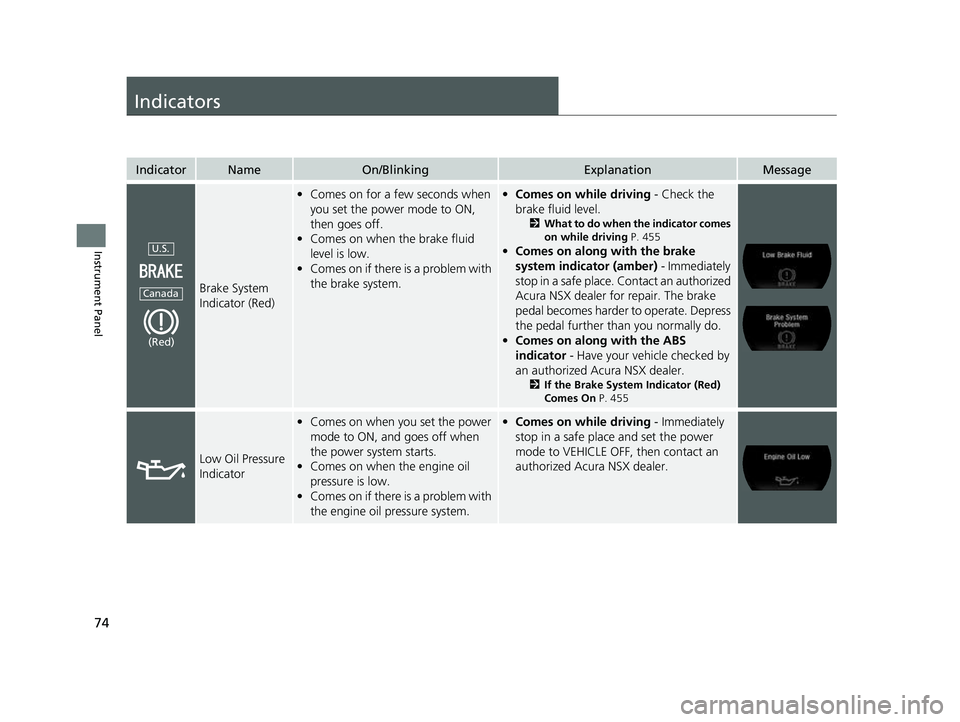
Instrument Panel
Indicators
IndicatorNameOn/BlinkingExplanationMessage
Brake System
Indicator (Red)
•Comes on for a few seconds when
you set the power mode to ON,
then goes off.
• Comes on when the brake fluid
level is low.
• Comes on if there is a problem with
the brake system.•Comes on while driving - Check the
brake fluid level.
2 What to do when the indicator comes
on while driving P. 455
•Comes on along with the brake
system indicator (amber) - Immediately
stop in a safe place. Contact an authorized
Acura NSX dealer for repair. The brake
pedal becomes harder to operate. Depress
the pedal further than you normally do.
• Comes on along with the ABS
indicator - Have your vehicle checked by
an authorized Acura NSX dealer.
2 If the Brake System Indicator (Red)
Comes On P. 455
Low Oil Pressure
Indicator
•Comes on when you set the power
mode to ON, and goes off when
the power system starts.
• Comes on when the engine oil
pressure is low.
• Comes on if there is a problem with
the engine oil pressure system.•Comes on while driving - Immediately
stop in a safe place and set the power
mode to VEHICLE OFF, then contact an
authorized Acura NSX dealer.
U.S.
Canada
(Red)
22 ACURA NSX PMC-31T6N6500.book 74 ページ 2021年9月28日 火曜日 午後4時7分
Page 77 of 492

75
uuIndicators u
Continued
Instrument Panel
IndicatorNameOn/BlinkingExplanationMessage
Electric Parking
Brake Indicator
•Comes on when the parking brake
is applied, and goes off when it is
released.
• Comes on for about 15 seconds
then goes off when you pull the
electric parking brake switch with
the power mode in OFF.
• Comes on for about 15 seconds
then goes off when you set the
power mode to OFF with the
parking brake applied.• Blinks and the electric parking brake
system indicator comes on at the same
time - There is a problem with the electric
parking brake system. The parking brake
may not be set.
• Comes on when you press the
electric parking brake switch
without depressing the brake
pedal.• Depress the brake pedal to release the
parking brake.
2 Parking Brake P. 355
Electric Parking
Brake System
Indicator
•Comes on for a few seconds when
you set the power mode to ON,
then goes off.
• Comes on if there is a problem with
the electric parking brake system.• Comes on while driving - Avoid using
the parking brake and have your vehicle
checked by an auth orized Acura NSX
dealer immediately.
2 If the Electric Parking Brake System
Indicator Comes On P. 456
U.S.
Canada
22 ACURA NSX PMC-31T6N6500.book 75 ページ 2021年9月28日 火曜日 午後4時7分
Page 78 of 492

76
uuIndicators u
Instrument Panel
IndicatorNameOn/BlinkingExplanationMessage
Automatic Brake
Hold System
Indicator•Comes on when the automatic
brake hold system is on.
2 Automatic Brake Hold P. 358
Automatic Brake
Hold Indicator
•Comes on for a few seconds when
you set the power mode to ON,
then goes off.
• Comes on when the automatic
brake hold is activated.
2 Automatic Brake Hold P. 358—
U.S.
Canada
22 ACURA NSX PMC-31T6N6500.book 76 ページ 2021年9月28日 火曜日 午後4時7分
Page 79 of 492

77
uuIndicators u
Continued
Instrument Panel
IndicatorNameOn/BlinkingExplanationMessage
Brake System
Indicator
(Amber)
•Comes on for a few seconds when
you set the power mode to ON,
then goes off.
• Comes on if there is a problem with
a system related to braking other
than the conventional brake
system.
• Comes on if there is a problem with
the cooperative control with
regenerative braking, the electric
servo brake system, or the hill start
assist system.• Comes on while driving - Have your
vehicle checked by an authorized Acura
NSX dealer.
• Stays on constantly - Avoid high speeds
and sudden braking. Take the vehicle to
an authorized Acura NSX dealer
immediately.
• With this indicator on, your vehicle still has
normal braking ability.
U.S.
Canada
(Amber)
U.S.
Canada
22 ACURA NSX PMC-31T6N6500.book 77 ページ 2021年9月28日 火曜日 午後4時7分