pairing phone ACURA NSX 2022 Owners Manual
[x] Cancel search | Manufacturer: ACURA, Model Year: 2022, Model line: NSX, Model: ACURA NSX 2022Pages: 492, PDF Size: 16.2 MB
Page 220 of 492
218
uuAudio System Basic Operation uAndroid AutoTM
Features
Android AutoTM
When you connect an Android phone to the audio system via the USB port, Android
Auto is automatically initia ted. When connected via Android Auto, you can use the
audio/information screen to access the Phone, Google Maps (Navigation), Google
Play Music, and Google Now functions. When you first use Android Auto, a tutorial
will appear on the screen.
We recommend that you complete this tuto rial while safely parked before using
Android Auto.
2 USB Ports P. 163
2 Auto Pairing Connection P. 220
1Android AutoTM
To use Android Auto, you need to download the
Android Auto app from Google Play to your
smartphone.
We recommend that you upda te Android OS to the
latest version when using Android Auto.
Bluetooth A2DP cannot be used while your phone is
connected to Android Auto.
Park in a safe place befo re connecting your Android
phone to Android Auto and when launching any
compatible apps.
When your Android phone is connected to Android
Auto, it is not possible to use the Bluetooth® Audio.
However, other previously paired phones can stream
audio via Bluetooth ® while Android Auto is
connected. 2 Phone Setup P. 277
22 ACURA NSX PMC-31T6N6500.book 218 ページ 2021年9月28日 火曜日 午後4時7分
Page 222 of 492

uuAudio System Basic Operation uAndroid AutoTM
220
Features
d Music and audio
Play Google Play Music and music apps that are compatible with Android Auto.
To switch between music apps, press this icon.
e Go back to the Home Screen.
f Voice
Operate Android Auto with your voice.
When you connect an Android phone to the unit via the USB port, Android Auto is
automatically initiated.
■Enabling Android Auto Enable once: Allows only once. (Prompt
shows again next time.)
Always enable : Allows anytime. (Prompt
does not show again.)
Cancel : Does not allow this consent.
You may change the consent settings under
the Smartphone settings menu.
■Auto Pairing Connection
1Enabling Android Auto
Only initialize Android Auto when you are safely
parked. When Android Auto first detects your phone,
you will need to set up your phone so that auto
pairing is possibl e. Refer to the instruction manual
that came with your phone.
You can use the method below to change Android
Auto settings after you ha ve completed the initial
setup:
Select Settings Smartphone Android Auto
Use of user and vehicle information
The use and handling of user and vehicle information
transmitted to/from your phone by Android Auto is
governed by Google’s Privacy Policy.
22 ACURA NSX PMC-31T6N6500.book 220 ページ 2021年9月28日 火曜日 午後4時7分
Page 255 of 492
253
uuCustomized Features u
Continued
Features
*1:Default SettingSetup
Group Customizable Features Descri
ption Selectable Settings
Bluetooth
/Wi-Fi
Bluetooth
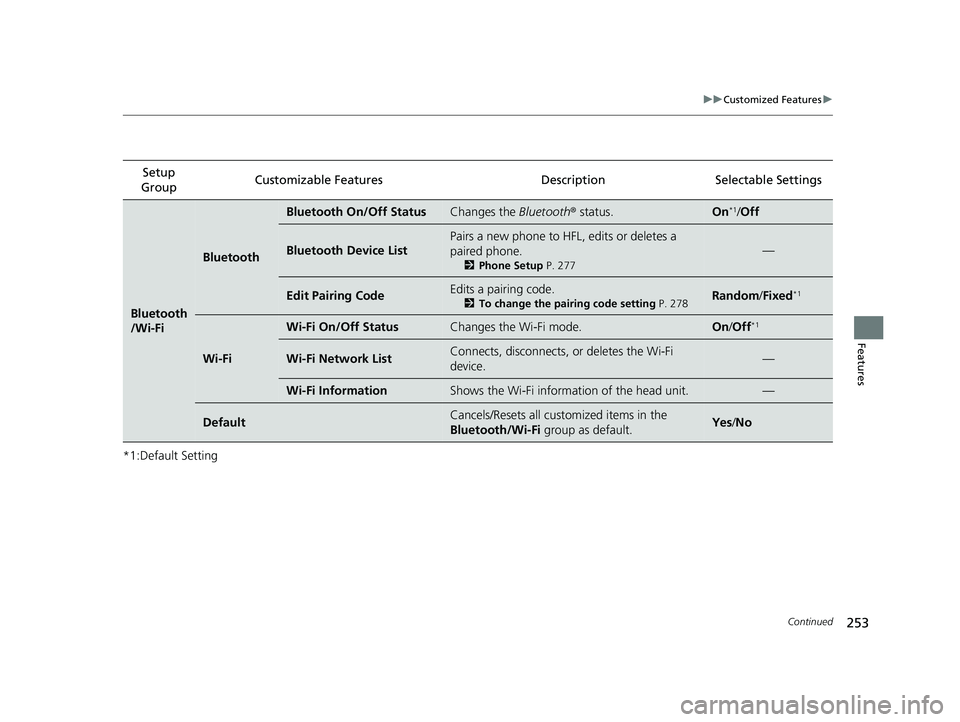
Bluetooth On/Off StatusChanges the Bluetooth® status.On*1/Off
Bluetooth Device List
Pairs a new phone to HF L, edits or deletes a
paired phone.
2 Phone Setup P. 277
—
Edit Pairing CodeEdits a pairing code.
2To change the pairing code setting P. 278Random/Fixed*1
Wi-Fi
Wi-Fi On/Off StatusChanges the Wi-Fi mode.On /Off*1
Wi-Fi Network ListConnects, disconnects, or deletes the Wi-Fi
device.—
Wi-Fi InformationShows the Wi-Fi information of the head unit.—
DefaultCancels/Resets all cust omized items in the
Bluetooth/Wi-Fi group as default.Yes/No
22 ACURA NSX PMC-31T6N6500.book 253 ページ 2021年9月28日 火曜日 午後4時7分
Page 271 of 492

269Continued
Features
Bluetooth® HandsFreeLink ®
Bluetooth® HandsFreeLink ® (HFL) allows you to place and receive phone calls using
your vehicle’s audio system, without handling your cell phone.
Using HFL
■HFL Buttons
1 Bluetooth ® HandsFreeLink ®
Place your phone where y ou can get good reception.
To use HFL, you need a Bluetooth-compatible cell
phone. For a list of compatible phones, pairing
procedures, and special feature capabilities:
•U.S.: Visit www.acura.com/handsfreelink , or call 1-
888-528-7876.
•Canada: For more info rmation on smartphone
compatibility, call 1-888-528-7876.
To use the system, the Bluetooth On/Off Status
setting must be On. If there is an active connection to
Apple CarPlay, H FL is unavailable.
2 How to customize P. 243
Voice control tips
•Aim the vents away from the ceiling and close the
windows, as noise coming from them may interfere
with the microphone.
•Press the button when you want to call a
number using a stored voice tag, a phonebook
name, or a number. Spe ak clearly and naturally
after a beep.
•If the microphone picks up vo ices other than yours,
the command may be misinterpreted.
•To change the volume level, the volume level is able
to change by the audio system’s volume.
Up to five speed dial entries can be displayed among
a total of 20 that can be entered. 2 Speed Dial P. 283
Up to five previous calls can be displayed at a time
among a total of 20 that can be entered. If there is no
call history, Call History is disabled.
Talk Button
Hang-up/Back Button
Pick-up Button Volume up
Volume down
Left Selector Wheel
22 ACURA NSX PMC-31T6N6500.book 269 ページ 2021年9月28日 火曜日 午後4時7分
Page 279 of 492

Continued277
uuBluetooth ® HandsFreeLink ®u HFL Menus
Features
■To pair a cell phone (when there is no
phone paired to the system)
1. Select Phone .
2. Select Yes.
3. Make sure your phone is in search or
discoverable mode, then select Continue.
u HFL automatically searches for a
Bluetooth ® device.
4. Select your phone when it appears on the
list.
u If your phone does not appear, you can
select Refresh to search again.
u If your phone still does not appear, select
Phone Not Found and search for
Bluetooth ® devices using your phone.
From your phone, search for
HandsFreeLink .
5. The system gives you a pairing code on the
audio/information screen.
u Confirm if the pairing code on the screen
and your phone match.
This may vary by phone.
■Phone Setup1Phone Setup
Your Bluetooth -compatible phone must be paired to
the system before you ca n make and receive hands-
free calls.
Phone Pairing Tips:
•You cannot pair your phone while the vehicle is
moving.
•Up to six phones can be paired.
•Your phone's battery may dr ain faster when it is
paired to the system.
Once you have paired a phone, you can see it
displayed on the screen with one or two icons on the
right side.
These icons indicate the following: : The phone can be used with HFL.
: The phone is compatible with Bluetooth® Audio.
If there is an active c onnection to Apple CarPlay,
pairing of additional Bluetooth-compatible devices is
unavailable and Add Bluetooth Device is grayed
out from the Bluetooth Device List screen.
22 ACURA NSX PMC-31T6N6500.book 277 ページ 2021年9月28日 火曜日 午後4時7分
Page 280 of 492

uuBluetooth ® HandsFreeLink ®u HFL Menus
278
Features
■To change the currently paired phone
1. Go to the phone settings screen.
2 Phone settings screen P. 272
2.Select Bluetooth Device List .
3. Select a phone to connect.
u HFL disconnects the connected phone
and starts searching for another paired
phone.
4. Select Connect , Connect , or
Connect .
■To change the pairing code setting
1. Select .
2. Select Settings .
3. Select Bluetooth/Wi-Fi .
4. Select the Bluetooth tab.
5. Select Edit Pairing Code .
6. Select Random or Fixed .
1To change the currently paired phone
If no other phones are found or paired when trying to
switch to another phone, HFL will inform you that the
original phone is connected again.
To pair other phones, select Add Bluetooth Device
from the Bluetooth device list screen.
1To change the pairing code setting
The default pairing code is 0000 until you change the
setting.
To create your own, select Fixed, and delete the
current code, then enter a new one.
For a randomly generated pair ing code each time you
pair a phone, select Random.
22 ACURA NSX PMC-31T6N6500.book 278 ページ 2021年9月28日 火曜日 午後4時7分