ECU ACURA RDX 2010 User Guide
[x] Cancel search | Manufacturer: ACURA, Model Year: 2010, Model line: RDX, Model: ACURA RDX 2010Pages: 514, PDF Size: 30.21 MB
Page 54 of 514
Installing a Child Seat with a Lap/
Shoulder Belt
When not using the LATCH system,
all child seats must be secured to the
vehicle with the lap part of a lap/
shoulder belt.
In addition, the lap/shoulder belts in
all seating positions except the
driver's have a lockable retractor that
must be activated to secure a child
seat.
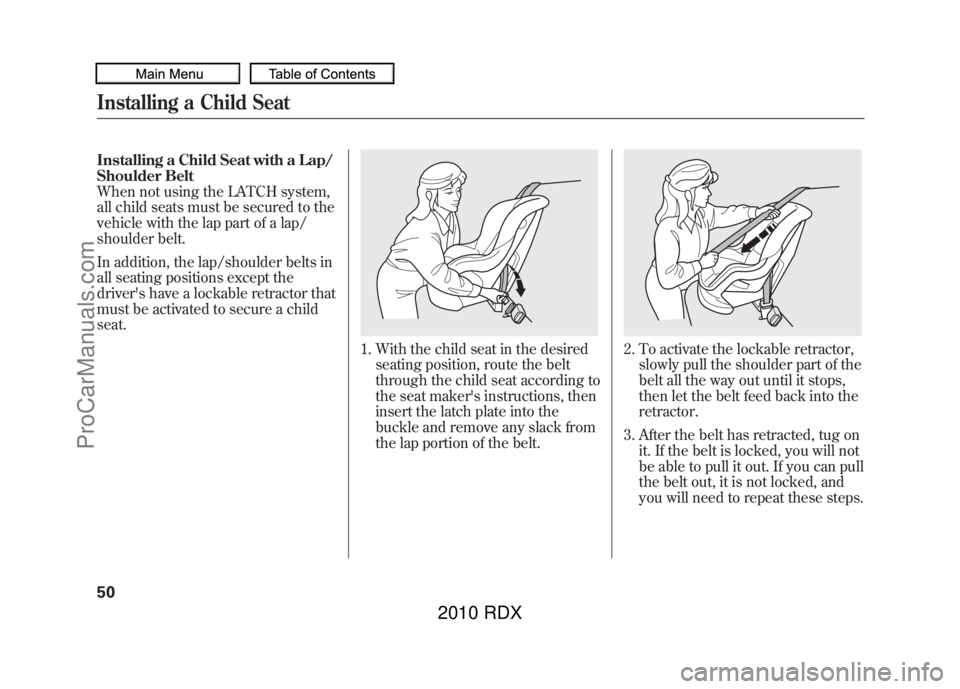
1. With the child seat in the desiredseating position, route the belt
through the child seat according to
the seat maker's instructions, then
insert the latch plate into the
buckle and remove any slack from
the lap portion of the belt.
2. To activate the lockable retractor,slowly pull the shoulder part of the
belt all the way out until it stops,
then let the belt feed back into the
retractor.
3. After the belt has retracted, tug on it. If the belt is locked, you will not
be able to pull it out. If you can pull
the belt out, it is not locked, and
you will need to repeat these steps.
Installing a Child Seat5009/07/07 15:02:04 10 ACURA RDX MMC North America Owner's M 50 31STK630 enu
ProCarManuals.com
2010 RDX
Page 55 of 514
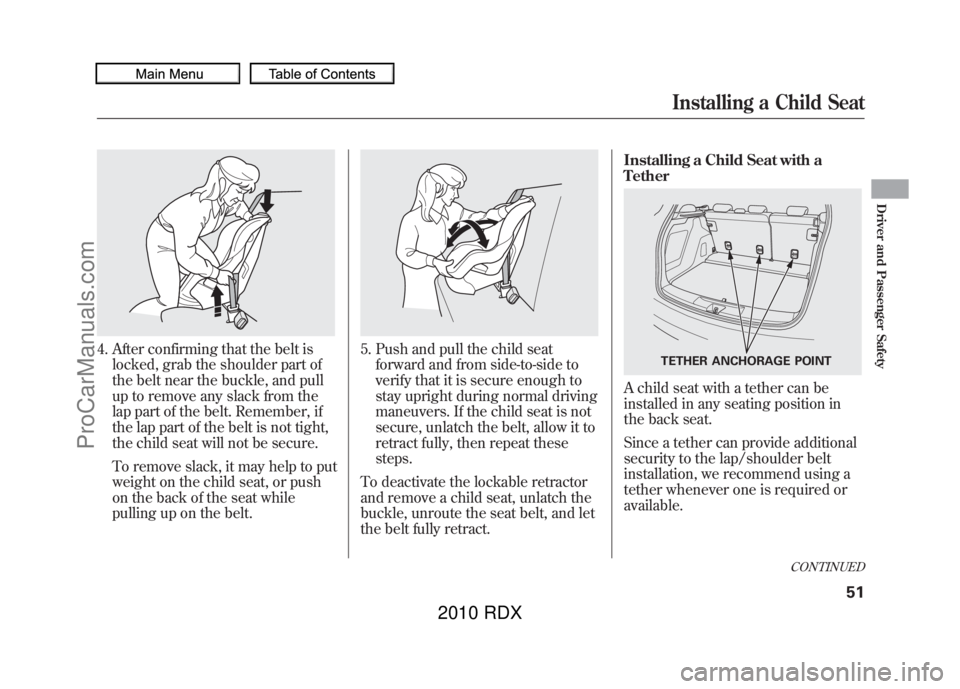
4. After confirming that the belt islocked, grab the shoulder part of
the belt near the buckle, and pull
up to remove any slack from the
lap part of the belt. Remember, if
the lap part of the belt is not tight,
the child seat will not be secure.
To remove slack, it may help to put
weight on the child seat, or push
on the back of the seat while
pulling up on the belt.
5. Push and pull the child seatforward and from side-to-side to
verify that it is secure enough to
stay upright during normal driving
maneuvers. If the child seat is not
secure, unlatch the belt, allow it to
retract fully, then repeat these
steps.
To deactivate the lockable retractor
and remove a child seat, unlatch the
buckle, unroute the seat belt, and let
the belt fully retract. Installing a Child Seat with a
Tether
A child seat with a tether can be
installed in any seating position in
the back seat.
Since a tether can provide additional
security to the lap/shoulder belt
installation, we recommend using a
tether whenever one is required or
available.
TETHER ANCHORAGE POINT
CONTINUED
Installing a Child Seat
51
Driver and Passenger Safety
09/07/07 15:02:04 10 ACURA RDX MMC North America Owner's M 50 31STK630 enu
ProCarManuals.com
2010 RDX
Page 56 of 514
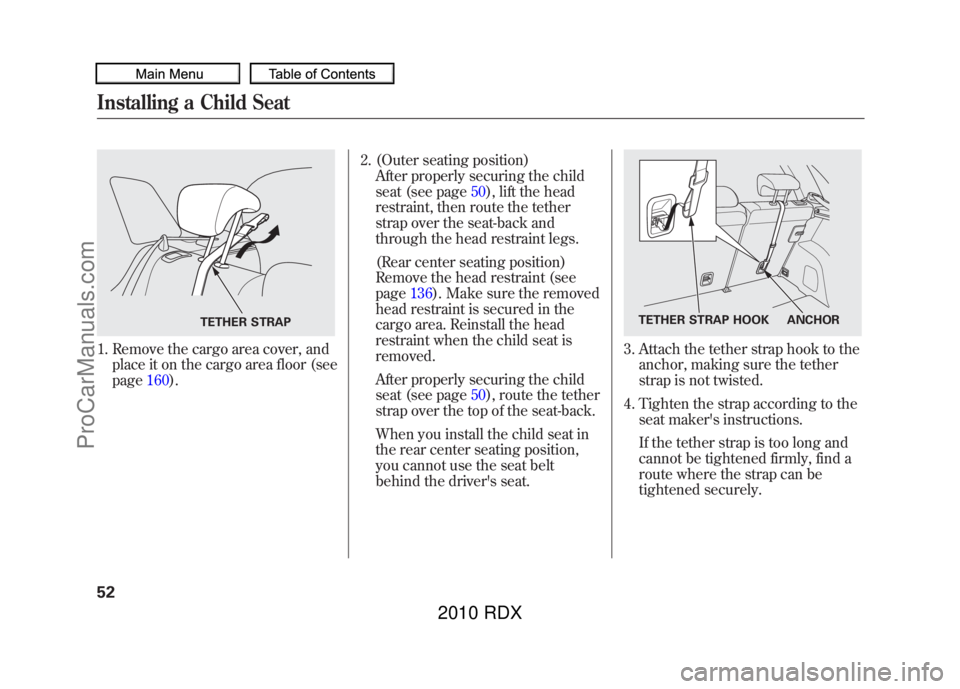
1. Remove the cargo area cover, andplace it on the cargo area floor (see
page 160). 2. (Outer seating position)
After properly securing the child
seat (see page 50), lift the head
restraint, then route the tether
strap over the seat-back and
through the head restraint legs.
(Rear center seating position)
Remove the head restraint (see
page 136). Make sure the removed
head restraint is secured in the
cargo area. Reinstall the head
restraint when the child seat is
removed.
After properly securing the child
seat (see page 50), route the tether
strap over the top of the seat-back.
When you install the child seat in
the rear center seating position,
you cannot use the seat belt
behind the driver's seat.
3. Attach the tether strap hook to the anchor, making sure the tether
strap is not twisted.
4. Tighten the strap according to the seat maker's instructions.
If the tether strap is too long and
cannot be tightened firmly, find a
route where the strap can be
tightened securely.
TETHER STRAP
TETHER STRAP HOOK ANCHOR
Installing a Child Seat5209/07/07 15:02:04 10 ACURA RDX MMC North America Owner's M 50 31STK630 enu
ProCarManuals.com
2010 RDX
Page 60 of 514
If you decide that a child can safely
ride up front, be sure to:●Carefully read the owner's manual,
and make sure you understand all
seat belt instructions and all safety
information.●Move the vehicle seat to the rear-
most position.●Have the child sit up straight, back
against the seat, and feet on or
near the floor.●Check that the child's seat belt is
properly and securely positioned.●Supervise the child. Even mature
children sometimes need to be
reminded to fasten the seat belts
or sit properly.Additional Safety Precautions
●Do not let a child wear a seat belt
across the neck.
This could result
in serious neck injuries during a
crash.
●Do not let a child put the shoulder part of a seat belt behind the back
or under the arm.
This could cause
very serious injuries during a
crash. It also increases the chance
that the child will slide under the
belt in a crash and be injured.
●Two children should never use the
same seat belt.
If they do, they
could be very seriously injured in a
crash.
●Do not put any accessories on a
seat belt.
Devices intended to
improve a child's comfort or
reposition the shoulder part of a
seat belt can make the belt less
effective and increase the chance
of serious injury in a crash.
Protecting Larger Children5609/07/07 15:02:04 10 ACURA RDX MMC North America Owner's M 50 31STK630 enu
ProCarManuals.com
2010 RDX
Page 67 of 514
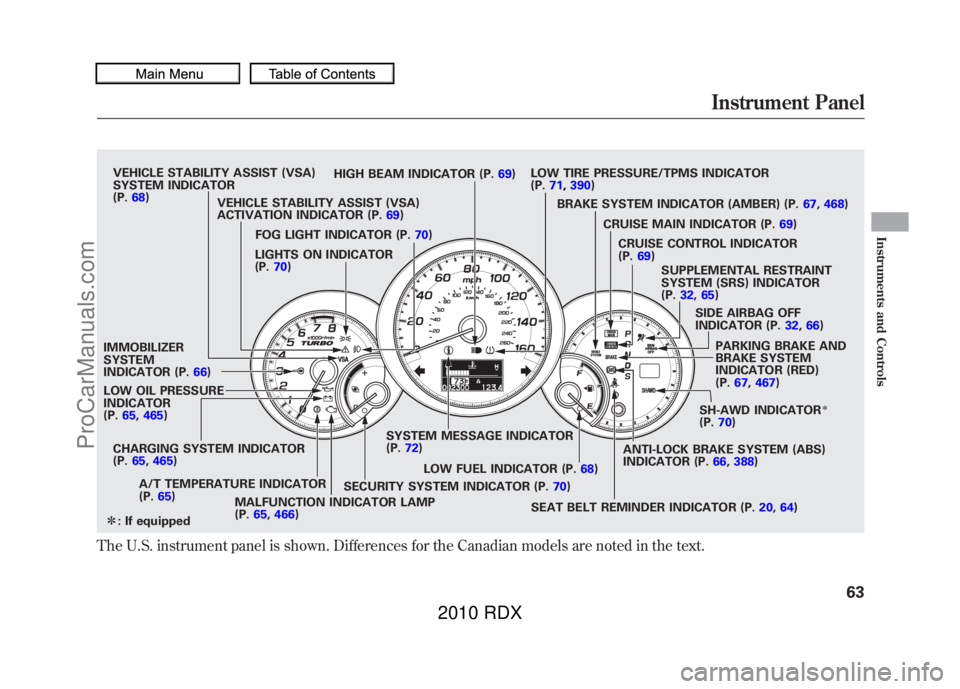
The U.S. instrument panel is shown. Differences for the Canadian models are noted in the text.
VEHICLE STABILITY ASSIST (VSA)
SYSTEM INDICATOR
(P.68) HIGH BEAM INDICATOR (P.
69)LOW TIRE PRESSURE/TPMS INDICATOR
(P.
71, 390)
VEHICLE STABILITY ASSIST (VSA)
ACTIVATION INDICATOR (P. 69) BRAKE SYSTEM INDICATOR (AMBER) (P.
67,468)
LIGHTS ON INDICATOR
(P. 70)
IMMOBILIZER
SYSTEM
INDICATOR (P. 66)
LOW OIL PRESSURE
INDICATOR
(P. 65, 465)
CHARGING SYSTEM INDICATOR
(P. 65, 465)
A/T TEMPERATURE INDICATOR
(P. 65)
MALFUNCTION INDICATOR LAMP
(P.65, 466) SYSTEM MESSAGE INDICATOR
(P.
72)
FOG LIGHT INDICATOR (P.
70)
LOW FUEL INDICATOR (P. 68)
SEAT BELT REMINDER INDICATOR (P. 20,64)
SECURITY SYSTEM INDICATOR (P.
70)SH-AWD INDICATOR
ꭧ
(P.
70)
PARKING BRAKE AND
BRAKE SYSTEM
INDICATOR (RED)
(P.
67, 467)
SIDE AIRBAG OFF
INDICATOR (P.
32,66)
SUPPLEMENTAL RESTRAINT
SYSTEM (SRS) INDICATOR
(P.
32, 65)
CRUISE CONTROL INDICATOR
(P.
69)
CRUISE MAIN INDICATOR (P.
69)
ANTI-LOCK BRAKE SYSTEM (ABS)
INDICATOR (P. 66,388)
ꭧ : If equippedInstrument Panel
63
Instruments and Controls
09/07/07 15:02:04 10 ACURA RDX MMC North America Owner's M 50 31STK630 enu
ProCarManuals.com
2010 RDX
Page 74 of 514

Security System IndicatorThis indicator comes on when the
security system is set. For more
information, see page 294.
Lights On Indicator
This indicator reminds you that the
exterior lights are on. It comes on
when the light switch is in either the
or
position. If you turn the
ignition switch to the ACCESSORY
(I) or the LOCK (0) position without
turning off the light switch, this
indicator will remain on. A reminder
chime will also sound when you open
the driver's door and remove the key
from the ignition switch.Fog Light Indicator
This indicator comes on when you
turn on the fog lights. For more
information, see page 119.
Super Handling-All
Wheel Drive (SH-AWD)
Indicator
On SH-AWD modelsThis indicator normally comes on for
a few seconds when you turn the
ignition switch to the ON (II)
position. If this indicator comes on at
any other time, there is a problem in
the SH-AWD system. You will also
see a‘‘CHECK SH-AWD SYSTEM ’’
message on the multi-information
display (see page 80). Take your
vehicle to a dealer to have it checked.
For more information, see page 385.
SECURITY SYSTEM INDICATOR
Instrument Panel Indicators7009/07/07 15:02:04 10 ACURA RDX MMC North America Owner's M 50 31STK630 enu
ProCarManuals.com
2010 RDX
Page 88 of 514

Customize Entry Customize Group Customize MenuDescriptionCustomize Setup PageCHG SETTING
(P.86) DOOR SETUP
(P.
102) DOOR LOCK MODE Changes which doors unlock with the remote
transmitter on a first push. DRIVER DOOR
ꭧ
105
ALL DOORS
KEYLESS LOCK
ACKNOWLEDGEMENT The exterior lights flash each time you press
the LOCK or UNLOCK button. A beeper will
also sound when you press the LOCK button
twice. ON
ꭧ
107
OFF
SECURITY RELOCK
TIMER Changes how long it takes (in seconds) for
the doors to relock and the security system to
set after you unlock but do not open the door. 30 sec
ꭧ
109
60 sec
90 sec
AUTO DOOR UNLOCK Changes when the system automatically unlock the driver's/all of the doors. DRIVER DOOR WITH
SHIFT TO P
ꭧ
111
ALL DOORS WITH SHIFT
TO P
DRIVER'S DOOR WITH
IGN OFF
ALL DOORS WITH IGN
OFF
OFF
DEFAULT ALL Returns all settings to the factory default. SET 85
EXIT
ꭧ : Default setting
Multi-Information Display8409/07/07 15:02:04 10 ACURA RDX MMC North America Owner's M 50 31STK630 enu
ProCarManuals.com
2010 RDX
Page 106 of 514

Door Setup
Here are the five custom settings for
the door setup:●AUTO DOOR LOCK●DOOR LOCK MODE●KEYLESS LOCK
ACKNOWLEDGEMENT●SECURITY RELOCK TIMER●AUTO DOOR UNLOCK
While CUSTOMIZE GROUP is
shown on the multi-information
display, select DOOR SETUP by
pressing INFO (
/
) button, then
press the SEL/RESET button.
Each time you press the INFO (
/
) button, the screen changes as
shown in the illustration. Press the
INFO (
/
) button until you see the
setting you want to customize, then
press the SEL/RESET button to
enter your selection.
: Press the SEL/
: Press the INFO See page
103
See page 105
See page 107
See page 109
See page 111
RESET button
or the select/
reset knob
( ▲ /▼ ) button or
rotate the
select/reset knob
Multi-Information Display10209/07/07 15:02:04 10 ACURA RDX MMC North America Owner's M 50 31STK630 enu
ProCarManuals.com
2010 RDX
Page 111 of 514

Keyless Lock AcknowledgementWhen you press the UNLOCK
button on the remote transmitter to
unlock the doors and the tailgate, the
exterior lights blink twice to verify
that the doors and the tailgate are
unlocked and the security system is
turned off.
When you push the LOCK button on
the remote transmitter, some
exterior lights flash, and a beeper
sounds when you push the LOCK
button again within 5 seconds to
verify that the doors and the tailgate
are locked and the security system
has set (see page130). You can
customize the exterior lights not to
flash and the beeper not to sound.
While DOOR SETUP is shown in the
CUSTOMIZE GROUP of the multi-
information display, press the SEL/
RESET button. The screen changes
to CUSTOMIZE MENU. Press the
INFO (
/
) button until you see the
above display.
Press the SEL/RESET button. The
screen changes as shown above.
Select ON or OFF by pressing the
INFO (
/
) button, then press the
SEL/RESET button to enter your
selection.
CONTINUED
Multi-Information Display
107
Instruments and Controls
09/07/07 15:02:04 10 ACURA RDX MMC North America Owner's M 50 31STK630 enu
ProCarManuals.com
2010 RDX
Page 113 of 514
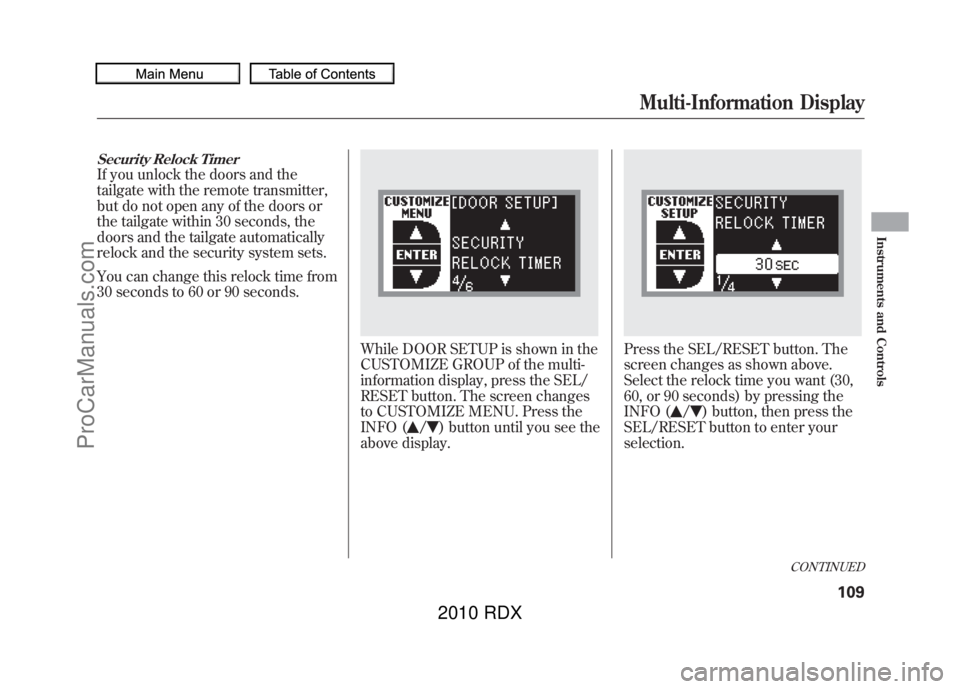
Security Relock TimerIf you unlock the doors and the
tailgate with the remote transmitter,
but do not open any of the doors or
the tailgate within 30 seconds, the
doors and the tailgate automatically
relock and the security system sets.
You can change this relock time from
30 seconds to 60 or 90 seconds.
While DOOR SETUP is shown in the
CUSTOMIZE GROUP of the multi-
information display, press the SEL/
RESET button. The screen changes
to CUSTOMIZE MENU. Press the
INFO (
/
) button until you see the
above display.
Press the SEL/RESET button. The
screen changes as shown above.
Select the relock time you want (30,
60, or 90 seconds) by pressing the
INFO (
/
) button, then press the
SEL/RESET button to enter your
selection.
CONTINUED
Multi-Information Display
109
Instruments and Controls
09/07/07 15:02:04 10 ACURA RDX MMC North America Owner's M 50 31STK630 enu
ProCarManuals.com
2010 RDX