blue tooth control ACURA RDX 2010 User Guide
[x] Cancel search | Manufacturer: ACURA, Model Year: 2010, Model line: RDX, Model: ACURA RDX 2010Pages: 514, PDF Size: 30.21 MB
Page 311 of 514
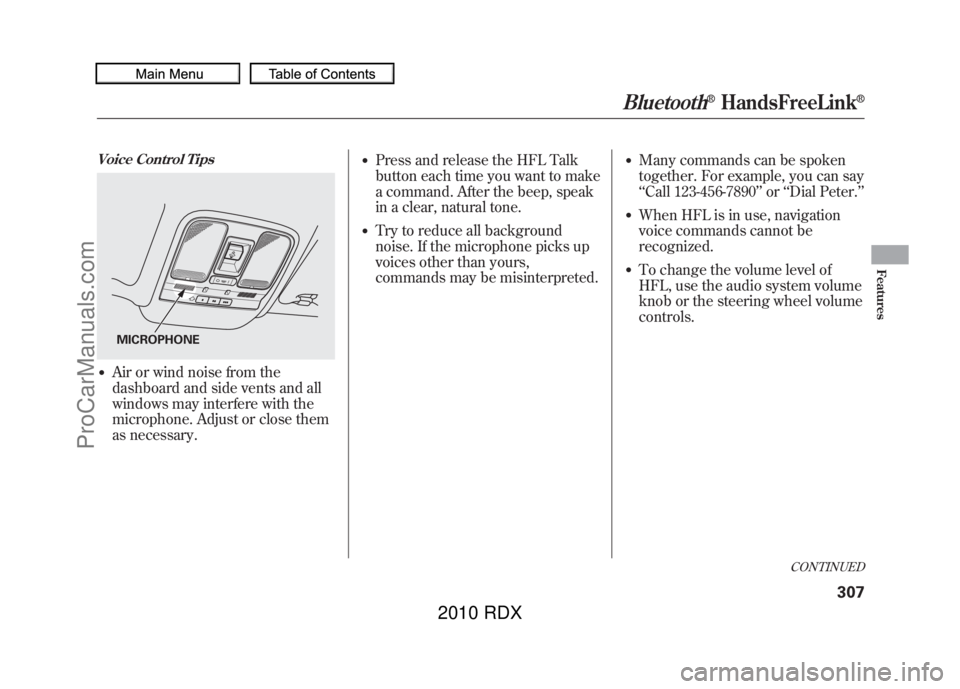
Voice Control Tips●Air or wind noise from the
dashboard and side vents and all
windows may interfere with the
microphone. Adjust or close them
as necessary.
●Press and release the HFL Talk
button each time you want to make
a command. After the beep, speak
in a clear, natural tone.●Try to reduce all background
noise. If the microphone picks up
voices other than yours,
commands may be misinterpreted.
●Many commands can be spoken
together. For example, you can say
‘‘Call 123-456-7890 ’’or ‘‘Dial Peter. ’’●When HFL is in use, navigation
voice commands cannot be
recognized.●To change the volume level of
HFL, use the audio system volume
knob or the steering wheel volume
controls.
MICROPHONE
CONTINUED
Bluetooth
®HandsFreeLink
®
307
Features
09/07/07 15:02:04 10 ACURA RDX MMC North America Owner's M 50 31STK630 enu
ProCarManuals.com
2010 RDX
Page 336 of 514
On models with navigation systemexcept Alaska, Hawaii, and Puerto RicoAcuraLink enhances your ownership
experience by providing a direct
communication link between your
vehicle and the Acura Server.
Working through the XM radio
satellite, AcuraLink works in
conjunction with the navigation
system,
Bluetooth
®HandsFreeLink
®
(HFL), and audio system in your
vehicle. It displays and receives
several kinds of messages, including:●Operating tips and information on
your vehicle's features.●Important recall and safety
information.●Maintenance information to keep
your vehicle in top condition.●Diagnostic information to provide
information about any problems
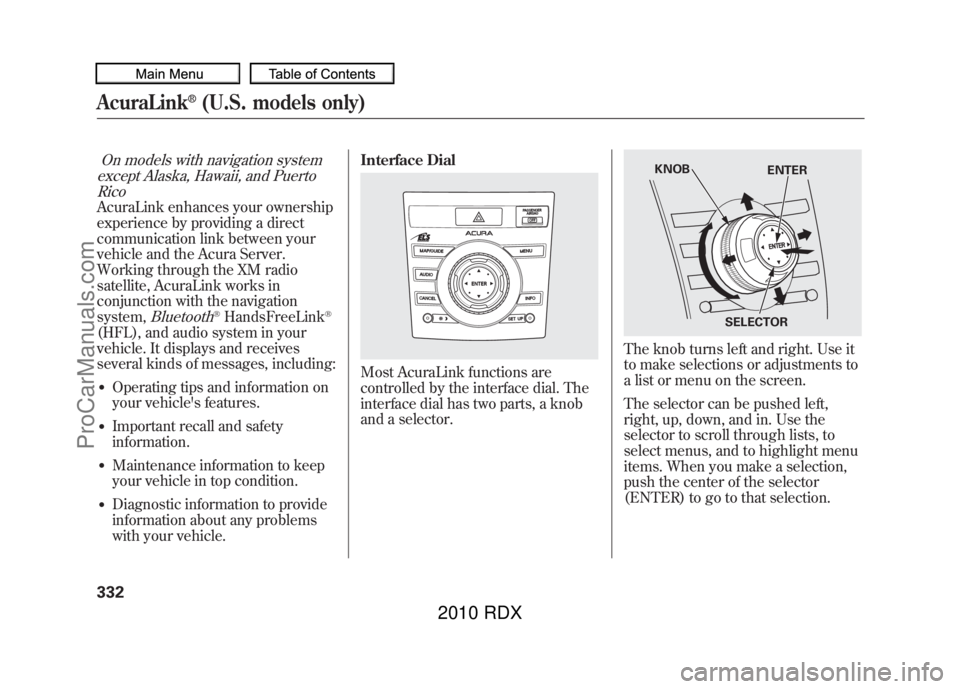
with your vehicle. Interface Dial
Most AcuraLink functions are
controlled by the interface dial. The
interface dial has two parts, a knob
and a selector.
The knob turns left and right. Use it
to make selections or adjustments to
a list or menu on the screen.
The selector can be pushed left,
right, up, down, and in. Use the
selector to scroll through lists, to
select menus, and to highlight menu
items. When you make a selection,
push the center of the selector
(ENTER) to go to that selection.
KNOB
ENTER
SELECTOR
AcuraLink
®(U.S. models only)
33209/07/07 15:02:04 10 ACURA RDX MMC North America Owner's M 50 31STK630 enu
ProCarManuals.com
2010 RDX
Page 502 of 514
A
Accessories andModifications
..........................
362
ACCESSORY (Ignition Key Position)
.................................
125
Accessory Power Sockets
..........
157
AcuraLink
®(U.S. models
only)
.......................................
332
Additives, Engine Oil
.................
421
Adjusting the Sound
............
177, 224
Adjusting the Steering Wheel....
122
Advanced Airbags
........................
28
Air Conditioning System
............
164
Usage
......................................
165
Air Pressure, Tires
..............
444, 445
Airbag (SRS)
..........................
10, 24
Alcohol in Gasoline
....................
352
Anti-lock Brakes (ABS) Indicator Light
..................
66, 388
Operation
................................
388
Anti-theft Steering Column Lock
.......................................
125
Anti-theft, Audio System
.............
292
Antifreeze
...................................
424 Armrests
....................................
138
Audio Antenna
...........................
439
Audio System
......................
172, 216
Automatic Lighting Off
Feature
...................................
118
Automatic Seat Belt Tensioners...
22
Automatic Speed Control
...........
300
Automatic Transmission
............
376
Capacity, Fluid
........................
480
Checking Fluid Level
..............
427
Driving with the Paddle Shifters
................................
380
Shift Lever Position Indicators
............................
376
Shift Lever Positions
...............
377
Shift Lock Release
...................
379
Shifting
...................................
376
Auxiliary Input Jack
...................
291
B
Battery Charging System
Indicator
........................
65, 465
Jump Starting
..........................
461 Maintenance
...........................
450
Specifications
..........................
481
Before Driving
...........................
351
Belts, Seat
................................
9, 20
Beverage Holders
......................
156
Bluetooth
®Audio
................
212, 280
Bluetooth
®HandsFreeLink
®......
306
Booster Seats
...............................
54
Brakes Anti-lock Brakes (ABS)
...........
388
Break-in, New Linings
.............
352
Bulb Replacement
...................
433
Fluid
.......................................
429
Parking
...................................
150
System Design
........................
387
System Indicator (Amber)
.......
468
System Indicator (Red)
...........
467
Wear Indicators
.......................
387
Braking System
..........................
387
Break-in, New Vehicle
................
352
Brightness Control,
Instruments
............................
120
CONTINUED
Index
I
INDEX
09/07/07 15:02:04 10 ACURA RDX MMC North America Owner's M 50 31STK630 enu
ProCarManuals.com
2010 RDX