lock ACURA RDX 2010 User Guide
[x] Cancel search | Manufacturer: ACURA, Model Year: 2010, Model line: RDX, Model: ACURA RDX 2010Pages: 514, PDF Size: 30.21 MB
Page 55 of 514
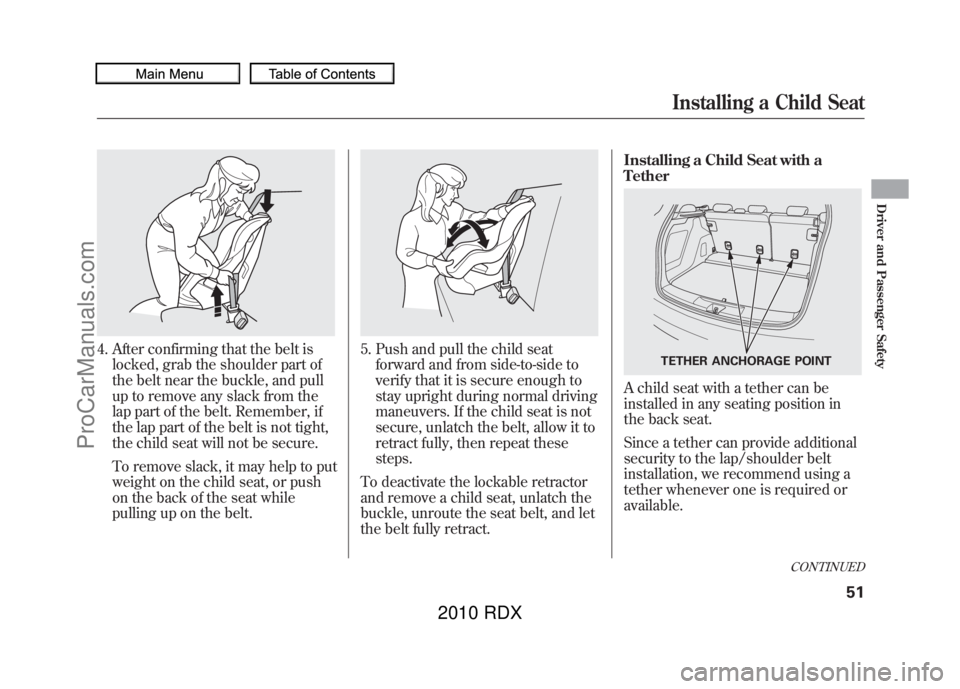
4. After confirming that the belt islocked, grab the shoulder part of
the belt near the buckle, and pull
up to remove any slack from the
lap part of the belt. Remember, if
the lap part of the belt is not tight,
the child seat will not be secure.
To remove slack, it may help to put
weight on the child seat, or push
on the back of the seat while
pulling up on the belt.
5. Push and pull the child seatforward and from side-to-side to
verify that it is secure enough to
stay upright during normal driving
maneuvers. If the child seat is not
secure, unlatch the belt, allow it to
retract fully, then repeat these
steps.
To deactivate the lockable retractor
and remove a child seat, unlatch the
buckle, unroute the seat belt, and let
the belt fully retract. Installing a Child Seat with a
Tether
A child seat with a tether can be
installed in any seating position in
the back seat.
Since a tether can provide additional
security to the lap/shoulder belt
installation, we recommend using a
tether whenever one is required or
available.
TETHER ANCHORAGE POINT
CONTINUED
Installing a Child Seat
51
Driver and Passenger Safety
09/07/07 15:02:04 10 ACURA RDX MMC North America Owner's M 50 31STK630 enu
ProCarManuals.com
2010 RDX
Page 65 of 514
This section gives information about
the controls and displays that
contribute to the daily operation of
your vehicle. All the essential
controls are within easy reach.
Control Locations
..........................
62
Instrument Panel
..........................
63
Instrument Panel Indicators
..........
64
Gauges
..........................................
73
Turbo Boost Meter
...................
73
Fuel Gauge
...............................
73
Multi-Information Display
.............
74
System Messages
.....................
79
Customized Settings
.................
82
Controls Near the Steering
Wheel
.....................................
113
Windshield Wipers and
Washers
..............................
114
Rear Window Wiper and Washer
...............................
115 Turn Signals and Headlights
.......
116
Instrument Panel Brightness
......
120
Rear Window Defogger
...............
121
Hazard Warning Button
..............
121
Steering Wheel Adjustments
.......
122
Keys and Locks
...........................
122
Immobilizer System
....................
124
Ignition Switch
............................
125
Door Locks
.................................
126
Power Door Locks
..................
126
Childproof Door Locks
............
127
Tailgate
.......................................
128
Remote Transmitter
....................
130
Seats
...........................................
134
Front Seat Power
Adjustments
........................
134
Head Restraints
.......................
135
Armrests
.................................
138
Folding the Rear Seats Down
..................................
138
Seat Heaters
................................
141
Power Windows
..........................
142
Moonroof
....................................
144 Mirrors
.......................................
146
Adjusting the Power
Mirrors
...............................
146
Reverse Tilt Door Mirror
........
147
Heated Mirrors
.......................
147
Driving Position Memory
System
....................................
148
Parking Brake
.............................
150
Interior Lights
.............................
151
Ceiling Lights
.........................
151
Individual Map Lights
.............
152
Courtesy Lights
......................
153
Cargo Area Light
.....................
153
Interior Convenience Items
.........
154
Glove Box
...............................
155
Front Door Pockets
.................
155
Beverage Holders
...................
156
Accessory Power Sockets
.......
157
Sun Visor
................................
157
Vanity Mirror
..........................
158
Console Compartment
............
158
Cargo Area Cover
...................
160
Instruments and Controls
61
Instruments and Controls
09/07/07 15:02:04 10 ACURA RDX MMC North America Owner's M 50 31STK630 enu
ProCarManuals.com
2010 RDX
Page 66 of 514

ꭧ1: On models without navigation system.
ꭧ 2: On models with navigation system.
ꭧ 3: HomeLink
®Buttons (P. 303)
Moonroof Switch (P. 144)
Front Ceiling Light Switch (P. 151)
INSTRUMENT PANEL
INDICATORS (P.63)
GAUGES (P. 73)
DRIVING POSITION
MEMORY SYSTEM
(P. 148)
POWER DOOR LOCK
MASTER SWITCH
(P. 126)
POWER WINDOW
SWITCHES
(P. 142)
HOOD RELEASE
HANDLE
(P. 355) FUEL FILL DOOR
RELEASE HANDLE
(P.
353) PARKING BRAKE
PEDAL (P.
150)AUTOMATIC
TRANSMISSION
(P.
376) ACCESSORY POWER
SOCKET
(P.
157)
AUDIO SYSTEM
ꭧ
1
(P. 174) CEILING CONSOLE
ꭧ
3MIRROR CONTROL
AUTO BUTTON (P. 146)
CLIMATE CONTROL
SYSTEM
(P. 164)
AUDIO SYSTEM
ꭧ 2
(P. 216)
POWER DOOR LOCK
MASTER SWITCH
(P. 126)
POWER WINDOW
SWITCH
(P. 142)
REARVIEW MONITOR
ꭧ
1
(P. 348)
Vehicle with navigation system is shown. USB ADAPTER CABLE
(P.
199, 207,263,274)
Control Locations6209/07/07 15:02:04 10 ACURA RDX MMC North America Owner's M 50 31STK630 enu
ProCarManuals.com
2010 RDX
Page 67 of 514
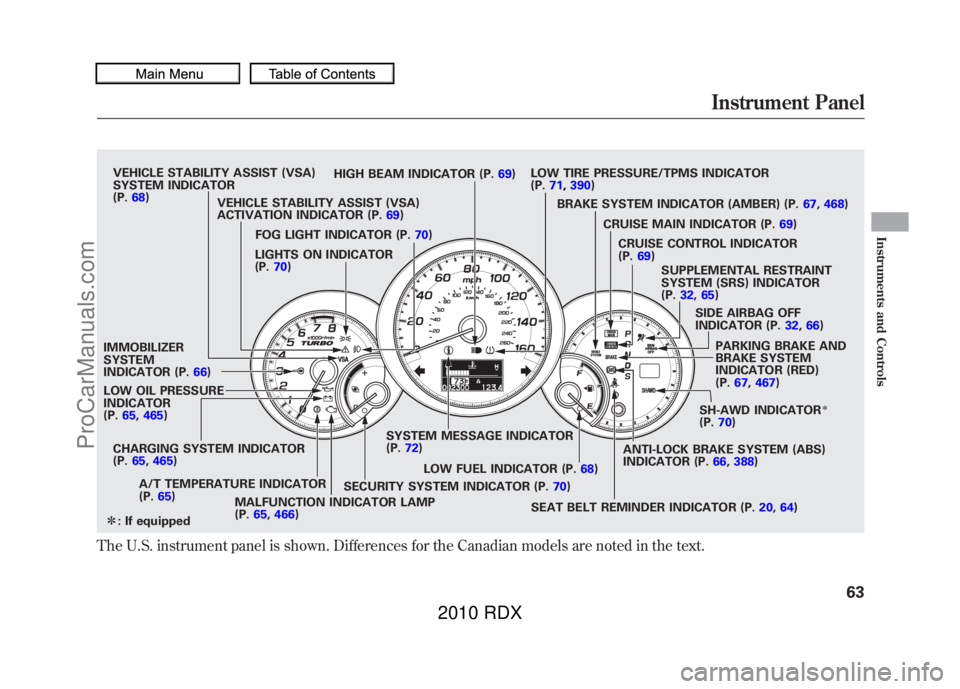
The U.S. instrument panel is shown. Differences for the Canadian models are noted in the text.
VEHICLE STABILITY ASSIST (VSA)
SYSTEM INDICATOR
(P.68) HIGH BEAM INDICATOR (P.
69)LOW TIRE PRESSURE/TPMS INDICATOR
(P.
71, 390)
VEHICLE STABILITY ASSIST (VSA)
ACTIVATION INDICATOR (P. 69) BRAKE SYSTEM INDICATOR (AMBER) (P.
67,468)
LIGHTS ON INDICATOR
(P. 70)
IMMOBILIZER
SYSTEM
INDICATOR (P. 66)
LOW OIL PRESSURE
INDICATOR
(P. 65, 465)
CHARGING SYSTEM INDICATOR
(P. 65, 465)
A/T TEMPERATURE INDICATOR
(P. 65)
MALFUNCTION INDICATOR LAMP
(P.65, 466) SYSTEM MESSAGE INDICATOR
(P.
72)
FOG LIGHT INDICATOR (P.
70)
LOW FUEL INDICATOR (P. 68)
SEAT BELT REMINDER INDICATOR (P. 20,64)
SECURITY SYSTEM INDICATOR (P.
70)SH-AWD INDICATOR
ꭧ
(P.
70)
PARKING BRAKE AND
BRAKE SYSTEM
INDICATOR (RED)
(P.
67, 467)
SIDE AIRBAG OFF
INDICATOR (P.
32,66)
SUPPLEMENTAL RESTRAINT
SYSTEM (SRS) INDICATOR
(P.
32, 65)
CRUISE CONTROL INDICATOR
(P.
69)
CRUISE MAIN INDICATOR (P.
69)
ANTI-LOCK BRAKE SYSTEM (ABS)
INDICATOR (P. 66,388)
ꭧ : If equippedInstrument Panel
63
Instruments and Controls
09/07/07 15:02:04 10 ACURA RDX MMC North America Owner's M 50 31STK630 enu
ProCarManuals.com
2010 RDX
Page 70 of 514

U.S. CanadaSide Airbag Off Indicator
This indicator comes on when you
turn the ignition switch to the ON
(II) position. If it comes on at any
other time, it indicates that the
passenger's side airbag has
automatically shut off. You will also
see a‘‘PASSENGER SIDE AIRBAG
OFF ’’message on the multi-
information display (see page 80).
For more information, see page 32.
Anti-lock Brake System
(ABS) Indicator
This indicator normally comes on for
a few seconds when you turn the
ignition switch to the ON (II)
position, and when the ignition
switch is turned to the START (III)
position. If this indicator comes on at
any other time, there is a problem in
the ABS. If this happens, take the
vehicle to your dealer to have it
checked. With this indicator on, your
vehicle still has normal braking
ability but no anti-lock function. You
will also see a ‘‘CHECK ABS
SYSTEM ’’message on the multi-
information display (see page 80).
For more information, see page 388.
Immobilizer System
Indicator
This indicator comes on briefly when
you turn the ignition switch to the
ON (II) position. It will then go off if
you have inserted a properly coded
ignition key. If it is not a properly
coded key, the indicator will blink,
and the engine's fuel system will be
disabled (see page 124).
Instrument Panel Indicators6609/07/07 15:02:04 10 ACURA RDX MMC North America Owner's M 50 31STK630 enu
ProCarManuals.com
2010 RDX
Page 74 of 514

Security System IndicatorThis indicator comes on when the
security system is set. For more
information, see page 294.
Lights On Indicator
This indicator reminds you that the
exterior lights are on. It comes on
when the light switch is in either the
or
position. If you turn the
ignition switch to the ACCESSORY
(I) or the LOCK (0) position without
turning off the light switch, this
indicator will remain on. A reminder
chime will also sound when you open
the driver's door and remove the key
from the ignition switch.Fog Light Indicator
This indicator comes on when you
turn on the fog lights. For more
information, see page 119.
Super Handling-All
Wheel Drive (SH-AWD)
Indicator
On SH-AWD modelsThis indicator normally comes on for
a few seconds when you turn the
ignition switch to the ON (II)
position. If this indicator comes on at
any other time, there is a problem in
the SH-AWD system. You will also
see a‘‘CHECK SH-AWD SYSTEM ’’
message on the multi-information
display (see page 80). Take your
vehicle to a dealer to have it checked.
For more information, see page 385.
SECURITY SYSTEM INDICATOR
Instrument Panel Indicators7009/07/07 15:02:04 10 ACURA RDX MMC North America Owner's M 50 31STK630 enu
ProCarManuals.com
2010 RDX
Page 86 of 514

Customized Settings
With the multi-information display
and the INFO (
/
) and SEL/
RESET buttons on the right side of
the steering wheel, you can
customize some vehicle control
settings.
To enter the customizing mode,
press and hold the INFO (
/
)
button for more than 3 seconds.
To change the settings, the ignition
switch must be in the ON (II)
position, and the vehicle must be
stopped with the transmission in
Park. You cannot customize the settings
under these conditions:
●If you turn the ignition switch to
the ACCESSORY (I) or the LOCK
(0) position.●If you move the shift lever out of
Park.
The first customizing menu is:●DEFAULT ALL●CHG SETTING If you want the settings as they were
when the vehicle left the factory,
select DEFAULT ALL, as described
on page
85.
If you want to change any vehicle
control settings, select CHG
SETTING, then press the SEL/
RESET button (see page 86).
Refer to the table on the following
pages about the settings you want to
customize.
Multi-Information Display8209/07/07 15:02:04 10 ACURA RDX MMC North America Owner's M 50 31STK630 enu
ProCarManuals.com
2010 RDX
Page 87 of 514

Customize Entry Customize Group Customize MenuDescriptionCustomize Setup PageCHG SETTING
(P.86) METER SETUP
(P.
88) LANGUAGE SELECTION Changes the language used in the display. ENGLISH
ꭧ
89
FRENCH
SPANISH
ADJUST OUTSIDE
TEMP. DISPLAY Changes the outside temperature reading
above or below its current reading. -
5°F ~ꭗ0°F
ꭧ~ 5°F
91
- 3°C ~ꭗ0°Cꭧ~ 3°C
TRIP A & AVG. FUEL
RESET with REFUEL Causes trip meter A and the average fuel
economy to reset when you refuel. ON
93
OFF
ꭧ
ELAP. TIME RESET
CONDITION Resets the elapsed time of your current trip. IGN RESET
ꭧ
95
TRIP A RESET
TRIP B RESET
LIGHTING SETUP
(P. 97) INTERIOR LIGHT
DIMMING TIME Changes how long (in seconds) the interior
lights stay on after you close the doors. 15 sec
98
30 sec
ꭧ
60 sec
HEADLIGHT AUTO OFF
TIMER Changes how long (in seconds) the exterior
lights stay on after you close the driver's
door. 0 sec
100
15 sec
ꭧ
30 sec
60 sec
DOOR SETUP
(P. 102) AUTO DOOR LOCK Changes when the system automatically
locks the doors. SHIFT FROM P
103
WITH VEH SPEED
ꭧ
OFF
ꭧ : Default setting
CONTINUED
Multi-Information Display
83
Instruments and Controls
09/07/07 15:02:04 10 ACURA RDX MMC North America Owner's M 50 31STK630 enu
ProCarManuals.com
2010 RDX
Page 88 of 514

Customize Entry Customize Group Customize MenuDescriptionCustomize Setup PageCHG SETTING
(P.86) DOOR SETUP
(P.
102) DOOR LOCK MODE Changes which doors unlock with the remote
transmitter on a first push. DRIVER DOOR
ꭧ
105
ALL DOORS
KEYLESS LOCK
ACKNOWLEDGEMENT The exterior lights flash each time you press
the LOCK or UNLOCK button. A beeper will
also sound when you press the LOCK button
twice. ON
ꭧ
107
OFF
SECURITY RELOCK
TIMER Changes how long it takes (in seconds) for
the doors to relock and the security system to
set after you unlock but do not open the door. 30 sec
ꭧ
109
60 sec
90 sec
AUTO DOOR UNLOCK Changes when the system automatically unlock the driver's/all of the doors. DRIVER DOOR WITH
SHIFT TO P
ꭧ
111
ALL DOORS WITH SHIFT
TO P
DRIVER'S DOOR WITH
IGN OFF
ALL DOORS WITH IGN
OFF
OFF
DEFAULT ALL Returns all settings to the factory default. SET 85
EXIT
ꭧ : Default setting
Multi-Information Display8409/07/07 15:02:04 10 ACURA RDX MMC North America Owner's M 50 31STK630 enu
ProCarManuals.com
2010 RDX
Page 99 of 514
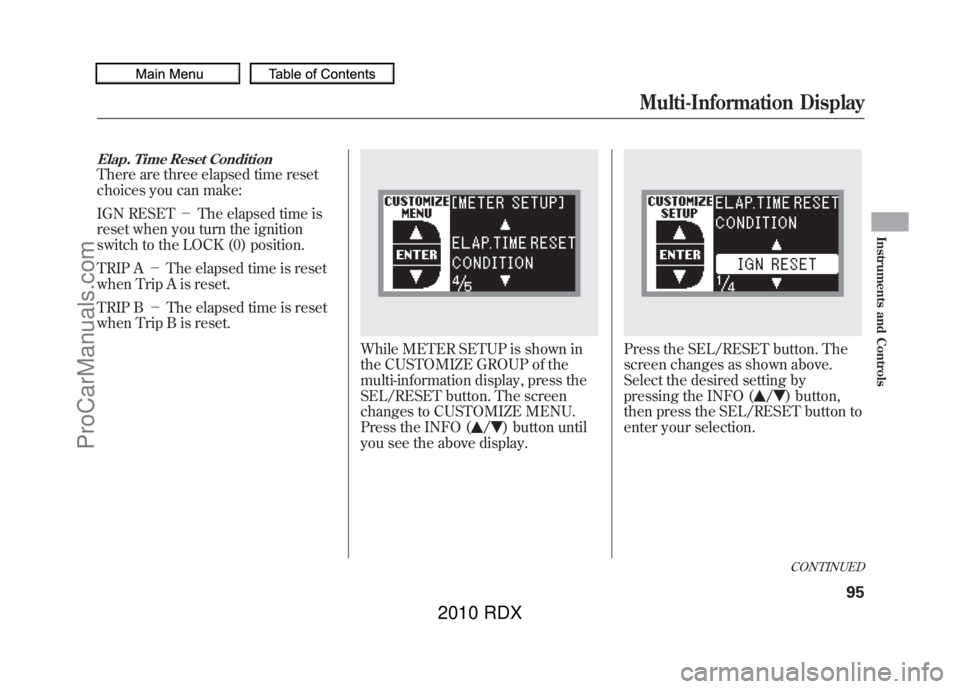
Elap. Time Reset ConditionThere are three elapsed time reset
choices you can make:
IGN RESET-The elapsed time is
reset when you turn the ignition
switch to the LOCK (0) position.
TRIP A -The elapsed time is reset
when Trip A is reset.
TRIP B -The elapsed time is reset
when Trip B is reset.
While METER SETUP is shown in
the CUSTOMIZE GROUP of the
multi-information display, press the
SEL/RESET button. The screen
changes to CUSTOMIZE MENU.
Press the INFO (
/
) button until
you see the above display.
Press the SEL/RESET button. The
screen changes as shown above.
Select the desired setting by
pressing the INFO (
/
) button,
then press the SEL/RESET button to
enter your selection.CONTINUED
Multi-Information Display
95
Instruments and Controls
09/07/07 15:02:04 10 ACURA RDX MMC North America Owner's M 50 31STK630 enu
ProCarManuals.com
2010 RDX