steering wheel ACURA RDX 2010 User Guide
[x] Cancel search | Manufacturer: ACURA, Model Year: 2010, Model line: RDX, Model: ACURA RDX 2010Pages: 514, PDF Size: 30.21 MB
Page 86 of 514

Customized Settings
With the multi-information display
and the INFO (
/
) and SEL/
RESET buttons on the right side of
the steering wheel, you can
customize some vehicle control
settings.
To enter the customizing mode,
press and hold the INFO (
/
)
button for more than 3 seconds.
To change the settings, the ignition
switch must be in the ON (II)
position, and the vehicle must be
stopped with the transmission in
Park. You cannot customize the settings
under these conditions:
●If you turn the ignition switch to
the ACCESSORY (I) or the LOCK
(0) position.●If you move the shift lever out of
Park.
The first customizing menu is:●DEFAULT ALL●CHG SETTING If you want the settings as they were
when the vehicle left the factory,
select DEFAULT ALL, as described
on page
85.
If you want to change any vehicle
control settings, select CHG
SETTING, then press the SEL/
RESET button (see page 86).
Refer to the table on the following
pages about the settings you want to
customize.
Multi-Information Display8209/07/07 15:02:04 10 ACURA RDX MMC North America Owner's M 50 31STK630 enu
ProCarManuals.com
2010 RDX
Page 117 of 514

ꭧ1: To use the horn, press the center pad of the steering wheel.
ꭧ 2: On models without navigation system.
ꭧ 3: Only on vehicles equipped with navigation system. Refer to the navigation system manual.BLUETOOTH HANDSFREELINK
BUTTONS (P. 306) HORN
ꭧ
1
STEERING WHEEL
ADJUSTMENTS (P. 122)MULTI-INFORMATION
BUTTONS (P.
74)CRUISE CONTROL
BUTTONS (P.
300)SEAT HEATER SWITCHES
(P.
141)
HEADLIGHTS/TURN
SIGNAL/FOG LIGHTS
(P.
116/119)
REMOTE AUDIO CONTROL
BUTTONS (P. 289)
VEHICLE STABILITY
ASSIST (VSA) OFF
SWITCH
(P. 396)
MIRROR CONTROLS
(P. 146)
VOICE CONTROL
BUTTONS
ꭧ 3
HAZARD WARNING BUTTON
(P. 121)
PADDLE SHIFTERS
(P.
380) WINDSHIELD
WIPERS/WASHERS/
REAR WINDOW
WIPER/WASHER
(P.
114/115) NAVIGATION SYSTEM
ꭧ
3/
CENTER DISPLAY
ꭧ 2
(P. 172)
PASSENGER AIRBAG
OFF INDICATOR (P. 33)
REAR WINDOW
DEFOGGER/
HEATED MIRROR
BUTTON
(P. 121/147)
AUXILIARY INPUT JACK
(P. 291)
ACCESSORY POWER
SOCKET
(P. 157)
UPPER DISPLAY
ꭧ
3
(P. 173)
Vehicle with navigation system is shown.
Controls Near the Steering Wheel
113
Instruments and Controls
09/07/07 15:02:04 10 ACURA RDX MMC North America Owner's M 50 31STK630 enu
ProCarManuals.com
2010 RDX
Page 126 of 514

Steering Wheel Adjustments
Make any steering wheel
adjustments before you start driving.
Adjusting the steering wheel
position while driving may
cause you to lose control of the
vehicle and be seriously injured
in a crash.
Adjust the steering wheel only
when the vehicle is stopped.
1. Push the lever under the steering column all the way down.
2. Move the steering wheel up or down, and in or out, so it points
toward your chest, not toward your
face. Make sure you can see the
instrument panel gauges and
indicators.
3. Push the lever up to lock thesteering wheel in position.
4. Make sure you have securely locked the steering wheel in place
by trying to move it up, down, in,
and out. Keys and Locks
The master key fits all the locks on
your vehicle. The valet key works
only in the ignition and the door
locks. You can keep the glove box
and console compartment locked
when you leave your vehicle and the
valet key at a parking facility.
LEVER
VALET KEY
(Light Gray)
MASTER KEYS
WITH REMOTE
TRANSMITTER
KEY
NUMBER
TAG
Steering Wheel Adjustments, Keys and Locks12209/07/07 15:02:04 10 ACURA RDX MMC North America Owner's M 50 31STK630 enu
ProCarManuals.com
2010 RDX
Page 129 of 514
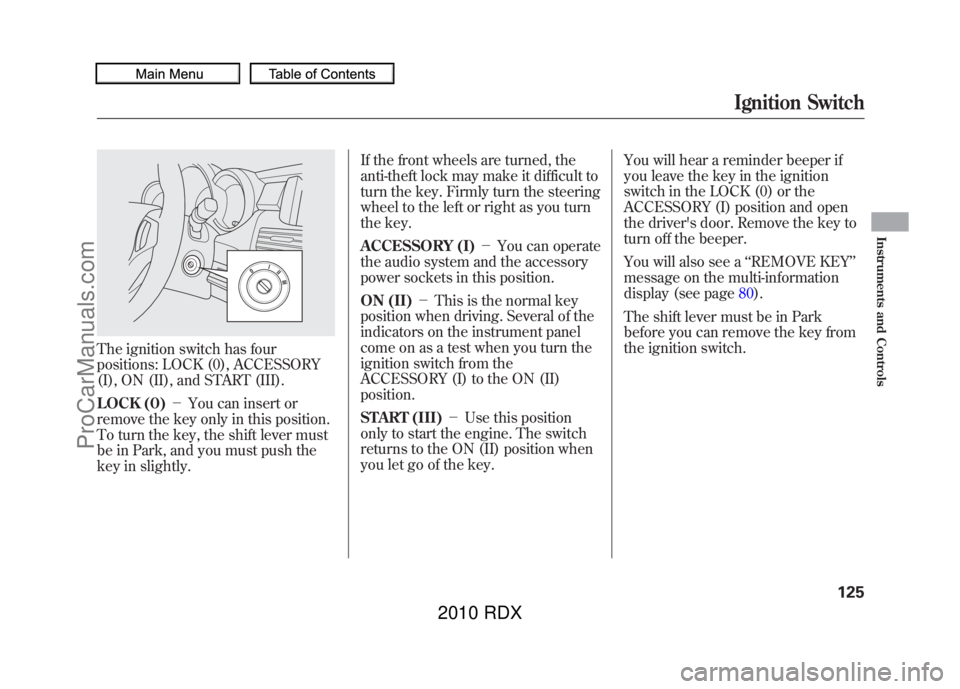
The ignition switch has four
positions: LOCK (0), ACCESSORY
(I), ON (II), and START (III).
LOCK (0)-You can insert or
remove the key only in this position.
To turn the key, the shift lever must
be in Park, and you must push the
key in slightly. If the front wheels are turned, the
anti-theft lock may make it difficult to
turn the key. Firmly turn the steering
wheel to the left or right as you turn
the key.
ACCESSORY (I)
-You can operate
the audio system and the accessory
power sockets in this position.
ON (II) -This is the normal key
position when driving. Several of the
indicators on the instrument panel
come on as a test when you turn the
ignition switch from the
ACCESSORY (I) to the ON (II)
position.
START (III) -Use this position
only to start the engine. The switch
returns to the ON (II) position when
you let go of the key. You will hear a reminder beeper if
you leave the key in the ignition
switch in the LOCK (0) or the
ACCESSORY (I) position and open
the driver's door. Remove the key to
turn off the beeper.
You will also see a
‘‘REMOVE KEY ’’
message on the multi-information
display (see page 80).
The shift lever must be in Park
before you can remove the key from
the ignition switch.
Ignition Switch
125
Instruments and Controls
09/07/07 15:02:04 10 ACURA RDX MMC North America Owner's M 50 31STK630 enu
ProCarManuals.com
2010 RDX
Page 214 of 514

Each time you press and release the
SCAN button, the mode changes
from file scan to folder scan, then to
normal play.To Stop Playing a USB Flash
Memory Device
To play the radio, press the FM, AM
or
button. Press the CD/AUX
button to switch between disc (if a
disc is loaded) and
Bluetooth
®Audio.
You can also press the MODE button
on the steering wheel to change
modes.
If you reconnect the same USB flash
memory device, the system will
begin playing where it left off.
Disconnecting a USB Flash Memory DeviceYou can disconnect the USB flash
memory device at any time even if
the USB mode is selected on the
audio system. Always follow the USB
flash memory device ’s instructions
when you remove it.
When you disconnect the USB flash
memory device while it is playing,
the center display shows ‘‘USB NO
DATA. ’’
If you reconnect the same USB flash
memory device, the system will
begin playing where it left off.
USB Flash Memory Device Error
Messages
For information, see page 211.
Playing a USB Flash Memory Device (Models without navigation system)21009/07/07 15:02:04 10 ACURA RDX MMC North America Owner's M 50 31STK630 enu
ProCarManuals.com
2010 RDX
Page 218 of 514

In the following conditions, If you
cannot see the
Bluetooth
®indicator
on the center display.
●The phone is not linked to HFL.●The phone is not turned on.●The phone is not in the vehicle.●Another HFL compatible phone,
which is not compatible forBluetooth
®Audio, is already
connected.
If your
Bluetooth
®Audio compatible
phone does not operate as described,
make sure it is an Acura approved
phone. To find out if your phone is
approved, go to
www.acura.com/
handsfreelink
(in Canada,
www.acura.
ca
), or call the HandsFreeLink
®
consumer support at (888) 528-7876.
To skip a filePress the
side of the SEEK/SKIP
bar to skip forward, and press the
side to skip backward to the
beginning of the current file. Push
the
side again to skip to the
previous file.
To pause or resume a fileThe resume/pause mode can stop
playing a file temporarily. Press the
preset 1 button to pause and press it
again to resume a file.
NOTE: The pause function may not
be available on some phone devices.
To switch to HFL modeIf you receive a call when theBluetooth
®Audio is playing, press
the Talk button on the steering
wheel. The display switches to the
HFL mode (see page 309).
After ending the call, press the HFL
Back button to go back to the
Bluetooth
®Audio mode.
If you receive a call while the system
is in the pause mode, the mode will
be canceled and
Bluetooth
®Audio
will continue to play.
Bluetooth
®Audio System (Models without navigation system)
21409/07/07 15:02:04 10 ACURA RDX MMC North America Owner's M 50 31STK630 enu
ProCarManuals.com
2010 RDX
Page 219 of 514

To turn off the Bluetooth
®Audio
mode
Select any other audio mode by
pressing a button: FM, AM,
or
CD/AUX (if a disc is loaded), on the
audio control panel or press the
mode button on the steering wheel
repeatedly to select another audio
mode. If iPod or USB flash memory
device is connected to the USB
adapter cable or audio unit is
connected to AUX jack, pressing the
CD/AUX button also changes a
mode.
Switching to another mode pauses
the music playing from your phone.
As required by the FCC:
This device complies with Part 15 of theFCC rules. Operation is subject to the
following two conditions: (1) This devicemay not cause harmful interference, and(2) this device must accept any
interference received, includinginterference that may cause undesiredoperation.
Changes or modifications not expresslyapproved by the party responsible for
compliance could void the user'sauthority to operate the equipment.
This device complies with IndustryCanada Standard RSS-210.
Operation is subject to the following twoconditions: (1) this device may not causeinterference, and (2) this device must
accept any interference that may causeundesired operation of the device.
Bluetooth
®Audio System (Models without navigation system)
215
Features
09/07/07 15:02:04 10 ACURA RDX MMC North America Owner's M 50 31STK630 enu
ProCarManuals.com
2010 RDX
Page 289 of 514

To change sound settingsPress the AUDIO button, then push
down the selector to display the
audio menu. Turn the knob to switch
the setting between the resume/
pause mode and the sound mode.
Select SOUND, then press ENTER
to set your selection.
Turn the knob to select a sound
mode, then press ENTER to set your
selection. Turn the knob to your
liking (see page224for more sound
setting information).
To switch to HFL modeIf you receive a call when theBluetooth
®Audio is playing, press
the HFL Talk button on the steering
wheel. The audio control display and
the upper display switch to the HFL
mode (see page 309).
After ending the call, press the HFL
Back button to go back to the
Bluetooth
®Audio mode.
If you receive a call while the system
is in the pause mode, the mode will
be canceled and
Bluetooth
®Audio
will continue to play.
To turn off the Bluetooth
®Audio
mode
Select any other audio mode by
pressing a button; AM/FM, XM or
DISC/AUX (if a disc is loaded), on
the audio control panel or press the
mode button on the steering wheel
repeatedly to select another audio
mode. If an iPod or USB flash
memory device is connected to the
USB adapter cable or audio unit is
connected to AUX jack, pressing the
DISC/AUX button also changes a
mode.
Switching to another mode pauses
the music playing from your phone.
CONTINUED
Bluetooth
®Audio System (Models with navigation system)
285
Features
09/07/07 15:02:04 10 ACURA RDX MMC North America Owner's M 50 31STK630 enu
ProCarManuals.com
2010 RDX
Page 293 of 514

Three controls for the audio system
are mounted in the steering wheel
hub. They let you control basic
functions without removing your
hand from the steering wheel.
The VOL button adjusts the volume
up (
) or down (
). Press the top or
bottom of the button, hold it until the
desired volume is reached, then
release it.
The MODE button changes the mode.On vehicles without navigation systemPressing the MODE button
repeatedly cycles through all
possible media sources whether they
are present or not.On vehicles with navigation systemPressing the MODE button
repeatedly cycles through all
present, connected media sources.
Media sources that are not present
or connected will not appear when
cycling with the MODE button. If you are listening to the radio, use
the CH button to change stations.
Each time you press and release the
top (+
) of the button, the system
goes to the next preset station on the
band you are listening to. Press and
release the bottom (- ) to go back to
the previous station.
To activate the seek function, press
and hold the top (+) or bottom (- )
of the CH button until you hear a
beep. The system searches up or
down from the current frequency to
find a station with a strong signal.
MODE BUTTON
VOL BUTTON CH BUTTON
CONTINUED
Remote Audio Controls
289
Features
09/07/07 15:02:04 10 ACURA RDX MMC North America Owner's M 50 31STK630 enu
ProCarManuals.com
2010 RDX
Page 304 of 514
Cruise control allows you to maintain
a set speed above 25 mph (40 km/h)
without keeping your foot on the
accelerator pedal. It should be used
for cruising on straight, open
highways. It is not recommended for
city driving, winding roads, slippery
roads, heavy rain, or bad weather.
Improper use of the cruise
control can lead to a crash.
Use the cruise control only
when traveling on open
highways in good weather.Using Cruise Control
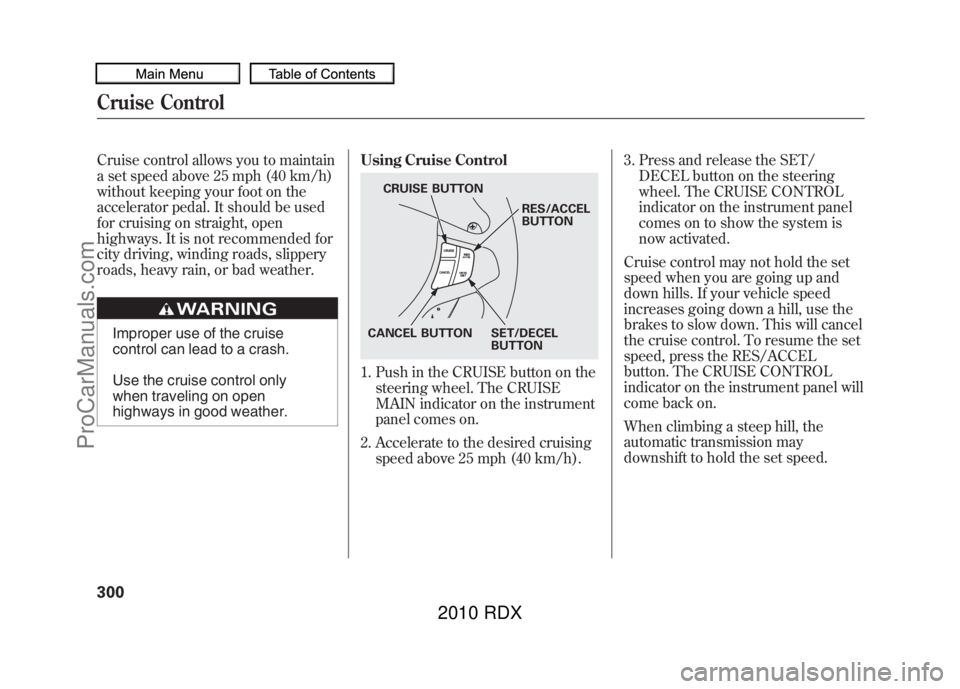
1. Push in the CRUISE button on the
steering wheel. The CRUISE
MAIN indicator on the instrument
panel comes on.
2. Accelerate to the desired cruising speed above 25 mph (40 km/h). 3. Press and release the SET/
DECEL button on the steering
wheel. The CRUISE CONTROL
indicator on the instrument panel
comes on to show the system is
now activated.
Cruise control may not hold the set
speed when you are going up and
down hills. If your vehicle speed
increases going down a hill, use the
brakes to slow down. This will cancel
the cruise control. To resume the set
speed, press the RES/ACCEL
button. The CRUISE CONTROL
indicator on the instrument panel will
come back on.
When climbing a steep hill, the
automatic transmission may
downshift to hold the set speed.
CRUISE BUTTON
RES/ACCEL
BUTTON
SET/DECEL
BUTTON
CANCEL BUTTON
Cruise Control30009/07/07 15:02:04 10 ACURA RDX MMC North America Owner's M 50 31STK630 enu
ProCarManuals.com
2010 RDX