AUX ACURA RDX 2010 Owner's Guide
[x] Cancel search | Manufacturer: ACURA, Model Year: 2010, Model line: RDX, Model: ACURA RDX 2010Pages: 514, PDF Size: 30.21 MB
Page 289 of 514

To change sound settingsPress the AUDIO button, then push
down the selector to display the
audio menu. Turn the knob to switch
the setting between the resume/
pause mode and the sound mode.
Select SOUND, then press ENTER
to set your selection.
Turn the knob to select a sound
mode, then press ENTER to set your
selection. Turn the knob to your
liking (see page224for more sound
setting information).
To switch to HFL modeIf you receive a call when theBluetooth
®Audio is playing, press
the HFL Talk button on the steering
wheel. The audio control display and
the upper display switch to the HFL
mode (see page 309).
After ending the call, press the HFL
Back button to go back to the
Bluetooth
®Audio mode.
If you receive a call while the system
is in the pause mode, the mode will
be canceled and
Bluetooth
®Audio
will continue to play.
To turn off the Bluetooth
®Audio
mode
Select any other audio mode by
pressing a button; AM/FM, XM or
DISC/AUX (if a disc is loaded), on
the audio control panel or press the
mode button on the steering wheel
repeatedly to select another audio
mode. If an iPod or USB flash
memory device is connected to the
USB adapter cable or audio unit is
connected to AUX jack, pressing the
DISC/AUX button also changes a
mode.
Switching to another mode pauses
the music playing from your phone.
CONTINUED
Bluetooth
®Audio System (Models with navigation system)
285
Features
09/07/07 15:02:04 10 ACURA RDX MMC North America Owner's M 50 31STK630 enu
ProCarManuals.com
2010 RDX
Page 295 of 514
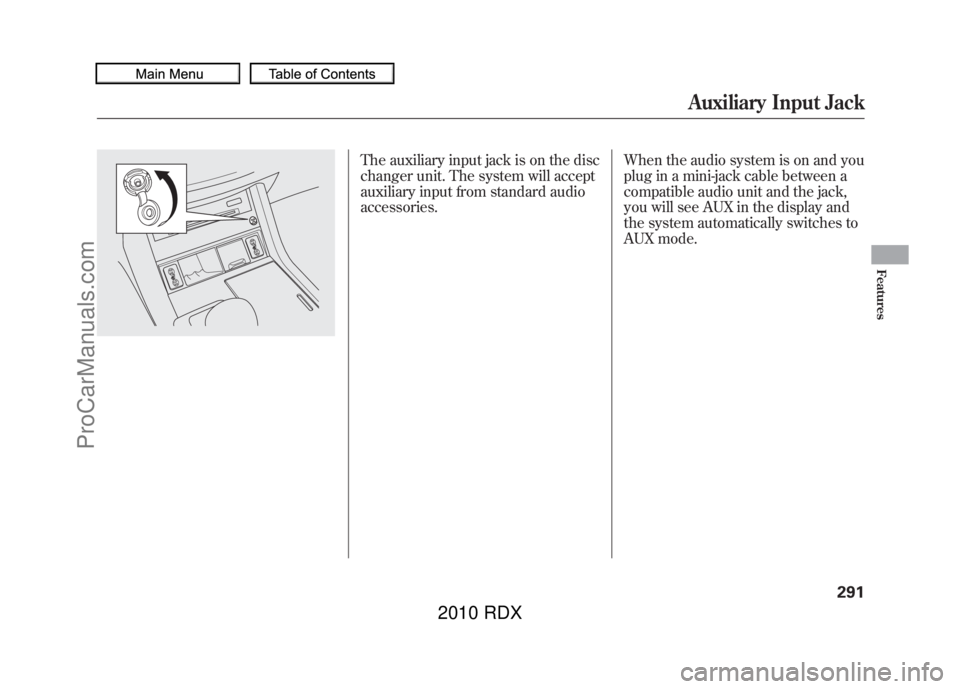
The auxiliary input jack is on the disc
changer unit. The system will accept
auxiliary input from standard audio
accessories.When the audio system is on and you
plug in a mini-jack cable between a
compatible audio unit and the jack,
you will see AUX in the display and
the system automatically switches to
AUX mode.
Auxiliary Input Jack
291
Features
09/07/07 15:02:04 10 ACURA RDX MMC North America Owner's M 50 31STK630 enu
ProCarManuals.com
2010 RDX
Page 502 of 514
A
Accessories andModifications
..........................
362
ACCESSORY (Ignition Key Position)
.................................
125
Accessory Power Sockets
..........
157
AcuraLink
®(U.S. models
only)
.......................................
332
Additives, Engine Oil
.................
421
Adjusting the Sound
............
177, 224
Adjusting the Steering Wheel....
122
Advanced Airbags
........................
28
Air Conditioning System
............
164
Usage
......................................
165
Air Pressure, Tires
..............
444, 445
Airbag (SRS)
..........................
10, 24
Alcohol in Gasoline
....................
352
Anti-lock Brakes (ABS) Indicator Light
..................
66, 388
Operation
................................
388
Anti-theft Steering Column Lock
.......................................
125
Anti-theft, Audio System
.............
292
Antifreeze
...................................
424 Armrests
....................................
138
Audio Antenna
...........................
439
Audio System
......................
172, 216
Automatic Lighting Off
Feature
...................................
118
Automatic Seat Belt Tensioners...
22
Automatic Speed Control
...........
300
Automatic Transmission
............
376
Capacity, Fluid
........................
480
Checking Fluid Level
..............
427
Driving with the Paddle Shifters
................................
380
Shift Lever Position Indicators
............................
376
Shift Lever Positions
...............
377
Shift Lock Release
...................
379
Shifting
...................................
376
Auxiliary Input Jack
...................
291
B
Battery Charging System
Indicator
........................
65, 465
Jump Starting
..........................
461 Maintenance
...........................
450
Specifications
..........................
481
Before Driving
...........................
351
Belts, Seat
................................
9, 20
Beverage Holders
......................
156
Bluetooth
®Audio
................
212, 280
Bluetooth
®HandsFreeLink
®......
306
Booster Seats
...............................
54
Brakes Anti-lock Brakes (ABS)
...........
388
Break-in, New Linings
.............
352
Bulb Replacement
...................
433
Fluid
.......................................
429
Parking
...................................
150
System Design
........................
387
System Indicator (Amber)
.......
468
System Indicator (Red)
...........
467
Wear Indicators
.......................
387
Braking System
..........................
387
Break-in, New Vehicle
................
352
Brightness Control,
Instruments
............................
120
CONTINUED
Index
I
INDEX
09/07/07 15:02:04 10 ACURA RDX MMC North America Owner's M 50 31STK630 enu
ProCarManuals.com
2010 RDX