brake ACURA RDX 2010 Service Manual
[x] Cancel search | Manufacturer: ACURA, Model Year: 2010, Model line: RDX, Model: ACURA RDX 2010Pages: 514, PDF Size: 30.21 MB
Page 438 of 514
5. Turn on the lights to make surethe new bulb is working.
6. Reinstall the socket into the light assembly by turning it clockwise
until it locks.
7. Reinstall the light assembly cover. Replacing Rear Bulbs
(in Rear Pillar)
1. Open the tailgate.
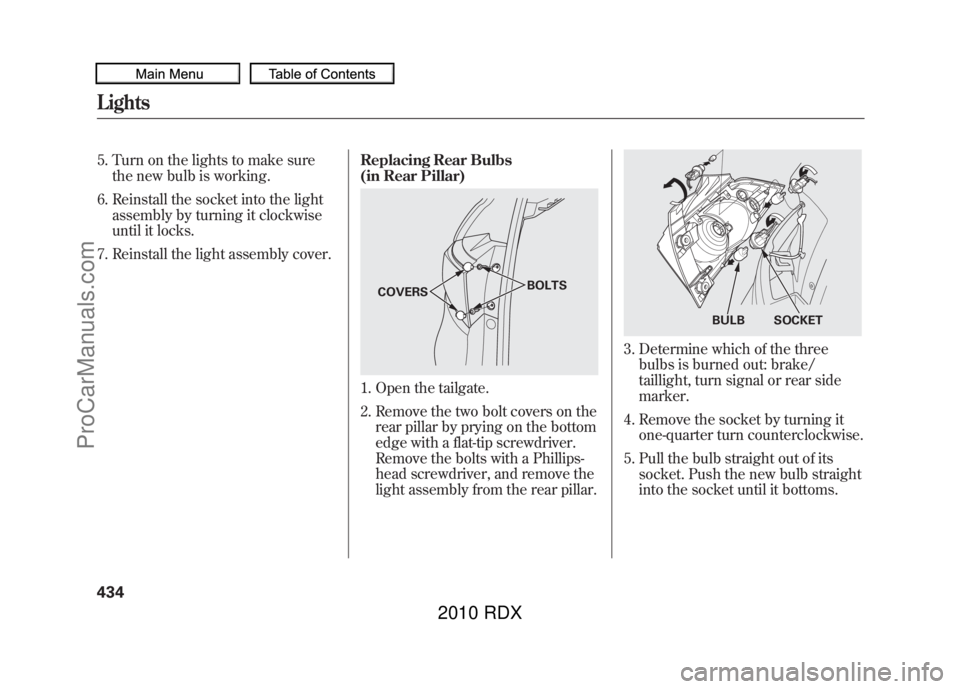
2. Remove the two bolt covers on the
rear pillar by prying on the bottom
edge with a flat-tip screwdriver.
Remove the bolts with a Phillips-
head screwdriver, and remove the
light assembly from the rear pillar.
3. Determine which of the threebulbs is burned out: brake/
taillight, turn signal or rear side
marker.
4. Remove the socket by turning it one-quarter turn counterclockwise.
5. Pull the bulb straight out of its socket. Push the new bulb straight
into the socket until it bottoms.
COVERS BOLTS
BULB SOCKET
Lights43409/07/07 15:02:04 10 ACURA RDX MMC North America Owner's M 50 31STK630 enu
ProCarManuals.com
2010 RDX
Page 440 of 514
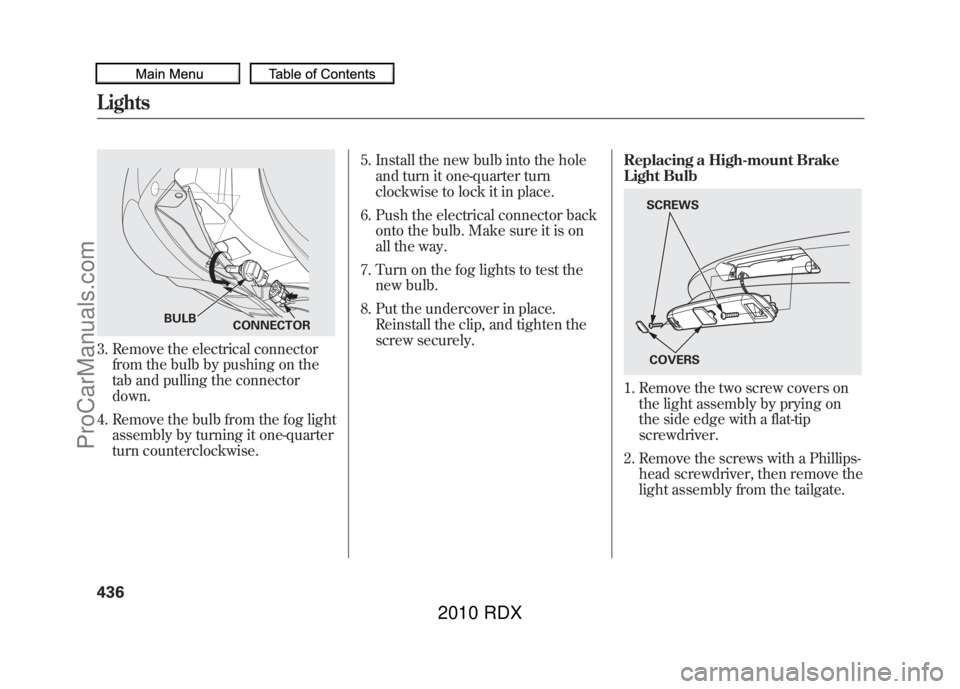
3. Remove the electrical connectorfrom the bulb by pushing on the
tab and pulling the connector
down.
4. Remove the bulb from the fog light assembly by turning it one-quarter
turn counterclockwise. 5. Install the new bulb into the hole
and turn it one-quarter turn
clockwise to lock it in place.
6. Push the electrical connector back onto the bulb. Make sure it is on
all the way.
7. Turn on the fog lights to test the new bulb.
8. Put the undercover in place. Reinstall the clip, and tighten the
screw securely. Replacing a High-mount Brake
Light Bulb
1. Remove the two screw covers on
the light assembly by prying on
the side edge with a flat-tip
screwdriver.
2. Remove the screws with a Phillips- head screwdriver, then remove the
light assembly from the tailgate.
CONNECTOR
BULB
SCREWS
COVERS
Lights43609/07/07 15:02:04 10 ACURA RDX MMC North America Owner's M 50 31STK630 enu
ProCarManuals.com
2010 RDX
Page 441 of 514
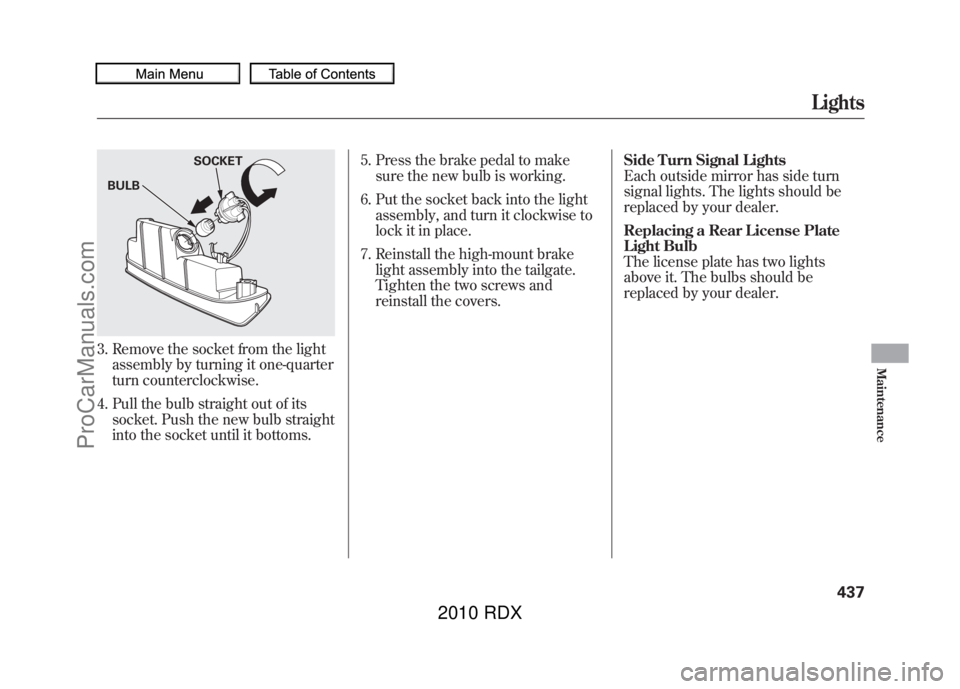
3. Remove the socket from the lightassembly by turning it one-quarter
turn counterclockwise.
4. Pull the bulb straight out of its socket. Push the new bulb straight
into the socket until it bottoms. 5. Press the brake pedal to make
sure the new bulb is working.
6. Put the socket back into the light assembly, and turn it clockwise to
lock it in place.
7. Reinstall the high-mount brake light assembly into the tailgate.
Tighten the two screws and
reinstall the covers. Side Turn Signal Lights
Each outside mirror has side turn
signal lights. The lights should be
replaced by your dealer.
Replacing a Rear License Plate
Light Bulb
The license plate has two lights
above it. The bulbs should be
replaced by your dealer.BULB
SOCKET
Lights
437
Maintenance
09/07/07 15:02:04 10 ACURA RDX MMC North America Owner's M 50 31STK630 enu
ProCarManuals.com
2010 RDX
Page 453 of 514
Tire Chains
Mount tire chains on your tires when
required by driving conditions or
local laws. Install them only on the
front tires.
Because your vehicle has limited tire
clearance, Acura strongly
recommends using the chains listed
below, made by Security Chain
Company (SCC).
Cable type: Shur Grip Z
SZ343When installing cables, follow the
manufacturer's instructions, and
mount them as tight as you can.
Make sure they are not contacting
the brake lines or suspension. Drive
slowly with them installed. If you
hear them coming into contact with
the body or chassis, stop and
investigate. Remove them as soon as
you begin driving on cleared roads.
Traction devices that are the wrong size
or improperly installed can damage
your vehicle's brake lines, suspension,
body, and wheels. Stop driving if they
are hitting any part of the vehicle.
Using the wrong chains, or not
properly installing chains, can
damage the brake lines and
cause a crash in which you can
be seriously injured or killed.
Follow all instructions in this
owner's manual regarding the
selection and use of tire chains.
Tires
449
Maintenance
09/07/07 15:02:04 10 ACURA RDX MMC North America Owner's M 50 31STK630 enu
ProCarManuals.com
2010 RDX
Page 456 of 514
If you need to park your vehicle for
an extended period (more than 1
month), there are several things you
should do to prepare it for storage.
Proper preparation helps prevent
deterioration and makes it easier to
get your vehicle back on the road. If
possible, store your vehicle indoors.●Fill the fuel tank.●Wash and dry the exterior
completely.●Clean the interior. Make sure the
carpeting, floor mats, etc., are
completely dry.●Leave the parking brake off. Put
the transmission in Park.
●Block the rear wheels.●If the vehicle is to be stored for a
longer period, it should be
supported on jackstands so the
tires are off the ground.●Leave one window open slightly (if
the vehicle is being stored
indoors).●Disconnect the battery.●Support the front and rear wiper
blade arms with a folded towel or
rag so they do not touch the
windshield.●To minimize sticking, apply a
silicone spray lubricant to all door
and tailgate seals. Also, apply a
vehicle body wax to the painted
surfaces that mate with the door
and tailgate seals.
●Cover the vehicle with a
‘‘breathable’’ cover, one made from
a porous material such as cotton.
Non-porous materials, such as
plastic sheeting, trap moisture,
which can damage the paint.●If possible, periodically run the
engine until it reaches full
operating temperature (the cooling
fans cycle on and off twice).
Preferably, do this once a month.
Vehicle Storage45209/07/07 15:02:04 10 ACURA RDX MMC North America Owner's M 50 31STK630 enu
ProCarManuals.com
2010 RDX
Page 457 of 514
This section covers the more
common problems that motorists
experience with their vehicles. It
gives you information about how to
safely evaluate the problem and what
to do to correct it. If the problem has
stranded you on the side of the road,
you may be able to get going again. If
not, you will also find instructions on
getting your vehicle towed.Compact Spare Tire
....................
454
Changing a Flat Tire
...................
455
If the Engine Won't Start
.............
459
Jump Starting
..............................
461
If the Engine Overheats
..............
463
Low Oil Pressure Indicator
.........
465
Charging System Indicator
.........
465
Malfunction Indicator Lamp
........
466
Brake System Indicator
...............
467
Fuses
..........................................
469
Fuse Locations
............................
473
Emergency Towing
.....................
475
Taking Care of the Unexpected
453
Taking Care of the Unexpected
09/07/07 15:02:04 10 ACURA RDX MMC North America Owner's M 50 31STK630 enu
ProCarManuals.com
2010 RDX
Page 459 of 514
If you have a flat tire while driving,
stop in a safe place to change it.
Drive slowly along the shoulder until
you get to an exit or an area that is
far away from the traffic lanes.
The vehicle can easily roll off
the jack, seriously injuring
anyone underneath.
Follow the directions for
changing a tire exactly, and
never get under the vehicle
when it is supported only by the
jack.1. Park the vehicle on firm, level, and
non-slippery ground. Put the
transmission in Park. Apply the
parking brake.
If you are towing a trailer, unhitch
it.
2. Turn on the hazard warning lights, and turn the ignition switch to the
LOCK (0) position. Have all
passengers get out of the vehicle
while you change the tire.
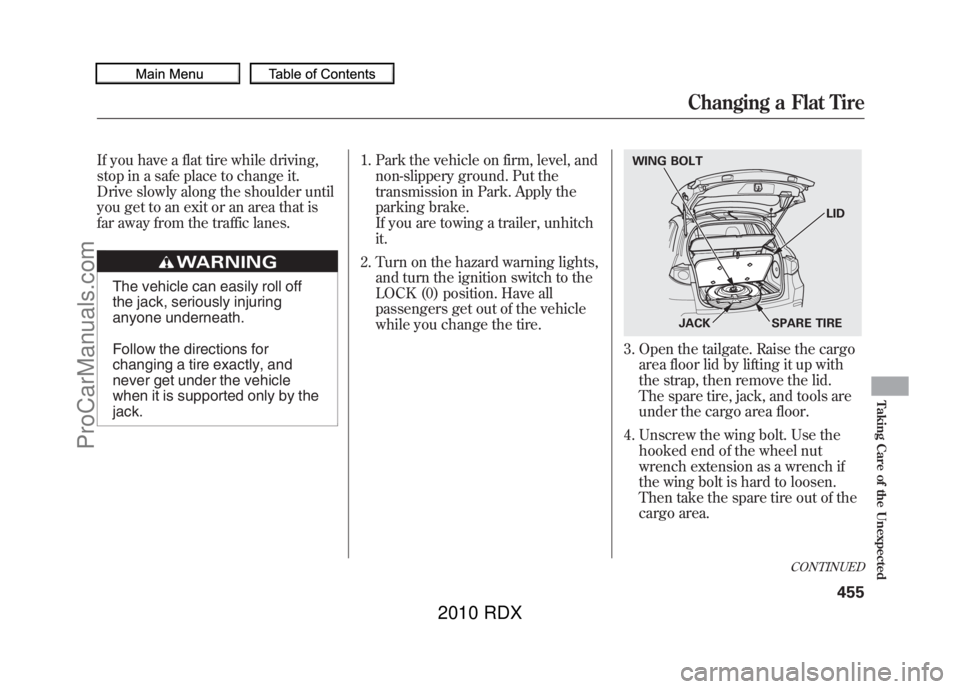
3. Open the tailgate. Raise the cargoarea floor lid by lifting it up with
the strap, then remove the lid.
The spare tire, jack, and tools are
under the cargo area floor.
4. Unscrew the wing bolt. Use the hooked end of the wheel nut
wrench extension as a wrench if
the wing bolt is hard to loosen.
Then take the spare tire out of the
cargo area.WING BOLT
JACK SPARE TIRELID
CONTINUED
Changing a Flat Tire
455
Taking Care of the Unexpected
09/07/07 15:02:04 10 ACURA RDX MMC North America Owner's M 50 31STK630 enu
ProCarManuals.com
2010 RDX
Page 461 of 514
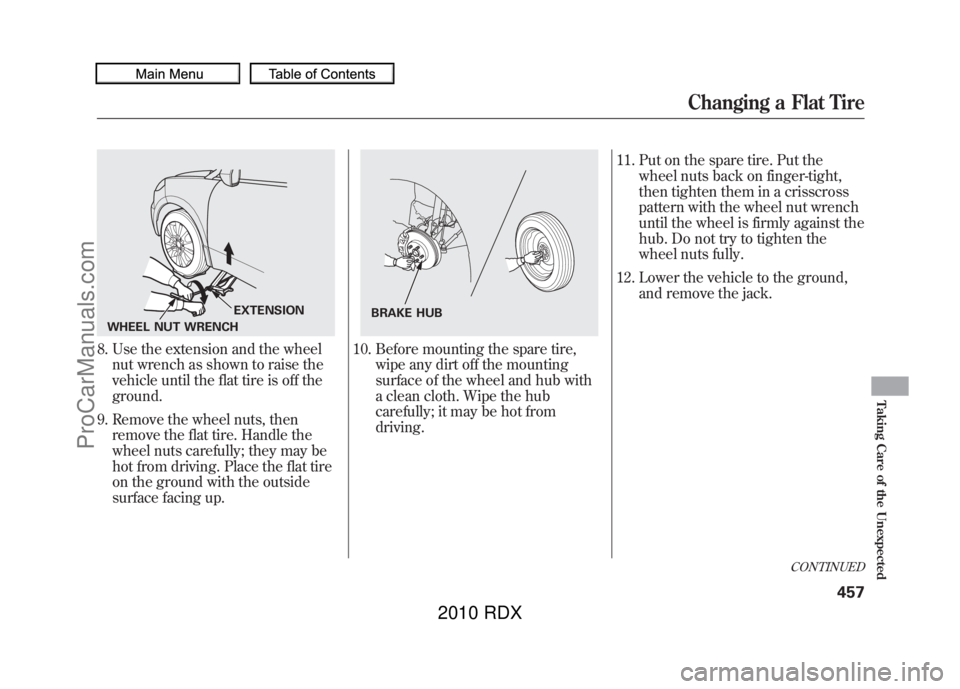
8. Use the extension and the wheelnut wrench as shown to raise the
vehicle until the flat tire is off the
ground.
9. Remove the wheel nuts, then remove the flat tire. Handle the
wheel nuts carefully; they may be
hot from driving. Place the flat tire
on the ground with the outside
surface facing up.
10. Before mounting the spare tire, wipe any dirt off the mounting
surface of the wheel and hub with
a clean cloth. Wipe the hub
carefully; it may be hot from
driving. 11. Put on the spare tire. Put the
wheel nuts back on finger-tight,
then tighten them in a crisscross
pattern with the wheel nut wrench
until the wheel is firmly against the
hub. Do not try to tighten the
wheel nuts fully.
12. Lower the vehicle to the ground, and remove the jack.
WHEEL NUT WRENCH EXTENSION
BRAKE HUB
CONTINUED
Changing a Flat Tire
457
Taking Care of the Unexpected
09/07/07 15:02:04 10 ACURA RDX MMC North America Owner's M 50 31STK630 enu
ProCarManuals.com
2010 RDX
Page 465 of 514
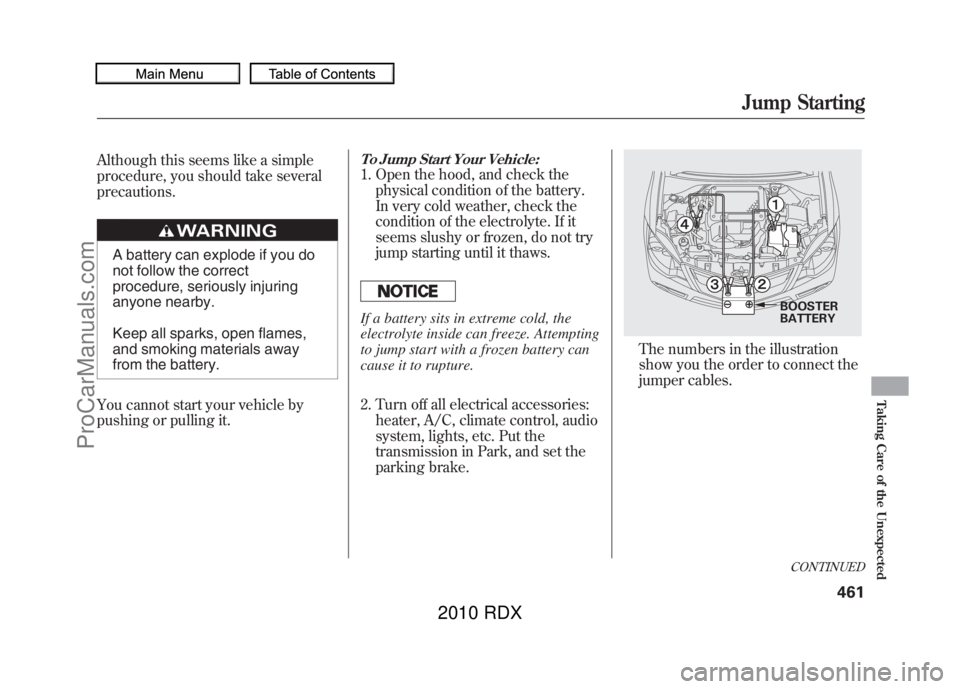
Although this seems like a simple
procedure, you should take several
precautions.
A battery can explode if you do
not follow the correct
procedure, seriously injuring
anyone nearby.
Keep all sparks, open flames,
and smoking materials away
from the battery.
You cannot start your vehicle by
pushing or pulling it.
To Jump Start Your Vehicle:1. Open the hood, and check the physical condition of the battery.
In very cold weather, check the
condition of the electrolyte. If it
seems slushy or frozen, do not try
jump starting until it thaws.If a battery sits in extreme cold, the
electrolyte inside can freeze. Attempting
to jump start with a frozen battery can
cause it to rupture.
2. Turn off all electrical accessories:heater, A/C, climate control, audio
system, lights, etc. Put the
transmission in Park, and set the
parking brake.
The numbers in the illustration
show you the order to connect the
jumper cables.
BOOSTER
BATTERYCONTINUED
Jump Starting
461
Taking Care of the Unexpected
09/07/07 15:02:04 10 ACURA RDX MMC North America Owner's M 50 31STK630 enu
ProCarManuals.com
2010 RDX
Page 467 of 514

The reading of the vehicle's
temperature gauge on the multi-
information display should stay in the
midrange. If it climbs to the H (Hot)
mark, you should determine the
reason (hot day, driving up a steep
hill, etc.).
If the coolant temperature rises to
224°F (118°C) or more, the
temperature gauge will appear on the
display and blink for several times.
At the same time, the beeper will
sound once.
If your vehicle overheats, you should
take immediate action. The only
indication may be the temperature
gauge climbing to the H (Hot) mark.
Or you may see steam or spray
coming from under the hood.
Driving with the temperature gauge
reading at the H (Hot) mark can cause
serious damage to the engine.
Steam and spray from an
overheated engine can
seriously scald you.
Do not open the hood if steam
is coming out.
1. Safely pull to the side of the road. Put the transmission in Park, and
set the parking brake. Turn off all
accessories, and turn on the
hazard warning lights. 2. If you see steam and/or spray
coming from under the hood, turn
off the engine. Wait until you see
no more signs of steam or spray,
then open the hood.
3. If you do not see steam or spray, leave the engine running and
watch the temperature gauge. If
the high heat is due to
overloading, the engine should
start to cool down almost
immediately. If it does, wait until
the temperature gauge comes
down to the midpoint, then
continue driving.
4. If the temperature gauge reading stays at the H (Hot) mark, turn off
the engine.
CONTINUED
If the Engine Overheats
463
Taking Care of the Unexpected
09/07/07 15:02:04 10 ACURA RDX MMC North America Owner's M 50 31STK630 enu
ProCarManuals.com
2010 RDX