FOLD Acura RDX 2011 User Guide
[x] Cancel search | Manufacturer: ACURA, Model Year: 2011, Model line: RDX, Model: Acura RDX 2011Pages: 517, PDF Size: 27.89 MB
Page 185 of 517

Operating the XM Radio
To listen to the XM Radio, turn the
ignition switch to the ACCESSORY
(I) or ON (II) position. Push the
PWR/VOL knob to turn on the audio
system, and press the
button.
Adjust the volume by turning the
PWR/VOL knob. The last channel
you listened to will show on the
audio display. DISP
-Each time you press and
release the DISP/MODE button, the
center display changes in the
following sequence: Channel name,
category, artist name, and music title.
MODE -To switch between the
category mode and channel mode,
press and hold the DISP/MODE
button until the mode changes. A
‘‘ CH ’’(channel) or ‘‘CAT ’’(category)
mode indicator appears on the center
display. To Select a Channel
When in the satellite radio mode, you
can use any of four methods to find
channels: TUNE, SEEK/SKIP
(CATEGORY), SCAN, and the preset
bars.
TUNE
-Press the TUNE/FOLDER
bar to change channel selections.
Press the
side of the bar to tune
to higher numbered channels, and
the
side of the bar to tune to
lower numbered channels. In the
category mode, you can only select
channels within that category.
SEEK/SKIP (CATEGORY) -
Press either side of the SEEK/SKIP
(CATEGORY) bar (
or
)to
select another category.
Playing the XM
®Radio (Models without navigation system)
18010/06/08 17:42:32 11 ACURA RDX MMC North America Owner's M 50 31STK640 enu
Page 190 of 517
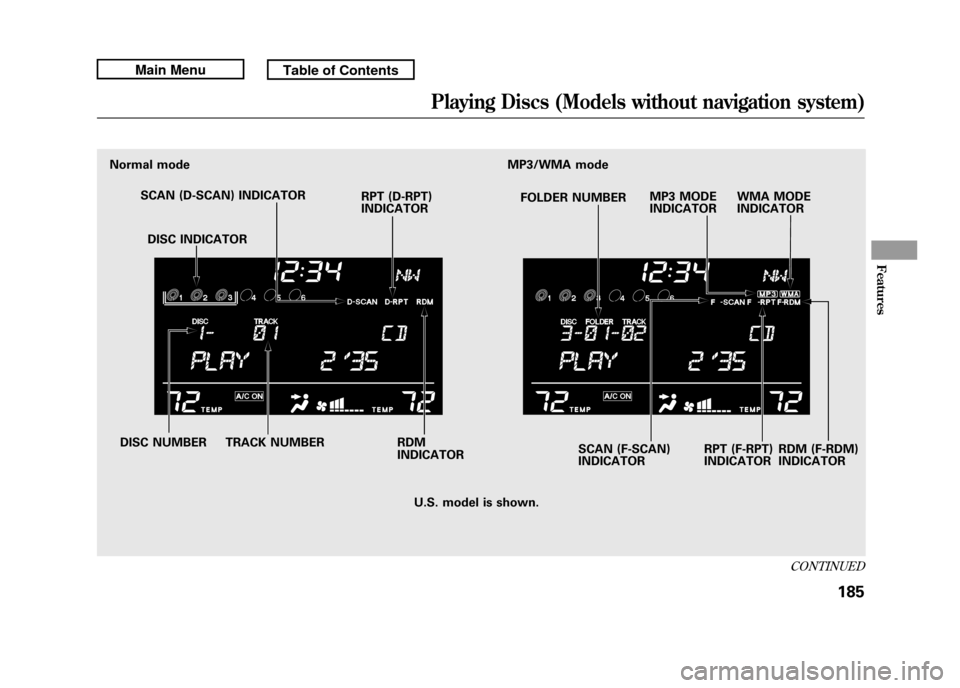
Normal modeMP3/WMA mode
SCAN (D-SCAN) INDICATOR RPT (D-RPT)
INDICATORFOLDER NUMBER
SCAN (F-SCAN)
INDICATOR RPT (F-RPT)
INDICATOR
DISC NUMBER TRACK NUMBER DISC INDICATOR
RDM (F-RDM)
INDICATOR
MP3 MODE
INDICATOR
WMA MODE
INDICATOR
U.S. model is shown.
RDM
INDICATOR
CONTINUED
Playing Discs (Models without navigation system)
185
Features
10/06/08 17:42:32 11 ACURA RDX MMC North America Owner's M 50 31STK640 enu
Page 191 of 517
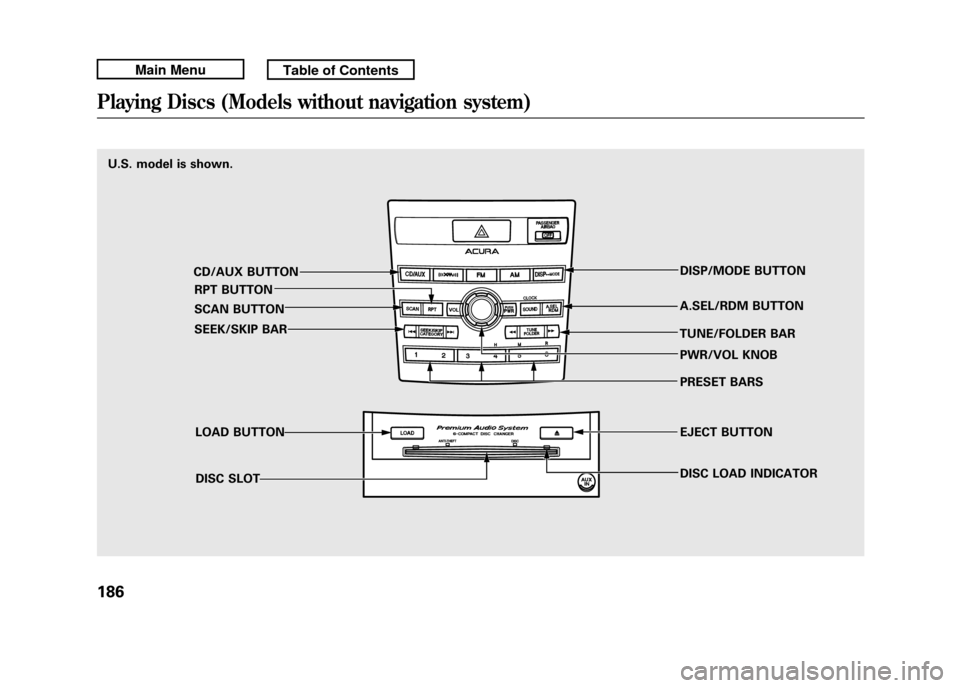
U.S. model is shown.CD/AUX BUTTONRPT BUTTON
SCAN BUTTON
SEEK/SKIP BAR
LOAD BUTTONDISC SLOT DISP/MODE BUTTON
A.SEL/RDM BUTTON
TUNE/FOLDER BAR PWR/VOL KNOB
PRESET BARS
EJECT BUTTON
DISC LOAD INDICATORPlaying Discs (Models without navigation system)18610/06/08 17:42:32 11 ACURA RDX MMC North America Owner's M 50 31STK640 enu
Page 194 of 517

3. You will see‘‘DISC READ ’’on the
center display, then the system
begins to play the CD.
You can load a CD into an empty
position while a CD is playing. Select
the empty position (the disc indicator
is not shown on the center display)
by pressing the appropriate side of
the preset bars. The current CD
stops playing and starts the loading
sequence. The CD just loaded will
play.
You can load a disc(s) in any mode
(AM, FM, XM, or AUX) if you do not
select an empty position.
If you press the LOAD button while a
disc is playing, the system will stop
playing that disc and start the loading
sequence. It will then play the disc
just loaded. To Play a CD
Select the CD changer by pressing
the CD/AUX button. You will see
‘‘
CD ’’on the center display. The
system will begin playing the last
selected CD in the CD changer. You
will see the disc and track numbers
displayed.
When the system reaches the end of
the disc, the system will advance to
the next disc and begin to play. To
select a different disc, press an
appropriate side of the preset bar
(1 - 6). If you select an empty
position in the CD changer, the
system will try to load the CD in the
empty slot. Playing an MP3/WMA Disc
The CD changer can play CD-Rs and
CD-RWs compressed in MP3 and
WMA format. When playing a disc in
MP3 or WMA, you will see
‘‘MP3 ’’or
‘‘ WMA’’ on the center display. A disc
can support more than 99 folders,
and each folder can hold up to 255
playable files.
When there are more than 99 folders
on a disc, the center display only
shows two digits.
CONTINUED
Playing Discs (Models without navigation system)
189
Features
10/06/08 17:42:32 11 ACURA RDX MMC North America Owner's M 50 31STK640 enu
Page 195 of 517

NOTE: If a file on an MP3 or WMA
disc is protected by digital rights
management (DRM), the audio unit
displays FORMAT, and then skips to
the next file.
If the disc has a complex structure, it
will take a while to read the disc
before the system begins to play it.
Depending on the software the files
were made with, it may not be
possible to play some files, or display
some text data.
Name Display FunctionEach time you press the DISP/
MODE button while playing a CD
(CD-DA), the center display changes
from album name, to track name, to
artist name, and then to normal
display. If the disc was not recorded
with CD-TEXT, ‘‘NO INFO ’’will be
shown on the center display.
When playing a disc compressed in
MP3/WMA format, the display
changes from folder name, to file
name, to artist tag, to album tag, to
track tag, and then to normal display
each time you press the DISP/
MODE button. If the disc was not
recorded with this information, ‘‘NO
INFO ’’will be shown on the center
display. If the title is too long, it will not show
all at once. Press and hold the DISP/
MODE button, and the rest of the
title will show on the center display.
You will also see the album and track
name (CD-TEXT), or the folder and
file name (MP3/WMA) under these
conditions:
●When you insert a disc, and the
system begins to play.●Each time a new track, file, or
folder plays.
Playing Discs (Models without navigation system)19010/06/08 17:42:32 11 ACURA RDX MMC North America Owner's M 50 31STK640 enu
Page 196 of 517

To Change or Select Tracks/FilesWhile a disc is playing you can use
the SEEK/SKIP bar to select
passages and change tracks (files in
MP3/WMA mode).
In MP3/WMA mode, use the
TUNE/FOLDER bar to select folders
on the disc, and use the SEEK/SKIP
bar to change files.SEEK/SKIP
-Each time you press
and release the
side of the
SEEK/SKIP bar, the system skips
forward to the beginning of the next
track (file in MP3/WMA mode).
Press and release the
side of the
bar to skip backward to the
beginning of the current track/file.
Press it again to skip to the
beginning of the previous track/file.
To move rapidly within a track/file,
press and hold the
or
side of
the SEEK/SKIP bar.
In MP3/WMA modeFOLDER SELECTION -To select
a different folder, press and release
the
side of the TUNE/FOLDER
bar to move to the beginning of the
next folder. Press and release the
side of the bar to move to the
beginning of the previous folder.
REPEAT -This feature, when
activated, continuously replays the
current track (file in MP3/WMA
mode). To activate it, press and
release the RPT button. You will see
‘‘ RPT ’’on the center display. To turn
off this feature, press the RPT button
for more than 2 seconds.
CONTINUED
Playing Discs (Models without navigation system)
191
Features
10/06/08 17:42:32 11 ACURA RDX MMC North America Owner's M 50 31STK640 enu
Page 197 of 517

In MP3/WMA modeFOLDER REPEAT-This feature,
when activated, replays all the files in
the current folder in the order they
are compressed in MP3/WMA. To
activate folder repeat mode, press the
RPT button twice. You will see ‘‘F-
RPT ’’on the center display. Press
and hold the RPT button for more
than 2 seconds to turn off this
feature.
DISC REPEAT -Press the RPT
button twice to continuously replay
the current CD. In MP3/WMA
mode, press the RPT button three
times. You will see ‘‘D-RPT ’’on the
center display. Press and hold the
RPT button for more than 2 seconds
to turn off this feature.
Each time you press and release the
RPT button, the mode changes from
repeat to folder repeat, disc repeat
then to normal play. SCAN
-The scan function samples
all the tracks (files in a folder in
MP3/WMA mode) on the current
disc in the order they are recorded
on the CD. To activate this feature,
press and release the SCAN button.
You will see ‘‘SCAN ’’and the track/
file number flashing on the center
display. The system will then play
the track/file for approximately 10
seconds. To hear the rest of the
track/file, press and hold the SCAN
button for more than 2 seconds. If
you do nothing, the system will then
play the following tracks/files for 10
seconds each. When the system
finishes scanning all the tracks/files
on the current disc, the system
returns to the track/file it first
started scanning with, scan is
canceled and the system begins to
play that track/file normally.
In MP3/WMA modeFOLDER SCAN -The folder scan
function samples the first file of each
folder on the current disc in the
order they are compressed in MP3/
WMA. To activate this feature, press
the SCAN button twice. The first file
of each folder plays for about 10
seconds. You will see ‘‘F-SCAN ’’and
the folder number flashing on the
center display. To hear the rest of the
file in the folder currently scanning,
press and hold the SCAN button for
more than 2 seconds. When the
system finishes scanning all the
folders on the current disc, the
system returns to the folder it started
scanning with, folder scan is
canceled and the system begins to
play that folder normally.
Playing Discs (Models without navigation system)19210/06/08 17:42:32 11 ACURA RDX MMC North America Owner's M 50 31STK640 enu
Page 198 of 517

DISC SCAN-The disc scan
function samples the first track (file
in MP3/WMA mode) on each disc
within the changer in numerical
order. To activate this feature, press
the SCAN button twice. In MP3/
WMA mode, press the SCAN button
three times. The first track/file on
each disc plays for about 10 seconds.
You will see ‘‘D-SCAN ’’and disc
number flashing on the center
display. To hear the rest of the track/
file on the disc currently scanning,
press and hold the SCAN button for
more than 2 seconds. When the
system finishes scanning all the
discs, disc scan is canceled and the
system begins to play the first track/
file of that disc normally. Each time you press and release the
SCAN button, the mode changes
from scan to folder scan, disc scan
then to normal play.
RANDOM (Random within a
Disc)
-This feature plays the
tracks (all files in each folder in
MP3/WMA mode) within a disc in
random order. To activate it, press
and release the A.SEL/RDM button.
In MP3/WMA mode, press the
A.SEL/RDM button twice to select
random play within a disc. You will
see ‘‘RDM ’’on the center display.
Press and hold the A.SEL/RDM
button for more than 2 seconds to
return to normal play.
In MP3/WMA modeFOLDER RANDOM -This feature
plays the files within a folder in
random order, rather than in the
order they are compressed in MP3/
WMA. To activate it, press the
A.SEL/RDM button once. You will
see ‘‘F-RDM ’’on the center display.
The system will then select and play
files randomly. This continues until
you deactivate folder random play by
pressing and holding the RDM
button for more than 2 seconds.
Each time you press and release the
A.SEL/RDM button, the mode
changes from folder random to
random, then to normal play.
CONTINUED
Playing Discs (Models without navigation system)
193
Features
10/06/08 17:42:32 11 ACURA RDX MMC North America Owner's M 50 31STK640 enu
Page 202 of 517
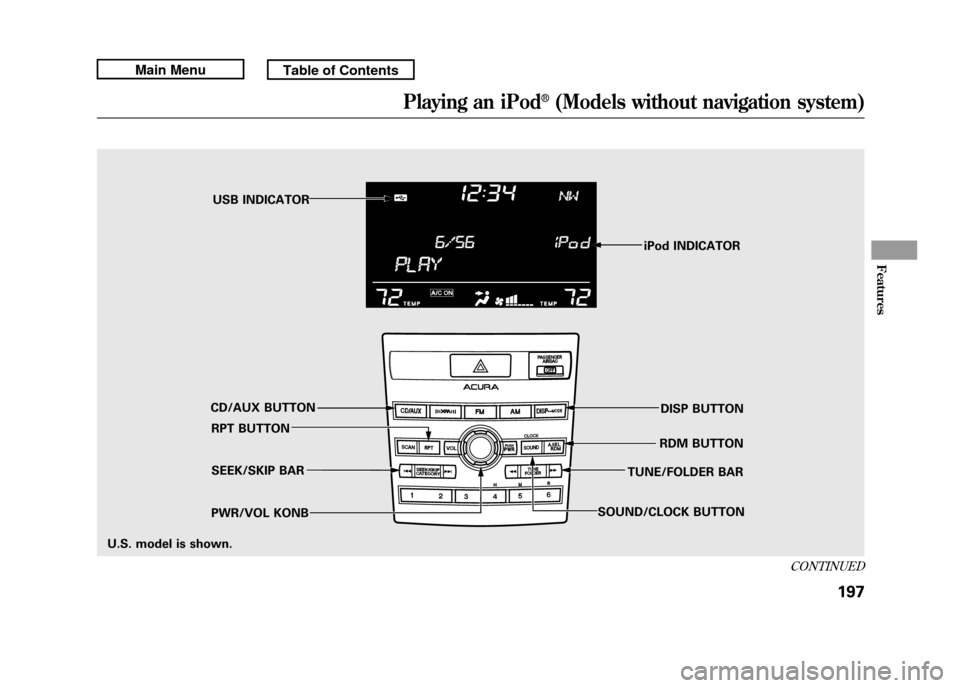
iPod INDICATOR
RPT BUTTON SEEK/SKIP BAR
PWR/VOL KONB RDM BUTTON
CD/AUX BUTTON USB INDICATOR
DISP BUTTON
SOUND/CLOCK BUTTON TUNE/FOLDER BAR
U.S. model is shown.
CONTINUED
Playing an iPod
®(Models without navigation system)
197
Features
10/06/08 17:42:32 11 ACURA RDX MMC North America Owner's M 50 31STK640 enu
Page 206 of 517
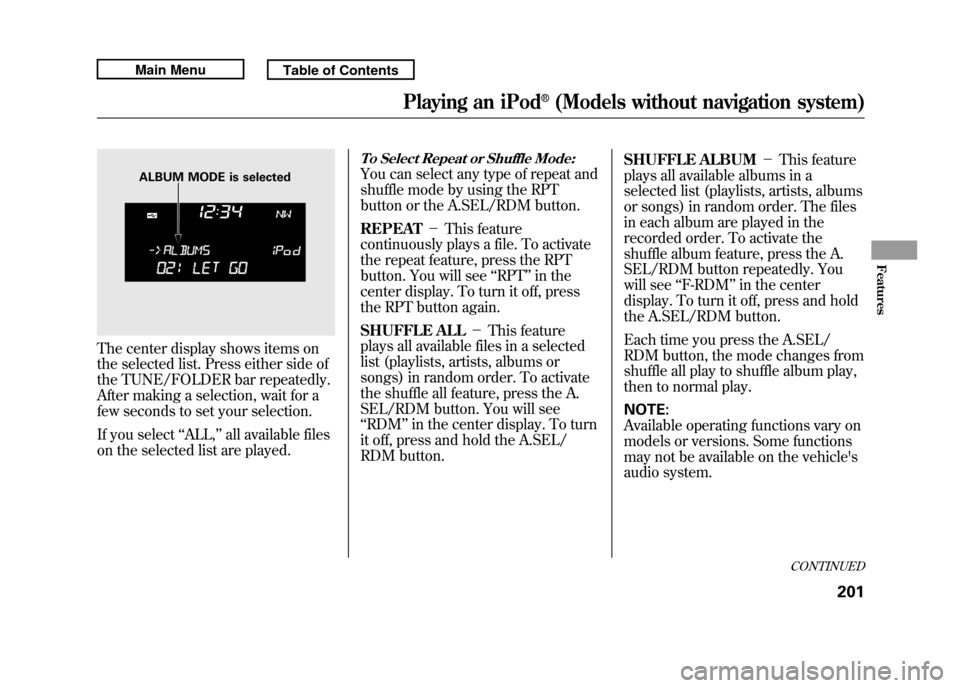
The center display shows items on
the selected list. Press either side of
the TUNE/FOLDER bar repeatedly.
After making a selection, wait for a
few seconds to set your selection.
If you select‘‘ALL,’’ all available files
on the selected list are played.
To Select Repeat or Shuffle Mode:You can select any type of repeat and
shuffle mode by using the RPT
button or the A.SEL/RDM button.
REPEAT -This feature
continuously plays a file. To activate
the repeat feature, press the RPT
button. You will see ‘‘RPT ’’in the
center display. To turn it off, press
the RPT button again.
SHUFFLE ALL -This feature
plays all available files in a selected
list (playlists, artists, albums or
songs) in random order. To activate
the shuffle all feature, press the A.
SEL/RDM button. You will see
‘‘ RDM ’’in the center display. To turn
it off, press and hold the A.SEL/
RDM button. SHUFFLE ALBUM
-This feature
plays all available albums in a
selected list (playlists, artists, albums
or songs) in random order. The files
in each album are played in the
recorded order. To activate the
shuffle album feature, press the A.
SEL/RDM button repeatedly. You
will see ‘‘F-RDM ’’in the center
display. To turn it off, press and hold
the A.SEL/RDM button.
Each time you press the A.SEL/
RDM button, the mode changes from
shuffle all play to shuffle album play,
then to normal play.
NOTE:
Available operating functions vary on
models or versions. Some functions
may not be available on the vehicle's
audio system.
ALBUM MODE is selected
CONTINUED
Playing an iPod
®(Models without navigation system)
201
Features
10/06/08 17:42:32 11 ACURA RDX MMC North America Owner's M 50 31STK640 enu