FOLD Acura RDX 2011 Owner's Guide
[x] Cancel search | Manufacturer: ACURA, Model Year: 2011, Model line: RDX, Model: Acura RDX 2011Pages: 517, PDF Size: 27.89 MB
Page 244 of 517
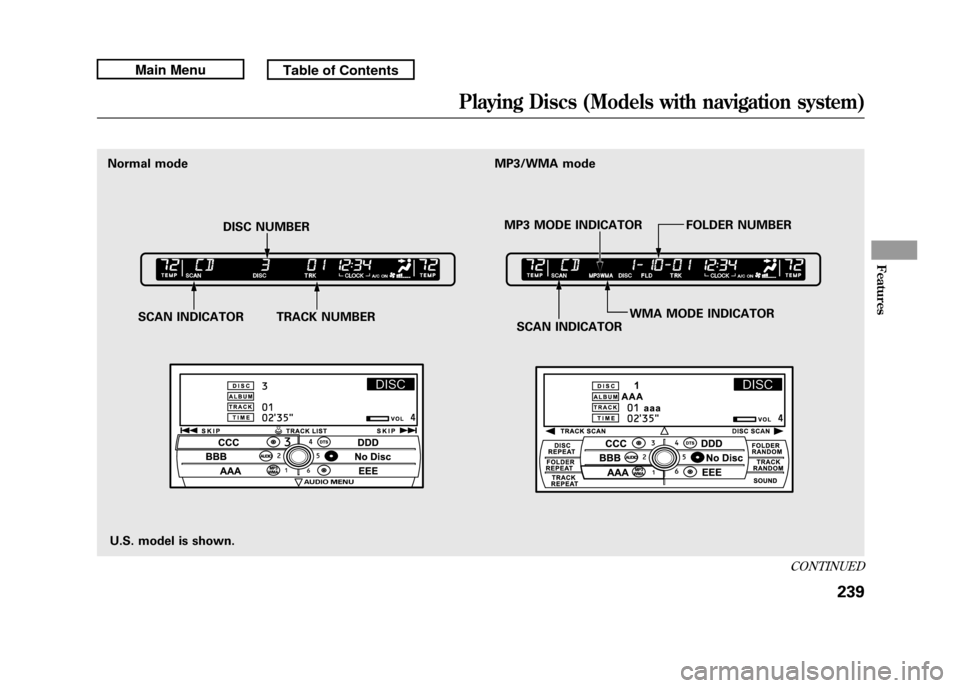
U.S. model is shown.
Normal mode
SCAN INDICATOR TRACK NUMBER SCAN INDICATORWMA MODE INDICATOR
DISC NUMBER
MP3 MODE INDICATOR FOLDER NUMBER
MP3/WMA mode
CONTINUED
Playing Discs (Models with navigation system)
239
Features
10/06/08 17:42:32 11 ACURA RDX MMC North America Owner's M 50 31STK640 enu
Page 245 of 517
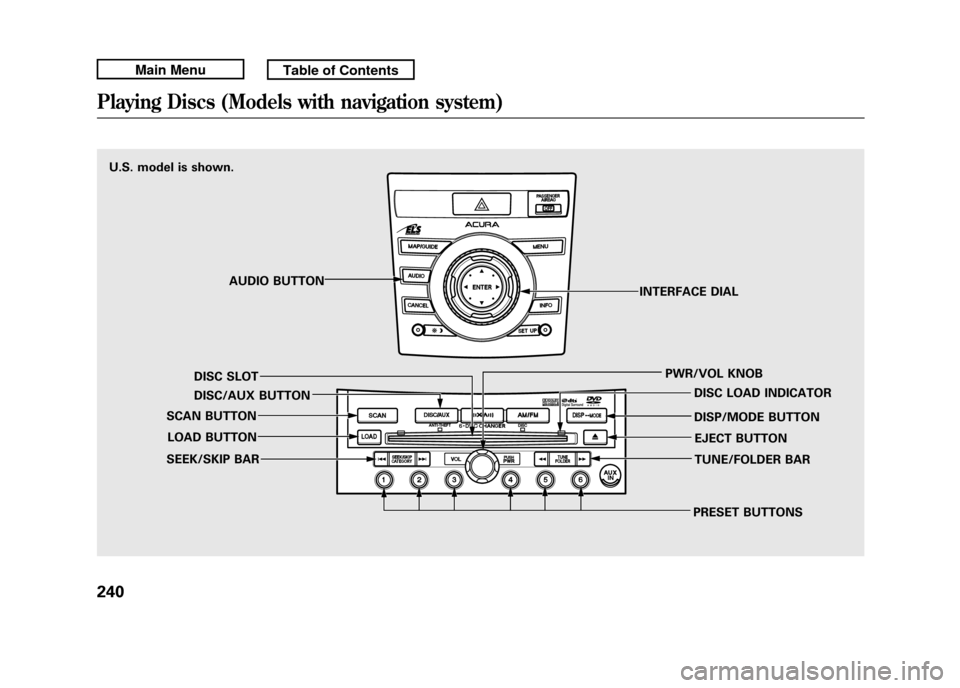
U.S. model is shown.AUDIO BUTTON
DISC SLOT
DISC/AUX BUTTON
SCAN BUTTON
LOAD BUTTON
SEEK/SKIP BAR
PRESET BUTTONSTUNE/FOLDER BAR EJECT BUTTON
DISP/MODE BUTTON DISC LOAD INDICATOR
PWR/VOL KNOB
INTERFACE DIALPlaying Discs (Models with navigation system)24010/06/08 17:42:32 11 ACURA RDX MMC North America Owner's M 50 31STK640 enu
Page 250 of 517

Playing an MP3/WMA Disc
The CD changer can also play CD-Rs
and CD-RWs compressed in MP3
and WMA format. When playing a
disc in MP3 or WMA, you will see
‘‘MP3 ’’or ‘‘WMA’’ on the upper
display. A disc can support more
than 99 folders, and each folder can
hold up to 255 playable files.
When there are more than 99 folders
on a disc, the upper display only
shows two digits. NOTE
: If a file on an MP3 or WMA
disc is protected by digital rights
management (DRM), the audio unit
displays FORMAT, and then skips to
the next file.
When playing a CD compressed in
MP3/WMA format, the audio control
display shows disc number, folder
name, file number, and elapsed time.
When playing a CD without this
information, the disc number, track
number, and the elapsed time are
shown on the audio control display. If the disc has a complex structure, it
will take a while to read the disc
before the system begins to play it.
Depending on the software the files
were made with, it may not be
possible to play some files, or display
some text data.
CONTINUED
Playing Discs (Models with navigation system)
245
Features
10/06/08 17:42:32 11 ACURA RDX MMC North America Owner's M 50 31STK640 enu
Page 251 of 517
To Change or Select Tracks/FilesWhile a disc is playing you can use
the SEEK/SKIP bar to select
passages and change tracks (files in
MP3/WMA mode).
In MP3/WMA mode, use the
TUNE/FOLDER bar to select folders
on the disc, and use the SEEK/SKIP
bar to change files.SEEK/SKIP
-Each time you press
and release the
side of the
SEEK/SKIP bar, the system skips
forward to the beginning of the next
track (file in MP3/WMA mode).
Press and release the
side of the
bar to skip backward to the
beginning of the current track/file.
Press it again to skip to the
beginning of the previous track/file.
To move rapidly within a track/file,
press and hold the
or
side of
the SEEK/SKIP bar.
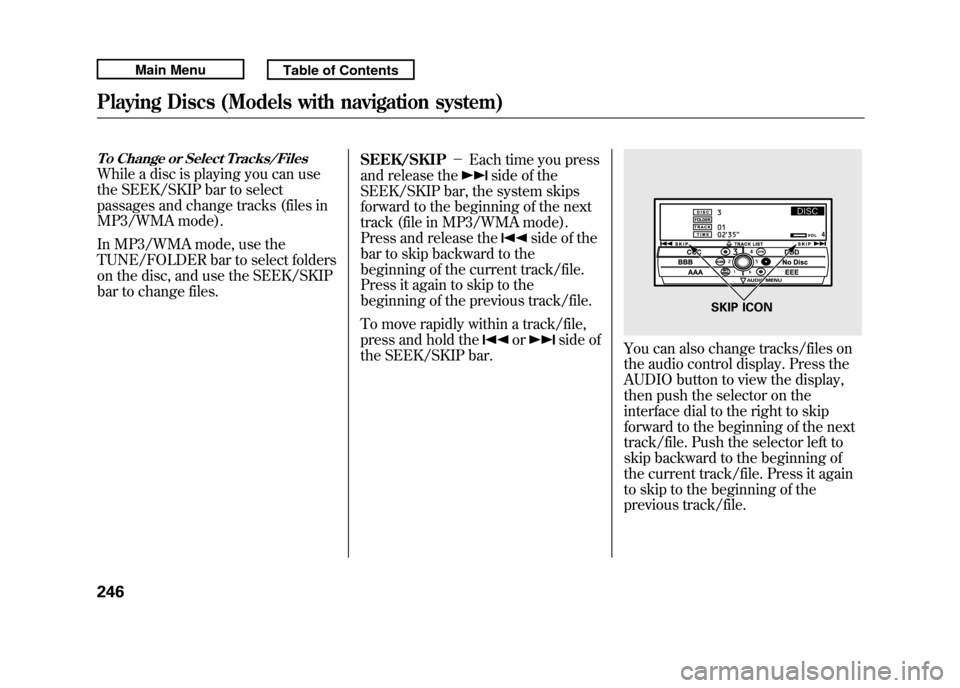
You can also change tracks/files on
the audio control display. Press the
AUDIO button to view the display,
then push the selector on the
interface dial to the right to skip
forward to the beginning of the next
track/file. Push the selector left to
skip backward to the beginning of
the current track/file. Press it again
to skip to the beginning of the
previous track/file.
SKIP ICON
Playing Discs (Models with navigation system)24610/06/08 17:42:32 11 ACURA RDX MMC North America Owner's M 50 31STK640 enu
Page 252 of 517
In MP3/WMA modeFOLDER SELECTION-To select
a different folder, press and release
the
side of the TUNE/FOLDER
bar to move to the beginning of the
next folder. Press and release the
side of the bar to move to the
beginning of the previous folder.
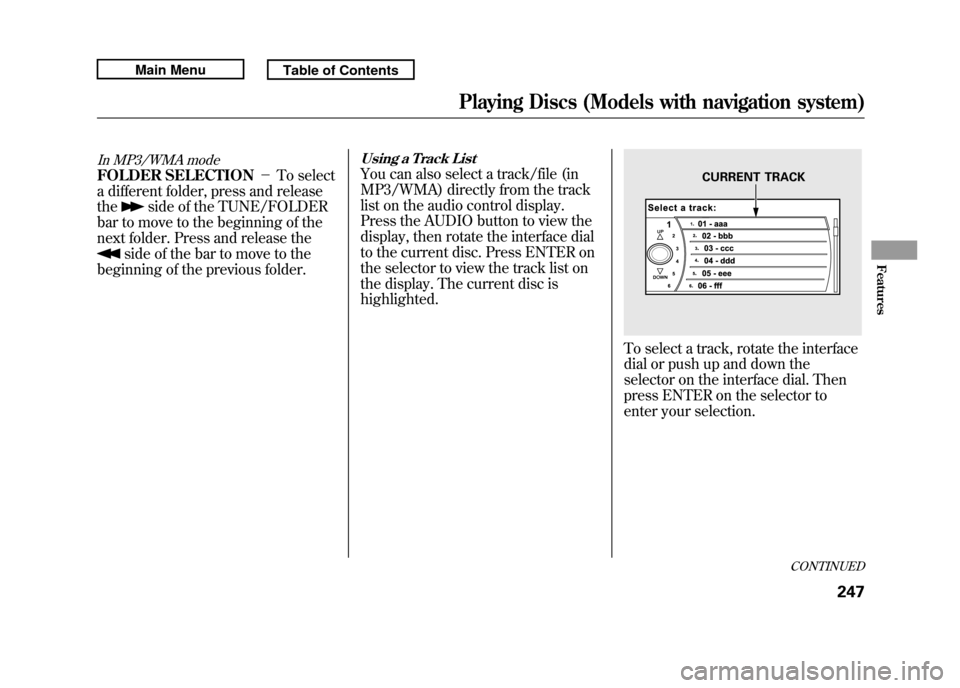
Using a Track ListYou can also select a track/file (in
MP3/WMA) directly from the track
list on the audio control display.
Press the AUDIO button to view the
display, then rotate the interface dial
to the current disc. Press ENTER on
the selector to view the track list on
the display. The current disc is
highlighted.
To select a track, rotate the interface
dial or push up and down the
selector on the interface dial. Then
press ENTER on the selector to
enter your selection.
CURRENT TRACK
CONTINUED
Playing Discs (Models with navigation system)
247
Features
10/06/08 17:42:32 11 ACURA RDX MMC North America Owner's M 50 31STK640 enu
Page 253 of 517
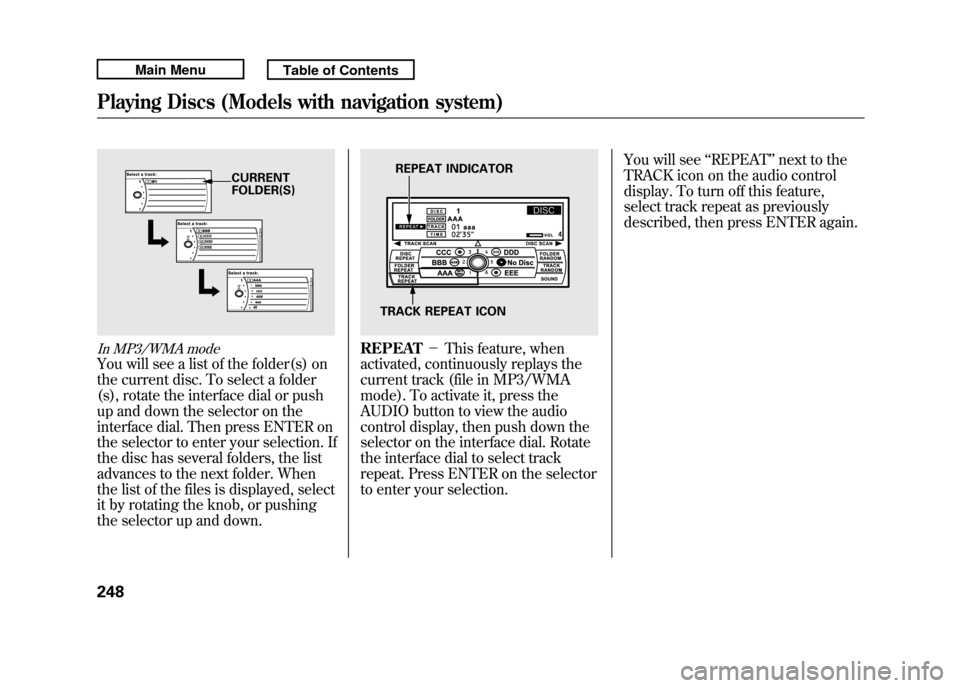
In MP3/WMA modeYou will see a list of the folder(s) on
the current disc. To select a folder
(s), rotate the interface dial or push
up and down the selector on the
interface dial. Then press ENTER on
the selector to enter your selection. If
the disc has several folders, the list
advances to the next folder. When
the list of the files is displayed, select
it by rotating the knob, or pushing
the selector up and down.
REPEAT-This feature, when
activated, continuously replays the
current track (file in MP3/WMA
mode). To activate it, press the
AUDIO button to view the audio
control display, then push down the
selector on the interface dial. Rotate
the interface dial to select track
repeat. Press ENTER on the selector
to enter your selection. You will see
‘‘REPEAT ’’next to the
TRACK icon on the audio control
display. To turn off this feature,
select track repeat as previously
described, then press ENTER again.
CURRENT
FOLDER(S)
REPEAT INDICATOR
TRACK REPEAT ICON
Playing Discs (Models with navigation system)24810/06/08 17:42:32 11 ACURA RDX MMC North America Owner's M 50 31STK640 enu
Page 254 of 517
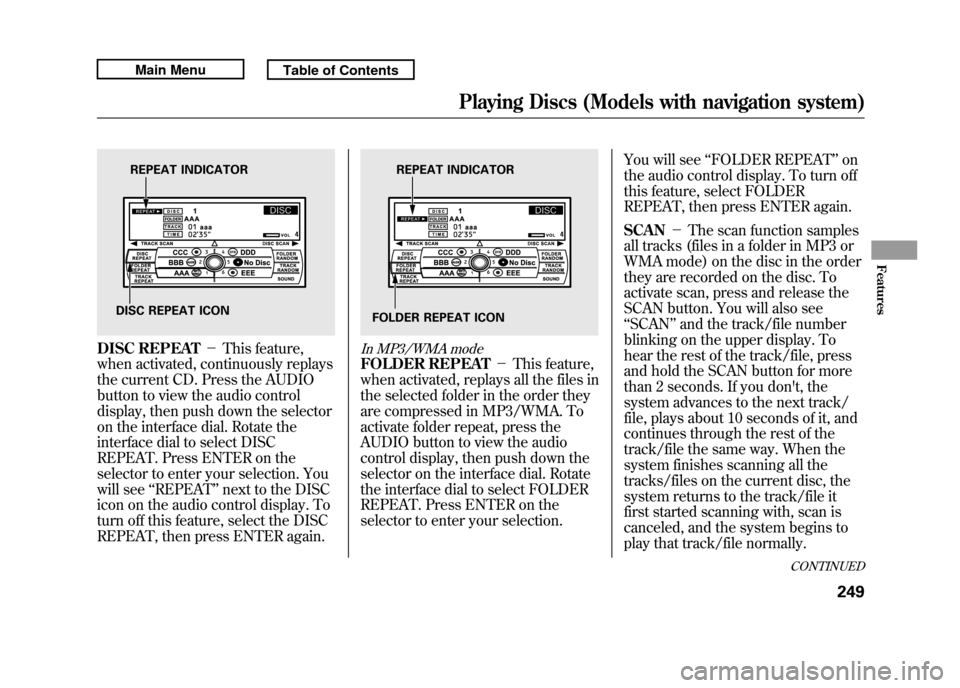
DISC REPEAT-This feature,
when activated, continuously replays
the current CD. Press the AUDIO
button to view the audio control
display, then push down the selector
on the interface dial. Rotate the
interface dial to select DISC
REPEAT. Press ENTER on the
selector to enter your selection. You
will see ‘‘REPEAT ’’next to the DISC
icon on the audio control display. To
turn off this feature, select the DISC
REPEAT, then press ENTER again.
In MP3/WMA modeFOLDER REPEAT -This feature,
when activated, replays all the files in
the selected folder in the order they
are compressed in MP3/WMA. To
activate folder repeat, press the
AUDIO button to view the audio
control display, then push down the
selector on the interface dial. Rotate
the interface dial to select FOLDER
REPEAT. Press ENTER on the
selector to enter your selection. You will see
‘‘FOLDER REPEAT ’’on
the audio control display. To turn off
this feature, select FOLDER
REPEAT, then press ENTER again.
SCAN -The scan function samples
all tracks (files in a folder in MP3 or
WMA mode) on the disc in the order
they are recorded on the disc. To
activate scan, press and release the
SCAN button. You will also see
‘‘ SCAN ’’and the track/file number
blinking on the upper display. To
hear the rest of the track/file, press
and hold the SCAN button for more
than 2 seconds. If you don't, the
system advances to the next track/
file, plays about 10 seconds of it, and
continues through the rest of the
track/file the same way. When the
system finishes scanning all the
tracks/files on the current disc, the
system returns to the track/file it
first started scanning with, scan is
canceled, and the system begins to
play that track/file normally.
REPEAT INDICATOR
DISC REPEAT ICON
REPEAT INDICATOR
FOLDER REPEAT ICON
CONTINUED
Playing Discs (Models with navigation system)
249
Features
10/06/08 17:42:32 11 ACURA RDX MMC North America Owner's M 50 31STK640 enu
Page 255 of 517
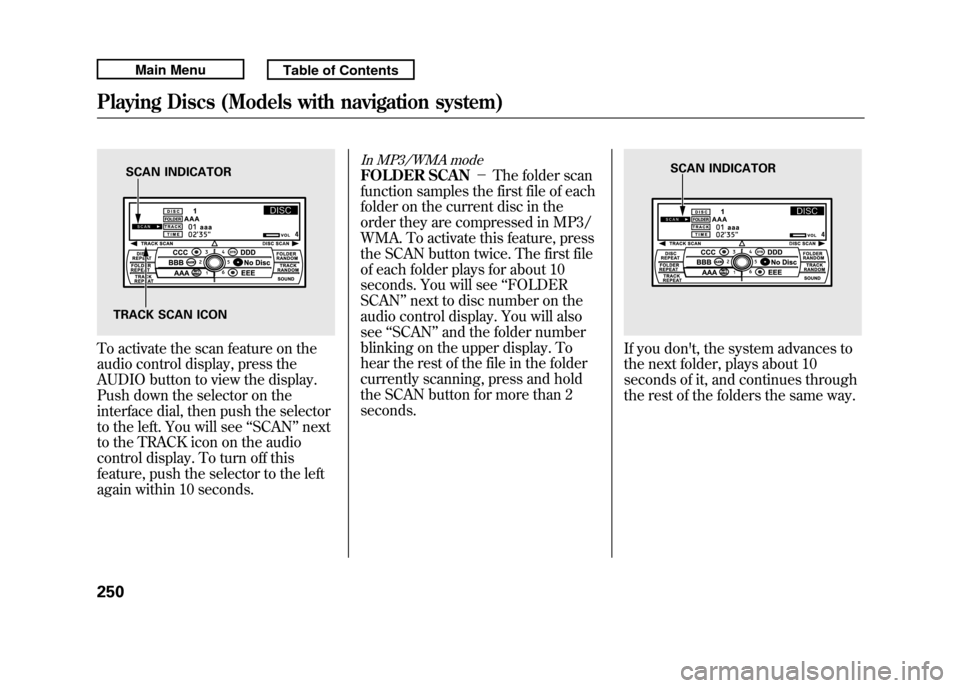
To activate the scan feature on the
audio control display, press the
AUDIO button to view the display.
Push down the selector on the
interface dial, then push the selector
to the left. You will see‘‘SCAN ’’next
to the TRACK icon on the audio
control display. To turn off this
feature, push the selector to the left
again within 10 seconds.
In MP3/WMA modeFOLDER SCAN -The folder scan
function samples the first file of each
folder on the current disc in the
order they are compressed in MP3/
WMA. To activate this feature, press
the SCAN button twice. The first file
of each folder plays for about 10
seconds. You will see ‘‘FOLDER
SCAN ’’next to disc number on the
audio control display. You will also
see ‘‘SCAN ’’and the folder number
blinking on the upper display. To
hear the rest of the file in the folder
currently scanning, press and hold
the SCAN button for more than 2
seconds.
If you don't, the system advances to
the next folder, plays about 10
seconds of it, and continues through
the rest of the folders the same way.
SCAN INDICATOR
TRACK SCAN ICON
SCAN INDICATOR
Playing Discs (Models with navigation system)25010/06/08 17:42:32 11 ACURA RDX MMC North America Owner's M 50 31STK640 enu
Page 256 of 517
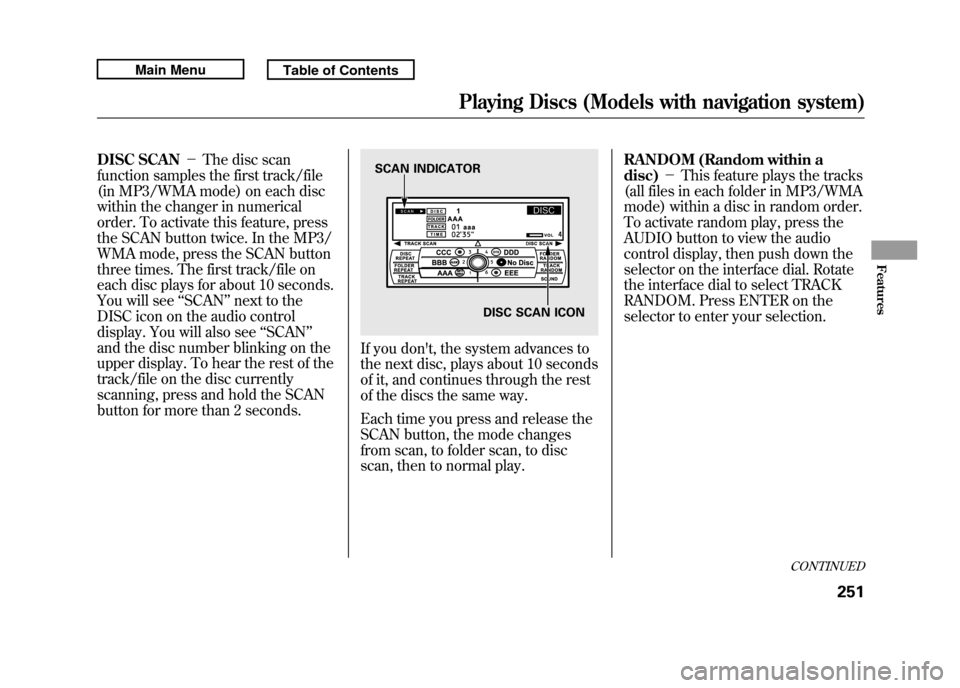
DISC SCAN-The disc scan
function samples the first track/file
(in MP3/WMA mode) on each disc
within the changer in numerical
order. To activate this feature, press
the SCAN button twice. In the MP3/
WMA mode, press the SCAN button
three times. The first track/file on
each disc plays for about 10 seconds.
You will see ‘‘SCAN ’’next to the
DISC icon on the audio control
display. You will also see ‘‘SCAN ’’
and the disc number blinking on the
upper display. To hear the rest of the
track/file on the disc currently
scanning, press and hold the SCAN
button for more than 2 seconds.
If you don't, the system advances to
the next disc, plays about 10 seconds
of it, and continues through the rest
of the discs the same way.
Each time you press and release the
SCAN button, the mode changes
from scan, to folder scan, to disc
scan, then to normal play. RANDOM (Random within a
disc)
-This feature plays the tracks
(all files in each folder in MP3/WMA
mode) within a disc in random order.
To activate random play, press the
AUDIO button to view the audio
control display, then push down the
selector on the interface dial. Rotate
the interface dial to select TRACK
RANDOM. Press ENTER on the
selector to enter your selection.SCAN INDICATOR
DISC SCAN ICON
CONTINUED
Playing Discs (Models with navigation system)
251
Features
10/06/08 17:42:32 11 ACURA RDX MMC North America Owner's M 50 31STK640 enu
Page 257 of 517
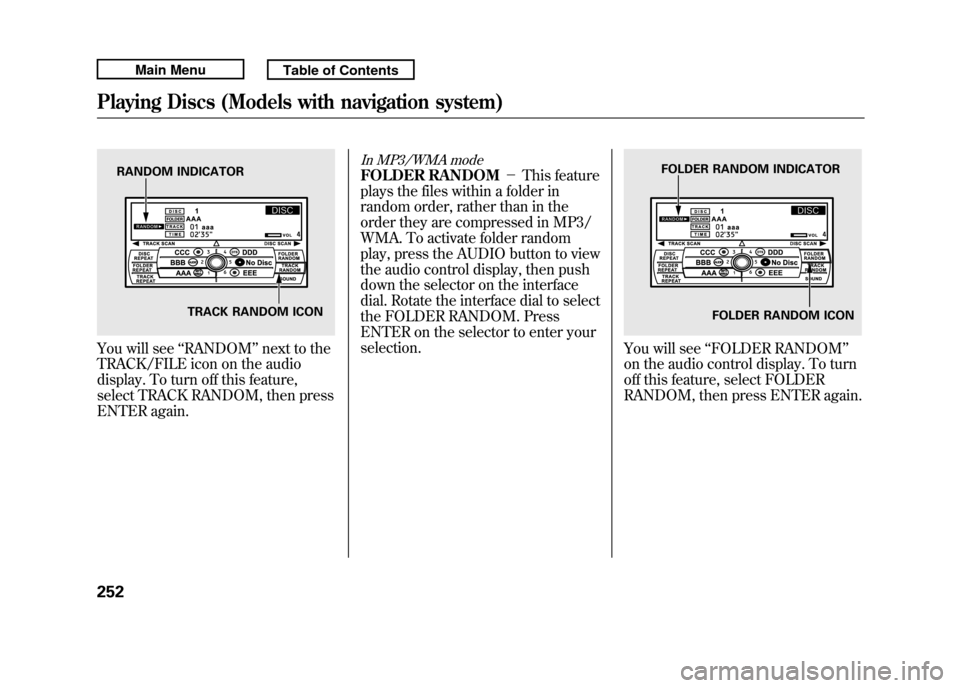
You will see‘‘RANDOM ’’next to the
TRACK/FILE icon on the audio
display. To turn off this feature,
select TRACK RANDOM, then press
ENTER again.
In MP3/WMA modeFOLDER RANDOM -This feature
plays the files within a folder in
random order, rather than in the
order they are compressed in MP3/
WMA. To activate folder random
play, press the AUDIO button to view
the audio control display, then push
down the selector on the interface
dial. Rotate the interface dial to select
the FOLDER RANDOM. Press
ENTER on the selector to enter your
selection.
You will see ‘‘FOLDER RANDOM’’
on the audio control display. To turn
off this feature, select FOLDER
RANDOM, then press ENTER again.
RANDOM INDICATOR
TRACK RANDOM ICON
FOLDER RANDOM INDICATOR
FOLDER RANDOM ICON
Playing Discs (Models with navigation system)25210/06/08 17:42:32 11 ACURA RDX MMC North America Owner's M 50 31STK640 enu