jack Acura RDX 2011 User Guide
[x] Cancel search | Manufacturer: ACURA, Model Year: 2011, Model line: RDX, Model: Acura RDX 2011Pages: 517, PDF Size: 27.89 MB
Page 296 of 517
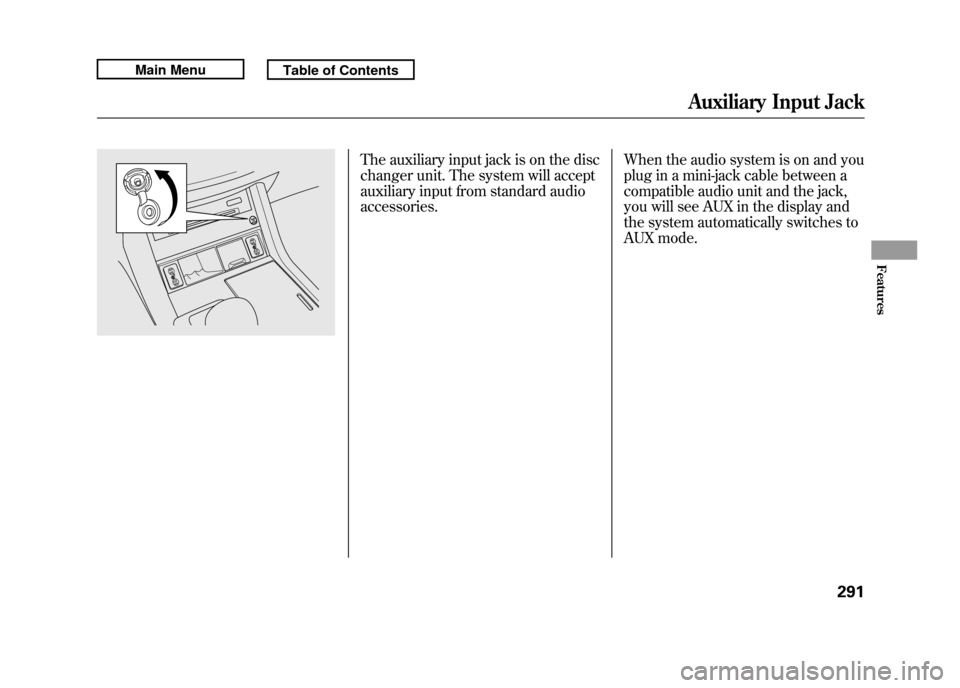
The auxiliary input jack is on the disc
changer unit. The system will accept
auxiliary input from standard audio
accessories.When the audio system is on and you
plug in a mini-jack cable between a
compatible audio unit and the jack,
you will see AUX in the display and
the system automatically switches to
AUX mode.
Auxiliary Input Jack
291
Features
10/06/08 17:42:32 11 ACURA RDX MMC North America Owner's M 50 31STK640 enu
Page 408 of 517

Towing Speeds and GearsDrive slower than normal in all
driving situations, and obey posted
speed limits for vehicles with trailers.
Use the D position when towing a
trailer on level roads. See‘‘
Driving on
Hills
’’ in the next column for
additional gear information. Do not
exceed 55 mph (88 km/h). At higher
speeds, the trailer may sway or affect
vehicle handling. When driving uphill and downhill,
use the S position (without using the
paddle shifters) to provide the proper
engine power and engine braking on
each gear. You can also use the
paddle shifters. In this case, select
third, second, or first gear with the
paddle shifter; depending on the
vehicle speeds and road condition.
Do not use fourth and fifth gears.
The recommended speed range for
each gear position is shown in the
table.
Gear position Speed range 10 -38 mph
(0 - 60 km/h)
2, 3 19 -62 mph
(30 -100 km/h)
Making Turns and BrakingMake turns more slowly and wider
than normal. The trailer tracks a
smaller arc than your vehicle, and it
can hit or run over something the
vehicle misses. Allow more time and
distance for braking. Do not brake or
turn suddenly as this could cause the
trailer to jackknife or turn over.
CONTINUED
Towing a Trailer
403
Driving
10/06/08 17:42:32 11 ACURA RDX MMC North America Owner's M 50 31STK640 enu
Page 412 of 517

Crossing a Stream
Avoid driving through deep water. If
you encounter water in your route (a
small stream or large puddle, for
example), evaluate it carefully before
going ahead. Make sure it is shallow,
flowing slowly, and has firm ground
underneath. If you are not sure of the
depth or the ground, turn around and
find another route.
Driving through deep water can also
damage your vehicle. The water can
get into the transmission and
differential, diluting the lubricant and
causing an eventual failure. It can
also wash the grease out of the wheel
bearings.If You Get Stuck
Avoid driving on soft sand, deep
mud, or other surfaces where you
could get stuck. If you do happen to
get stuck because of inclement
weather or other conditions, choose
a safe and appropriate course of
action.
You should never use a jack to try
getting unstuck. A jack only works
on firm, level ground. Also, your
vehicle could easily slip off the jack
and hurt you or someone else.
If you spin the wheels excessively
trying to get unstuck, you may
overheat the components of the
SH-AWD system. The SH-AWD
indicator on the instrument panel will
blink to indicate the rear differential
temperature is too high.
You will also see an
‘‘SH-AWD DIFF
TEMP. HIGH ’’message on the multi-
information display (see page 385).
If this happens, stop and allow
everything to cool down. The
SH-AWD indicator goes off after the
rear differential temperature drops.
Off-Highway Driving Guidelines
407
Driving
10/06/08 17:42:32 11 ACURA RDX MMC North America Owner's M 50 31STK640 enu
Page 457 of 517

●Block the rear wheels.●If the vehicle is to be stored for a
longer period, it should be
supported on jackstands so the
tires are off the ground.●Leave one window open slightly (if
the vehicle is being stored
indoors).●Disconnect the battery.●Support the front and rear wiper
blade arms with a folded towel or
rag so they do not touch the
windshield.●To minimize sticking, apply a
silicone spray lubricant to all door
and tailgate seals. Also, apply a
vehicle body wax to the painted
surfaces that mate with the door
and tailgate seals.
●Cover the vehicle with a
‘‘breathable ’’cover, one made from
a porous material such as cotton.
Non-porous materials, such as
plastic sheeting, trap moisture,
which can damage the paint.●If possible, periodically run the
engine until it reaches full
operating temperature (the cooling
fans cycle on and off twice).
Preferably, do this once a month. Interior Care
Leather
Vacuum dirt and dust from the
leather frequently. Pay close
attention to the pleats and seams.
Clean the leather with a soft cloth
dampened with a 90% water and 10%
neutral wool detergent solution.
Then buff it with a clean, dry cloth.
Remove any dust or dirt on leather
surfaces immediately.
Vehicle Storage, Interior Care45210/06/08 17:42:32 11 ACURA RDX MMC North America Owner's M 50 31STK640 enu
Page 460 of 517
If you have a flat tire while driving,
stop in a safe place to change it.
Drive slowly along the shoulder until
you get to an exit or an area that is
far away from the traffic lanes.
The vehicle can easily roll off
the jack, seriously injuring
anyone underneath.
Follow the directions for
changing a tire exactly, and
never get under the vehicle
when it is supported only by the
jack.1. Park the vehicle on firm, level, and
non-slippery ground. Put the
transmission in Park. Apply the
parking brake.
If you are towing a trailer, unhitch
it.
2. Turn on the hazard warning lights, and turn the ignition switch to the
LOCK (0) position. Have all
passengers get out of the vehicle
while you change the tire.
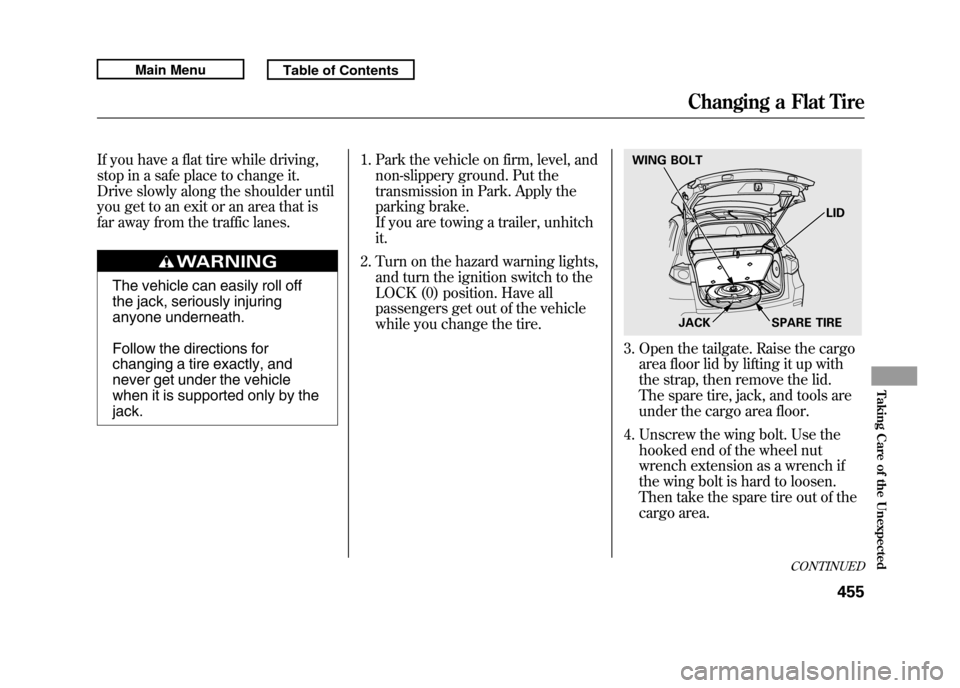
3. Open the tailgate. Raise the cargoarea floor lid by lifting it up with
the strap, then remove the lid.
The spare tire, jack, and tools are
under the cargo area floor.
4. Unscrew the wing bolt. Use the hooked end of the wheel nut
wrench extension as a wrench if
the wing bolt is hard to loosen.
Then take the spare tire out of the
cargo area.WING BOLT
JACK SPARE TIRELID
CONTINUED
Changing a Flat Tire
455
Taking Care of the Unexpected
10/06/08 17:42:32 11 ACURA RDX MMC North America Owner's M 50 31STK640 enu
Page 461 of 517
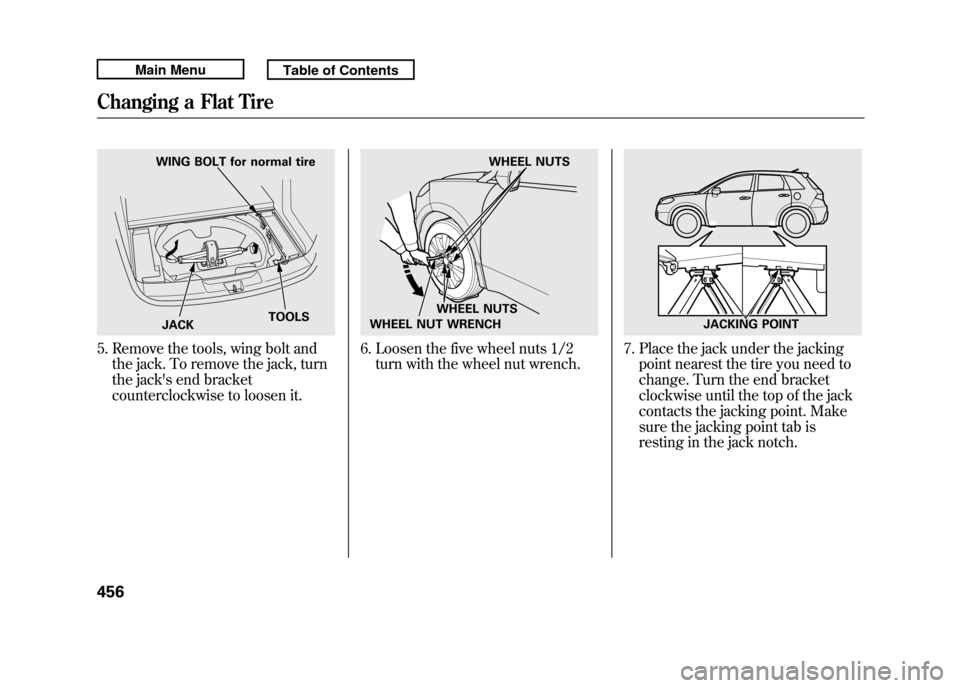
5. Remove the tools, wing bolt andthe jack. To remove the jack, turn
the jack's end bracket
counterclockwise to loosen it.
6. Loosen the five wheel nuts 1/2turn with the wheel nut wrench.
7. Place the jack under the jackingpoint nearest the tire you need to
change. Turn the end bracket
clockwise until the top of the jack
contacts the jacking point. Make
sure the jacking point tab is
resting in the jack notch.
WING BOLT for normal tire
JACK TOOLS
WHEEL NUTS
WHEEL NUTS
WHEEL NUT WRENCH
JACKING POINT
Changing a Flat Tire45610/06/08 17:42:32 11 ACURA RDX MMC North America Owner's M 50 31STK640 enu
Page 462 of 517

8. Use the extension and the wheelnut wrench as shown to raise the
vehicle until the flat tire is off the
ground.
9. Remove the wheel nuts, then remove the flat tire. Handle the
wheel nuts carefully; they may be
hot from driving. Place the flat tire
on the ground with the outside
surface facing up.
10. Before mounting the spare tire, wipe any dirt off the mounting
surface of the wheel and hub with
a clean cloth. Wipe the hub
carefully; it may be hot from
driving. 11. Put on the spare tire. Put the
wheel nuts back on finger-tight,
then tighten them in a crisscross
pattern with the wheel nut wrench
until the wheel is firmly against the
hub. Do not try to tighten the
wheel nuts fully.
12. Lower the vehicle to the ground, and remove the jack.
WHEEL NUT WRENCH EXTENSION
BRAKE HUB
CONTINUED
Changing a Flat Tire
457
Taking Care of the Unexpected
10/06/08 17:42:32 11 ACURA RDX MMC North America Owner's M 50 31STK640 enu
Page 463 of 517
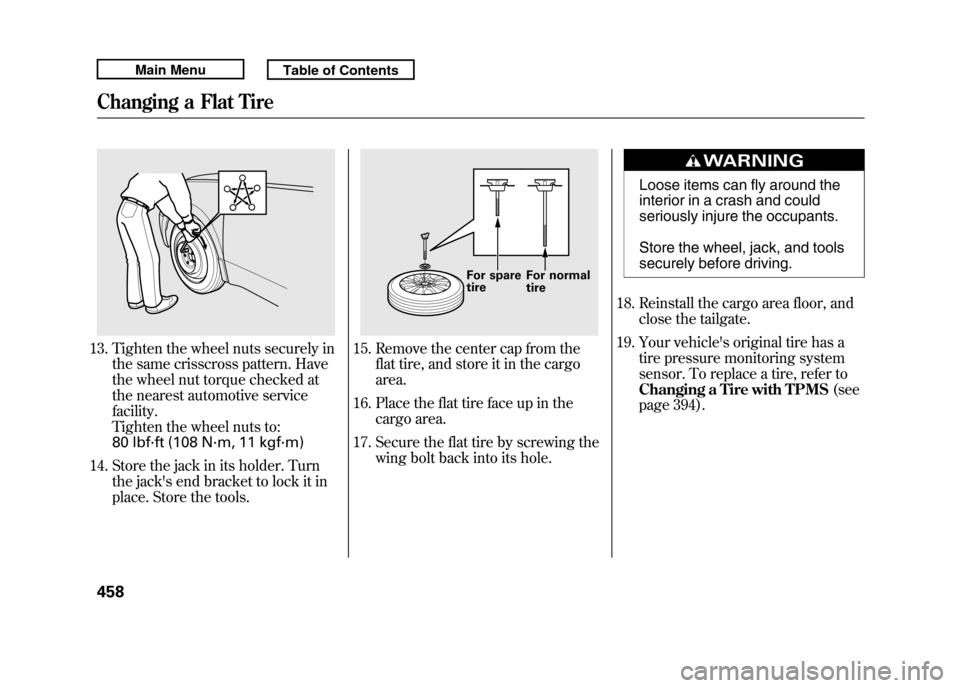
13. Tighten the wheel nuts securely inthe same crisscross pattern. Have
the wheel nut torque checked at
the nearest automotive service
facility.
Tighten the wheel nuts to:
80 lbf·ft (108 N·m, 11 kgf·m)
14. Store the jack in its holder. Turn the jack's end bracket to lock it in
place. Store the tools.
15. Remove the center cap from theflat tire, and store it in the cargo
area.
16. Place the flat tire face up in the cargo area.
17. Secure the flat tire by screwing the wing bolt back into its hole.
Loose items can fly around the
interior in a crash and could
seriously injure the occupants.
Store the wheel, jack, and tools
securely before driving.
18. Reinstall the cargo area floor, and close the tailgate.
19. Your vehicle's original tire has a tire pressure monitoring system
sensor. To replace a tire, refer to
Changing a Tire with TPMS (see
page 394).
For spare
tire For normal
tire
Changing a Flat Tire45810/06/08 17:42:32 11 ACURA RDX MMC North America Owner's M 50 31STK640 enu
Page 504 of 517

A
Accessories andModifications
..........................
362
ACCESSORY (Ignition Key Position)
.................................
125
Accessory Power Sockets
..........
157
AcuraLink
®(U.S. models
only)
.......................................
332
Additives, Engine Oil
.................
421
Adjusting the Sound
............
177, 224
Adjusting the Steering Wheel....
122
Advanced Airbags
........................
28
Airbag (SRS)
..........................
10, 24
Air Conditioning System
............
164
Usage
......................................
165
Air Pressure, Tires
..............
444, 445
Alcohol in Gasoline
....................
352
Antifreeze
...................................
424
Anti-lock Brakes (ABS) Indicator
............................
66, 388
Operation
................................
388
Anti-theft, Audio System
.............
292
Anti-theft Steering Column Lock
.......................................
125 Armrests
....................................
138
Audio Antenna
...........................
439
Audio System
......................
172, 216
Automatic Lighting Off
Feature
...................................
118
Automatic Seat Belt Tensioners...
22
Automatic Speed Control
...........
300
Automatic Transmission
............
376
Capacity, Fluid
........................
480
Checking Fluid Level
..............
427
Driving with the Paddle Shifters
................................
380
Shifting
...................................
376
Shift Lever Position Indicators
............................
376
Shift Lever Positions
...............
377
Shift Lock Release
...................
379
Auxiliary Input Jack
...................
291
B
Battery Charging System
Indicator
........................
65, 465
Jump Starting
..........................
461 Maintenance
...........................
450
Specifications
..........................
481
Before Driving
...........................
351
Belts, Seat
................................
9, 20
Beverage Holders
......................
156
Bluetooth
®Audio
................
212, 280
Bluetooth
®HandsFreeLink
®......
306
Booster Seats
...............................
54
Brakes Anti-lock Brakes (ABS)
...........
388
Break-in, New Linings
.............
352
Bulb Replacement
...................
433
Fluid
.......................................
429
Parking
...................................
150
System Design
........................
387
System Indicator (Amber)
.......
468
System Indicator (Red)
...........
467
Wear Indicators
.......................
387
Braking System
..........................
387
Break-in, New Vehicle
................
352
Brightness Control,
Instruments
............................
120
CONTINUED
Index
I
INDEX
10/06/08 17:42:32 11 ACURA RDX MMC North America Owner's M 50 31STK640 enu
Page 509 of 517

Infant Restraint
............................
41
Infant Seats
..................................
41
Tether Anchorage Point
...........
51
Inflation, Proper Tire
..................
444
Recommended Pressures
.......
445
Inside Mirror
.............................
146
Inspection, Tire
..........................
445
Installing a Child Seat
..................
45
Instrument Panel
..........................
63
Instrument Panel Brightness
.....
120
Instruments and Controls
.............
61
Intercooler
.................................
439
Interface Dial
.............................
216
Interior Care
..............................
452
Interior Lights
............................
151
Introduction
...................................
i
iPod
®...................................
197, 260
iPod
®Error Messages
.........
203, 269
J
Jacking up the Vehicle
...............
455
Jack, Tire
...................................
455
Jump Starting
.............................
461 K
Keys
...........................................
122
L
Label, Certification
.....................
478
Lane Change, Signaling
.............
116
Lap/Shoulder Belt
.................
15, 21
LATCH Anchorage System
..........
46
Lights Bulb Replacement
...................
431
Indicator
...................................
63
Interior
....................................
151
Parking
...................................
116
Turn Signal
.............................
116
Load Limit
...........................
365, 397
LOCK (Ignition Key Position)....
125
Locks Anti-theft Steering Column
......
125
Childproof Door
......................
127
Fuel Fill Door
..........................
353
Glove Box
...............................
155
Lockout Prevention
.................
127
Power Door
.............................
126 Tailgate
...................................
128
Low Coolant Level
......................
357
Lower Anchors
.............................
46
Low Fuel Indicator
.......................
68
Low Oil Pressure Indicator
...........................
65, 465
Low Tire Pressure/TPMS Indicator
...........................
71, 390
Lubricant Specifications Chart...
480
Luggage, Storing (cargo)
...........
364
M
Maintenance
..............................
409
Main Items and Sub Items
......
415
Minder
....................................
411
Owner's Maintenance Checks
................................
417
Safety
......................................
410
Schedule
.................................
418
Malfunction Indicator Lamp
................................
65, 466
Memory, Driving Position
..........
148
Meters, Gauges
............................
73
Methanol in Gasoline
.................
352
IndexVI10/06/08 17:42:32 11 ACURA RDX MMC North America Owner's M 50 31STK640 enu