service Acura RDX 2011 Owner's Guide
[x] Cancel search | Manufacturer: ACURA, Model Year: 2011, Model line: RDX, Model: Acura RDX 2011Pages: 517, PDF Size: 27.89 MB
Page 361 of 517
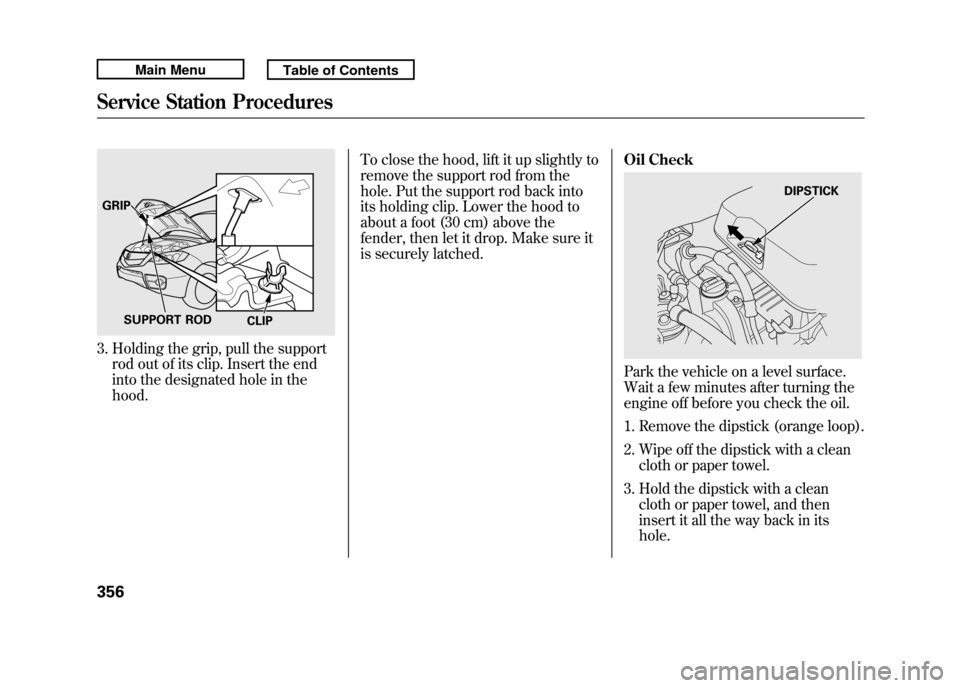
3. Holding the grip, pull the supportrod out of its clip. Insert the end
into the designated hole in the
hood. To close the hood, lift it up slightly to
remove the support rod from the
hole. Put the support rod back into
its holding clip. Lower the hood to
about a foot (30 cm) above the
fender, then let it drop. Make sure it
is securely latched.
Oil Check
Park the vehicle on a level surface.
Wait a few minutes after turning the
engine off before you check the oil.
1. Remove the dipstick (orange loop).
2. Wipe off the dipstick with a clean
cloth or paper towel.
3. Hold the dipstick with a clean cloth or paper towel, and then
insert it all the way back in its
hole.
GRIP
SUPPORT ROD CLIP
DIPSTICK
Service Station Procedures35610/06/08 17:42:32 11 ACURA RDX MMC North America Owner's M 50 31STK640 enu
Page 362 of 517
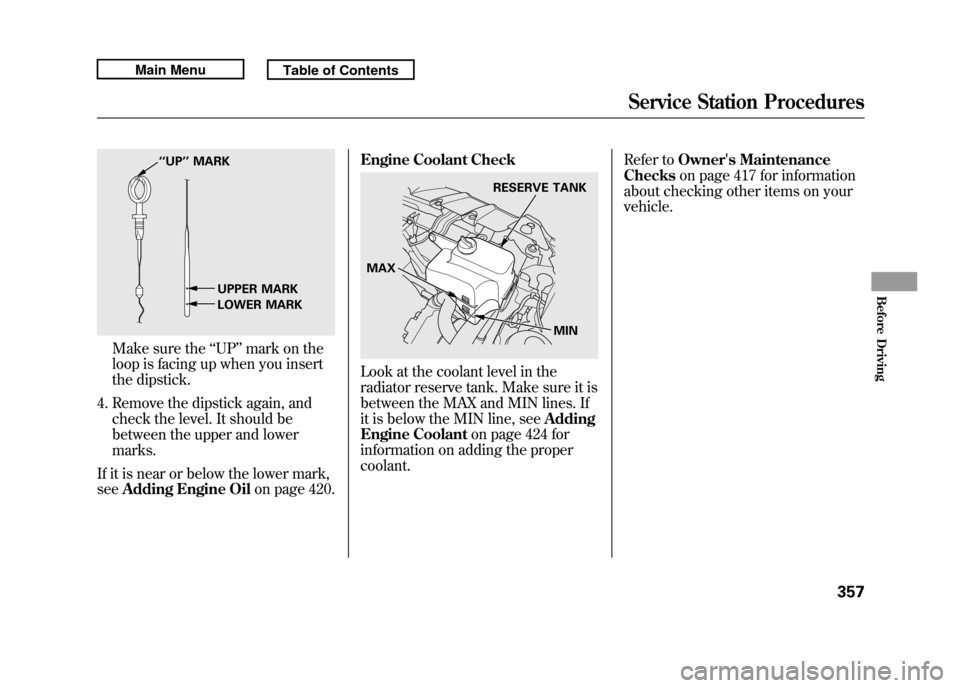
Make sure the‘‘UP ’’mark on the
loop is facing up when you insert
the dipstick.
4. Remove the dipstick again, and check the level. It should be
between the upper and lower
marks.
If it is near or below the lower mark,
see Adding Engine Oil on page 420.Engine Coolant Check
Look at the coolant level in the
radiator reserve tank. Make sure it is
between the MAX and MIN lines. If
it is below the MIN line, see
Adding
Engine Coolant on page 424 for
information on adding the proper
coolant. Refer to
Owner's Maintenance
Checks on page 417 for information
about checking other items on your
vehicle.
‘‘ UP’’ MARK
UPPER MARK
LOWER MARK
RESERVE TANK
MAX MIN
Service Station Procedures
357
Before Driving
10/06/08 17:42:32 11 ACURA RDX MMC North America Owner's M 50 31STK640 enu
Page 395 of 517

Your vehicle is equipped with a tire
pressure monitoring system (TPMS)
that turns on every time you start the
engine and monitors the pressure in
your tires while driving.
Each tire has its own pressure
sensor. If the air pressure of a tire
becomes significantly low, the sensor
in that tire immediately sends a
signal that causes the low tire
pressure/TPMS indicator in the
instrument panel to come on. If this
happens, you will see which tire is
losing pressure on the multi-
information display along with a
‘‘CHECK TIRE PRESSURE ’’
message.
Low Tire Pressure/TPMS
Indicator
When the low tire pressure/TPMS
indicator is on, one or more of your
tires is significantly underinflated.
You should stop and check your tires
as soon as possible, and inflate them
to the proper pressure as indicated
on the vehicle's tire information
placard.
It is possible that the pressures
shown on the multi-information
display and the pressures you
manually measure are slightly
different.
If the difference is significant or you
cannot make the low tire pressure/
TPMS indicator and message on the
multi-information display go out after
inflating the tires to the specified
values, have your dealer check the
system as soon as possible. If you think you can safely drive a
short distance to a service station,
proceed slowly to the station, then
inflate the tire to the recommended
pressure.
If the tire is flat, or if the tire pressure
is too low to continue driving, replace
the tire with the compact spare tire
(see page 454).
Driving on a significantly under-
inflated tire causes the tire to
overheat and can lead to tire failure.
Under-inflation also reduces fuel
efficiency and tire tread life, and may
affect the vehicle's handling and
stopping ability.
Because tire pressure varies by
temperature and other conditions,
the low tire pressure/TPMS
indicator may come on unexpectedly.
Tire Pressure Monitoring System (TPMS)39010/06/08 17:42:32 11 ACURA RDX MMC North America Owner's M 50 31STK640 enu
Page 399 of 517

Changing a Tire with TPMS
If you have a flat tire, the low tire
pressure/TPMS and tire monitor
indicators will come on. Replace the
indicated flat tire with the compact
spare tire (see page 454).
After the flat tire is replaced with the
spare tire, the low tire pressure/
TPMS indicator stays on while
driving. After several miles
(kilometers) driving, this indicator
begins to flash, then stays on again.
You will also see a‘‘CHECK TPMS
SYSTEM ’’message on the multi-
information display. This is normal;
the system cannot monitor the spare
tire pressure. Manually check the
spare tire pressure to be sure it is
correct. This indicator and the warning
message on the multi-information
display will go off, after several miles
(kilometers) driving, when the spare
tire is replaced with the specified
regular tire equipped with the tire
pressure monitor sensor.
Each wheel is equipped with a tire
pressure sensor. You must use
TPMS specific wheels. It is
recommended that you always have
your tires serviced by your dealer or
a qualified technician.
Never use a puncture-repairing agent
in a flat tire. If used, you will have to
replace the tire pressure sensor.
Have the flat tire repaired by your
dealer as soon as possible.
As required by the FCC:
This device complies with Part 15 of theFCC rules. Operation is subject to the
following two conditions: (1) This devicemay not cause harmful interference, and(2) this device must accept any
interference received, includinginterference that may cause undesiredoperation.
Changes or modifications not expresslyapproved by the party responsible for
compliance could void the user'sauthority to operate the equipment.
This device complies with IndustryCanada Standard RSS-210.
Operation is subject to the following twoconditions: (1) this device may not causeinterference, and (2) this device must
accept any interference that may causeundesired operation of the device.
Tire Pressure Monitoring System (TPMS)39410/06/08 17:42:32 11 ACURA RDX MMC North America Owner's M 50 31STK640 enu
Page 406 of 517

Since lighting and wiring vary by
trailer type and brand, you should
have a qualified technician install a
suitable connector between the
vehicle and the trailer. Improper
equipment or installation can cause
damage to your vehicle's electrical
system and affect your vehicle
warranty.
Additional Towing EquipmentMany states, Canadian provinces and
territories require special outside
mirrors when towing a trailer. Even if
they don't, you should install special
mirrors if you cannot clearly see
behind you, or if the trailer creates a
blind spot.
Ask your trailer sales or rental
agency if any other items are
recommended or required for your
towing situation.Pre-Tow Checklist
When preparing to tow, and before
driving away, be sure to check the
following:
●The vehicle has been properly
serviced, and the suspension,
cooling system, and lights are in
good operating condition.
CONTINUED
Towing a Trailer
401
Driving
10/06/08 17:42:32 11 ACURA RDX MMC North America Owner's M 50 31STK640 enu
Page 407 of 517

●The trailer has been properly
serviced and is in good condition.●All weights and loads are within
limits.●The hitch, safety chains, and any
other attachments are secure.●All items in or on the trailer are
properly secured and cannot shift
while you drive.
●The lights and brakes on your
vehicle and the trailer are working
properly.●Your vehicle tires and spare are
properly inflated, and the trailer
tires and spare are inflated as
recommended by the trailer
maker.Driving Safely With a Trailer
The added weight, length, and
height of a trailer will affect your
vehicle's handling and performance,
so driving with a trailer requires
some special driving skills and
techniques.
For your safety and the safety of
others, take time to practice driving
maneuvers before heading for the
open road, and follow the guidelines
in this section.
Towing a Trailer40210/06/08 17:42:32 11 ACURA RDX MMC North America Owner's M 50 31STK640 enu
Page 411 of 517

Check Out Your Vehicle
Before you leave the pavement, be
sure to do all scheduled maintenance
and service, and inspect your vehicle
for any problems. Pay special
attention to the condition of the tires,
and check the tire pressures.
After you return to the pavement,
carefully inspect your vehicle to
make sure there is no damage that
could make driving it unsafe.
Recheck the condition of the tires
and the tire pressures.
Remember
The route presents limits (too steep
or bumpy roads). You have limits
(driving skill and comfort). And your
vehicle has limits (traction, stability,
and power).
Driving off-highway can be
hazardous if you fail to recognize
limits and take the proper
precautions.Accelerating and Braking
For better traction on all surfaces,
accelerate slowly and gradually build
up speed. If you try to start too fast
on wet soil, mud, snow, or ice, you
might not have enough traction to
get underway, and you may dig
yourself a hole. Starting with the shift
lever in the D position will help you
have a smoother start on snow or ice.
Keep in mind that you will usually
need more time and distance to
brake to a stop on unpaved surfaces.
Avoid hard braking. Do not
‘‘pump ’’
the brakes; let the anti-lock braking
system pump them for you. Avoiding Obstacles
Debris in the road can damage your
suspension or other components.
Because your vehicle has a high
center of gravity, driving over a large
obstacle, or allowing a wheel to drop
into a deep hole can cause your
vehicle to tip or roll over.
Driving on Slopes
If you can't clearly see all conditions
or obstacles on a slope, walk the
slope before you drive on it. If you
have any doubt whether or not you
can safely drive on the slope, don't
do it. Find another route.
If you are driving up a hill and find
that you cannot continue,
do not try to
turn around.
Your vehicle could roll
over. Slowly back down the hill,
following the same route you took up
the hill.
Off-Highway Driving Guidelines40610/06/08 17:42:32 11 ACURA RDX MMC North America Owner's M 50 31STK640 enu
Page 414 of 517

This section explains why it is
important to keep your vehicle well
maintained and how to follow basic
maintenance safety precautions.
This section also includes
instructions on how to read the
maintenance minder messages on
the multi-information display, and
instructions for simple maintenance
tasks you may want to take care of
yourself.
If you have the skills and tools to
perform more complex maintenance
tasks on your vehicle, you may want
to purchase the service manual. See
page 497 for information on how to
obtain a copy, or see your dealer.U.S. Vehicles:
Maintenance,
replacement, or repair of
emissions control devices and
systems may be done by any
automotive repair establishment
or individual using parts that are
‘‘certified’’ to EPA standards. Maintenance Safety
.....................
410
Maintenance Minder ™
................
411
Fluid Locations
...........................
419
Adding Engine Oil
......................
420
Required Engine Oil
...............
420
Changing the Engine Oil and
Filter
.......................................
422
Engine Coolant
...........................
424
Windshield Washers
...................
426
Automatic Transmission Fluid
....
427
Brake Fluid
.................................
429
Power Steering Fluid
..................
430
Lights
..........................................
431
Cleaning the Seat Belts
...............
438
Floor Mats
..................................
438
Audio Antenna
............................
439
Intercooler
..................................
439
Dust and Pollen Filter
.................
439
Wiper Blades
..............................
440
Wheels
........................................
443
Tires
...........................................
444
Checking the Battery
..................
450
Vehicle Storage
...........................
451
Interior Care
...............................
452
Maintenance
409
Maintenance
10/06/08 17:42:32 11 ACURA RDX MMC North America Owner's M 50 31STK640 enu
Page 415 of 517

All service items not detailed in this
section should be performed by a
certified technician or other qualified
mechanic.
Important Safety Precautions
To eliminate potential hazards, read
the instructions before you begin,
and make sure you have the tools
and skills required.●Make sure your vehicle is parked
on level ground, the parking brake
is set, and the engine is off.●To clean parts, use a commercially
available degreaser or parts
cleaner, not gasoline.●To reduce the possibility of fire or
explosion, keep cigarettes, sparks,
and flames away from the battery
and all fuel-related parts.●Wear eye protection and protective
clothing when working with the
battery or compressed air.
Improperly maintaining this
vehicle, or failing to correct a
problem before driving can
cause a crash in which you can
be seriously hurt or killed.
Always follow the inspection
and maintenance
recommendations and
schedules in this owner's
manual.
Potential Vehicle Hazards●Carbon Monoxide poison from
engine exhaust. Be sure there is
adequate ventilation whenever you
operate the engine.●Burns from hot parts. Let the
engine and exhaust system cool
down before touching any parts.
●Injury from moving parts. Do
not run the engine unless
instructed to do so.Failure to properly follow
maintenance instructions and
precautions can cause you to
be seriously hurt or killed.
Always follow the procedures
and precautions in this owner's
manual.
Some of the most important safety
precautions are given here. However,
we cannot warn you of every
conceivable hazard that can arise in
performing maintenance. Only you
can decide whether or not you
should perform a given task.
Maintenance Safety41010/06/08 17:42:32 11 ACURA RDX MMC North America Owner's M 50 31STK640 enu
Page 416 of 517
One of the most convenient and
important features of the multi-
information display on your vehicle is
the Maintenance Minder
TM.
Based on engine operating
conditions and accumulated engine
revolutions, the onboard computer in
your vehicle calculates the remaining
engine oil life and displays it as a
percentage.
The system also displays the code for
other scheduled maintenance items
needing service. Engine Oil Life
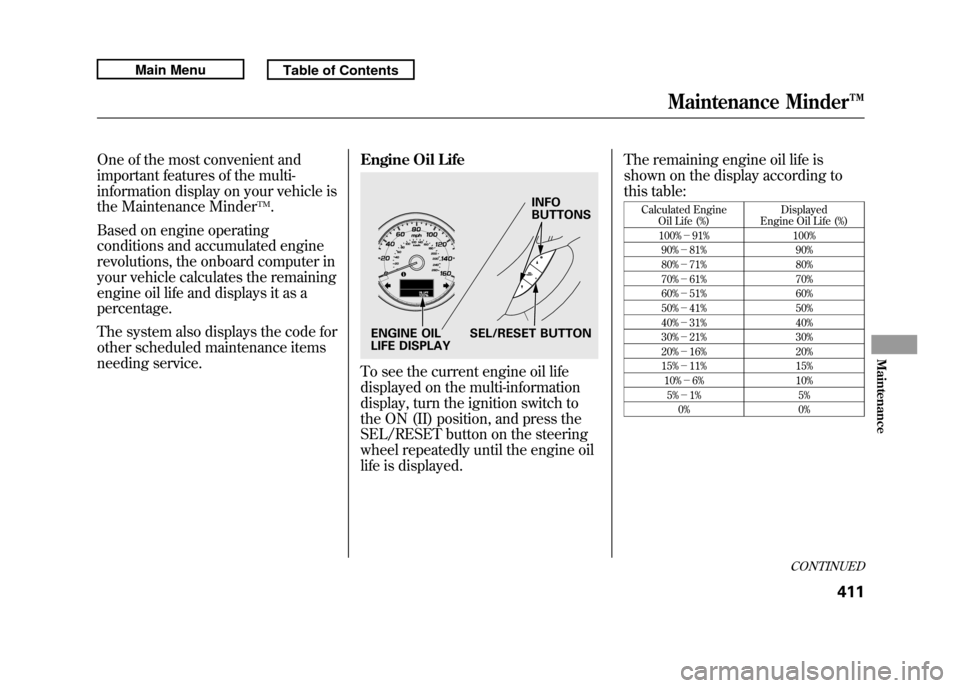
To see the current engine oil life
displayed on the multi-information
display, turn the ignition switch to
the ON (II) position, and press the
SEL/RESET button on the steering
wheel repeatedly until the engine oil
life is displayed.The remaining engine oil life is
shown on the display according to
this table:
Calculated Engine
Oil Life (%) Displayed
Engine Oil Life (%)
100% -91% 100%
90% -81% 90%
80% -71% 80%
70% -61% 70%
60% -51% 60%
50% -41% 50%
40% -31% 40%
30% -21% 30%
20% -16% 20%
15% -11% 15%
10% -6% 10%
5% -1% 5%
0% 0%
INFO
BUTTONS
SEL/RESET BUTTON
ENGINE OIL
LIFE DISPLAY
CONTINUED
Maintenance Minder™
411
Maintenance
10/06/08 17:42:32 11 ACURA RDX MMC North America Owner's M 50 31STK640 enu