service Acura RDX 2011 Service Manual
[x] Cancel search | Manufacturer: ACURA, Model Year: 2011, Model line: RDX, Model: Acura RDX 2011Pages: 517, PDF Size: 27.89 MB
Page 451 of 517
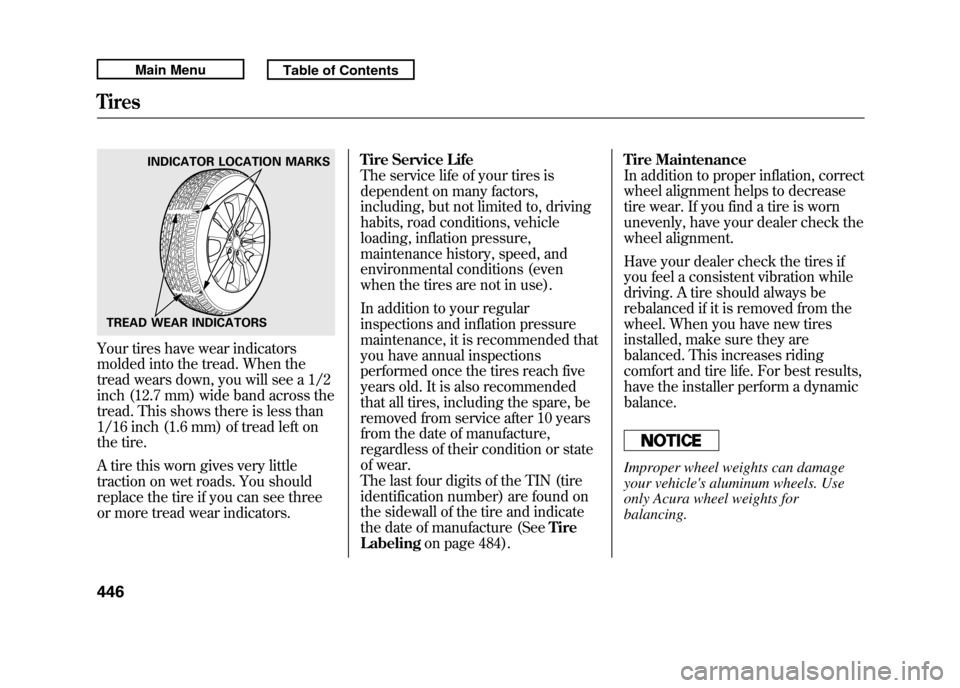
Your tires have wear indicators
molded into the tread. When the
tread wears down, you will see a 1/2
inch (12.7 mm) wide band across the
tread. This shows there is less than
1/16 inch (1.6 mm) of tread left on
the tire.
A tire this worn gives very little
traction on wet roads. You should
replace the tire if you can see three
or more tread wear indicators.Tire Service Life
The service life of your tires is
dependent on many factors,
including, but not limited to, driving
habits, road conditions, vehicle
loading, inflation pressure,
maintenance history, speed, and
environmental conditions (even
when the tires are not in use).
In addition to your regular
inspections and inflation pressure
maintenance, it is recommended that
you have annual inspections
performed once the tires reach five
years old. It is also recommended
that all tires, including the spare, be
removed from service after 10 years
from the date of manufacture,
regardless of their condition or state
of wear.
The last four digits of the TIN (tire
identification number) are found on
the sidewall of the tire and indicate
the date of manufacture (See
Tire
Labeling on page 484). Tire Maintenance
In addition to proper inflation, correct
wheel alignment helps to decrease
tire wear. If you find a tire is worn
unevenly, have your dealer check the
wheel alignment.
Have your dealer check the tires if
you feel a consistent vibration while
driving. A tire should always be
rebalanced if it is removed from the
wheel. When you have new tires
installed, make sure they are
balanced. This increases riding
comfort and tire life. For best results,
have the installer perform a dynamic
balance.
Improper wheel weights can damage
your vehicle's aluminum wheels. Use
only Acura wheel weights for
balancing.
INDICATOR LOCATION MARKS
TREAD WEAR INDICATORS
Tires44610/06/08 17:42:32 11 ACURA RDX MMC North America Owner's M 50 31STK640 enu
Page 463 of 517
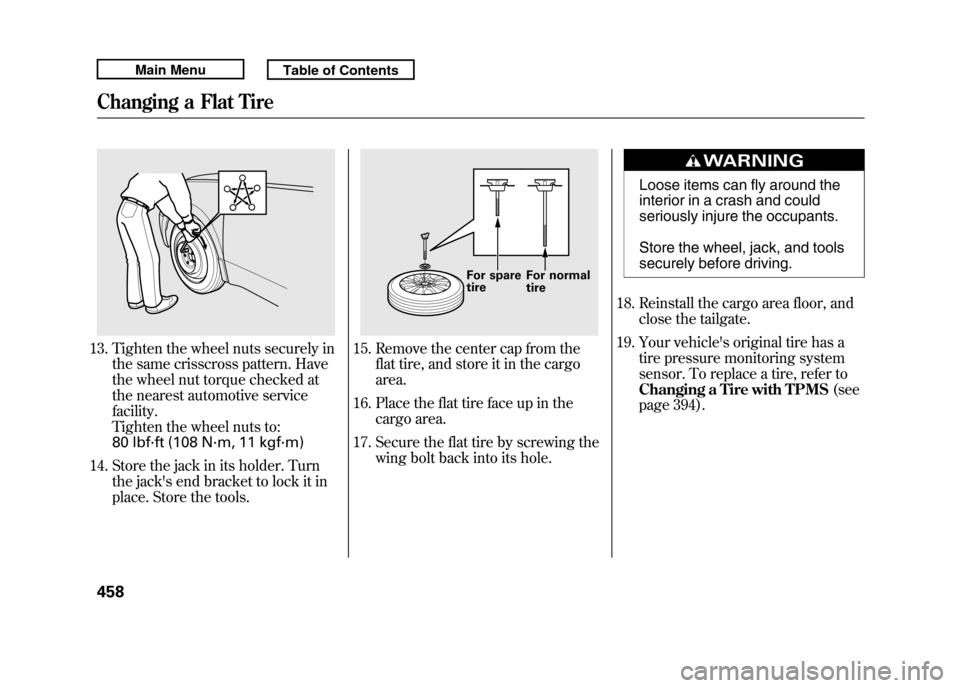
13. Tighten the wheel nuts securely inthe same crisscross pattern. Have
the wheel nut torque checked at
the nearest automotive service
facility.
Tighten the wheel nuts to:
80 lbf·ft (108 N·m, 11 kgf·m)
14. Store the jack in its holder. Turn the jack's end bracket to lock it in
place. Store the tools.
15. Remove the center cap from theflat tire, and store it in the cargo
area.
16. Place the flat tire face up in the cargo area.
17. Secure the flat tire by screwing the wing bolt back into its hole.
Loose items can fly around the
interior in a crash and could
seriously injure the occupants.
Store the wheel, jack, and tools
securely before driving.
18. Reinstall the cargo area floor, and close the tailgate.
19. Your vehicle's original tire has a tire pressure monitoring system
sensor. To replace a tire, refer to
Changing a Tire with TPMS (see
page 394).
For spare
tire For normal
tire
Changing a Flat Tire45810/06/08 17:42:32 11 ACURA RDX MMC North America Owner's M 50 31STK640 enu
Page 470 of 517

Low Oil Pressure Indicator
This indicator should never
come on when the engine is
running. If it starts flashing or stays
on, the oil pressure has dropped very
low or lost pressure. Serious engine
damage is possible, and you should
take immediate action.
You will also see an ‘‘OIL PRESSURE
LOW ’’message on the multi-
information display (see page 79).
Running the engine with low oil
pressure can cause serious mechanical
damage almost immediately. Turn off
the engine as soon as you can safely get
the vehicle stopped. 1. Safely pull off the road, and shut
off the engine. Turn on the hazard
warning lights.
2. Let the vehicle sit for a minute. Open the hood, and check the oil
level (see page 356). An engine
very low on oil can lose pressure
during cornering and other driving
maneuvers.
3. If necessary, add oil to bring the level back to the full mark on the
dipstick (see page 420).
4. Start the engine, and watch the oil pressure indicator. If it does not go
out within 10 seconds, turn off the
engine. There is a mechanical
problem that needs to be repaired
before you can continue driving
(see Emergency Towing on page
475). Charging System Indicator
If the charging system
indicator comes on brightly
when the engine is running, the
battery is not being charged.
You will also see a ‘‘CHECK
CHARGING SYSTEM ’’message on
the multi-information display (see
page 79).
Immediately turn off all electrical
accessories. Try not to use other
electrically operated controls such as
the power windows. Keep the engine
running; starting the engine will
discharge the battery rapidly.
Go to a service station or garage
where you can get technical
assistance.
Low Oil Pressure Indicator, Charging System Indicator
465
Taking Care of the Unexpected
10/06/08 17:42:32 11 ACURA RDX MMC North America Owner's M 50 31STK640 enu
Page 472 of 517

Brake System Indicator
(Red)U.S. CanadaThe brake system indicator (red)
normally comes on when you turn
the ignition switch to the ON (II)
position, and as a reminder to check
the parking brake. It will stay on if
you do not fully release the parking
brake.
If the brake system indicator (red)
comes on while driving, the brake
fluid level is probably low. Press
lightly on the brake pedal to see if it
feels normal. If it does, check the
brake fluid level the next time you
stop at a service station (see page
429).
You will also see a‘‘BRAKE FLUID
LOW ’’message on the multi-
information display (see page 79). If the fluid level is low, take your
vehicle to a dealer, and have the
brake system inspected for leaks or
worn brake pads.
However, if the brake pedal does not
feel normal, you should take
immediate action. A problem in one
part of the system's dual circuit
design will still give you braking at
two wheels. You will feel the brake
pedal go down much farther before
the vehicle begins to slow down, and
you will have to press harder on the
pedal.
You will also see a
‘‘CHECK BRAKE
SYSTEM ’’message on the multi-
information display (see page 79). Slow down by shifting to a lower
gear, and pull to the side of the road
when it is safe. Because of the long
distance needed to stop, it is
hazardous to drive the vehicle. You
should have it towed, and repaired as
soon as possible (see
Emergency
Towing on page 475).
If you must drive the vehicle a short
distance in this condition, drive
slowly and carefully.
If the ABS indicator and the VSA
system indicator come on with the
brake system indicator, have your
vehicle inspected by your dealer
immediately.
Brake System Indicator
467
Taking Care of the Unexpected
10/06/08 17:42:32 11 ACURA RDX MMC North America Owner's M 50 31STK640 enu
Page 480 of 517
If your vehicle needs to be towed,
call a professional towing service or
organization. Never tow your vehicle
with just a rope or chain. It is very
dangerous.(On SH-AWD models)The only way you can safely tow
your vehicle is with flat-bed
equipment.The operator will load
your vehicle on the back of a truck.
Any other method of towing will
damage the drive system. When you
contact the towing agency, inform
them a flat-bed is required.Towing with only two tires on the
ground will damage parts of the all-
wheel-drive system. Your vehicle should
be transported on a flat-bed truck or
trailer.
(Execpt SH-AWD models)There are two ways to tow your
vehicle:Flat-bed Equipment
- The operator
loads your vehicle on the back of a
truck. This is the best way to
transport your vehicle.
Wheel-lift Equipment
- The tow
truck uses two pivoting arms that go
under the front tires and lift them off
the ground. The rear tires remain on
the ground. This is an acceptable
way to tow your vehicle. If, due to damage, your vehicle must
be towed with the front wheels on
the ground, do this:
●Start the engine.●Shift to the D position and hold for
5 seconds, then to N.●Turn off the engine.●Leave the ignition switch in the
ACCESSORY (I) position so the
steering wheel does not lock.●Release the parking brake.
CONTINUED
Emergency Towing
475
Taking Care of the Unexpected
10/06/08 17:42:32 11 ACURA RDX MMC North America Owner's M 50 31STK640 enu
Page 487 of 517

The tires on your vehicle meet all
U.S. Federal Safety Requirements.
All tires are also graded for
treadwear, traction, and temperature
performance according to
Department of Transportation (DOT)
standards. The following explains
these gradings.
Uniform Tire Quality Grading
Quality grades can be found where
applicable on the tire sidewall
between tread shoulder and
maximum section width. For
example:Treadwear 200
Traction AA
Temperature A
All passenger car tires must conform
to Federal Safety Requirements in
addition to these grades. Treadwear
The treadwear grade is a
comparative rating based on the wear
rate of the tire when tested under
controlled conditions on a specified
government test course. For
example, a tire graded 150 would
wear one and one-half (1 1/2) times
as well on the government course as
a tire graded 100. The relative
performance of tires depends upon
the actual conditions of their use,
however, and may depart
significantly from the norm due to
variations in driving habits, service
practices and differences in road
characteristics and climate.
Traction
The traction grades, from highest to
lowest, are AA, A, B, and C. Those
grades represent the tire's ability to
stop on wet pavement as measured
under controlled conditions on
specified government test surfaces of
asphalt and concrete. A tire marked
C may have poor traction
performance.
Warning: The traction grade
assigned to this tire is based on
straight-ahead braking traction tests,
and does not include acceleration,
cornering, hydroplaning, or peak
traction characteristics.DOT Tire Quality Grading (U.S. Vehicles)48210/06/08 17:42:32 11 ACURA RDX MMC North America Owner's M 50 31STK640 enu
Page 498 of 517

Client Service Information
...........
494
Warranty Coverages
...................
495
Reporting Safety Defects (U.S. Vehicles)
.................................
496
Authorized Manuals
....................
497
Warranty and Client Relations
493
Warranty and Client Relations
10/06/08 17:42:32 11 ACURA RDX MMC North America Owner's M 50 31STK640 enu
Page 499 of 517

Acura dealership personnel are
trained professionals. They should
be able to answer all your questions.
If you encounter a problem that your
dealership does not solve to your
satisfaction, please discuss it with the
dealership's management. The
service manager or general manager
can help. Almost all problems are
solved in this way.
If you are dissatisfied with the
decision made by the dealership's
management, contact Acura Client
Services.
U.S. Owners:American Honda Motor Co., Inc.
Acura Client Services
Mail Stop 500-2N-7E
1919 Torrance Blvd.
Torrance, CA 90501-2746
Tel: (800) 382-2238
Canadian Owners:Acura Client Services
Honda Canada Inc.
Visit
www.acura.ca
for contact information
Tel: 1-888-9-ACURA-9
Fax: 1-877-939-0909
In Puerto Rico and the U.S. Virgin
Islands:Vortex Motor Corp.
Bella International
P.O. Box 190816
San Juan, PR 00919-0816
Tel: (787) 620-7546
When you call or write, please give
us this information:●Vehicle Identification Number (see
page 478)●Name and address of the dealer
who services your vehicle●Date of purchase●Odometer reading of your vehicle●Your name, address, and
telephone number●A detailed description of the
problem●Name of the dealer who sold the
vehicle to you
Client Service Information49410/06/08 17:42:32 11 ACURA RDX MMC North America Owner's M 50 31STK640 enu
Page 502 of 517

Purchasing Factory Authorized Manuals (U.S. only)The publications shown below can be purchased from Helm
Incorporated. You can order by phone or online:●Call Helm Inc. at 1-800-782-4356 (credit card orders only)●Go online at
www.helminc.com
If you are interested in other years or models, contact Helm Inc.
at 1-800-782-4356.
Publication
Form Number Form Description
61STK04 2007-2011 Acura RDX Service Manual
61STK04EL 2011 Acura RDX
Electrical Troubleshooting Manual
61STK30 2007 Model series Acura RDX
Body Repair Manual
31STK640 2011 Acura RDX Owner's Manual
31STK840 2011 Acura RDX Navigation System Manual
31STKM40 2011 Acura RDX Maintenance Journal
31STKQ40 2011 Acura RDX Advanced Technology Guide
ACU-R Order Form for Previous Years-
Indicate Year and Model Desired
Service Manual:
Covers maintenance and recommended procedures for
repair to engine and chassis components. It is written
for the journeyman mechanic, but it is simple enough
for most mechanically inclined owners to understand.
Electrical Troubleshooting Manual:
Complements the Service Manual by providing in-depth
troubleshooting information for each electrical circuit in
your vehicle.
Body Repair Manual:
Describes the procedures involved in the replacement
of damaged body parts.
Authorized Manuals
497
Warranty and Client Relations
Page 505 of 517

Bulb ReplacementBack-up Lights
........................
433
Brake Lights
...........................
433
Fog Lights
...............................
435
Front Parking Lights
...............
432
Front Side Marker Lights
........
432
Headlights
..............................
431
High-mount Brake Light
.........
436
Rear Bulbs
......................
433, 434
Rear License Plate Lights........
437
Specifications
..........................
481
Taillights
.........................
433, 434
Turn Signal Lights
..........
432, 433
Bulbs, Halogen
..........................
431
C
Capacities Chart
.........................
480
Carbon Monoxide Hazard
............
57
Cargo
.........................................
364
Cargo Area Cover
.......................
160
Cargo Area Light
........................
153
Cargo, How to Carry
..................
364
Carrying Cargo
..........................
364
CAUTION, Explanation of
............
iii CD Care
.....................................
257
Ceiling Lights
.............................
151
Certification Label
......................
478
Chains, Tires
..............................
449
Changing a Flat Tire
..................
455
Changing Oil How to
....................................
422
When to
..................................
411
Charging System Indicator
...........................
65, 465
Checklist, Before Driving
...........
373
Childproof Door Locks
...............
127
Child Safety
..................................
36
Booster Seats
...........................
54
Child Seats
....................
41, 42, 44
Important Safety Reminders
.....
40
Infants
......................................
41
Larger Children
.......................
53
LATCH
.....................................
46
Risks with Airbags
...................
37
Small Children
.........................
42
Tethers
....................................
51
Warning Labels
........................
38
Where Should a Child Sit?
........
37
Child Seats
...................................
44
LATCH Anchorage Points
........
46 Tether Anchorage Points
.........
51
Cleaning the Seat Belts
..............
438
Client Service Information
..........
494
Climate Control Sensors
............
171
Climate Control System
.............
164
Clock
..........................................
293
Coat Hook
..................................
161
Code, Audio System
...................
292
CO in the Exhaust
................
57, 487
Cold Weather, Starting in
...........
374
Compact Spare Tire
....................
454
Compass Operation
..................
295
Console Compartment
...............
158
Consumer Information
...............
494
Controls, Instruments and
............
61
Coolant Adding
....................................
424
Checking
................................
357
Proper Solution
.......................
424
Courtesy Lights
..........................
153
Crankcase Emissions Control
System
...................................
487
Cruise Control Indicator
...............
69
Cruise Control Operation
...........
300
Cruise Main Indicator
..................
69
Cup Holders
...............................
156
IndexII10/06/08 17:42:32 11 ACURA RDX MMC North America Owner's M 50 31STK640 enu