fuel Acura RDX 2012 User Guide
[x] Cancel search | Manufacturer: ACURA, Model Year: 2012, Model line: RDX, Model: Acura RDX 2012Pages: 518, PDF Size: 26.43 MB
Page 83 of 518

Maintenance Minder
TM
The multi-information display in the
instrument panel shows you the
engine oil life and maintenance
service items when the ignition
switch is in the ON (II) position. This
information helps to keep you aware
of the periodic maintenance your
vehicle needs for continued trouble-
free driving. Refer to page 411 for
more information.
INST. MPG (U.S. models)/INST.
L/100 km (Canadian models)
This shows your instant fuel
economy.
When you turn off the engine, INST.
MPG or INST. L/100 km is also
reset.RANGE
This shows the estimated distance
you can travel on the fuel remaining
in the fuel tank. This distance is
estimated from the fuel economy you
received over the last several miles
(U.S.) or kilometers (Canada), so it
will vary with changes in speed,
traffic, etc.
When the battery is disconnected, or
you refuel, RANGE is also reset.
ELAPSED TIME
This shows the accumulated
traveling time since you last reset it.
When you turn the ignition switch to
the ON (II) position, ELAPSED
TIME is reset.
You can customize the ELAPSED
TIME reset condition on the multi-
information display (see page 95).AVG. SPEED
This shows the average speed you
are traveling in miles per hour (mph)
for U.S. models or kilometers per
hour (km/h) for Canadian models.
When you reset Trip A, AVG. SPEED
is also reset.
AVG. FUEL A/B
This shows your vehicle's average
fuel economy in mpg (U.S. models)
or liter/100 km (Canadian models)
since you last reset Trip A or Trip B.
You can customize the Trip A and
AVG. FUEL A reset condition on the
multi-information display (see page
93).
The average fuel economy will be
reset when you reset the trip meter,
or if the vehicle's battery goes dead
or is disconnected.
CONTINUED
Multi-Information Display
77
Instruments and Controls
11/06/16 17:42:51 12 ACURA RDX MMC North America Owner's M 50 31STK650 enu
Page 89 of 518

Customize Entry Customize Group Customize MenuDescriptionCustomize Setup PageCHG SETTING
(P. 86)METER SETUP
(P. 88) LANGUAGE SELECTION Changes the language used in the display. ENGLISH
ᤳ
89
FRENCH
SPANISH
ADJUST OUTSIDE
TEMP. DISPLAY Changes the outside temperature reading
above or below its current reading. -
5°F ~ᤣ0°F
ᤳ~ 5°F
91
- 3°C ~ᤣ0°Cᤳ~ 3°C
TRIP A & AVG. FUEL
RESET with REFUEL Causes trip meter A and the average fuel
economy to reset when you refuel. ON
93
OFF
ᤳ
ELAP. TIME RESET
CONDITION Resets the elapsed time of your current trip. IGN RESET
ᤳ
95
TRIP A RESET
TRIP B RESET
LIGHTING SETUP
(P. 97) INTERIOR LIGHT
DIMMING TIME Changes how long (in seconds) the interior
lights stay on after you close the doors. 15 sec
98
30 sec
ᤳ
60 sec
HEADLIGHT AUTO OFF
TIMER Changes how long (in seconds) the exterior
lights stay on after you close the driver's
door. 0 sec
100
15 sec
ᤳ
30 sec
60 sec
DOOR SETUP
(P. 102) AUTO DOOR LOCK Changes when the system automatically
locks the doors. SHIFT FROM P
103
WITH VEH SPEED
ᤳ
OFF
ᤳ : Default setting
CONTINUED
Multi-Information Display
83
Instruments and Controls
11/06/16 17:42:51 12 ACURA RDX MMC North America Owner's M 50 31STK650 enu
Page 94 of 518
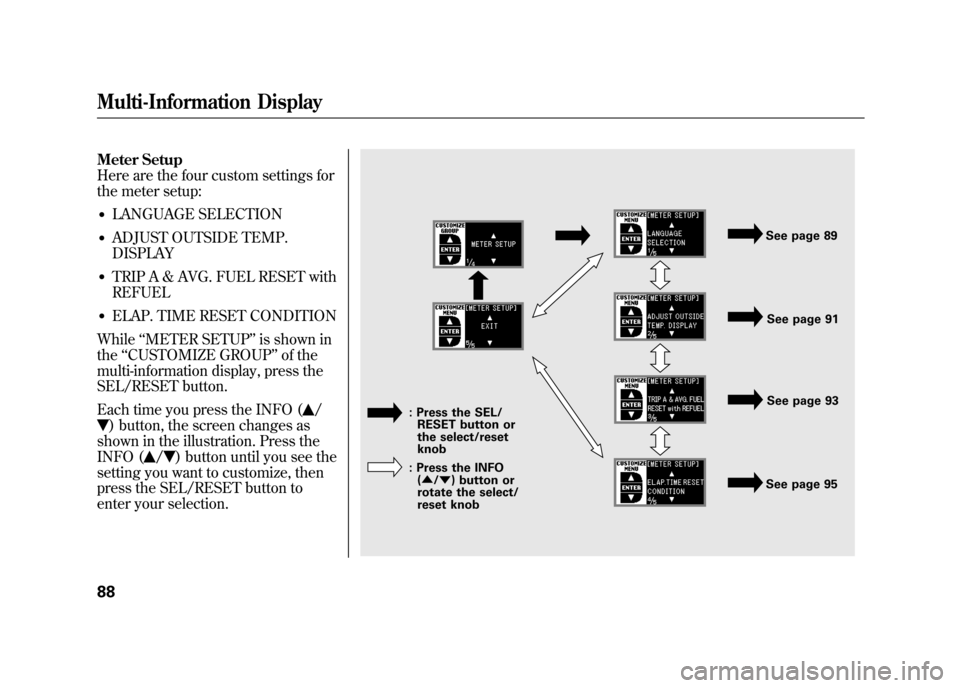
Meter Setup
Here are the four custom settings for
the meter setup:●LANGUAGE SELECTION●ADJUST OUTSIDE TEMP.
DISPLAY●TRIP A & AVG. FUEL RESET with
REFUEL●ELAP. TIME RESET CONDITION
While ‘‘METER SETUP ’’is shown in
the ‘‘CUSTOMIZE GROUP ’’of the
multi-information display, press the
SEL/RESET button.
Each time you press the INFO (
/
) button, the screen changes as
shown in the illustration. Press the
INFO (
/
) button until you see the
setting you want to customize, then
press the SEL/RESET button to
enter your selection.
See page 91
See page 89
See page 93
See page 95
: Press the SEL/
RESET button or
the select/reset
knob
: Press the INFO (▲ /▼ ) button or
rotate the select/
reset knob
Multi-Information Display8811/06/16 17:42:51 12 ACURA RDX MMC North America Owner's M 50 31STK650 enu
Page 99 of 518
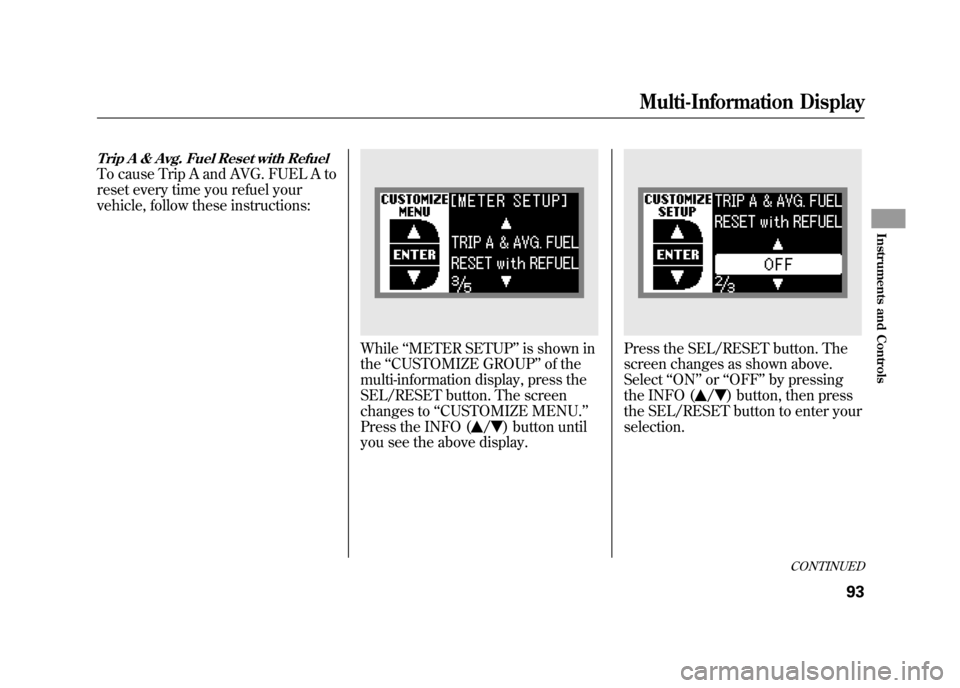
Trip A & Avg. Fuel Reset with RefuelTo cause Trip A and AVG. FUEL A to
reset every time you refuel your
vehicle, follow these instructions:
While‘‘METER SETUP ’’is shown in
the ‘‘CUSTOMIZE GROUP ’’of the
multi-information display, press the
SEL/RESET button. The screen
changes to ‘‘CUSTOMIZE MENU. ’’
Press the INFO (
/
) button until
you see the above display.
Press the SEL/RESET button. The
screen changes as shown above.
Select ‘‘ON ’’or ‘‘OFF ’’by pressing
the INFO (
/
) button, then press
the SEL/RESET button to enter your
selection.
CONTINUED
Multi-Information Display
93
Instruments and Controls
11/06/16 17:42:51 12 ACURA RDX MMC North America Owner's M 50 31STK650 enu
Page 100 of 518
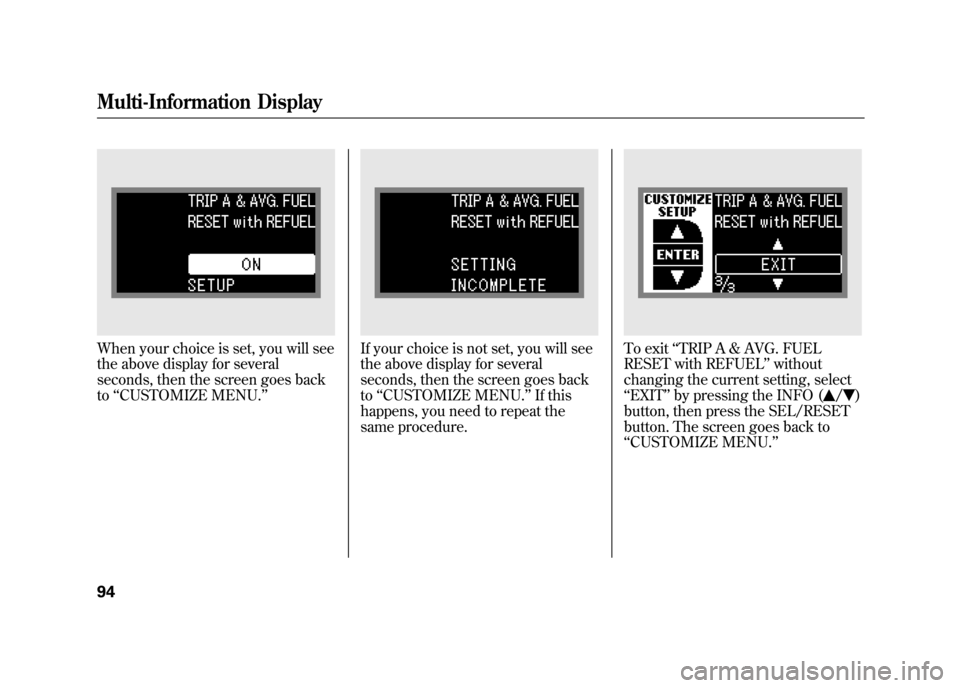
When your choice is set, you will see
the above display for several
seconds, then the screen goes back
to‘‘CUSTOMIZE MENU.’’
If your choice is not set, you will see
the above display for several
seconds, then the screen goes back
to ‘‘CUSTOMIZE MENU. ’’If this
happens, you need to repeat the
same procedure.
To exit ‘‘TRIP A & AVG. FUEL
RESET with REFUEL ’’without
changing the current setting, select
‘‘ EXIT’’ by pressing the INFO (
/
)
button, then press the SEL/RESET
button. The screen goes back to
‘‘ CUSTOMIZE MENU. ’’
Multi-Information Display9411/06/16 17:42:51 12 ACURA RDX MMC North America Owner's M 50 31STK650 enu
Page 130 of 518

The immobilizer system protects
your vehicle from theft. If an
improperly coded key (or other
device) is used, the engine's fuel
system is disabled.
When you turn the ignition switch to
the ON (II) position, the immobilizer
system indicator should come on
briefly, then go off. If the indicator
starts to blink, it means the system
does not recognize the coding of the
key. Turn the ignition switch to the
LOCK (0) position, remove the key,
reinsert it, and turn the ignition
switch to the ON (II) position again.The system may not recognize your
key's coding if another immobilizer
key or other metal object (i.e. key
chain) is near the ignition switch
when you insert the key.
If the system repeatedly does not
recognize the coding of your key,
contact your dealer.
Do not attempt to alter this system or
add other devices to it. Electrical
problems could result that may make
your vehicle inoperable.
If you have lost your key and cannot
start the engine, contact your dealer.
Always take the ignition key with you
whenever you leave the vehicle alone.
As required by the FCC:
This device complies with Part 15 of theFCC rules. Operation is subject to the
following two conditions: (1) This devicemay not cause harmful interference, and(2) this device must accept any
interference received, includinginterference that may cause undesiredoperation.
Changes or modifications not expresslyapproved by the party responsible for
compliance could void the user'sauthority to operate the equipment.
This device complies with IndustryCanada Standard RSS-210.
Operation is subject to the following twoconditions: (1) this device may not causeinterference, and (2) this device must
accept any interference that may causeundesired operation of the device.
Immobilizer System12411/06/16 17:42:51 12 ACURA RDX MMC North America Owner's M 50 31STK650 enu
Page 357 of 518

Before you begin driving your
vehicle, you should know what
gasoline to use and how to check the
levels of important fluids. You also
need to know how to properly store
luggage or packages. The
information in this section will help
you. If you plan to add any
accessories to your vehicle, please
read the information in this section
first.Break-in Period
...........................
352
Fuel Recommendation
................
352
Service Station Procedures
.........
354
Refueling
.................................
354
Tighten Fuel Cap Message
.....
355
Opening and Closing the
Hood
...................................
356
Oil Check
................................
357
Engine Coolant Check
............
358
Fuel Economy
.............................
358
Accessories and
Modifications
..........................
362
Carrying Cargo
...........................
365
Before Driving
351
Before Driving
11/06/16 17:42:51 12 ACURA RDX MMC North America Owner's M 50 31STK650 enu
Page 358 of 518

Break-in Period
Help assure your vehicle's future
reliability and performance by paying
extra attention to how you drive
during the first 600 miles (1,000 km).
During this period:●Avoid full-throttle starts and rapid
acceleration.●Avoid hard braking for the first 200
miles (300 km).●Do not change the oil until the
scheduled maintenance time.●Do not tow a trailer.
You should also follow these
recommendations with an
overhauled or exchanged engine, or
when the brakes are replaced. Fuel Recommendation
Your vehicle is designed to operate
on premium unleaded gasoline with
a pump octane of 91 or higher. If this
octane grade is unavailable, regular
unleaded gasoline with a pump
octane of 87 or higher may be used
temporarily. The use of regular
unleaded gasoline can cause metallic
knocking noises in the engine and
will result in decreased engine
performance. The long-term use of
regular-grade gasoline can lead to
engine damage.
Avoid driving with an extremely low
fuel level. Running out of fuel could
cause the engine to misfire, damaging
the catalytic converter.
To help prevent harmful fuel system and
engine deposits, use high quality fuel
containing detergent and additives. In
addition, in order to maintain good
performance, fuel economy, and
emissions control, we strongly
recommend the use of gasoline that
does NOT contain harmful manganese-
based fuel additives such as MMT, if
such gasoline is available.
Break-in Period, Fuel Recommendation35211/06/16 17:42:51 12 ACURA RDX MMC North America Owner's M 50 31STK650 enu
Page 359 of 518

Use of gasoline with these additives
may adversely affect performance,
and cause the malfunction indicator
lamp on your instrument panel to
come on. If this happens, contact
your dealer for service. Some
gasoline today is blended with
oxygenates such as ethanol. Your
vehicle is designed to operate on
oxygenated gasoline containing up to
10% ethanol by volume. Do not use
gasoline containing methanol. If you
notice any undesirable operating
symptoms, try another service
station or switch to another brand of
gasoline.Because the level of detergency and
additives in gasoline vary in the
market, Honda endorses the use of
‘‘
TOP TIER Detergent Gasoline ’’
where available to help maintain the
performance and reliability of your
vehicle. TOP TIER Detergent
Gasoline meets a new gasoline
standard jointly established by
leading automotive manufacturers to
meet the needs of today ’s advanced
engines. Qualifying gasoline retailers
will, in most cases, identify their
gasoline as having met ‘‘TOP TIER
Detergent Gasoline ’’standards at the
retail location. This fuel is
guaranteed to contain the proper
level of detergent additives and be
free of metallic additives. The proper
level of detergent additives, and
absence of harmful metallic additives
in gasoline, help avoid build-up of
deposits in your engine and emission
control system. For further important fuel-related
information for your vehicle, or
information on gasoline that does not
contain MMT, visit My Acura at
owners.acura.com.
In Canada, visit
www.acura.ca
for additional
information on gasoline. For more
information on top tier gasoline, visit
www.toptiergas.com
.
Fuel Recommendation
353
Before Driving
11/06/16 17:42:51 12 ACURA RDX MMC North America Owner's M 50 31STK650 enu
Page 360 of 518
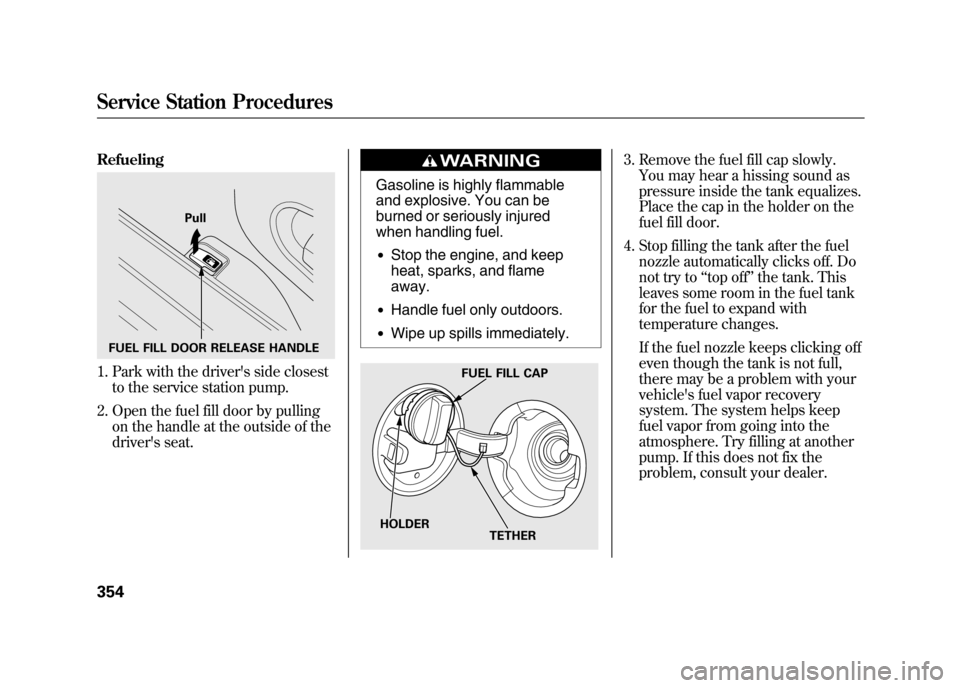
Refueling1. Park with the driver's side closestto the service station pump.
2. Open the fuel fill door by pulling on the handle at the outside of the
driver's seat.
Gasoline is highly flammable
and explosive. You can be
burned or seriously injured
when handling fuel.●Stop the engine, and keep
heat, sparks, and flame
away.●Handle fuel only outdoors.●Wipe up spills immediately.
3. Remove the fuel fill cap slowly.You may hear a hissing sound as
pressure inside the tank equalizes.
Place the cap in the holder on the
fuel fill door.
4. Stop filling the tank after the fuel nozzle automatically clicks off. Do
not try to ‘‘top off ’’the tank. This
leaves some room in the fuel tank
for the fuel to expand with
temperature changes.
If the fuel nozzle keeps clicking off
even though the tank is not full,
there may be a problem with your
vehicle's fuel vapor recovery
system. The system helps keep
fuel vapor from going into the
atmosphere. Try filling at another
pump. If this does not fix the
problem, consult your dealer.
FUEL FILL DOOR RELEASE HANDLE Pull
FUEL FILL CAP
TETHER
HOLDER
Service Station Procedures35411/06/16 17:42:51 12 ACURA RDX MMC North America Owner's M 50 31STK650 enu