ECU Acura RDX 2012 Owner's Guide
[x] Cancel search | Manufacturer: ACURA, Model Year: 2012, Model line: RDX, Model: Acura RDX 2012Pages: 518, PDF Size: 26.43 MB
Page 116 of 518

When your choice is set, you will see
the above display for several
seconds, then the screen goes back
to‘‘CUSTOMIZE MENU.’’
If your choice is not set, you will see
the above display for several
seconds, then the screen goes back
to ‘‘CUSTOMIZE MENU. ’’If this
happens, you need to repeat the
same procedure.
To exit ‘‘SECURITY RELOCK
TIMER ’’without changing the
current setting, select ‘‘EXIT ’’by
pressing the INFO (
/
) button,
then press the SEL/RESET button.
The screen goes back to
‘‘ CUSTOMIZE MENU. ’’
Multi-Information Display11011/06/16 17:42:51 12 ACURA RDX MMC North America Owner's M 50 31STK650 enu
Page 128 of 518

Steering Wheel Adjustments
Make any steering wheel
adjustments before you start driving.
Adjusting the steering wheel
position while driving may
cause you to lose control of the
vehicle and be seriously injured
in a crash.
Adjust the steering wheel only
when the vehicle is stopped.
1. Push the lever under the steering column all the way down.
2. Move the steering wheel up or down, and in or out, so it points
toward your chest, not toward your
face. Make sure you can see the
instrument panel gauges and
indicators.
3. Push the lever up to lock thesteering wheel in position.
4. Make sure you have securely locked the steering wheel in place
by trying to move it up, down, in,
and out. Keys and Locks
The master key fits all the locks on
your vehicle. The valet key works
only in the ignition and the door
locks. You can keep the glove box
and console compartment locked
when you leave your vehicle and the
valet key at a parking facility.
LEVER
VALET KEY
(Light Gray)
MASTER KEYS
WITH REMOTE
TRANSMITTER
KEY
NUMBER
TAG
Steering Wheel Adjustments, Keys and Locks12211/06/16 17:42:51 12 ACURA RDX MMC North America Owner's M 50 31STK650 enu
Page 129 of 518

You should have received a key
number tag with your keys. You will
need this key number if you ever
have to get a lost key replaced. Use
only Acura-approved key blanks.
These keys contain electronic
circuits that are activated by the
immobilizer system. They will not
work to start the engine if the circuits
are damaged.●Protect the keys from direct
sunlight, high temperature, and
high humidity.●Do not drop the keys or set heavy
objects on them.●Keep the keys away from liquids.
If they get wet, dry them
immediately with a soft cloth.
The valet key does not contain a
battery. Do not try to take it apart.
Retractable Master KeyThe master key can be retracted into
the remote transmitter. To use the
key, push the release button to
release the key from the transmitter.
The key should be fully extended. To
retract the key, push the release
button and at the same time push the
key into the remote transmitter until
it is securely latched. Always use the fully-extended key
when you insert it to the ignition
switch. If the key does not fully
extend, the immobilizer system may
not operate properly and may
prevent the engine from starting.
The key may come in contact with
your finger while being retracted or
extended. Make sure your fingers do
not touch the pivot of the key when
retracting or extending the key.RELEASE BUTTON
Push
Keys and Locks
123
Instruments and Controls
11/06/16 17:42:51 12 ACURA RDX MMC North America Owner's M 50 31STK650 enu
Page 136 of 518

LOCK-Press this button once to
lock all doors and the tailgate. Some
exterior lights will flash. When you
push LOCK twice within 5 seconds,
you will hear a beep to verify that the
doors and tailgate are locked and the
security system has set. This button
does not work if any door or tailgate
is not fully closed.
To change the ‘‘KEYLESS LOCK
ACKNOWLEDGEMENT ’’setting,
see page 107. UNLOCK
-Press this button once
to unlock the driver's door. Push it
twice to unlock the other doors.
Some exterior lights will flash twice
when you push the button. If you do
not open any door or the tailgate
within 30 seconds, they will
automatically relock.
To change the ‘‘DOOR LOCK
MODE ’’setting, see page 105.
To change the ‘‘SECURITY RELOCK
TIMER ’’setting, see page 109. When you press the UNLOCK
button, the ceiling lights (if the front
and rear ceiling light switches are in
the door activated position) will come
on. If you do not open any door, the
lights stay on for about 30 seconds,
then fade out. If you relock the doors
with the remote transmitter before 30
seconds have elapsed, the lights go
off immediately.
To change the
‘‘INTERIOR LIGHT
DIMMING TIME’’ setting, see page
98.
PANIC -Press this button for
about 1 second to attract attention;
the horn will sound, and the exterior
lights will flash for about 30 seconds.
To cancel panic mode, press any
button on the remote transmitter, or
turn the ignition switch to the ON
(II) position.
UNLOCK
BUTTON LOCK
BUTTON
PANIC
BUTTON
Remote Transmitter13011/06/16 17:42:51 12 ACURA RDX MMC North America Owner's M 50 31STK650 enu
Page 142 of 518
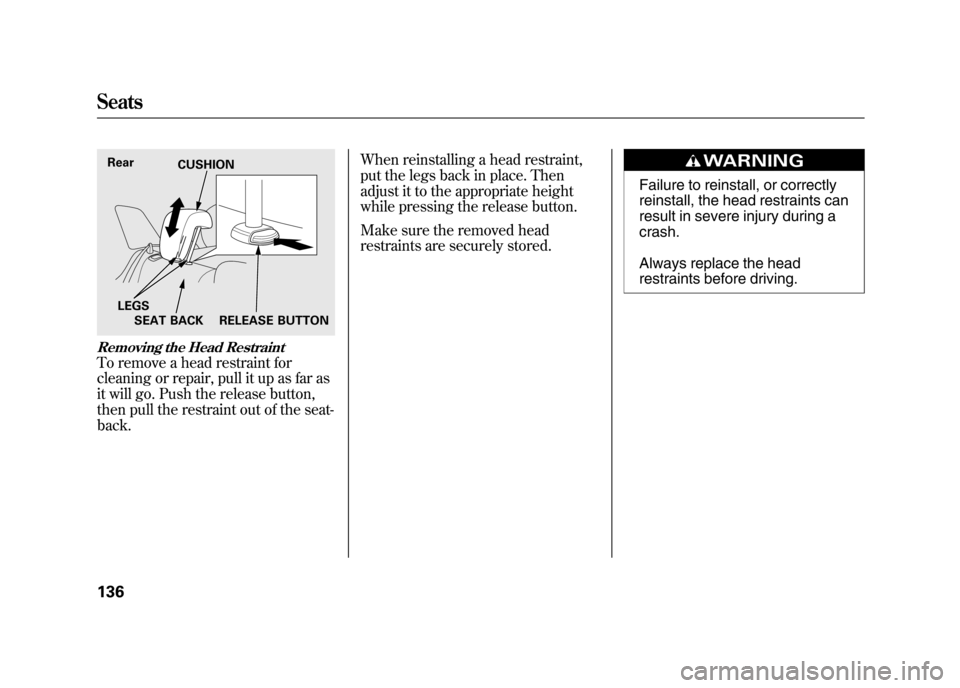
Removing the Head RestraintTo remove a head restraint for
cleaning or repair, pull it up as far as
it will go. Push the release button,
then pull the restraint out of the seat-
back.When reinstalling a head restraint,
put the legs back in place. Then
adjust it to the appropriate height
while pressing the release button.
Make sure the removed head
restraints are securely stored.
Failure to reinstall, or correctly
reinstall, the head restraints can
result in severe injury during a
crash.
Always replace the head
restraints before driving.
Rear
CUSHION
SEAT BACK RELEASE BUTTON
LEGSSeats13611/06/16 17:42:51 12 ACURA RDX MMC North America Owner's M 50 31STK650 enu
Page 143 of 518
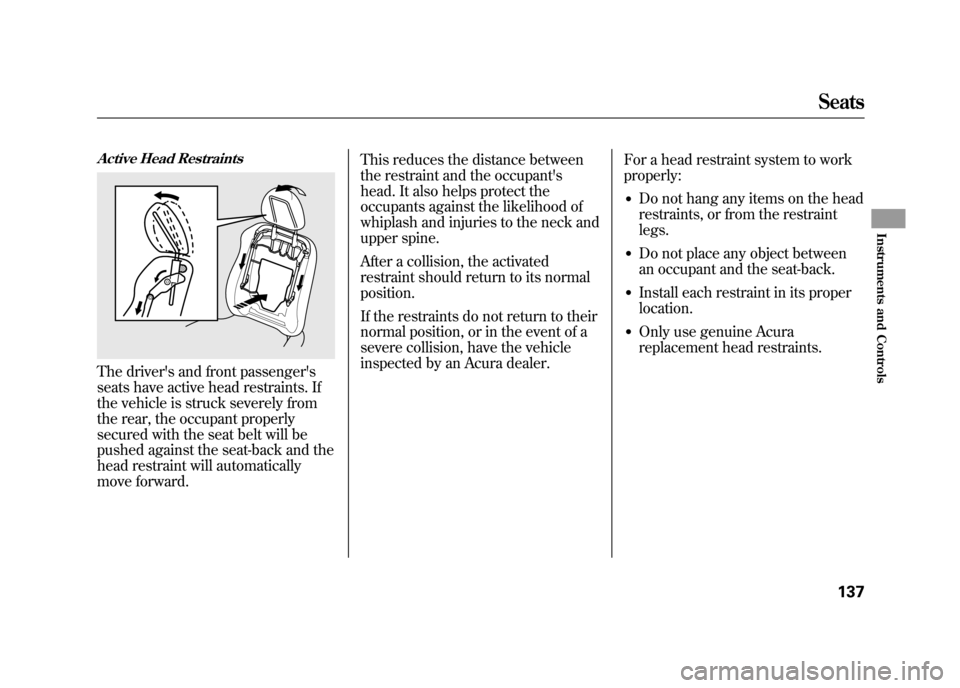
Active Head RestraintsThe driver's and front passenger's
seats have active head restraints. If
the vehicle is struck severely from
the rear, the occupant properly
secured with the seat belt will be
pushed against the seat-back and the
head restraint will automatically
move forward.This reduces the distance between
the restraint and the occupant's
head. It also helps protect the
occupants against the likelihood of
whiplash and injuries to the neck and
upper spine.
After a collision, the activated
restraint should return to its normal
position.
If the restraints do not return to their
normal position, or in the event of a
severe collision, have the vehicle
inspected by an Acura dealer.
For a head restraint system to work
properly:
●Do not hang any items on the head
restraints, or from the restraint
legs.●Do not place any object between
an occupant and the seat-back.●Install each restraint in its proper
location.●Only use genuine Acura
replacement head restraints.
Seats
137
Instruments and Controls
11/06/16 17:42:51 12 ACURA RDX MMC North America Owner's M 50 31STK650 enu
Page 146 of 518

Do not put any heavy items on the
seat-back when it is folded down.
Make sure all items in the cargo area
are secured. Loose items can fly
forward and cause injury if you have
to brake hard (SeeCarrying Cargo
on page 365).
Make sure that the folded down rear
seat does not interfere with the front
passenger's seat-back. This will
cause the front passenger's weight
sensors and the front passenger's
seat belt reminder indicator to work
improperly (see pages 21 and 33).
Also check the passenger airbag off
indicator to assure proper operation
of the passenger's front airbag.
After returning the seat-back to the
upright position, tug on the seat-back
to make sure it is latched. If the seat-
back is not latched fully, the seat belt
will not work properly and you will
see the red indicator behind the
release lever as shown. To return the seat cushion to its
original position, lift up the seat
cushion, then place the rear of the
seat cushion at the base of the seat-
back. Use the seat buckles as guides.
Lower the front of the seat cushion
until it locks into place.
Make sure the seat-back and seat
cushion are locked securely and all
rear shoulder belts are positioned in
front of the rear seat-backs.
RELEASE
LEVER
INDICATOR
Seats14011/06/16 17:42:51 12 ACURA RDX MMC North America Owner's M 50 31STK650 enu
Page 167 of 518
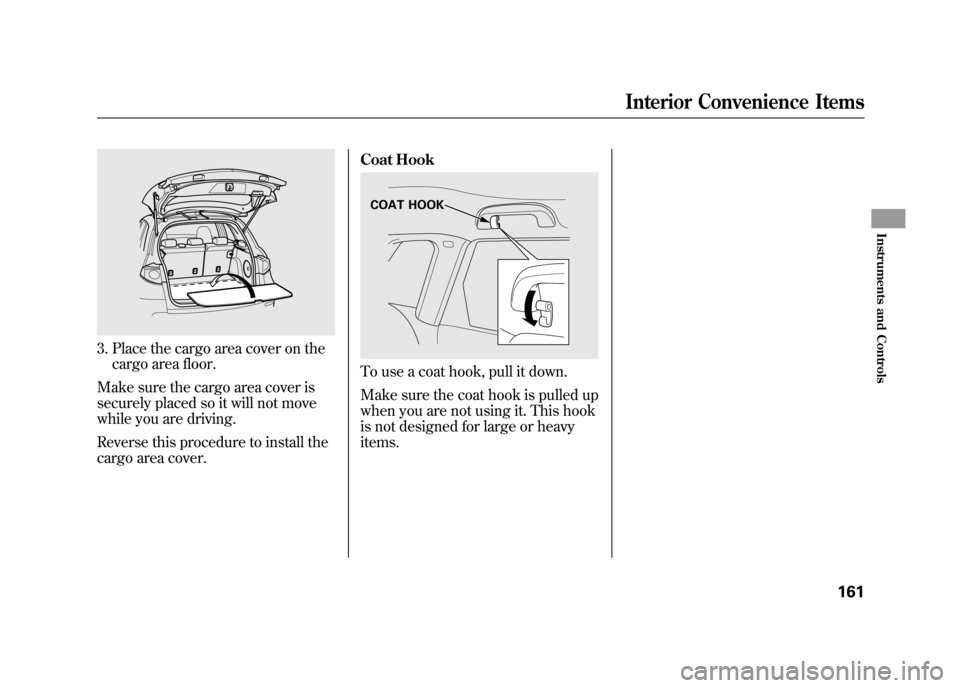
3. Place the cargo area cover on thecargo area floor.
Make sure the cargo area cover is
securely placed so it will not move
while you are driving.
Reverse this procedure to install the
cargo area cover. Coat Hook
To use a coat hook, pull it down.
Make sure the coat hook is pulled up
when you are not using it. This hook
is not designed for large or heavy
items.COAT HOOK
Interior Convenience Items
161
Instruments and Controls
11/06/16 17:42:51 12 ACURA RDX MMC North America Owner's M 50 31STK650 enu
Page 169 of 518

The climate control system in your vehicle
provides a comfortable driving
environment in all weather conditions.
The standard audio system has many
features. This section describes those
features and how to use them.
Your vehicle has an anti-theft audio system
that requires a code number to enable it.
The security system helps to discourage
vandalism and theft of your vehicle.On models with navigation systemThe climate control system and the audiosystem have a voice control feature. Referto the navigation system manual for more
information.Climate Control System
....................
164
Dual Temperature Control
.............
169
Climate Control Sensors
................
171
Audio System
..................................
172
Playing the FM/AM Radio (Models without navigation system)
........
174
To Play the Radio
.........................
174
Adjusting the Sound
.....................
177
Playing the XM
®Radio (Models
without navigation system)
............
179
Playing Discs (Models without navigation system)
.......................
185 Disc Changer Error Messages
(Models without navigationsystem)
..................................
195
Playing an iPod
®(Models without
navigation system)
.......................
197
iPod
®Error Messages (Models
without navigation system)
............
203
Playing a USB Flash Memory Device (Models without navigationsystem)
..................................
204
USB Flash Memory Device Error Messages (Models without
navigation system)
...................
211
Bluetooth
®Audio System (Models
without navigation system)
............
212
Audio System (Models with navigation system)
..................................
216
Interface Dial
..............................
216
Playing the FM/AM Radio (Models
with navigation system)
.............
217
Adjusting the Sound
.....................
224
Playing the XM
®Radio (Models with
navigation system)
.......................
228
Playing Discs (Models with navigation system)
......................................
239
Disc Changer Error Messages
(Models with navigationsystem)
..................................
255 Protecting Your Discs
.......................
257
Playing an iPod
®(Models with
navigation system)
.......................
260
iPod
®Error Messages (Models with
navigation system)
.......................
269
Playing a USB Flash Memory Device (Models with navigation
system)
..................................
270
USB Flash Memory Device Error Messages (Models with navigation
system)
..................................
279
Bluetooth
®Audio System (Models with
navigation system)
.......................
280
FM/AM Radio Reception
..................
287
Remote Audio Controls
.....................
289
Auxiliary Input Jack
..........................
291
Radio Theft Protection
......................
291
Setting the Clock
.............................
293
Security System
...............................
294
Compass
........................................
295
Compass Operation
....................
295
Cruise Control
.................................
300
HomeLink
®Universal Transceiver
......
303
Bluetooth
®HandsFreeLink
®..............
306
AcuraLink
®(U.S. models only)
...........
332
Rearview Mirror with Rearview
Camera Display
...........................
348
Features
163
Features
11/06/16 17:42:51 12 ACURA RDX MMC North America Owner's M 50 31STK650 enu
Page 205 of 518
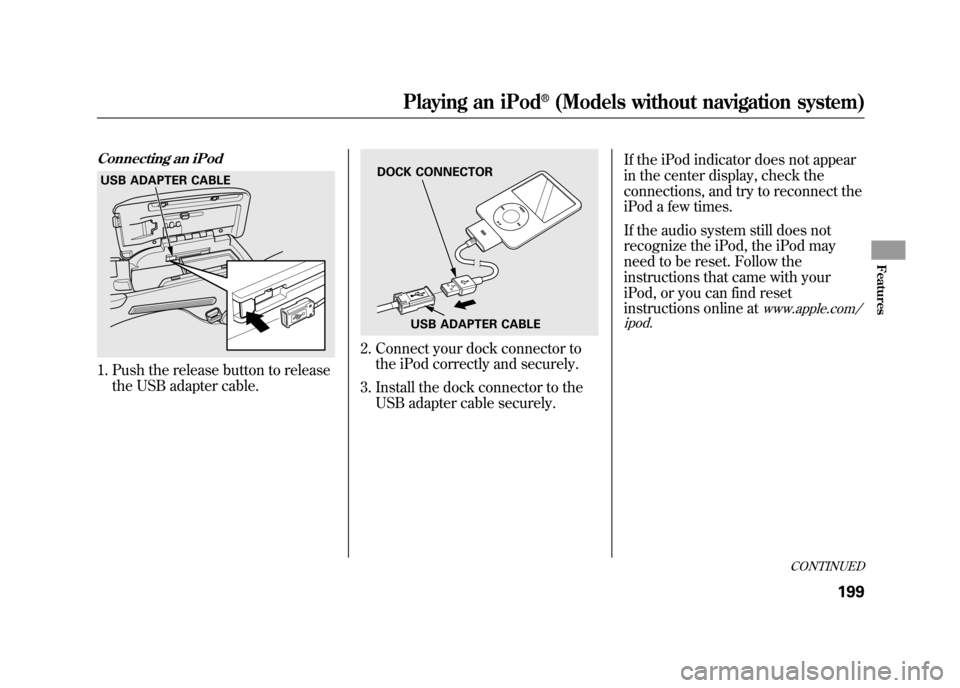
Connecting an iPod1. Push the release button to releasethe USB adapter cable.
2. Connect your dock connector tothe iPod correctly and securely.
3. Install the dock connector to the USB adapter cable securely. If the iPod indicator does not appear
in the center display, check the
connections, and try to reconnect the
iPod a few times.
If the audio system still does not
recognize the iPod, the iPod may
need to be reset. Follow the
instructions that came with your
iPod, or you can find reset
instructions online at
www.apple.com/
ipod.
USB ADAPTER CABLE
DOCK CONNECTOR
USB ADAPTER CABLE
CONTINUED
Playing an iPod
®(Models without navigation system)
199
Features
11/06/16 17:42:51 12 ACURA RDX MMC North America Owner's M 50 31STK650 enu