light Acura RDX 2012 Workshop Manual
[x] Cancel search | Manufacturer: ACURA, Model Year: 2012, Model line: RDX, Model: Acura RDX 2012Pages: 518, PDF Size: 26.43 MB
Page 253 of 518

In MP3/WMA modeFOLDER SELECTION-To select
a different folder, press and release
the
side of the TUNE/FOLDER
bar to move to the beginning of the
next folder. Press and release the
side of the bar to move to the
beginning of the previous folder.
Using a Track ListYou can also select a track/file (in
MP3/WMA) directly from the track
list on the audio control display.
Press the AUDIO button to view the
display, then rotate the interface dial
to the current disc. Press ENTER on
the selector to view the track list on
the display. The current disc is
highlighted.
To select a track, rotate the interface
dial or push up and down the
selector on the interface dial. Then
press ENTER on the selector to
enter your selection.
CURRENT TRACK
CONTINUED
Playing Discs (Models with navigation system)
247
Features
11/06/16 17:42:51 12 ACURA RDX MMC North America Owner's M 50 31STK650 enu
Page 263 of 518
General Information●When using CD-R/CD-RW discs,
use only high quality CDs labeled
for audio use.●When recording a CD-R/CD-RW,
the recording must be closed for it
to be used by the system.●Play only standard round CDs.
Odd-shaped CDs may jam in the
drive or cause other problems.●Handle your CDs properly to
prevent damage and skipping.
Protecting CDsWhen a CD is not being played, store
it in its case to protect it from dust
and other contamination. To prevent
warpage, keep CDs out of direct
sunlight and extreme heat.
To clean a CD, use a clean soft cloth.
Wipe across the CD from the center
to the outside edge.
A new CD may be rough on the inner
and outer edges. The small plastic
pieces causing this roughness can
flake off and fall on the recording
surface of the CD, causing skipping
or other problems. Remove these
pieces by rubbing the inner and
outer edges with the side of a pencil
or pen.
Never try to insert foreign objects in
the disc changer.
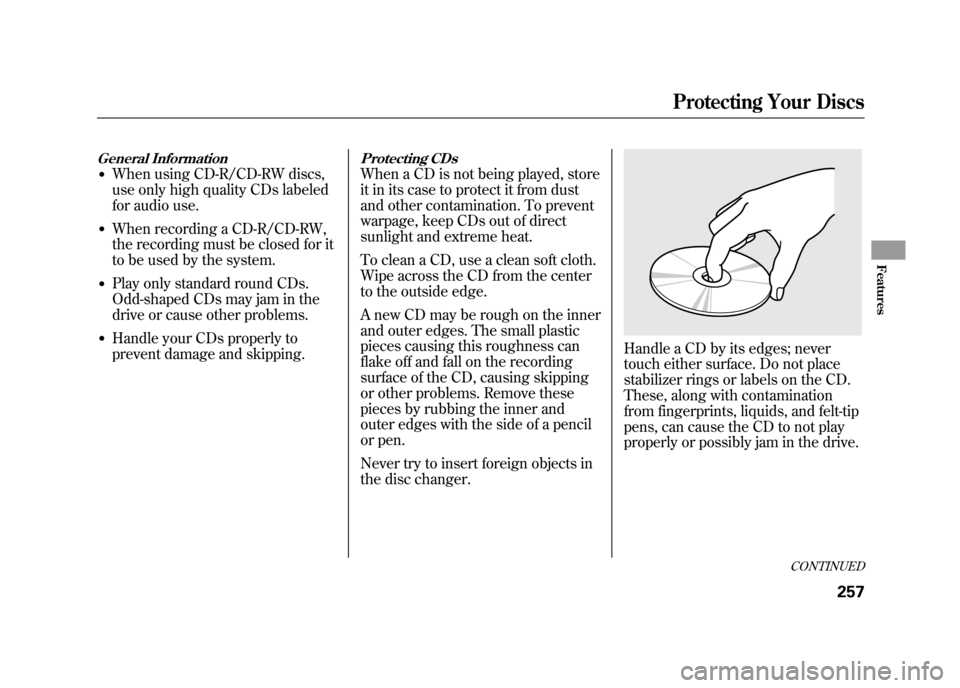
Handle a CD by its edges; never
touch either surface. Do not place
stabilizer rings or labels on the CD.
These, along with contamination
from fingerprints, liquids, and felt-tip
pens, can cause the CD to not play
properly or possibly jam in the drive.
CONTINUED
Protecting Your Discs
257
Features
11/06/16 17:42:51 12 ACURA RDX MMC North America Owner's M 50 31STK650 enu
Page 268 of 518

To Play an iPod
®
This audio system can operate the
audio files on the iPod
®with the
same controls used for the in-dash
disc changer. To play an iPod,
connect it to the USB adapter cable
in the console compartment by using
your dock connector, then press the
DISC/AUX button. The ignition
switch must be in the ACCESSORY
(I) or ON (II) position. The iPod will
also be recharged with the ignition
switch in these positions.
The system will only play songs
stored on the iPod with iTunes.
iPod and iTunes are registered
trademarks owned by Apple Inc.
Voice Control SystemYou can select the AUX mode by
using the navigation system voice
control buttons, but cannot operate
the play mode functions. iPod models confirmed to be
compatible with your audio system
using the USB adapter cable are:
Model
iPod classic 80/160 G
iPod classic 120 G
iPod classic 160 G (launch in 2009)
iPod (5th generation)
iPod nano
iPod touch
This system may not work with all
software versions of these devices. NOTE:
●Do not connect your iPod using a
hub.●Do not keep the iPod in the
vehicle. Direct sunlight and high
heat will damage it.●Do not use an extension cable
between the USB adapter cable
equipped with your vehicle and
your dock connector.●We recommend backing up your
data before playing it.●Some devices cannot be powered
or charged via the USB adapter, if
this is the case use the accessory
adapter to supply power to your
device.
Playing an iPod
®(Models with navigation system)
26211/06/16 17:42:51 12 ACURA RDX MMC North America Owner's M 50 31STK650 enu
Page 272 of 518
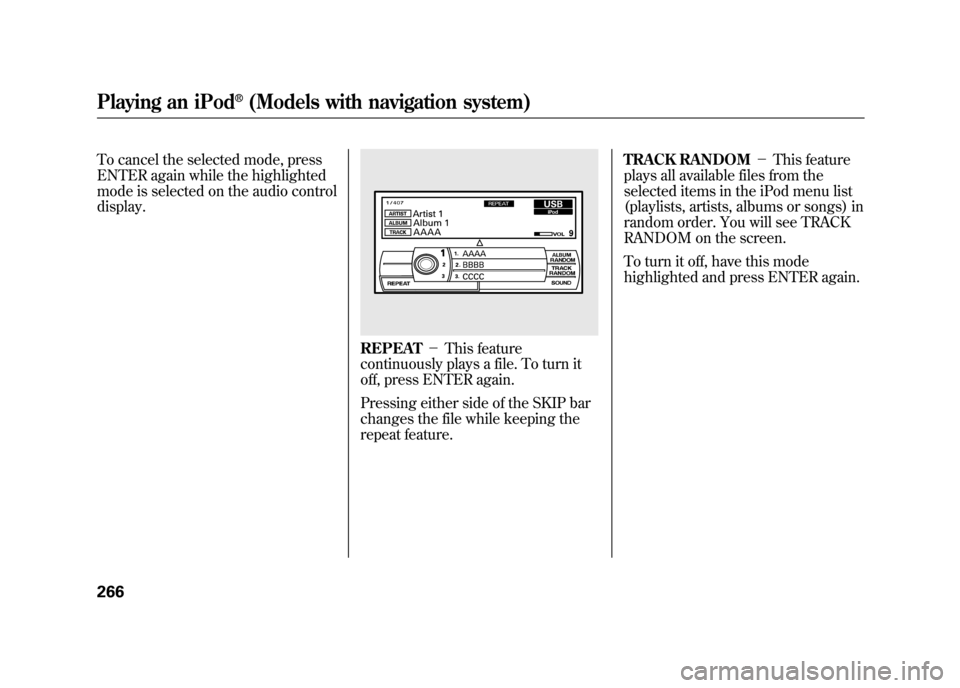
To cancel the selected mode, press
ENTER again while the highlighted
mode is selected on the audio control
display.
REPEAT-This feature
continuously plays a file. To turn it
off, press ENTER again.
Pressing either side of the SKIP bar
changes the file while keeping the
repeat feature. TRACK RANDOM
-This feature
plays all available files from the
selected items in the iPod menu list
(playlists, artists, albums or songs) in
random order. You will see TRACK
RANDOM on the screen.
To turn it off, have this mode
highlighted and press ENTER again.
Playing an iPod
®(Models with navigation system)
26611/06/16 17:42:51 12 ACURA RDX MMC North America Owner's M 50 31STK650 enu
Page 273 of 518
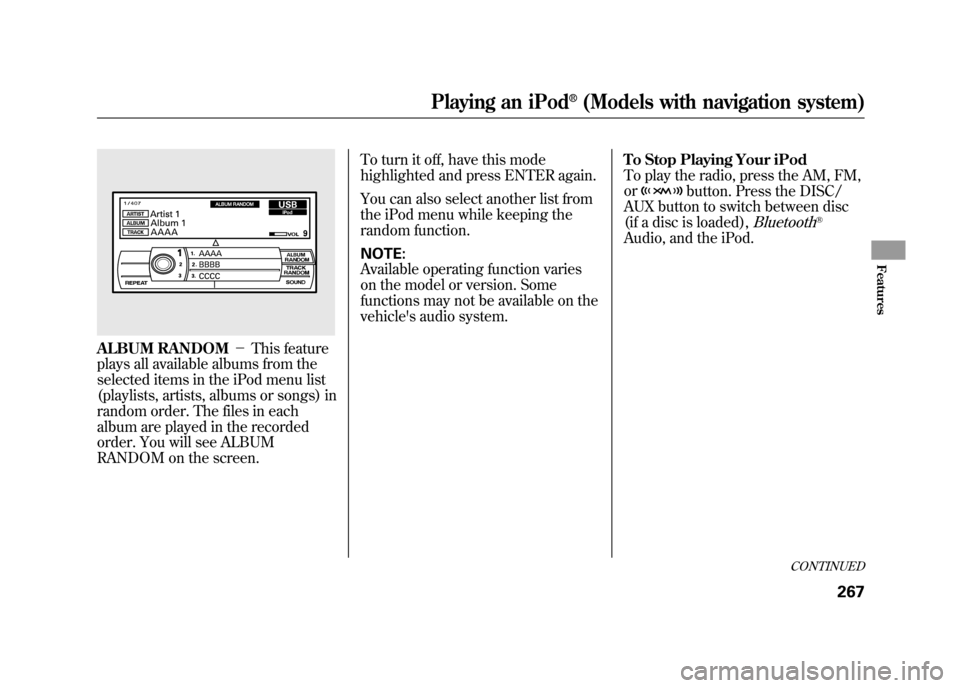
ALBUM RANDOM-This feature
plays all available albums from the
selected items in the iPod menu list
(playlists, artists, albums or songs) in
random order. The files in each
album are played in the recorded
order. You will see ALBUM
RANDOM on the screen. To turn it off, have this mode
highlighted and press ENTER again.
You can also select another list from
the iPod menu while keeping the
random function.
NOTE:
Available operating function varies
on the model or version. Some
functions may not be available on the
vehicle's audio system.
To Stop Playing Your iPod
To play the radio, press the AM, FM,
or
button. Press the DISC/
AUX button to switch between disc
(if a disc is loaded),
Bluetooth
®
Audio, and the iPod.
CONTINUED
Playing an iPod
®(Models with navigation system)
267
Features
11/06/16 17:42:51 12 ACURA RDX MMC North America Owner's M 50 31STK650 enu
Page 279 of 518

NOTE:●Do not use a device such as a card
reader or hard drive as the device
or your files may be damaged.●Do not connect your USB flash
memory device using a hub.●Do not use an extension cable to
the USB adapter cable equipped
with your vehicle.●Do not keep a USB flash memory
device in the vehicle. Direct
sunlight and high heat will damage
it.●We recommend backing up your
data before playing a USB flash
memory device.
●Depending on the type and
number of files, it may take some
time before they begin to play.●Depending on the software the
files were made with, it may not be
possible to play some files, or
display some text data.●Some devices cannot be powered
or charged via the USB adapter, if
this is the case use the accessory
adapter to supply power to your
device.●Depending on the type of
encoding and writing software
used, there may be cases where
character information does not
display properly.
Voice Control SystemYou can select the AUX mode by
using the navigation system voice
control buttons, but cannot operate
the play mode functions.
CONTINUED
Playing a USB Flash Memory Device (Models with navigation system)
273
Features
11/06/16 17:42:51 12 ACURA RDX MMC North America Owner's M 50 31STK650 enu
Page 283 of 518
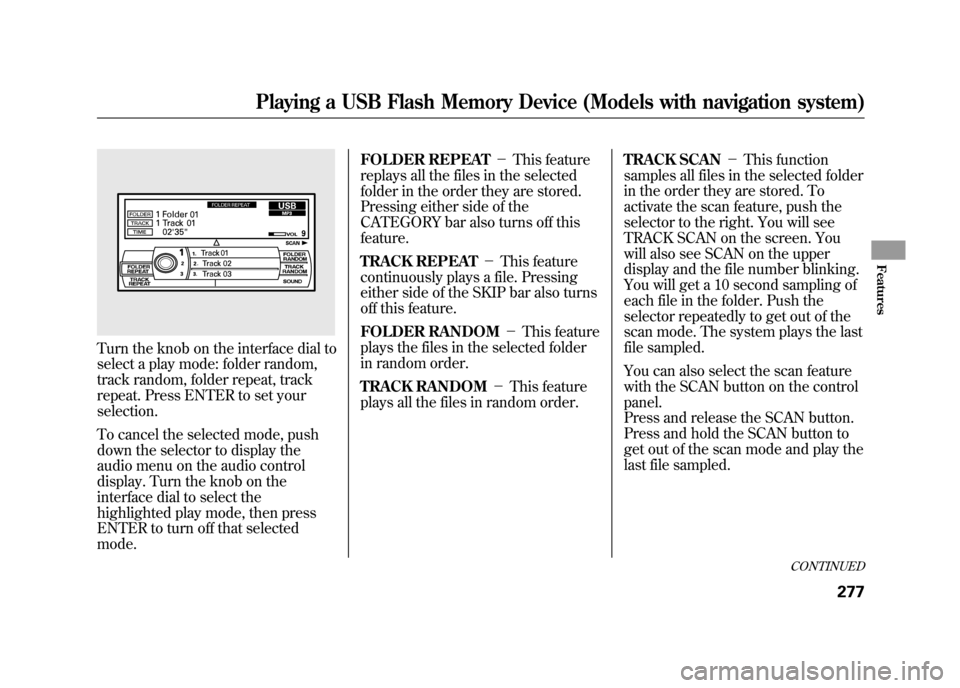
Turn the knob on the interface dial to
select a play mode: folder random,
track random, folder repeat, track
repeat. Press ENTER to set your
selection.
To cancel the selected mode, push
down the selector to display the
audio menu on the audio control
display. Turn the knob on the
interface dial to select the
highlighted play mode, then press
ENTER to turn off that selected
mode.FOLDER REPEAT
-This feature
replays all the files in the selected
folder in the order they are stored.
Pressing either side of the
CATEGORY bar also turns off this
feature.
TRACK REPEAT -This feature
continuously plays a file. Pressing
either side of the SKIP bar also turns
off this feature.
FOLDER RANDOM -This feature
plays the files in the selected folder
in random order.
TRACK RANDOM -This feature
plays all the files in random order. TRACK SCAN
-This function
samples all files in the selected folder
in the order they are stored. To
activate the scan feature, push the
selector to the right. You will see
TRACK SCAN on the screen. You
will also see SCAN on the upper
display and the file number blinking.
You will get a 10 second sampling of
each file in the folder. Push the
selector repeatedly to get out of the
scan mode. The system plays the last
file sampled.
You can also select the scan feature
with the SCAN button on the control
panel.
Press and release the SCAN button.
Press and hold the SCAN button to
get out of the scan mode and play the
last file sampled.
CONTINUED
Playing a USB Flash Memory Device (Models with navigation system)
277
Features
11/06/16 17:42:51 12 ACURA RDX MMC North America Owner's M 50 31STK650 enu
Page 300 of 518

The security system helps to protect
your vehicle and valuables from
theft. The horn sounds and a
combination of headlights, parking
lights, side marker lights, and
taillights flashes if someone attempts
to break into your vehicle or remove
the audio unit. This alarm continues
for two minutes, then the system
resets. To deactivate the system
before the two minutes have elapsed,
unlock the driver's door with the key
or the remote transmitter.
The security system automatically
sets 15 seconds after you lock the
doors, hood, and the tailgate. For the
system to activate, you must lock the
doors and the tailgate from the
outside with the key, or use driver's
lock tab, door lock master switch, or
remote transmitter. The security
system indicator on the instrument
panel starts blinking immediately to
show you the system is setting itself.
Once the security system sets,
opening any door, the tailgate, or the
hood without using the key or the
remote transmitter, will cause the
alarm to activate. It also activates if
the audio unit is removed from the
dashboard or the wiring is cut.The alarm also activates if a
passenger inside the locked vehicle
turns the ignition switch on.
The security system does not set if
the hood, tailgate, or any door is not
fully closed. Before you leave the
vehicle, make sure the doors,
tailgate, and hood are securely
closed.
NOTE:
To see if the system is set
after you exit the vehicle, press the
LOCK button on the remote
transmitter within five seconds. If the
system is set, a beep will sound.
Do not attempt to alter this system or
add other devices to it.
SECURITY SYSTEM INDICATOR
Security System29411/06/16 17:42:51 12 ACURA RDX MMC North America Owner's M 50 31STK650 enu
Page 307 of 518

Changing the Set Speed
You can increase the set cruising
speed in any of these ways:●Press and hold the RES/ACCEL
button. When you reach the
desired cruising speed, release the
button.●Push on the accelerator pedal.
Accelerate to the desired cruising
speed, then press the SET/
DECEL button.●To increase your speed in very
small amounts, tap the RES/
ACCEL button. Each time you do
this, the vehicle speeds up about 1
mph (1.6 km/h).You can decrease the set cruising
speed in any of these ways:
NOTE
: If you need to decrease your
speed quickly, use the brakes as you
normally would.
●Press and hold the SET/DECEL
button. Release the button when
you reach the desired speed.●To slow down in very small
amounts, tap the SET/DECEL
button. Each time you do this,
your vehicle will slow down about
1 mph (1.6 km/h).●Tap the brake pedal lightly with
your foot. The CRUISE CONTROL
indicator on the instrument panel
will go out. When the vehicle
slows to the desired speed, press
the SET/DECEL button. Even with cruise control on, you can
still use the accelerator pedal to
speed up for passing. After
completing the pass, take your foot
off the accelerator pedal. The vehicle
will return to the set cruising speed.
Resting your foot on the brake pedal
causes cruise control to cancel.
CONTINUED
Cruise Control
301
Features
11/06/16 17:42:51 12 ACURA RDX MMC North America Owner's M 50 31STK650 enu
Page 309 of 518

The HomeLink
®Universal Transceiver
built into your vehicle can be
programmed to operate up to three
remote controlled devices around your
home, such as garage doors, lighting,
or home security systems.
General Safety InformationBefore programming your HomeLink
to operate a garage door opener,
confirm that the opener has an
external entrapment protection
system, such as an ‘‘electronic eye, ’’or
other safety and reverse stop features.
If your garage door was manufactured
before April 1, 1982, you may not be
able to program HomeLink to operate
it. These units do not have safety
features that cause the motor to stop
and reverse it if an obstacle is detected
during closing, increasing the risk of
injury. Do not use HomeLink with any
garage door opener that lacks safety
stop and reverse features. Units manufactured between April 1,
1982 and January 1, 1993 may be
equipped with safety stop and reverse
features. If your unit does not have an
external entrapment protection
system, an easy test to confirm the
function and performance of the safety
stop and reverse feature is to lay a 2
╳
4 under the closing door. The door
should stop and reverse upon
contacting the piece of wood. As an
additional safety feature, garage door
openers manufactured after January 1,
1993 are required to have external
entrapment protection systems, such
as an electronic eye, which detect an
object obstructing the door.
Important Safety PrecautionsRefer to the safety information that
came with your garage door opener to
test that the safety features are
functioning properly. If you do not
have this information, contact the
manufacturer of the equipment.
Before programming HomeLink to a
garage door or gate opener, make sure
that people and objects are out of the
way of the device to prevent potential
injury or damage. When programming
a garage door opener, park just
outside the garage.Training HomeLinkBefore you begin
- If you just
received your vehicle and have not
trained any of the buttons in
HomeLink before, you should erase
any previously learned codes before
training the first button. To do this,
press and hold the two outside buttons
on the HomeLink transceiver for about
20 seconds, until the red indicator
flashes. Release the buttons, then
proceed to step 1.
CONTINUED
HomeLink
®Universal Transceiver
303
Features
11/06/16 17:42:51 12 ACURA RDX MMC North America Owner's M 50 31STK650 enu