Key start Acura RDX 2013 User Guide
[x] Cancel search | Manufacturer: ACURA, Model Year: 2013, Model line: RDX, Model: Acura RDX 2013Pages: 364, PDF Size: 12.54 MB
Page 114 of 364
113
Continued
Controls
Security SystemImmobilizer SystemThe immobilizer system prevents a key that has not been pre-registered from
starting the engine. Each key contains electronic transmitters that use electronic
signals to verify the key.
Pay attention to the following when selecting the ACCESSORY mode with the
ENGINE START/STOP button:
• Do not allow objects that emit strong radio waves near the ENGINE START/
STOP button.
• Make sure the key is not covered by or touching a metal object.
• Do not bring a key from another vehicle's immobilizer system with the keyless
access remote.Security System AlarmThe security system alarm activates when the doors, tailgate, or hood are opened
without the key, remote transmitter or keyless access system.■
When the security system alarm activates
The horn sounds intermittently, and all of the exterior lights flash.
■
To deactivate the security system alarm
Unlock the vehicle using the key, remo te transmitter, or keyless access system. The
system, along with the horn and flashing lights, is deactivated.
1Immobilizer System
NOTICELeaving the ignition key in the vehicle can result in
theft or accidental movement of the vehicle.
Always take the ignition key with you whenever you
leave the vehicle unattended.
Do not alter the system or add other devices to it.
Doing so may damage the system and make your
vehicle inoperable.1Security System Alarm
The security alarm continues for a maximum of two
minutes until the security system alarm deactivates.
Page 120 of 364
119
Continued
Controls
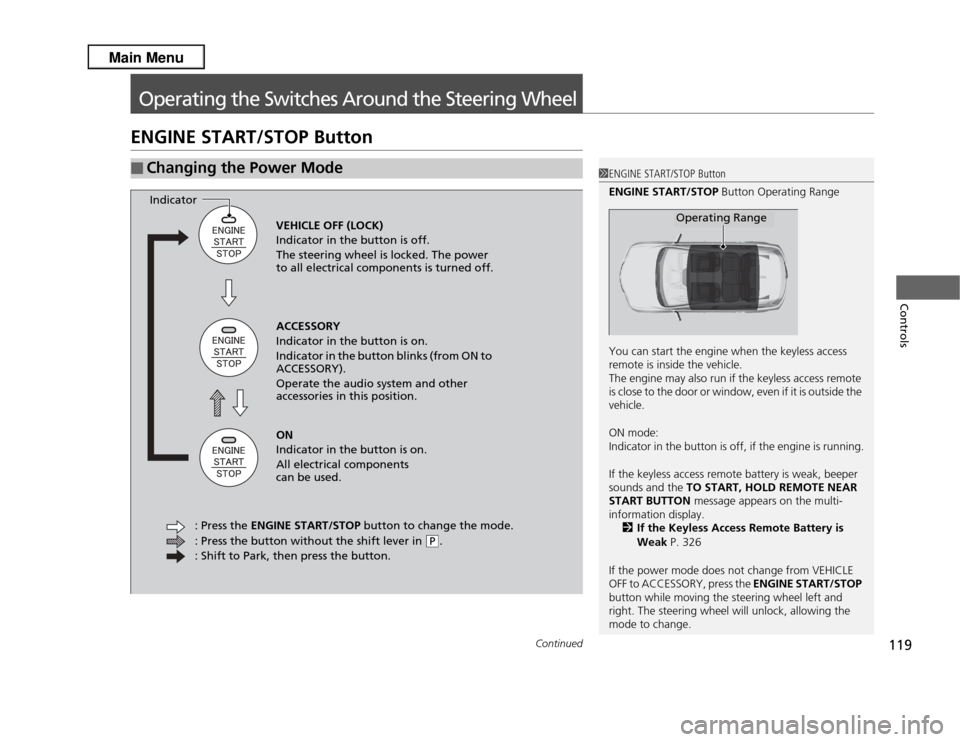
Operating the Switches Around the Steering WheelENGINE START/STOP Button■
Changing the Power Mode
1ENGINE START/STOP Button
ENGINE START/STOP Button Operating Range
You can start the engine when the keyless access
remote is inside the vehicle.
The engine may also run if the keyless access remote
is close to the door or window, even if it is outside the
vehicle.
ON mode:
Indicator in the button is off, if the engine is running.
If the keyless access remote battery is weak, beeper
sounds and the TO START, HOLD REMOTE NEAR
START BUTTON message appears on the multi-
information display.
2 If the Keyless Access Remote Battery is
Weak P. 326
If the power mode does not change from VEHICLE
OFF to ACCESSORY, press the ENGINE START/STOP
button while moving the steering wheel left and
right. The steering wheel will unlock, allowing the
mode to change.
Operating Range
VEHICLE OFF (LOCK)
Indicator in the button is off.
The steering wheel is locked. The power
to all electrical components is turned off.
ACCESSORY
Indicator in the button is on.
Indicator in the button blinks (from ON to
ACCESSORY).
Operate the audio system and other
accessories in this position.
ON
Indicator in the button is on.
All electrical components
can be used.
: Press the ENGINE START/STOP button to change the mode.
: Press the button without the shift lever in
( P
.
: Shift to Park, then press the button.
Indicator
Page 121 of 364
120
uuOperating the Switches Around the Steering Wheel uENGINE START/STOP Button
Controls
If you leave the vehicle for 30 to 60 minutes with the shift lever in
(P
and the power
mode in ACCESSORY, the vehicle automatically goes into the mode similar to
VEHICLE OFF (LOCK) to avoid the battery drain.
When in this mode:
The steering wheel does not lock.
You cannot lock or unlock doors with the remote transmitter or the keyless access
system.
Press the ENGINE START/STOP button to switch the mode to VEHICLE OFF (LOCK).
■
Automatic Power Off
Page 122 of 364
121
uuOperating the Switches Around the Steering Wheel uENGINE START/STOP Button
Controls
If you open the driver's door when the power mode is set to ACCESSORY, a warning
buzzer sounds.
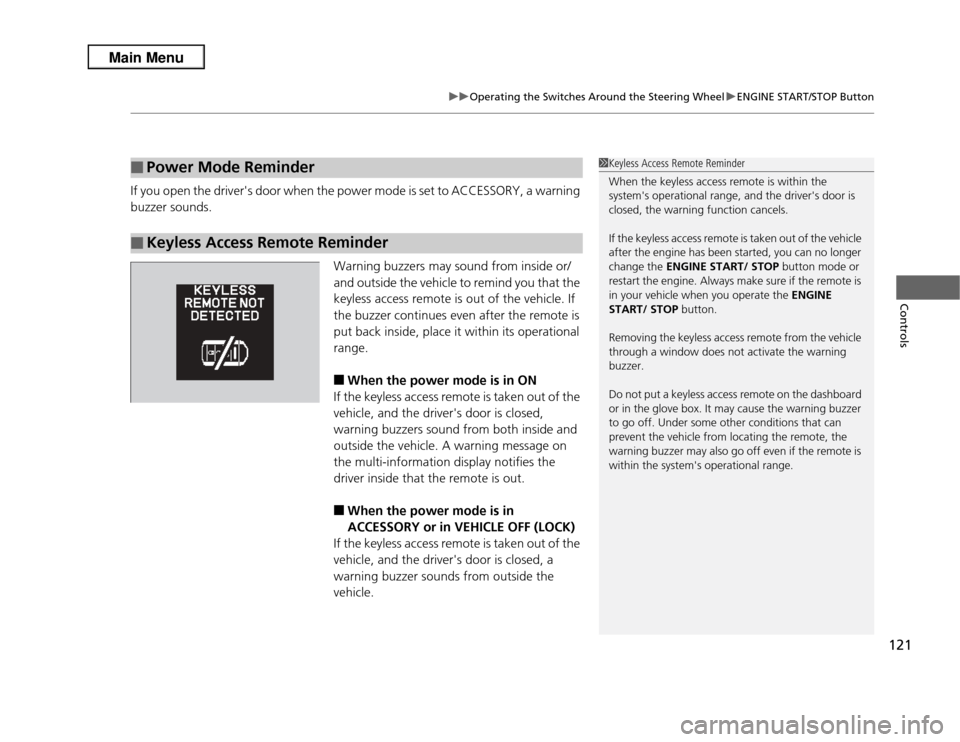
Warning buzzers may sound from inside or/
and outside the vehicle to remind you that the
keyless access remote is out of the vehicle. If
the buzzer continues even after the remote is
put back inside, place it within its operational
range.
■
When the power mode is in ON
If the keyless access remote is taken out of the
vehicle, and the driver's door is closed,
warning buzzers sound from both inside and
outside the vehicle. A warning message on
the multi-information display notifies the
driver inside that the remote is out.
■
When the power mode is in
ACCESSORY or in VEHICLE OFF (LOCK)
If the keyless access remote is taken out of the
vehicle, and the driver's door is closed, a
warning buzzer sounds from outside the
vehicle.
■
Power Mode Reminder
■
Keyless Access Remote Reminder
1 Keyless Access Remote Reminder
When the keyless access remote is within the
system's operational range, and the driver's door is
closed, the warning function cancels.
If the keyless access remote is taken out of the vehicle
after the engine has been started, you can no longer
change the ENGINE START/ STOP button mode or
restart the engine. Always make sure if the remote is
in your vehicle when you operate the ENGINE
START/ STOP button.
Removing the keyless access remote from the vehicle
through a window does not activate the warning
buzzer.
Do not put a keyless access remote on the dashboard
or in the glove box. It may cause the warning buzzer
to go off. Under some other conditions that can
prevent the vehicle from locating the remote, the
warning buzzer may also go off even if the remote is
within the system's operational range.
Page 229 of 364
228Driving
Before DrivingDriving PreparationCheck the following items before you start driving.
•Make sure there are no obstructions on the windows, door mirrors, exterior
lights, or other parts of the vehicle.
u Remove any frost, snow, or ice.
u Remove any snow on the roof, as this can slip down and obstruct your field of
vision while driving. If frozen solid, remove ice once it has softened.
u When removing ice from around the wheels, be sure not to damage the wheel
or wheel components.
• Make sure the hood is securely closed.
u If the hood opens while driving, your front view will be blocked.
• Make sure the tires are in good condition.
u Check air pressures, and check for damage and excessive wear.
2 Checking and Maintaining Tires P. 301
•Make sure there are no people or objects behind or around the vehicle.
u There are blind spots from the inside.■
Exterior Checks
1Exterior Checks
NOTICEWhen doors are frozen shut, use warm water around
the door edges to melt any ice. Do not try to force
them open, as this can damage the rubber trim
around the doors. When done, wipe dry to avoid
further freezing.
Do not pour warm water into the key cylinder.
You will be unable to insert key if the water freezes in
the hole.
Heat from the engine and exhaust can ignite
flammable materials left under the hood, causing a
fire. If you've parked your vehicle for an extended
period, inspect and remove any debris that may have
collected, such as dried grass and leaves that have
fallen or have been carried in for use as a nest by a
small animal.
Also check under the hood for leftover flammable
materials after you or someone else has performed
maintenance on your vehicle.
Page 241 of 364
240Driving
When DrivingStarting the Engine
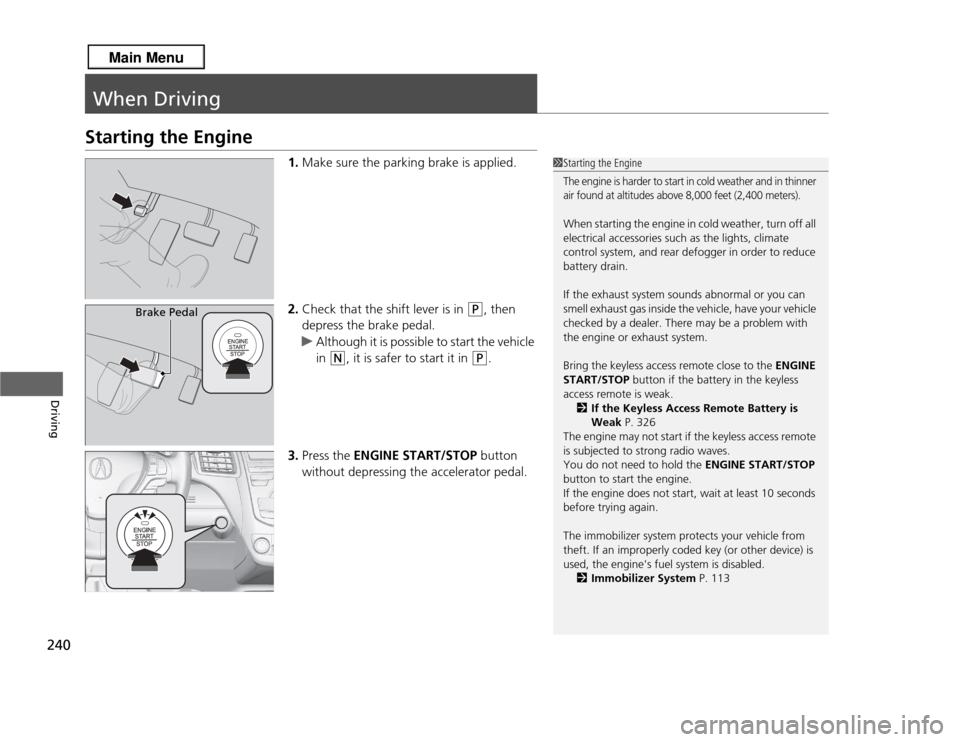
1.Make sure the parking brake is applied.
2. Check that the shift lever is in
(P
, then
depress the brake pedal.
u Although it is possible to start the vehicle
in
(N
, it is safer to start it in
(P
.
3. Press the ENGINE START/STOP button
without depressing the accelerator pedal.
1 Starting the EngineThe engine is harder to start in cold weather and in thinner
air found at altitudes above 8,000 feet (2,400 meters).When starting the engine in cold weather, turn off all
electrical accessories such as the lights, climate
control system, and rear defogger in order to reduce
battery drain.
If the exhaust system sounds abnormal or you can
smell exhaust gas inside the vehicle, have your vehicle
checked by a dealer. There may be a problem with
the engine or exhaust system.
Bring the keyless access remote close to the ENGINE
START/STOP button if the battery in the keyless
access remote is weak.
2 If the Keyless Access Remote Battery is
Weak P. 326
The engine may not start if the keyless access remote
is subjected to strong radio waves.
You do not need to hold the ENGINE START/STOP
button to start the engine.
If the engine does not start, wait at least 10 seconds
before trying again.
The immobilizer system protects your vehicle from
theft. If an improperly coded key (or other device) is
used, the engine's fuel system is disabled. 2 Immobilizer System P. 113
Brake Pedal
Page 318 of 364

317
Handling the Unexpected
This chapter explains how to handle unexpected troubles.
Tools
Types of Tools .................................. 318
If a Tire Goes Flat Changing a Flat Tire ......................... 319
Engine Does Not Start Checking the Engine ........................ 325
If the Keyless Access Remote Battery is Weak ............................................. 326
Emergency Engine Stop ................... 327
Jump Starting .................................... 328
Shift Lever Does Not Move .............. 330Overheating
How to Handle Overheating............. 331
Indicator, Coming On/Blinking
If the Low Oil Pressure Indicator Comes On ............................................. 333If the Charging System Indicator Comes
On ................................................. 333
If the Malfunction Indicator Lamp Comes On or Blinks ................................... 334If the Brake System Indicator (Red) Comes On .................................................... 335If the EPS System Indicator Comes On...... 335
If the Low Tire Pressure/TPMS Indicator
Comes On or Blinks ....................... 336
Fuses Fuse Locations ................................. 337
Inspecting and Changing Fuses ........ 339
Emergency Towing ........................... 340When You Cannot Open the Tailgate
..... 341
Page 327 of 364
326
uuEngine Does Not Start uIf the Keyless Access Remote Battery is Weak
Handling the Unexpected
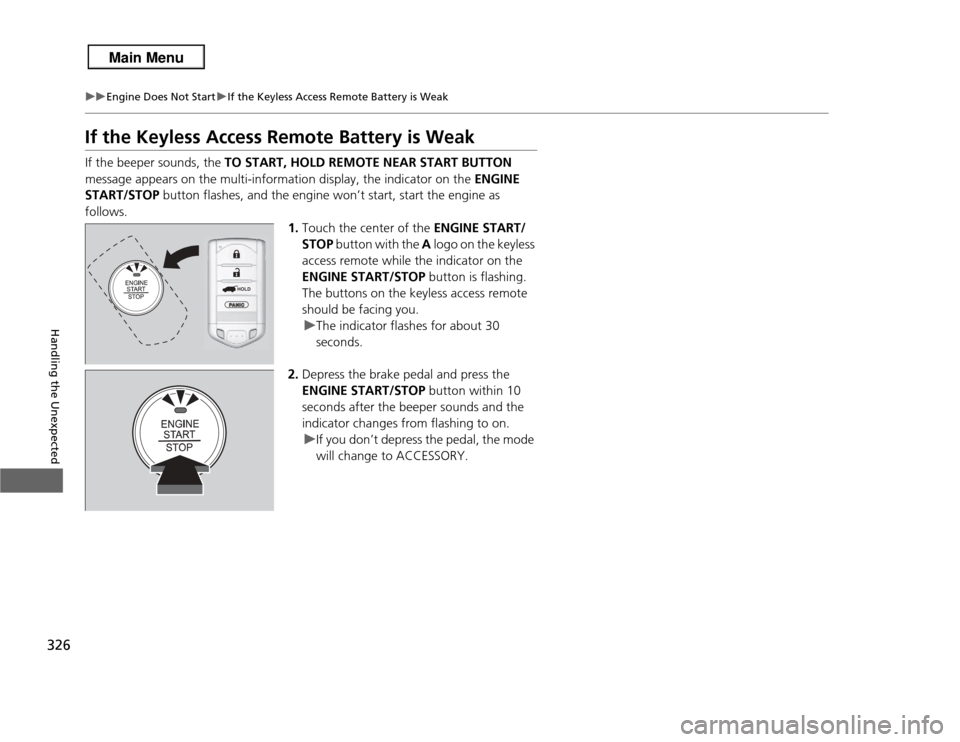
If the Keyless Access Remote Battery is WeakIf the beeper sounds, the TO START, HOLD REMOTE NEAR START BUTTON
message appears on the multi-information display, the indicator on the ENGINE
START/STOP button flashes, and the engine won’t start, start the engine as
follows. 1.Touch the center of the ENGINE START/
STOP button with the A logo on the keyless
access remote while the indicator on the
ENGINE START/STOP button is flashing.
The buttons on the keyless access remote
should be facing you.
u The indicator flashes for about 30
seconds.
2. Depress the brake pedal and press the
ENGINE START/STOP button within 10
seconds after the beeper sounds and the
indicator changes from flashing to on. u If you don’t depress the pedal, the mode
will change to ACCESSORY.
HOLD
Page 358 of 364

357
Index
Keys.......................................................... 97
Locking/Unlocking the Doors from the Inside...................................... 104
Locking/Unlocking the Doors
from the Outside..................................... 99
Lockout Prevention System ..................... 100
DOT Tire Quality Grading ........................ 304
Driver’s Seat Lumbar Support ................. 136
Driving ...................................................... 227
Automatic Transmission .......................... 243
Braking ................................................... 257
Cruise Control ........................................ 248
Off-Highway Driving Guidelines .............. 238
Shifting Gear .......................................... 244
Starting the Engine ................................. 240
Driving Position Memory System ............ 130
Dust and Pollen Filter .............................. 312EElapsed Time.............................................. 86
Electric Power Steering (EPS) System Indicator ........................................... 74, 335
Electronic Stability Control (ESC) ............ 251
Emergency ................................................ 340
Emissions Testing (Readiness Codes) ...... 349
Engine ....................................................... 346
Coolant .................................................. 282
Jump Starting ......................................... 328
Oil .......................................................... 277
Starting................................................... 240 Engine Coolant
......................................... 282
Adding to the Radiator ............................ 283
Adding to the Reserve Tank ..................... 282
Overheating ............................................ 331
Temperature Gauge .................................. 82
Engine Oil ................................................. 277
Adding .................................................... 279
Checking ................................................. 278
Displaying Oil Life .................................... 271
Low Oil Pressure Indicator.................. 69, 333
Recommended Engine Oil........................ 277
EPS (Electric Power Steering) System ............................................... 74, 335
Exhaust Gas Hazard (Carbon Monoxide) .................................. 64
Exterior Care (Cleaning) ........................... 315
Exterior Mirrors ........................................ 134
FFeatures..................................................... 157
Filters Dust and Pollen ....................................... 312
Oil ........................................................... 280
Flat Tire ..................................................... 319
Floor Mats ................................................. 314
Fluids
Automatic Transmission........................... 284
Brake....................................................... 285
Engine Coolant........................................ 282
Windshield Washer.................................. 286 Fog Light Indicator
..................................... 75
Folding Down the Rear Seats .................. 141
Foot Brake ................................................ 258
Front Airbags (SRS) ..................................... 40
Front Seats ................................................ 136
Adjusting ................................................ 136
Fuel ...................................................... 15, 263
Economy ................................................. 265
Gauge ....................................................... 82
Low Fuel Indicator ..................................... 71
Range ....................................................... 86
Recommendation .................................... 263
Refueling................................................. 263
Fuel Economy ........................................... 265
Fuel Fill Cap ........................................ 15, 264
Message.................................................. 334
Fuel Fill Door ...................................... 15, 264
Fuses .......................................................... 337
Inspecting and Changing........ ............... .. 339
Locations......................................... 337, 338
GGasoline (Fuel) Economy ................................................. 265
Gauge ....................................................... 82
Information ............................................. 263
Low Fuel Indicator ..................................... 71
Refueling................................................. 263
Gauges ........................................................ 82