brake Acura RDX 2013 User Guide
[x] Cancel search | Manufacturer: ACURA, Model Year: 2013, Model line: RDX, Model: Acura RDX 2013Pages: 364, PDF Size: 12.54 MB
Page 72 of 364
71
uuIndicators u
Continued
Instrument Panel
Indicator
Name
On/Blinking
Explanation
Message
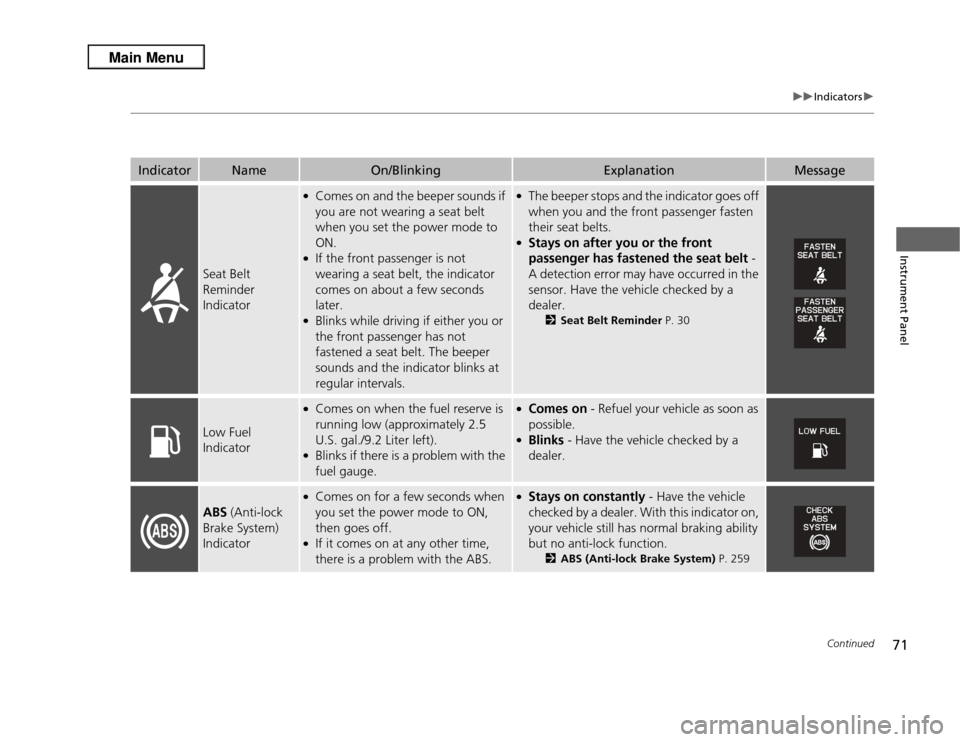
Seat Belt
Reminder
Indicator
●Comes on and the beeper sounds if
you are not wearing a seat belt
when you set the power mode to
ON.●If the front passenger is not
wearing a seat belt, the indicator
comes on about a few seconds
later.●Blinks while driving if either you or
the front passenger has not
fastened a seat belt. The beeper
sounds and the indicator blinks at
regular intervals.
●The beeper stops and the indicator goes off
when you and the front passenger fasten
their seat belts.●Stays on after you or the front
passenger has fastened the seat belt -
A detection error may have occurred in the
sensor. Have the vehicle checked by a
dealer.
2 Seat Belt Reminder P. 30
Low Fuel
Indicator
●Comes on when the fuel reserve is
running low (approximately 2.5
U.S. gal./9.2 Liter left).●Blinks if there is a problem with the
fuel gauge.
●Comes on - Refuel your vehicle as soon as
possible.●Blinks - Have the vehicle checked by a
dealer.
ABS (Anti-lock
Brake System)
Indicator
●Comes on for a few seconds when
you set the power mode to ON,
then goes off.●If it comes on at any other time,
there is a problem with the ABS.
●Stays on constantly - Have the vehicle
checked by a dealer. With this indicator on,
your vehicle still has normal braking ability
but no anti-lock function.
2 ABS (Anti-lock Brake System) P. 259
Page 81 of 364
80
uuIndicators uMulti-Information Display Warning and Information Messages
Instrument Panel
Message
Condition
Explanation
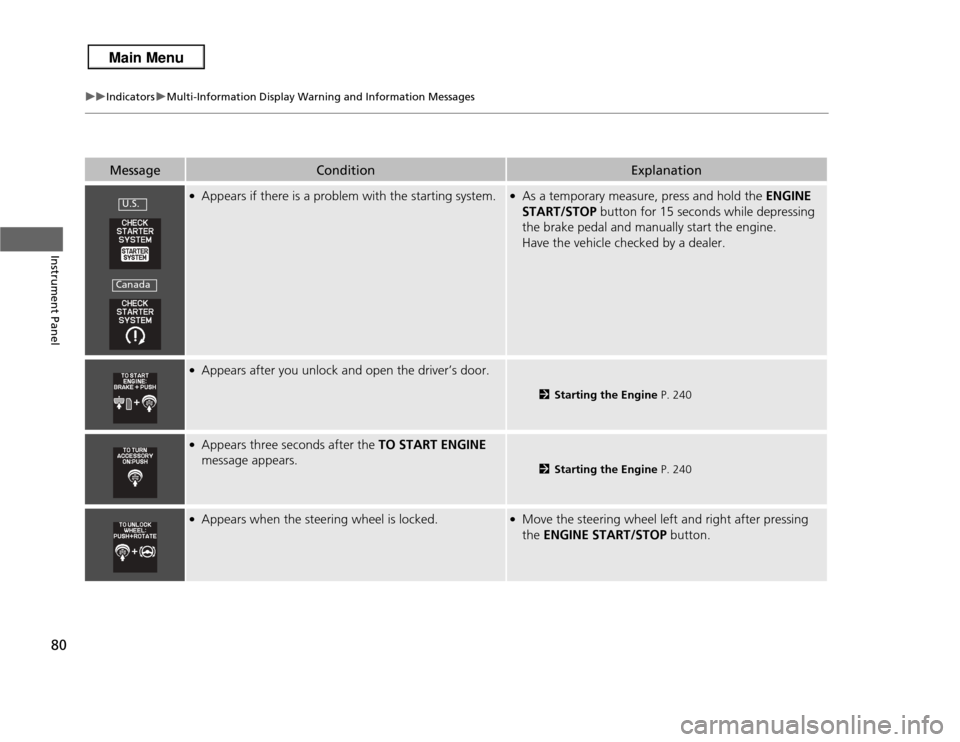
●Appears if there is a problem with the starting system.
●As a temporary measure, press and hold the ENGINE
START/STOP button for 15 seconds while depressing
the brake pedal and manually start the engine.
Have the vehicle checked by a dealer.
●Appears after you unlock and open the driver’s door.
2 Starting the Engine P. 240
●Appears three seconds after the TO START ENGINE
message appears.
2 Starting the Engine P. 240
●Appears when the steering wheel is locked.
●Move the steering wheel left and right after pressing
the ENGINE START/STOP button.
U.S.Canada
Page 82 of 364
81
uuIndicators uMulti-Information Display Warning and Information Messages
Instrument Panel
Message
Condition
Explanation
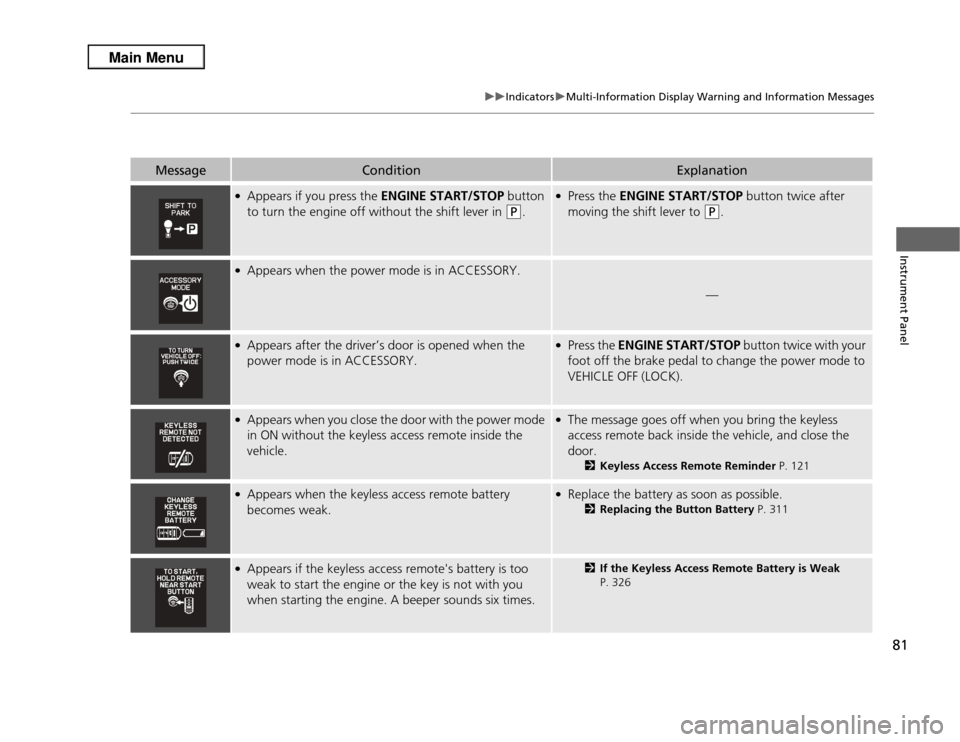
●Appears if you press the ENGINE START/STOP button
to turn the engine off without the shift lever in
(P
.
●Press the ENGINE START/STOP button twice after
moving the shift lever to
(P
.
●Appears when the power mode is in ACCESSORY.
—
●Appears after the driver’s door is opened when the
power mode is in ACCESSORY.
●Press the ENGINE START/STOP button twice with your
foot off the brake pedal to change the power mode to
VEHICLE OFF (LOCK).
●Appears when you close the door with the power mode
in ON without the keyless access remote inside the
vehicle.
●The message goes off when you bring the keyless
access remote back inside the vehicle, and close the
door.
2 Keyless Access Remote Reminder P. 121
●Appears when the keyless access remote battery
becomes weak.
●Replace the battery as soon as possible.
2Replacing the Button Battery P. 311
●Appears if the keyless access remote's battery is too
weak to start the engine or the key is not with you
when starting the engine. A beeper sounds six times.
2If the Keyless Access Remote Battery is Weak
P. 326
Page 107 of 364
106
uuLocking and Unlocking the Doors uAuto Door Locking/Unlocking
Controls
Auto Door Locking/UnlockingYour vehicle locks all doors and unlocks the driver’s door automatically when a
certain condition is met.■
Drive lock mode
All doors and tailgate lock when the vehicle’s speed reaches about 10 mph (15 km/h).■
Park unlock mode
The driver’s door unlocks when the shift lever is moved into
(P
with the brake pedal
depressed.
■
Auto Door Locking
■
Auto Door Unlocking
1 Auto Door Locking/Unlocking
You can turn off or change to another auto door
locking/unlocking setting using the multi-information
display.
2 Customized Features P. 87
Page 126 of 364
125
uuOperating the Switches Around the Steering Wheel uFog Lights
*
Controls
Fog Lights
*
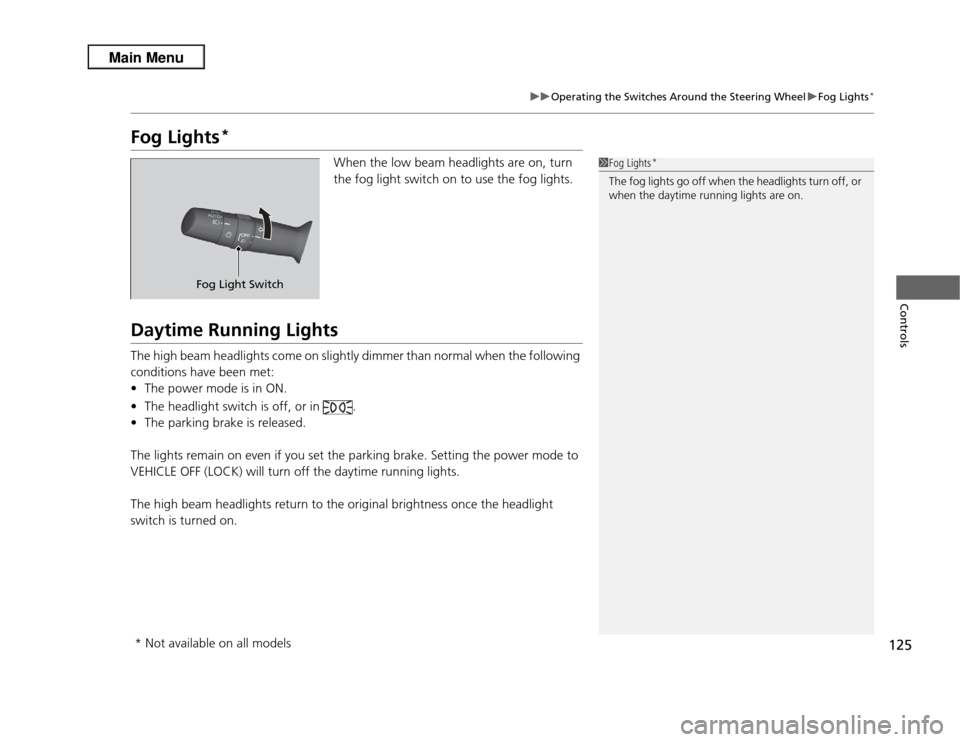
When the low beam headlights are on, turn
the fog light switch on to use the fog lights.
Daytime Running LightsThe high beam headlights come on slightly dimmer than normal when the following
conditions have been met:
• The power mode is in ON.
• The headlight switch is off, or in .
• The parking brake is released.
The lights remain on even if you set the parking brake. Setting the power mode to
VEHICLE OFF (LOCK) will turn off the daytime running lights.
The high beam headlights return to the original brightness once the headlight
switch is turned on.
1 Fog Lights
*
The fog lights go off when the headlights turn off, or
when the daytime running lights are on.
Fog Light Switch
* Not available on all models
Page 132 of 364
131
uuOperating the Switches Around the Steering Wheel uDriving Position Memory System
Controls
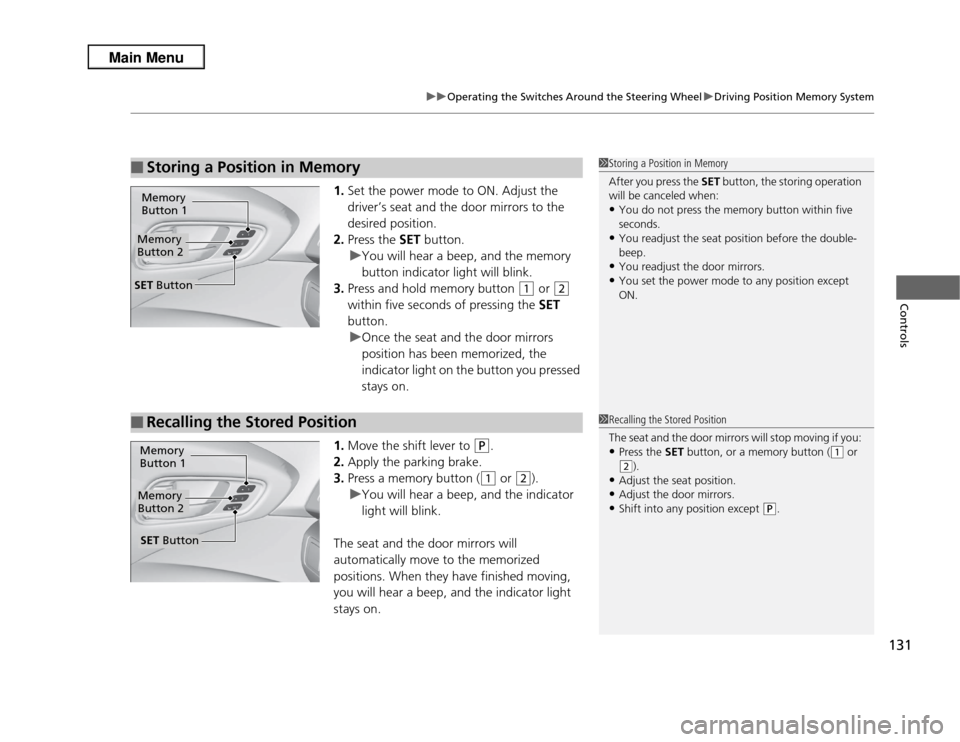
1. Set the power mode to ON. Adjust the
driver’s seat and the door mirrors to the
desired position.
2. Press the SET button.
u You will hear a beep, and the memory
button indicator light will blink.
3. Press and hold memory button
(1
or
(2
within five seconds of pressing the SET
button.
u Once the seat and the door mirrors
position has been memorized, the
indicator light on the button you pressed
stays on.
1. Move the shift lever to
(P
.
2. Apply the parking brake.
3. Press a memory button ((1
or
(2
).
u You will hear a beep, and the indicator
light will blink.
The seat and the door mirrors will
automatically move to the memorized
positions. When they have finished moving,
you will hear a beep, and the indicator light
stays on.
■
Storing a Position in Memory
1 Storing a Position in Memory
After you press the SET button, the storing operation
will be canceled when: •You do not press the memory button within five
seconds.•You readjust the seat position before the double-
beep.•You readjust the door mirrors.•You set the power mode to any position except
ON.
Memory
Button 1Memory
Button 2SET Button■
Recalling the Stored Position
1 Recalling the Stored Position
The seat and the door mirrors will stop moving if you: •Press the SET button, or a memory button (
(1
or
(2
).
•Adjust the seat position.•Adjust the door mirrors.•Shift into any position except
(P
.
Memory
Button 1Memory
Button 2SET Button
Page 142 of 364

141
uuAdjusting the Seats uRear Seats
Continued
Controls
Rear SeatsSeparately fold down the left and right halves of the rear seat to make room for
cargo.■
To fold down the seat
1. Store the center seat belt first. Insert the latch plate into the slot on the side of the
anchor buckle.
2. Retract the seat belt into the holder on the ceiling.
2 Seat Belt with Detachable Anchor P. 34
3.Lower the center head restraint to its lowest position. Put the armrest back into
the seat-back.
4.Pull the release lever.
4. Pull the release lever.■
Folding Down the Rear Seats
1Folding Down the Rear Seats
Remove any items from the rear seat cushion and
floor before you fold down the rear seat.
When you fold down one side of the rear seats and
use the non-recessed part of the cargo area, make
sure to secure the cargo. Loose items can fly forward
and cause injury if you have to brake hard.
The front seats must be far enough forward so they
do not interfere with the rear seats as they fold
down.
Make sure all items in the cargo area or items
extending to the rear seats are properly
secured. Loose items can fly forward if you have
to brake hard.
Pull
From the rear door side
Lever
From the cargo area side
Page 228 of 364
227
Driving
This chapter discusses driving, refueling, and information on items such as accessories.
Before DrivingDriving Preparation .......................... 228
Maximum Load Limit........................ 231
Towing a Trailer Towing Preparation .......................... 233
Driving Safely with a Trailer .............. 236
Towing Your Vehicle ........................ 237
Off-Highway Driving Guidelines General Information ......................... 238
Important Safety Precautions............ 238
Avoiding Trouble ............................. 239
When Driving Starting the Engine .......................... 240 Precautions While Driving ................ 242
Automatic Transmission ................... 243
Shifting ............................................ 244
Cruise Control ................................. 248
VSA
® (Vehicle Stability Assist), aka ESC
(Electronic Stability Control), System .. 251AWD (All-Wheel Drive) with Intelligent Control System
*..................................................... 253
TPMS (Tire Pressure Monitoring System) ... 253Tire Pressure Monitoring System (TPMS) - Required Federal Explanation ......... 255
Braking Brake System ................................... 257 ABS (Anti-lock Brake System) ........... 259
Brake Assist System ......................... 260
Parking Your Vehicle When Stopped ................................ 261
Multi-View Rear Camera .................. 262
Refueling Fuel Information .............................. 263
How to Refuel ................................. 264
Fuel Economy .................................... 265
Improving Fuel Economy .................. 265
Accessories and Modifications Accessories ...................................... 266
Modifications................................... 266
* Not available on all models
Page 230 of 364
Continued
229
uuBefore Driving uDriving Preparation
Driving
• Store or secure all items on board properly.
u Carrying too much cargo, or improp erly storing it, can affect your vehicle's
handling, stability, stopping distance, and tires, and make it unsafe.
2 Maximum Load Limit P. 231
•Do not pile items higher than the seat height.
u They can block your view and may be thrown forward in the event of sudden
braking.
• Do not place anything in the front seat footwells. Make sure to secure the floor
mat.
u An object or unsecured floor mat can interfere with your brake and accelerator
pedal operation while driving.
• If you have any animals on board, do not let them move around in the vehicle.
u They may interfere with driving and a crash could occur.
• Securely close and lock all doors and the tailgate.
2 Locking/Unlocking the Doors from the Inside P. 104
•Adjust your seating position properly.
u Adjust the head restraint, too.
2 Adjusting the Seats P. 136
2 Adjusting the Head Restraints P. 138
•Adjust the mirrors and steering wheel properly for your driving.
u Adjust them while sitting in the proper driving position.
2 Adjusting the Steering Wheel P. 132
2 Adjusting the Mirrors P. 133
■
Interior Checks
1Interior Checks
The headlight aim is set by the factory, and does not
need to be adjusted. However, if you regularly carry
heavy items in the cargo area or tow a trailer, have
the aiming readjusted at a dealer or by a qualified
technician.
Page 235 of 364
uuTowing a Trailer uTowing Preparation
234Driving
Towing equipment varies by the size of your trailer, how much load you are towing,
and where you are towing.■
Hitches
The hitch must be of an approved type and properly bolted to the underbody.
■
Safety chains
Always use safety chains when you tow a trailer. Leave enough slack to allow the
trailer to turn corners easily, but do not allow the chains to drag on the ground.
■
Trailer brakes
Recommended for any trailer with a total weight of 1,000 lbs (450 kg) or more:
There are two common types of trailer brakes: surge and electric. Surge brakes are
common for boat trailers, since the brakes will get wet. If you choose electric brakes,
be sure they are electronically actuated. Do not attempt to attach trailer brakes to
your vehicle's hydraulic system, as it will lower braking effectiveness and create a
potential hazard.
■
Additional towing equipment
Many states and provinces/territories require special outside mirrors when towing a
trailer. Even if mirrors are not required in your locale, you should install special
mirrors if visibility is restricted in any way.
■
Towing Equipment and Accessories
1 Towing Equipment and Accessories
Make sure that all equipment is properly installed and
maintained, and that it meets federal, state, province/
territory, and local regulations.
Consult your trailer sales or rental agency if any other
items are recommended or required for your towing
situation.
The lighting and wiring of trailers can vary by type
and brand. If a connector is required, it should only
be installed by a qualified technician.