brake light Acura RDX 2013 User Guide
[x] Cancel search | Manufacturer: ACURA, Model Year: 2013, Model line: RDX, Model: Acura RDX 2013Pages: 364, PDF Size: 12.54 MB
Page 241 of 364
240Driving
When DrivingStarting the Engine
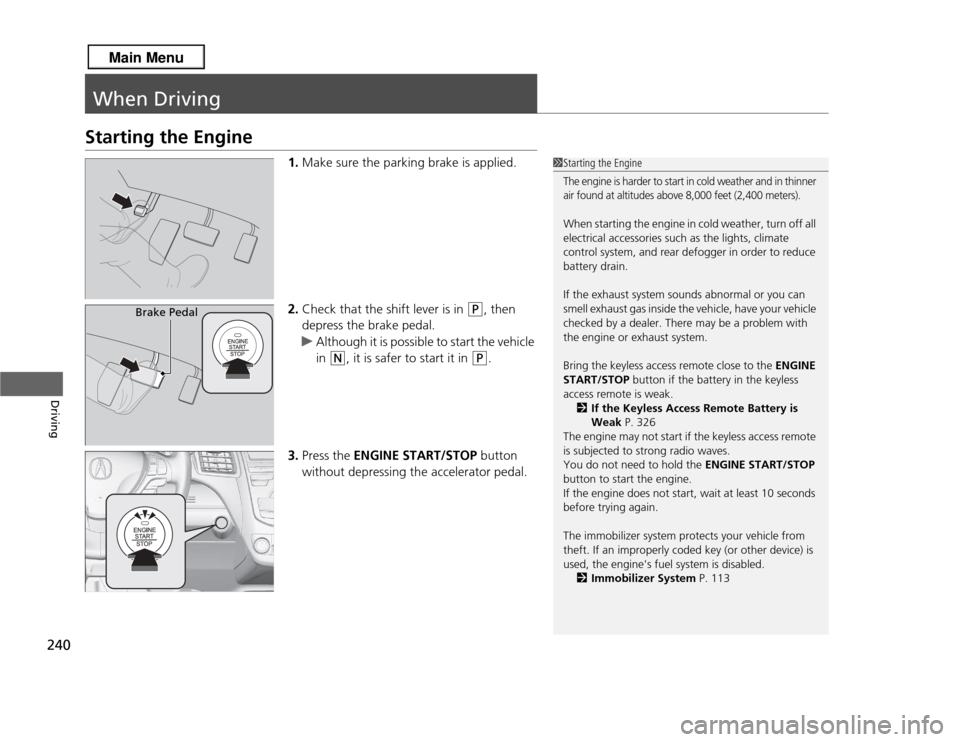
1.Make sure the parking brake is applied.
2. Check that the shift lever is in
(P
, then
depress the brake pedal.
u Although it is possible to start the vehicle
in
(N
, it is safer to start it in
(P
.
3. Press the ENGINE START/STOP button
without depressing the accelerator pedal.
1 Starting the EngineThe engine is harder to start in cold weather and in thinner
air found at altitudes above 8,000 feet (2,400 meters).When starting the engine in cold weather, turn off all
electrical accessories such as the lights, climate
control system, and rear defogger in order to reduce
battery drain.
If the exhaust system sounds abnormal or you can
smell exhaust gas inside the vehicle, have your vehicle
checked by a dealer. There may be a problem with
the engine or exhaust system.
Bring the keyless access remote close to the ENGINE
START/STOP button if the battery in the keyless
access remote is weak.
2 If the Keyless Access Remote Battery is
Weak P. 326
The engine may not start if the keyless access remote
is subjected to strong radio waves.
You do not need to hold the ENGINE START/STOP
button to start the engine.
If the engine does not start, wait at least 10 seconds
before trying again.
The immobilizer system protects your vehicle from
theft. If an improperly coded key (or other device) is
used, the engine's fuel system is disabled. 2 Immobilizer System P. 113
Brake Pedal
Page 245 of 364
244
uuWhen Driving uShifting
Driving
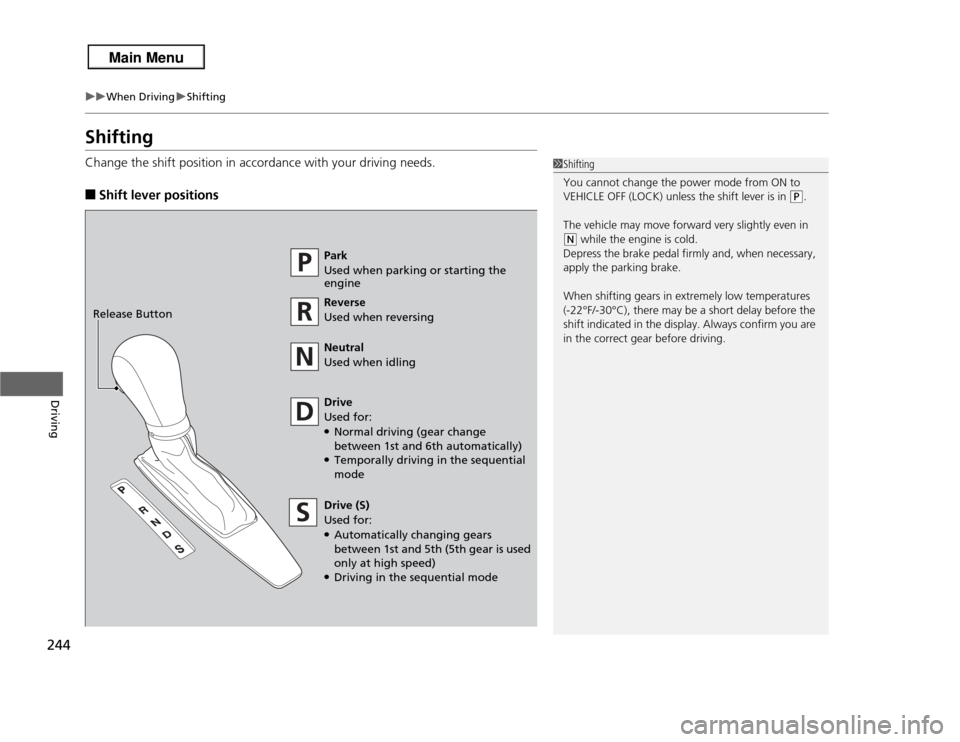
ShiftingChange the shift position in accordance with your driving needs.■
Shift lever positions
1Shifting
You cannot change the power mode from ON to
VEHICLE OFF (LOCK) unless the shift lever is in
(P
.
The vehicle may move forward very slightly even in
( N
while the engine is cold.
Depress the brake pedal firmly and, when necessary,
apply the parking brake.
When shifting gears in extremely low temperatures
(-22°F/-30°C), there may be a short delay before the
shift indicated in the display. Always confirm you are
in the correct gear before driving.
Park
Used when parking or starting the
engine
Reverse
Used when reversing
Neutral
Used when idling
Drive
Used for:●Normal driving (gear change
between 1st and 6th automatically)●Temporally driving in the sequential
mode
Drive (S)
Used for:●Automatically changing gears
between 1st and 5th (5th gear is used
only at high speed)●Driving in the sequential mode
Release Button
Page 246 of 364
Continued
245
uuWhen Driving uShifting
Driving
■
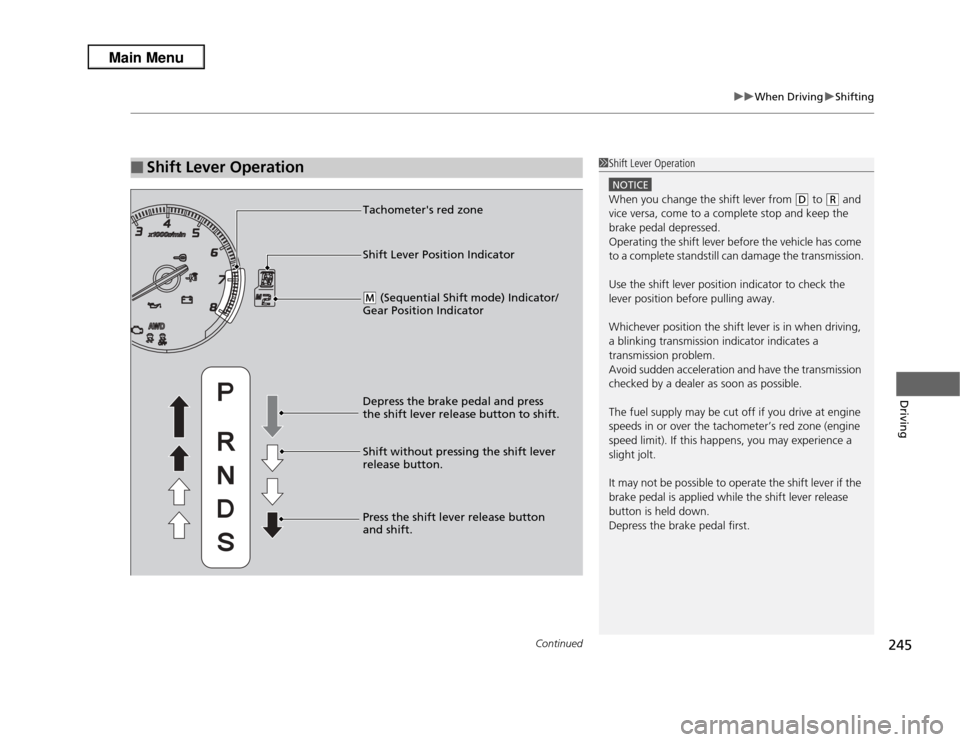
Shift Lever Operation
1Shift Lever Operation
NOTICEWhen you change the shift lever from
(D
to
(R
and
vice versa, come to a complete stop and keep the
brake pedal depressed.
Operating the shift lever before the vehicle has come
to a complete standstill can damage the transmission.
Use the shift lever position indicator to check the
lever position before pulling away.
Whichever position the shift lever is in when driving,
a blinking transmission indicator indicates a
transmission problem.
Avoid sudden acceleration and have the transmission
checked by a dealer as soon as possible.
The fuel supply may be cut off if you drive at engine
speeds in or over the tachometer’s red zone (engine
speed limit). If this happens, you may experience a
slight jolt.
It may not be possible to operate the shift lever if the
brake pedal is applied while the shift lever release
button is held down.
Depress the brake pedal first.
Tachometer's red zone
Shift Lever Position Indicator
Depress the brake pedal and press
the shift lever release button to shift.
Shift without pressing the shift lever
release button.
Press the shift lever release button
and shift.( M
(Sequential Shift mode) Indicator/
Gear Position Indicator
Page 259 of 364
uuBraking uBrake System
258Driving
Your vehicle is equipped with disc brakes at all four wheels. A vacuum power assist
helps reduce the effort needed on the brake pedal. The brake assist system increases
the stopping force when you depress the brake pedal hard in an emergency
situation. The anti-lock brake system (ABS) helps you retain steering control when
braking very hard.
2 Brake Assist System P. 260
2 ABS (Anti-lock Brake System) P. 259
■
Foot Brake
1Foot Brake
Check the brakes after driving through deep water,
or if there is a buildup of road surface water. If
necessary, dry the brakes by lightly depressing the
pedal several times.
If you hear a continuous metallic friction sound when
applying the brakes, the brake pads need to be
replaced. Have the vehicle checked by a dealer.
Constantly using the brake pedal while going down a
long hill builds up heat, which reduces the brake
effectiveness. Apply engine braking by taking your
foot off the accelerator pedal and downshifting to a
lower gear.
Do not rest your foot on the brake pedal while
driving, as it will lightly apply the brakes and cause
them to lose effectiveness over time and reduce pad
life. It will also confuse drivers behind you.
Your vehicle is equipped with a hydraulic brake
booster that, under certain conditions, such as
braking at high altitudes, supplements the vacuum
power assist. When the hydraulic brake booster
activates, you may hear a motor sound and a slight
vibration in the pedal. This is normal.
Page 260 of 364
259
uuBraking uABS (Anti-lock Brake System)
Driving
ABS (Anti-lock Brake System)Helps prevent the wheels from locking up, and helps you retain steering control by
pumping the brakes rapidly, much faster than you.
The electronic brake distribution (EBD) system, which is part of the ABS, also
balances the front-to-rear braking distribution according to vehicle loading.
You should never pump the brake pedal. Let the ABS work for you by always
keeping firm, steady pressure on the brake pedal. This is sometimes referred to as
“stomp and steer.”■
ABS operation
The brake pedal may pulsate slightly when the ABS is working. Keep holding the
pedal firmly down. On dry pavement, you will need to press on the brake pedal very
hard before the ABS activates. However, you may feel the ABS activate immediately
if you are trying to stop on snow or ice.
When the vehicle speed goes under 6 mph (10 km/h), the ABS stops.
■
ABS
1 ABS (Anti-lock Brake System)
NOTICEThe ABS may not function correctly if you use an
incorrect tire type and size.
When the ABS indicator comes on while driving,
there may be a problem with the system.
While normal braking is not affected, there is a
possibility of the ABS not operating. Have the vehicle
checked by a dealer immediately.
The ABS does not reduce the time or distance it takes
to stop the vehicle. It only helps with steering control
during hard braking.
In the following cases, your vehicle may need more
stopping distance than a vehicle without the ABS:•When driving on rough road surfaces, including
when driving on uneven surfaces, such as gravel or
snow.•When tire chains are installed.
You may hear a motor sound coming from the
engine compartment while system checks are being
performed immediately after starting the engine or
while driving. This is normal.
Page 261 of 364

260
uuBraking uBrake Assist System
Driving
Brake Assist SystemDesigned to assist the driver by generating greater braking force when you depress
the brake pedal hard during emergency braking.■
Brake assist system operation
Press the brake pedal firmly for more powerful braking.
When brake assist operates, the pedal may wiggle slightly and an operating noise
may be heard. This is normal. Keep holding the brake pedal firmly down.
Page 268 of 364
267
Maintenance
This chapter discusses basic maintenance.
Before Performing MaintenanceInspection and Maintenance ............ 268Safety When Performing Maintenance..... 269Parts and Fluids Used in Maintenance Service ........................................... 270
Maintenance Minder
TM..................... 271
Maintenance Under the Hood
Maintenance Items Under the Hood ..... 275Opening the Hood ........................... 276
Recommended Engine Oil ...... .......... 277
Oil Check ......................................... 278
Adding Engine Oil ............................ 279Changing the Engine Oil and Oil Filter ..... 280
Engine Coolant ................................ 282
Transmission Fluid ............................ 284
Brake Fluid ....................................... 285
Refilling Window Washer Fluid......... 286
Replacing Light Bulbs ....................... 287Checking and Maintaining Wiper Blades
.... 297
Checking and Maintaining Tires
Checking Tires ................................. 301Tire and Loading Information Label ...... 302Tire Labeling .................................... 302DOT Tire Quality Grading (U.S. Vehicles)....... 304Wear Indicators................................ 306
Tire Service Life ................................ 306 Tire and Wheel Replacement ........... 307
Tire Rotation .................................... 308
Winter Tires ..................................... 309
Battery ............................................... 310
Remote Transmitter Care Replacing the Button Battery ........... 311
Climate Control System Maintenance
..... 312
Cleaning
Interior Care .................................... 313
Exterior Care.................................... 315
Page 269 of 364
268Maintenance
Before Performing MaintenanceInspection and MaintenanceFor your safety, perform all listed inspections and maintenance to keep your vehicle
in good condition. If you become aware of any abnormality (noise, smell, insufficient
brake fluid, oil residue on the ground, etc.), have your vehicle inspected by a dealer.
(Note, however, that service at a dealer is not mandatory to keep your warranties in
effect.) Refer to the separate maintenance booklet for detailed maintenance and
inspection information.■
Daily inspections
Perform inspections before long distance trips, when washing the vehicle, or when
refueling.
■
Periodic inspections
• Check the automatic transmission fluid level monthly.
2 Automatic Transmission Fluid P. 284
•Check the brake fluid level monthly.
2 Checking the Brake Fluid P. 285
•Check the tire pressure monthly. Examine the tread for wear and foreign objects.
2 Checking and Maintaining Tires P. 301
•Check the operation of the exterior lights monthly.
2 Replacing Light Bulbs P. 287
•Check the condition of the wiper blades at least every six months.
2 Checking and Maintaining Wiper Blades P. 297
■
Types of Inspection and Maintenance
1Inspection and Maintenance
Maintenance, replacement, or repair of
emissions control devices and systems may be
done by any automotive repair establishment or
individuals using parts that are “certified” to
EPA standards.
According to state and federal regulations, failure to
perform maintenance on the maintenance main
items marked with # will not void your emissions
warranties. However, all maintenance services should
be performed in accordance with the intervals
indicated by the multi-information display.
2 Maintenance Service Items P. 273
If you want to perform complex maintenance tasks
that require more skills and tools, you can purchase a
subscription to the Service Express website at
www.techinfo.honda.com .
2 Authorized Manuals P. 353
If you want to perform maintenance yourself, make
sure that you have the necessary tools and skills first.
After performing maintenance, update the records in
the separate maintenance booklet.
U.S. models
Page 277 of 364
276
uuMaintenance Under the Hood uOpening the Hood
Maintenance
Opening the Hood
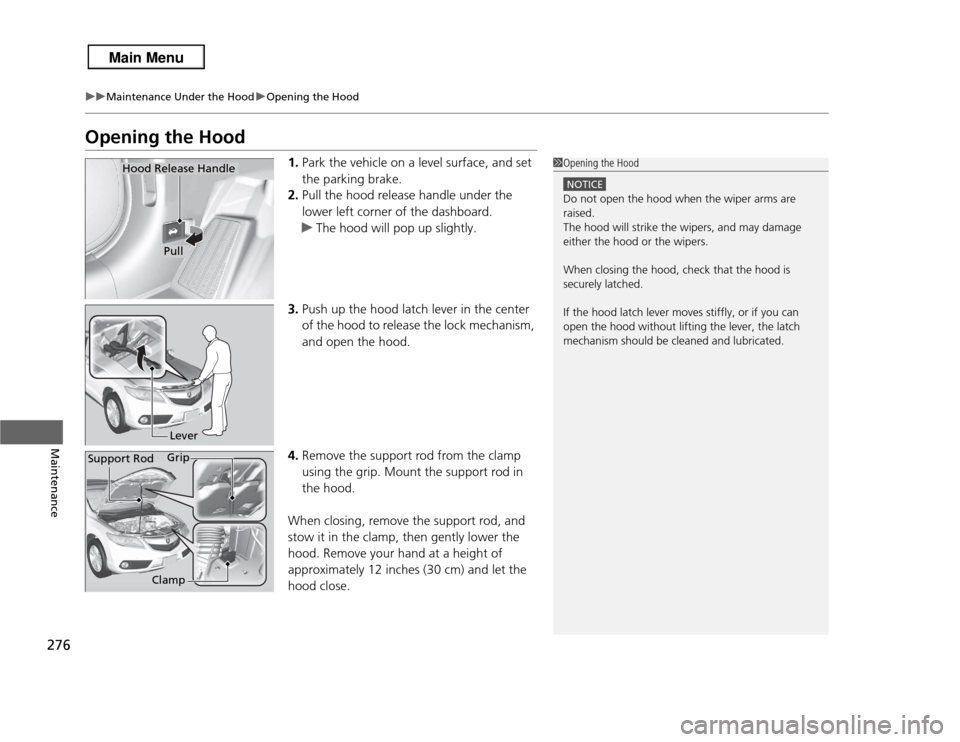
1. Park the vehicle on a level surface, and set
the parking brake.
2. Pull the hood release handle under the
lower left corner of the dashboard.
u The hood will pop up slightly.
3. Push up the hood latch lever in the center
of the hood to release the lock mechanism,
and open the hood.
4. Remove the support rod from the clamp
using the grip. Mount the support rod in
the hood.
When closing, remove the support rod, and
stow it in the clamp, then gently lower the
hood. Remove your hand at a height of
approximately 12 inches (30 cm) and let the
hood close.
1 Opening the Hood
NOTICEDo not open the hood when the wiper arms are
raised.
The hood will strike the wipers, and may damage
either the hood or the wipers.
When closing the hood, check that the hood is
securely latched.
If the hood latch lever moves stiffly, or if you can
open the hood without lifting the lever, the latch
mechanism should be cleaned and lubricated.
Hood Release Handle
PullLever
Support Rod Grip
Clamp
Page 288 of 364
287
Continued
Maintenance
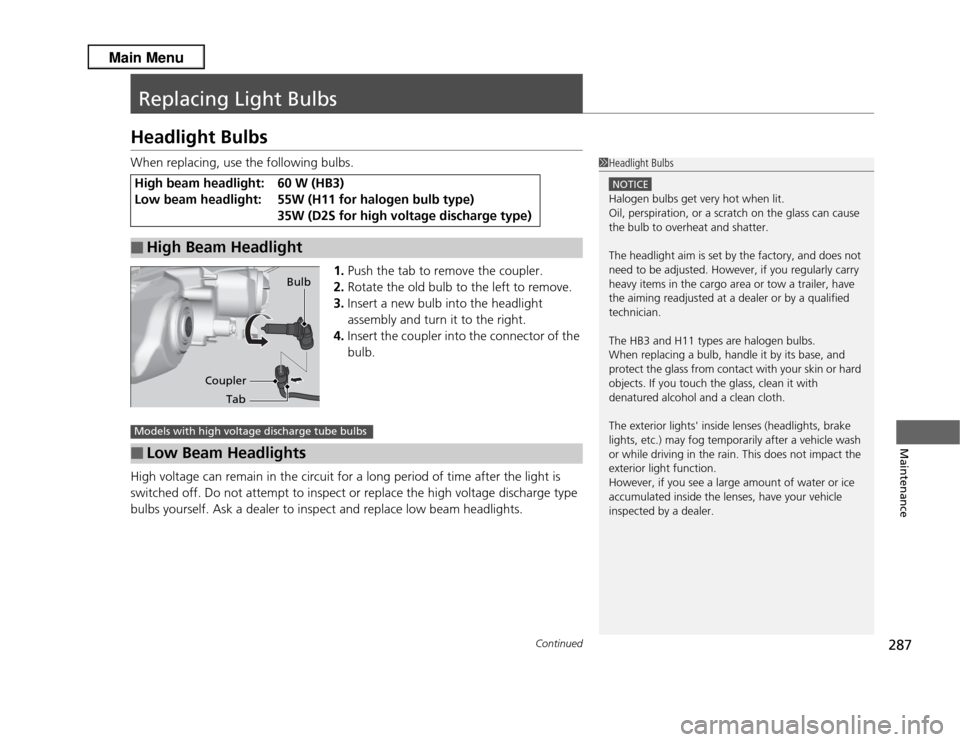
Replacing Light BulbsHeadlight BulbsWhen replacing, use the following bulbs.1.Push the tab to remove the coupler.
2. Rotate the old bulb to the left to remove.
3. Insert a new bulb into the headlight
assembly and turn it to the right.
4. Insert the coupler into the connector of the
bulb.
High voltage can remain in the circuit for a long period of time after the light is
switched off. Do not attempt to inspect or replace the high voltage discharge type
bulbs yourself. Ask a dealer to inspect and replace low beam headlights.High beam headlight:
Low beam headlight:
60 W (HB3)
55W (H11 for halogen bulb type)
35W (D2S for high voltage discharge type)
■
High Beam Headlight
1 Headlight Bulbs
NOTICEHalogen bulbs get very hot when lit.
Oil, perspiration, or a scratch on the glass can cause
the bulb to overheat and shatter.
The headlight aim is set by the factory, and does not
need to be adjusted. However, if you regularly carry
heavy items in the cargo area or tow a trailer, have
the aiming readjusted at a dealer or by a qualified
technician.
The HB3 and H11 types are halogen bulbs.
When replacing a bulb, handle it by its base, and
protect the glass from contact with your skin or hard
objects. If you touch the glass, clean it with
denatured alcohol and a clean cloth.
The exterior lights' inside lenses (headlights, brake
lights, etc.) may fog temporarily after a vehicle wash
or while driving in the rain. This does not impact the
exterior light function.
However, if you see a large amount of water or ice
accumulated inside the lenses, have your vehicle
inspected by a dealer.
Coupler Bulb
Tab
■
Low Beam Headlights
Models with high voltage discharge tube bulbs