eco button Acura RDX 2013 User Guide
[x] Cancel search | Manufacturer: ACURA, Model Year: 2013, Model line: RDX, Model: Acura RDX 2013Pages: 364, PDF Size: 12.54 MB
Page 103 of 364
uuLocking and Unlocking the Doors uLocking/Unlocking the Doors from the Outside
102Controls
■
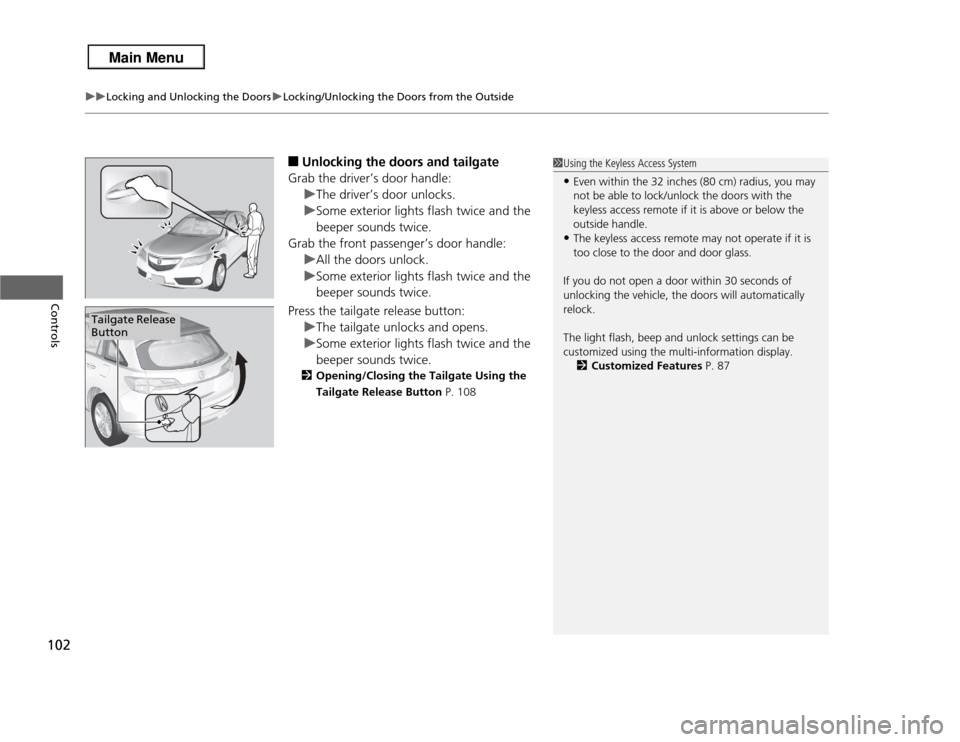
Unlocking the doors and tailgate
Grab the driver’s door handle: uThe driver’s door unlocks.
u Some exterior lights flash twice and the
beeper sounds twice.
Grab the front passenger’s door handle:
uAll the doors unlock.
u Some exterior lights flash twice and the
beeper sounds twice.
Press the tailgate release button: uThe tailgate unlocks and opens.
u Some exterior lights flash twice and the
beeper sounds twice.2 Opening/Closing the Tailgate Using the
Tailgate Release Button P. 108
1Using the Keyless Access System•Even within the 32 inches (80 cm) radius, you may
not be able to lock/unlock the doors with the
keyless access remote if it is above or below the
outside handle.•The keyless access remote may not operate if it is
too close to the door and door glass.
If you do not open a door within 30 seconds of
unlocking the vehicle, the doors will automatically
relock.
The light flash, beep and unlock settings can be
customized using the multi-information display. 2 Customized Features P. 87
Tailgate Release
Button
Page 110 of 364
109
uuOpening and Closing the Tailgate uOpening/Closing the Power Tailgate
*
Continued
Controls
Opening/Closing the Power Tailgate
*
The power tailgate can be operated by pressing the power tailgate button on the
remote transmitter, pressing the power tailgate switch on the dashboard, or
pressing the button on the tailgate.■
The power tailgate can be opened when:
• The tailgate is fully closed.
• The shift lever is in
(P
.
• Press and hold the tailgate button on the remote transmitter for about one
second.
u If you have changed the POWER TAILGATE KEYLESS OPEN MODE setting to
WHEN UNLOCKED , you need to unlock the tailgate before you press the
tailgate button to open it.
2 Customized Features P. 87
■
The power tailgate can be closed when:
• The tailgate is fully open.
• The shift lever is in
(P
.
• Press and hold the tailgate button on the remote transmitter for about one
second.
1Opening/Closing the Power Tailgate
*
The power tailgate may not open or close under the
following conditions:•The vehicle is parked on a steep hill.•The vehicle is swayed in a strong wind.•The tailgate or the roof is covered with snow or ice.
If you close the power tailgate when all the doors are
locked, the power tailgate locks automatically.
If you replace the battery or the power tailgate fuse
while the tailgate is open, the power tailgate may be
disabled. The power tailgate resumes once you
manually close the tailgate.
Installing aftermarket components other than Acura
genuine accessories on the power tailgate may
prevent it from fully opening or closing.
Make sure the power tailgate is fully open before you
get your luggage in and out.
Make sure the power tailgate is fully closed before
you start the vehicle.
* Not available on all models
Page 111 of 364
uuOpening and Closing the Tailgate uOpening/Closing the Power Tailgate
*
110Controls
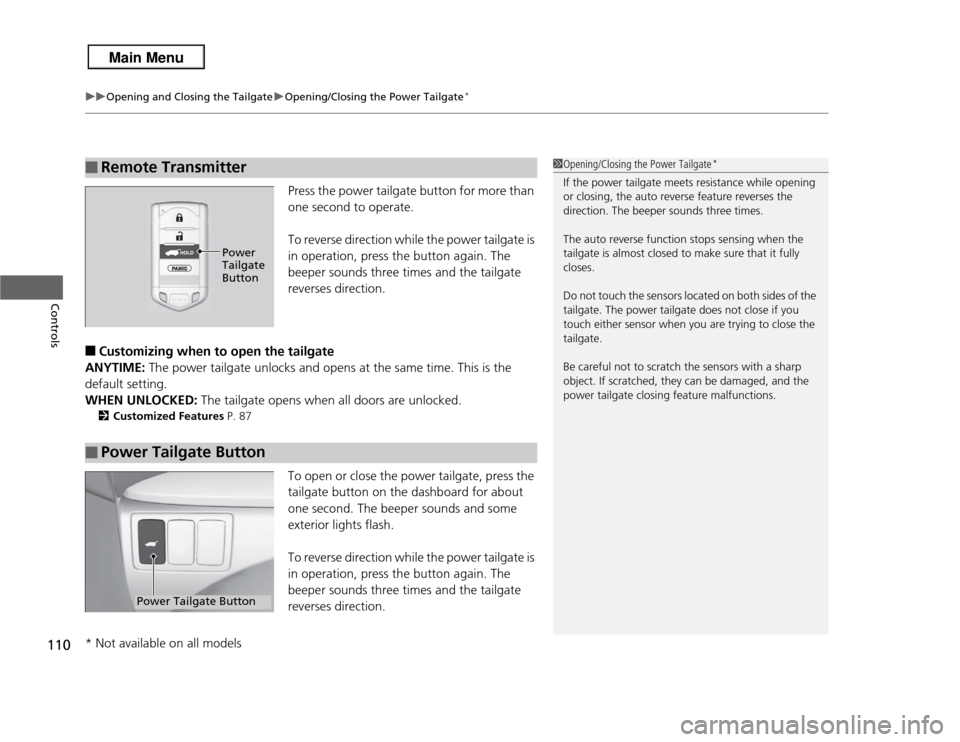
Press the power tailgate button for more than
one second to operate.
To reverse direction while the power tailgate is
in operation, press the button again. The
beeper sounds three times and the tailgate
reverses direction.
■
Customizing when to open the tailgate
ANYTIME: The power tailgate unlocks and opens at the same time. This is the
default setting.
WHEN UNLOCKED: The tailgate opens when all doors are unlocked.2Customized Features P. 87
To open or close the power tailgate, press the
tailgate button on the dashboard for about
one second. The beeper sounds and some
exterior lights flash.
To reverse direction while the power tailgate is
in operation, press the button again. The
beeper sounds three times and the tailgate
reverses direction.
■
Remote Transmitter
1Opening/Closing the Power Tailgate
*
If the power tailgate meets resistance while opening
or closing, the auto reverse feature reverses the
direction. The beeper sounds three times.
The auto reverse function stops sensing when the
tailgate is almost closed to make sure that it fully
closes.
Do not touch the sensors located on both sides of the
tailgate. The power tailgate does not close if you
touch either sensor when you are trying to close the
tailgate.
Be careful not to scratch the sensors with a sharp
object. If scratched, they can be damaged, and the
power tailgate closing feature malfunctions.
Power
Tailgate
Button
■
Power Tailgate Button
Power Tailgate Button
* Not available on all models
Page 115 of 364
uuSecurity System uSecurity System Alarm
114Controls
■
Setting the security system alarm
The security system alarm automatically sets when the following conditions have
been met:
• The power mode is in VEHICLE OFF (LOCK).
• The hood is closed.
• All doors and the tailgate are locked from outside with the key, remote
transmitter, or keyless access system.
■
When the security system alarm sets
The security system alarm indicator in the instrument panel blinks. When the
blinking interval changes after about 15 seconds, the security system alarm is set.
■
To cancel the security system alarm
The security system alarm is canceled when the vehicle is unlocked using the key,
remote transmitter, or keyless access system. The security system alarm indicator
goes off at the same time.
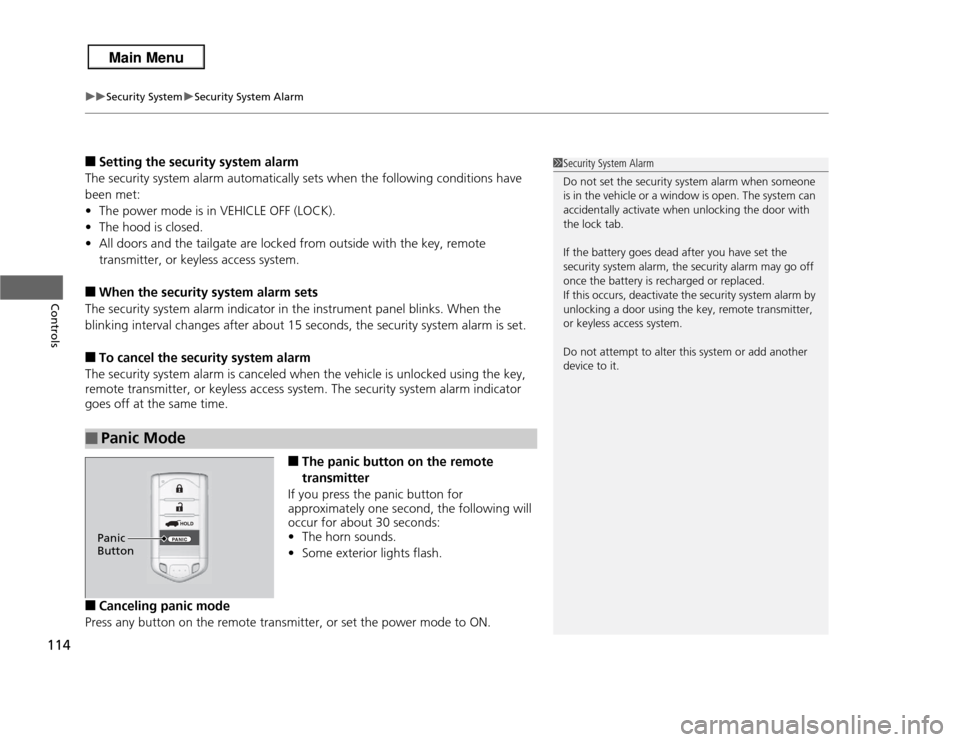
■
The panic button on the remote
transmitter
If you press the panic button for
approximately one second, the following will
occur for about 30 seconds:
• The horn sounds.
• Some exterior lights flash.
■
Canceling panic mode
Press any button on the remote transmitter, or set the power mode to ON.
■
Panic Mode
1 Security System Alarm
Do not set the security system alarm when someone
is in the vehicle or a window is open. The system can
accidentally activate when unlocking the door with
the lock tab.
If the battery goes dead after you have set the
security system alarm, the security alarm may go off
once the battery is recharged or replaced.
If this occurs, deactivate the security system alarm by
unlocking a door using the key, remote transmitter,
or keyless access system.
Do not attempt to alter this system or add another
device to it.
Panic
Button
Page 118 of 364
117
uuOpening and Closing the Windows uOpening/Closing the Power Windows
Controls
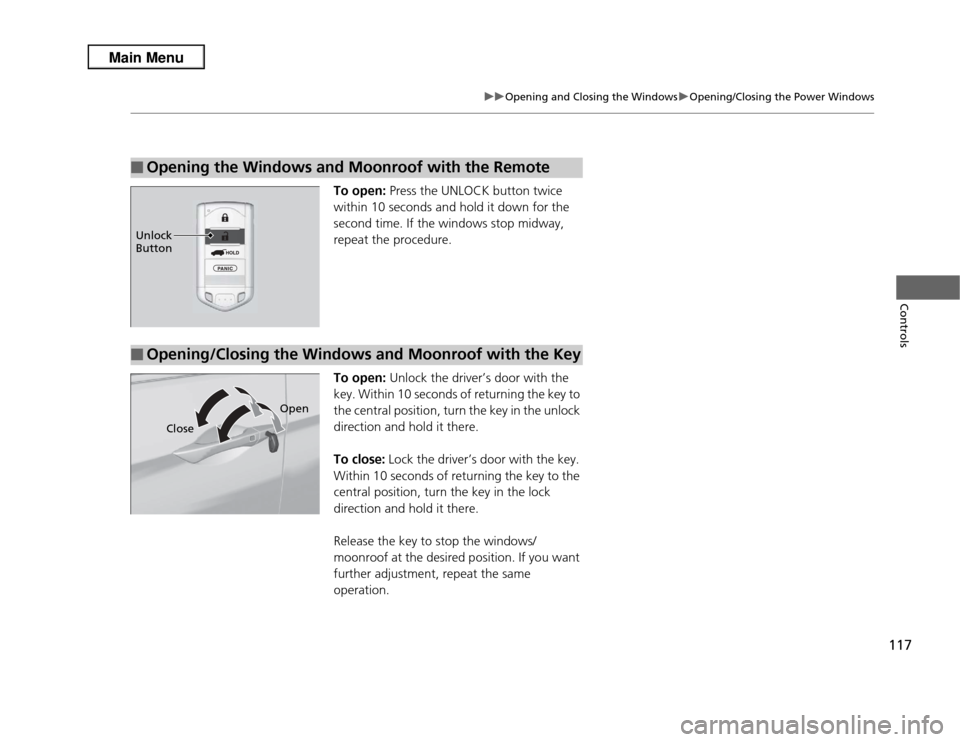
To open: Press the UNLOCK button twice
within 10 seconds and hold it down for the
second time. If the windows stop midway,
repeat the procedure.
To open: Unlock the driver’s door with the
key. Within 10 seconds of returning the key to
the central position, turn the key in the unlock
direction and hold it there.
To close: Lock the driver’s door with the key.
Within 10 seconds of returning the key to the
central position, turn the key in the lock
direction and hold it there.
Release the key to stop the windows/
moonroof at the desired position. If you want
further adjustment, repeat the same
operation.
■
Opening the Windows and Moonroof with the RemoteUnlock
Button■
Opening/Closing the Windows and Moonroof with the Key
Close Open
Page 132 of 364
131
uuOperating the Switches Around the Steering Wheel uDriving Position Memory System
Controls
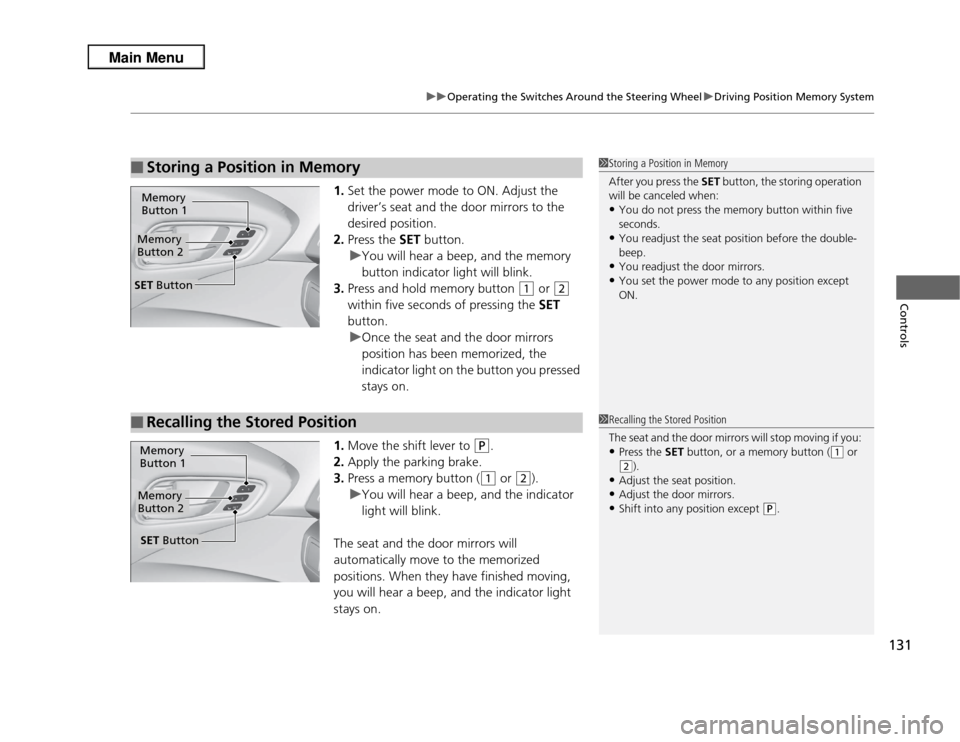
1. Set the power mode to ON. Adjust the
driver’s seat and the door mirrors to the
desired position.
2. Press the SET button.
u You will hear a beep, and the memory
button indicator light will blink.
3. Press and hold memory button
(1
or
(2
within five seconds of pressing the SET
button.
u Once the seat and the door mirrors
position has been memorized, the
indicator light on the button you pressed
stays on.
1. Move the shift lever to
(P
.
2. Apply the parking brake.
3. Press a memory button ((1
or
(2
).
u You will hear a beep, and the indicator
light will blink.
The seat and the door mirrors will
automatically move to the memorized
positions. When they have finished moving,
you will hear a beep, and the indicator light
stays on.
■
Storing a Position in Memory
1 Storing a Position in Memory
After you press the SET button, the storing operation
will be canceled when: •You do not press the memory button within five
seconds.•You readjust the seat position before the double-
beep.•You readjust the door mirrors.•You set the power mode to any position except
ON.
Memory
Button 1Memory
Button 2SET Button■
Recalling the Stored Position
1 Recalling the Stored Position
The seat and the door mirrors will stop moving if you: •Press the SET button, or a memory button (
(1
or
(2
).
•Adjust the seat position.•Adjust the door mirrors.•Shift into any position except
(P
.
Memory
Button 1Memory
Button 2SET Button
Page 144 of 364
143
Continued
Controls
Interior Lights/Interior Convenience ItemsInterior Lights
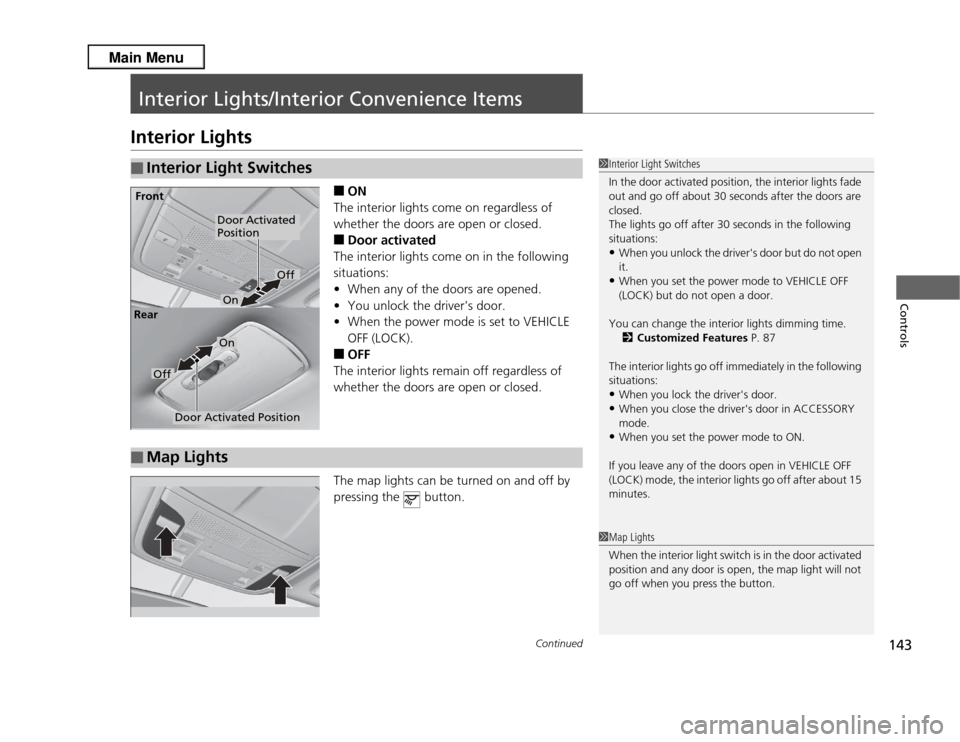
■
ON
The interior lights come on regardless of
whether the doors are open or closed.
■
Door activated
The interior lights come on in the following
situations:
• When any of the doors are opened.
• You unlock the driver's door.
• When the power mode is set to VEHICLE
OFF (LOCK).
■
OFF
The interior lights remain off regardless of
whether the doors are open or closed.
The map lights can be turned on and off by
pressing the button.
■
Interior Light Switches
1 Interior Light Switches
In the door activated position, the interior lights fade
out and go off about 30 seconds after the doors are
closed.
The lights go off after 30 seconds in the following
situations:•When you unlock the driver's door but do not open
it.•When you set the power mode to VEHICLE OFF
(LOCK) but do not open a door.
You can change the interior lights dimming time. 2 Customized Features P. 87
The interior lights go off immediately in the following
situations:•When you lock the driver's door.•When you close the driver's door in ACCESSORY
mode.•When you set the power mode to ON.
If you leave any of the doors open in VEHICLE OFF
(LOCK) mode, the interior lights go off after about 15
minutes.
Door Activated
Position
Off
Front
Door Activated Position
On
Off
Rear
On
■
Map Lights
1
Map Lights
When the interior light switch is in the door activated
position and any door is open, the map light will not
go off when you press the button.
Page 160 of 364
159
uuAudio System uUSB Adapter Cable
Features
USB Adapter Cable
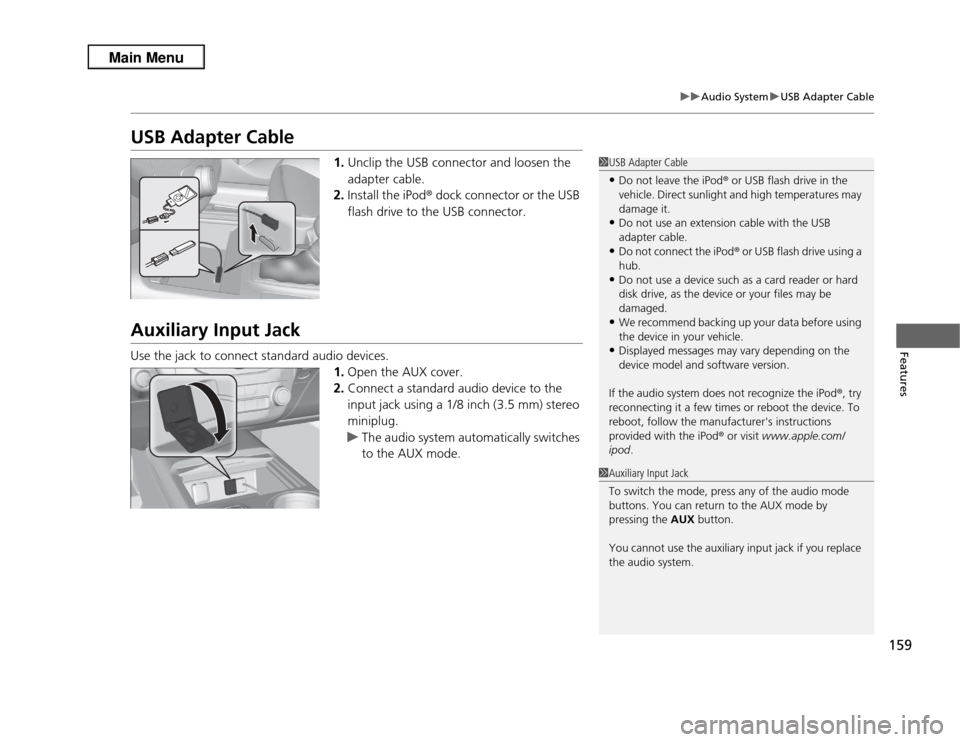
1. Unclip the USB connector and loosen the
adapter cable.
2. Install the iPod ® dock connector or the USB
flash drive to the USB connector.
Auxiliary Input JackUse the jack to connect standard audio devices. 1.Open the AUX cover.
2. Connect a standard audio device to the
input jack using a 1/8 inch (3.5 mm) stereo
miniplug.
u The audio system automatically switches
to the AUX mode.
1USB Adapter Cable•Do not leave the iPod ® or USB flash drive in the
vehicle. Direct sunlight and high temperatures may
damage it.•Do not use an extension cable with the USB
adapter cable.•Do not connect the iPod ®
or USB flash drive using a
hub.•Do not use a device such as a card reader or hard
disk drive, as the device or your files may be
damaged.•We recommend backing up your data before using
the device in your vehicle.•Displayed messages may vary depending on the
device model and software version.
If the audio system does not recognize the iPod ®, try
reconnecting it a few times or reboot the device. To
reboot, follow the manufacturer's instructions
provided with the iPod ® or visit www.apple.com/
ipod .
1Auxiliary Input Jack
To switch the mode, press any of the audio mode
buttons. You can return to the AUX mode by
pressing the AUX button.
You cannot use the auxiliary input jack if you replace
the audio system.
Page 161 of 364
160
uuAudio System uAudio System Theft Protection
Features
Audio System Theft ProtectionThe audio system is disabled when it is disconnected from the power source, such as
when the battery is disconnected or goes dead.■
Reactivating the audio system
1. Set the power mode to ON, and turn on the audio system.
u If you set the power mode to ACCESSORY, you will be requested to enter the
audio security code. See step 3.
2. Press and hold the power button again for more than two seconds.
u The audio system is reactivated when the system’s control unit recognizes that
the system is in your vehicle.
If the control unit fails to recognize, ENTER CODE appears on the audio/
information screen.
3. Enter the audio security code using the preset buttons. If you enter an incorrect
digit, continue to the last digit, then try again. If you do not enter the code
correctly after 10 tries, leave the system for one hour before trying again, or visit
a dealer to have the system reset.
1Audio System Theft Protection
Find the audio system's security code and serial
number label in your owner’s manual kit.
We recommend that you write down the serial
number in this owner’s manual.
Do not store the label in your vehicle. If you lose the
label, you must first retrieve the serial number, and
then obtain the code.
You can find out about your serial number and
security code from a dealer.
You can register the security code at My Acura
(owners.acura.com. ), and find information on how to
retrieve the serial number and obtain the code at
radio-navicode.acura.com .
U.S. models
Page 168 of 364
167
uuAudio System Basic Operation uPlaying the AM/FM Radio
Continued
Features
Playing the AM/FM Radio
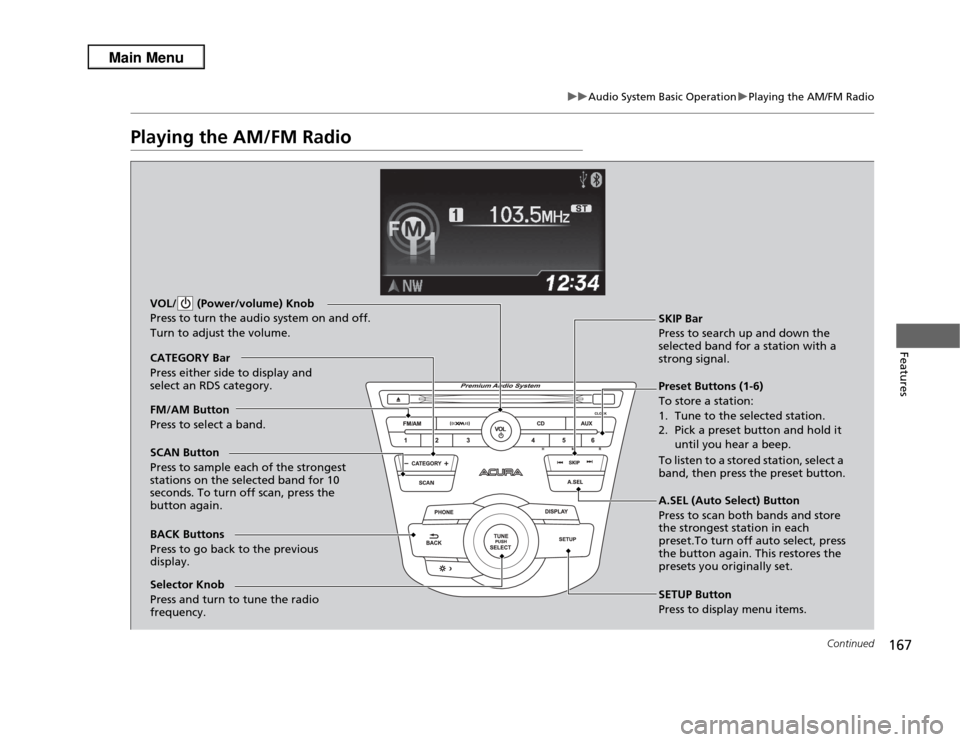
BACK Buttons
Press to go back to the previous
display. SCAN Button
Press to sample each of the strongest
stations on the selected band for 10
seconds. To turn off scan, press the
button again. VOL/ (Power/volume) Knob
Press to turn the audio system on and off.
Turn to adjust the volume.
Preset Buttons (1-6)
To store a station:
1. Tune to the selected station.
2. Pick a preset button and hold it
until you hear a beep.
To listen to a stored station, select a
band, then press the preset button. SKIP Bar
Press to search up and down the
selected band for a station with a
strong signal.
SETUP Button
Press to display menu items.
Selector Knob
Press and turn to tune the radio
frequency. FM/AM Button
Press to select a band. CATEGORY Bar
Press either side to display and
select an RDS category.
A.SEL (Auto Select) Button
Press to scan both bands and store
the strongest station in each
preset.To turn off auto select, press
the button again. This restores the
presets you originally set.