wiper Acura RDX 2013 User Guide
[x] Cancel search | Manufacturer: ACURA, Model Year: 2013, Model line: RDX, Model: Acura RDX 2013Pages: 364, PDF Size: 12.54 MB
Page 262 of 364
261Driving
Parking Your VehicleWhen Stopped1.Depress the brake pedal firmly with the shift lever in
(D
.
2. Firmly apply the parking brake.
3. Move the shift lever from
(D
to
(P
.
4. Turn off the engine.
Always set the parking brake firmly, in particular if you are parked on an incline.
1 Parking Your Vehicle
Do not park your vehicle near flammable objects,
such as dry grass, oil, or timber.
Heat from the exhaust can cause a fire.1When Stopped
NOTICEThe following can damage the transmission:•Depressing the accelerator and brake pedals
simultaneously.•Holding the vehicle in place when facing uphill by
depressing the accelerator pedal.•Moving the shift lever into
(P
before the vehicle
stops completely.
Raise the wiper arms when snow is expected.
In extremely cold temperatures, the parking brake
may freeze in the applied position. To prevent this,
use a block or wheel chock to prevent the wheels
from moving.
Page 268 of 364
267
Maintenance
This chapter discusses basic maintenance.
Before Performing MaintenanceInspection and Maintenance ............ 268Safety When Performing Maintenance..... 269Parts and Fluids Used in Maintenance Service ........................................... 270
Maintenance Minder
TM..................... 271
Maintenance Under the Hood
Maintenance Items Under the Hood ..... 275Opening the Hood ........................... 276
Recommended Engine Oil ...... .......... 277
Oil Check ......................................... 278
Adding Engine Oil ............................ 279Changing the Engine Oil and Oil Filter ..... 280
Engine Coolant ................................ 282
Transmission Fluid ............................ 284
Brake Fluid ....................................... 285
Refilling Window Washer Fluid......... 286
Replacing Light Bulbs ....................... 287Checking and Maintaining Wiper Blades
.... 297
Checking and Maintaining Tires
Checking Tires ................................. 301Tire and Loading Information Label ...... 302Tire Labeling .................................... 302DOT Tire Quality Grading (U.S. Vehicles)....... 304Wear Indicators................................ 306
Tire Service Life ................................ 306 Tire and Wheel Replacement ........... 307
Tire Rotation .................................... 308
Winter Tires ..................................... 309
Battery ............................................... 310
Remote Transmitter Care Replacing the Button Battery ........... 311
Climate Control System Maintenance
..... 312
Cleaning
Interior Care .................................... 313
Exterior Care.................................... 315
Page 269 of 364
268Maintenance
Before Performing MaintenanceInspection and MaintenanceFor your safety, perform all listed inspections and maintenance to keep your vehicle
in good condition. If you become aware of any abnormality (noise, smell, insufficient
brake fluid, oil residue on the ground, etc.), have your vehicle inspected by a dealer.
(Note, however, that service at a dealer is not mandatory to keep your warranties in
effect.) Refer to the separate maintenance booklet for detailed maintenance and
inspection information.■
Daily inspections
Perform inspections before long distance trips, when washing the vehicle, or when
refueling.
■
Periodic inspections
• Check the automatic transmission fluid level monthly.
2 Automatic Transmission Fluid P. 284
•Check the brake fluid level monthly.
2 Checking the Brake Fluid P. 285
•Check the tire pressure monthly. Examine the tread for wear and foreign objects.
2 Checking and Maintaining Tires P. 301
•Check the operation of the exterior lights monthly.
2 Replacing Light Bulbs P. 287
•Check the condition of the wiper blades at least every six months.
2 Checking and Maintaining Wiper Blades P. 297
■
Types of Inspection and Maintenance
1Inspection and Maintenance
Maintenance, replacement, or repair of
emissions control devices and systems may be
done by any automotive repair establishment or
individuals using parts that are “certified” to
EPA standards.
According to state and federal regulations, failure to
perform maintenance on the maintenance main
items marked with # will not void your emissions
warranties. However, all maintenance services should
be performed in accordance with the intervals
indicated by the multi-information display.
2 Maintenance Service Items P. 273
If you want to perform complex maintenance tasks
that require more skills and tools, you can purchase a
subscription to the Service Express website at
www.techinfo.honda.com .
2 Authorized Manuals P. 353
If you want to perform maintenance yourself, make
sure that you have the necessary tools and skills first.
After performing maintenance, update the records in
the separate maintenance booklet.
U.S. models
Page 277 of 364
276
uuMaintenance Under the Hood uOpening the Hood
Maintenance
Opening the Hood
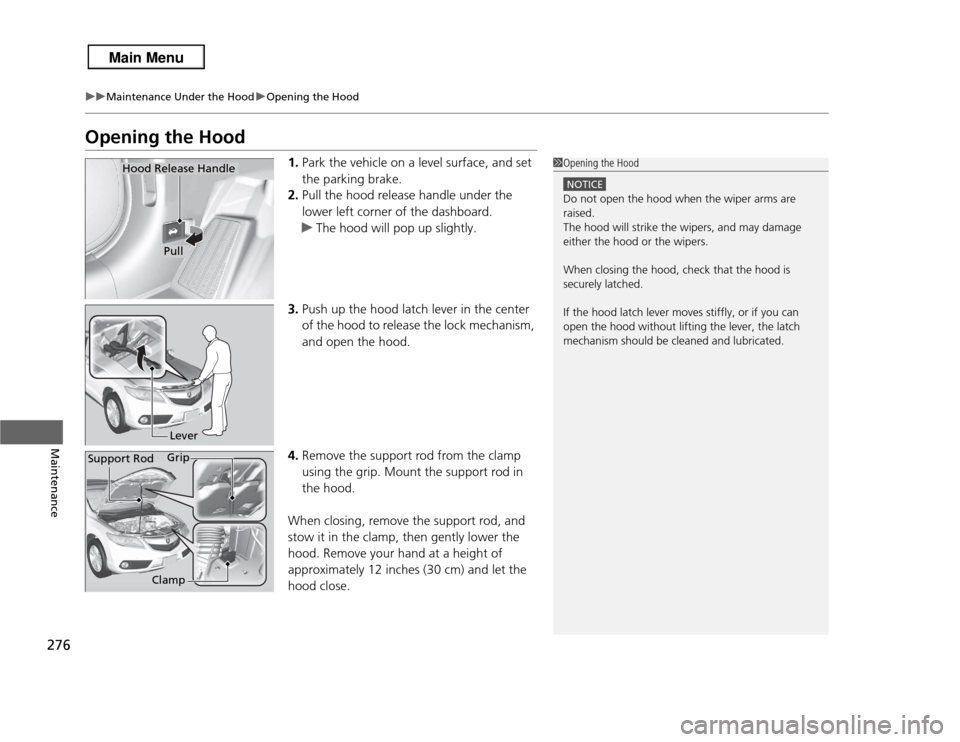
1. Park the vehicle on a level surface, and set
the parking brake.
2. Pull the hood release handle under the
lower left corner of the dashboard.
u The hood will pop up slightly.
3. Push up the hood latch lever in the center
of the hood to release the lock mechanism,
and open the hood.
4. Remove the support rod from the clamp
using the grip. Mount the support rod in
the hood.
When closing, remove the support rod, and
stow it in the clamp, then gently lower the
hood. Remove your hand at a height of
approximately 12 inches (30 cm) and let the
hood close.
1 Opening the Hood
NOTICEDo not open the hood when the wiper arms are
raised.
The hood will strike the wipers, and may damage
either the hood or the wipers.
When closing the hood, check that the hood is
securely latched.
If the hood latch lever moves stiffly, or if you can
open the hood without lifting the lever, the latch
mechanism should be cleaned and lubricated.
Hood Release Handle
PullLever
Support Rod Grip
Clamp
Page 298 of 364
297
Continued
Maintenance
Checking and Maintaining Wiper BladesChecking Wiper BladesIf the wiper blade rubber has deteriorated, it will leave streaks and the metal wiper
arm may scratch the window glass.Changing the Front Wiper Blade Rubber
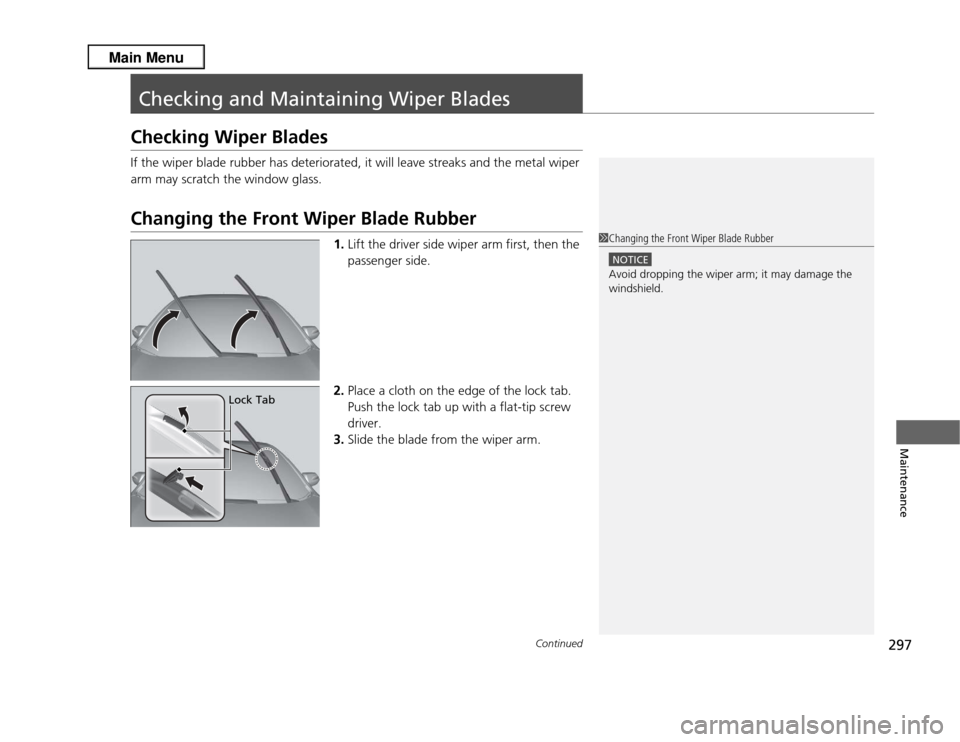
1.Lift the driver side wiper arm first, then the
passenger side.
2. Place a cloth on the edge of the lock tab.
Push the lock tab up with a flat-tip screw
driver.
3. Slide the blade from the wiper arm.
1Changing the Front Wiper Blade Rubber
NOTICEAvoid dropping the wiper arm; it may damage the
windshield.
Lock Tab
Page 299 of 364
298
uuChecking and Maintaining Wiper Blades uChanging the Front Wiper Blade Rubber
Maintenance
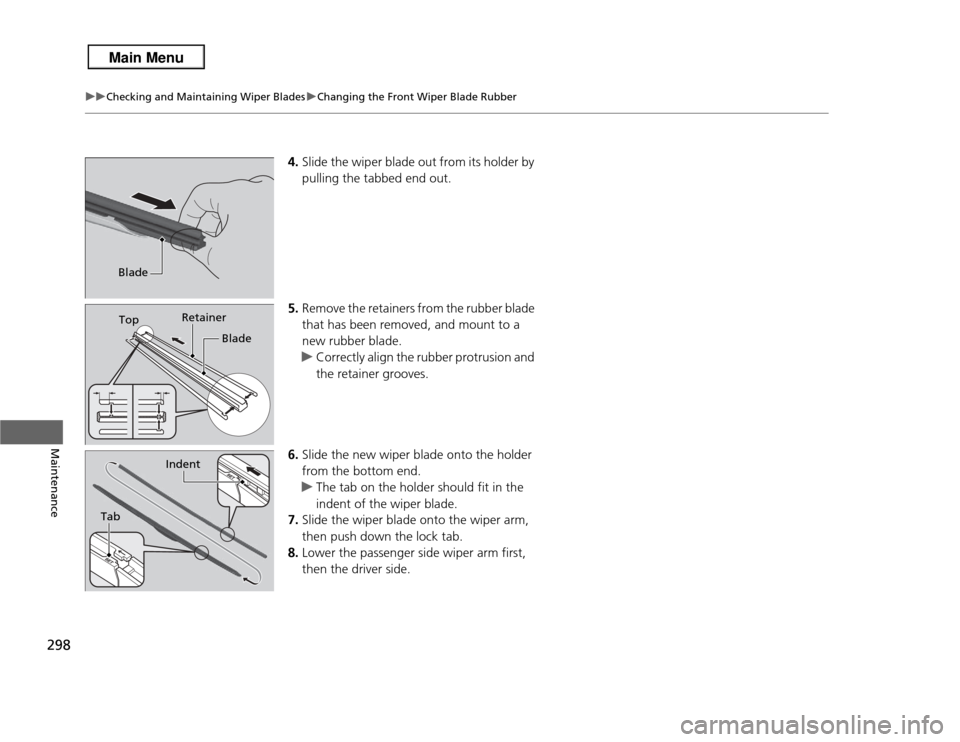
4. Slide the wiper blade out from its holder by
pulling the tabbed end out.
5. Remove the retainers from the rubber blade
that has been removed, and mount to a
new rubber blade.
u Correctly align the rubber protrusion and
the retainer grooves.
6. Slide the new wiper blade onto the holder
from the bottom end.
u The tab on the holder should fit in the
indent of the wiper blade.
7. Slide the wiper blade onto the wiper arm,
then push down the lock tab.
8. Lower the passenger side wiper arm first,
then the driver side.
BladeTop Retainer
Blade
Tab
Indent
Page 300 of 364
299
uuChecking and Maintaining Wiper Blades uChanging the Rear Wiper Blade Rubber
Continued
Maintenance
Changing the Rear Wiper Blade Rubber
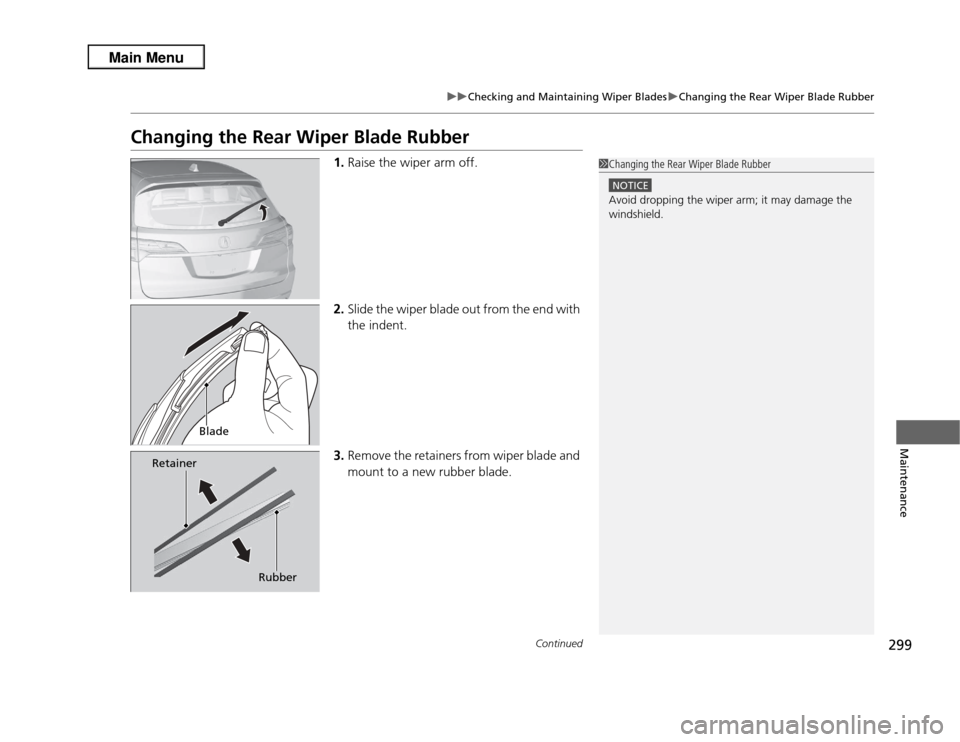
1. Raise the wiper arm off.
2. Slide the wiper blade out from the end with
the indent.
3. Remove the retainers from wiper blade and
mount to a new rubber blade.
1Changing the Rear Wiper Blade Rubber
NOTICEAvoid dropping the wiper arm; it may damage the
windshield.
Blade
Retainer
Rubber
Page 301 of 364
300
uuChecking and Maintaining Wiper Blades uChanging the Rear Wiper Blade Rubber
Maintenance
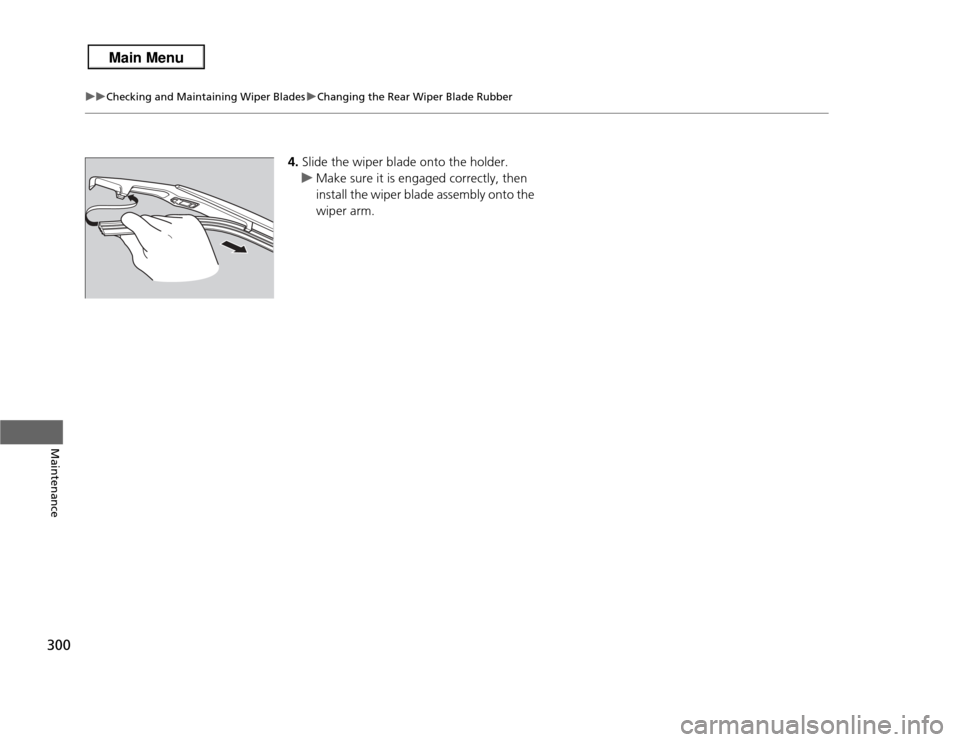
4. Slide the wiper blade onto the holder.
u Make sure it is engaged correctly, then
install the wiper blade assembly onto the
wiper arm.
Page 339 of 364
338
uuFuses uFuse Locations
Handling the Unexpected
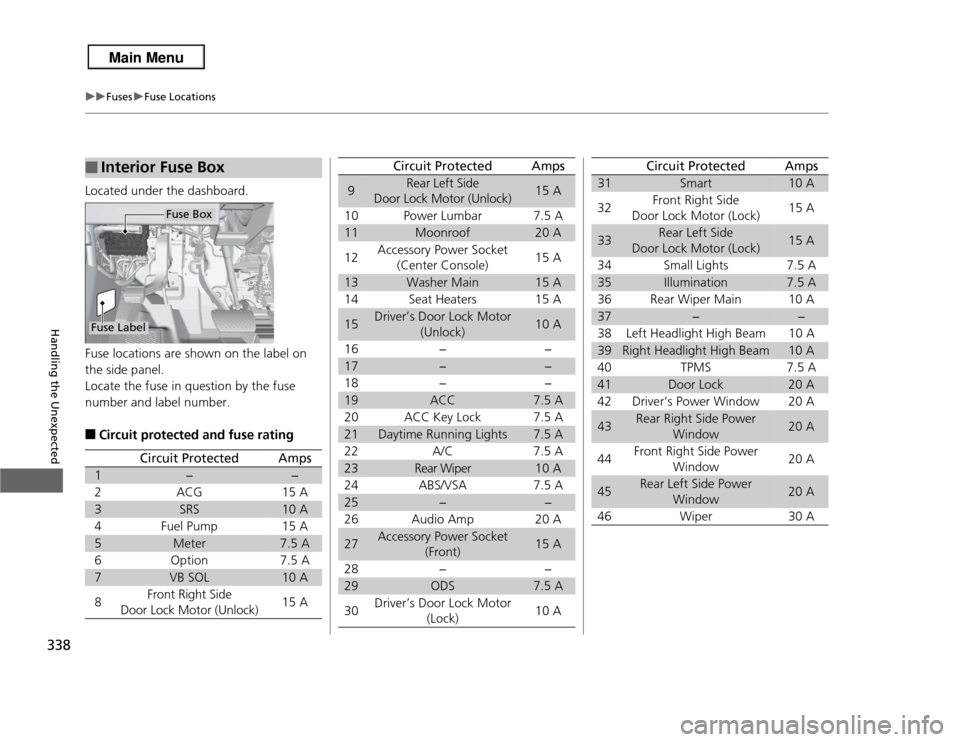
Located under the dashboard.
Fuse locations are shown on the label on
the side panel.
Locate the fuse in question by the fuse
number and label number.■
Circuit protected and fuse rating
■
Interior Fuse BoxFuse Label
Fuse Box
Circuit Protected
Amps
1
−
−
2
ACG
15 A
3
SRS
10 A
4
Fuel Pump
15 A
5
Meter
7.5 A
6
Option
7.5 A
7
VB SOL
10 A
8
Front Right Side
Door Lock Motor (Unlock)
15 A
9
Rear Left Side
Door Lock Motor (Unlock)
15 A
10 Power Lumbar 7.5 A
11
Moonroof
20 A
12 Accessory Power Socket
(Center Console) 15 A
13
Washer Main
15 A
14 Seat Heaters 15 A
15
Driver’s Door Lock Motor (Unlock)
10 A
16 − −
17
−
−
18 − −
19
ACC
7.5 A
20 ACC Key Lock 7.5 A
21
Daytime Running Lights
7.5 A
22 A/C 7.5 A
23
Rear Wiper
10 A
24 ABS/VSA 7.5 A
25
−
−
26 Audio Amp 20 A
27
Accessory Power Socket (Front)
15 A
28 − −
29
ODS
7.5 A
30 Driver’s Door Lock Motor
(Lock) 10 A
Circuit Protected
Amps
31
Smart
10 A
32 Front Right Side
Door Lock Motor (Lock) 15 A
33
Rear Left Side
Door Lock Motor (Lock)
15 A
34 Small Lights 7.5 A
35
Illumination
7.5 A
36 Rear Wiper Main 10 A
37
−
−
38 Left Headlight High Beam 10 A
39
Right Headlight High Beam
10 A
40 TPMS 7.5 A
41
Door Lock
20 A
42 Driver’s Power Window 20 A
43
Rear Right Side Power Window
20 A
44 Front Right Side Power
Window 20 A
45
Rear Left Side Power
Window
20 A
46 Wiper 30 A
Circuit Protected
Amps
Page 361 of 364

360Index
Power Windows ...................................... 115
Tailgate ................................................... 107
Outside Temperature Display .................... 85
Overheating .............................................. 331PPaddle Shifters
(Sequential Shift Mode) ......................... 246
Pandora ®................................................... 177
Panic Mode ............................................... 114
Parking ...................................................... 261
Parking Brake ............................................ 257
Parking Brake and Brake System Indicator ..................... 68, 335
Passenger Airbag Off Indicator ................. 49
Passing Indicators ..................................... 122
Power Tailgate .......................................... 109
Power Windows ........................................ 115
Precautions While Driving ........................ 242
Driving Guidelines
for Your Utility Vehicle ........................... 242
Rain ......................................................... 242
Pregnant Women ....................................... 35
Puncture (Tire) .......................................... 319RRadiator..................................................... 283
Radio (AM/FM) .......................................... 167
Radio (XM ®) .............................................. 169 Radio Data System (RDS)
......................... 168
Range .......................................................... 86
RDS (Radio Data System) ......................... 168
Readiness Codes (Emissions Testing) ....... 349
Rear Defogger/ Heated Door Mirror Button ................... 129
Rear Seats (Folding Down) ...................... 141
Rearview Camera ..................................... 262
Rearview Mirror ....................................... 133
Refueling .................................................. 263
Fuel Gauge................................................ 82
Gasoline .......................................... 263, 344
Low Fuel Indicator ..................................... 71
Regulations ............................... 255, 304, 347
Remote Transmitter ................................... 99
Replacement
Bulbs ....................................................... 287
Front Wiper Blade Rubber ....................... 297
Fuses ............................................... 337, 338
Rear Wiper Blade Rubber......................... 299
Tires ........................................................ 307
Reporting Safety Defects ......................... 348
Resetting a Trip Meter ............................... 85
SSafe Driving................................................ 23
Safety Check ............................................... 28
Safety Labels ............................................... 65
Safety Message ........................................... 22
Seat Belts .................................................... 29 Adjusting the Shoulder Anchor ................. 33
Automatic Seat Belt Tensioners ................. 31
Checking .................................................. 36
Detachable Anchor ................................... 34
Fastening .................................................. 32
Installing a Child Seat with a Lap/
Shoulder Seat Belt ................................... 59
Pregnant Women...................................... 35
Reminder .................................................. 30
Warning Indicator ............................... 30, 71
Seat Heaters ............................................. 151
Seats .......................................................... 136
Adjusting ................................................ 136
Driver’s Seat Lumbar Support .................. 136
Front Seats.............................................. 136
Rear Seats ............................................... 141
Seat Heaters ........................................... 151
Security System ........................................ 113
Immobilizer System Indicator..................... 75
Security System Alarm Indicator ................ 76
SEL/RESET Button ....................................... 83
Select Lever ........................................ 14, 244
Operation ......................................... 14, 245
Releasing ................................................ 330
Won’t Move ........................................... 330
Selecting a Child Seat ................................ 56
Selector Knob (Audio) ............................. 161
Sequential Shift Mode ............................. 246
Setting the Clock ........................................ 96
Shift Lever .......................................... 14, 244
Shift Lever Position Indicator ............ 70, 245