start engine Acura RDX 2013 Owner's Manual
[x] Cancel search | Manufacturer: ACURA, Model Year: 2013, Model line: RDX, Model: Acura RDX 2013Pages: 364, PDF Size: 12.54 MB
Page 2 of 364
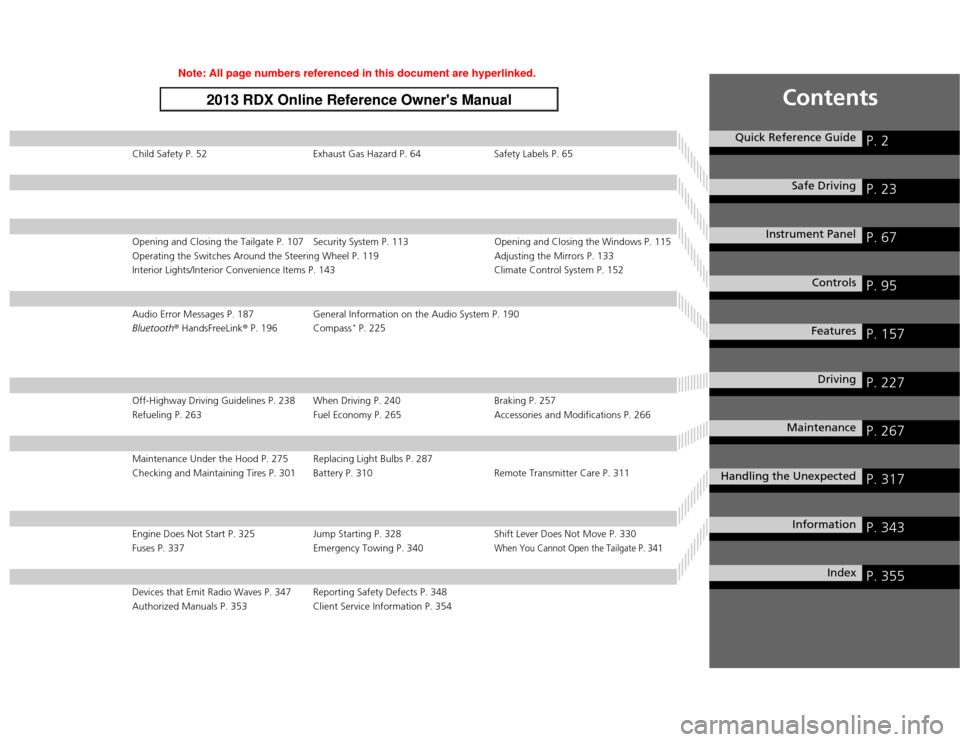
Contents
Child Safety P. 52Exhaust Gas Hazard P. 64 Safety Labels P. 65Opening and Closing the Tailgate P. 107 Security System P. 113 Opening and Closing the Windows P. 115
Operating the Switches Around the Steering Wheel P. 119 Adjusting the Mirrors P. 133
Interior Lights/Interior Convenience Items P. 143 Climate Control System P. 152Audio Error Messages P. 187General Information on the Audio System P. 190
Bluetooth ® HandsFreeLink ® P. 196 Compass
* P. 225
Off-Highway Driving Guidelines P. 238 When Driving P. 240 Braking P. 257
Refueling P. 263 Fuel Economy P. 265Accessories and Modifications P. 266Maintenance Under the Hood P. 275 Replacing Light Bulbs P. 287
Checking and Maintaining Tires P. 301 Battery P. 310 Remote Transmitter Care P. 311Engine Does Not Start P. 325Jump Starting P. 328 Shift Lever Does Not Move P. 330
Fuses P. 337 Emergency Towing P. 340
When You Cannot Open the Tailgate P. 341
Devices that Emit Radio Waves P. 347 Reporting Safety Defects P. 348
Authorized Manuals P. 353 Client Service Information P. 354
Quick Reference Guide
P. 2
Safe Driving
P. 23
Instrument Panel
P. 67
Controls
P. 95
Features
P. 157
Driving
P. 227
Maintenance
P. 267
Handling the Unexpected
P. 317
Information
P. 343
Index
P. 355
Page 3 of 364
2Quick Reference Guide
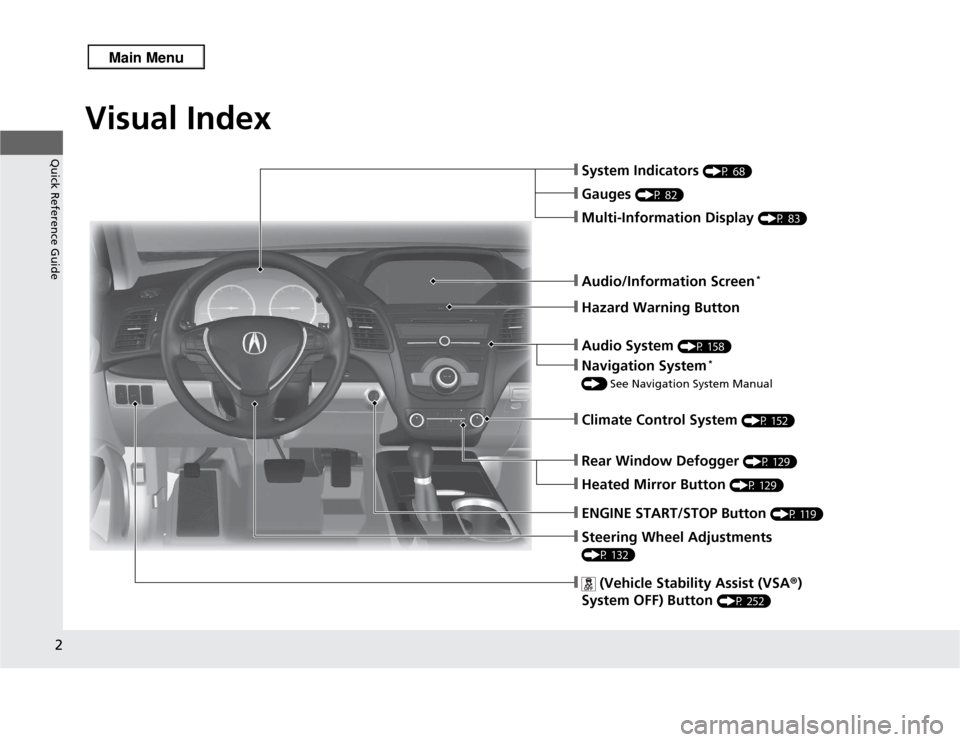
Quick Reference GuideVisual Index
❙Steering Wheel Adjustments (P 132)❙
(Vehicle Stability Assist (VSA®)
System OFF) Button
(P 252)
❙System Indicators
(P 68)
❙Gauges
(P 82)
❙Multi-Information Display
(P 83)
❙Audio/Information Screen
*
❙Hazard Warning Button❙Audio System
(P 158)
❙Navigation System
*
() See Navigation System Manual❙Climate Control System
(P 152)
❙Rear Window Defogger
(P 129)
❙Heated Mirror Button
(P 129)
❙ENGINE START/STOP Button
(P 119)
Page 10 of 364
9Quick Reference Guide
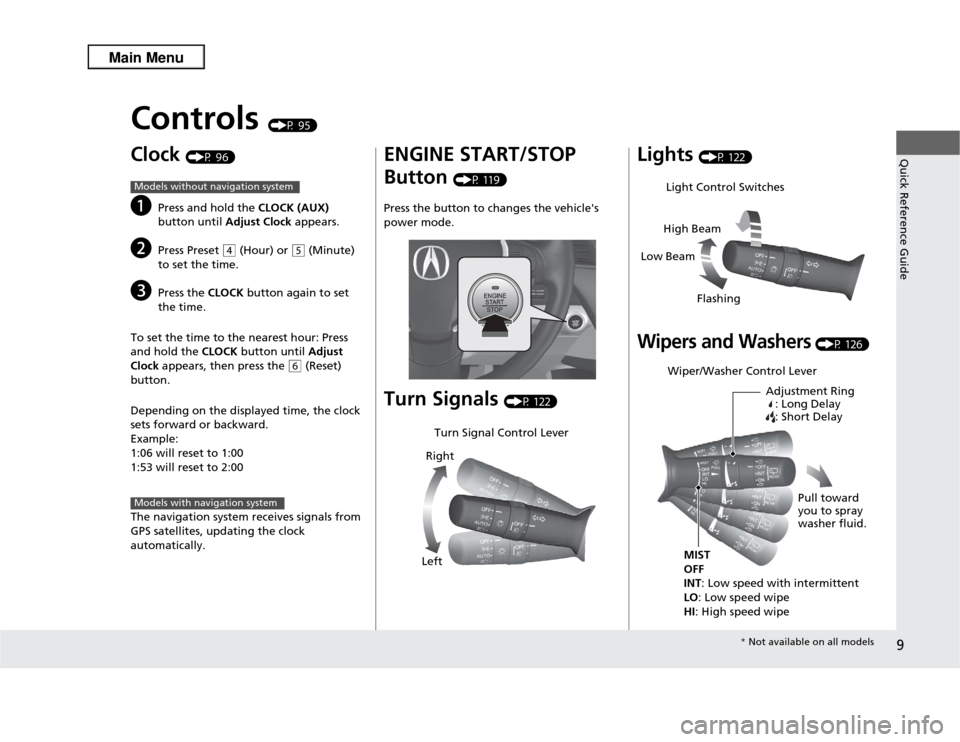
Controls
(P 95)
Clock
(P 96)
a
Press and hold the CLOCK (AUX)
button until Adjust Clock appears.
b
Press Preset
(4
(Hour) or
(5
(Minute)
to set the time.
c
Press the CLOCK button again to set
the time.
To set the time to the nearest hour: Press
and hold the CLOCK button until Adjust
Clock appears, then press the
(6
(Reset)
button.
Depending on the displayed time, the clock
sets forward or backward.
Example:
1:06 will reset to 1:00
1:53 will reset to 2:00
The navigation system receives signals from
GPS satellites, updating the clock
automatically.
Models without navigation systemModels with navigation system
ENGINE START/STOP
Button
(P 119)
Press the button to changes the vehicle's
power mode.
Turn Signals
(P 122)
Turn Signal Control Lever
Right
Left
Lights
(P 122)
Wipers and Washers
(P 126)
Light Control Switches
Low Beam High Beam
FlashingWiper/Washer Control Lever Adjustment Ring: Long Delay
: Short Delay
MIST
OFF
INT : Low speed with intermittent
LO : Low speed wipe
HI : High speed wipe Pull toward
you to spray
washer fluid.
*
Not available on all models
Page 15 of 364
14Quick Reference Guide
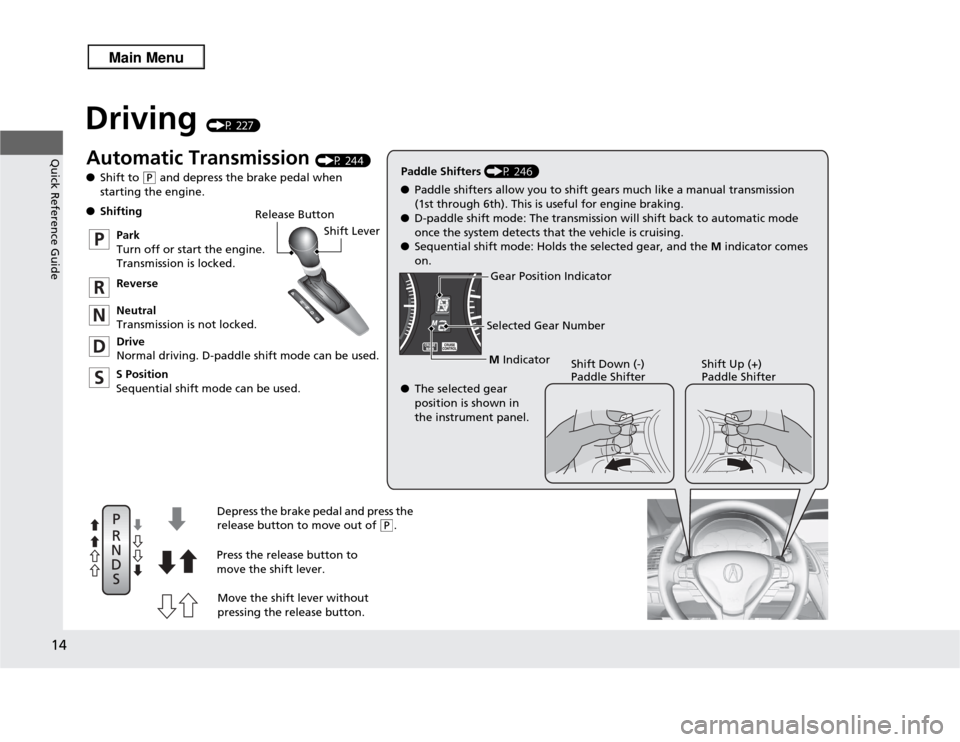
Driving
(P 227)
Release ButtonShift Lever
Depress the brake pedal and press the
release button to move out of
( P
.
Move the shift lever without
pressing the release button.
Press the release button to
move the shift lever.
●
Shifting
Park
Turn off or start the engine.
Transmission is locked.
Reverse
Neutral
Transmission is not locked.
Drive
Normal driving. D-paddle shift mode can be used.
S Position
Sequential shift mode can be used. Paddle Shifters
(P 246)
M Indicator
Shift Down (-)
Paddle Shifter Shift Up (+)
Paddle Shifter
●
Paddle shifters allow you to shift gears much like a manual transmission
(1st through 6th). This is useful for engine braking.
● D-paddle shift mode: The transmission will shift back to automatic mode
once the system detects that the vehicle is cruising.
● Sequential shift mode: Holds the selected gear, and the M indicator comes
on.
Selected Gear Number
Automatic Transmission
(P 244)
● Shift to
(P
and depress the brake pedal when
starting the engine.
Gear Position Indicator
● The selected gear
position is shown in
the instrument panel.
Page 16 of 364
15Quick Reference Guide
VSA® OFF Button
(P 252)
● The vehicle stability assist (VSA® ) system
helps stabilize the vehicle during
cornering, and helps maintain traction
while accelerating on loose or slippery
road surfaces.
● VSA ® comes on automatically every time
you start the engine.
● To turn VSA ® on or off, press and hold
the button until you hear a beep.
Cruise Control
(P 248)
● Cruise control allows you to maintain a
set speed without keeping your foot on
the accelerator pedal.
● To use cruise control, press the CRUISE
button, then press the DECEL/SET button
once you have achieved the desired speed
(above 25 mph or 40 km/h).
Tire Pressure Monitoring
System (TPMS)
(P 253)
● TPMS monitors tire pressure.
● TPMS is turned on automatically every
time you start the engine.
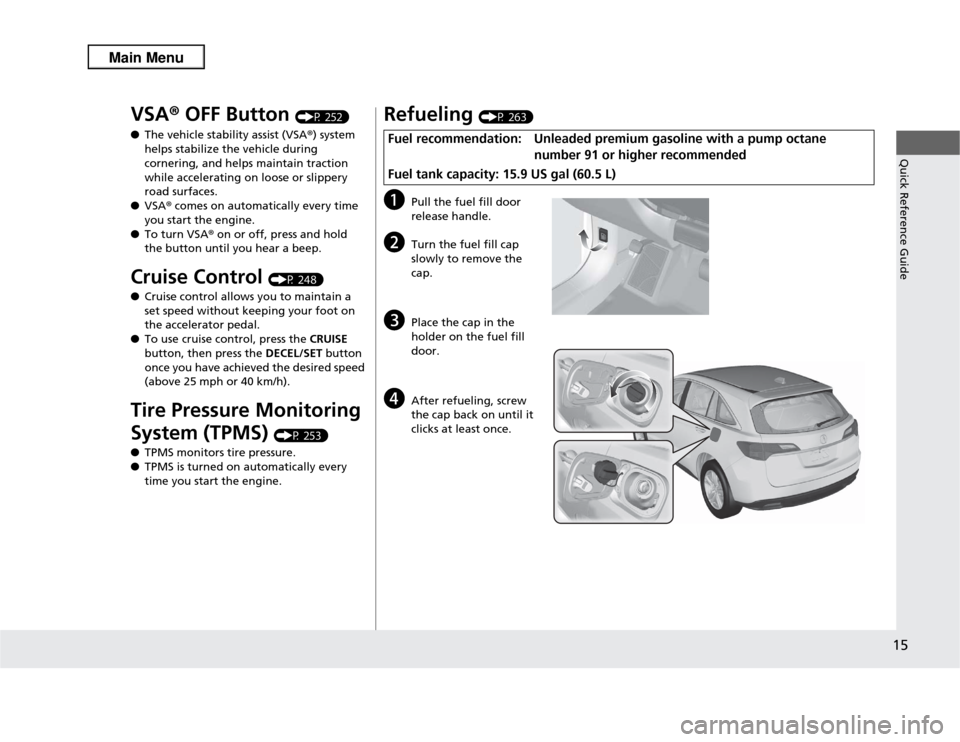
Refueling
(P 263)
a
Pull the fuel fill door
release handle.
b
Turn the fuel fill cap
slowly to remove the
cap.
c
Place the cap in the
holder on the fuel fill
door.
d
After refueling, screw
the cap back on until it
clicks at least once.
Fuel recommendation: Unleaded premium gasoline with a pump octane
number 91 or higher recommended
Fuel tank capacity: 15.9 US gal (60.5 L)
Page 18 of 364
Quick Reference Guide17
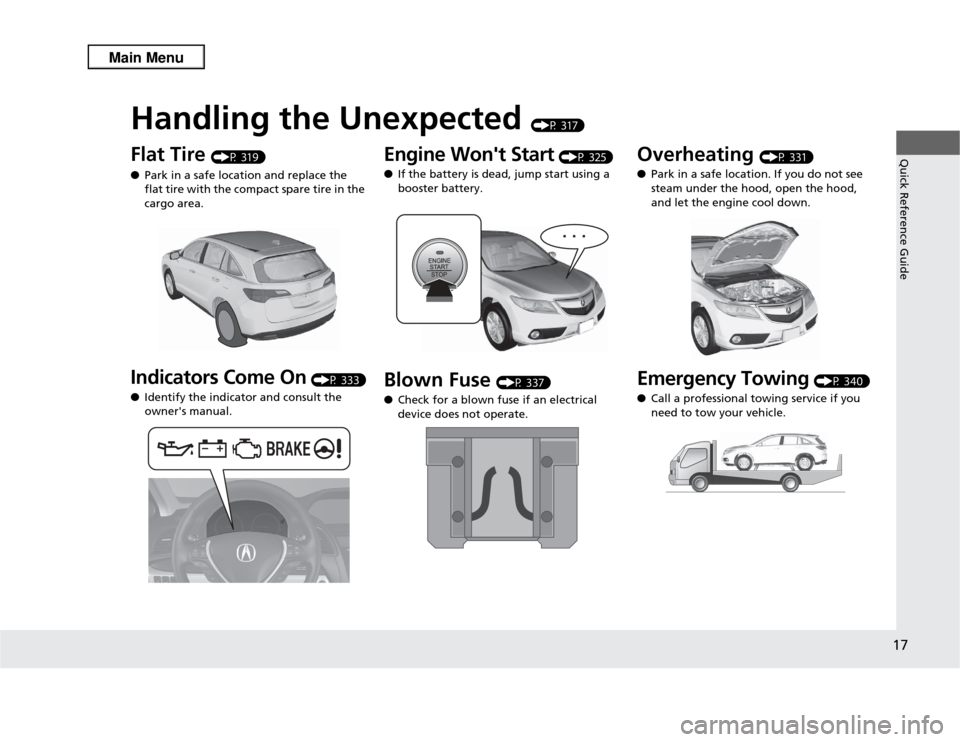
Handling the Unexpected
(P 317)
Flat Tire
(P 319)
● Park in a safe location and replace the
flat tire with the compact spare tire in the
cargo area.
Indicators Come On
(P 333)
● Identify the indicator and consult the
owner's manual.
Engine Won't Start
(P 325)
● If the battery is dead, jump start using a
booster battery.
Blown Fuse
(P 337)
● Check for a blown fuse if an electrical
device does not operate.
Overheating
(P 331)
● Park in a safe location. If you do not see
steam under the hood, open the hood,
and let the engine cool down.
Emergency Towing
(P 340)
● Call a professional towing service if you
need to tow your vehicle.
Page 19 of 364
18Quick Reference Guide
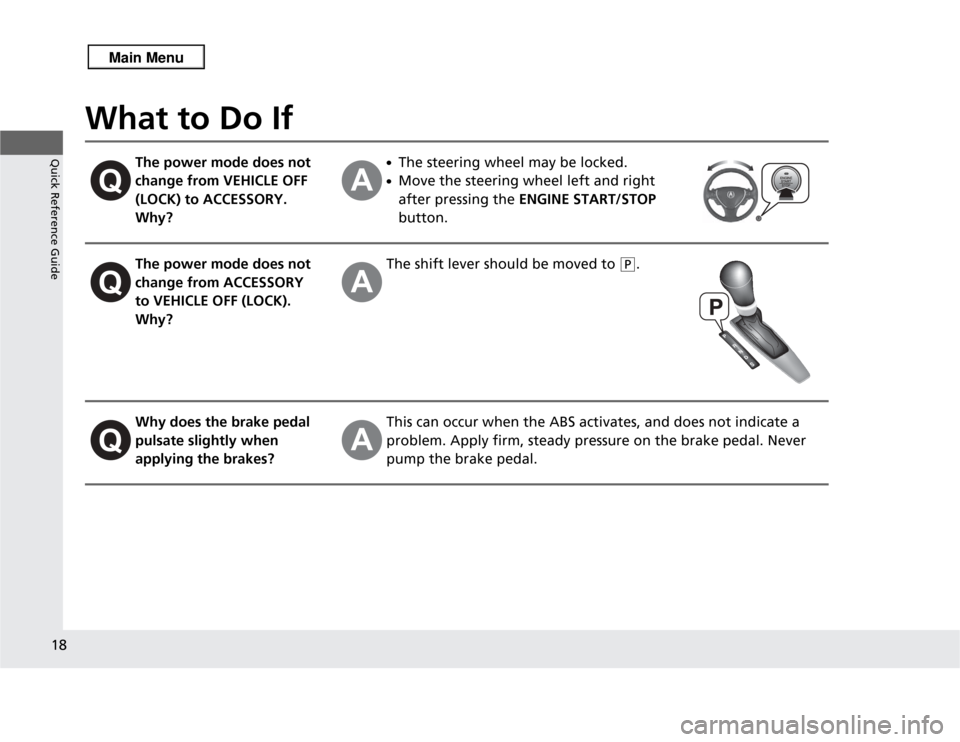
What to Do If
The power mode does not
change from VEHICLE OFF
(LOCK) to ACCESSORY.
Why?
●The steering wheel may be locked.●Move the steering wheel left and right
after pressing the ENGINE START/STOP
button.
The power mode does not
change from ACCESSORY
to VEHICLE OFF (LOCK).
Why?
The shift lever should be moved to
(P
.
Why does the brake pedal
pulsate slightly when
applying the brakes?
This can occur when the ABS activates, and does not indicate a
problem. Apply firm, steady pressure on the brake pedal. Never
pump the brake pedal.
Page 65 of 364
64Safe Driving
Exhaust Gas HazardCarbon Monoxide GasThe engine exhaust from this vehicle contains carbon monoxide, a colorless,
odorless, and highly toxic gas. As long as you properly maintain your vehicle, carbon
monoxide gas will not get into the interior.■
Have the exhaust system inspected for leaks whenever
• The exhaust system is making an unusual noise.
• The exhaust system may have been damaged.
• The vehicle is raised for an oil change.
When you operate a vehicle with the tailgate open, airflow can pull exhaust gas into
the interior and create a hazardous condition. If you must drive with the tailgate
open, open all the windows and set the climate control system as shown below.
1. Select the fresh air mode.
2. Select the mode.
3. Set the fan speed to high.
4. Set the temperature control to a comfortable setting.
Adjust the climate control system in the same manner if you sit in your parked
vehicle with the engine running.
1 Carbon Monoxide Gas
An enclosed area such as a garage can quickly fill up
with carbon monoxide gas.
Do not run the engine with the garage door closed.
Even when the garage door is open, drive out of the
garage immediately after starting the engine.
3
WARNING
Carbon monoxide gas is toxic.
Breathing it can cause unconsciousness and
even kill you.
Avoid any enclosed areas or activities that
expose you to carbon monoxide.
Page 70 of 364
69
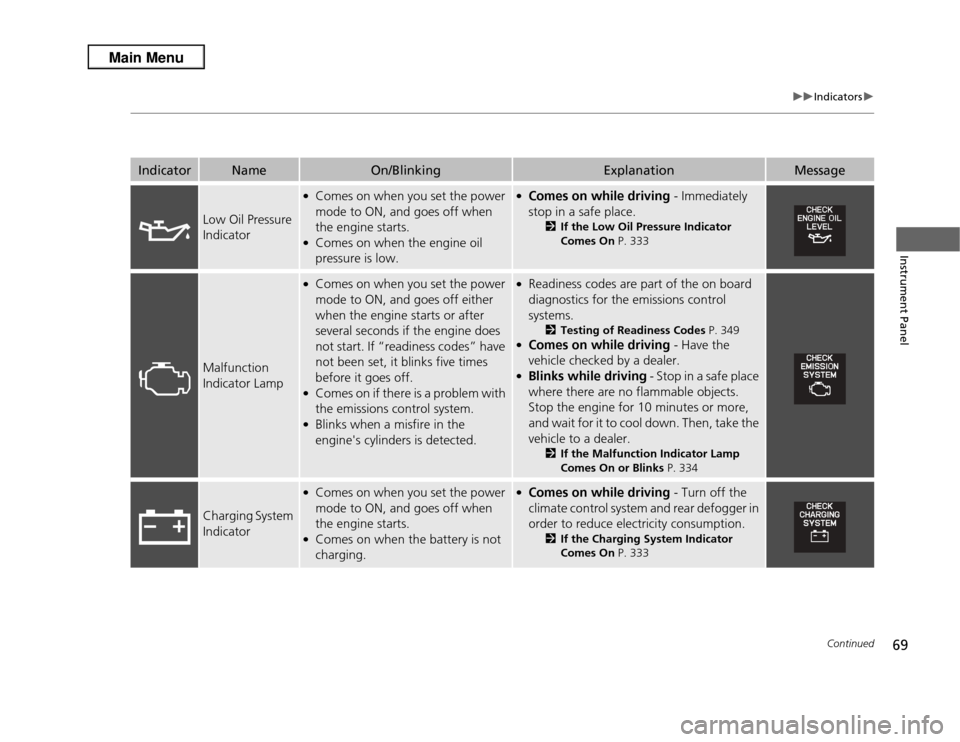
uuIndicators u
Continued
Instrument Panel
Indicator
Name
On/Blinking
Explanation
Message
Low Oil Pressure
Indicator
●Comes on when you set the power
mode to ON, and goes off when
the engine starts.●Comes on when the engine oil
pressure is low.
●Comes on while driving - Immediately
stop in a safe place.
2 If the Low Oil Pressure Indicator
Comes On P. 333
Malfunction
Indicator Lamp
●Comes on when you set the power
mode to ON, and goes off either
when the engine starts or after
several seconds if the engine does
not start. If “readiness codes” have
not been set, it blinks five times
before it goes off.●Comes on if there is a problem with
the emissions control system.●Blinks when a misfire in the
engine's cylinders is detected.
●Readiness codes are part of the on board
diagnostics for the emissions control
systems.
2Testing of Readiness Codes P. 349
●Comes on while driving - Have the
vehicle checked by a dealer.●Blinks while driving - Stop in a safe place
where there are no flammable objects.
Stop the engine for 10 minutes or more,
and wait for it to cool down. Then, take the
vehicle to a dealer.
2 If the Malfunction Indicator Lamp
Comes On or Blinks P. 334
Charging System
Indicator
●Comes on when you set the power
mode to ON, and goes off when
the engine starts.●Comes on when the battery is not
charging.
●Comes on while driving - Turn off the
climate control system and rear defogger in
order to reduce electricity consumption.
2 If the Charging System Indicator
Comes On P. 333
Page 75 of 364
74
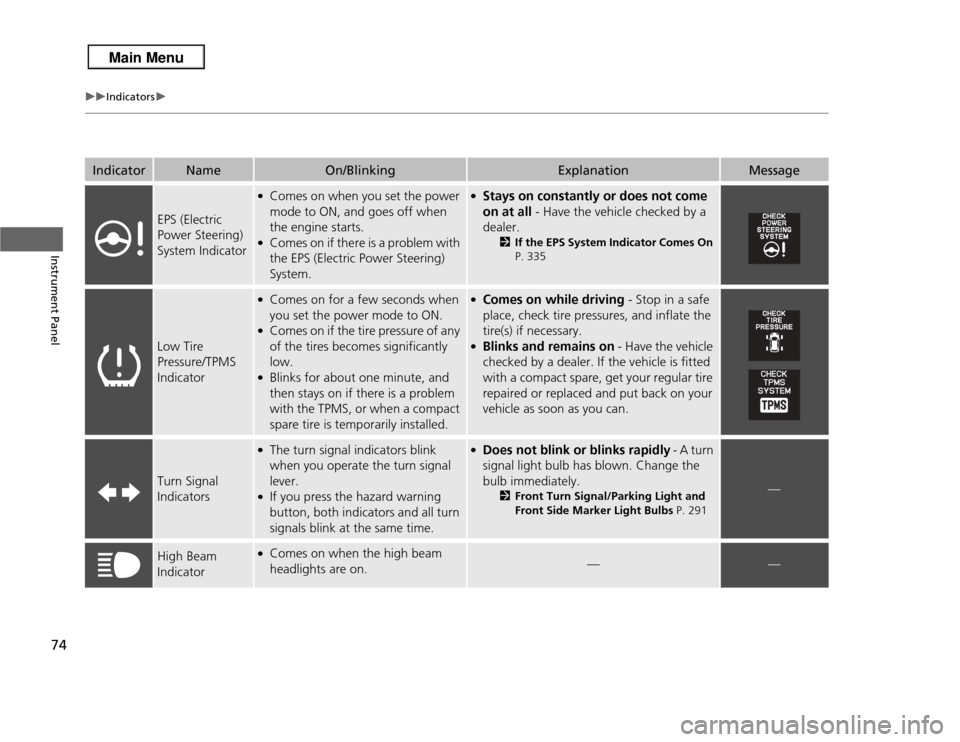
uuIndicators u
Instrument Panel
Indicator
Name
On/Blinking
Explanation
Message
EPS (Electric
Power Steering)
System Indicator
●Comes on when you set the power
mode to ON, and goes off when
the engine starts.●Comes on if there is a problem with
the EPS (Electric Power Steering)
System.
●Stays on constantly or does not come
on at all - Have the vehicle checked by a
dealer.
2If the EPS System Indicator Comes On
P. 335
Low Tire
Pressure/TPMS
Indicator
●Comes on for a few seconds when
you set the power mode to ON.●Comes on if the tire pressure of any
of the tires becomes significantly
low.●Blinks for about one minute, and
then stays on if there is a problem
with the TPMS, or when a compact
spare tire is temporarily installed.
●Comes on while driving - Stop in a safe
place, check tire pressures, and inflate the
tire(s) if necessary.●Blinks and remains on - Have the vehicle
checked by a dealer. If the vehicle is fitted
with a compact spare, get your regular tire
repaired or replaced and put back on your
vehicle as soon as you can.
Turn Signal
Indicators
●The turn signal indicators blink
when you operate the turn signal
lever.●If you press the hazard warning
button, both indicators and all turn
signals blink at the same time.
●Does not blink or blinks rapidly - A turn
signal light bulb has blown. Change the
bulb immediately.
2 Front Turn Signal/Parking Light and
Front Side Marker Light Bulbs P. 291
—
High Beam
Indicator
●Comes on when the high beam
headlights are on.
—
—