tires Acura RDX 2015 Owner's Guide
[x] Cancel search | Manufacturer: ACURA, Model Year: 2015, Model line: RDX, Model: Acura RDX 2015Pages: 71, PDF Size: 18.23 MB
Page 43 of 71

78 || 79
DRIVING
DRIVING
TABLE OF
CONTENTS
VISUAL INDEX
SAFETY
INFORMATION
INSTRUMENT PANEL
VEHICLE
CONTROLS
AUDIO AND
CONNECTIVITY
BLUETOOTH®
HANDSFREELINK®
ACURALINK®
INDEX
VOICE COMMAND INDEX
CLIENT
INFORMATION
SPECIFICATIONS
MAINTENANCE
HANDLING THE UNEXPECTED
DRIVING
NAVIGATION
Learn about preparation for driving and other features.
Before Driving
Check the following items before you begin driving.
Exterior Checks
• Make sure there are no obstructions on the windows, door mirrors, exterior
lights, or other parts of the vehicle.
• Remove any frost, snow, or ice.
• Make sure the hood is securely closed.
• Heat from the engine and exhaust can ignite flammable materials left under
the hood, causing a fire. If you’ve parked your vehicle for an extended period,
inspect and remove any debris that may have collected, such as dried grass
and leaves that have fallen or have been carried in for use as a nest by a small
animal. Also check under the hood for leftover flammable materials after you
or someone else has performed maintenance on your vehicle.
• Make sure the tires are in good condition.
• Make sure there are no people or objects behind or around the vehicle.
DRIVING
If the doors are frozen shut, use warm water around the door edges to melt any
ice. Do not try to force them open, as this can damage the rubber trim around the
doors. When done, wipe dry to avoid further freezing.
NOTICE
Interior Checks
• Store or secure all items on board properly.
• Do not pile items higher than the seat height.
• Do not place anything in the front seat footwells. Make sure to secure the floor
mats.
• If you have any animals on board, do not let them move freely in the vehicle.
• Securely close and lock all doors and the tailgate.
• Adjust your seating position, mirrors, and steering wheel properly.
• Be sure items placed on the floor behind the front seats cannot roll under the
seats.
• Everyone in the vehicle must fasten their seat belt.
Make sure that the indicators in the instrument panel come on when you start the
vehicle, and go off soon after.
Driving Guidelines for Your Utility Vehicle
Utility vehicles have a significantly higher rollover rate than other types of
vehicles. To prevent rollovers or loss of control:
• Take corners at slower speeds than you would with a passenger vehicle.
• Avoid sharp turns and abrupt maneuvers whenever possible.
• Do not modify your vehicle in any way that raises its center of gravity.
• Never carry more than 165 lbs (75 kg) of cargo on the roof rack (Acura
accessory).
In addition:
• During the first 600 miles (1,000 km) of operation, avoid sudden acceleration
or full throttle operation so as not to damage the engine or powertrain.
• Avoid hard braking for the first 200 miles (300 km). You should also follow this
when the brake pads are replaced.
Improperly operating this vehicle on or off pavement can cause a crash or
rollover in which you and your passengers can be seriously injured or killed.
Follow all instructions and guidelines in this guide.
Keep your speed low, and don’t drive faster than conditions permit.
WARNING
Improper accessories or modifications can affect your vehicle’s handling,
stability, and performance, and cause a crash in which you can be seriously hurt
or killed.
Follow all instructions in the vehicle owner’s manual regarding accessories and
modifications.
WARNING
Page 44 of 71

80 || 81
DRIVING
DRIVING
TABLE OF
CONTENTS
VISUAL INDEX
SAFETY
INFORMATION
INSTRUMENT PANEL
VEHICLE
CONTROLS
AUDIO AND
CONNECTIVITY
BLUETOOTH®
HANDSFREELINK®
ACURALINK®
INDEX
VOICE COMMAND INDEX
CLIENT
INFORMATION
SPECIFICATIONS
MAINTENANCE
HANDLING THE UNEXPECTED
DRIVING
NAVIGATION
This figure includes the total weight of all occupants, cargo, and
accessories, and the tongue load if you are towing a trailer. Below are the
steps for determining the correct load limit:
1. Locate the statement “The combined weight of occupants and cargo
should never exceed XXX kg or XXX lbs.” on your vehicle’s placard.
2. Determine the combined weight of the driver and passengers that will
be riding in your vehicle.
3. Subtract the combined weight of the driver and passengers from XXX kg
or XXX lbs.
4. The resulting figure equals the available amount of cargo and luggage
load capacity. For example, if the “XXX” amount equals 1,400 lbs. and
there will be five 150 lb. passengers in your vehicle, the amount of
available cargo and luggage load capacity is 650 lbs. (1,400 - 750 (5 x
150) = 650 lbs.)
5. Determine the combined weight of luggage and cargo being loaded on
the vehicle. That weight may not safely exceed the available cargo and
luggage load capacity calculated in step 4.
6. If your vehicle will be towing a trailer, load from your trailer will be
transferred to your vehicle. Consult the Owner’s Manual to determine
how this reduces the available cargo and luggage load capacity of your
vehicle.
Maximum Load Limit
Carrying too much cargo or improperly storing it can affect your vehicle’s handling,
stability, stopping distance, and tires, and make it unsafe.
The maximum load for your vehicle is 870 lbs (395 kg). See the Tire and Loading
Information label on the driver’s doorjamb.
Label Example
Load limits example
Example 1
Max load
870 lbs
(395 kg ) Passenger weight
150 lbs x 2 = 300 lbs
(68 kg x 2 = 136 kg) Cargo
weight
570 lbs
(259 kg)
Example 2
Max load
870 lbs
(395 kg ) Passenger weight
150 lbs x 5 = 750 lbs
(68 kg x 5 = 340 kg) Ca
rgo weight
120 lbs (55 kg )
Overloading or improper loading can affect handling and stability and cause a
crash in which you can be hurt or killed.
Follow all load limits and other loading guidelines in this guide.
WARNING
The headlight aim on your vehicle was set by the factory, and does not need to be
adjusted. However, if you regularly carry heavy items in the cargo area or pull a
trailer, have the aiming readjusted at your dealer or by a qualified technician.
In addition, the total weight of the vehicle, all occupants, accessories,
cargo, and trailer tongue load must not exceed the Gross Vehicle Weight
Rating (GVWR) or the Gross Axle Weight Rating (GAWR). Both are on a
label on the driver’s doorjamb.
Page 51 of 71

94 || 95
HANDLING THE UNEXPECTED
HANDLING THE UNEXPECTED
TABLE OF
CONTENTS
VISUAL INDEX
SAFETY
INFORMATION
INSTRUMENT PANEL
VEHICLE
CONTROLS
AUDIO AND
CONNECTIVITY
BLUETOOTH®
HANDSFREELINK®
ACURALINK®
INDEX
VOICE COMMAND INDEX
CLIENT
INFORMATION
SPECIFICATIONS
MAINTENANCE
HANDLING THE UNEXPECTED
DRIVING
NAVIGATION
Emergency Engine Stop
The ENGINE START/STOP button may be used to stop the engine due to an
emergency situation even while driving. If you must stop the engine, choose one of
the following operations:
• Press and hold the ENGINE START/STOP
button for three seconds, OR
• Firmly press the ENGINE START/STOP button
three times.
The steering wheel will not lock. The power mode changes to ACCESSORY, unless
the shift lever is in Park (P), in which case the power mode changes to VEHICLE OFF.
Because turning off the engine also disables the power assist the engine provides to
the steering and braking systems, it will require significantly more physical effort
and time to steer and slow the vehicle. Downshift gears and use both feet on the
brake pedal, if necessary, to slow the vehicle and stop immediately in a safe place.
Trying to lift or tow your vehicle by the bumpers will cause serious damage. The
bumpers are not designed to support the vehicle’s weight.
Improper towing such as towing behind a motorhome or other motor vehicle can
damage the transmission.
NOTICE
NOTICE
Emergency Towing
Call a professional towing service if you need to tow your vehicle.
All models
Flat bed equipment: The operator loads your vehicle on the back of a truck. This is
the best way to transport your vehicle.
2WD models
Wheel lift equipment: The tow truck uses two pivoting arms that go under the front
tires and lift them off the ground. The rear tires remain on the ground. This is an
acceptable way to tow your vehicle. Do not press the button while driving unless it is absolutely necessary for the
engine to be switched off.
Tire Pressure Monitoring System (TPMS)
Monitors the tire pressure while you are driving.
If your vehicle’s tire pressure becomes significantly low, the low tire pressure
indicator comes on and a message appears on the multi-information display.
What to Do
Stop your vehicle in a safe place. Adjust the tire pressure to the specified level on
a label on the driver’s doorjamb.
Driving on an extremely underinflated tire can cause it to overheat. An overheated
tire can fail. Always inflate your tires to the specified pressure.
NOTICE
Press the INFO button to
scroll to the tire pressure
monitor to see which
tire(s) have low pressure.
Tire
pressure
monitor
The
specific
tire is
displayed.
Page 55 of 71

102 || 103
MAINTENANCE
MAINTENANCE
TABLE OF
CONTENTS
VISUAL INDEX
SAFETY
INFORMATION
INSTRUMENT PANEL
VEHICLE
CONTROLS
AUDIO AND
CONNECTIVITY
BLUETOOTH®
HANDSFREELINK®
ACURALINK®
INDEX
VOICE COMMAND INDEX
CLIENT
INFORMATION
SPECIFICATIONS
MAINTENANCE
HANDLING THE UNEXPECTED
DRIVING
NAVIGATION
Learn about basic maintenance that you can perform on the vehicle yourself, as
well as information about how to best maintain the vehicle.
Safety Precautions
Some of the most important safety precautions are listed below; however,
we cannot warn you of every conceivable hazard that can arise in performing
maintenance. Only you can decide whether or not you should perform a given task.
Maintenance Safety
• To reduce the possibility of fire or explosion, keep cigarettes, sparks, and flames
away from the battery and all fuel-related parts.
• Never leave rags, towels, or other flammable objects under the hood.
• To clean parts, use a commercially available degreaser or parts cleaner, not
gasoline.
• Wear eye protection and protective clothing when working with the battery or
compressed air.
• Do not run the engine in confined spaces where carbon monoxide gas can
accumulate.
Vehicle Safety
• The vehicle must be stationary, and parked on level ground with the parking
brake set and the engine off.
• Be aware that hot parts can burn you.
• Be aware that moving parts can injure you.
MAINTENANCE
Improperly maintaining this vehicle or failing to correct a problem before
driving can cause a crash in which you can be seriously hurt or killed.
Always follow the inspection and maintenance recommendations according to
the schedules in this guide.
WARNING
Failure to properly follow maintenance instructions and precautions can cause
you to be seriously hurt or killed.
Always follow the procedures and precautions in this guide.
WARNING
Maintenance Minder™
Reminds you when indicated maintenance service is due.
When maintenance is due, the system message indicator comes on and the
Maintenance Minder appears on the multi-information display every time you turn
the vehicle on. Press the info button to change displays.
Maintenance Minder Service Codes
These codes indicate what services are due on your vehicle.
*1: If the message SERVICE does not appear more than 12 months after the display is\
reset, change the
engine oil every year .
#: See information on maintenance and emissions warranty.*2:If you drive in dusty conditions, replace the air cleaner element every 15,000 miles (24,000 km).
*3: If you drive primarily in urban areas that have high concentrations of i\
ndustrial soot and pollution from
diesel-powered vehicles, replace the dust and pollen lter every 15,000 miles (24,000 km).
CODEMaintenance Main Items
A•Replace engine oi l*1
B•Replace engine oil*1 and oil lter•Inspect front and rear brakes, service as necessary•Check parking brake adjustment•Inspect tie rod ends, steering gearbox, and boot s•Inspect suspension components•Inspect driveshaft boots•Inspect brake hoses and lines (Including ABS/VSA)•Inspect all uid levels and condition of uid s•Inspect exhaust system#
•Inspect fuel lines and connections#
*4:If you drive regularly in very high temperatures (over 110 °F, 43 °C), \
in very low temperatures (under -
20 °F, -29 °C), or tow a tra iler, repl ace ever y 60,000 mi les/100,000 km .
CODE Maintenance Sub Items
1
•Rotate tires
2
•Replace air cleaner element*2
•Replace dust and pollen lte r*3
•Inspect drive belt
3
•Replace transmission and transfer uid*
4•Replace spark plugs•Replace timing belt an d inspect water pump*4
•Inspect valve clearance
5
•Replace engine coolant
6
•Replace rear differential uid*
System
message
indicator
Main
itemSub item
Maintenance Minder
Page 56 of 71
104 || 105
MAINTENANCE
MAINTENANCE
TABLE OF
CONTENTS
VISUAL INDEX
SAFETY
INFORMATION
INSTRUMENT PANEL
VEHICLE
CONTROLS
AUDIO AND
CONNECTIVITY
BLUETOOTH®
HANDSFREELINK®
ACURALINK®
INDEX
VOICE COMMAND INDEX
CLIENT
INFORMATION
SPECIFICATIONS
MAINTENANCE
HANDLING THE UNEXPECTED
DRIVING
NAVIGATION
*1: If the message SERVICE does not appear more than 12 months after the display is\
reset, change the
engine oil every year .
#: See information on maintenance and emissions warranty.*2:If you drive in dusty conditions, replace the air cleaner element every 15,000 miles (24,000 km).
*3: If you drive primarily in urban areas that have high concentrations of i\
ndustrial soot and pollution from
diesel-powered vehicles, replace the dust and pollen lter every 15,000 miles (24,000 km).
CODE Maintenance Main Items
A
•Replace engine oi l*1
B•Replace engine oil*1 and oil lter•Inspect front and rear brakes, service as necessary•Check parking brake adjustment•Inspect tie rod ends, steering gearbox, and boot s•Inspect suspension components•Inspect driveshaft boots•Inspect brake hoses and lines (Including ABS/VSA)•Inspect all uid levels and condition of uid s•Inspect exhaust system#
•Inspect fuel lines and connections#
*4:If you drive regularly in very high temperatures (over 110 °F, 43 °C), \
in very low temperatures (under -
20 °F, -29 °C), or tow a tra iler, repl ace ever y 60,000 mi les/100,000 km .
CODEMaintenance Sub Item s
1
•Rotate tires
2•Replace air cleaner element*2
•Replace dust and pollen lte r*3
•Inspect drive belt
3
•Replace transmission and transfer uid*
4•Replace spark plugs•Replace timing belt an d inspect water pump*4
•Inspect valve clearance
5
•Replace engine coolant
6•Replace rear differential uid*
• Independent of the Maintenance Minder information, replace the brake fluid
every 3 years.
• Inspect idle speed every 160,000 miles (256,000 km).
• Adjust the valves during services A, B, 1, 2, or 3 if they are noisy.
U.S. models
Maintenance, replacement, or repair of emissions control devices and systems
may be done by any automotive repair establishment or individuals using
parts that are certified to EPA standards.
According to state and federal regulations, failure to perform maintenance on the
maintenance main items marked with # will not void your emissions warranties.
However, all maintenance services should be performed in accordance with the
intervals indicated by the multi-information display.
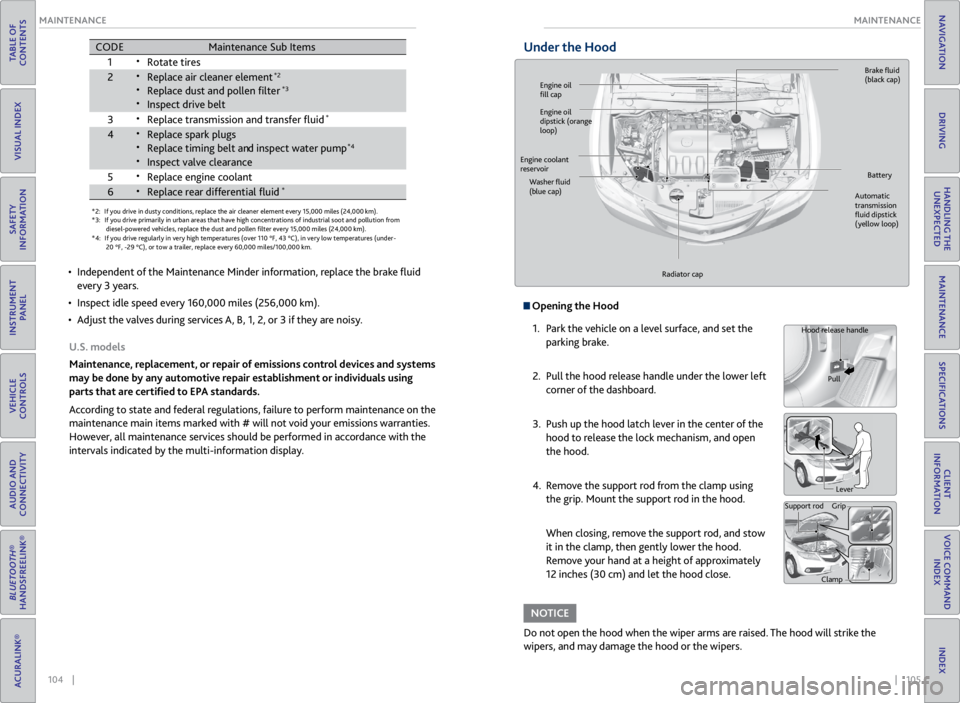
Under the Hood
Opening the Hood
1. Park the vehicle on a level surface, and set the
parking brake.
2. Pull the hood release handle under the lower left
corner of the dashboard.
3. Push up the hood latch lever in the center of the
hood to release the lock mechanism, and open
the hood.
4. Remove the support rod from the clamp using
the grip. Mount the support rod in the hood.
When closing, remove the support rod, and stow
it in the clamp, then gently lower the hood.
Remove your hand at a height of approximately
12 inches (30 cm) and let the hood close.
Do not open the hood when the wiper arms are raised. The hood will strike the
wipers, and may damage the hood or the wipers.
NOTICE
Hood release handle
Pull
Lever
Support rod Grip
Clamp
Engine oil
fill cap Brake
fluid
(black cap)
Automatic
transmission
fluid dipstick
(yellow loop)
Washer
fluid
(blue cap) Battery
Engine coolant
reservoir
Radiator cap
Engine oil
dipstick (orange
loop)
Page 60 of 71

112 || 113
MAINTENANCE
MAINTENANCE
TABLE OF
CONTENTS
VISUAL INDEX
SAFETY
INFORMATION
INSTRUMENT PANEL
VEHICLE
CONTROLS
AUDIO AND
CONNECTIVITY
BLUETOOTH®
HANDSFREELINK®
ACURALINK®
INDEX
VOICE COMMAND INDEX
CLIENT
INFORMATION
SPECIFICATIONS
MAINTENANCE
HANDLING THE UNEXPECTED
DRIVING
NAVIGATION
Tire Information
To safely operate your vehicle, your tires must be of the proper type and size, in
good condition with adequate tread, and properly inflated.
Inflation Guidelines
• Properly inflated tires provide the best combination of handling, tread life, and
comfort. Refer to the driver’s doorjamb label or the specifications (see page
120) for the specified pressure.
• Underinflated tires wear unevenly, adversely affect handling and fuel economy,
and are more likely to fail from overheating.
• Overinflated tires make your vehicle ride harshly, are more prone to road
hazards, and wear unevenly.
• Every day before you drive, look at each of the tires. If one looks lower than the
others, check the pressure with a tire gauge.
• Measure the air pressure when tires are cold. This means the vehicle has been
parked for at least 3 hours, or driven less than 1 mile (1.6 km). If necessary, add
or release air until the specified pressure is reached. If checked when hot, tire
pressure can be as much as 4-6 psi (30-40 kPa, 0.3-0.5 kgf/cm
2) higher than
checked when cold.
• At least once a month or before long trips, use a gauge to measure the pressure
in all tires, including the spare. Even tires in good condition can lose 1-2 psi
(10-20 kPa, 0.1-0.2 kgf/cm
2) per month.
Inspection Guidelines
Every time you inflate the tires, check for the following:
• Any damage to tires, including bumps, bulges, cuts, splits, or cracks in the side
or tread. Remove any foreign objects and inspect for air leaks. Replace tires if
you see fabric or cord.
• Uneven or excessive tread wear. Have a dealer check the wheel alignment.
• Cracks or other damage around the valve stems.
Wear Indicators
The groove where the wear indicator is located is
1/16 inch (1.6 mm) shallower than elsewhere on the
tire. If the tread has worn so low that the indicator
is exposed, replace the tire. Worn out tires have
poor traction on wet roads.
Example of a wear
indicator mark
Tire and Loading Information Label
The label attached to the driver’s doorjamb provides necessary tire and
loading information. Using
tires that are excessively worn or improperly inflated can cause
a crash in which you can be seriously hurt or killed.
Follow all instructions in this owner’s manual regarding tire inflation
and maintenance.
WARNING
Original
tire sizes Number of
people your
vehicle can
carry Proper
cold tire
pressure
Total weight
your vehicle
can carry (do
not exceed)
Tire and Wheel Replacement
Replace your tires with radials of the same size, load range, speed rating, and
maximum cold tire pressure rating (as shown on the tire’s sidewall). Using
tires of a different size or construction can cause certain vehicle systems to
work incorrectly. It is best to replace all four tires at the same time. If that isn’t
possible, replace the front or rear tires in pairs.
If you change or replace a wheel, make sure that the wheel’s specifications match
those of the original wheels. Only use TPMS-specified wheels approved for your
vehicle.
Installing improper tires on your vehicle can affect handling and stability.
This can cause a crash in which you can be seriously hurt or killed.
Always use the size and type of tires recommended in the owner’s manual.
WARNING
Page 61 of 71

114 || 115
MAINTENANCE
MAINTENANCE
TABLE OF
CONTENTS
VISUAL INDEX
SAFETY
INFORMATION
INSTRUMENT PANEL
VEHICLE
CONTROLS
AUDIO AND
CONNECTIVITY
BLUETOOTH®
HANDSFREELINK®
ACURALINK®
INDEX
VOICE COMMAND INDEX
CLIENT
INFORMATION
SPECIFICATIONS
MAINTENANCE
HANDLING THE UNEXPECTED
DRIVING
NAVIGATION
Tire Service Life
The life of your tires is dependent on many factors, including driving habits, road
conditions, vehicle loading, inflation pressure, maintenance history, speed, and
environmental conditions (even when the tires are not in use).
In addition to regular inspections and inflation pressure maintenance, it is
recommended that you have annual inspections performed once the tires reach
five years old. All tires, including the spare, should be removed from service after
10 years from the date of manufacture, regardless of their condition or state of
wear.
Winter Tires
If driving on snowy or frozen roads, mount all season tires marked “M+S”, snow
tires, or tire chains; reduce speed; and maintain sufficient distance between
vehicles when driving. For winter tires, select the size and load ranges that are
the same as the original tires, and mount them to all four wheels. For tire chains,
install them on the front tires only.
Using the wrong chains, or not properly installing chains, can damage the
brake lines and cause a crash in which you can be seriously injured or killed.
Follow all instructions in this guide regarding the selection and use of tire
chains.
WARNING
Traction devices that are the wrong size or improperly installed can damage your
vehicle’s brake lines, suspension, body, and wheels. Stop driving if they are hitting
any part of the vehicle.
NOTICE
Tire Labeling
The tires that came on your vehicle have a number of markings. Those you
should be aware of are described below.
Glossary of Tire Terminology
Cold Tire Pressure – The tire air pressure when the vehicle has been
parked for at least three hours or driven less than 1 mile (1.6 km).
Load Rating – The maximum load that a tire is rated to carry for a given
inflation pressure.
Maximum Inflation Pressure – The maximum tire air pressure that the tire
can hold.
Maximum Load Rating – The load rating for a tire at the maximum
permissible inflation pressure for that tire.
Recommended Inflation Pressure – The cold tire inflation pressure
recommended by the manufacturer.
Treadwear Indicators (TWI) – The projections within the principal grooves
designed to give a visual indication of the degrees of wear of the tread.
Tire Identification Number (TIN)
The tire identification number (TIN)
is a group of numbers and letters
that look like the example below. TIN
is located on the sidewall of the tire.
DO T B97R FW6X 2209DOT: This indicates that the tire meets all requirements of the U.S. Department of
Transportation.
B97R: Manufacturer’s identication mark.
FW6X: Tire type code.
22 09: Date of manufacture.
Year
Week
Tire sizeTire
identication number (TIN)
Maximum
tire load
Maximum
tire pressure
Tire size
Here is an example of what each marking
means:
215/70R16 100S
• 215: tire width in millimeters
• 70: aspect ratio (tire section height as a
percentage of its width)
• R: tire construction code (radial)
• 16: rim diameter in inches
• 100: load index (code indicating
maximum load tire can carry)
• S: speed symbol (code indicating
maximum speed rating)
Page 62 of 71

116 || 117
MAINTENANCE
MAINTENANCE
TABLE OF
CONTENTS
VISUAL INDEX
SAFETY
INFORMATION
INSTRUMENT PANEL
VEHICLE
CONTROLS
AUDIO AND
CONNECTIVITY
BLUETOOTH®
HANDSFREELINK®
ACURALINK®
INDEX
VOICE COMMAND INDEX
CLIENT
INFORMATION
SPECIFICATIONS
MAINTENANCE
HANDLING THE UNEXPECTED
DRIVING
NAVIGATION
DOT Tire Quality Grading
The tires on your vehicle meet all U.S. Federal Safety Requirements. All tires are
also graded for treadwear, traction, and temperature performance according to
Department of Transportation (DOT) standards. The following explains these
gradings.
Uniform Tire Quality Grading
Quality grades can be found where applicable on the tire sidewall between tread
shoulder and maximum section width.
For example:
Treadwear 200
Traction AA
Temperature A
All passenger car tires must conform to Federal Safety Requirements in addition
to these grades.
TreadwearThe treadwear grade is a comparative rating based on the wear rate of the tire
when tested under controlled conditions on a specified government test course.
For example, a tire graded 150 would wear one and one-half (1 1/2) times as
well on the government course as a tire graded 100. The relative performance of
tires depends upon the actual conditions of their use, however, and may depart
significantly from the norm due to variations in driving habits, service practices,
and differences in road characteristics and climate.
TractionThe traction grades, from highest to lowest, are AA, A, B, and C. Those grades
represent the tire’s ability to stop on wet pavement as measured under controlled
conditions on specified government test surfaces of asphalt and concrete. A tire
marked C may have poor traction performance.
WARNING: The traction grade assigned to this tire is based on straight-ahead
braking traction tests, and does not include acceleration, cornering, hydroplaning,
or peak traction characteristics.
TemperatureThe temperature grades are A (the highest), B, and C, representing the tire’s
resistance to the generation of heat and its ability to dissipate heat when
tested under controlled conditions on a specified indoor laboratory test wheel.
Sustained high temperature can cause the material of the tire to degenerate and
reduce tire life, and excessive temperature can lead to sudden tire failure. The
grade C corresponds to a level of performance which all passenger car tires must
meet under the Federal Motor Vehicle Safety Standard No. 109. Grades B and
A represent higher levels of performance on the laboratory test wheel than the
minimum required by law.
WARNING: The temperature grade for this tire is established for a tire that
is properly inflated and not overloaded. Excessive speed, underinflation, or
excessive loading, either separately or in combination, can cause heat buildup
and possible tire failure.
Page 63 of 71

118 || 119
MAINTENANCE
MAINTENANCE
TABLE OF
CONTENTS
VISUAL INDEX
SAFETY
INFORMATION
INSTRUMENT PANEL
VEHICLE
CONTROLS
AUDIO AND
CONNECTIVITY
BLUETOOTH®
HANDSFREELINK®
ACURALINK®
INDEX
VOICE COMMAND INDEX
CLIENT
INFORMATION
SPECIFICATIONS
MAINTENANCE
HANDLING THE UNEXPECTED
DRIVING
NAVIGATION
Tire Pressure Monitoring System (TPMS) - Required Federal
Explanation
U.S. models only
Each tire, including the spare (if provided), should be checked monthly
when cold and inflated to the inflation pressure recommended by the
vehicle manufacturer on the vehicle placard or tire inflation pressure label.
(If your vehicle has tires of a different size than the size indicated on the
vehicle placard or tire inflation pressure label, you should determine the
proper tire inflation pressure for those tires.)
As an added safety feature, your vehicle has been equipped with a
tire pressure monitoring system (TPMS) that illuminates a
low tire pressure telltale when one or more of your tires is
significantly under-inflated.
Accordingly, when the low tire pressure telltale illuminates, you should
stop and check your tires as soon as possible, and inflate them to the
proper pressure.
Driving on a significantly under-inflated tire causes the tire to overheat and
can lead to tire failure. Under-inflation also reduces fuel efficiency and tire
tread life, and may affect the vehicle’s handling and stopping ability.
Please note that the TPMS is not a substitute for proper tire maintenance,
and it is the driver’s responsibility to maintain correct tire pressure, even
if under-inflation has not reached the level to trigger illumination of the
TPMS low tire pressure telltale.
Your vehicle has also been equipped with a TPMS malfunction indicator to
indicate when the system is not operating properly. The TPMS malfunction
indicator is combined with the low tire pressure telltale. When the system
detects a malfunction, the telltale will flash for approximately one minute
and then remain continuously illuminated. This sequence will continue
upon subsequent vehicle start-ups as long as the malfunction exists.
When the malfunction indicator is illuminated, the system may not be able
to detect or signal low tire pressure as intended.
TPMS malfunctions may occur for a variety of reasons, including the
installation of replacement or alternate tires or wheels on the vehicle that
prevent the TPMS from functioning properly.
Always check the TPMS malfunction telltale after replacing one or more
tires or wheels on your vehicle to ensure that the replacement or alternate
tires and wheels allow the TPMS to continue to function properly.
Testing of Readiness Codes
Your vehicle has “Readiness Codes” as part of the onboard self-diagnostic system.
Some states refer to these codes as a test to see if your vehicle’s emissions
components are working properly. The codes may not be read if you go through the
testing just after the battery has gone dead or been disconnected.
To check if they are set, turn the vehicle on without starting the engine. The
malfunction indicator lamp will come on for several seconds. If it goes off, the
readiness codes are set. If it blinks five times, the readiness codes are not set.
If you are required to have your vehicle tested before the readiness codes are set,
prepare the vehicle for retesting by doing the following:
1. Fill the gas tank to approximately 3/4 full.
2. Park the vehicle and leave the engine off for 6 hours or more.
3. Make sure the ambient temperature is between 40°F and 95°F (4°C and 35°C).
4. Start the engine without touching the accelerator pedal, and let it idle for 20
seconds.
5. Keep the vehicle in Park (P). Increase the engine speed to 2,000 rpm, and hold it
there for about 3 minutes.
6. Let the engine idle with your foot off the accelerator for 20 seconds.
7. Select a nearby, lightly traveled major highway where you can maintain a speed
of 50 to 60 mph (80 to 97 km/h) for at least 20 minutes. Drive on the highway
with the vehicle in Drive. Do not use cruise control. When traffic allows, drive
for 90 seconds without using the accelerator pedal. (Vehicle speed may vary
slightly; this is OK.) If you cannot do this for a continuous 90 seconds because of
traffic conditions, drive for at least 30 seconds, then repeat two more times (for
a total of 90 seconds).
8. Drive in city/suburban traffic for at least 10 minutes. When traffic conditions
allow, let the vehicle coast for several seconds without using the accelerator
pedal or the brake pedal.
9. Park the vehicle and leave the engine off for 30 minutes.
The readiness codes are erased when the battery is disconnected, and set again
only after several days of driving under a variety of conditions.
If a testing facility determines that the readiness codes are not set, you may be
requested to return at a later date to complete the test, or see your dealer.=
Page 64 of 71

120 || 121
CLIENT INFORMATION
SPECIFICATIONS
TABLE OF
CONTENTS
VISUAL INDEX
SAFETY
INFORMATION
INSTRUMENT PANEL
VEHICLE
CONTROLS
AUDIO AND
CONNECTIVITY
BLUETOOTH®
HANDSFREELINK®
ACURALINK®
INDEX
VOICE COMMAND INDEX
CLIENT
INFORMATION
SPECIFICATIONS
MAINTENANCE
HANDLING THE UNEXPECTED
DRIVING
NAVIGATION
Vehicle Light Bulbs
Engine and Fuel Fluids
*1:2 WD models
*2 :A WD models
Mode lAcura RDX
No. of Passengers :
Fron t2
Rear 3
Tota l5
Weights :Gross Vehicle
Weight Ratin gU.S.:4,850 lbs (2,200 kg )*14,982 lbs (2,260 kg)*2Canada:2,260 kgGross Axle Weight
Rating (Front)U.S.:2,557 lbs (1,160 kg )*12,623 lbs (1,190 kg)*2Canada:1,190 kgGross Axle Weight
Rating (Rear)U.S.:2,293 lbs (1,040 kg )*12,381 lbs (1,080 kg)*2Canada:1,080 kg
Gross Combined Weight
Ratin g U.S.: 6,349 lbs (2,880 kg
)*1 6,482 lbs (2,940 kg)*2Canada: 2,940 kgAir Conditioning:Refrigerant Type HFC-134a (R-134a)Charge Quantity15.2 – 16.9 oz (430 – 480 g)Lubricant TypeND-OIL8
Engine Specifcations
FuelDisplacemen t211.8 cu-in (3,471 cm3)
Spark Plugs NG
KI LZKR7B11
DENSO SXU22HCR11
TypeUnleaded premium gasoline, Pump
octane number of 91 or higher
Fuel Tank Capacity 16 US gal (60.5 )
Light \fulb s
\fr ake Flui\bHead lights (High Beams)60W (HB3 )
Headlights (Low Beams) 35W (D2S)*55W (H11)*Fog Lights*55W (H11)
Si
de Turn Si gnal Lights
(on Door Mirrors)LE D
Rear Side Mark er/Brake/Taillights21/5W
P
C
3
s
t
h
g
i
l
l
i
a
T
Back-Up Lights16W
High-Mount Brake Ligh t16W
Cargo Area Lights5W
Interior LightsMap LightsLEDCe iling Light8W
Console Compartment Ligh t1.4W
Foot LightLED
Specife dAcura Heavy Duty Brake Fluid DOT 3
*not applicable to all models
Automatic Transmis\Dsion Fluid
Rear Di\ferential Fl\Duid*
Transfer Assembl\b Flu\Did*
SpecifedAcura Automatic Tr\Fansmission F\fuid AT\FF DW- \b
Capacity Change 3.3 US qt (3.\b )
SpecifedAcura A\f\f Whee\f Driv\Fe F\fuid (DPSF)
Ca pacit yC hange\b .32 US qt (\b.25 )
SpecifedAcura Hypoid Gear \FOi\f HGO- \b
Ca pacit yC hange0 .43 US qt (0.4\b )
Engine Oil
Engine Coolan tRecommended·Genuine Acura Mot\For Oi\f 0W-20
·API Premium-grade \F0W-20 detergent oi \f
Capacity Change
4.23 US qt (4.0 )
Change
inc\fuding
f\fter 4.55 US qt (4.3
)
SpecifedAcura Long-Life Ant\Fi freeze/Coo\fant Type\F2
Ratio 50/50 with disti\f\fe\Fd water
Capacity\b.75 US ga\f (6.6 )\F
(change inc\fuding the remaining 0.\b93 US ga\f (0.73 ) in the re\Fserve tank )
Tire
Regu\fa r Size
P235/60R\b8 \b02V
Pressure
ps i (kPa[kgf/c m2])33 (23
0 [2.3])
Compact
Spar e Size
T\b65/90R\b7 \b05M
Pressure
ps i (kPa[kgf/c m
2])60 (42
0 [4.2])
Whee\f Size Regu\fa
r \b8 x 7.5J
Compact Spar e\b7 x 4T
Brake Flui dSpecifedAcura Heavy Duty B\Frake F\fuid DOT 3
*not app\ficab\fe to \Fa\f\f mode\fs
Washer Fluid
Tank CapacityU.S.: 2.6 US qt (2.\F5 )
Canada: 5.\b US qt (4.8\F5 )
SPECIFICATIONS
*1:2 WD models
*2 :A WD models
Mode lAcura RDX
No. of Passengers :
Fron t2
Rear 3
Tota l5
Weights :Gross Vehicle
Weight Ratin gU.S.:4,850 lbs (2,200 kg )*14,982 lbs (2,260 kg)*2Canada:2,260 kgGross Axle Weight
Rating (Front)U.S.:2,557 lbs (1,160 kg )*12,623 lbs (1,190 kg)*2Canada:1,190 kgGross Axle Weight
Rating (Rear)U.S.:2,293 lbs (1,040 kg )*12,381 lbs (1,080 kg)*2Canada:1,080 kg
Gross Combined Weight
Ratin g U.S.: 6,349 lbs (2,880 kg
)*1 6,482 lbs (2,940 kg)*2Canada: 2,940 kgAir Conditioning:Refrigerant Type HFC-134a (R-134a)Charge Quantity15.2 – 16.9 oz (430 – 480 g)Lubricant TypeND-OIL8
Engine Specifcations
FuelDisplacemen t211.8 cu-in (3,471 cm3)
Spark Plugs NG
KI LZKR7B11
DENSO SXU22HCR11
TypeUnleaded premium gasoline, Pump
octane number of 91 or higher
Fuel Tank Capacity 16 US gal (60.5 )
Light \fulb s
\fr ake Flui\bHead lights (High Beams)60W (HB3 )
Headlights (Low Beams) 35W (D2S)*55W (H11)*Fog Lights*55W (H11)
Si
de Turn Si gnal Lights
(on Door Mirrors)LE D
Rear Side Mark er/Brake/Taillights21/5W
P
C
3
s
t
h
g
i
l
l
i
a
T
Back-Up Lights16W
High-Mount Brake Ligh t16W
Cargo Area Lights5W
Interior LightsMap LightsLEDCe iling Light8W
Console Compartment Ligh t1.4W
Foot LightLED
Specife dAcura Heavy Duty Brake Fluid DOT 3
*not applicable to all models
*1:2 WD models
*2 :A WD models
Mode lAcura RDX
No. of Passengers :
Fron t2
Rear 3
Tota l5
Weights :Gross Vehicle
Weight Ratin gU.S.:4,850 lbs (2,200 kg )*14,982 lbs (2,260 kg)*2Canada:2,260 kgGross Axle Weight
Rating (Front)U.S.:2,557 lbs (1,160 kg )*12,623 lbs (1,190 kg)*2Canada:1,190 kgGross Axle Weight
Rating (Rear)U.S.:2,293 lbs (1,040 kg )*12,381 lbs (1,080 kg)*2Canada:1,080 kg
Gross Combined Weight
Ratin g U.S.: 6,349 lbs (2,880 kg
)*1 6,482 lbs (2,940 kg)*2Canada: 2,940 kgAir Conditioning:Refrigerant Type HFC-134a (R-134a)Charge Quantity15.2 – 16.9 oz (430 – 480 g)Lubricant TypeND-OIL8
Engine Specifcations
FuelDisplacemen t211.8 cu-in (3,471 cm3)
Spark Plugs NG
KI LZKR7B11
DENSO SXU22HCR11
TypeUnleaded premium gasoline, Pump
octane number of 91 or higher
Fuel Tank Capacity 16 US gal (60.5 )
Light \fulb s
\fr ake Flui\bHead lights (High Beams)60W (HB3 )
Headlights (Low Beams) 35W (D2S)*55W (H11)*Fog Lights*55W (H11)
Si
de Turn Si gnal Lights
(on Door Mirrors)LE D
Rear Side Mark er/Brake/Taillights21/5W
P
C
3
s
t
h
g
i
l
l
i
a
T
Back-Up Lights16W
High-Mount Brake Ligh t16W
Cargo Area Lights5W
Interior LightsMap LightsLEDCe iling Light8W
Console Compartment Ligh t1.4W
Foot LightLED
Specife dAcura Heavy Duty Brake Fluid DOT 3
*not applicable to all models
Tires
Automatic Transmis\Dsion Flui d
Rear Di\ferential Fl\Duid *
Transfer Assembl\b Flu\Did*
SpecifedAcura Automatic Tr\Fansmission F\fuid AT\FF DW- \b
Capacity Change 3.3 US qt (3.\b )
Specife d Acura A\f\f Whee\f Driv\Fe F\fuid (DPSF)
Ca pacit yC hange\b .32 US qt (\b.25 )
Specife d Acura Hypoid Gear \FOi\f HGO- \b
Ca pacit yC hange0 .43 US qt (0.4\b )
Engine Oil
Engine Coolan t
Recommended ·Genuine Acura Mot\For Oi\f 0W-20
·API Premium-grade \F0W-20 detergent oi
\f
Capacity Change
4.23 US qt (4.0 )
Change
inc\fuding
f\fter 4.55 US qt (4.3
)
Specifed Acura Long-Life Ant\Fi freeze/Coo\fant Type\F2
Ratio 50/50 with disti\f\fe\Fd water
Capacity \b.75 US ga\f (6.6 )\F
(change
inc\fuding the remaining 0.\b93 US ga\f
(0.73 ) in the re\Fserve tank )
Tire
Regu\fa rSizeP235/60R\b8 \b02VPressure
ps i (kPa[kgf/c m2])33 (230 [2.3])
Compact
Spar e Size
T\b65/90R\b7 \b05M
Pressure
ps i (kPa[kgf/c m
2])60 (42
0 [4.2])
Whee\f SizeRegu\fa r\b8 x 7.5 JCompact Spar e\b7 x 4T
Brake FluidSpecifedAcura Heavy Duty B\Frake F\fuid DOT 3
*not app\ficab\fe to \Fa\f\f mode\fs
Washer Fluid
Tank CapacityU.S.: 2.6 US qt (2.\F5 )
Ca
nada: 5.\b US qt (4.8\F5 )
Learn about information specific to you as an Acura client and how to get help.
Frequently Asked Questions/Troubleshooting
Below are some frequently asked questions and troubleshooting items that you
may have about the vehicle.
Q: How do I set the vehicle clock?
A: For vehicles without navigation, see page 44. For vehicles with navigation, the
time is automatically set using GPS signals.
Q: Why doesn’t the vehicle start when I press the ENGINE START/STOP button?
A: The brake pedal must be pressed to start the engine.
Q: What is the AUTO setting on my headlight lever?
A: When in the AUTO position, the vehicle’s exterior lights will automatically turn
on or off depending on the ambient lighting.
Q: Only the driver’s door unlocks when I shift to Park (P). Can all doors unlock?
A: You can change door lock or unlock settings in the multi-information display
using the Customize Settings menus. See page 27.
Q: Why won’t the driver’s door unlock when I grab the door handle, even though the
keyless access remote is within range?
A: If you pull the handle too quickly, the system may not have time to confirm the
door is unlocked. Wait to hear a beep to confirm the door is unlocked. If you are
wearing gloves, the system may be slow to respond.
Q: After my battery was disconnected or went dead, the audio system is asking for a
code. Where do I find this?
A: In most cases, you do not need to enter a code. Turn on the vehicle and the audio
system, and press and hold the power button until the system reactivates.
Q: Why can’t I operate Pandora through the audio system?
A: Audio may be streaming through Bluetooth® Audio. Make sure Pandora mode is
selected and the phone cable is properly connected to the USB adapter. Some
phones may prompt you to “Allow” a connection.
Q: Is my phone compatible with Bluetooth features?
A: Visit www.acura.com/handsfreelink (U.S) or www.handsfreelink.ca (Canada) to
check phone compatibility for Bluetooth® Audio, Bluetooth® HandsFreeLink®,
and SMS text messaging.
CLIENT INFORMATION