USB Acura RDX 2015 Owner's Manual
[x] Cancel search | Manufacturer: ACURA, Model Year: 2015, Model line: RDX, Model: Acura RDX 2015Pages: 365, PDF Size: 12.56 MB
Page 8 of 365
7
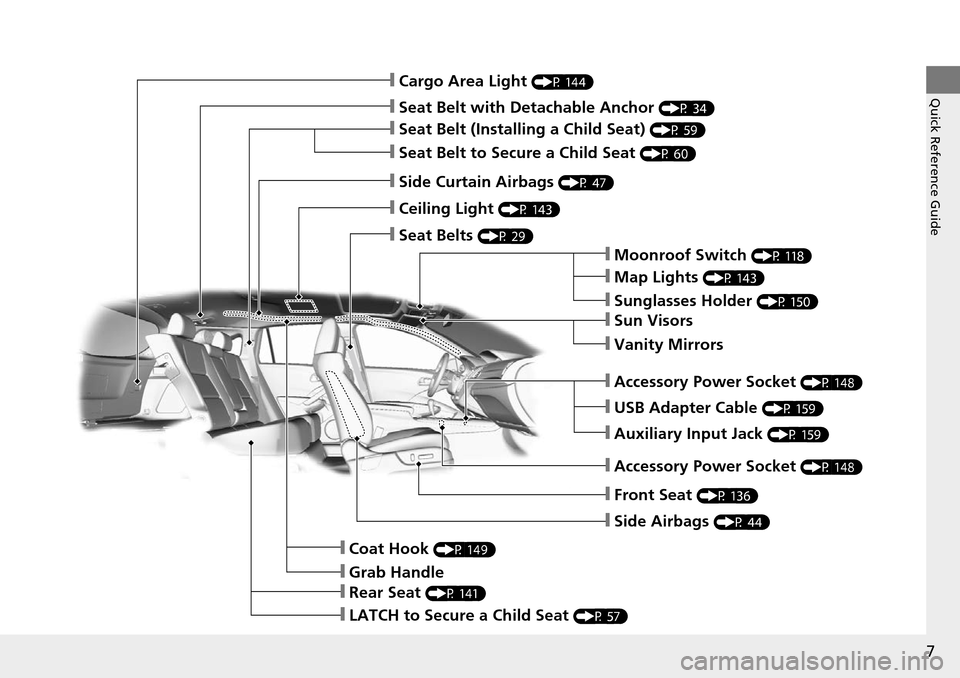
Quick Reference Guide❙Cargo Area Light (P 144)
❙Seat Belt with Detachable Anchor (P 34)
❙Seat Belt (Installing a Child Seat) (P 59)
❙Seat Belt to Secure a Child Seat (P 60)
❙Side Curtain Airbags (P 47)
❙Ceiling Light (P 143)
❙Seat Belts (P 29)
❙Moonroof Switch (P 118)
❙Map Lights (P 143)
❙Sunglasses Holder (P 150)
❙Sun Visors
❙Vanity Mirrors
❙USB Adapter Cable (P 159)
❙Auxiliary Input Jack (P 159)
❙Front Seat (P 136)
❙Side Airbags (P 44)
❙Coat Hook (P 149)
❙Grab Handle
❙Rear Seat (P 141)
❙LATCH to Secure a Child Seat (P 57)
❙Accessory Power Socket (P 148)
❙Accessory Power Socket (P 148)
Page 16 of 365
15
Quick Reference Guide
Features (P 157)
Audio System (P 158)
For navigation system operation () See Navigation System Manual
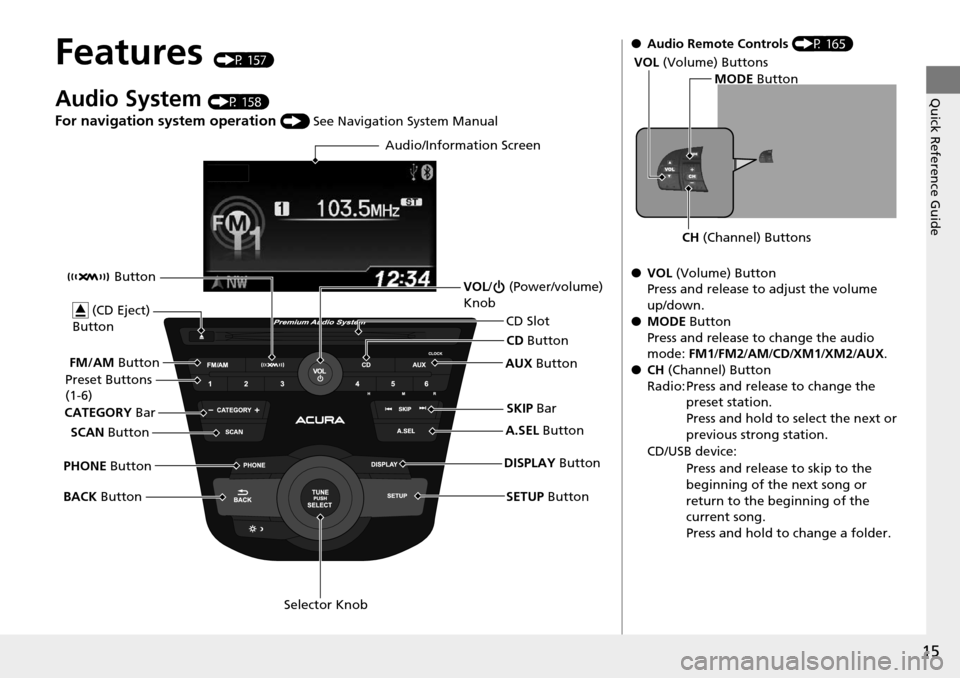
Audio/Information Screen
SCAN Button
CATEGORY
Bar
Selector Knob
BACK
Button VOL
/ (Power/volume)
Knob
CD Button
AUX Button
CD Slot
(CD Eject)
Button
Preset Buttons
(1-6)
SETUP Button
SKIP
Bar
PHONE Button Button
FM/AM
Button
A.SEL Button
DISPLAY Button
●Audio Remote Controls (P 165)
● VOL (Volume) Button
Press and release to adjust the volume
up/down.
● MODE Button
Press and release to change the audio
mode: FM1/FM2 /AM/CD/XM1 /XM2/AUX.
● CH (Channel) Button
Radio: Press and release to change the preset station.
Press and hold to select the next or
previous strong station.
CD/USB device: Press and release to skip to the
beginning of the next song or
return to the beginning of the
current song.
Press and hold to change a folder.
MODE Button
CH (Channel) Buttons
VOL
(Volume) Buttons
Page 158 of 365
157
Features
This chapter describes how to operate technology features.
Audio SystemAbout Your Audio System ................ 158
USB Adapter Cable .......................... 159
Auxiliary Input Jack .......................... 159
Audio System Theft Protection ......... 160
Audio System Basic Operation ........ 161
Audio/Information Screen
*.............. 162
Audio Remote Controls .................... 165
Adjusting the Sound ........................ 166
Playing the AM/FM Radio ................. 167
Playing the XM ® Radio ..................... 169
Playing a CD .................................... 171
Playing an iPod ................................ 174 Playing Pandora
®............................. 177
Playing a USB Flash Drive ................. 179
Playing Bluetooth ® Audio................. 182
Wallpaper Setup .............................. 184
Display Setup ................................... 186
Audio Error Messages ...................... 187
General Information on the Audio System ............................................. 190
HomeLink ® Universal Transceiver
Training HomeLink ........................... 194
Bluetooth® HandsFreeLink®
Using HFL ........................................ 196
HFL Menus....................................... 198 Compass
*.......................................... 225
* Not available on all models
Page 159 of 365
158
Features
Audio System
About Your Audio System
On models with navigation system, see Navigation System Manual for operation of
the audio system, Bluetooth® HandsFreeLink ®, and voice commands for these
features.
The audio system features AM/FM radio and the XM ® Radio service. It can also play
audio CDs, WMA/MP3/AAC files, iP od, iPhone, USB flash drives, and Bluetooth®
devices.
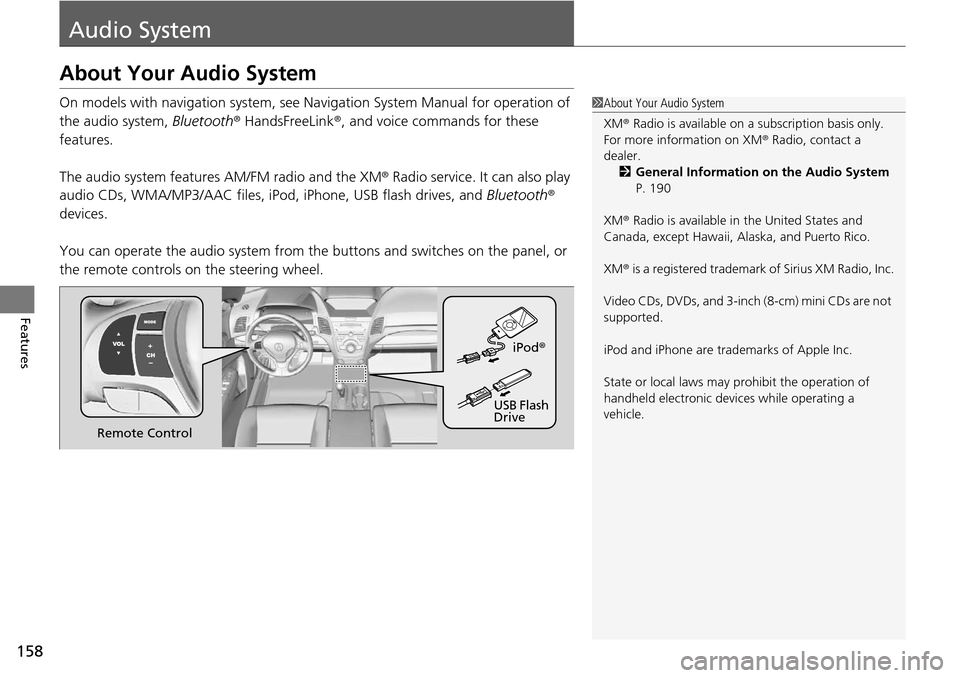
You can operate the audio system from the buttons and switches on the panel, or
the remote controls on the steering wheel.1About Your Audio System
XM ® Radio is available on a subscription basis only.
For more information on XM ® Radio, contact a
dealer.
2 General Information on the Audio System
P. 190
XM ® Radio is available in the United States and
Canada, except Ha waii, Alaska, and Puerto Rico.
XM ® is a registered trademark of Sirius XM Radio, Inc.
Video CDs, DVDs, and 3-inch (8-cm) mini CDs are not
supported.
iPod and iPhone are trademarks of Apple Inc.
State or local laws may pr ohibit the operation of
handheld electronic devices while operating a
vehicle.
Remote Control iPod
®
USB Flash
Drive
Page 160 of 365

159
uuAudio System uUSB Adapter Cable
Features
USB Adapter Cable
1. Unclip the USB connec tor and loosen the
adapter cable.
2. Install the iPod dock connector or the USB
flash drive to the USB connector.
Auxiliary Input Jack
Use the jack to connect standard audio devices.
1.Open the AUX cover.
2. Connect a standard audio device to the
input jack using a 1/8 inch (3.5 mm) stereo
miniplug.
u The audio system auto matically switches
to the AUX mode.
1 USB Adapter Cable
•Do not leave the iPod or USB flash drive in the
vehicle. Direct sunlight and high temperatures may
damage it.
•Do not use an extension cable with the USB
adapter cable.
•Do not connect the iPod or USB flash drive using a
hub.
•Do not use a device such as a card reader or hard
disk drive, as the device or your files may be
damaged.
•We recommend backing up yo ur data before using
the device in your vehicle.
•Displayed messages may vary depending on the
device model and software version.
If the audio system does not recognize the iPod, try
reconnecting it a few times or reboot the device. To
reboot, follow the manufac turer's instructions
provided with the iPod or visit www.apple.com/ipod.
1Auxiliary Input Jack
To switch the mode, pres s any of the audio mode
buttons. You can return to the AUX mode by
pressing the AUX button.
You cannot use the auxiliary input jack if you replace
the audio system.
Page 166 of 365
165
uuAudio System Basic Operation uAudio Remote Controls
Features
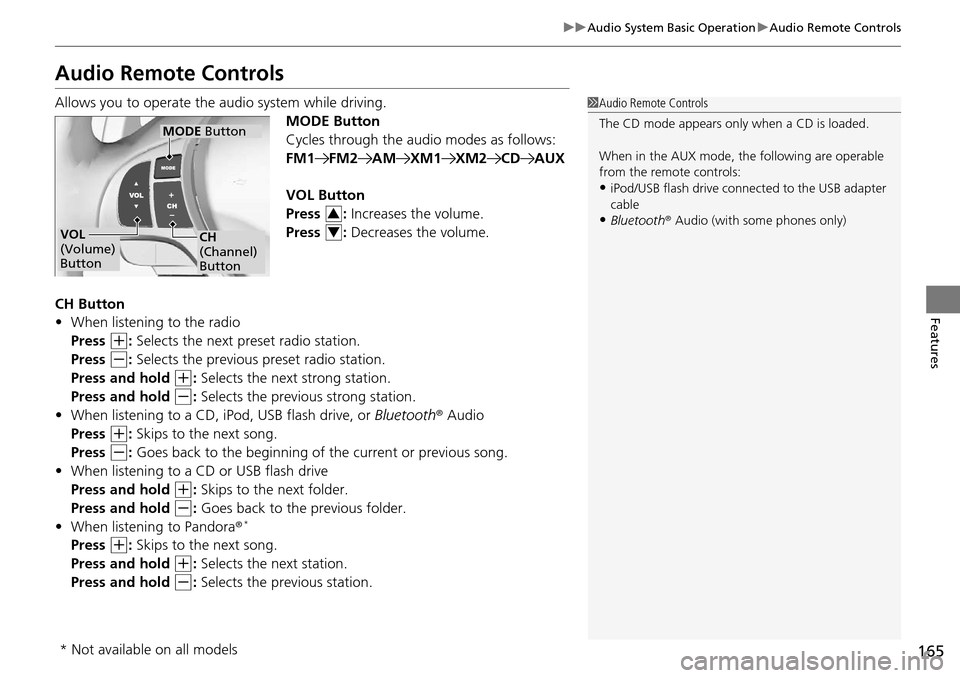
Audio Remote Controls
Allows you to operate the audio system while driving.
MODE Button
Cycles through the audio modes as follows:
FM1FM2AMXM1XM2CDAUX
VOL Button
Press : Increases the volume.
Press : Decreases the volume.
CH Button
• When listening to the radio
Press
(+: Selects the next preset radio station.
Press
(-: Selects the previous preset radio station.
Press and hold
(+: Selects the next strong station.
Press and hold
(-: Selects the previous strong station.
• When listening to a CD, iPod, USB flash drive, or Bluetooth® Audio
Press
(+: Skips to the next song.
Press
(-: Goes back to the beginning of the current or previous song.
• When listening to a CD or USB flash drive
Press and hold
(+: Skips to the next folder.
Press and hold
(-: Goes back to the previous folder.
• When listening to Pandora ®*
Press (+: Skips to the next song.
Press and hold
(+: Selects the next station.
Press and hold
(-: Selects the previous station.
1 Audio Remote Controls
The CD mode appears only when a CD is loaded.
When in the AUX mode, the following are operable
from the remote controls:
•iPod/USB flash drive connect ed to the USB adapter
cable
•Bluetooth ® Audio (with some phones only)VOL
(Volume)
Button
MODE Button
CH
(Channel)
Button
3
4
* Not available on all models
Page 175 of 365
174
uuAudio System Basic Operation uPlaying an iPod
Features
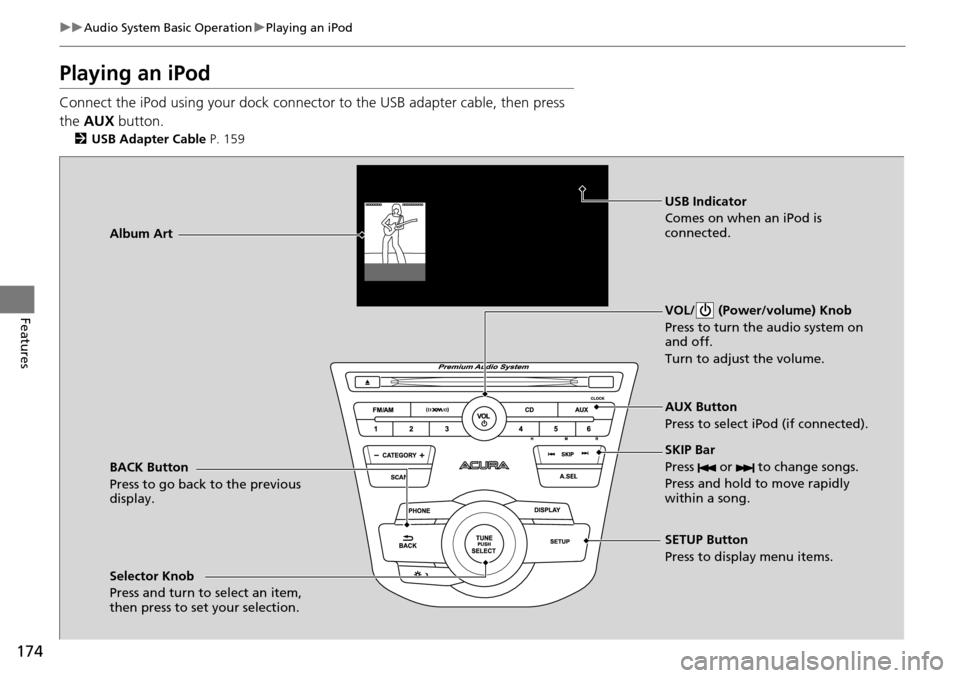
Playing an iPod
Connect the iPod using your dock connector to the USB adapter cable, then press
the AUX button.
2USB Adapter Cable P. 159
BACK Button
Press to go back to the previous
display. VOL/ (Power/volume) Knob
Press to turn the audio system on
and off.
Turn to adjust the volume.
SKIP Bar
Press or to change songs.
Press and hold to move rapidly
within a song.
SETUP Button
Press to display menu items.
Selector Knob
Press and turn to select an item,
then press to set your selection. AUX Button
Press to select iPod (if connected).
Album Art
USB Indicator
Comes on when an iPod is
connected.
Page 176 of 365
Continued175
uuAudio System Basic Operation uPlaying an iPod
Features
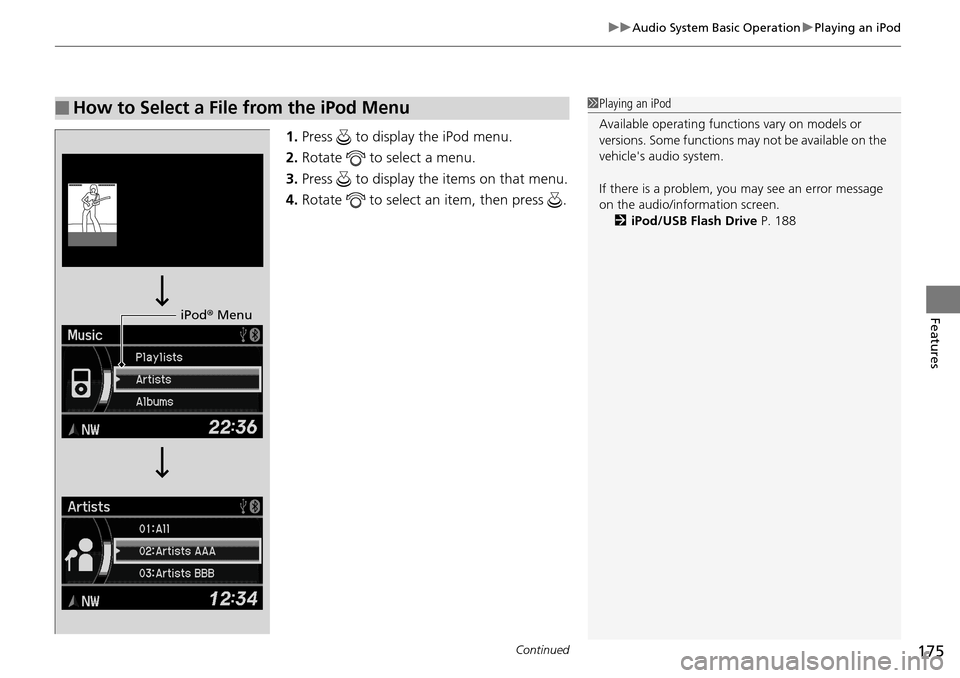
1. Press to display the iPod menu.
2. Rotate to select a menu.
3. Press to display the items on that menu.
4. Rotate to select an item, then press .
■How to Select a File from the iPod Menu1Playing an iPod
Available operating functi ons vary on models or
versions. Some functions ma y not be available on the
vehicle's audio system.
If there is a problem, you may see an error message
on the audio/information screen. 2 iPod/USB Flash Drive P. 188
iPod® Menu
Page 178 of 365
177
uuAudio System Basic Operation uPlaying Pandora ®
Continued
Features
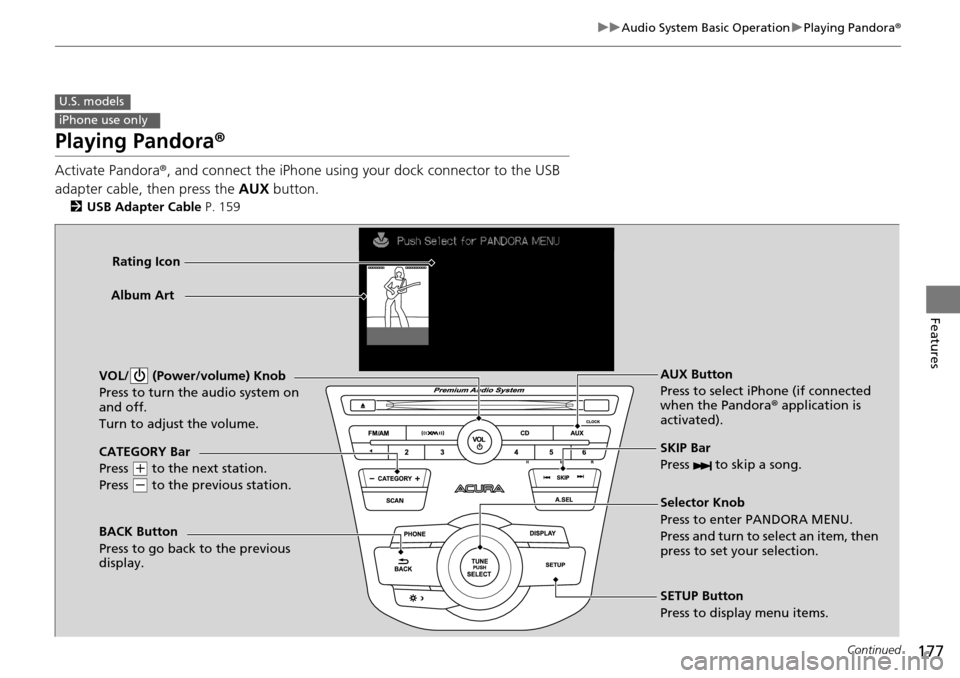
Playing Pandora ®
Activate Pandora®, and connect the iPhone using your dock connector to the USB
adapter cable, then press the AUX button.
2USB Adapter Cable P. 159
U.S. models
iPhone use only
CATEGORY Bar
Press
(+ to the next station.
Press
( - to the previous station.
VOL/ (Power/volume) Knob
Press to turn the audio system on
and off.
Turn to adjust the volume.
SKIP Bar
Press to skip a song.
SETUP Button
Press to display menu items. Selector Knob
Press to enter PANDORA MENU.
Press and turn to select an item, then
press to set your selection. AUX Button
Press to select iPhone (if connected
when the Pandora
® application is
activated).
Album Art
Rating Icon
BACK Button
Press to go back to the previous
display.
Page 180 of 365
179
uuAudio System Basic Operation uPlaying a USB Flash Drive
Continued
Features
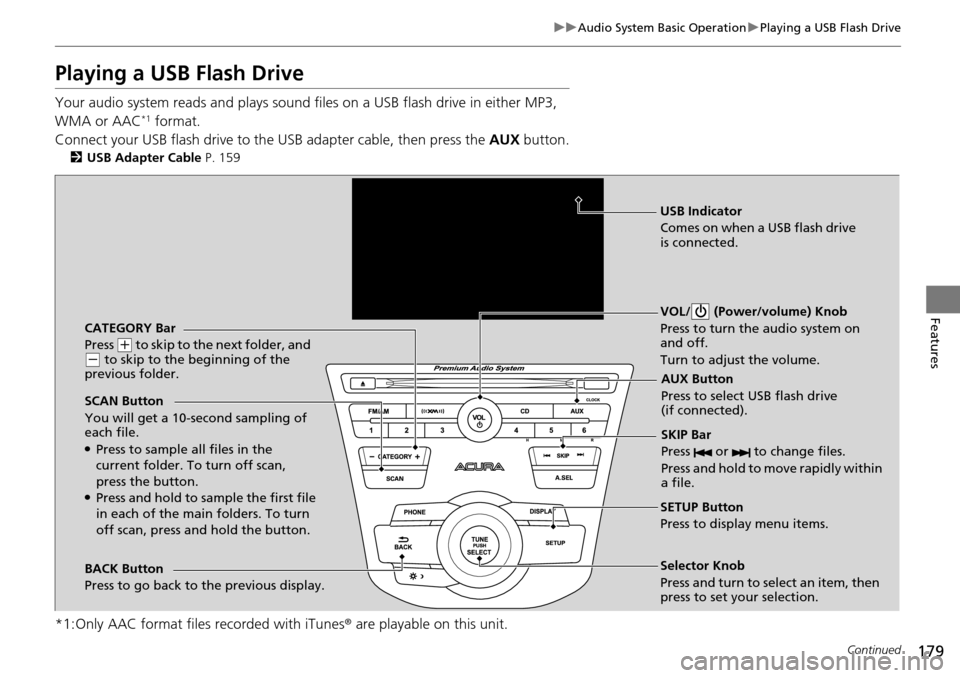
Playing a USB Flash Drive
Your audio system reads and plays sound files on a USB flash drive in either MP3,
WMA or AAC*1 format.
Connect your USB flash drive to the USB adapter cable, then press the AUX button.
2USB Adapter Cable P. 159
*1:Only AAC format files recorded with iTunes® are playable on this unit.
CATEGORY Bar
Press
(+ to skip to the next folder, and (- to skip to the beginning of the
previous folder.
SCAN Button
You will get a 10-second sampling of
each file.
●Press to sample all files in the
current folder. To turn off scan,
press the button.
●Press and hold to sample the first file
in each of the main folders. To turn
off scan, press and hold the button. VOL/ (Power/volume) Knob
Press to turn the audio system on
and off.
Turn to adjust the volume.
SKIP Bar
Press or to change files.
Press and hold to move rapidly within
a file.
SETUP Button
Press to display menu items.
Selector Knob
Press and turn to se
lect an item, then
press to set your selection. AUX Button
Press to select USB flash drive
(if connected).
USB Indicator
Comes on when a USB flash drive
is connected.
BACK Button
Press to go back to the previous display.